Page 333 of 568
3336-1. Using the air conditioning system and defogger
6
Interior features
CAMRY_U (OM33C64U)■
Switching between outside air
and recirculated air modes
Press .
The mode switches between outside air mode (indicator off) and recir-
culated air mode (indicator on) each time is pressed.
■
Defogging the windshield
Defoggers are used to defog the windshield and front side win-
dows.
Press .
The dehumidification function operates and fan speed increases.
Set the outside/recirculated air mode button to the outside air mode if
the recirculated air mode is used. (It may switch automatically.)
To defog the windshield and the side windows early, turn the air flow and
temperature up.
To return to the previous mode, press again when the windshield
is defogged.
■
Defogging the rear window and outside rear view mirrors
Defoggers are used to defog the rear window, and to remove rain-
drops, dew and frost from the outside rear view mirrors.
Press .
The defoggers will automatically turn off after a period of time.
Other functions
Page 335 of 568
3356-1. Using the air conditioning system and defogger
6
Interior features
CAMRY_U (OM33C64U)
■Using automatic mode
Fan speed is adjusted automatically according to the temperature setting and
the ambient conditions.
Therefore, the fan may stop for a while until warm or cool air is ready to flow
immediately after is pressed.
■ Fogging up of the windows
●The windows will easily fog up when the humidity in the vehicle is high.
Turning on will dehumidify the air from the outlets and defog the wind-
shield effectively.
● If you turn off, the windows may fog up more easily.
● The windows may fog up if the recirculated air mode is used.
■ Outside/recirculated air mode
●When driving on dusty roads such as tunnels or in heavy traffic, set the out-
side/recirculated air mode button to recirculated air mode. This is effective in
preventing outside air from entering the vehicle interior. During cooling oper-
ation, setting the recirculated air mode will also cool the vehicle interior
effectively.
● Outside/recirculated air mode may automatically switch depending on the
temperature setting or the inside temperature.
■ When the outside temperature exceeds 75°F (24°C) and the air condition-
ing system is on
● In order to reduce the air conditioning power consumption, the air condition-
ing system may switch to recirculated air mode automatically. This may also
reduce fuel consumption.
● Vehicles without a smart key system:
Recirculated air mode is selected as a default mode when the engine switch
is turned to the “ON” position.
Vehicles with a smart key system:
Recirculated air mode is selected as a default mode when the engine
switch is turned to IGNITION ON mode.
● It is possible to switch to outside air mode at any time by pressing .
■ When the outside temperature is low
The dehumidification function may not operate even when is pressed.
Page 337 of 568
3376-1. Using the air conditioning system and defogger
6
Interior features
CAMRY_U (OM33C64U)
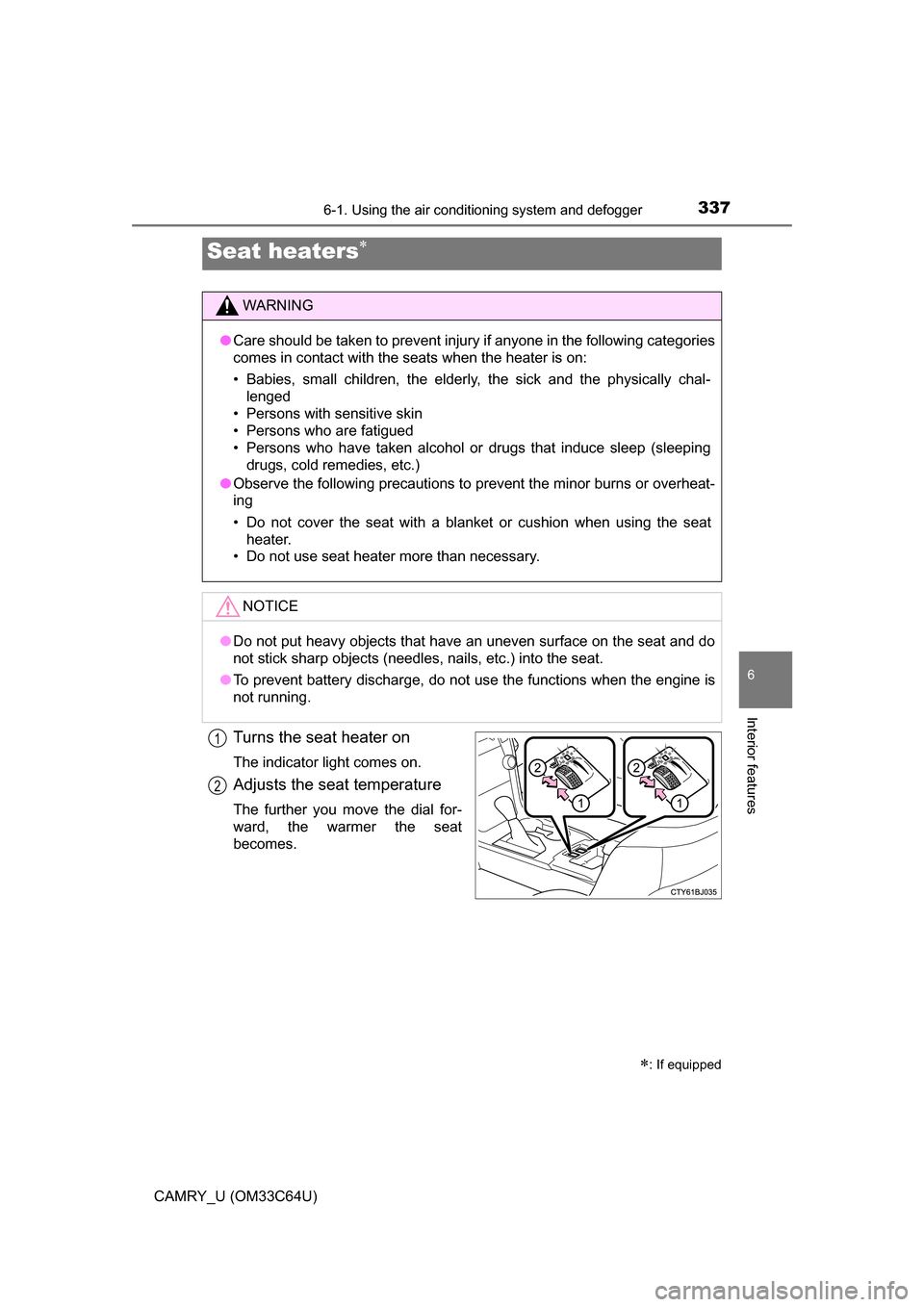
Turns the seat heater on
The indicator light comes on.
Adjusts the seat temperature
The further you move the dial for-
ward, the warmer the seat
becomes.
Seat heaters
: If equipped
WARNING
●Care should be taken to prevent injury if anyone in the following categories
comes in contact with the seats when the heater is on:
• Babies, small children, the elderly, the sick and the physically chal-
lenged
• Persons with sensitive skin
• Persons who are fatigued
• Persons who have taken alcohol or drugs that induce sleep (sleeping drugs, cold remedies, etc.)
● Observe the following precautions to prevent the minor burns or overheat-
ing
• Do not cover the seat with a blanket or cushion when using the seat
heater.
• Do not use seat heater more than necessary.
NOTICE
● Do not put heavy objects that have an uneven surface on the seat and do
not stick sharp objects (needles, nails, etc.) into the seat.
● To prevent battery discharge, do not use the functions when the engine is
not running.
1
2
Page 339 of 568
339
6
Interior features
CAMRY_U (OM33C64U)
6-2. Using the interior lights
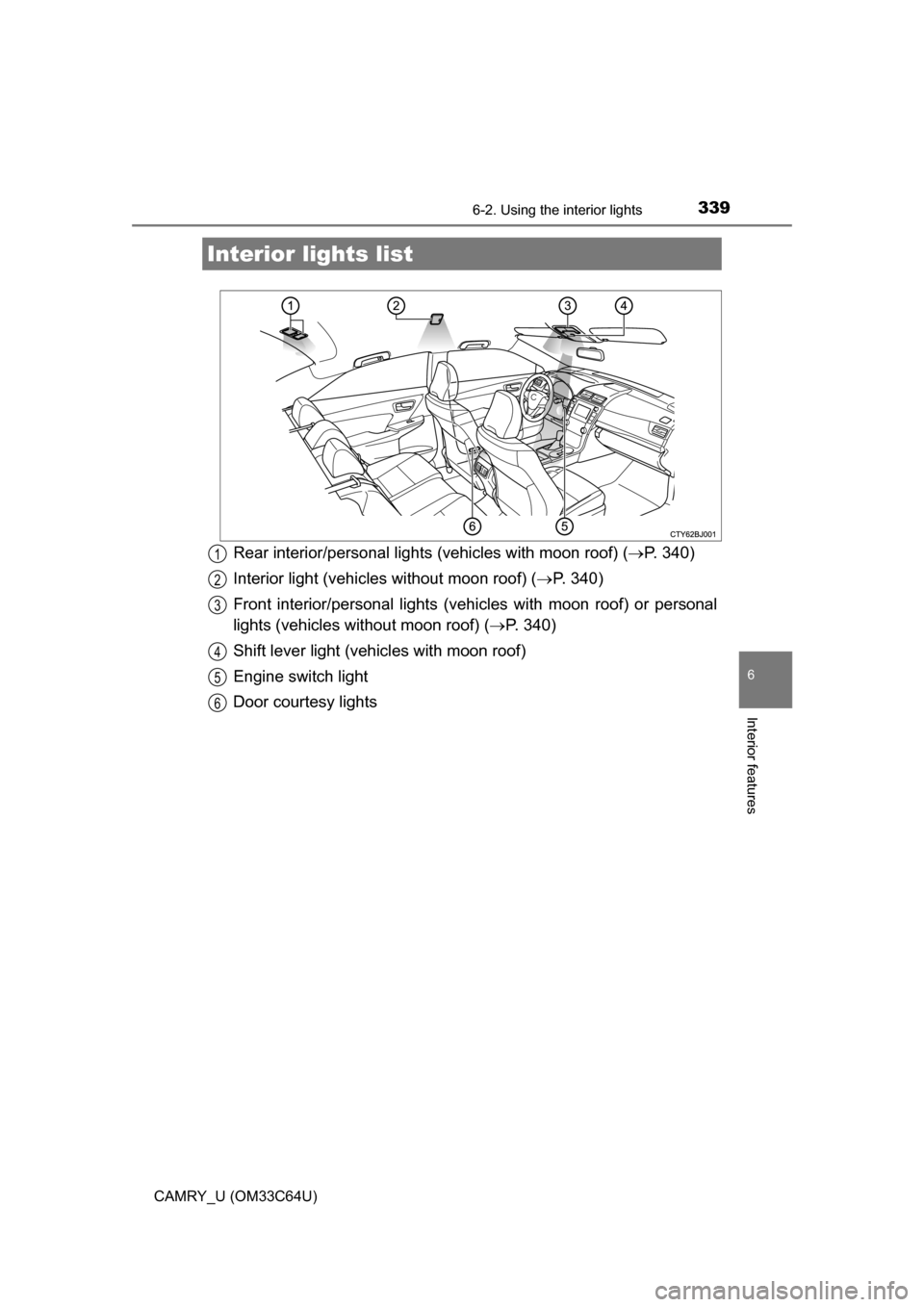
Rear interior/personal lights (vehicles with moon roof) (P. 340)
Interior light (vehicles without moon roof) ( P. 340)
Front interior/personal lights (vehi cles with moon roof) or personal
lights (vehicles without moon roof) ( P. 340)
Shift lever light (vehicles with moon roof)
Engine switch light
Door courtesy lights
Interior li ghts list
1
2
3
4
5
6
Page 341 of 568
3416-2. Using the interior lights
6
Interior features
CAMRY_U (OM33C64U)
●Illuminated entry system:
Vehicles without a smart key system:
The lights automatically turn on/off according to the engine switch position,
whether the doors are locked/unlocked, and whether the doors are open/
closed.
Vehicles with a smart key system:
The lights automatically turn on/off according to the engine switch mode,
the presence of the electronic key, whether the doors are locked/unlocked,
and whether the doors are open/closed.
● If the following lights are left on when the engine switch is turned off, the
lights will go off automatically after 20 minutes:
• Interior lights
• Personal lights
• Door courtesy lights
● Setting (e.g. the time elapsed before lights turn off) can be changed.
(Customizable features: P. 530)
Page 343 of 568
3436-3. Using the storage features
6
Interior features
CAMRY_U (OM33C64U)
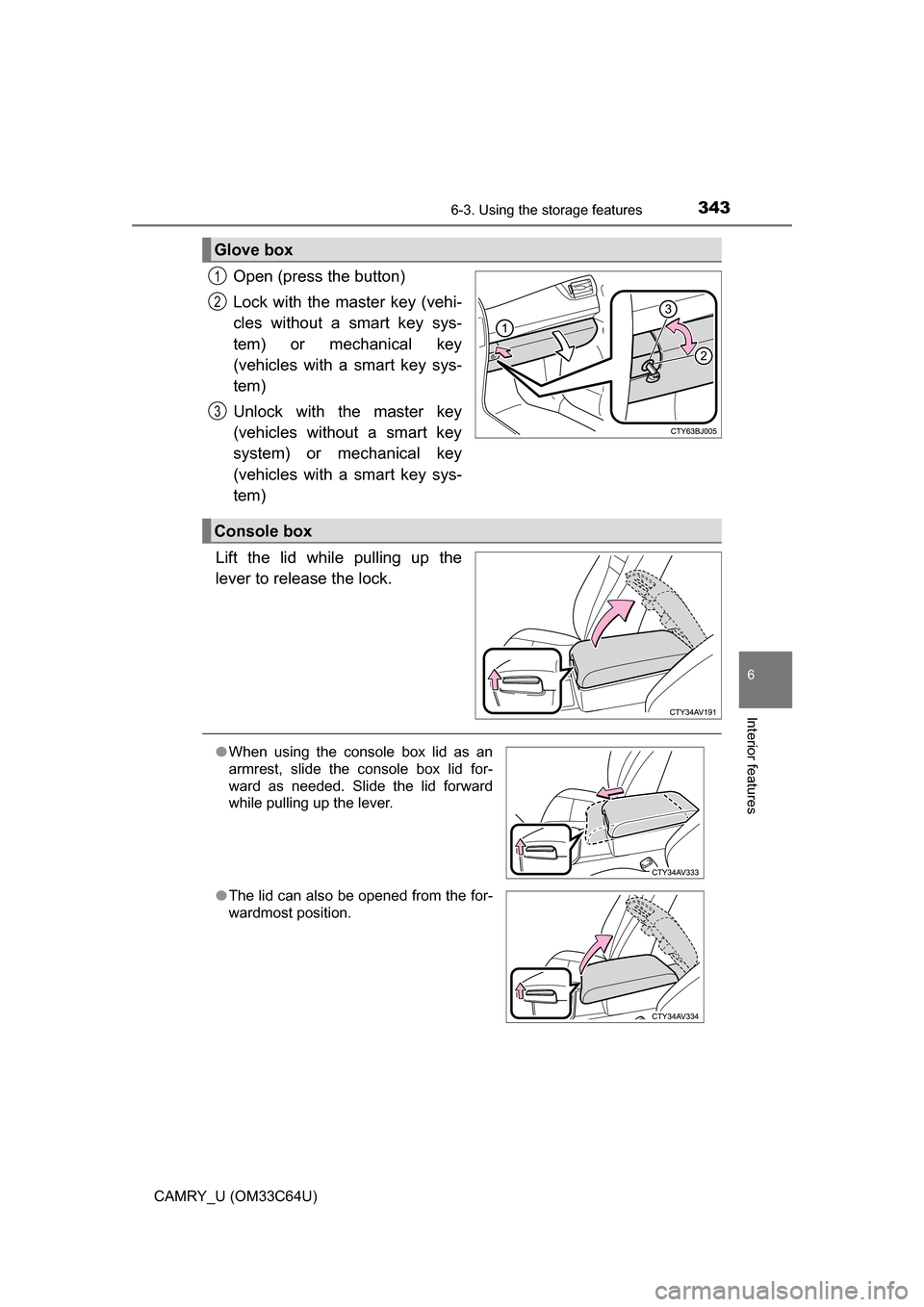
Open (press the button)
Lock with the master key (vehi-
cles without a smart key sys-
tem) or mechanical key
(vehicles with a smart key sys-
tem)
Unlock with the master key
(vehicles without a smart key
system) or mechanical key
(vehicles with a smart key sys-
tem)
Lift the lid while pulling up the
lever to release the lock.
Glove box
1
2
3
Console box
● When using the console box lid as an
armrest, slide the console box lid for-
ward as needed. Slide the lid forward
while pulling up the lever.
● The lid can also be opened from the for-
wardmost position.
Page 345 of 568
3456-3. Using the storage features
6
Interior features
CAMRY_U (OM33C64U)
NOTICE
Put the cap on before stowing a bottle. Do not place open bottles in the bot-
tle holders, or glass or paper cups containing liquid. The contents may spill
and glass cups may break.
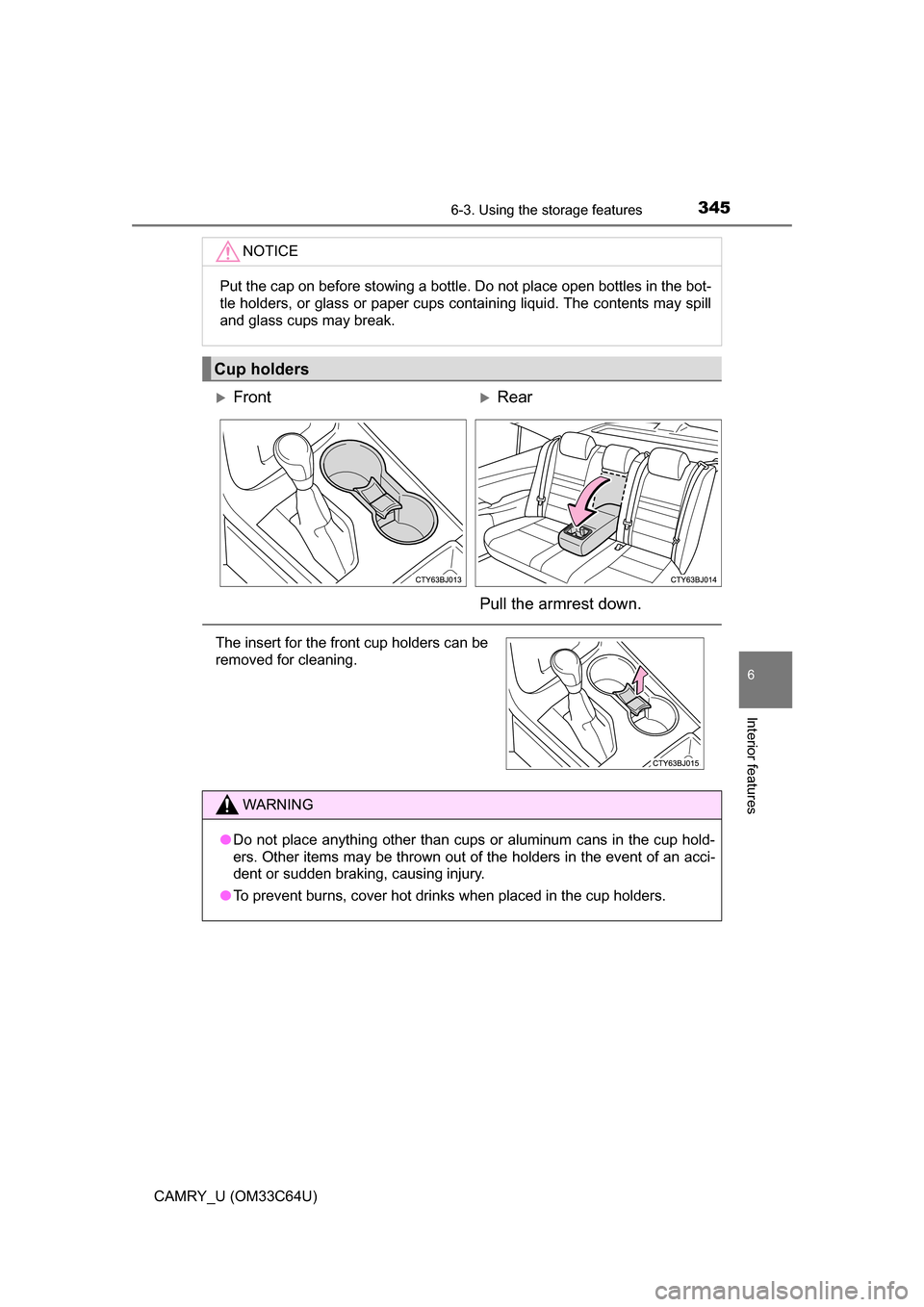
Cup holders
FrontRear
Pull the armrest down.
The insert for the front cup holders can be
removed for cleaning.
WARNING
● Do not place anything other than cups or aluminum cans in the cup hold-
ers. Other items may be thrown out of the holders in the event of an acci-
dent or sudden braking, causing injury.
● To prevent burns, cover hot drinks when placed in the cup holders.
Page 347 of 568

3476-3. Using the storage features
6
Interior features
CAMRY_U (OM33C64U)■
When using wireless charger (if equipped)
A mobile device can be charged wirelessly on the tray.
Charging can only be performed with the engine switch in ACCESSORY or
IGNITION ON mode and only on mobile devices with the “ ” logo.
When placing the mobile device on the wireless charging surface of the
tray, make sure that there are no objects in-between the mobile device
and the tray. They may interfere with charging.
■ If the wireless charger LED indicators flash
If the wireless charging surface of the tray becomes too hot, the LED indica-
tors will flash and charging is canceled. The LED indicators will be illuminated
if the surface of the tray cools down.
If the LED indicators flash even though the surface of the tray is not hot, the
wireless charger may be malfunctioning. Consult your Toyota dealer.
■ When charging of the wirel ess charger stops temporarily
If any of the following operations are performed with the electronic key pres-
ent, charging may stop temporarily. Charging will start again after a while.
● Locking/unlocking the doors by touching the door handle
● Opening/closing the doors
● Opening/closing the trunk lid
● Starting the engine
● Locking the doors by pressing the lock button on the electronic key
● When the electronic key is out of the detection areaOpen the lid and press the wireless
charger switch.
Place a mobile device on the tray as
shown in the illustration.
An amber indicator is illuminated
while charging is in progress. When
charging is complete, a green indica-
tor will also be illuminated.
Some phones, cases or cover type
wireless chargers may not cause the
green indicator to illuminate even
though it is fully charged.
1
2