Page 157 of 428
1572-1. Driving procedures
2
When driving
Horn
■ After adjusting the steering wheel
Make sure that the steering wheel is securely locked.
The horn may not sound if the steering wheel is not securely locked.
( → P. 49) To sound the horn, press on or
close to the mark.
Page 162 of 428

1622-2. Instrument cluster
■ Indicators
The indicators inform the driver of the operating state of the
vehicle’s various systems. Turn signal indicator
( → P. 155) Slip indicator
( → P. 185)
Headlight high beam
indicator ( → P. 173) Hill-start assist control
ON indicator
( → P. 191)
Security indicator
( → P. 61) “TRAC OFF” indicator
( → P. 185)
Shift position and shift
range indicator
( → P. 146) VSC off indicator
( → P. 186)(Vehicles with an automatic transmission)
“TRACK” indicator
( → P. 186)Upshift/downshift indi-
cator ( → P. 148, 150)(Vehicles with an automatic transmission)
REV indicator
( → P. 132)“SPORT” indicator
( → P. 147)(Vehicles with an automatic transmission)
“SNOW” indicator
( → P. 147) (Green)
Cruise control indicator
( → P. 179)(Vehicles with an automatic transmission)
Shift position indicator
( → P. 153) “SET” indicator
( → P. 179)(Vehicles with a manual transmission)
Airbag on-off indicator ( → P. 104)Shift-up indicator
( → P. 153)(Vehicles with a manual transmission) * 1, 2
* 2
* 1
* 1
Page 186 of 428

1862-4. Using other driving systems
“TRACK” mode
Your vehicle is equipped with two types of control modes to accom-
modate various driving prefer ences. The control modes can be
selected with the “TRACK” switch. Normal mode allows secure and
smooth normal driving. When t he switch is pressed and held for 1
second or more, “TRACK” mode is activated. Contro l characteristics
such as the VSC and TRAC are adj usted to afford maneuverability
closer to what a driver may desire, while a sense of security is
retained.
“TRACK” mode/Normal mode The “TRACK” indicator and VSC
off indicator come on when in
“TRACK” mode.
To change back to normal mode
while in “TRACK” mode, press
or the “TRACK” switch.
Turning off both TRAC and VSC systems
To turn the TRAC and VSC systems off, press and hold for
more than 3 seconds while the vehicle is stopped.
The “TRAC OFF” indicator light and the VSC off indicator light will
come on.
However, on vehicles with an aut omatic transmission, the brake LSD
function will remain on.
Press the button again to tu rn the systems back on.
Page 191 of 428
1912-4. Using other driving systems
2
When driving
Hill-start assist control Hill-start assist control helps to maintain braking force to assist
starting off forward while facing uphill or starting off backward while
facing downhill. As hill-start assist control is initially disabled,
enable the system to make it op erable. The enabled/disabled setting
will be maintained the next time the engine is started.
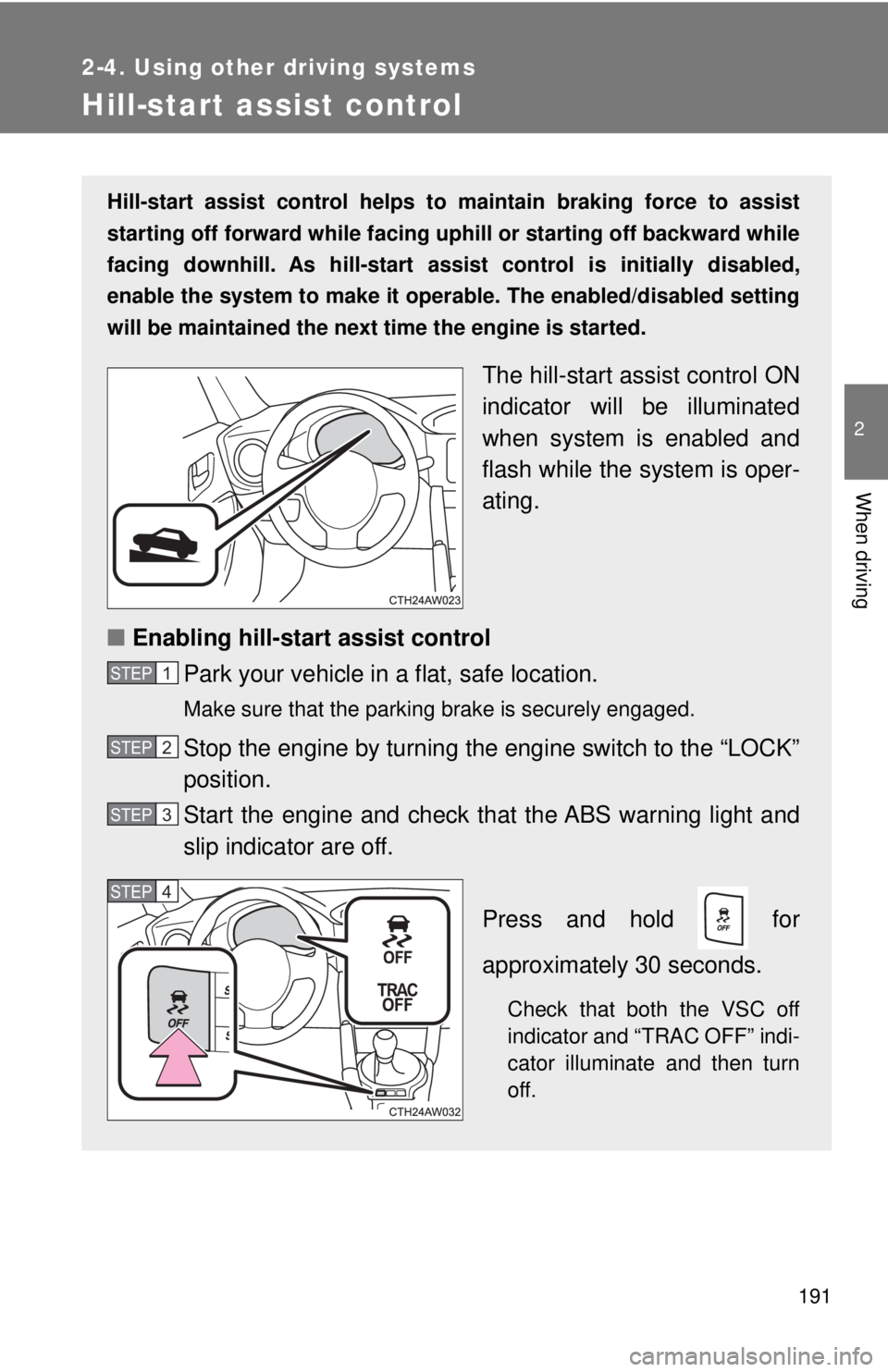
The hill-start as sist control ON
indicator will be illuminated
when system is enabled and
flash while the system is oper-
ating.
■ Enabling hill-start assist control
Park your vehicle in a flat, safe location. Make sure that the parking brake is securely engaged.
Stop the engine by turning the engine switch to the “LOCK”
position.
Start the engine and check t hat the ABS warning light and
slip indicator are off.
Press and hold for
approximately 30 seconds.
Check that both the VSC off
indicator and “TRAC OFF” indi-
cator illuminate and then turn
off.STEP 1
STEP 2
STEP 3
STEP 4
Page 195 of 428
195 2
When driving 2-5. Driving information
Cargo and luggage
Capacity and distribution
Cargo capacity depends on the to tal weight of the occupants.
(Cargo capacity) = (Total load capa city) - (Total weight of occupants)
Steps for Determining Correct Load Limit ⎯
(1)Locate the statement “The combined wei ght of occupants and
cargo should never exceed XXX kg or XXX lbs.” on your vehicle's
placard.
(2)Determine the combined weight of the driver and passengers that
will be riding in your vehicle.
(3)Subtract the combined weight of the driver and passengers from
XXX kg or XXX lbs.
(4)The resulting figure equals the av ailable amount of cargo and lug-
gage load capacity.
For example, if the “XXX” amount equals 1400 lbs. and there will
be five 150 lb passengers in your vehicle, the amount of available
cargo and luggage load capacity is 650 lbs. (1400 - 750 (5 × 150) =
650 lbs.)
(5)Determine the combined weight of luggage and cargo being
loaded on the vehicle. That weight may not safely exceed the avail-
able cargo and luggage load capacity calculated in Step 4.Take notice of the following information about storage precau-
tions, cargo capacity and load:
● Stow cargo and luggage in t he trunk whenever possible.
● Be sure all items are secured in place.
● To maintain vehicle balance while driving, position luggage
evenly within the luggage compartment.
● For better fuel economy, do no t carry unnecessary weight.
Page 198 of 428

1982-5. Driving information
WARNING■
Storage precautions
Observe the following precautions.
Failure to do so may result in death or serious injury.●
Stow cargo and luggage in the trunk whenever possible.●
To prevent cargo and luggage from sliding forward during braking, do
not stack anything in the enlarged trunk. Keep cargo and luggage low,
as close to the floor as possible.●
When you fold down the rear seats, long items should not be placed
directly behind the front seats.●
Never allow anyone to ride in the enlarged trunk. It is not designed for
passengers. They should ride in t heir seats with their seat belts prop-
erly fastened. Otherwise, they are much more likely to suffer death or
serious bodily injury, in the event of sudden braking, sudden swerving
or an accident.
●
Do not place cargo or luggage in or on the following locations as the
item may get under the clutch, brake or accelerator pedal and prevent
the pedals from being depressed properly, block the driver’s vision, or
hit the driver or passengers, causing an accident:
• At the feet of the driver
• On the front passenger or rear seats (when stacking items)
• On the package tray
• On the instrument panel
• On the dashboard
●
Secure all items in the occupant compartment, as they may shift and
injure someone during sudden braking, sudden swerving or an acci-
dent.
■
Capacity and distribution
●
Do not exceed the maximum axle weight rating or the total vehicle
weight rating.
●
Even if the total load of occupant's weight and the cargo load is less
than the total load capacity, do not apply the load unevenly. Improper
loading may cause deterioration of steering or braking control which
may cause death or serious injury.
Page 226 of 428
2263-4. Using the storage features
WARNING■ Caution while driving
Observe the following precautions.
Failure to do so may cause an accident resulting in death or serious injury.
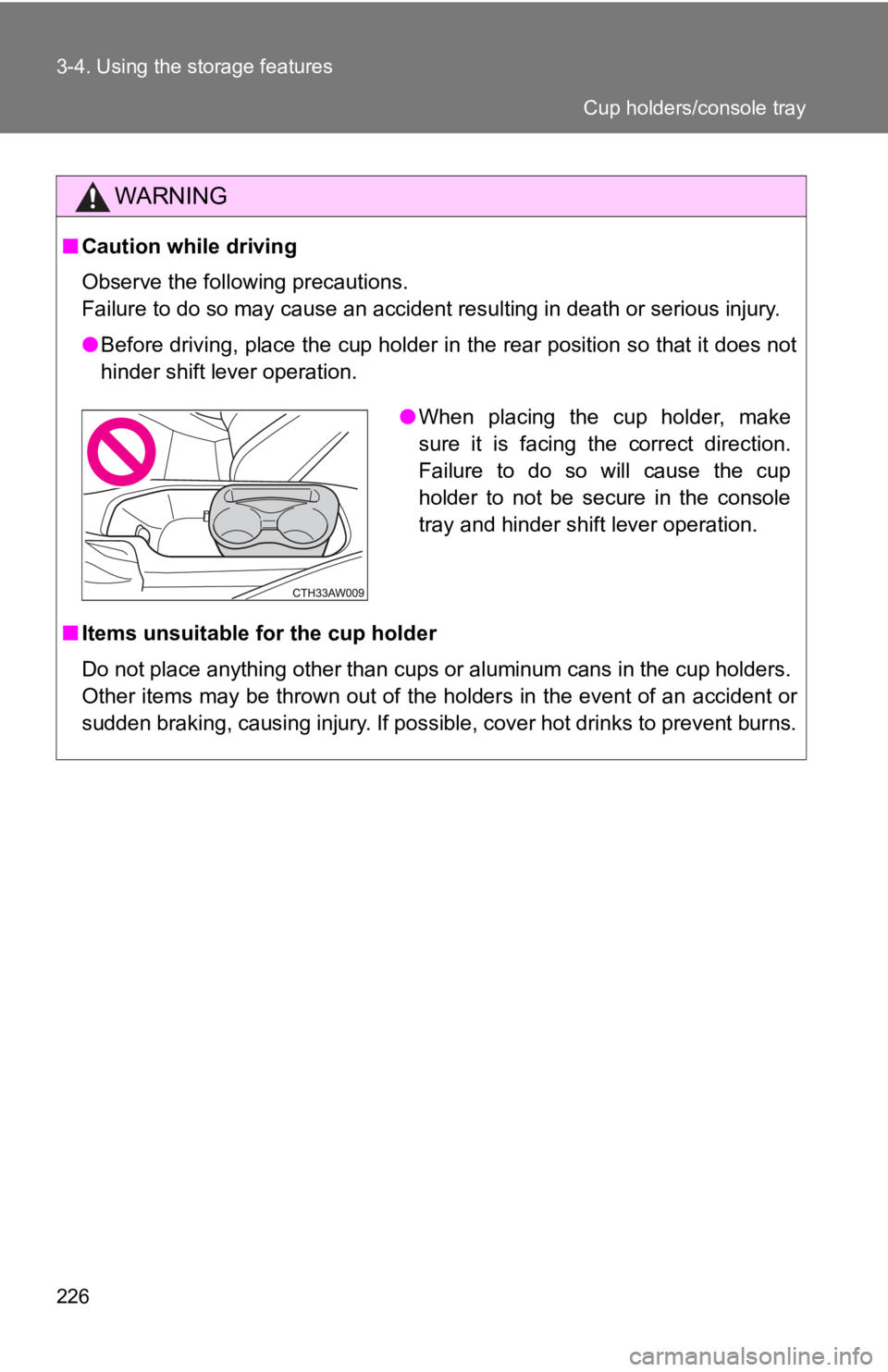
● Before driving, place the cup holder in the rear position so that it does not
hinder shift lever operation.
■ Items unsuitable for the cup holder
Do not place anything other than cups or aluminum cans in the cup holders.
Other items may be thrown out of the holders in the event of an accident or
sudden braking, causing injury. If possible, cover hot drinks to prevent burns. ● When placing the cup holder, make
sure it is facing the correct direction.
Failure to do so will cause the cup
holder to not be secure in the console
tray and hinder shift lever operation. Cup holders/console tray
Page 232 of 428
2323-5. Other interior features
Floor mat Use only floor mats designed specifically for vehicles of the same
model and model year as your vehic le. Fix them securely in place
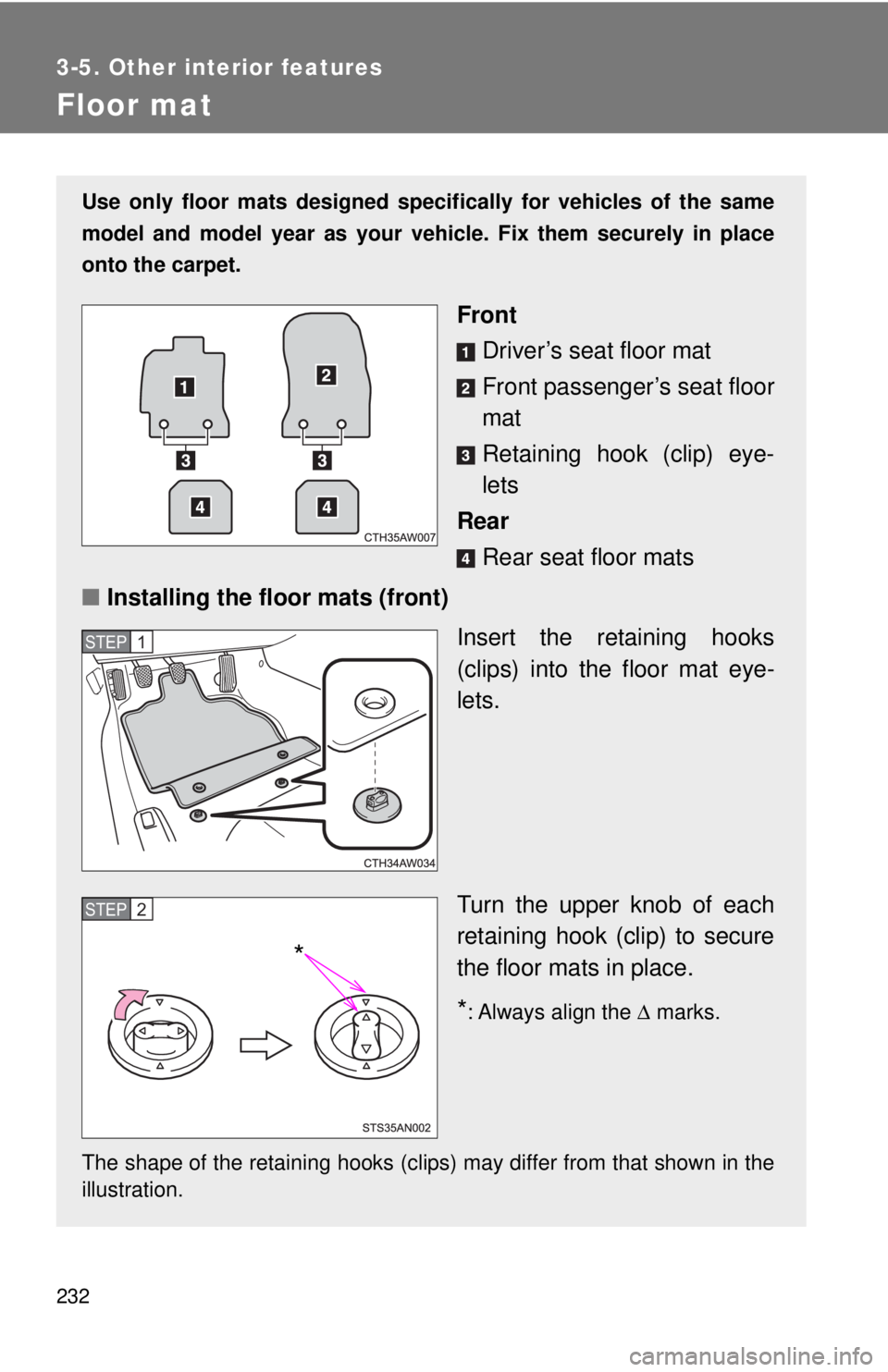
onto the carpet.
Front
Driver’s seat floor mat
Front passenger’s seat floor
mat
Retaining hook (clip) eye-
lets
Rear
Rear seat floor mats
■ Installing the floor mats (front)
Insert the retaining hooks
(clips) into the floor mat eye-
lets.
Turn the upper knob of each
retaining hook (clip) to secure
the floor mats in place.
* : Always align the Δ marks.
The shape of the retaining hooks (clips) may differ from that shown in the
illustration. STEP 1
STEP 2
*