2017 TOYOTA 4RUNNER tow
[x] Cancel search: towPage 3 of 528

3
1
8 7
6
5
4
3
2
9
4RUNNER (U)_(OM35B37U)4-1. Before driving
Driving the vehicle ............. 160
Cargo and luggage............ 170
Vehicle load limits ............. 175
Trailer towing..................... 176
Dinghy towing.................... 192
4-2. Driving procedures Engine (ignition) switch (vehicles without a
smart key system) ........... 193
Engine (ignition) switch (vehicles with a
smart key system) ........... 196
Automatic transmission ..... 201
Turn signal lever................ 206
Parking brake .................... 207
4-3. Operating the lights and wipers
Headlight switch ................ 208
Fog light switch ................. 214
Windshield wipers and washer ............................ 216
Rear window wiper and washer ............................ 219
4-4. Refueling Opening the fuel tank cap .................................. 222 4-5. Using the driving
support systems
Cruise control .................... 225
Intuitive parking assist ....... 229
Four-wheel drive system (part-time 4WD
models)............................ 235
Four-wheel drive system (full-time 4WD
models)............................ 239
Active traction control system ............................. 243
AUTO LSD system ............ 245
Rear differential lock system ............................. 247
Downhill assist control system ............................. 250
Crawl Control ..................... 253
Multi-terrain Select............. 256
Driving assist systems ....... 263
4-6. Driving tips Winter driving tips .............. 272
Off-road precautions .......... 276
4Driving
Page 5 of 528

5
1
8 7
6
5
4
3
2
9
4RUNNER (U)_(OM35B37U)6-1. Maintenance and care
Cleaning and protecting the vehicle exterior .......... 338
Cleaning and protecting the vehicle interior ........... 341
6-2. Maintenance Maintenance requirements ................... 344
General maintenance ........ 346
Emission inspection and maintenance (I/M)
programs ......................... 349
6-3. Do-it-yourself maintenance
Do-it-yourself service precautions ..................... 350
Hood.................................. 353
Engine compartment ......... 354
Tires .................................. 369
Tire inflation pressure........ 375
Wheels .............................. 378
Air conditioning filter .......... 381
Wireless remote control/ electronic key
battery ............................. 383
Checking and replacing fuses ............................... 386
Light bulbs ......................... 389 7-1. Essential information
Emergency flashers ........... 406
If your vehicle has to be stopped in an
emergency....................... 407
7-2. Steps to take in an emergency
If your vehicle needs to be towed .......................... 409
If you think something is wrong............................... 415
Fuel pump shut off system ............................. 416
If a warning light turns on or a warning buzzer
sounds ............................. 417
If a warning message or indicator is displayed ....... 426
If you have a flat tire .......... 433
If the engine will not start ................................. 448
If you cannot operate back door opener ............ 450
If the electronic key does not operate properly ........ 451
If the vehicle battery is discharged ....................... 453
If your vehicle overheats.... 457
If the vehicle becomes stuck ................................ 460
6Maintenance and care7When trouble arises
Page 16 of 528

16Pictorial index
4RUNNER (U)_(OM35B37U)
■Instrument panel
Engine switch . . . . . . . . . . . . . . . . . . . . . . . . . . . . . . . . . P. 193, 196
Starting the engine/changing the modes . . . . . . . . . . . . . P. 193, 196
Emergency stop of the engine . . . . . . . . . . . . . . . . . . . . . . . . . P. 407
When the engine will not start . . . . . . . . . . . . . . . . . . . . . . . . . P. 448
Warning messages . . . . . . . . . . . . . . . . . . . . . . . . . . . . . . . . . P. 429
Shift lever . . . . . . . . . . . . . . . . . . . . . . . . . . . . . . . . . . . . . . . . P. 201
Changing the shift position . . . . . . . . . . . . . . . . . . . . . . . . . . . P. 201
Precautions against towing . . . . . . . . . . . . . . . . . . . . . . . . . . . P. 409
When the shift lever does not move . . . . . . . . . . . . . . . . . . . . P. 204
Meters . . . . . . . . . . . . . . . . . . . . . . . . . . . . . . . . . . . . . . . . . . . . P. 81
Reading the meters . . . . . . . . . . . . . . . . . . . . . . . . . . . . . . . . . . P. 81
Warning lights/indicator lights . . . . . . . . . . . . . . . . . . . . . . . . . . P. 76
When the warning lights come on . . . . . . . . . . . . . . . . . . . . . . P. 4171
2
3
Page 37 of 528

371-1. For safe use
1
For safety and security
4RUNNER (U)_(OM35B37U)
Your vehicle is equipped with ADVANCED AIRBAGS designed based
on the US motor vehicle safety standards (FMVSS208). The airbag
sensor assembly (ECU ) controls airbag deployment based on infor-
mation obtained from the sensors et c. shown in the system compo-
nents diagram above. This informat ion includes crash severity and
occupant information. As the airbags deploy, a chemical reaction in
the inflators quickly fills the airbag s with non-toxic gas to help restrain
the motion of the occupants.
CAUTION
■ SRS airbag precautions
Observe the following precautions regarding the SRS airbags.
Failure to do so may cause death or serious injury.
● The driver and all passengers in the vehicle must wear their seat belts
properly.
The SRS airbags are supplemental devices to be used with the seat belts.
● The SRS driver airbag deploys with considerable force, and can cause
death or serious injury especially if the driver is very close to the airbag.
The National Highway Traffic Safety Administration (NHTSA) advises:
Since the risk zone for the driver’s airbag is the first 2 - 3 in. (50 - 75 mm)
of inflation, placing yourself 10 in. (250 mm) from your driver airbag pro-
vides you with a clear margin of safety. This distance is measured from
the center of the steering wheel to your breastbone. If you sit less than 10
in. (250 mm) away now, you can change your driving position in several
ways:
• Move your seat to the rear as far as you can while still reaching the ped- als comfortably.
• Slightly recline the back of the seat.
Although vehicle designs vary, many drivers can achieve the 10 in. (250
mm) distance, even with the driver seat all the way forward, simply by
reclining the back of the seat somewhat. If reclining the back of your
seat makes it hard to see the road, raise yourself by using a firm, non-
slippery cushion, or raise the seat if your vehicle has that feature.
• If your steering wheel is adjustable, tilt it downward. This points the air-
bag toward your chest instead of your head and neck.
The seat should be adjusted as recommended by NHTSA above, while
still maintaining control of the foot pedals, steering wheel, and your v\
iew
of the instrument panel controls.
Page 39 of 528

391-1. For safe use
1
For safety and security
4RUNNER (U)_(OM35B37U)
CAUTION
■SRS airbag precautions
● Do not allow a child to stand in front of
the SRS front passenger airbag unit or
sit on the knees of a front passenger.
● Do not allow the front seat occupants to
hold items on their knees.
● Do not lean against the door, the roof
side rail or the front, side and rear pil-
lars.
● Do not allow anyone to kneel on the
passenger seats toward the door or put
their head or hands outside the vehicle.
● Do not attach anything to or lean any-
thing against areas such as the dash-
board, steering wheel pad and lower
portion of the instrument panel.
These items can become projectiles
when the SRS driver, front passenger
and knee airbags deploy.
● Do not attach anything to areas such as
a door, windshield glass, side door
glass, front or rear pillar, roof side rail
and assist grip.
Page 93 of 528

933-1. Key information
3
Operation of each component
4RUNNER (U)_(OM35B37U)■
If you lose your keys
New genuine keys can be made by your Toyota dealer using the other key
(vehicles without a smart key system) or mechanical key (vehicles with a
smart key system) and the key number stamped on your key number plate.
Keep the plate in a safe place such as your wallet, not in the vehicle.
■ When riding in an aircraft
When bringing a key with wireless remote control function onto an aircraft,
make sure you do not press any buttons on the key while inside the aircraft
cabin. If you are carrying the key in your bag etc., ensure that the buttons are
not likely to be pressed accidentally. Pressing a button may cause the key to
emit radio waves that could interfere with the operation of the aircraft.
■ Conditions affecting operation
Vehicles without a smart key system
The wireless remote control function may not operate normally in the follow-
ing situations:
● Near a TV tower, radio station, electric power plant, airport or other facility
that generates strong radio waves
● When carrying a portable radio, cellul ar phone or other wireless communi-
cation devices
● When multiple wireless keys are in the vicinity
● When the wireless key is in contact with, or is covered by, a metallic object
● When a wireless key (that emits radio waves) is being used nearby
● When the wireless key has been left near an electrical appliance such as a
personal computer
Vehicles with a smart key system
→P. 107
Page 107 of 528

1073-2. Opening, closing and locking the doors
3
Operation of each component
4RUNNER (U)_(OM35B37U)■
Battery-saving function
The battery-saving function will be activated in order to prevent the electronic
key battery and the vehicle battery from being discharged while the vehicle is
not in operation for a long time.
●In the following situations, the smart key system may take some time to
unlock the doors.
• The electronic key has been left in an area of approximately 6 ft. (2 m) of
the outside of the vehicle for 10 minutes or longer.
• The smart key system has not been used for 5 days or longer.
● If the smart key system has not been used for 14 days or longer, the doors
cannot be unlocked at any doors except the driver’s door. In this case, take
hold of the driver’s door handle, or use the wireless remote control or the
mechanical key, to unlock the doors.
The system will resume operation when
● The vehicle is locked using the door handle lock switch when carrying the
electronic key on your person.
● The vehicle is locked/unlocked using the wireless remote control.
(→P. 97)
● The vehicle is locked/unlocked using the mechanical key. ( →P. 451)
■ Conditions affecting operation
The smart key system uses weak radio waves. In the following situations, the
communication between the electronic key and the vehicle may be affected,
preventing the smart key system, wireless remote control and engine immobi-
lizer system from operating properly. (Ways of coping: →P. 451)
● When the electronic key battery is depleted
● Near a TV tower, electric power plant, gas station, radio station, large dis-
play, airport or other facility that generates strong radio waves or electrical
noise
● When carrying a portable radio, cellular phone, cordless phone or other
wireless communication device
Interior alarm sounds
once.
The engine switch was
pressed after the doors
were unlocked with the
mechanical key.
Touch the electronic
key to the engine
switch while depressing
the brake pedal.
The engine switch was
pressed two consecu-
tive times without the
electronic key being
present.
AlarmSituationCorrection procedure
Page 125 of 528
1253-3. Adjusting the seats
3
Operation of each component
4RUNNER (U)_(OM35B37U)■
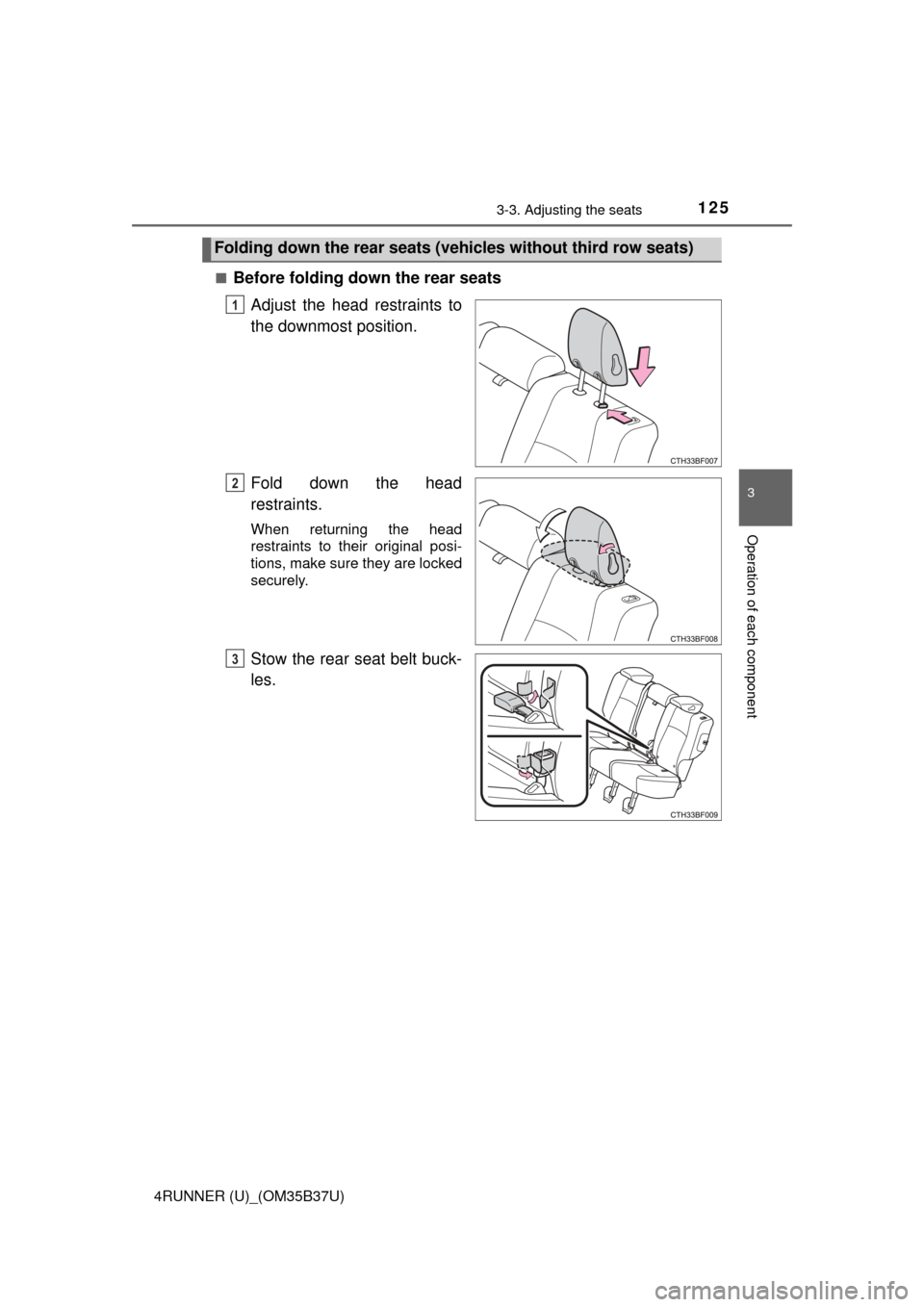
Before folding down the rear seats
Adjust the head restraints to
the downmost position.
Fold down the head
restraints.
When returning the head
restraints to their original posi-
tions, make sure they are locked
securely.
Stow the rear seat belt buck-
les.
Folding down the rear seats (veh icles without third row seats)
1
2
3