Page 226 of 528
2264-5. Using the driving support systems
4RUNNER (U)_(OM35B37U)
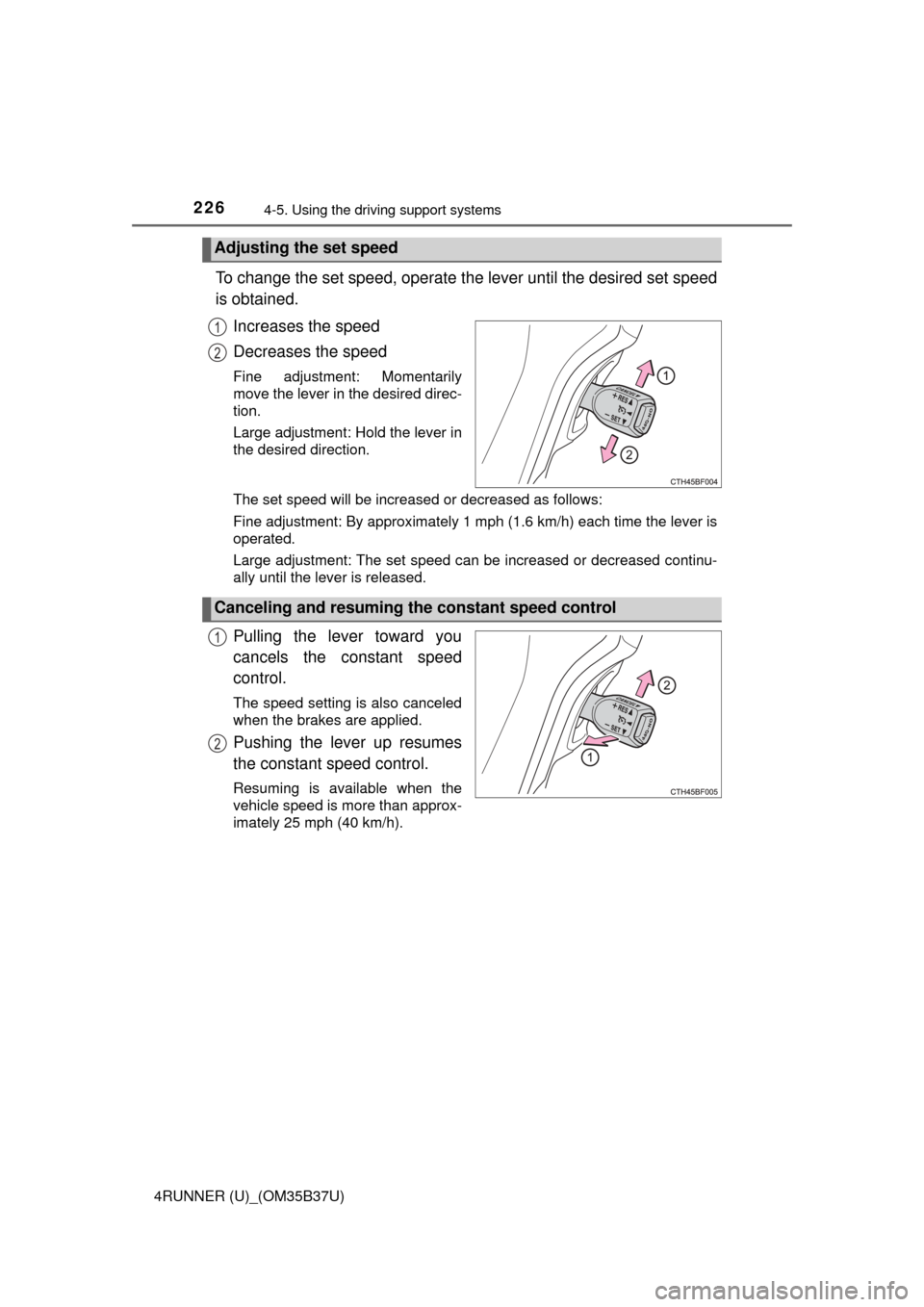
To change the set speed, operate the lever until the desired set speed
is obtained.
Increases the speed
Decreases the speed
Fine adjustment: Momentarily
move the lever in the desired direc-
tion.
Large adjustment: Hold the lever in
the desired direction.
The set speed will be increased or decreased as follows:
Fine adjustment: By approximately 1 mph (1.6 km/h) each time the lever is
operated.
Large adjustment: The set speed can be increased or decreased continu-
ally until the lever is released.
Pulling the lever toward you
cancels the c onstant speed
control.
The speed setting is also canceled
when the brakes are applied.
Pushing the lever up resumes
the constant speed control.
Resuming is available when the
vehicle speed is more than approx-
imately 25 mph (40 km/h).
Adjusting the set speed
1
2
Canceling and resuming the constant speed control
1
2
Page 228 of 528
2284-5. Using the driving support systems
4RUNNER (U)_(OM35B37U)
CAUTION
■To avoid operating the cruise control by mistake
Switch the cruise control off using the “ON-OFF” button when not in use.
■ Situations unsuitable for cruise control
Do not use cruise control in any of the following situations.
Doing so may result in loss of control and could cause an accident resulting
in death or serious injury.
● In heavy traffic
● On roads with sharp bends
● On winding roads
● On slippery roads, such as those covered with rain, ice or snow
● On steep hills
Vehicle speed may exceed the set speed when driving down a steep hill.
● When your vehicle is towing a trailer or during emergency towing
Page 232 of 528

2324-5. Using the driving support systems
4RUNNER (U)_(OM35B37U)■
Sensor detection information
●The sensor’s detection areas are limited to the areas around the vehicle’s
front corner and rear bumpers.
● Certain vehicle conditions and the surrounding environment may affect the
ability of the sensor to correctly detect obstacles. Particular instances where
this may occur are listed below.
• There is dirt, snow or ice on the sensor. (Wiping the sensors will resolve
this problem.)
• The sensor is frozen. (Thawing the area will resolve this problem.)
In especially cold weather, if a sensor is frozen the screen may show an
abnormal display, or obstacles may not be detected.
• The sensor is covered in any way.
• The vehicle is leaning considerably to one side.
• On an extremely bumpy road, on an incline, on gravel, or on grass.
• The vicinity of the vehicle is noisy due to vehicle horns, motorcycleengines, air brakes of large vehicles, or other loud noises producing ultra-
sonic waves.
• There is another vehicle equipped with parking assist sensors in the
vicinity.
• The sensor is coated with a sheet of spray or heavy rain.
• The vehicle is equipped with a fender pole or wireless antenna.
• Towing eyelet is installed.
• The bumper or sensor receives a strong impact.
• The vehicle is approaching a tall or curved curb.
• In harsh sunlight or intense cold weather.
• The area directly under the bumpers is not detected.
• If obstacles draw too close to the sensor.
• A non-genuine Toyota suspension (lowered suspension etc.) is installed.
• People may not be detected if they are wearing certain types of clothing.
In addition to the examples above, there are instances in which, because of
their shape, signs and other objects may be judged by the sensor to be closer
than they are.
● The shape of the obstacle may prevent the sensor from detecting it. Pay
particular attention to the following obstacles:
• Wires, fences, ropes, etc.
• Cotton, snow and other materials that absorb sound waves
• Sharply-angled objects
• Low obstacles
• Tall obstacles with upper sections projecting outwards in the direction of
your vehicle
Page 271 of 528

2714-5. Using the driving support systems
4
Driving
4RUNNER (U)_(OM35B37U)
CAUTION
■When the VSC and Trailer Sway Control are activated
The slip indicator light flashes. Always drive carefully.
Reckless driving may cause an accident. Exercise particular care when the
indicator light flashes.
■ When TRAC/VSC/Trailer Sway Control systems are turned off
Be especially careful and drive at a speed appropriate to the road condi-
tions. As these are systems to help ensure vehicle stability and driving
force, do not turn the TRAC/VSC/Trailer Sway Control systems off unless
necessary.
■ Replacing tires
Make sure that all tires are of the specified size, brand, tread pattern and
total load capacity. In addition, make sure that the tires are inflated to the
recommended tire inflation pressure level.
The ABS, Multi Terrain ABS, VSC and Trailer Sway Control will not function
correctly if different tires are fitted on the vehicle.
Contact your Toyota dealer for further information when replacing tires or
wheels.
■ Handling of tires and the suspension
Using tires with any kind of problem or modifying the suspension will affect
the driving assist systems, and may cause a system to malfunction.
■ Trailer Sway Control precaution
The Trailer Sway Control system is not able to reduce trailer sway in all situ-
ations.
Depending on many factors such as the conditions of the vehicle, trailer,
road surface, and driving environment, the Trailer Sway Control system
may not be effective. Refer to your trailer owner’s manual for information on
how to tow your trailer properly.
■ If trailer sway occurs
Observe the following precautions.
Failing to do so may cause death or serious injury.
● Firmly grip the steering wheel. Steer straight ahead.
Do not try to control trailer swaying by turning the steering wheel.
● Begin releasing the accelerator pedal immediately but very gradually to
reduce speed.
Do not increase speed. Do not apply vehicle brakes.
If you make no extreme correction with the steering or brakes, your vehicle
and trailer should stabilize. ( →P. 188)
Page 303 of 528
3035-3. Using the storage features
5
Interior features
4RUNNER (U)_(OM35B37U)
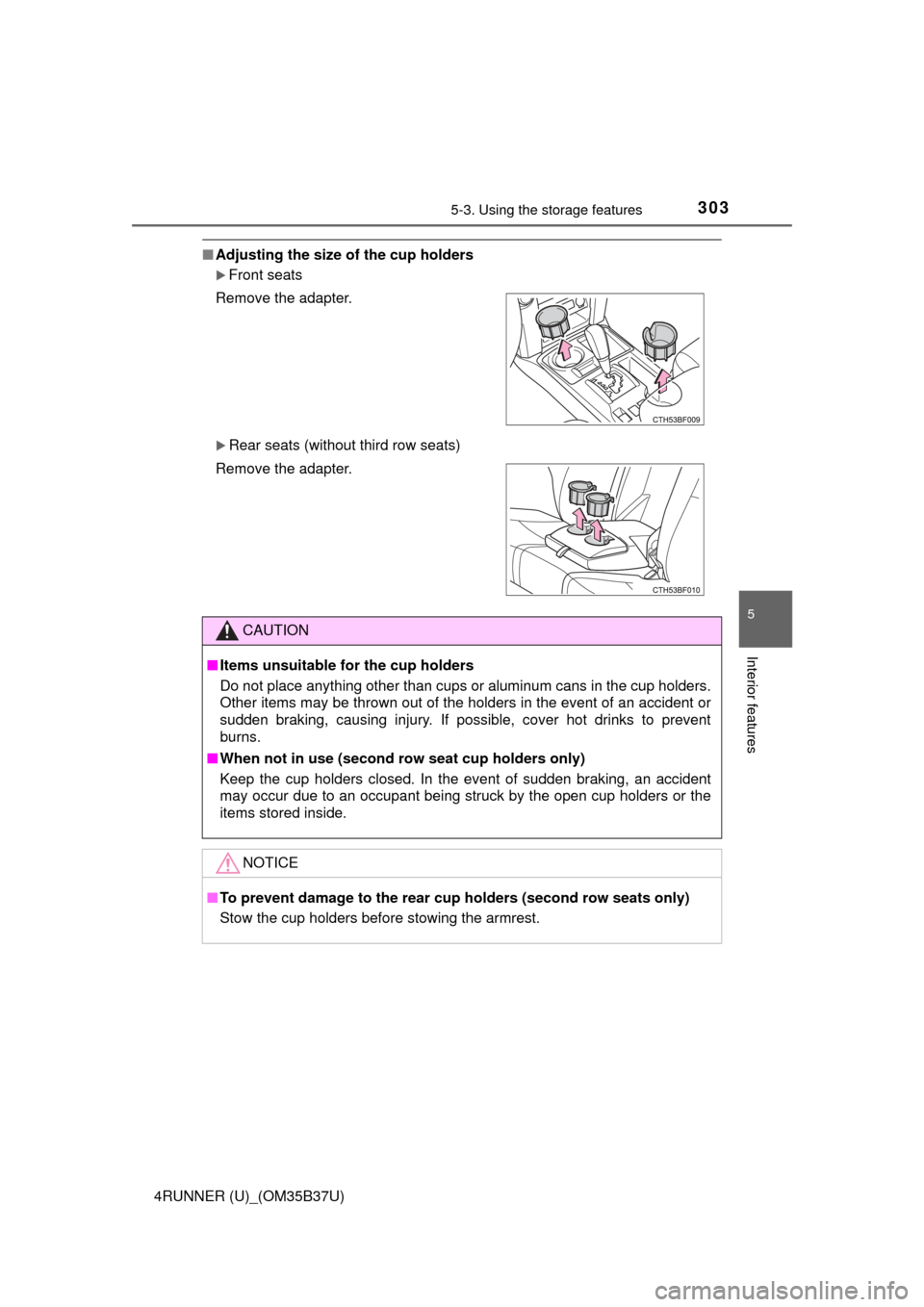
■Adjusting the size of the cup holders
Front seats
Rear seats (without third row seats)
Remove the adapter.
Remove the adapter.
CAUTION
■
Items unsuitable for the cup holders
Do not place anything other than cups or aluminum cans in the cup holders.
Other items may be thrown out of the holders in the event of an accident or
sudden braking, causing injury. If possible, cover hot drinks to prevent
burns.
■ When not in use (second row seat cup holders only)
Keep the cup holders closed. In the event of sudden braking, an accident
may occur due to an occupant being struck by the open cup holders or the
items stored inside.
NOTICE
■To prevent damage to the rear cup holders (second row seats only)
Stow the cup holders before stowing the armrest.
Page 306 of 528
3065-3. Using the storage features
4RUNNER (U)_(OM35B37U)
■When using the bottle holder
●When storing a bottle, close the cap.
● The bottle may not be stored depending on its size or shape.
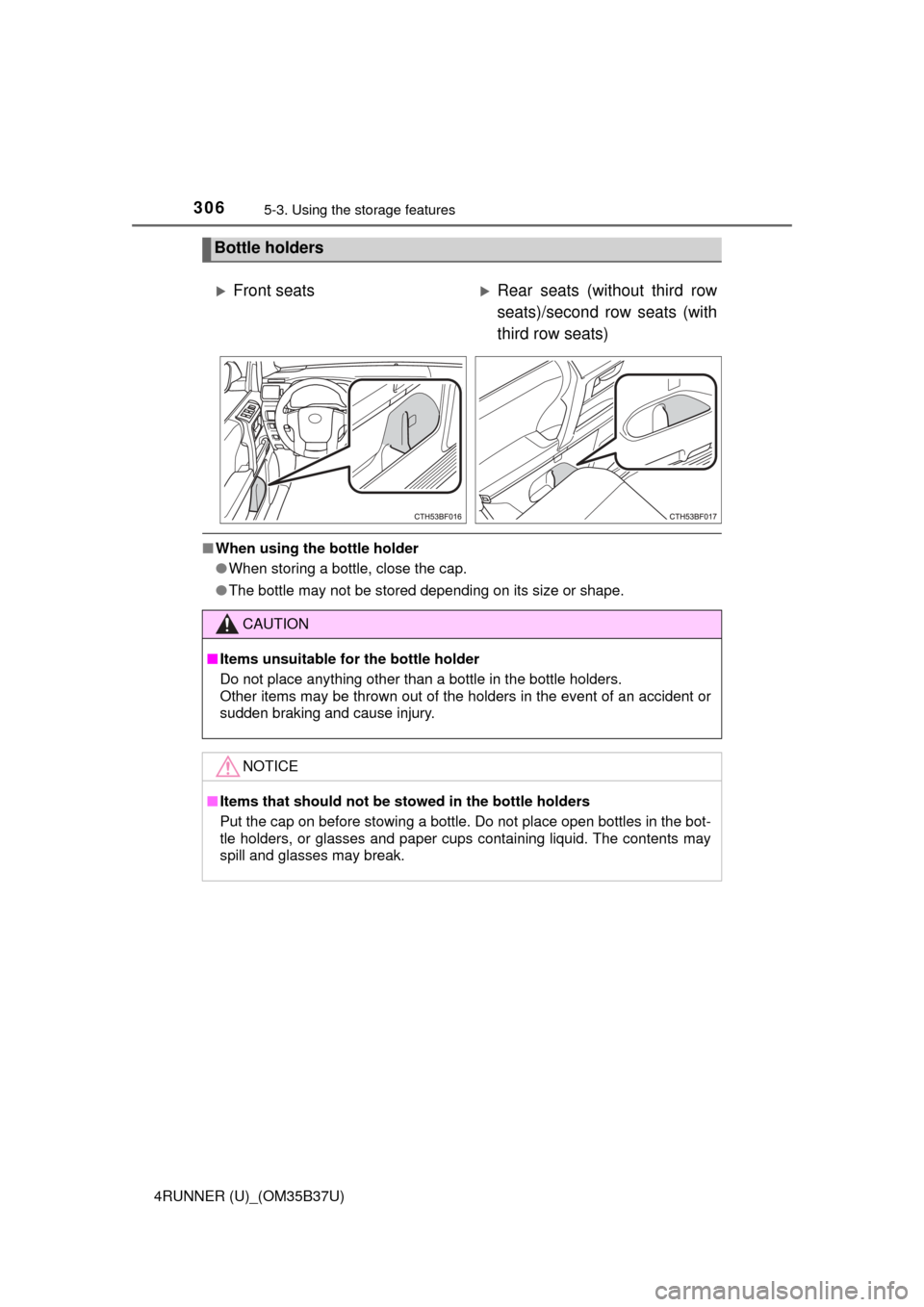
Bottle holders
Front seatsRear seats (without third row
seats)/second row seats (with
third row seats)
CAUTION
■Items unsuitable for the bottle holder
Do not place anything other than a bottle in the bottle holders.
Other items may be thrown out of the holders in the event of an accident or
sudden braking and cause injury.
NOTICE
■Items that should not be st owed in the bottle holders
Put the cap on before stowing a bottle. Do not place open bottles in the bot-
tle holders, or glasses and paper cups containing liquid. The contents may
spill and glasses may break.
Page 311 of 528

3115-3. Using the storage features
5
Interior features
4RUNNER (U)_(OM35B37U)
CAUTION
■When the cargo hoo ks are not in use
To avoid injury, always return the cargo hooks to their stowed positions.
■ Slide deck operating pr ecaution (if equipped)
● Be careful not to get hands or feet pinched by the slide deck.
● Be careful not to allow the slide deck to hit any persons or luggage while
sliding the deck.
● Do not operate the slide deck while someone is on it.
Doing so may cause an accident.
● If operating the slide deck when the vehicle is stopped on an incline, the
slide deck may move faster. Be careful not to allow the slide deck to hit
you or pinch your fingers etc.
● After sliding the deck, make sure it is securely locked in position.
● Do not close the back door while any person is sitting on the slide deck or
any person is between the slide deck and back door.
● Do not stow any objects into the space between the slide deck rails.
NOTICE
■To prevent damage to the cargo net hooks
Avoid hanging things other than a cargo net on them.
■ Slide deck weight capacity (if equipped)
Do not load anything heavier than 440 lb. (200 kg) on the sliding deck.
■ Grocery bag hook weight capacity
Do not hang any object heavier than 8.8 lb. (4 kg) on the grocery bag hooks.
■ When using the slide deck (if equipped)
● Do not close the back door while the slide deck is sliding out. Doing so
may cause the back door or slide deck to break.
● If operating the slide deck when the vehicle is stopped on an incline, the
slide deck may move faster. Be careful as luggage may become damaged
or fly out and damage the cabin.
Page 334 of 528

3345-4. Other interior features
4RUNNER (U)_(OM35B37U)■
Stolen Vehicle Location
If your vehicle is stolen, Safety
Connect can work with local author-
ities to assist them in locating and recovering the vehicle. After filing
a police report, call the Safety Connect response center at 1-800-
331-4331 and follow the prompts for Safety Connect to initiate this
service.
In addition to assisting law enforcement with recovery of a stolen
vehicle, Safety-Connect-equipped vehicle location data may, under
certain circumstances, be shared with third parties to locate your
vehicle. Further information is available at Toyota.com.
■Emergency Assistance Button (“SOS”)
In the event of an emergency on the road, push the “SOS” button to
reach the Safety Connect respons e center. The answering agent
will determine your vehicle’s location, assess the emergency, and
dispatch the necessary assistance required.
If you accidentally press the “SOS” button, tell the response-center
agent that you are not experiencing an emergency.
■
Enhanced Roadside Assistance
Enhanced Roadside Assi stance adds GPS data to the already
included warranty-based Toyota roadside service.
Subscribers can press the “SOS” bu tton to reach a Safety Connect
response-center agent, who can help with a wide range of needs,
such as: towing, flat tire, fuel deli very, etc. For a description of the
Enhanced Roadside Assistance services and their limitations,
please see the Safety Connect Terms and Conditions, which are
available at Toyota.com.