5-42
OTHER CONTROLS AND EQUIPMENT
74LH0-74E
iPod
® operations
/TUNE
VOL -VOL + FLD/TUNE
MODE
AS
SOUND
1
5
4
FLDENT
SEEK
TRACK
SEEK
TRACK
RPT RDM
6
MENU
3 2DISP
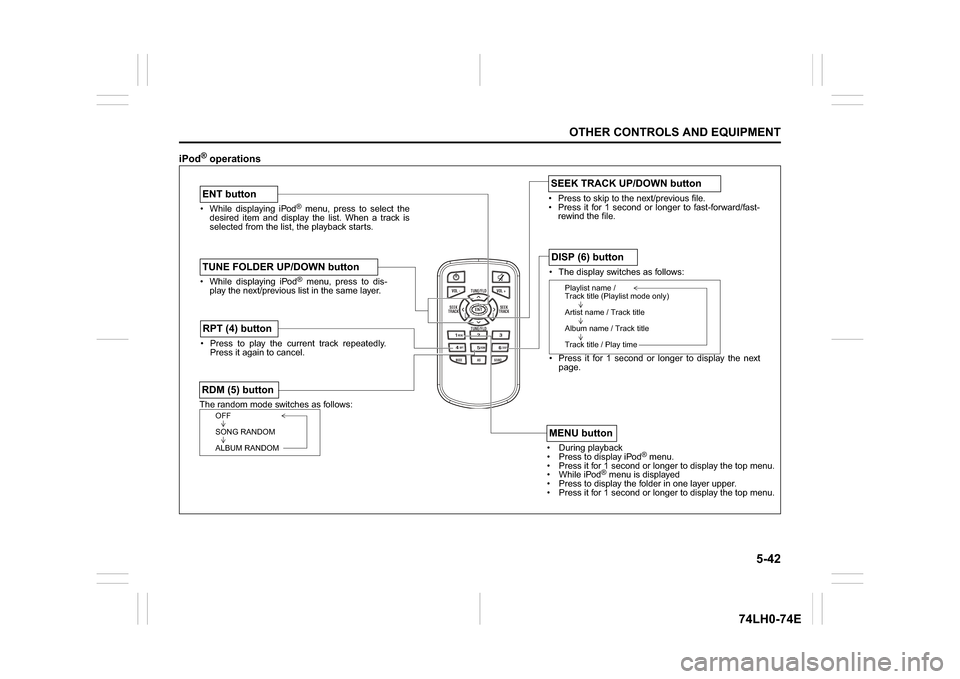
While displaying iPod
® menu, press to select the
desired item and display the list. When a track is
selected from the list, the playback starts.
ENT buttonThe random mode switches as follows:RDM (5) button
OFF
SONG RANDOM
ALBUM RANDOM
Press to play the current track repeatedly.
Press it again to cancel.RPT (4) button
The display switches as follows:
Press it for 1 second or longer to display the next
page.DISP (6) button
Playlist name /
Track title (Playlist mode only)
Artist name / Track title
Album name / Track title
Track title / Play time
During playback
Pres
s to display iPod
® menu.
Press it for 1 second or longer to display the top menu.
While iPod
® menu is displayed
Press to displa
y the folder in one layer upper.
Press it for 1 second or longer to display the top menu.
MENU button
While displaying iPod
® menu, press to dis-
play the next/previous list in the same layer.
TUNE FOLDER UP/DOWN button
Press to skip to the next/previous file.
Press it for 1 second or longer to fast-forward/fast-
rewind the file.SEEK TRACK UP/DOWN button