2017 SUBARU LEGACY shift
[x] Cancel search: shiftPage 422 of 610

nation meter will appear.
2. Depress the accelerator pedal until the
vehicle reaches the desired speed.
3. Press the“RES/SET”switch to the
“SET ”side and release it. Then release
the accelerator pedal.
Cruise control set indicator
1) When setting the displayed unit as “MPH ”.
2) When setting the displayed unit as “km/h ”.
At this time, the cruise control set indicator
appears in the combination meter. The set
speed will be shown on the combination
meter. You can change the displayed unit
by operating the multi information display.
For details, refer to “Units”F 3-44.
The vehicle will maintain the desired
speed.
Vehicle speed can be temporarily in-
creased while driving with the cruise
control activated. Simply depress the
accelerator pedal to accelerate the vehi-
cle. When the accelerator pedal is re-
leased, the vehicle will return to and maintain the previous cruising speed.
&
To temporarily cancel the
cruise control
The cruise control can be temporarily
canceled in the following ways.
. Press the “CANCEL”button.
. Press the X-mode switch to activate
the X-mode (models with X-mode).
. Depress the brake pedal.
. Depress the clutch pedal (MT models).
WARNING
For CVT models, do not place the
select lever in the “N ” position while
driving. If the select lever is shifted
into the “N ” position, cruise control
can be canceled but the engine
Starting and operating/Cruise control
–CONTINUED –7-51
Page 427 of 610

Starting and operating/BSD/RCTA
the surroundings with your eyes
when reversing the vehicle.
Example 2
1) The detection range of the radar sensors
C) Vehicle that may be detected
NOTE
The system may detect that a vehicle
(C) is passing in front of your vehicle.
Always be sure to check the surround-
ings with your eyes when reversing the
vehicle.
&System operation
! Operating conditions
The BSD/RCTA will operate when all of
the following conditions are met.
. The ignition switch is in the “ON ”
position.
. The BSD/RCTA warning indicator and
BSD/RCTA OFF indicator are turned off.
. The vehicle is driven at speeds above
6 mph (10 km/h) (except when reversing).
. The shift lever/select lever is in the “R”
position (RCTA only).
The BSD/RCTA will not operate in the
following situations.
. The BSD/RCTA OFF indicator ap-
pears.
. The vehicle speed is below 6 mph (10
km/h) even when the BSD/RCTA OFF
indicator does not appear (except when
reversing).
NOTE
. In the following cases, the BSD/
RCTA will stop operating and the
BSD/RCTA warning indicator will ap-
pear.
–When a malfunction occurs in the
system, including the BSD/RCTA
approach indicator light
. If the BSD/RCTA warning indicator appears, exercise proper caution. For
details, refer to
“BSD/RCTA warning
indicator ”F 7-59.
. In the following cases, the BSD/
RCTA will temporarily stop operating
(or may stop operating) and the BSD/
RCTA warning indicator will appear.
–When the radar sensor becomes
significantly misaligned (If the or-
ientation of the radar sensor is
shifted for any reason, readjust-
ment is required. Have the sensor
adjusted at a SUBARU dealer.)
– When a large amount of snow or
ice sticks to the rear bumper sur-
face around the radar sensors
– When the vehicle is driven on a
snow-covered road or in an envir-
onment in which there are no
objects around (such as in a desert)
for a prolonged period of time
– When the temperature around
the radar sensors increases exces-
sively due to long driving on uphill
grades in the summer, etc.
– When the temperature around
the radar sensors becomes extre-
mely low
– When the vehicle battery voltage
lowers
– When the vehicle voltage ex-
ceeds the battery voltage rating
7-56
Page 429 of 610

Starting and operating/BSD/RCTA
tected.
The indicator light will
flash to warn the
driver of dangers under the following
conditions.
. While the indicator light is illuminating,
if the turn signal lever is operated toward
the side in which this light turned on
. When reversing the vehicle while the
system detects a vehicle approaching
from either side
! BSD/RCTA approach indicator
light dimming function
When the headlights are turned on, the
brightness of the BSD/RCTA approach
indicator light will be reduced.
NOTE
. You may have difficulty seeing the
BSD/RCTA approach indicator light
under the following conditions.
–When sunlight shines directly on
it
– When the headlight beams from a
vehicle traveling behind shines di-
rectly on it
. While the illumination brightness
control dial is in the fully upward
position, even if the headlights are
turned on, the brightness of the BSD/
RCTA approach indicator light will not
be reduced. For details about the illumination brightness control dial,
refer to
“Illumination brightness con-
trol” F3-55.
! BSD/RCTA approach warning buz-
zer (only when reversing)
A warning buzzer sounds along with
flashing of the BSD/RCTA approach in-
dicator light to warn the driver of dangers.
The setting of the warning buzzer volume
can be changed by operating the multi
information display of the combination
meter. For details, refer to “BSD/RCTA”
F 3-45.
! Safety tips regarding the BSD/RCTA
approach indicator light/warning
buzzer
. In the following cases, operation of the
BSD/RCTA approach indicator light and
the warning buzzer may be delayed or the
system may fail to issue these warnings.
–Whenavehiclemovestothe
neighboring lane from a lane next to
the neighboring lane
– When driving on a steep incline or
on repeated sharp uphill and downhill
grades
– When going beyond a pass
– When both your vehicle and a
vehicle driving on a neighboring lane
are driving on the far side of each lane. –
When several narrowly-spaced ve-
hicles are approaching in a row
– In low radius bends (tight bends or
when making turns at an intersection)
– When there is a difference in height
between your lane and the neighbor-
ing lane
– Immediately after the BSD/RCTA is
activated by pressing the BSD/RCTA
OFF switch
– Immediately after the shift lever/
select lever is shifted to the “R ”
position
– When extremely heavy cargo is
loaded in the trunk or cargo area
. During reversing, operation of the BSD/
RCTA approach indicator light and the
warning buzzer may be delayed or the
system may fail to issue these warnings
under the following conditions.
–When backing out of an angled
parking space
– When a large-sized vehicle is
parked next to your vehicle (That
vehicle prevents the propagation of
radar waves.)
– When reversing on sloped roads
– When reversing at a high speed
7-58
Page 438 of 610

Warning message
2)Second braking and warning:
When the system has detected an object,
if the vehicle is further reversed and the
system determines that a collision is
highly likely to occur, a continuous warn-
ing beep will sound and automatic hard
braking will be applied.
Warning message
3) After the vehicle has been stopped
by the system:
Make sure to depress the brake pedal
after the vehicle has been stopped by
automatic braking. Until the brake pedal is
depressed, a message will be displayed
on the audio/navigation monitor and the
continuous beep will remain sounding.
Message
After the brake pedal is depressed, the
Reverse Automatic Braking system OFF
indicator will illuminate and the system will
temporarily stop operating. The Reverse
Automatic Braking system OFF indicator
will turn off when the select lever is shifted
to a position other than the “R”position.
The system will operate again the next
time the select lever is shifted to “R”
position.
NOTE
. In the following cases, after the
vehicle has been stopped by the Re-
verse Automatic Braking system, brake
control is released and the electronic
parking brake operates. For details
about releasing the parking brake, refer
Starting and operating/Reverse Automatic Braking System
–CONTINUED –7-67
Page 440 of 610

&Canceling the Reverse Auto-
matic Braking system opera-
tion
The Reverse Automatic Braking system
can be temporarily canceled by any of the
following operation.
. While automatic braking is in operation,
the brake pedal is depressed
. While automatic braking is in operation,
the accelerator pedal is depressed
. The accelerator pedal is depressed
hard (in this case, limited acceleration will
be canceled and the vehicle will continue
reversing)
. The select lever is shifted to a position
other than the “R”position
NOTE
Thesystemwillbecanceledifthe
object is no longer detected.
& RAB warning indicator
If the Reverse Automatic Braking System
malfunctions, the above indicator illumi-
nates on the combination meter. Contact
the nearest SUBARU dealer for details.
&Reverse Automatic Braking
system ON/OFF setting
While the select lever is shifted to the “R”
position, the below functions of the Re-
verse Automatic Braking system can be
set by operating the audio/navigation
monitor.
1) ON setting key of Reverse Automatic Braking
2) OFF setting key of Reverse Automatic Braking
3) ON setting key of the object detection warning beeping sound
4) OFF setting key of the object detection warning beeping sound
When the ON setting key is shown, the
corresponding setting is ON.
Touch and hold the ON setting key to turn
the setting OFF.
Starting and operating/Reverse Automatic Braking System
–CONTINUED –7-69
Page 441 of 610

Starting and operating/Reverse Automatic Braking System
When the OFF setting is shown, the
corresponding setting is OFF.
Touch and hold the OFF setting key to turn
the setting ON.
When the Reverse Automatic Braking
system and/or the object detection warn-
ing beeping sounds are turned OFF, the
following indicator(s) will illuminate.
1) RAB OFF indicator: illuminates when theReverse Automatic Braking system is
turned OFF.
2) Sonar audible alarm OFF indicator: illuminates when the object detection
warning beeping sound is turned OFF.
Each indicator will turn off when the
corresponding function is turned ON.
NOTE
.When the settings cannot be chan-
ged, the ON/OFF setting key will be
grayed out.
. The settings cannot be changed for
approximately 14 seconds after turning
the ignition switch to the “ON ”posi-
tion.
. The ON/OFF setting key may be
greyed out if the Reverse Automatic
Braking system malfunctions, etc. In
this case, turn the ignition switch to the
“ LOCK ”/“ OFF ”position and then turn it
to the “ON ”position again. If the
setting cannot be changed even after
turning the ignition switch to the “ON ”
position again, consult your SUBARU
dealer.
. The settings will be restored as
follows when the select lever is shifted
to the “R ” position next time.
– Reverse Automatic Braking sys-
tem settings: default (ON setting)
– Object detection warning beep-
ing sound: the setting selected by
operating the multi function display
Also, the following settings can be chan-
ged by operating the multi information
display.
. Warning volume
. Sonar audible alarm For details, refer to
“RAB”F 3-45.& Handling of the sonar sen-
sors
The 4 sonar sensors are located in the
rear bumper. To ensure the proper opera-
tion of the Reverse Automatic Braking
system, observe the following precau-
tions.
. Do not affix any stickers or other items
on the bumper surface near the sonar
sensors.
. Always keep the rear bumper surface
near the sonar sensors clean.
. Do not modify the rear bumper.
. Do not paint the bumper near the sonar
sensors.
. Do not apply strong impacts to the rear
7-70
Page 448 of 610
Driving tips for AWD vehicles
WARNING
.Always maintain a safe driving
speed according to the road and
weather conditions in order to
avoid having an accident on a
sharp turn, during sudden brak-
ing or under other similar condi-
tions.
. Always use the utmost care in
driving –overconfidence be-
cause you are driving an All-
Wheel Drive vehicle could easily
lead to a serious accident.
. When replacing or installing tire
(s), all four tires must be the
same for the following items.
(a) Size
(b) Circumference
(c) Speed symbol
(d) Load index
(e) Construction
(f) Manufacturer
(g) Brand (tread pattern)
(h) Degrees of wear
For items (a) to (d), you must obey the specification that is
printed on the tire placard. The
tire placard is located on the
driver
’s door pillar.
If all four tires are not the same in
items (a) to (h), it may lead to
serious mechanical damage to
the drive train of your car and
affect the following factors.
— Ride
— Handling
— Braking
— Speedometer/Odometer
calibration
— Clearance between the body
and the tires
It also may be dangerous and
lead to loss of vehicle control,
and it can lead to an accident.
CAUTION
If you use a temporary spare tire to
replace a flat tire, be sure to use the
original temporary spare tire stored
in the vehicle. Using other sizes may
result in severe mechanical damage
to the drive train of your vehicle.
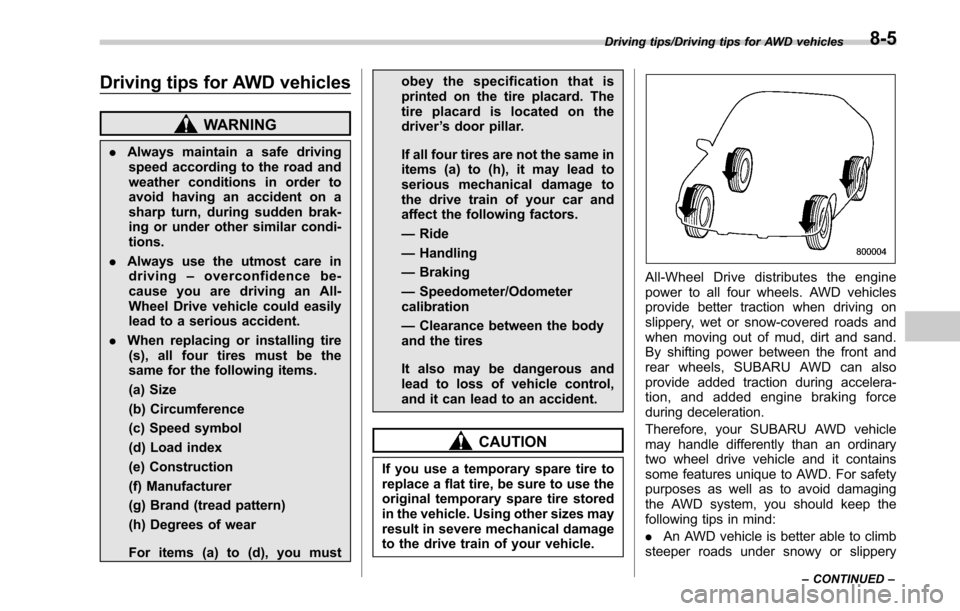
All-Wheel Drive distributes the engine
power to all four wheels. AWD vehicles
provide better traction when driving on
slippery, wet or snow-covered roads and
when moving out of mud, dirt and sand.
By shifting power between the front and
rear wheels, SUBARU AWD can also
provide added traction during accelera-
tion, and added engine braking force
during deceleration.
Therefore, your SUBARU AWD vehicle
may handle differently than an ordinary
two wheel drive vehicle and it contains
some features unique to AWD. For safety
purposes as well as to avoid damaging
the AWD system, you should keep the
following tips in mind:
. An AWD vehicle is better able to climb
steeper roads under snowy or slippery
Driving tips/Driving tips for AWD vehicles
–CONTINUED –8-5
Page 450 of 610

.Continuously variable transmis-
sion fluid (CVT models)
. Front differential gear oil (CVT
models)
Remember that damage done to
your SUBARU while operating it
off-road and not using common
sense precautions such as those
listed above is not eligible for war-
ranty coverage.
Because of the AWD feature and higher
ground clearance, you can drive your
SUBARU on ordinary roads or off-road.
But please keep in mind that an AWD
SUBARU is a passenger car and is
neither a conventional off-road vehicle
nor an all-terrain vehicle. If you do take
your SUBARU off-road, certain common
sense precautions such as those in the
following list should be taken.
! Before driving
. Make certain that you and all of your
passengers are wearing seatbelts.
. Carry some emergency equipment,
such as a towing rope or chain, a shovel,
wheel blocks, first aid kit and cell phone or
citizens band radio.
. Secure all cargo carried inside the
vehicle and make certain that it is not
piled higher than the seatbacks. During sudden stops or jolts, unsecured cargo
could be thrown around in the vehicle and
cause injury. Do not pile heavy loads on
the roof. Those loads raise the vehicle’
s
center of gravity and make it more prone
to tip over.
. Never equip your vehicle with tires
larger than those specified in this manual.
! During driving
General precautions:
. Drive carefully. Do not take unneces-
sary risks by driving in dangerous areas or
over rough terrain.
. Slow down and employ extra caution at
all times. When driving off-road, you will
not have the benefit of marked traffic
lanes, banked curves, traffic signs and
the like.
. Do not drive across steep slopes.
Instead, drive either straight up or straight
down the slopes. A vehicle can much
more easily tip over sideways than it can
end over end. Avoid driving straight up or
down slopes that are too steep.
. Avoid sharp turning maneuvers, espe-
cially at higher speeds.
. Do not grip the inside or spokes of the
steering wheel. A bad bump could jerk the
wheel and injure your hands. Instead,
drive with your fingers and thumbs on
the outside of the rim. .
Do not drive or park over or near
flammable materials such as dry grass or
fallen leaves, as they may burn easily. The
exhaust system is very hot while the
engine is running and right after the
engine stops. This could create a fire
hazard.
Precautions when driving under espe-
cially dangerous situations:
. If driving through water, such as when
crossing shallow streams:
–First, check the depth of the water
and the bottom of the stream bed for
firmness.
– Next, ensure that the bed of the
stream is flat.
– Then, drive slowly and completely
through the stream. The water should
be shallow enough that it does not
reach the vehicle’ s undercarriage.
. Water entering the engine air intake or
the exhaust pipe or water splashing onto
electrical parts may damage your vehicle
and may cause it to stall. Never drive
through rushing water. Regardless of its
depth, it can wash away the ground from
under your tires, resulting in possible loss
of traction and even vehicle rollover.
. If you must rock the vehicle to free it
from sand or mud, depress the accelerator
pedal slightly and move the shift lever/
Driving tips/Off road driving
–CONTINUED –8-7