2017 SUBARU LEGACY USB
[x] Cancel search: USBPage 309 of 610

Audio/Audio set
!How to change the source
TheiPodoperationscreencanbe
reached by the following methods:
. Connect an iPod. Refer to “Connecting
and disconnecting a USB memory/porta-
ble device ”F 5-17.
. Select the “USB/iPod ”key on the
source select screen. Refer to “Selecting
an audio source” F5-18.
! Select play mode
The play mode settings display will appear
when play mode key is touched. Select
the preferred play mode from the following
items.
Icon Function
Touch to start 1 track repeat.
Touch to start repeat all.
Touch to start shuffle all.
Touch to turn off shuffle.
Touch to start shuffle album.
Return to the control screen.
!iPod settings
You can choose the following items from
the list screen after touching the
tab
on the screen.
Icon Function
Select to display the play list.
Select to display tracks list.
Select to display artists list.
Select to display albums list.
Select to open other list ( “Gen-
res ”, “Composers ”, “Audiobooks ”
and “Podcast ”).
Select to open “Genres ”list.
Select to open “Composers ”list.
Select to open “Audiobooks ”list.
Select to open “Podcasts ”list.
& Bluetooth audio
The Bluetooth audio system enables
users to enjoy listening to music that is
played on a portable player on the vehicle
speakers via wireless communication.
This audio system supports Bluetooth, a
wireless data system capable of playing
portable audio music without cables. If
your device does not support Bluetooth,
the Bluetooth audio system will not func-
tion.
WARNING
. Do not operate the player ’s con-
trols or connect to the Bluetooth
audio system while driving.
Doing so may result in loss of
control of your vehicle and cause
an accident or serious injury.
. Your audio unit is fitted with
Bluetooth antennas. People with
implantable cardiac pacemakers,
cardiac resynchronization ther-
apy-pacemakers or implantable
cardioverter defibrillators should
maintain a reasonable distance
between themselves and the
Bluetooth antennas. The radio
waves may affect the operation
of such devices.
5-58
Page 313 of 610

Audio/Audio set
!Control screen and audio panel
No. Function
&1Select to display the audio source
selection screen.
&2Select to adjust the audio gain level.
Refer to“Audio level settings ”F 5-62.
&3Turn to adjust volume.
Press to turn the audio system on/off.
&4Press to select an audio source.
Refer to “Selecting an audio source ”
F 5-18.
&5Press to display the sound setting
screen. Refer to “Unit settings ”F 5-
19.
! Connecting a portable audio device
You can connect a portable audio device
to the vehicle AUX jack. Refer to “Con-
necting and disconnecting a USB mem-
ory/portable device ”F 5-17.
! How to change the source
The AUX operation screen can be
reached by the following methods:
. Connect a portable audio device. Refer
to “Connecting and disconnecting a USB
memory/portable device ”F 5-17.
. Select the “AUX”key on the source
select screen. Refer to “Selecting an audio
source” F5-18.
! Audio level settings
You can set the audio gain level.
1. Select the
tab on the screen, and
then touch the right side key of the “Audio
Level ”key.
2. Select the audio level from the follow-
ing items. .Low
. Mid
. High
5-62
Page 315 of 610
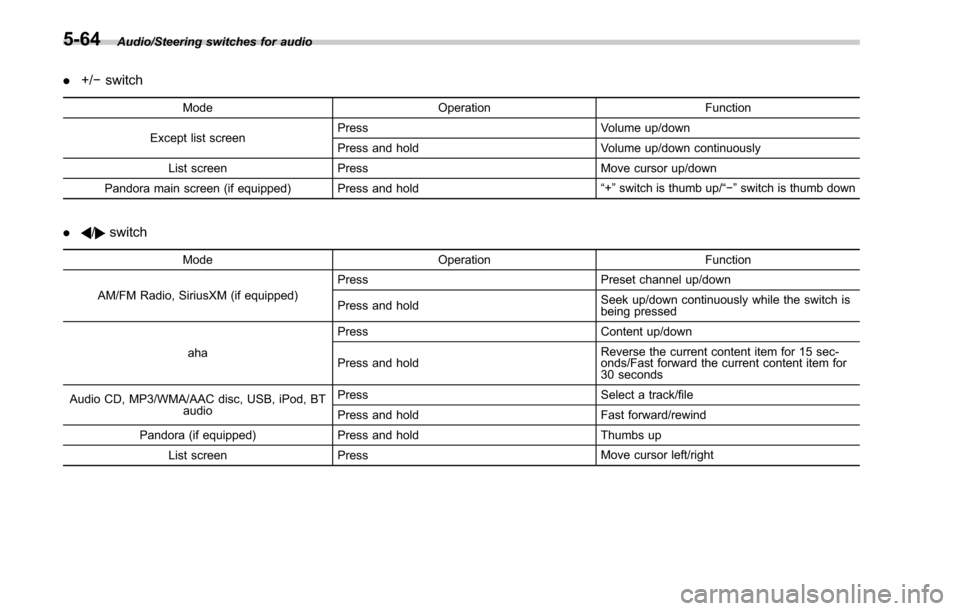
Audio/Steering switches for audio
.+/− switch
Mode Operation Function
Except list screen Press
Volume up/down
Press and hold Volume up/down continuously
List screen Press Move cursor up/down
Pandora main screen (if equipped) Press and hold “
+” switch is thumb up/ “− ” switch is thumb down
./switch
Mode Operation Function
AM/FM Radio, SiriusXM (if equipped) Press
Preset channel up/down
Press and hold Seek up/down continuously while the switch is
being pressed
aha Press
Content up/down
Press and hold Reverse the current content item for 15 sec-
onds/Fast forward the current content item for
30 seconds
Audio CD, MP3/WMA/AAC disc, USB, iPod, BT audio Press
Select a track/file
Press and hold Fast forward/rewind
Pandora (if equipped) Press and hold Thumbs up
List screen Press Move cursor left/right
5-64
Page 316 of 610
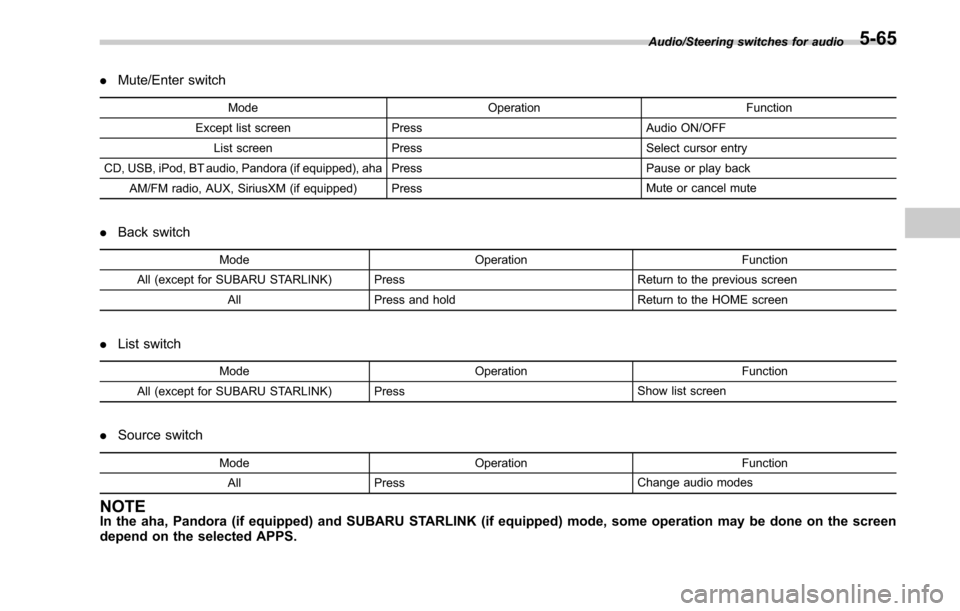
.Mute/Enter switch
Mode OperationFunction
Except list screen Press Audio ON/OFF
List screen Press Select cursor entry
CD, USB, iPod, BT audio, Pandora (if equipped), aha Press Pause or play back
AM/FM radio, AUX, SiriusXM (if equipped) Press Mute or cancel mute
.
Back switch
Mode Operation Function
All (except for SUBARU STARLINK) Press Return to the previous screen
All Press and hold Return to the HOME screen
.
List switch
Mode Operation Function
All (except for SUBARU STARLINK) Press Show list screen
.
Source switch
Mode Operation Function
All Press Change audio modes
NOTEIn the aha, Pandora (if equipped) and SUBARU STARLINK (if equipped) mode, some operation may be done on the screen
depend on the selected APPS.
Audio/Steering switches for audio5-65
Page 320 of 610

&Setting Bluetooth details
! BT Devices Connection screen
1. Press the HOME button.
2. Touch the “SETTINGS”key and then
touch the
tab.
3. Touch the “BT Devices Connection ”
key and then select the desired device to
register.
“ BT Devices Connection ”screen (One
device is registered.)
No. Function
&1Register the device. Refer to “Regis-
tering/connecting Bluetooth®device ”
F 5-66.
&2Make the connection to the registered
device. No. Function
&3This shows the status of the device
connection profile. (The icon illuminates
while connected.)
&4Delete the registered device. Refer to
“
Deleting a Bluetooth device ”F 5-70.
&5Switch to connect/disconnect Bluetooth
communication. Refer to “Bluetooth
ON/OFF ”F 5-69.
! Connecting a Bluetooth device
Up to 5 Bluetooth devices (phones and
audio devices) can be registered.
If more than 1 Bluetooth device has been
registered, select which device to connect
to.
1. Display the “BT Devices Connection ”
screen. Refer to “BT Devices Connection
screen” F5-69.
2. Select the device to be connected. .Supported profile icons will be dis-
played.
–
: Phone
–
: Audio device
–
: Smartphone Application
. Supported profile icons for currently
connected devices will illuminate.
. The audio icon illuminates only
when in the Bluetooth audio mode.
. All icons are dimmed when Blue- tooth is set to off or when the connec-
tion cannot be made with the device.
NOTE
.
It may take time if the device con-
nection is carried out during Bluetooth
audio playback.
. Depending on the type of Bluetooth
device being connected, it may be
necessary to perform additional steps
on the device.
. It is not possible to establish a
Bluetooth connection with iOS devices
currently connected with a USB cable.
. Supported profile icons of the un-
selected devices are not displayed if
several Bluetooth devices have been
registered.
!Bluetooth ON/OFF
1. Display the “BT Devices Connection ”
screen. Refer to “BT Devices Connection
screen” F5-69.
2. Select the “ON”or “OFF ”key by the
right side of the “Connect with Bluetooth ”
key. The “ON”key establishes a connec-
tion, and the “OFF”key disconnects the
connection.
Audio/Bluetooth®settings
– CONTINUED –5-69
Page 336 of 610

!Commands for changing the audio
mode
Voice command Function
Change to AM Switch to AM mode
Change to AM1 Switch to AM mode
band 1
Change to AM2 Switch to AM mode
band 2
Change to FM Switch to FM mode
Change to FM1 Switch to FM mode
band 1
Change to FM2 Switch to FM mode
band 2
Change to FM3 Switch to FM mode
band 3
Change to SiriusXM Switch to XM mode
Change to BT Audio Switch to Bluetooth
Audio mode
Change to CD Switch to CD mode
Change to USB Switch to USB mode
Change to iPod Switch to iPod mode
Change to aha Switch to aha radio
mode
Change to Pandora Switch to Pandora
mode
Change to AUX Switch to AUX mode
!
Commands for hands-free phone
Voice command Function
Dial Number ?<0-9,
+, *, #> ?Change
number, Dial Places a call to the
said phone number
Dial <0-9, +, *, #> ?
Change number, Dial
Contacts, Phonebook
?
? Dial Make a call by using
the phonebook
Call
<1-5> ?Dial
Call History ?In-
coming call, Outgoing
call ?Next (page),
Previous (page) ?
<1-5> ?Dial Make a call by using
the call history
Incoming Calls Display the call his-
tory screen
Outgoing Calls Display the call his-
tory screen
Redial Places a call to the
phone number of the
latest outgoing call
Callback Places a call to the
phone number of the
latest incoming call
Select Phone ?
<1-5> Display the phone
select screen
Phone Menu Display the hands
free top screen
!
Commands for Pandora
Voice command Function
Like Mark “Like ”flag
Dislike Mark“Dislike ”flag
Skip, Next Skip to the next song
!
Commands for aha
Voice command Function
Thumbs Up, Heart,
Like Mark
“Like ”flag
Thumbs Down, Ban,
Dislike Mark
“Dislike ”flag
Refresh, update Refresh the selected
station to get the lat-
est information
Content Up Playback next Con-
tent
Content Down Playback previous
Content
Audio/Voice command system
–CONTINUED –
5-85
Page 337 of 610

Audio/Voice command system
!Commands for AM/FM control
Voice command Function
Seek Up Tunes in the higher
frequency direction
Seek Down Tunes in the lower
frequency direction
Scan Switch to the scan
mode
Tune to
quency to switch to a
specific radio station
Preset
channel to switch to
specific radio station
Ta g iTunes Tagging for
HD Radio
!
Commands for SiriusXM radio con-
trol
Voice command Function
Preset
channel to switch to
specific radio station
Scan Switch to the scan
mode
Channel
nel to switch to spe-
cific radio station Voice command Function
Category ?Next
(page), Previous
(page), <1-5> ?Next
(page), Previous
(page), <1-5> Displays the category
list screen
!
Commands for CD control
Voice command Function
Track Up Select the next track
Track Down Select the current
track
Scan Switch to the scan
mode
Repeat ?1 Track
Repeat, Repeat All Select a repeat mode
1 Track Repeat Repeat single track
Repeat All Repeat all tracks
Shuffle Plays randomly
!
Commands for MP3/WMA/AAC,
USB control
Voice command Function
Track Up Select the next track
Track Down Select the current
track
Folder Up Plays from the start of
the next folder
Folder Down Plays from the start of
the previous folder
Scan Switch to the scan
mode
Repeat ?1 Track
Repeat, Repeat
Folder, Repeat All Select a repeat mode
1 Track Repeat Repeat single track
Repeat Folder Repeat of the folder
Repeat All Repeat all tracks
Shuffle ?Shuffle
Folder, Shuffle All Select a random play
mode
Shuffle Folder Plays randomly of the
folder
Shuffle All Plays randomly
5-86
Page 591 of 610

14-2Index
A
Abbreviation................................................................... 3
ABS (Anti-lock Brake System) ..................................... 7-33
Warning light ......................................................... 3-19
Access key ............................................................... 2-10
Warning indicator ................................................... 3-25
Accessories .............................................................. 11-40
Accessory power outlet ............................................... 6-10
Air cleaner element ................................................... 11-15
Air conditioner Automatic climate control system ............................... 4-5
Manual climate control system ................................... 4-6
Air filtration system ..................................................... 4-10
Airflow selection ........................................................... 4-6
Alarm system ............................................................ 2-28
All-Wheel Drive warning light ....................................... 3-23
Aluminum wheel ....................................................... 11-32
Cleaning ............................................................... 10-3
Antenna ...................................................................... 5-2
Anti-lock Brake System (ABS) ..................................... 7-33
Arming the system ..................................................... 2-30
Armrest ..................................................................... 1-15
Ashtray ..................................................................... 6-12
AT OIL TEMP warning light ......................................... 3-17
Audio aha
TMby HARMAN ................................................ 5-44
AM/FM radio ......................................................... 5-28
AUX ..................................................................... 5-61
Base display audio set. ............................................. 5-4
Basic operation ...................................................... 5-18
Bluetooth audio ...................................................... 5-58 CD ....................................................................... 5-53
iPod
...................................................................... 5-56
Pandora
®.............................................................. 5-50
SiriusXM Satellite Radio .......................................... 5-37
Steering switches for audio ...................................... 5-63
SUBARU STARLINK ............................................... 5-26
SUBARU STARLINK
TMMultimedia Plus audio set ... .... 5-6
Unit setting ............................................................ 5-19
USB memory ......................................................... 5-55
Auto on/off headlights ................................................. 3-47
Sensor .................................................................. 3-49
Vehicle setting ........................................................ 3-46
Auto-dimming mirror .................................................... 3-69
Automatic climate control system ................................... 4-5
Automatic headlight beam leveler Warning light .......................................................... 3-32
Automatic Locking Retractor/Emergency Locking Retractor (ALR/ELR) ................................................ 1-17
B
Battery Drainage prevention function ..................................... 2-8
Jump starting ......................................................... 9-11
Replacement (access key) ..................................... 11-50
Replacement (remote engine start transmitter) ........... 7-21
Replacement (transmitter) ...................................... 11-51
Vehicle battery ..................................................... 11-37
Bluetooth
®
Audio .................................................................... 5-58
Hands-free phone system ........................................ 5-71
Settings ................................................................. 5-66