2017 SUBARU FORESTER ignition
[x] Cancel search: ignitionPage 194 of 634

By operating the“”or “”switch on the
steering wheel, you can select the menu.
Pull the “
/SET”switch to enter the
selected menu.
NOTE
If you enter the “Go Back ”menu, the
system will return to the previous
screen.
! Screen Settings
After entering the “Screen Settings”menu,
select one of the following menus.
!Welcome Good-bye Screen
The welcome screen/good-bye screens
can be activated or deactivated. Select
“On” to activate the screens. Select “Off ”
to deactivate the screens.
!Gauge Initial Movement
The movement of the meter needles and
gauge needles that occurs when the
ignition switch is turned to the “ON ”
position can be activated or deactivated.
Select “On”to activate. Select “Off ”to
deactivate.
!Languages
Operate the “
”or “”switch on the
steering wheel to display the preferred
language. Then pull the “
/SET”switch to
select the displayed language. !
EyeSight (models with EyeSight
system)
NOTE
For models with the EyeSight system,
refer to the Owner ’s Manual supple-
ment for the EyeSight system.
After entering the “EyeSight”menu, select
one of the following menus.
!Warning Volume
The volume of the warning buzzer that
sounds when the EyeSight system is in
use can be set in 3 stages (“ Max”,“Mid ”
and “Min ”).
! Lead Vehicle Acquisition Sound
When adaptive cruise control is used, the
buzzer that sounds if a vehicle is detected
in front or if detection is not possible can
be activated or deactivated. Select “On ”to
activate the buzzer. Select “Off”to deac-
tivate the buzzer.
! Lead Vehicle Moving Monitor
Function
When the lead vehicle moving monitor
function is in operation, the buzzer that
sounds if a vehicle in front has started can
be activated or deactivated. Select “On”to
activate the buzzer. Select “Off”to deac-
tivate the buzzer. !
BSD/RCTA (if equipped)
After entering the “BSD/RCTA ”menu,
select the “Warning Volume ”menu. You
can set the volume of the warning buzzer
for RCTA (Rear Cross Traffic Alert). You
can select “Max ”,“Mid ”,“Min ”or “Off ”.
! RAB (if equipped)
NOTE
For models with the RAB (Reverse
Automatic Braking) system, refer to
“Reverse Automatic Braking System ”
F 7-66.
After entering the “RAB”menu, select one
of the following menus.
!Warning Volume
The volume of the warning sound that is
activated when the RAB (Reverse Auto-
matic Braking) system is in operation can
be set in 3 stages (“Max ”,“Mid ”and “Min ”).
! Sonar Audible Alarm
The RAB (Reverse Automatic Braking)
system is equipped with a function that
emits a warning sound when the system
operates. The function can be activated or
deactivated. Select “On”to set the warn-
ing sound to active. Select “Off ”to set the
warning sound to inactive.
Instruments and controls/Multi information display (models with type B combination meter)
–CONTINUED –3-43
Page 196 of 634
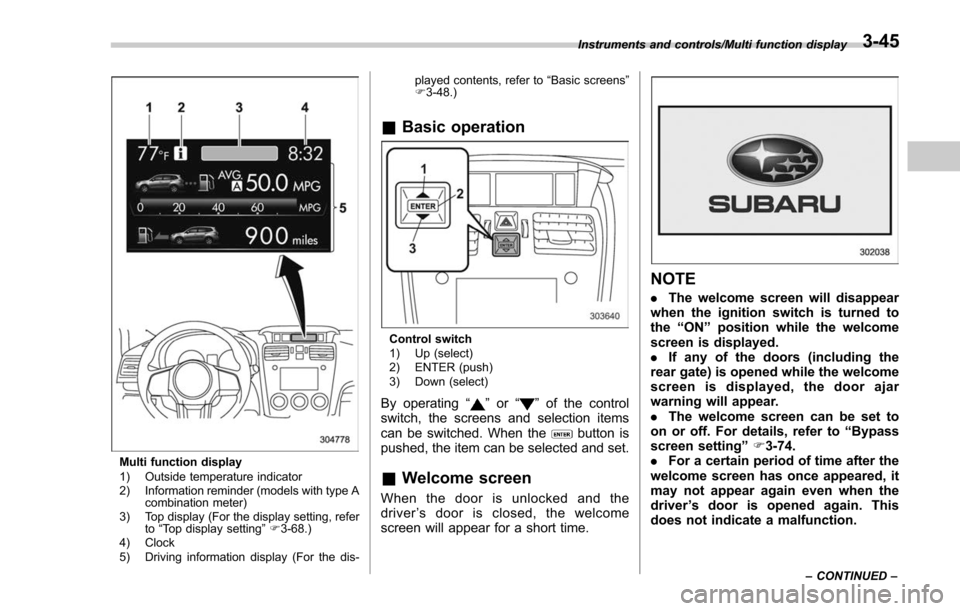
Multi function display
1) Outside temperature indicator
2) Information reminder (models with type Acombination meter)
3) Top display (For the display setting, refer to“Top display setting ”F 3-68.)
4) Clock
5) Driving information display (For the dis- played contents, refer to
“Basic screens ”
F 3-48.)
& Basic operation
Control switch
1) Up (select)
2) ENTER (push)
3) Down (select)
By operating “”or “”of the control
switch, the screens and selection items
can be switched. When the
button is
pushed, the item can be selected and set.
& Welcome screen
When the door is unlocked and the
driver ’s door is closed, the welcome
screen will appear for a short time.
NOTE
. The welcome screen will disappear
when the ignition switch is turned to
the “ON ”position while the welcome
screen is displayed.
. If any of the doors (including the
rear gate) is opened while the welcome
screen is displayed, the door ajar
warning will appear.
. The welcome screen can be set to
on or off. For details, refer to “Bypass
screen setting ”F 3-74.
. For a certain period of time after the
welcome screen has once appeared, it
may not appear again even when the
driver ’s door is opened again. This
does not indicate a malfunction.
Instruments and controls/Multi function display
–CONTINUED –3-45
Page 197 of 634
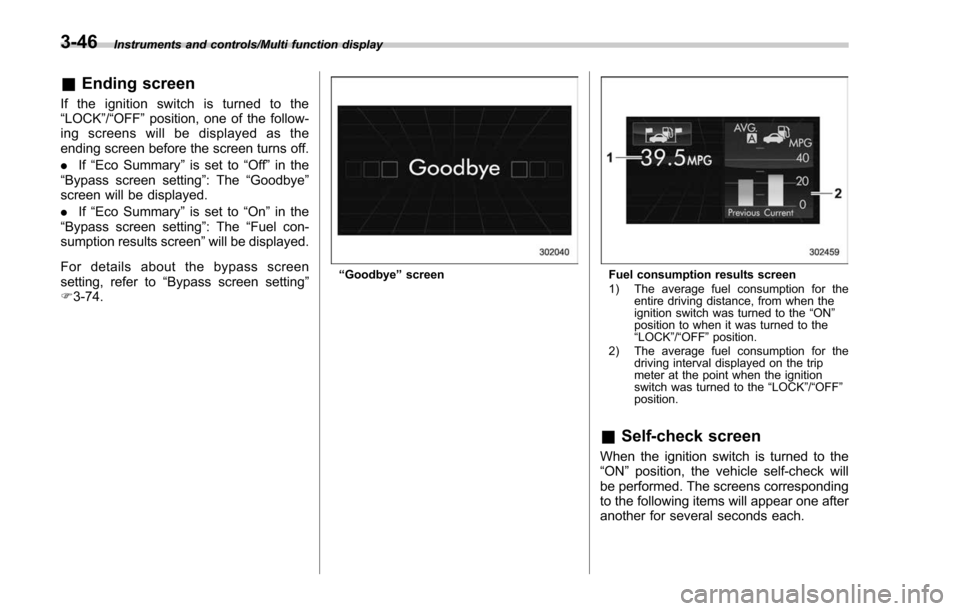
Instruments and controls/Multi function display
&Ending screen
If the ignition switch is turned to the
“LOCK”/ “OFF ”position, one of the follow-
ing screens will be displayed as the
ending screen before the screen turns off.
. If“Eco Summary ”is set to “Off ”in the
“Bypass screen setting ”: The“Goodbye ”
screen will be displayed.
. If“Eco Summary ”is set to “On”in the
“ Bypass screen setting ”: The “Fuel con-
sumption results screen” will be displayed.
For details about the bypass screen
setting, refer to “Bypass screen setting ”
F 3-74.
“Goodbye ”screenFuel consumption results screen
1) The average fuel consumption for the
entire driving distance, from when the
ignition switch was turned to the “ON ”
position to when it was turned to the
“ LOCK ”/“ OFF ”position.
2) The average fuel consumption for the driving interval displayed on the trip
meter at the point when the ignition
switch was turned to the “LOCK ”/“ OFF ”
position.
& Self-check screen
When the ignition switch is turned to the
“ON ”position, the vehicle self-check will
be performed. The screens corresponding
to the following items will appear one after
another for several seconds each.
3-46
Page 200 of 634

!Information bar
1) Information bar
2) Outside temperature indicator
3) Information reminder (models with type A
combination meter)
4) Top display
5) Clock
While the ignition switch is in the “ACC ”or
“ON ”position, the outside temperature
indicator, clock, etc. will be shown on the
information bar.
!Outside temperature indicator
This displays the outside temperature
between −408 F( −408 C) and 122 8F
(50 8C).
Icy road surface warning screen
When the outside temperature becomes
37 8F(3 8C) or less, the icy road surface
warning screen interrupts to inform the
driver that the road surface may be frozen.
NOTE
. The outside temperature indicator
shows the temperature around the
sensor. Therefore, the temperature in-
dication may differ from the actual
outside air temperature.
. The icy road surface warning screen
should be treated only as a guide. Be
sure to check the condition of the road
surface before driving.
. Once the icy road surface warning
screen is displayed, it will not be
displayed again unless the ignition switch is turned to the
“ACC ”or “ON ”
position after it has been turned to
“ LOCK ”/“ OFF ”position.
! Information reminder
The screen returns to the original screen
several seconds after the interruption
screen has been displayed. If the inter-
ruption screen can be displayed once
more even after the original screen has
appeared, an information reminder should
be displayed. For details about the inter-
ruption screen, refer to “Interruption
screen” F3-48.
! Top display
One of the following items can be dis-
played on the top display.
. Average fuel consumption correspond-
ing to the driving distance of each trip
meter
. Current fuel consumption (This may
not be displayed when driving at a low
speed.)
. Driving range on remaining fuel
For details about the setting of the top
display, refer to “Top display setting ”F 3-
68.
Instruments and controls/Multi function display
–CONTINUED –3-49
Page 204 of 634
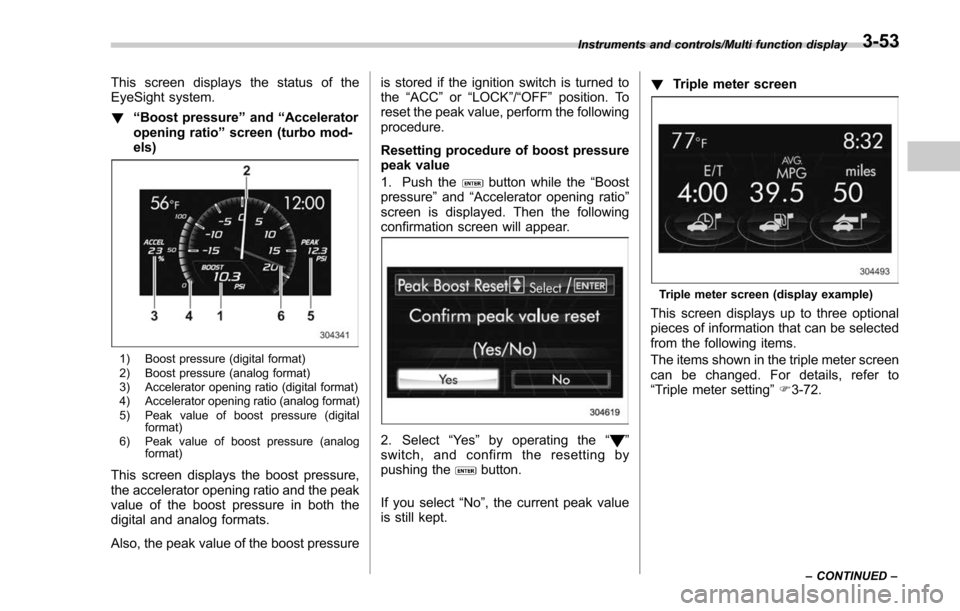
This screen displays the status of the
EyeSight system.
!“Boost pressure ”and “Accelerator
opening ratio ”screen (turbo mod-
els)
1) Boost pressure (digital format)
2) Boost pressure (analog format)
3) Accelerator opening ratio (digital format)
4) Accelerator opening ratio (analog format)
5) Peak value of boost pressure (digital format)
6) Peak value of boost pressure (analog format)
This screen displays the boost pressure,
the accelerator opening ratio and the peak
value of the boost pressure in both the
digital and analog formats.
Also, the peak value of the boost pressure is stored if the ignition switch is turned to
the
“ACC ”or “LOCK ”/“OFF ”position. To
reset the peak value, perform the following
procedure.
Resetting procedure of boost pressure
peak value
1. Push the
button while the “Boost
pressure ”and “Accelerator opening ratio ”
screen is displayed. Then the following
confirmation screen will appear.
2. Select “Ye s ”by operating the “”
switch, and confirm the resetting by
pushing the
button.
If you select “No”, the current peak value
is still kept. !
Triple meter screen
Triple meter screen (display example)
This screen displays up to three optional
pieces of information that can be selected
from the following items.
The items shown in the triple meter screen
can be changed. For details, refer to
“Triple meter setting ”F 3-72.
Instruments and controls/Multi function display
–CONTINUED –3-53
Page 205 of 634
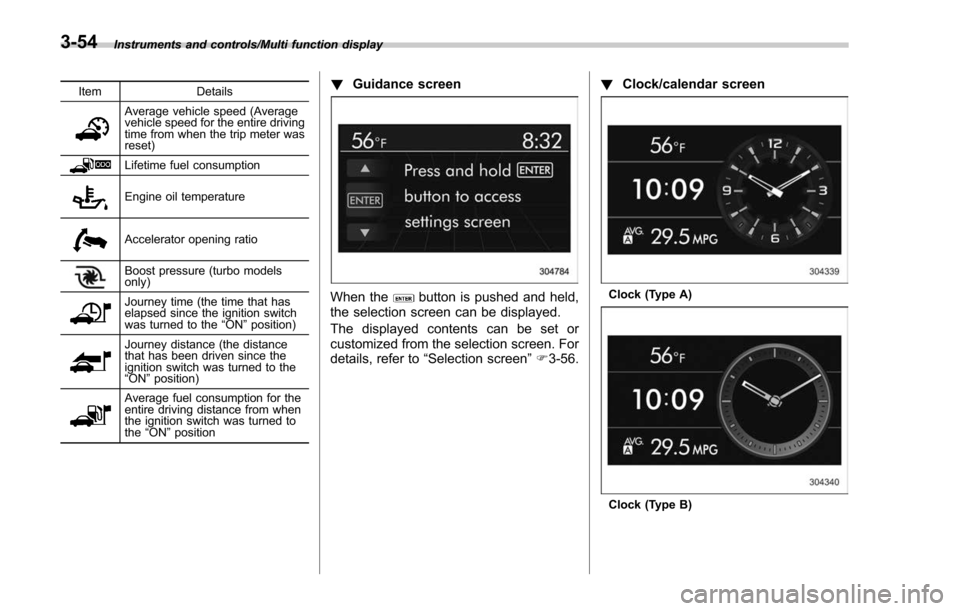
Instruments and controls/Multi function display
ItemDetails
Average vehicle speed (Average
vehicle speed for the entire driving
time from when the trip meter was
reset)
Lifetime fuel consumption
Engine oil temperature
Accelerator opening ratio
Boost pressure (turbo models
only)
Journey time (the time that has
elapsed since the ignition switch
was turned to the“ON ”position)
Journey distance (the distance
that has been driven since the
ignition switch was turned to the
“ON ”position)
Average fuel consumption for the
entire driving distance from when
the ignition switch was turned to
the “ON ”position
! Guidance screen
When thebutton is pushed and held,
the selection screen can be displayed.
The displayed contents can be set or
customized from the selection screen. For
details, refer to “Selection screen” F3-56. !
Clock/calendar screenClock (Type A)
Clock (Type B)
3-54
Page 208 of 634
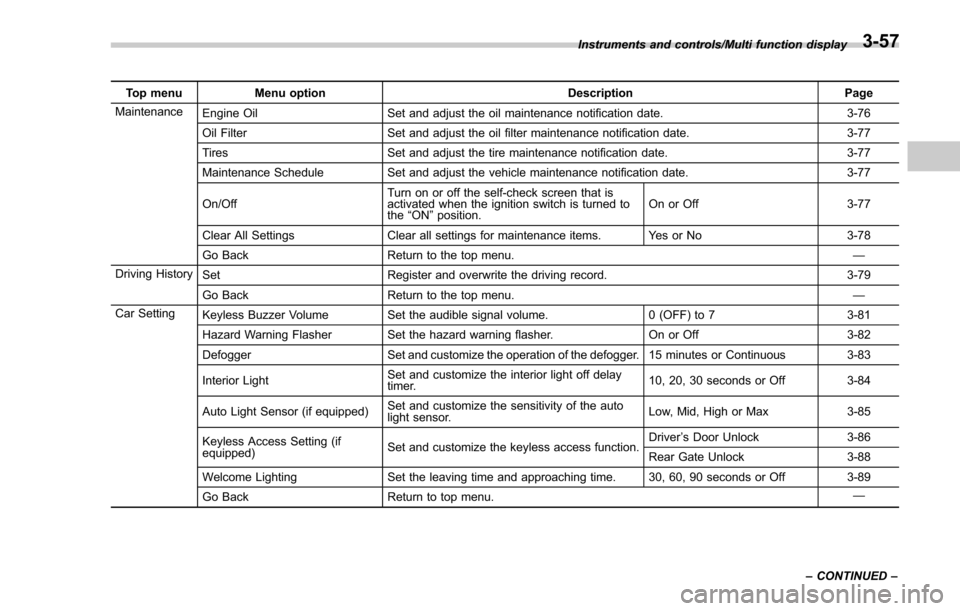
Top menuMenu option DescriptionPage
Maintenance Engine Oil Set and adjust the oil maintenance notification date. 3-76
Oil Filter Set and adjust the oil filter maintenance notification date. 3-77
Tires Set and adjust the tire maintenance notification date. 3-77
Maintenance Schedule Set and adjust the vehicle maintenance notification date. 3-77
On/Off Turn on or off the self-check screen that is
activated when the ignition switch is turned to
the
“ON ”position. On or Off
3-77
Clear All Settings Clear all settings for maintenance items. Yes or No 3-78
Go Back Return to the top menu. —
Driving History Set Register and overwrite the driving record. 3-79
Go Back Return to the top menu. —
Car Setting Keyless Buzzer Volume Set the audible signal volume. 0 (OFF) to 73-81
Hazard Warning Flasher Set the hazard warning flasher. On or Off3-82
Defogger Set and customize the operation of the defogger. 15 minutes or Continuous 3-83
Interior Light Set and customize the interior light off delay
timer. 10, 20, 30 seconds or Off
3-84
Auto Light Sensor (if equipped) Set and customize the sensitivity of the auto
light sensor. Low, Mid, High or Max
3-85
Keyless Access Setting (if
equipped) Set and customize the keyless access function. Driver
’s Door Unlock 3-86
Rear Gate Unlock 3-88
Welcome Lighting Set the leaving time and approaching time. 30, 60, 90 seconds or Off 3-89
Go Back Return to top menu. —
Instruments and controls/Multi function display
–CONTINUED –
3-57
Page 210 of 634
&Date and time settings
The items in the date and time settings
can be set. To change the items, operate
the “
”or “”switch.
NOTE
. The “Time/Date ”item must be set to
display the “Birthday ”, “Anniversary ”
and notifications for vehicle mainte-
nance.
. The “Birthday ”and “Anniversary ”
items can be entered after the “Time/
Date ”item has been set.
. Dates that do not exist in the
Gregorian calendar cannot be set (for
example, April 31).
. If your vehicle is equipped with
genuine SUBARU navigation system,
the clock of navigation system must be
set separately.
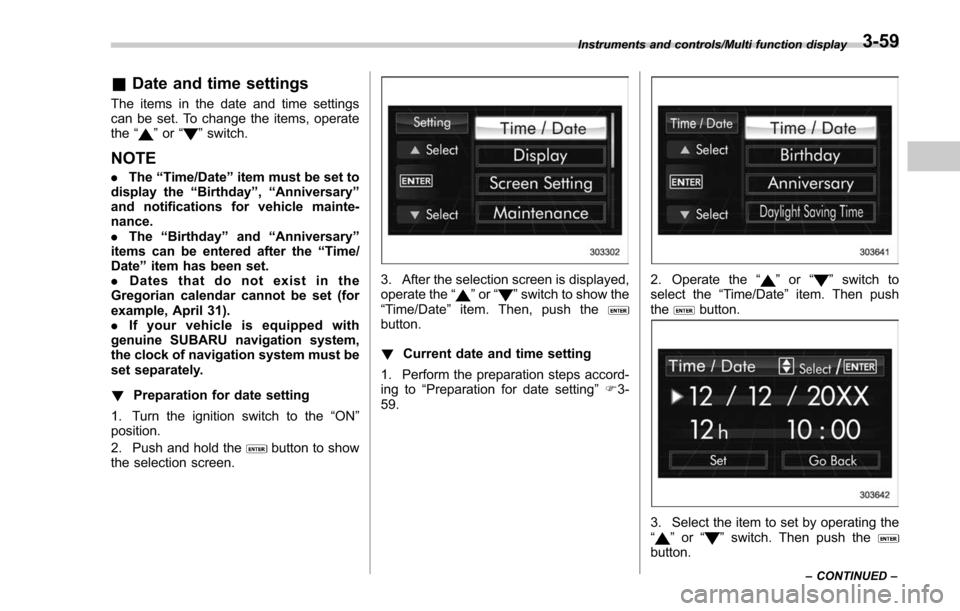
! Preparation for date setting
1. Turn the ignition switch to the “ON”
position.
2. Push and hold the
button to show
the selection screen.
3. After the selection screen is displayed,
operate the “”or “”switch to show the
“Time/Date ”item. Then, push the
button.
! Current date and time setting
1. Perform the preparation steps accord-
ing to “Preparation for date setting ”F 3-
59.
2. Operate the “”or “”switch to
select the “Time/Date”item. Then push
the
button.
3. Select the item to set by operating the
“” or “”switch. Then push thebutton.
Instruments and controls/Multi function display
–CONTINUED –3-59