2017 SUBARU CROSSTREK lock
[x] Cancel search: lockPage 401 of 572

Electronic Brake Force Dis-
tribution (EBD) system
The EBD system maximizes the effective-
ness of the brakes by allowing the rear
brakes to supply a greater proportion of
the braking force. It functions by adjusting
the distribution of braking force to the rear
wheels in accordance with the vehicle’s
loading condition and speed.
The EBD system is an integral part of the
ABS and uses some of the ABS compo-
nents to perform its function of optimizing
the distribution of braking force. If any of
the ABS components used by the EBD
system malfunction, the EBD system also
stops working.
When the EBD system is operating, you
may hear a chattering noise or feel a slight
vibration in the brake pedal. This is normal
and does not indicate a malfunction.
&Steps to take if EBD system
malfunctions
Type A
Type B
If a malfunction occurs in the EBD system,
the system stops working and the brakesystem warning light and ABS warning
light illuminate simultaneously.
The EBD system may be malfunctioning if
the brake system warning light and ABS
warning light illuminate simultaneously
during driving.
Even if the EBD system malfunctions, the
conventional braking system will still func-
tion. However, the rear wheels will be
more prone to locking when the brakes
are applied harder than usual and the
vehicle’s motion may therefore become
somewhat harder to control.
If the brake system warning light and ABS
warning light illuminate simultaneously,
take the following steps.
1. Stop the vehicle in the nearest safe,
flat location.
2. Apply the parking brake and turn off
the engine.
3. Restart the engine.
4. Release the parking brake.
Even if both warning lights turn off:
The EBD system may be malfunctioning.
Drive carefully to the nearest SUBARU
dealer and have the system inspected.
If both warning lights illuminate again
and remain illuminated after restarting
the engine:
1. Turn off the engine again.
Starting and operating/Electronic Brake Force Distribution (EBD) system
–CONTINUED–7-33
Page 405 of 572
above-mentioned situations.
NOTE
.When the switch has been pressed
to deactivate the Vehicle Dynamics
Control system, the Vehicle Dynamics
Control system automatically reacti-
vates itself the next time the ignition
switch is turned to the“LOCK”/“OFF”
position and the engine is restarted.
.If the switch is held down for 30
seconds or longer, the indicator light
turns off, the Vehicle Dynamics Control
system is activated, and the system
ignores any further pressing of the
switch. To make the switch usable
again, turn the ignition switch to the
“LOCK”/“OFF”position and restart the
engine.
.When the switch is pressed to
deactivate the Vehicle Dynamics Con-
trol system, the vehicle’s running per-
formance is comparable with that of a
vehicle that does not have a Vehicle
Dynamics Control system. Do not de-
activate the Vehicle Dynamics Control
system except when absolutely neces-
sary.
.Even when the Vehicle Dynamics
Control system is deactivated, compo-
nents of the brake control system may
still activate. When the brake control
system is activated, the Vehicle Dy-namics Control operation indicator
light flashes.
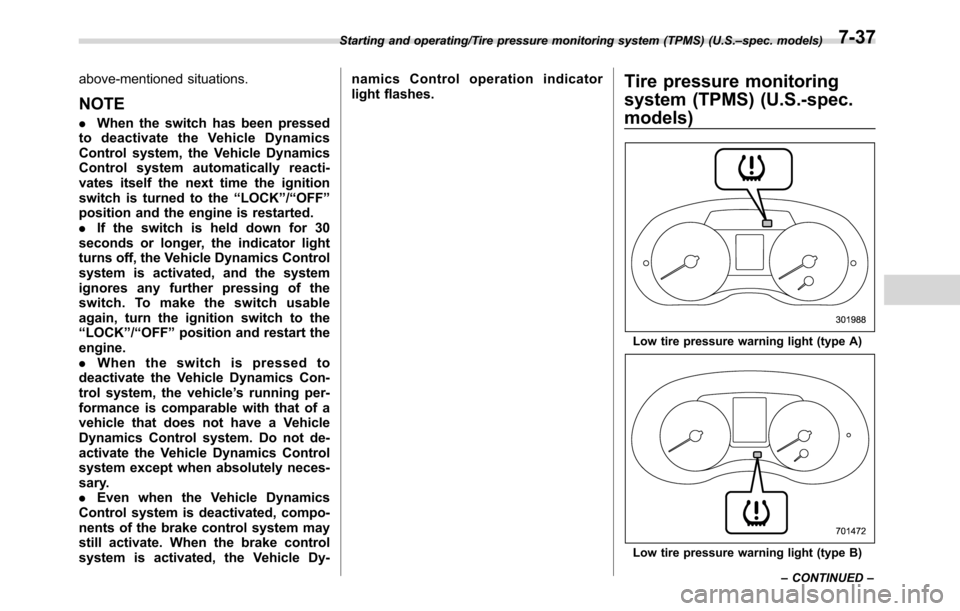
Tire pressure monitoring
system (TPMS) (U.S.-spec.
models)
Low tire pressure warning light (type A)
Low tire pressure warning light (type B) Starting and operating/Tire pressure monitoring system (TPMS) (U.S.–spec. models)
–CONTINUED–
7-37
Page 408 of 572

Starting and operating/Parking your vehicle
When parking on a hill, always turn the
steering wheel. When the vehicle is
headed up the hill, the front wheels should
be turned away from the curb.
When facing downhill, the front wheels
should be turned into the curb.
WARNING
.Never leave unattended children
or pets in the vehicle. They could
accidentally injure themselves or
others through inadvertent op-
eration of the vehicle. Also, on
hot or sunny days, the tempera-
ture in a closed vehicle could
quickly become high enough to
cause severe or possibly fatal
injuries to people.
.Do not park the vehicle over
flammable materials such as dry
grass, waste paper or rags, as
they may burn easily if they come
near hot engine or exhaust sys-
tem parts.
.Be sure to stop the engine if you
take a nap in the vehicle. If
engine exhaust gas enters the
passenger compartment, occu-
pants in the vehicle could die
from carbon monoxide (CO) con-
tained in the exhaust gas.
CAUTION
.If your vehicle has a front under-
spoiler and rear underspoiler
(both optional), pay attention toblocks and other obstructions on
the ground when parking. The
underspoilers could be damaged
by contact with them.
.The braking power of the parking
brake may not be sufficient when
stronger braking power is
needed (e.g., when parking on a
steep slope while towing a trai-
ler).
7-40
Page 409 of 572

Hill start assist system
WARNING
.The Hill start assist system is a
device only for helping the driver
to START the vehicle on an uphill
grade. To prevent accidents
when the vehicle is parked on a
slope, be sure to firmly set the
parking brake. When setting the
parking brake, make sure that the
vehicle remains stationary when
the clutch pedal (MT models) and
brake pedal (both MT and CVT
models) are released.
.Do not turn the ignition switch to
the“LOCK”/“OFF”position while
the Hill start assist system is
operating. The Hill start assist
system will be deactivated and
may lead to an accident.
The Hill start assist system is a device to
make the following vehicle operations
easier.
1) Starting forward facing uphill
2) Starting backward facing downhill
A) Brake pedal (both MT models and CVT
models)
B) Clutch pedal (MT models only)
In both these cases, the Hill start assist
system operates under the following con-ditions.
.when the clutch pedal is depressed
while the brake pedal is also depressed
(MT models)
.when the vehicle has stopped with the
brake pedal depressed (CVT models)
Braking power is maintained temporarily
(for approximately 2 seconds) by the Hill
start assist system after the brake pedal is
released. The driver is therefore able to
start the vehicle in the same way as on a
level grade, just using the clutch pedal
(MT models only) and accelerator pedal
(all models).
If the braking power of the Hill start assist
system is insufficient after the brake pedal
is released, apply more braking power by
depressing the brake pedal again.
The Hill start assist system may not
operate on slight grades. Also, the Hill
start assist system does not operate in the
following cases.
Starting and operating/Hill start assist system
–CONTINUED–7-41
Page 410 of 572

Starting and operating/Hill start assist system
.when starting backward facing uphill
.when starting forward facing downhill
.while the parking brake is applied
.while the ignition switch is in the“ACC”
or“LOCK”/“OFF”position
.while the Hill start assist warning light/Hill start assist OFF indicator light is
illuminated
When using the Hill start assist system, a
braking effect may be felt even after the
brake pedal has been released. However,
for MT models, this braking effect should
disappear once the clutch pedal is re-
leased.
CAUTION
The braking power of the Hill start
assist system may not be sufficient
when strong braking power is
needed (e.g., while towing a trailer).
NOTE
A slight jolt may be felt when the
vehicle begins to move forward after
being reversed.
&To activate/deactivate the Hill
start assist system
CAUTION
While the Hill start assist system is
deactivated, when starting on an
uphill grade, braking power is not
maintained if the brake pedal is
released. Start on an uphill grade
by using the parking brake.
You can activate/deactivate the Hill start
assist system according to the following
procedure.
NOTE
If you make an error when performing
any steps in the following procedure,
place the ignition switch in the
“LOCK”/“OFF”position once and then
start over again.
!To deactivate
1. Park your vehicle in a flat and safe
location and apply the parking brake.
2. Turn the ignition switch to the“LOCK”/
“OFF”position.
3. Restart the engine.
7-42
Page 412 of 572

Starting and operating/Cruise control
assist OFF indicator light blinks.
8. Turn the ignition switch to the“LOCK”/
“OFF”position. The hill start assist system
has now been deactivated.
NOTE
While the Hill start assist system is
deactivated, the Hill start assist OFF
indicator light blinks.
!To activate
When the procedure to deactivate the Hill
start assist system is performed again, the
system is activated. When the Hill start
assist system is activated, the Hill start
assist OFF indicator light turns off.
&Hill start assist warning light/
Hill start assist OFF indicator
light
Refer to“Hill start assist warning light/Hill
start assist OFF indicator light”F3-22.
Cruise control (if equipped)
NOTE
For models with EyeSight system:
Refer to the Owner’s Manual supple-
ment for the EyeSight system.
Cruise control enables you to maintain a
constant vehicle speed without holding
your foot on the accelerator pedal and it is
operative when the vehicle speed is 25
mph (40 km/h) or more.
WARNING
Do not use the cruise control under
any of the following conditions.
These may cause loss of vehicle
control.
.driving up or down a steep grade
.driving on slippery or winding
roads
.driving in heavy traffic
.towing a trailer
NOTE
Make sure the cruise control system is
turned off when the cruise control is
not in use to avoid unintentionally
setting of the cruise control.
&To set cruise control
Cruise control main button
1. Press the cruise control main button.
Cruise control indicator light (type A)
7-44
Page 414 of 572

Starting and operating/Cruise control
only).
WARNING
For CVT models, you can cancel the
cruise control by shifting the select
lever into the“N”position. However,
do not shift the lever into the“N”
position while driving except in case
of emergency. If the select lever is
shifted into the“N”position, the
engine brake will no longer work.
This could result in an accident.
The cruise control set indicator light in the
combination meter turns off when the
cruise control is canceled.
To resume the cruise control after it has
been temporarily canceled and with vehi-
cle speed of approximately 20 mph (30km/h) or more, press the“RES/SET”
switch to the“RES”side to return to the
original cruising speed automatically.
The cruise control set indicator light in the
combination meter will automatically illu-
minate at this time.
&To turn off the cruise control
There are two ways to turn off the cruise
control:
.Press the cruise control main button
again.
.Turn the ignition switch to the“ACC”or
“LOCK”/“OFF”position (but only when the
vehicle is completely stopped).
&To change the cruising speed
!To increase the speed (by the“RES/
SET”switch)
Press the“RES/SET”switch to the“RES”
side and hold it until the vehicle reaches
the desired speed. Then, release the
switch. The vehicle speed at that moment
will be memorized and treated as the new
set speed.
U.S.-spec. models
When the difference between the actual
vehicle speed and the set speed is small,
the set speed can be increased 1 mph
(1.6 km/h) each time by pressing the
“RES/SET”switch to the“RES”side
quickly.
7-46
Page 423 of 572

&BSD/RCTA OFF switch
BSD/RCTA OFF switch
BSD/RCTA OFF indicator
If the BSD/RCTA OFF switch is pressed,
the BSD/RCTA OFF indicator appears on
the multi information display of the combi-nation meter, and the BSD/RCTA is
deactivated.
Press the switch again to activate the
BSD/RCTA. The BSD/RCTA OFF indica-
tor will disappear.
NOTE
.In the following cases, the system
may not operate properly due to
blocked radar waves. Press the BSD/
RCTA OFF switch to deactivate the
system.
–When towing a trailer
–When a bicycle carrier or other
item is fitted to the rear of the
vehicle
–When using a chassis dynam-
ometer or free roller device, etc.
–When running the engine and
making the wheels rotate while
lifting up the vehicle
.If the ignition switch is turned to the
“LOCK”/“OFF”position, the last known
status of the system is maintained. For
example, if the ignition switch is turned
to the“LOCK”/“OFF”position with the
BSD/RCTA deactivated, the BSD/RCTA
will remain deactivated the next time
the ignition switch is turned to the
“ON”position.
.If the vehicle battery is disconnected
duetosituationssuchasbatteryterminal or fuse replacement, after the
battery is reconnected, the BSD/RCTA
will be activated.
&Certification for the BSD/
RCTA
U.S.-spec. models:
FCC ID: OAYSRR2A
CAUTION
FCC WARNING
Changes or modifications not ex-
pressly approved by the party re-
sponsible for compliance could void
the user’s authority to operate the
equipment.
This device complies with part 15 of the
FCC Rules. Operation is subject to the
following two conditions: (1) This device
may not cause harmful interference, and
(2) this device must accept any interfer-
ence received, including interference that
may cause undesired operation.
Starting and operating/BSD/RCTA
–CONTINUED–7-55