2017 SUBARU CROSSTREK lock
[x] Cancel search: lockPage 296 of 572

Audio/Audio set
!Direct Tune
1. A channel input screen is displayed
when you touch the
tab.
2. Input any number and touch the“OK”
key, receive the channel which input.
!SXM setting
1. An option menu screen is displayed
when you touch the
tab on the lower
left side of the screen. The“Options”
screen will appear.
Option menu screen
No. Function
&1Set the lock function of each chan-
nel. Input the password is necessary
for operation.
&2Set the password of the lock func-
tion.
2. A password input screen is displayed
when you touch the“Set”key of the
Channel Lock function.
Password input screen
3. When the input password is approved,
change to the lock channel selection
screen.
5-42
Page 297 of 572

Lock channel selection screen
4. In the channel list, touch the channel
that should be locked.
!Displaying the Radio ID
Each SiriusXM tuner is identified with a
unique radio ID. The“Radio ID”is required
when activating an SiriusXM Satellite
Services or when reporting a problem.
.If“Ch 000”is selected using the
AUDIO/TUNE knob, the ID code will be
displayed.
.Touch the
key. The Radio ID will be
displayed on the“Options”screen.
&ahaTMby HARMAN
aha is a cloud-based application that
connects to the system and gives you
access to your favorite web content safely
and easily. There are over 30,000 stations
spanning internet radio, personalized mu-
sic, audiobooks, Facebook, Twitter, res-
taurant and hotel searches, weather and
more. For more about aha, go to the aha
site (http://www.aharadio.com).
When connecting iPhone and iPod touch
or Android devices with the aha applica-
tion installed, you can control, view, and
hear aha content through the system.
In order to connect to this system, use a
USB port for an iPhone or iPod touch and
Bluetooth for Android devices.In this chapter, iPhone and iPod touch or
Android devices will be referred to as a
smartphone.
WARNING
Do not connect or operate the
smartphone while driving. Doing so
may result in loss of control of your
vehicle and cause an accident or
serious injury.
CAUTION
.Do not leave your smartphone in
the car. In particular, high tem-
peratures inside the vehicle may
damage the smartphone.
.Do not push down on or apply
unnecessary pressure to the
smartphone while it is connected
as this may damage the smart-
phone or its terminal.
.Do not insert foreign objects into
the port as this may damage the
smartphone or its terminal.
Audio/Audio set
–CONTINUED–5-43
Page 304 of 572

Audio/Audio set
!Control screen and audio panel
No. Function
&1Select to display the audio source
selection screen.
&2Select to open the station list. Refer to
“Station list”F5-51.
&3Select to skip the current track.
&4The track pauses when touched during
playback and plays when touched
during pause.
&5
Select to set thumbs up.
This gives a high rating to the current
song.
All other similar songs will be played
back more frequently.No. Function
&6
Select to set thumbs down.
This gives a low rating to the current
song.
All other similar songs will be played
back less frequently.
When you select thumbs down, the
current track is skipped.
&7
During playback of a station, you can
use this key to bookmark a song or
artist. Refer to“Registering Bookmarks”
F5-51.
&8Turn to adjust volume.
Press to turn the audio system on/off.
&9Turn clockwise to skip to the next track.
Press to select an audio source. Refer
to“Selecting an audio source”F5-18.
&10Press to display the sound setting
screen. Refer to“Unit settings”F5-19.No. Function
&11Press to skip to the next track/cover art.
!Connecting a smartphone
Connect the iPhone/iPod touch to the
USB port or connect the Android device
by using Bluetooth connection (SPP and
A2DP profile).
.For details about connecting an
iPhone/iPod touch: Refer to“Connecting
and disconnecting a USB memory/porta-
ble device”F5-17.
.For details about registering or con-
necting an Android device: Refer to
“Registering/connecting Bluetooth
®de-
vice”F5-65.
!How to change the source
The Pandora operation screen can be
reached by the following methods:
.Connecting a Pandora device. Refer to
“Connecting a Bluetooth device”F5-68 or
“Connecting and disconnecting a USB
memory/portable device”F5-17.
.Select the“Pandora”key on the source
select screen. Refer to“Selecting an audio
source”F5-18.
.Select the“Pandora”key on the APPS
screen. Refer to“SUBARU STARLINK”
F5-26.
5-50
Page 350 of 572

Interior equipment/Interior lights
Interior lights
CAUTION
When leaving your vehicle, make
sure the lights are turned off to
avoid battery discharge.
&Dome light
1) ON
2) DOOR
3) OFF
The dome light switch has the following
positions.
ON:The light remains on continuously.
OFF:The light remains off.
DOOR:The dome light illuminates auto-
matically in the following cases.
.Any of the doors or the rear gate is
opened.
.The doors or the rear gate are un-
locked using the keyless access function
(if equipped). Refer to“Locking and
unlocking with“keyless access”entry
function”F2-13..The doors or the rear gate are un-
locked using the remote keyless entry
transmitter.
.The ignition switch is turned from the
“ACC”position to the“LOCK”/“OFF”posi-
tion.
&Cargo area light
1) DOOR
2) OFF
DOOR: The light illuminates when the rear
gate is opened. The light remains illumi-
nated for several seconds and gradually
turns off after the rear gate is closed.
OFF: The light remains off.
6-2
Page 351 of 572

&Map lights
Type A
Type B
To turn on the map light, push the switch.
To turn it off, push the switch again.
NOTE
For the type A map lights, although the
light switches are in the ON position,
the lights are automatically turned off
after approximately 30 seconds of
illumination to prevent the vehicle
battery from discharging. For details,
refer to“Battery drainage prevention
function”F2-7.
!Automatic illumination (models
with moonroof)
The map lights illuminate automatically in
the following cases.
.Any of the doors other than the rear
gate is opened. (The map lights do not
illuminate when only the rear gate is
opened.)
.The doors are unlocked using the
keyless access function (if equipped).
Refer to“Locking and unlocking with
“keyless access”entry function”F2-13.
.The doors are unlocked using the
remote keyless entry system. Refer to
“Remote keyless entry system”F2-22.
.The ignition switch is turned from the
“ACC”position to the“LOCK”/“OFF”posi-
tion.&OFF delay timer
The following lights have an automatic
illumination function.
.dome light
.map light (type A)
.cargo area light
After being illuminated automatically,
these lights remain on for several seconds
and then gradually turn off under the
following conditions.
.after all doors and the rear gate are
closed (dome light)
.after all doors are closed (type A map
light)
.after the rear gate is closed (cargo area
light)
While the lights are illuminated, if any of
the following operations are performed,
the lights turn off immediately.
.The ignition switch is turned from the
“LOCK”/“OFF”position to the“ACC”or
“ON”position.
.All doors and the rear gate are locked
using the keyless access function (if
equipped).
.All doors and the rear gate are locked
using the remote keyless entry system.
The setting for the period of time in which
the lights remain on (OFF delay timer) can
Interior equipment/Interior lights
–CONTINUED–6-3
Page 352 of 572

Interior equipment/Sun visors
be changed by a SUBARU dealer. Con-
tact your SUBARU dealer for details. For
models with multi function display, the
setting can be changed by operating the
multi function display. For details, refer to
“Interior light off delay timer setting”F3-
81.Sun visors
To block out glare, swing down the visors.
To use the sun visor at a side window,
swing it down and move it sideways.
&Sun visor extension plate
(models with the EyeSight
system)
With the sun visor positioned over the side
window, you can use the sun visor
extension plate to prevent glare through
the gap between the sun visor and center
pillar. To use the extension plate, pull it
toward the rear of the vehicle. When you
have finished using it, stow it by pushing it
toward the front of the vehicle.
6-4
Page 354 of 572

Interior equipment/Storage compartment
&Glove box
1) Lock
2) Unlock
To open the glove box, pull the handle. To
close it, push the lid firmly upward.
To lock the glove box, insert the key and
turn it clockwise. To unlock the glove box,
insert the key and turn it counterclockwise.
For models with“keyless access with
push-button start system”, use the me-
chanical key to lock or unlock the glove
box.
NOTE
The mechanical key is directional. If the
key cannot be inserted, change the
direction that the grooved side is
facing and insert it again.
&Center console
The center console box provides a sto-
rage space.
1) Paper holder
2) Pen holder
3) Card holder
The top of the console can be used as an
armrest.
For some models, the armrest is adjus-
table. Slide the armrest to the desired
position.
6-6
Page 369 of 572
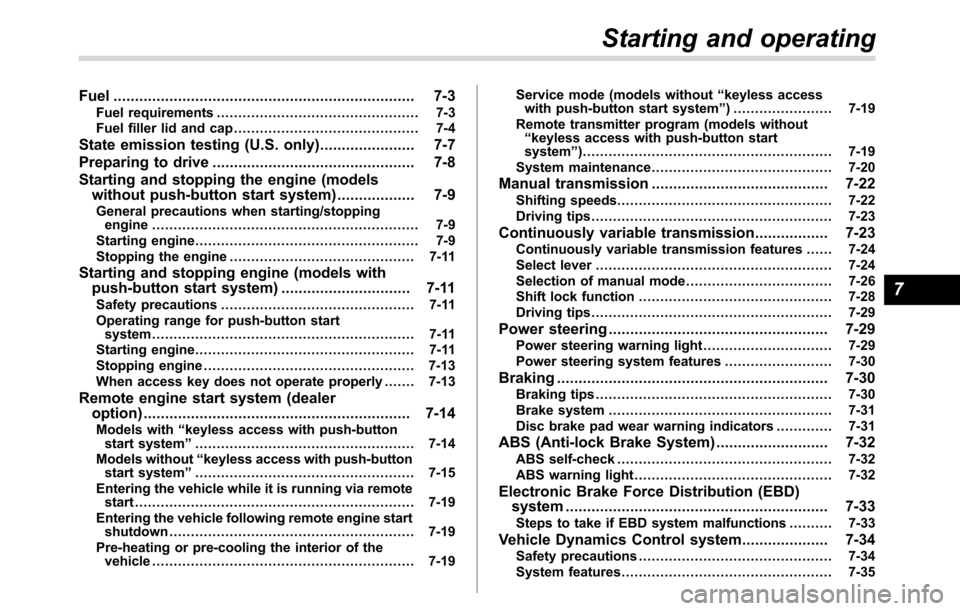
Fuel...................................................................... 7-3
Fuel requirements............................................... 7-3
Fuel filler lid and cap........................................... 7-4
State emission testing (U.S. only)...................... 7-7
Preparing to drive............................................... 7-8
Starting and stopping the engine (models
without push-button start system).................. 7-9
General precautions when starting/stopping
engine.............................................................. 7-9
Starting engine.................................................... 7-9
Stopping the engine........................................... 7-11
Starting and stopping engine (models with
push-button start system).............................. 7-11
Safety precautions............................................. 7-11
Operating range for push-button start
system............................................................. 7-11
Starting engine................................................... 7-11
Stopping engine................................................. 7-13
When access key does not operate properly....... 7-13
Remote engine start system (dealer
option).............................................................. 7-14
Models with“keyless access with push-button
start system”................................................... 7-14
Models without“keyless access with push-button
start system”................................................... 7-15
Entering the vehicle while it is running via remote
start................................................................. 7-19
Entering the vehicle following remote engine start
shutdown......................................................... 7-19
Pre-heating or pre-cooling the interior of the
vehicle............................................................. 7-19Service mode (models without“keyless access
with push-button start system”) ....................... 7-19
Remote transmitter program (models without
“keyless access with push-button start
system”).......................................................... 7-19
System maintenance.......................................... 7-20
Manual transmission......................................... 7-22
Shifting speeds.................................................. 7-22
Driving tips........................................................ 7-23
Continuously variable transmission................. 7-23Continuously variable transmission features ...... 7-24
Select lever....................................................... 7-24
Selection of manual mode.................................. 7-26
Shift lock function............................................. 7-28
Driving tips........................................................ 7-29
Power steering................................................... 7-29
Power steering warning light.............................. 7-29
Power steering system features......................... 7-30
Braking............................................................... 7-30Braking tips....................................................... 7-30
Brake system.................................................... 7-31
Disc brake pad wear warning indicators............. 7-31
ABS (Anti-lock Brake System).......................... 7-32ABS self-check.................................................. 7-32
ABS warning light.............................................. 7-32
Electronic Brake Force Distribution (EBD)
system............................................................. 7-33
Steps to take if EBD system malfunctions.......... 7-33
Vehicle Dynamics Control system.................... 7-34Safety precautions............................................. 7-34
System features................................................. 7-35
Starting and operating
7