Page 228 of 540
226 2-2. Instrument cluster
■G-force display
●Depending on the vehicle usage conditions, the brake fluid pressure dis-
play may not reach its maximum reading even though the brake pedal is
fully depressed.
●If a battery terminal is disconnected and reconnected, the steering
amount display may be disabled temporarily. After driving the vehicle for
a while, the display will be enabled.
■Suspension of the settings display
●The settings cannot be changed while driving. When changing settings,
park the vehicle in a safe place.
●If a warning message is displayed, operation of the settings display will
be suspended.
■Using the stopwatch
If the engine is stopped while the stopwatch is operating, the stopwatch will
stop and the time up to that point will be recorded.
■Outside temperature display
●In the following situations, the correct outside temperature may not be
displayed.
• When the vehicle is very hot, such as when under the sun.
• When the vehicle is idling or being driven at low speeds such as in a
traffic jam or when the engine is stopped and then restarted immedi-
ately afterward.
• When the actual outside temperature is outside of the indicator range.
●If “���” is displayed for approximately 1 minute or more or if the outside
temperature is not displayed, the system may be malfunctioning. Have
the vehicle inspected by your SUBARU dealer.
■Liquid crystal display
Small spots or light spots may appear on the display. This phenomenon is
characteristic of liquid crystal displays, and there is no problem continuing to
use the display.
Page 229 of 540

227 2-2. Instrument cluster
2
When driving
WARNING
■Caution for use while driving
●When operating the multi-information display while driving, pay extra
attention to the safety of the area around the vehicle.
●Do not look continuously at the multi-information display while driving as
you may fail to see pedestrians, objects on the road, etc. ahead of the
vehicle.
■The information display at low temperatures
Allow the interior of the vehicle to warm up before using the liquid crystal
information display. At extremely low temperatures, the information display
monitor may respond slowly, and display changes may be delayed.
For example, there is a lag between the driver’s shifting and the new gear
number appearing on the display. This lag could cause the driver to down-
shift again, causing rapid and excessive engine braking and possibly an
accident resulting in death or injury.
■Cautions during setting up the display
As the engine needs to be running during setting up the display, ensure that
the vehicle is parked in a place with adequate ventilation. In a closed area
such as a garage, exhaust gases including harmful carbon monoxide (CO)
may collect and enter the vehicle. This may lead to death or a serious health
hazard.
CAUTION
■While setting up the display
To prevent battery discharge, ensure that the engine is running while setting
up the display features.
Page 244 of 540
242
2-4. Using other driving systems
Rear view camera
The rear view camera is installed to the trunk lid and displays a rear
view image on the audio/navigation monitor when the engine switch
is in the “ON” position (vehicles without a keyless access with push
button start system) or the push-button ignition switch is in “ON”
mode (vehicles with a keyless access with push button start system)
and the select lever (vehicles with an automatic transmission) or
shift lever (vehicles with a manual transmission) is set to “R”.
Page 245 of 540
243 2-4. Using other driving systems
2
When driving
How to use the rear view camera
Perform the following to display a rear view image on the rear view
camera.
Turn the engine switch to the “ON” position (vehicles without a
keyless access with push button start system) or turn the
push-button ignition switch to “ON” mode (vehicles with a key-
less access with push button start system).
Shift the select lever (vehicles with an automatic transmis-
sion) or shift lever (vehicles with a manual transmission) to
“R”.
In the following situations, the screen will return to the image that
was displayed before the lever was shifted to “R”.
• Vehicles with an automatic transmission: When several seconds
have passed since the select lever was shifted to a position other
than “P” or “R” (off delay function).
• Vehicles with an automatic transmission: When the select lever is
shifted to “P”.
• Vehicles with a manual transmission: When several seconds have
passed since the shift lever was shifted to a position other than
“R” (off delay function).
• When the vehicle speed is 5 mph (8 km/h) or more.
STEP 1
STEP 2
Page 246 of 540
244 2-4. Using other driving systems
Displayed area
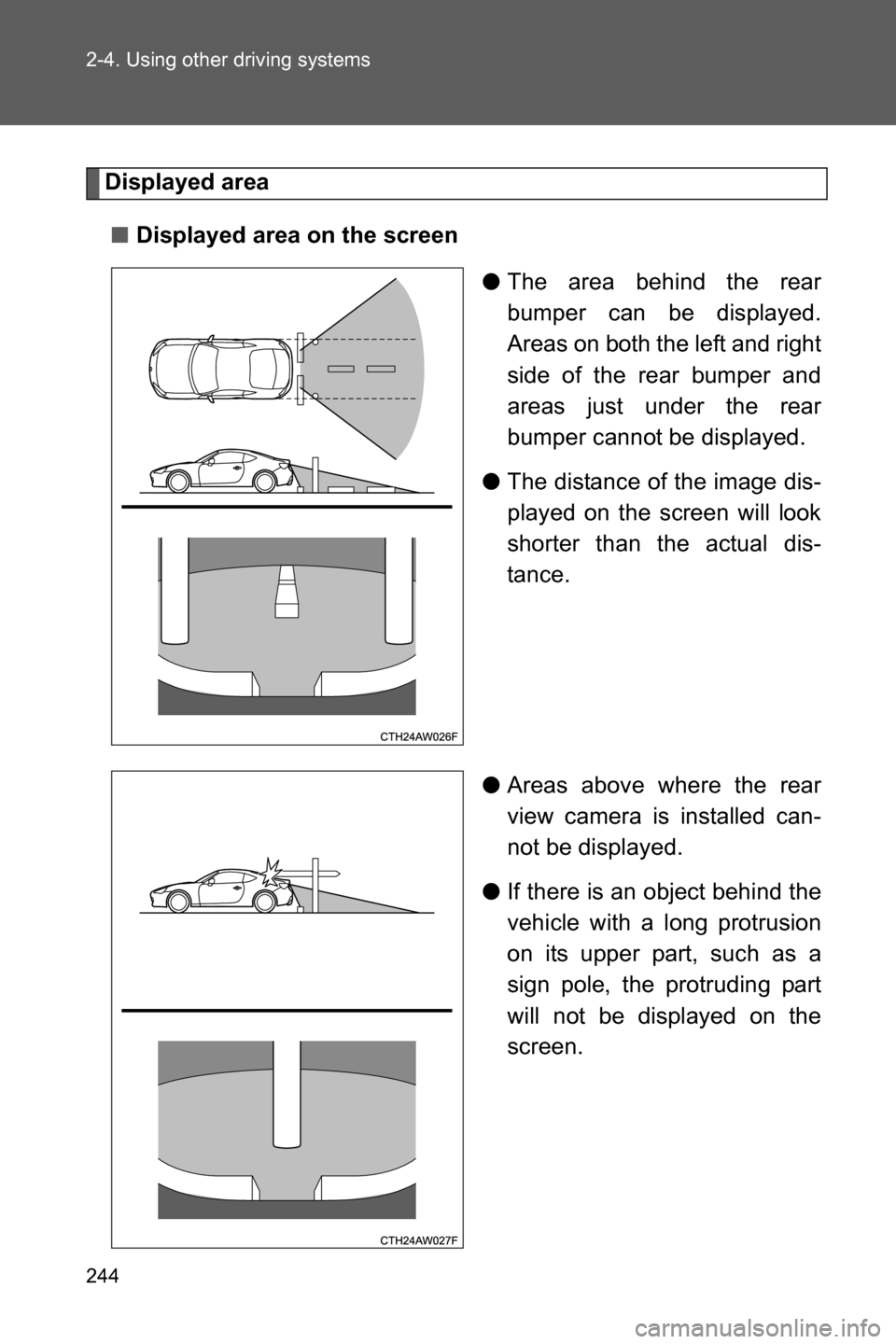
■Displayed area on the screen
●The area behind the rear
bumper can be displayed.
Areas on both the left and right
side of the rear bumper and
areas just under the rear
bumper cannot be displayed.
●The distance of the image dis-
played on the screen will look
shorter than the actual dis-
tance.
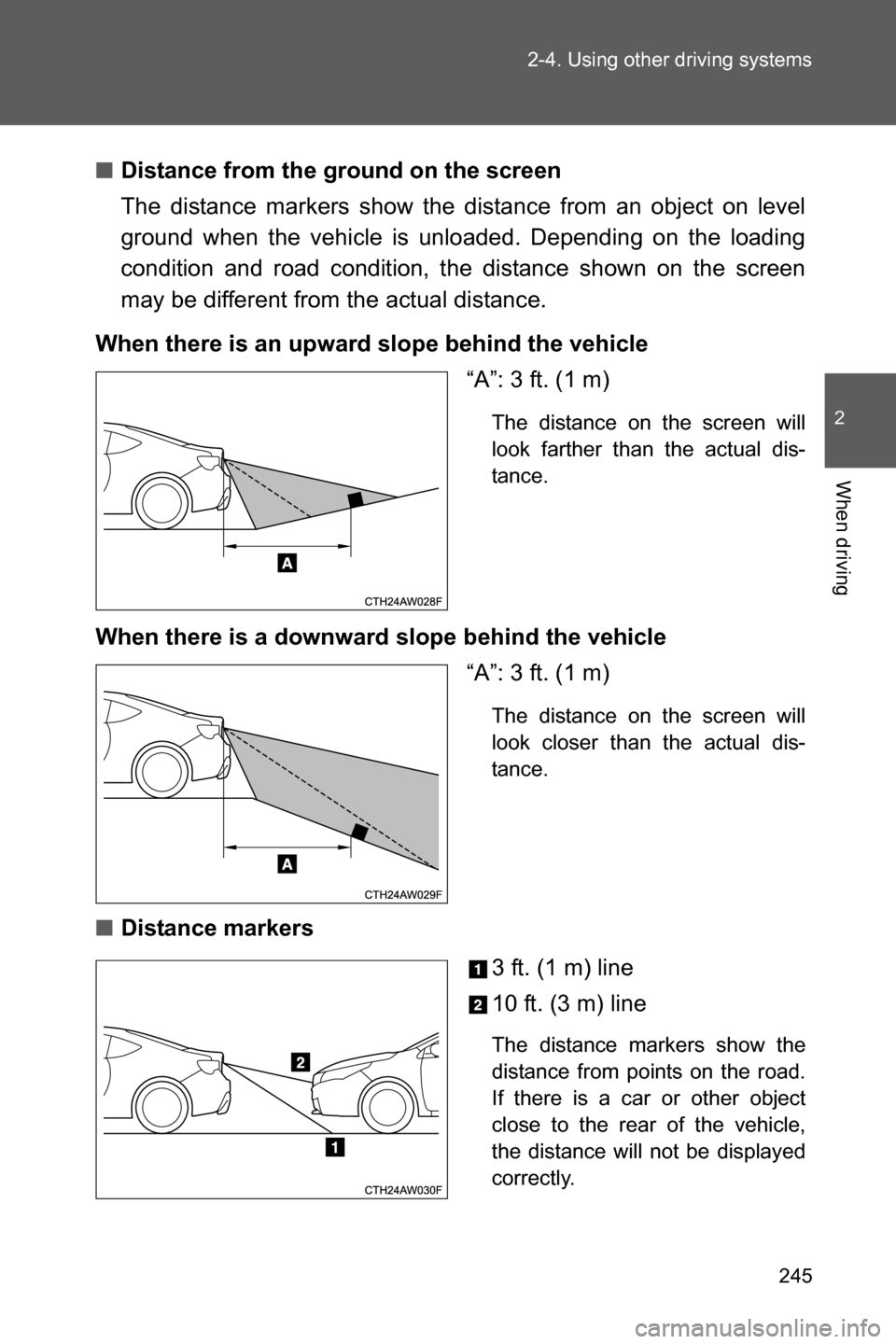
●Areas above where the rear
view camera is installed can-
not be displayed.
●If there is an object behind the
vehicle with a long protrusion
on its upper part, such as a
sign pole, the protruding part
will not be displayed on the
screen.
Page 247 of 540
245 2-4. Using other driving systems
2
When driving
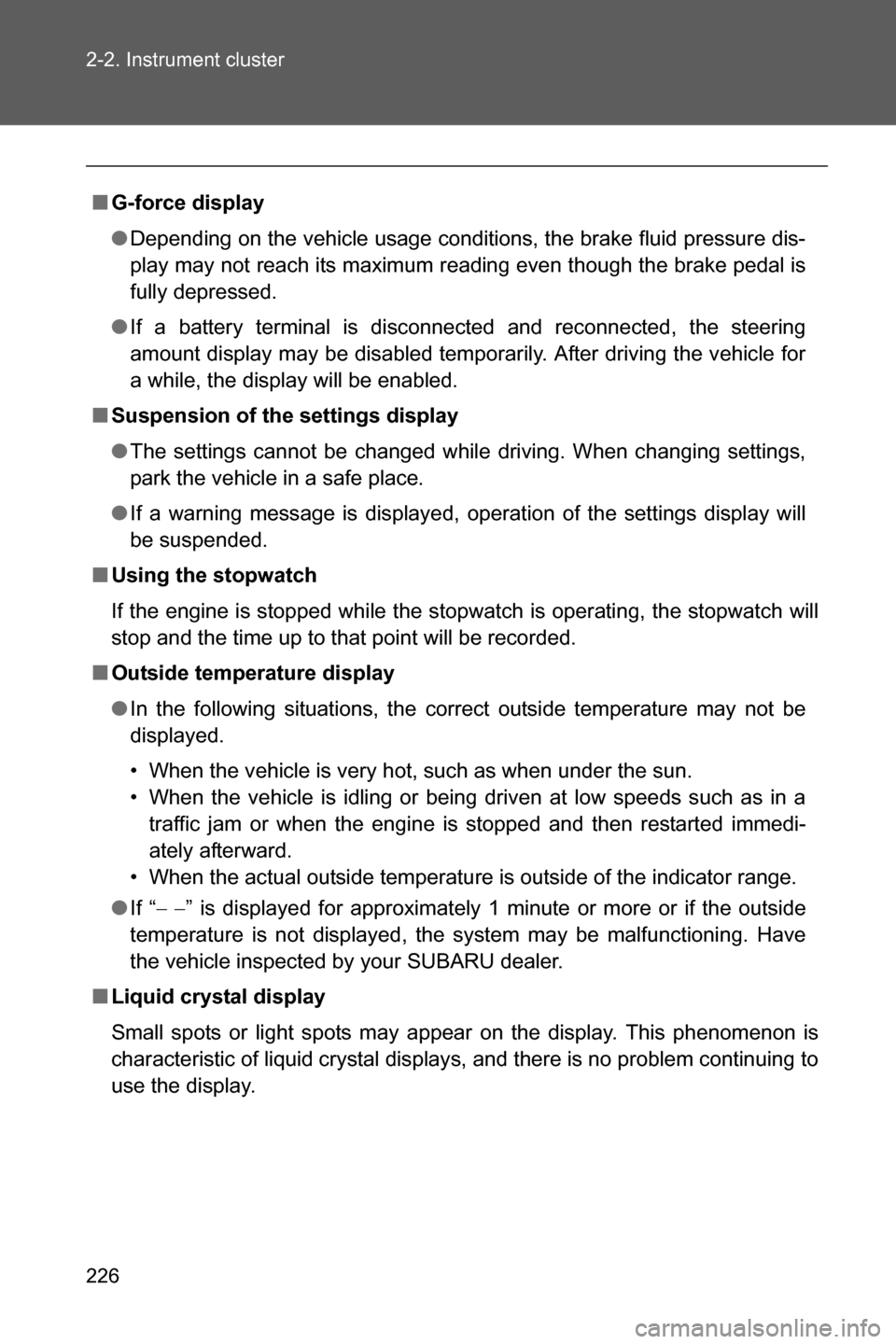
■Distance from the ground on the screen
The distance markers show the distance from an object on level
ground when the vehicle is unloaded. Depending on the loading
condition and road condition, the distance shown on the screen
may be different from the actual distance.
When there is an upward slope behind the vehicle
“A”: 3 ft. (1 m)
The distance on the screen will
look farther than the actual dis-
tance.
When there is a downward slope behind the vehicle
“A”: 3 ft. (1 m)
The distance on the screen will
look closer than the actual dis-
tance.
■Distance markers
3 ft. (1 m) line
10 ft. (3 m) line
The distance markers show the
distance from points on the road.
If there is a car or other object
close to the rear of the vehicle,
the distance will not be displayed
correctly.
Page 248 of 540
246 2-4. Using other driving systems
Help lines
The help lines (distance markers and vehicle width lines) are a guide
to help you realize the actual distance of points on the screen.
Vehicle width lines (oblique
vertical lines)
Approximately 10 ft. (3 m)
from the bumper (green hori-
zontal line)
Approximately 3 ft. (1 m) from
the bumper (yellow horizontal
line)
Approximately 1.5 ft. (0.5 m)
from the bumper (red horizon-
tal line)
Vehicle centerline
When the select lever (vehi-
cles with an automatic trans-
mission) or shift lever
(vehicles with a manual trans-
mission) is shifted to “R”, the
screen will display the help
lines together with the rear
view image.
Page 249 of 540

247 2-4. Using other driving systems
2
When driving
■Rear view camera display
●On vehicles with a genuine SUBARU navigation system, the rear view
camera display will be prioritized over other displays. To display another
display, shift the select lever (vehicles with an automatic transmission) or
shift lever (vehicles with a manual transmission) to a position other than
“R”.
●Images from the rear view camera will be displayed horizontally reversed
as is the case with the vehicle’s rear view mirror or a side view mirror.
●Images on the screen may look different depending on the number of
passengers and loading conditions.
●When the vehicle is on an incline or decline, distances displayed on the
screen may look different than the actual distance.
●When the vehicle is loaded, the distance on the screen will look farther
than the actual distance, as is the case when approaching an upward
incline.
●The color of objects on the screen may be different from the actual color
of the objects.
●Be sure to check your surroundings when “Check Surroundings Before
Backing Up” is displayed.
●If you shift to “R” shortly after turning the engine switch to the “ON” posi-
tion (vehicles without a keyless access with push button start system) or
the push-button ignition switch to “ON” mode (vehicles with a keyless
access with push button start system), “Check Surroundings Before
Backing Up” may not be displayed. Wait several seconds or more after
turning the engine switch to the “ON” position (vehicles without a keyless
access with push button start system) or the push-button ignition switch
to “ON” mode (vehicles with a keyless access with push button start sys-
tem) before shifting to the “R” range. The warning message can then be
displayed.