Page 250 of 540

248 2-4. Using other driving systems
●Strong light shined on the rear view camera lens may develop white light
stripes around the light source. This is not a malfunction.
●Under fluorescent lighting, the display may flicker. However, this is not a
malfunction.
●It may be difficult to see the image from the rear view camera in the fol-
lowing situations. This is not a malfunction.
●When the vehicle is in a dark area (at night, in a tunnel, etc.).
●When the vehicle is in an extremely hot or cold place.
●When foreign matter (such as raindrops, snow, dirt, etc.) that disturbs the
view of the rear view camera is stuck to the lens of the rear view camera.
●When strong lights shine directly into the camera lens (in this case, verti-
cal lines may be displayed on the screen).
■Taking care of the rear view camera
●Do not clean the rear view camera with alcohol, benzine or paint thinner.
Otherwise, discoloration may occur. To remove contamination, wipe the
rear view camera with a cloth moistened with a diluted neutral detergent
and then wipe it with a soft, dry cloth.
●When waxing the vehicle, be careful not to apply wax to the rear view
camera. If wax contacts the rear view camera, remove it with a clean
cloth moistened with a diluted neutral detergent.
●The camera lens has hard coating to help prevent scratches. However,
when washing the vehicle or cleaning the camera lens, be careful not to
scratch the camera lens. Do not use a washing brush directly on the
camera lens as the displayed image may be adversely affected.
Page 256 of 540
254 2-4. Using other driving systems
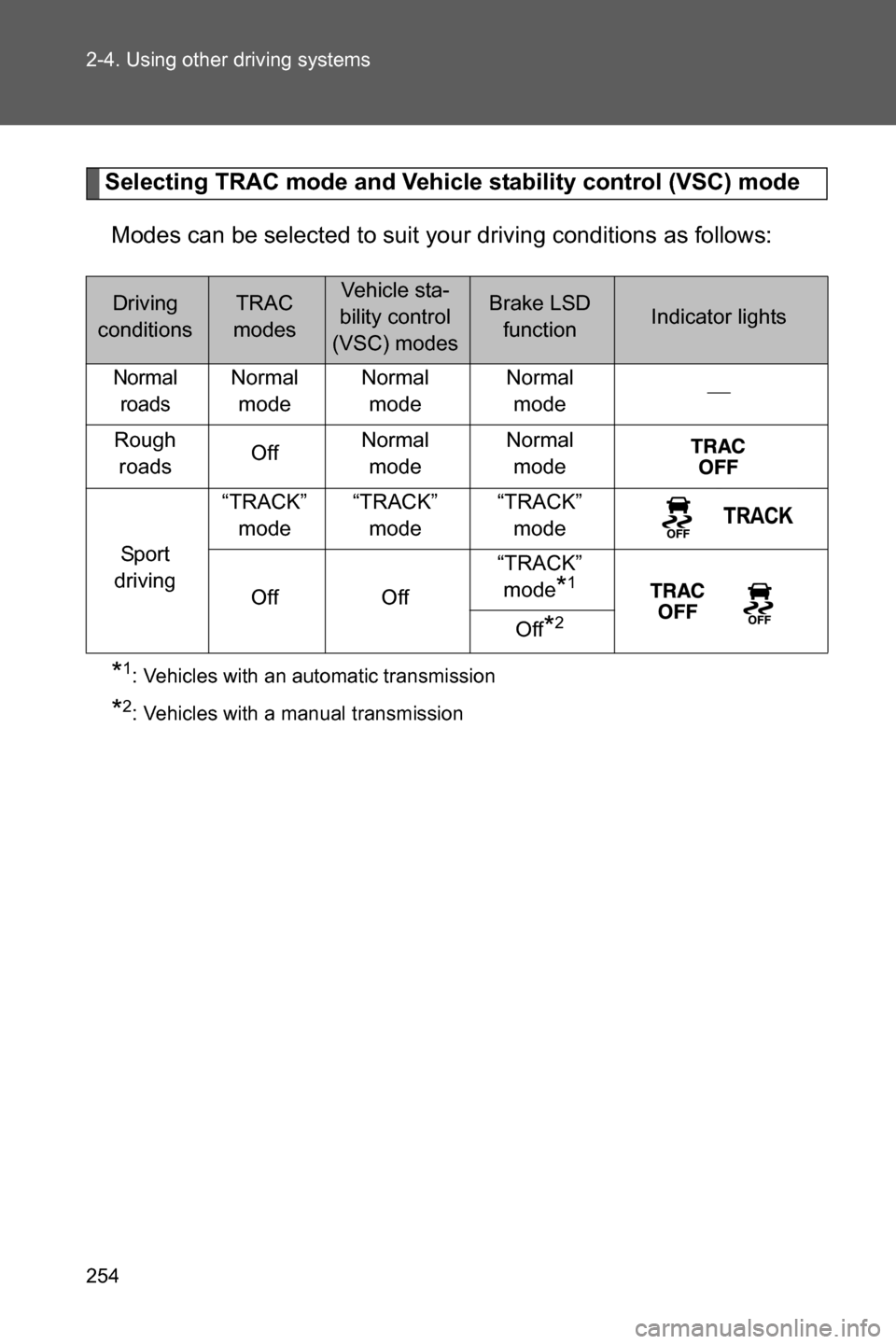
Selecting TRAC mode and Vehicle stability control (VSC) mode
Modes can be selected to suit your driving conditions as follows:
*1:Vehicles with an automatic transmission
*2:Vehicles with a manual transmission
Driving
conditionsTRAC
modesVehicle sta-
bility control
(VSC) modesBrake LSD
functionIndicator lights
Normal
roadsNormal
modeNormal
modeNormal
mode
Rough
roadsOffNormal
modeNormal
mode
Sport
driving“TRACK”
mode“TRACK”
mode“TRACK”
mode
Off Off“TRACK”
mode
*1
Off*2
Page 261 of 540
259 2-4. Using other driving systems
2
When driving
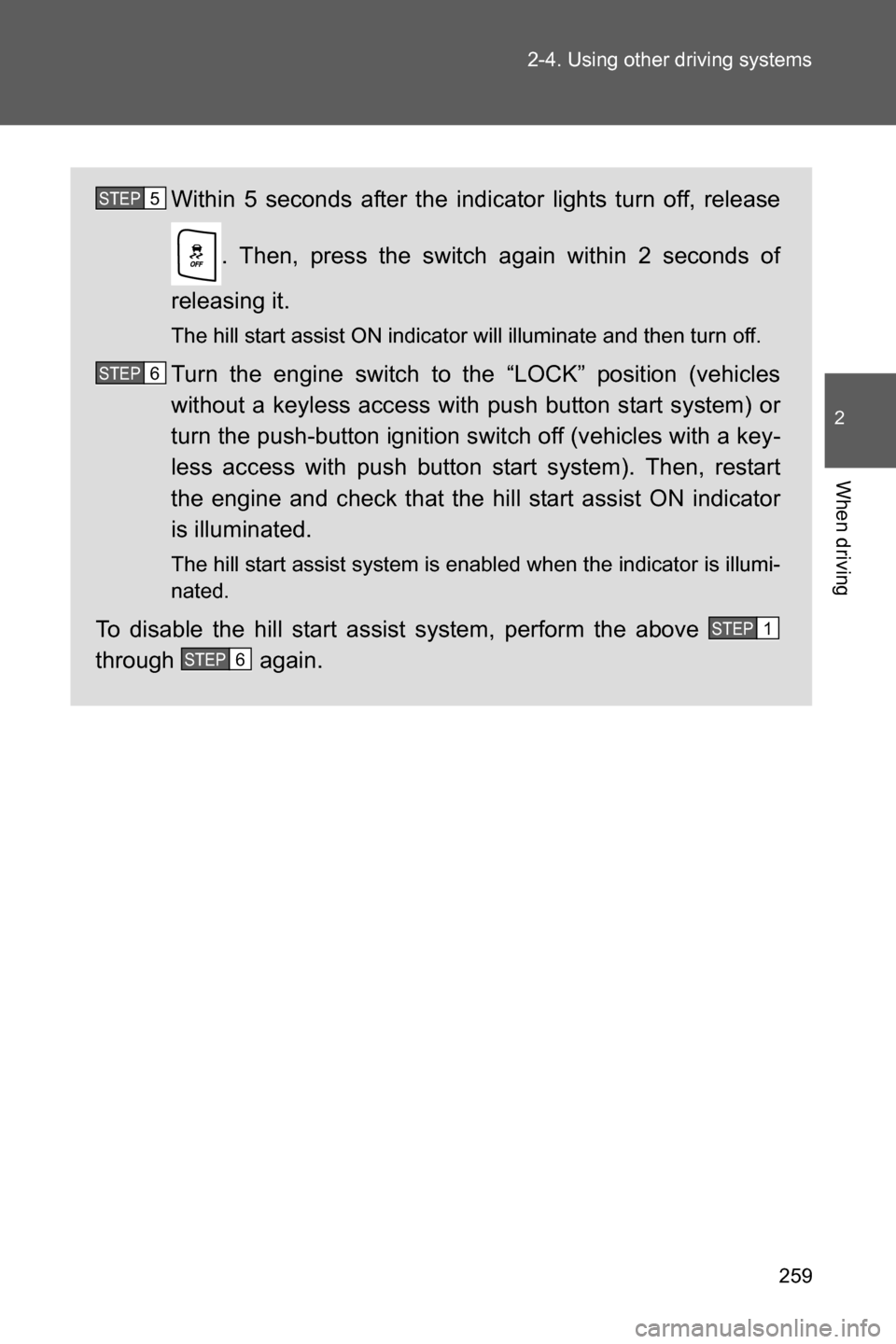
Within 5 seconds after the indicator lights turn off, release
. Then, press the switch again within 2 seconds of
releasing it.
The hill start assist ON indicator will illuminate and then turn off.
Turn the engine switch to the “LOCK” position (vehicles
without a keyless access with push button start system) or
turn the push-button ignition switch off (vehicles with a key-
less access with push button start system). Then, restart
the engine and check that the hill start assist ON indicator
is illuminated.
The hill start assist system is enabled when the indicator is illumi-
nated.
To disable the hill start assist system, perform the above
through again.
STEP 5
STEP 6
STEP 1
STEP 6
Page 271 of 540
269 2-5. Driving information
2
When driving
●Check for and remove any excess ice or snow that may have
accumulated on the exterior lights, vehicle's roof, chassis,
around the tires or on the brakes.
●Remove any snow or mud from the bottom of your shoes
before getting in the vehicle.
●If a door is opened and closed when its side window is frozen,
the window safety device will operate and the side window
open/close function linked to door operation may not operate
correctly. If this occurs, perform the following after the ice has
melted.
Open the side window until it is approximately halfway open
with the door closed.
Fully close the window by pulling the switch up to the one-
touch closing position and continue holding the switch for 1
second or more after the window fully closes.
The window position is reset and the safety device operations will
be released.
■When driving the vehicle
Accelerate the vehicle slowly, keep a safe distance between you
and the vehicle ahead, and drive at a reduced speed suitable to
road conditions.
■When parking the vehicle (in the winter time or in the cold
latitudes)
Park the vehicle and move the select lever to P (automatic trans-
mission) or shift lever to 1 or R (manual transmission) without
setting the parking brake. The parking brake may freeze up, pre-
venting it from being released. If necessary, block the wheels to
prevent inadvertent sliding or creeping.
STEP 1
STEP 2
Page 277 of 540
Interior features3
275
3-1. Using the air conditioning
system and defogger
Manual air conditioning
system ........................... 276
Automatic air conditioning
system ........................... 283
Rear window and outside
rear view mirror
defoggers ....................... 292
3-2. Using the audio system
Using the AUX/USB
port................................. 294
Using the microphone ...... 2953-3. Using the interior lights
Interior lights list ............... 296
• Interior light .................... 297
3-4. Using the storage
features
List of storage features .... 298
• Glove box ....................... 299
• Bottle holders ................. 300
• Cup holders/
console tray ................... 301
• Cup holders/
console tray ................... 302
3-5. Other interior features
Sun visors ........................ 303
Vanity mirrors ................... 304
Clock ................................ 305
Power outlets ................... 306
Seat heaters..................... 308
Floor mat .......................... 310
Page 298 of 540
296
3-3. Using the interior lights
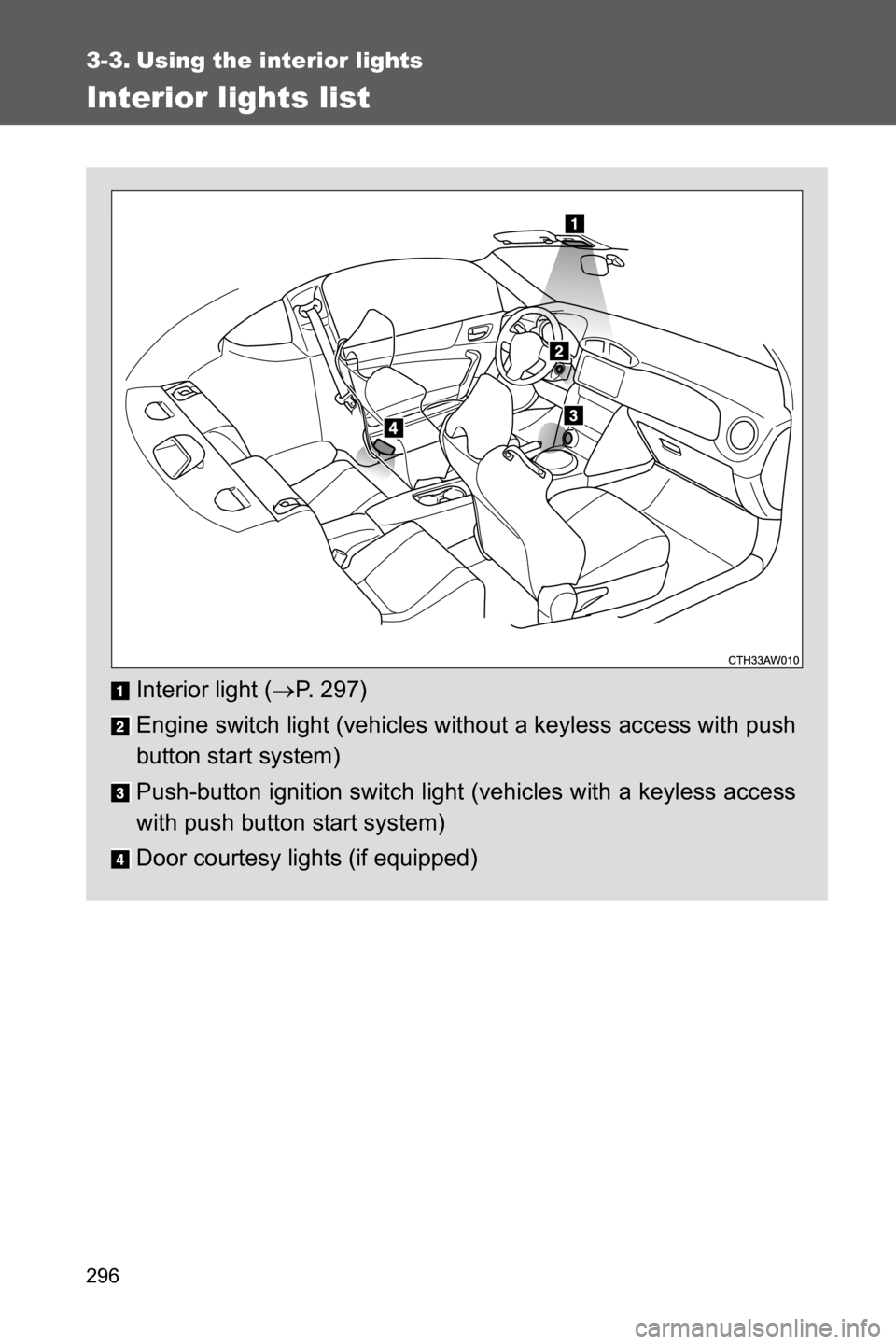
Interior lights list
Interior light (oP. 297)
Engine switch light (vehicles without a keyless access with push
button start system)
Push-button ignition switch light (vehicles with a keyless access
with push button start system)
Door courtesy lights (if equipped)
Page 299 of 540
297 3-3. Using the interior lights
3
Interior features
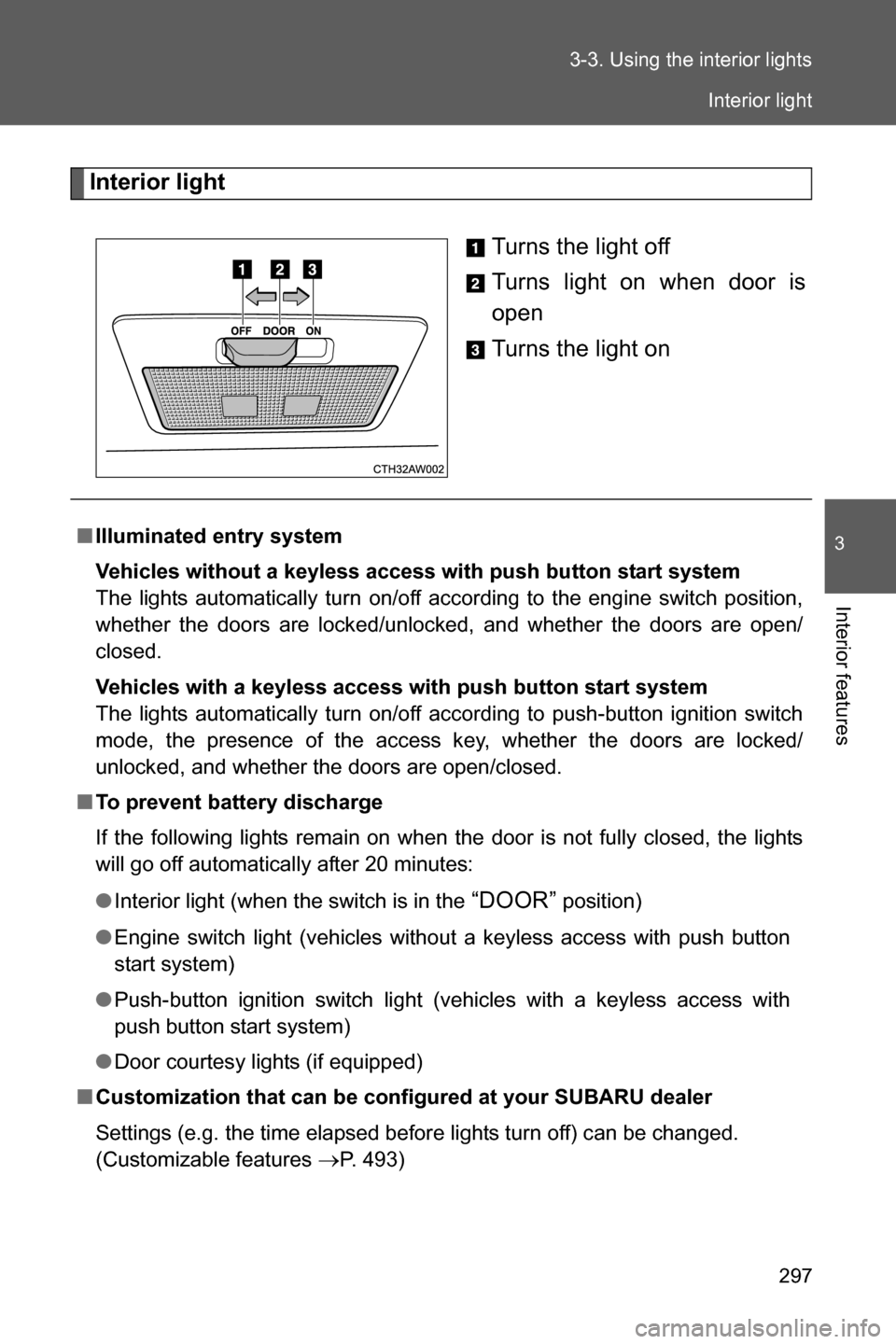
Interior light
Turns the light off
Turns light on when door is
open
Turns the light on
■Illuminated entry system
Vehicles without a keyless access with push button start system
The lights automatically turn on/off according to the engine switch position,
whether the doors are locked/unlocked, and whether the doors are open/
closed.
Vehicles with a keyless access with push button start system
The lights automatically turn on/off according to push-button ignition switch
mode, the presence of the access key, whether the doors are locked/
unlocked, and whether the doors are open/closed.
■To prevent battery discharge
If the following lights remain on when the door is not fully closed, the lights
will go off automatically after 20 minutes:
●Interior light (when the switch is in the
“DOOR” position)
●Engine switch light (vehicles without a keyless access with push button
start system)
●Push-button ignition switch light (vehicles with a keyless access with
push button start system)
●Door courtesy lights (if equipped)
■Customization that can be configured at your SUBARU dealer
Settings (e.g. the time elapsed before lights turn off) can be changed.
(Customizable features
oP. 493)
Interior light
Page 306 of 540
304
3-5. Other interior features
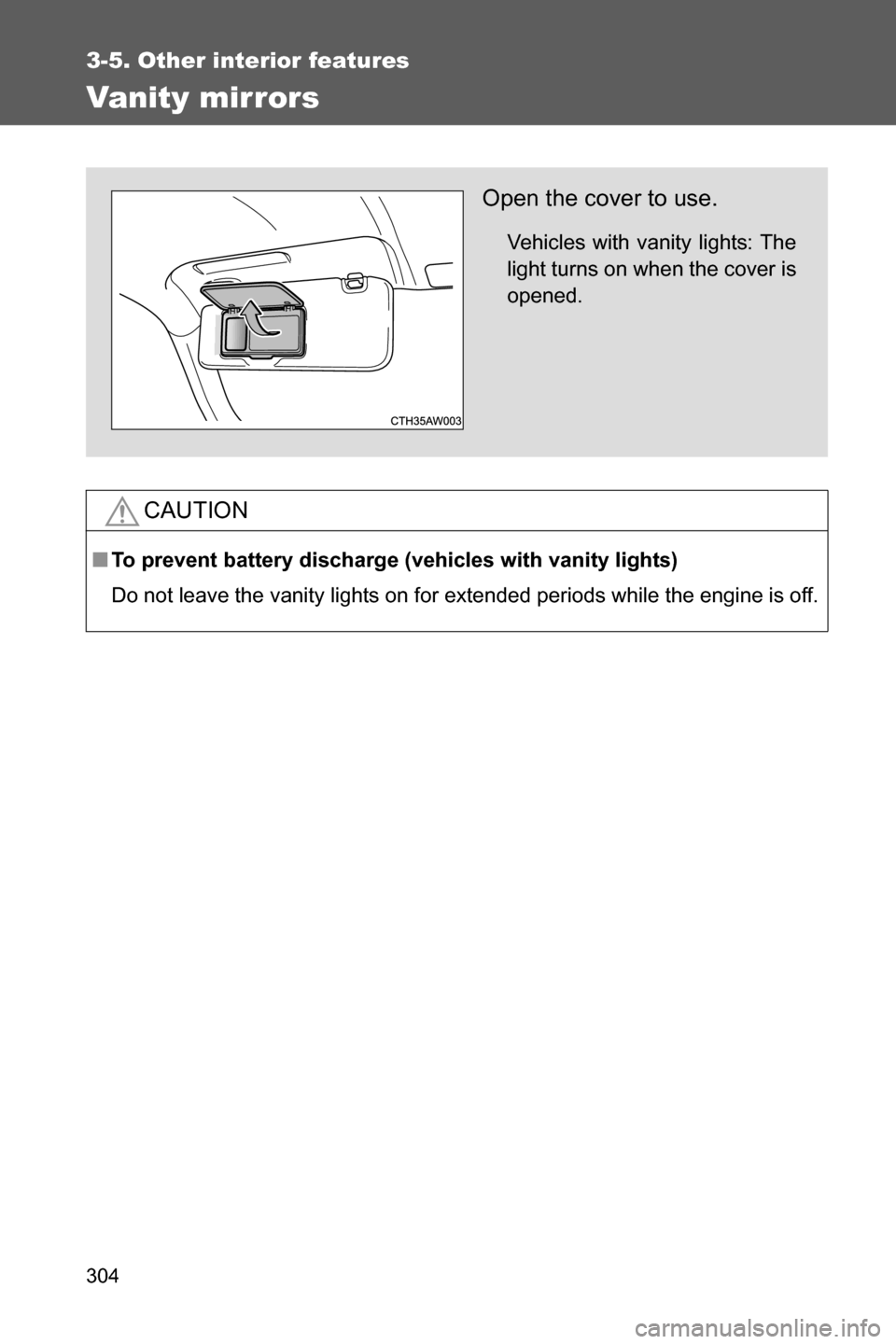
Vanity mirrors
CAUTION
■To prevent battery discharge (vehicles with vanity lights)
Do not leave the vanity lights on for extended periods while the engine is off.
Open the cover to use.
Vehicles with vanity lights: The
light turns on when the cover is
opened.