Page 78 of 220

1.72
TRIP COMPUTER AND WARNING SYSTEM: information messages
Examples of messagesInterpreting the display selected
«Disconnect cable to start up» Indicates that the charging cord is still plugged into the vehicle.
«Please insert keycard» Indicates that the cardRENAULT is not in the reader.
«Steering wheel not locked» Indicates that the steering column has not been locked.
«Apply brakes» Follow these instructions: risk of damage to the motor.
«Check connections» Unplug, then plug in the vehicle.
If the message still shows, this may be caused by the external charging \
conditions
or by the home installation.
«Check charging post» Indicates a possible electrical fault or a defective charging cable: cha\
nge the charg-
ing terminal or location or have the cable checked.
«Power cut while charging» Indicates an electrical fault while charging. Restart charging.
If this does not work, have the electrical installation checked.
«Charging refused no contract» Charging prohibited by your battery rental organisation. Rectify the sit\
uation.
These can help in the vehicle starting phase, or give information about \
a selection or a driving status.
Examples of information messages are given in the following pages.
Page 79 of 220

1.73
TRIP COMPUTER AND WARNING SYSTEM: operating fault messages
These appear with the © warning light and mean that you should drive very carefully to an author\
ised dealer as
soon as possible. If you fail to follow this recommendation, you risk da\
maging your vehicle.
They disappear when the display selection key is pressed or after severa\
l seconds and are stored in the computer log. The
©
warning light stays on. Examples of operating fault messages are given i\
n the following pages.
Examples of messages Interpreting the display selected
«Check airbag» Indicates a fault in the restraint system in addition to the seat belts.\
In the event of an
accident, it is possible that they may not be triggered.
«Elec. System to check» Indicates a fault on one of the pedal sensors or in the 12 V battery man\
agement
system.
«Check braking system» Indicates wear or the need to check the braking system.
«Vehicle plug to be checked» Indicates overheating at the vehicle-side charging socket. Wait for about 20 minutes
and try again. If this does not work, contact an authorised dealer.
«Elec. System to check» Indicates a fault in the traction system.
«Always charging» Indicates a fault on the traction battery recharge system.
Page 96 of 220
2.2
STARTING, STOPPING THE ENGINE (1/3)
The vehicle can only be started if
the charging cord is unplugged from
the vehicle.
The vehicle can only be started if the
selection lever is at P. Please see
the information on “Gear control” in
Section 2.
Remote control RENAULT
card
When you get into the vehicle, insert the
RENAULT card fully into card reader 2.
To start
– position the gear lever to the posi- tion P only;
– press button 1. The message
READY comes on, on the instrument
panel, along with a beep.
The message disappears when the
vehicle speed is above approximately
3.1 mph (5 km/h).
Hands-free RENAULT card
The RENAULT card must be inserted
in card reader 2 or in detection zone 3.
To start
– position the gear lever to the position P only ;
– depress the brake pedal;
– press button 1. The message
READY comes on, on the instrument
panel, along with a beep.
The message disappears when the
vehicle speed is above approximately
3.1 mph (5 km/h).
3
1
2
Page 99 of 220

2.5
Only engage D or R when the vehi-
cle is stopped, with your foot on the
brake and the accelerator pedal re-
leased.
Driving
While driving, press the accelerator
pedal to achieve the desired speed.
The reversing lights will come on as
soon as reverse gear is selected (with
the ignition on).
GEAR CONTROL (1/2)
2
1
Operates similar to an automatic gear-
box.
Selector lever 1The display 3 on the instrument panel
indicates the gear lever position.
P: park
R: reverse
N: neutral
D: forward drive
OperationTo start the engine, please refer to the
information on “Starting/Stopping the
engine” in Section 2.
To move out of position P, you must de-
press the brake pedal before pressing
unlocking button 2.
With the foot on the brake pedal (warn-
ing light
c on the display 3 goes out),
move the lever out of position P.
The vehicle can only start of the
gear selector is in position P.
The vehicle can only be started if
the charging cord is unplugged from
the vehicle.
Obstructions to the driver
On the driver’s side, only
use mats suitable for the
vehicle, attached with the
pre-fitted components, and check
the fitting regularly. Do not lay one
mat on top of another. There is a
risk of wedging the pedals
Put the lever 1 to position D or R.
The vehicle moves forward once
you release the brake pedal (without
pressing on the accelerator pedal).
3
Page 102 of 220
2.8
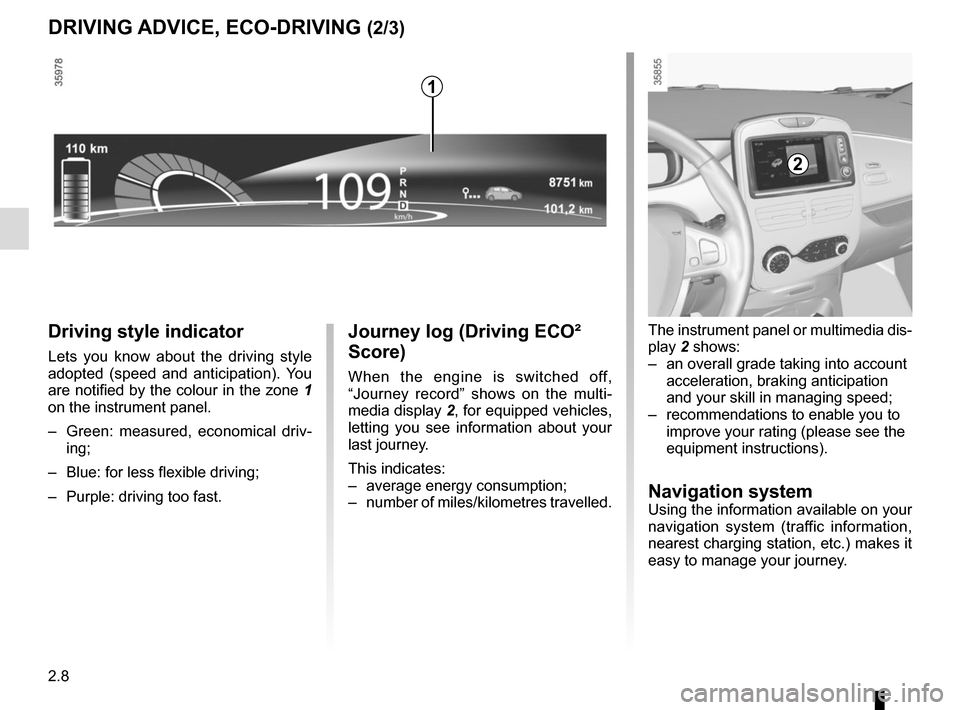
Journey log (Driving ECO²
Score)
When the engine is switched off,
“Journey record” shows on the multi-
media display 2, for equipped vehicles,
letting you see information about your
last journey.
This indicates:
– average energy consumption;
– number of miles/kilometres travelled.
Driving style indicator
Lets you know about the driving style
adopted (speed and anticipation). You
are notified by the colour in the zone 1
on the instrument panel.
– Green: measured, economical driv- ing;
– Blue: for less flexible driving;
– Purple: driving too fast.
DRIVING ADVICE, ECO-DRIVING (2/3)
The instrument panel or multimedia dis-
play 2 shows:
– an overall grade taking into account acceleration, braking anticipation
and your skill in managing speed;
– recommendations to enable you to improve your rating (please see the
equipment instructions).
Navigation systemUsing the information available on your
navigation system (traffic information,
nearest charging station, etc.) makes it
easy to manage your journey.
2
1
Page 138 of 220
3.12
Stopping the programmed air
conditioning
The air conditioning stops automati-
cally around ten minutes after the set
end time.
However, the function can be deacti-
vated if:
– the charging socket is disconnected;
– the “Remote Activation” function is activated – please see the informa-
tion on “Air conditioning: remote acti-
vation” in Section 2;
– the traction battery charging level is lower than 15% or, depending on the
vehicle, 30%Driver’s responsibility
when parking or stopping
the vehicle
Never leave an animal,
child or adult who is not self-suffi-
cient alone on your vehicle, even for
a short time.
In hot and/or sunny weather, please
remember that the temperature
inside the passenger compartment
increases very quickly.
RISK OF DEATH OR SERIOUS
INJURY.
AIR CONDITIONING: programming (4/4)
Connected services
The air conditioning can also be acti-
vated using the connected services.
For more information regarding the op-
erating conditions, please contact an
authorised dealer.
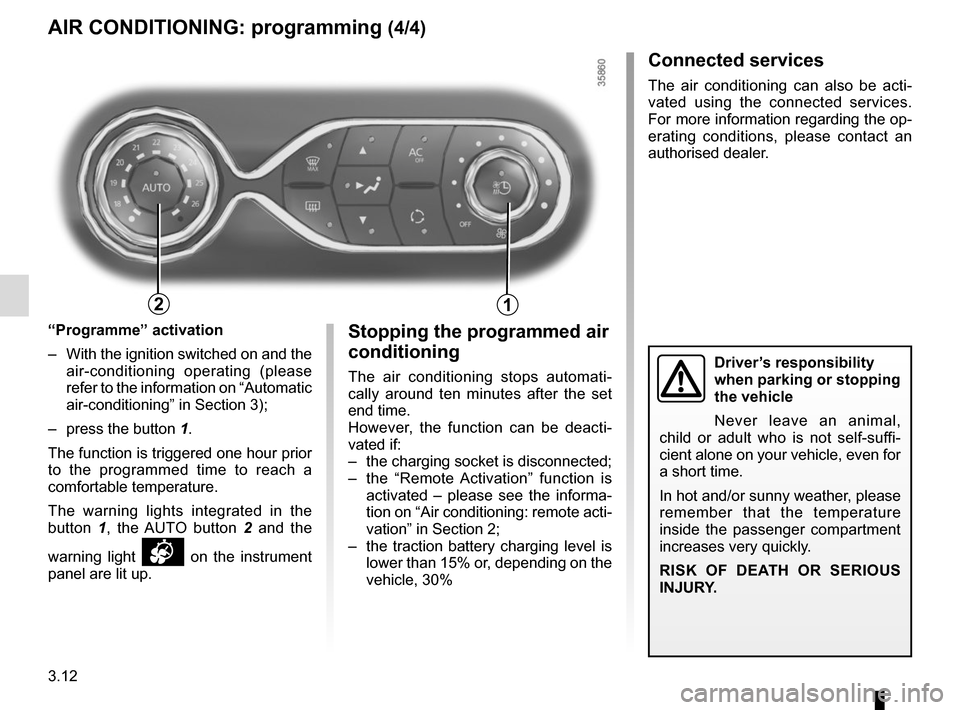
“Programme” activation
– With the ignition switched on and the air-conditioning operating (please
refer to the information on “Automatic
air-conditioning” in Section 3);
– press the button 1.
The function is triggered one hour prior
to the programmed time to reach a
comfortable temperature.
The warning lights integrated in the
button 1, the AUTO button 2 and the
warning light
on the instrument
panel are lit up.
12
Page 158 of 220
4.2
To open, pull handle 1, located on the
left-hand side of the dashboard.
BONNET (1/2)
1
When working in the engine
compartment, certain parts
may be hot. In addition,
the engine cooling fan can
come on at any moment.
Risk of burns or serious injury.
In the event of even a slight
impact involving the radia-
tor grille or bonnet, have the
bonnet lock checked by an
authorised dealer as soon as pos-
sible.
Do not do any work under
the bonnet when the vehicle
is charging or when the igni-
tion is switched on.
Unlocking the bonnet catch
Lift the bonnet by several centimetres
and push lever 2 to the left.
2
When working in the engine
compartment, ensure that
the windscreen wiper stalk
is in the park position.
Risk of injury.
Page 160 of 220

4.4
Replacement intervals
Refer to the Maintenance Document for
your vehicle.
LEVELS (1/2)
CoolantThe level is checked with the engine
switched off and on flat ground. The
level when cold must be between the
“MIN” and “MAX” marks on the coolant
reservoir 1. Top this level up when cold before the
“MINIMUM” mark is reached. Checking intervals
Check the coolant level regularly
(very severe damage is likely to be
caused to the engine if it runs out of
coolant).
If the level needs to be topped up, only
use products approved by our Technical
Department which ensure:
– protection against freezing;
– anticorrosion protection of the cool-
ing system.
No operations should be
carried out on the cooling
circuit when the engine is
hot.
Risk of burns.
Consult your approved dealer at
once if you notice an abnormal or
repeated drop in any of the fluid
levels.
Do not do any work under
the bonnet when the vehicle
is charging or when the igni-
tion is switched on.
1
When working in the engine
compartment, certain parts
may be hot. In addition,
the engine cooling fan can
come on at any moment.
Risk of burns or serious injury.
When working in the engine
compartment, ensure that
the windscreen wiper stalk
is in the park position.
Risk of injury.

