Page 156 of 294
2.30
Driving
Once a cruising speed is stored and
the cruise control function is active,
you may lift your foot off the accelera-
tor pedal.
Please note that you must
keep your feet close to the
pedals in order to react in
an emergency.
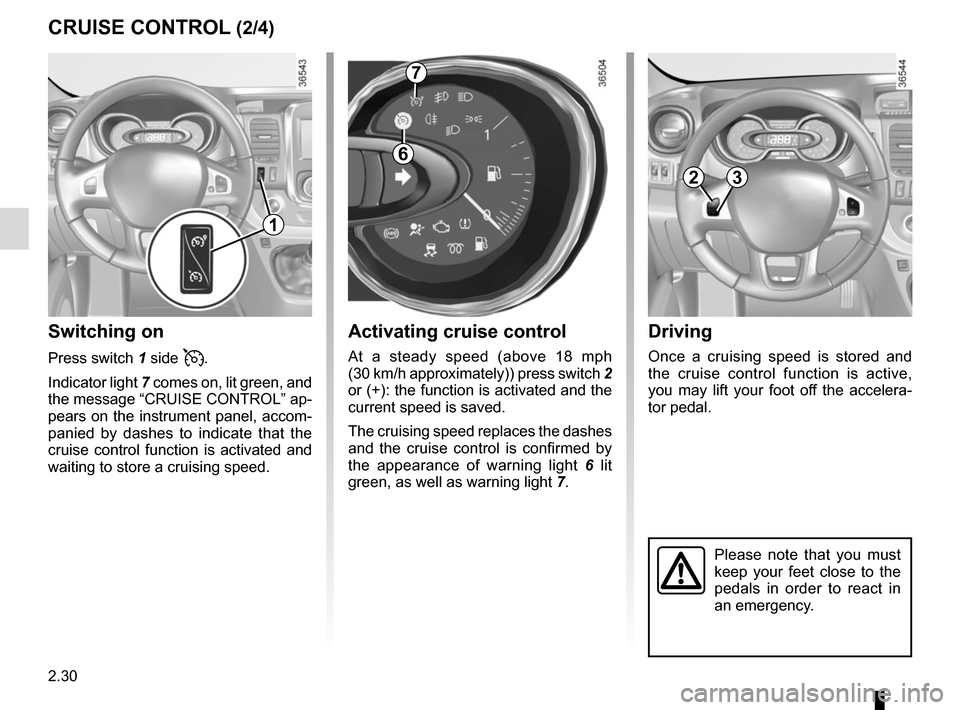
Activating cruise control
At a steady speed (above 18 mph
(30 km/h approximately)) press switch 2
or (+): the function is activated and the
current speed is saved.
The cruising speed replaces the dashes
and the cruise control is confirmed by
the appearance of warning light 6 lit
green, as well as warning light 7.
Switching on
Press switch 1 side .
Indicator light 7 comes on, lit green, and
the message “CRUISE CONTROL” ap-
pears on the instrument panel, accom-
panied by dashes to indicate that the
cruise control function is activated and
waiting to store a cruising speed.
CRUISE CONTROL (2/4)
7
6
23
1
Page 157 of 294
2.31
CRUISE CONTROL (3/4)
Exceeding the cruising speed
The cruising speed may be exceeded
at any time by depressing the accelera-
tor pedal. While it is being exceeded,
the cruising speed flashes on the in-
strument panel.
Then, release the accelerator: after a
few seconds, the vehicle will automati-
cally return to its set cruising speed.
Cruising speed cannot be
maintained
When driving down a steep gradient,
the system is unable to maintain the
cruising speed: the stored speed will
flash on the instrument panel informa-
tion display to inform you of this situ-
ation.
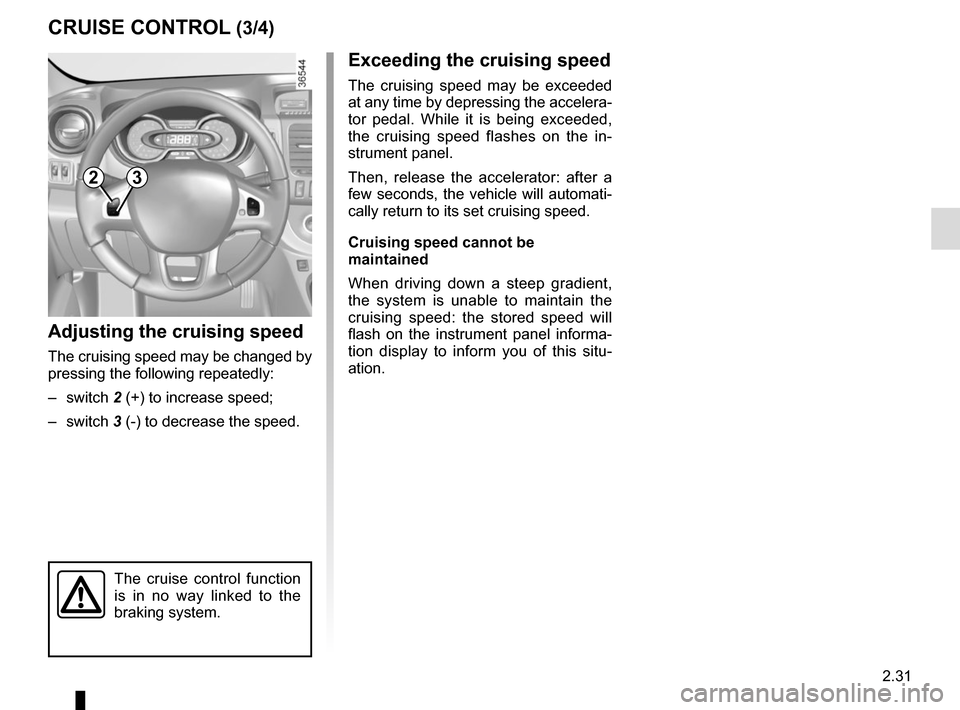
Adjusting the cruising speed
The cruising speed may be changed by
pressing the following repeatedly:
– switch 2 (+) to increase speed;
– switch 3 (-) to decrease the speed.
The cruise control function
is in no way linked to the
braking system.
23
Page 158 of 294
2.32
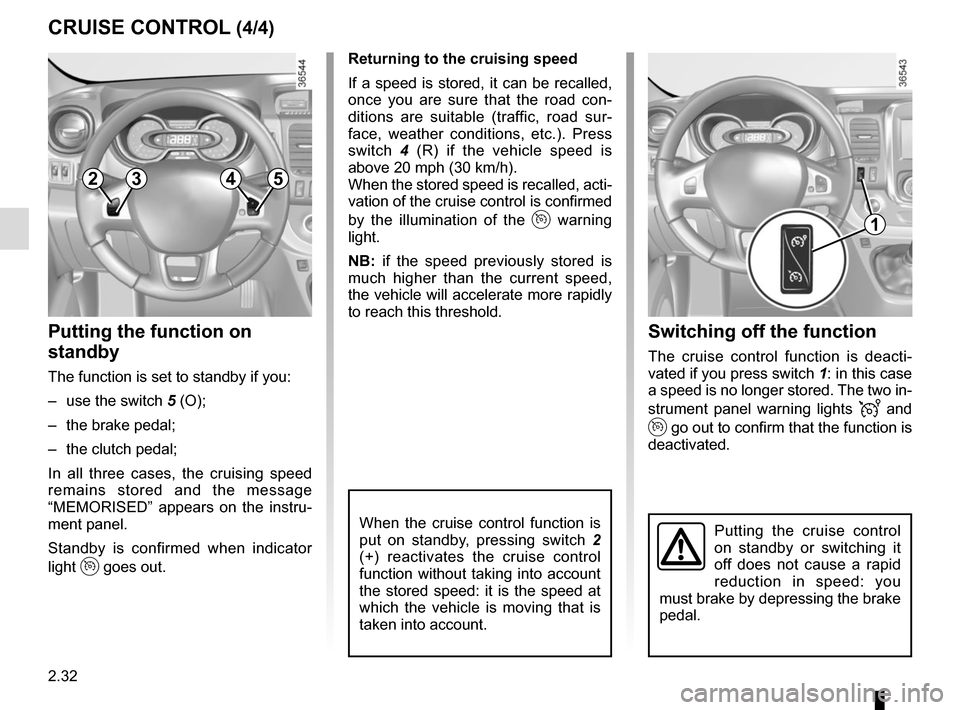
Switching off the function
The cruise control function is deacti-
vated if you press switch 1: in this case
a speed is no longer stored. The two in-
strument panel warning lights
and
go out to confirm that the function is
deactivated.
Returning to the cruising speed
If a speed is stored, it can be recalled,
once you are sure that the road con-
ditions are suitable (traffic, road sur-
face, weather conditions, etc.). Press
switch
4 (R) if the vehicle speed is
above 20 mph (30 km/h).
When the stored speed is recalled, acti-
vation of the cruise control is confirmed
by the illumination of the
warning
light.
NB: if the speed previously stored is
much higher than the current speed,
the vehicle will accelerate more rapidly
to reach this threshold.
When the cruise control function is
put on standby, pressing switch 2
(+) reactivates the cruise control
function without taking into account
the stored speed: it is the speed at
which the vehicle is moving that is
taken into account.
Putting the function on
standby
The function is set to standby if you:
– use the switch 5 (O);
– the brake pedal;
– the clutch pedal;
In all three cases, the cruising speed
remains stored and the message
“MEMORISED” appears on the instru-
ment panel.
Standby is confirmed when indicator
light
goes out.
CRUISE CONTROL (4/4)
Putting the cruise control
on standby or switching it
off does not cause a rapid
reduction in speed: you
must brake by depressing the brake
pedal.
2354
1
Page 159 of 294
2.33
VEHICLE WITH OVERSPEED FUNCTION
The vehicle speed may be permanently
set at a fixed value depending on the
vehicle or on local legislation.
To adjust the value or activate/deacti-
vate the function, consult an approved
dealer.
In the event of statutory limits (depend-
ing on the vehicle), this function may
not be deactivated.
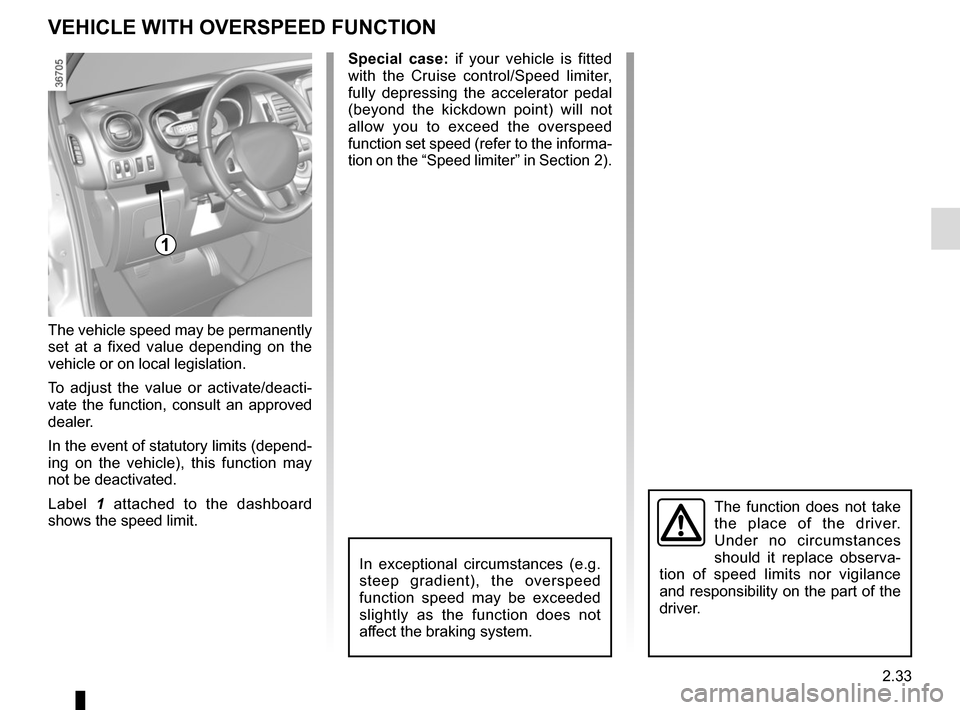
Label 1 attached to the dashboard
shows the speed limit. Special case:
if your vehicle is fitted
with the Cruise control/Speed limiter,
fully depressing the accelerator pedal
(beyond the kickdown point) will not
allow you to exceed the overspeed
function set speed (refer to the informa-
tion on the “Speed limiter” in Section 2).
In exceptional circumstances (e.g.
steep gradient), the overspeed
function speed may be exceeded
slightly as the function does not
affect the braking system.
The function does not take
the place of the driver.
Under no circumstances
should it replace observa-
tion of speed limits nor vigilance
and responsibility on the part of the
driver.
1
Page 160 of 294
2.34
FAST IDLE SPEED
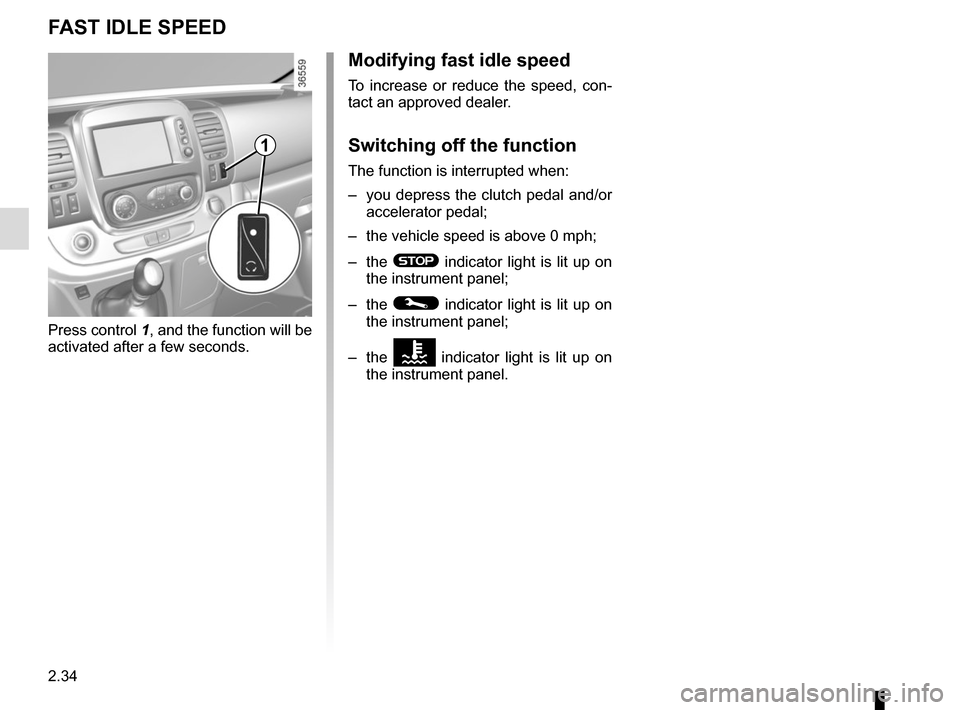
Press control 1, and the function will be
activated after a few seconds.
Modifying fast idle speed
To increase or reduce the speed, con-
tact an approved dealer.
Switching off the function
The function is interrupted when:
– you depress the clutch pedal and/or accelerator pedal;
– the vehicle speed is above 0 mph;
– the
® indicator light is lit up on
the instrument panel;
– the
© indicator light is lit up on
the instrument panel;
– the
Ô indicator light is lit up on
the instrument panel.
1
Page 168 of 294
3.4
Adjusting the ventilation fan
speed.
Turn control 3 from 0 to 4. The further to
the right it is positioned, the more air is
blown into the passenger compartment.
If you want to shut off the flow of air, set
control 3 to 0.
The system is deactivated: the ventila-
tion speed for the passenger compart-
ment air is zero (vehicle stationary),
you can however still feel a slight flow
of air when the vehicle is moving.
Note:
Leaving this control in position 0 for
prolonged periods can lead to conden-
sation forming on the side windows and
windscreen and problems due to the
use of non-renewed air in the passen-
ger compartment.
Rapid demisting
Isolation of the passenger compart-
ment/air recirculation deactivated
(warning light integrated in button 4 is
off), put controls 1 and 3 to
W po-
sitions.
Using the climate control increases the
speed of demisting.
MANUAL AIR CONDITIONING (1/4)
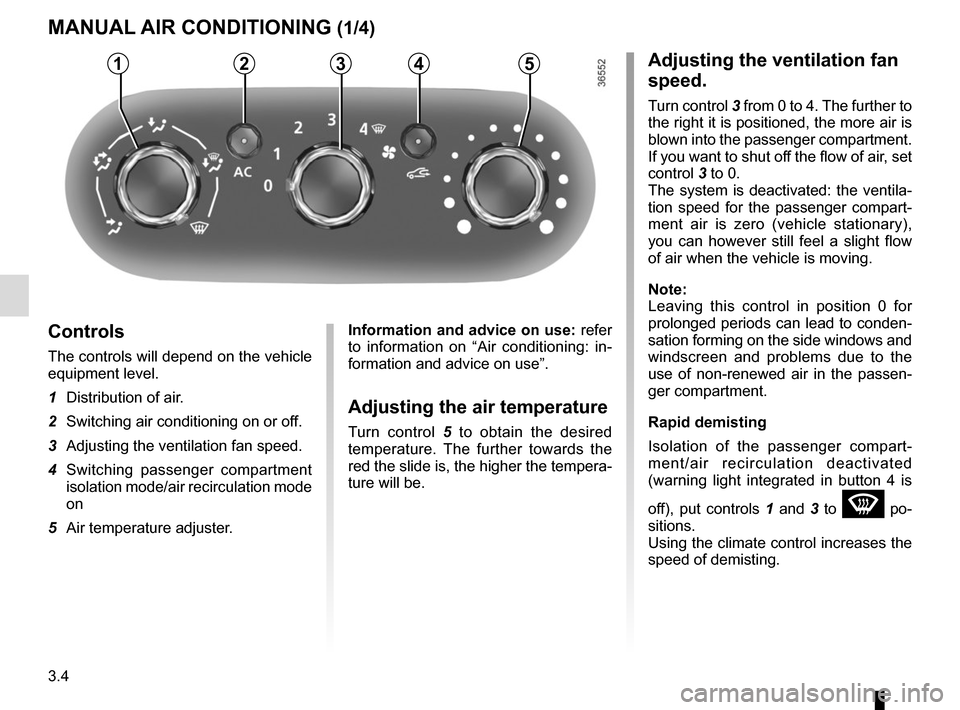
Controls
The controls will depend on the vehicle
equipment level.
1 Distribution of air.
2 Switching air conditioning on or off.
3 Adjusting the ventilation fan speed.
4 Switching passenger compartment isolation mode/air recirculation mode
on
5 Air temperature adjuster.
Information and advice on use: refer
to information on “Air conditioning: in-
formation and advice on use”.
Adjusting the air temperature
Turn control 5 to obtain the desired
temperature. The further towards the
red the slide is, the higher the tempera-
ture will be.
53214
Page 172 of 294

3.8
Varying the ventilation speed
In automatic mode, the system uses
the most suitable amount of air to reach
and maintain the desired comfort level.
You can still adjust the ventilation
speed by turning control 6 to increase
or reduce the ventilation speed.
Adjusting the air temperature
Turn control 2 to obtain the desired
temperature.
Turning the control to the right in-
creases the temperature.
Special note: the maximum and mini-
mum settings allow the system to pro-
duce a minimum or maximum tempera-
ture (18°C and 26°C).
The controls
1 Automatic mode.
2 Air temperature adjuster.
3 “Clear View” function.
4 Passenger compartment air distribu-
tion adjustment.
5 Air conditioning control.
6 Adjusting the ventilation fan speed.
7 Air recirculation.
8 De-icing/demisting of the rear screen
and, depending on the vehicle, the
door mirrors.
AUTOMATIC CLIMATE CONTROL (1/4)
235
786
Automatic mode
The automatic climate control system
guarantees comfort in the passen-
ger compartment and good visibility
(except in the event of extreme condi-
tions), while optimising consumption.
The system controls the ventilation
speed, air distribution, air recirculation,
and starting and stopping the air condi-
tioning and air temperature.
AUTO: allows the selected comfort
level to be best attained, depending on
the exterior conditions. Press button 1.
14
Page 175 of 294

3.11
AUTOMATIC CLIMATE CONTROL (4/4)
76
Air recirculation (isolation of
the passenger compartment)
K
This function is managed automatically
(operation is confirmed by a warning
light on button 7), but you can also acti-
vate it manually.Manual use
Press button 7 – the integrated indica-
tor light comes on.
Prolonged use of this position may lead
to odours, caused by non-renewal of
air, and the formation of condensation
on the windows.
We therefore advise you to return to au-
tomatic mode as soon as air recircula-
tion is no longer needed, by pressing
button 7.
To exit this function, press button
7
again.
Stopping the system
Turn control 6 to “OFF” to stop the
system. To start, turn control 6 again
to adjust the blower speed or press
button 1.
1
NB:
– during recirculation, air is taken from the passenger compartment and
is recycled, with no air being taken
from outside the vehicle;
– air recirculation allows the external atmosphere to be cut off (when driv-
ing in polluted areas, etc.);
– bringing the passenger compartment to the desired temperature as quickly
as possible.
The demisting/de-icing will still take
priority over the air recirculation.