2017 RENAULT TRAFIC speed
[x] Cancel search: speedPage 142 of 294

2.16
MAINTENANCE AND ANTIPOLLUTION ADVICE
Your vehicle complies with criteria for
recycling and recovering vehicles at the
end of their service life which will come
into force in 2015.
Some parts of your vehicle have there-
fore been designed to facilitate future
recycling.
These parts are easy to remove so
that they can be recovered and repro-
cessed by recycling companies.
By virtue of its design, moderate fuel
consumption and initial settings, your
vehicle also conforms to current anti-
pollution regulations. The manufactu-
rer is actively striving to reduce pollu-
tant exhaust gas emissions and to save
energy. But the fuel consumption of
your vehicle and the level of pollutant
exhaust gas emissions are also your
responsibility. Ensure that it is maintai-
ned and used correctly.Maintenance
It is important to remember that failure to
respect antipollution regulations could
lead to legal action being taken against
the vehicle owner. In addition, replacing
engine, fuel supply system and exhaust
components with parts other than those
originally recommended by the manu-
facturer may alter your vehicle so that
it no longer complies with antipollution
regulations.
Have your vehicle adjusted and chec-
ked by an approved Dealer, in accor-
dance with the instructions given in
your maintenance schedule: they will
have all the equipment necessary for
ensuring that your vehicle is maintained
to its original standard.
Engine adjustments
– Air filter, diesel filter: a choked el-
ement will reduce efficiency. It must
be replaced.
– Idle speed: this does not require ad- justment.
Exhaust gas monitoring
system
The exhaust gas monitoring system will
detect any operating faults in the vehi-
cle’s antipollution system.
If this system malfunctions, toxic subs-
tances may be released into the atmos-
phere or damage may occur.
ÄThis warning light on the ins-
trument panel will indicate if
there are any faults in the system:
This lights up when the ignition is
switched on and goes out when the
engine is started.
– If it lights up continuously, consult an approved Dealer as soon as pos-
sible;
– if it flashes, reduce the engine speed until the light stops flashing. Contact
your approved dealer as soon as
possible.
Refer to the information on
«Additive tank» in Section 1.
Page 148 of 294

2.22
Operating faults
When the system detects an operat-
ing fault the message “Check ESC” and
warning light
© and appear
on the instrument panel. In this case,
the ESC and traction control system
are deactivated.
Consult an approved dealer.
Electronic stability program
(ESC) with understeer control
and traction control
Electronic stability control ESC
This system helps you to keep control
of the vehicle in critical driving condi-
tions (avoiding an obstacle, loss of grip
on a bend, etc.).
Operating principle
A sensor in the steering wheel detects
the direction selected by the driver.
Other sensors throughout the vehicle
measure the actual direction.
The system compares driver input to
the actual trajectory of the vehicle and
corrects the trajectory if necessary by
controlling the braking of certain wheels
and/or engine power. In the event that
the system is engaged, indicator light
flashes on the instrument panel.
DRIVING CORRECTION DEVICES AND AIDS (2/5)
Understeer control
This system optimises the action of the
ESC in the case of pronounced under-
steer (loss of front axle road holding).
Traction control
This system helps to limit wheelspin of
the drive wheels and to control the ve-
hicle when pulling away accelerating or
decelerating.
Operating principle
Using the wheel sensors, the system
measures and compares the speed of
the drive wheels at all times and slows
down their over-rotation. If a wheel is
starting to slip, the system brakes au-
tomatically until the drive supplied be-
comes compatible with the level of grip
under the wheel again.
The system also adjusts the engine
speed to the grip available under the
wheels, independently of the pressure
exerted on the accelerator pedal.
These functions are an ad-
ditional aid in the event of
critical driving conditions,
enabling the vehicle behav-
iour to be adapted to suit the driving
conditions.
The functions do not take the place
of the driver. They do not increase
the vehicle’s limits and should
not encourage you to drive more
quickly. Therefore, they can under
no circumstances replace the vigi-
lance or responsibility of the driver
when manoeuvring the vehicle (the
driver must always be ready for
sudden incidents which may occur
when driving).
Page 149 of 294

2.23
DRIVING CORRECTION DEVICES AND AIDS (3/5)
Emergency brake assist
This system supplements the ABS
and helps reduce vehicle stopping dis-
tances.
Operating principle
The system is for detecting an emer-
gency braking situation. In this case,
the braking assistance immediately de-
velops maximum power and may trig-
ger ABS regulation.
ABS braking is maintained as long as
the brake pedal is applied.
Hazard warning lights switching on
Depending on the vehicle, these may
light up in the event of sudden decel-
eration. Braking anticipation
Depending on the vehicle, when you
rapidly release the accelerator, the
system anticipates the braking ma-
noeuvre in order to reduce stopping
distances.
When using the cruise control:
– if you use the accelerator, when you
release it, the system may be trig-
gered;
– if you do not use the accelerator, the system will not be triggered.
Operating faults
When the system detects an operating
fault the message “CHECK BRAKING
SYSTEM” appears on the instrument
panel along with the
© warning
light.
Consult an approved dealer.
Driver assistance with a
trailer
This system helps to maintain control
over the vehicle while using a trailer.
It detects shaking caused by towing a
trailer under certain driving conditions.
Operating conditions
– the towbar must be approved by an authorised dealer;
– the harness must be approved by an authorised dealer;
– the towbar must be connected to the vehicle.
Operating principle
The function stabilises the vehicle by:
– asymmetric braking of the front wheels to reduce shaking caused by
the trailer;
– braking of all four wheels and limita- tion on engine torque to reduce the
vehicle speed until the shaking has
stopped.
Warning light
flashes on the in-
strument panel to inform the driver.
Page 150 of 294

2.24
DRIVER CORRECTION DEVICES AND AIDS (4/5)
Grip control
If fitted on the vehicle, grip control
makes it easier to control the vehicle on
low grip surfaces (soft ground, etc.).“Soft ground” mode
Press the switch 1: warning light
comes on the instrument panel accom-
panied by the message “NON GRIP
ROAD MODE ON”.
This position enables optimal usage on
soft ground (mud, sand, dead leaves,
etc.). In this position, engine speed
is left under the driver’s control. The
system automatically switches to”Road”
mode at speeds above about 31 mph
(50 km/h) and the
warning light
on the instrument panel goes out.
Tyres
When they need to be re-
placed, only tyres of the
same make, size, type and
profile should be used.
Tyres fitted to the vehicle should
either be identical to those fitted
originally or conform to those
recommended by your approved
dealer.
1
These functions are an ad-
ditional aid in the event of
critical driving conditions,
enabling the vehicle behav-
iour to be adapted to suit the driving
conditions.
However, the functions do not take
the place of the driver. They do
not increase the vehicle’s limits
and should not encourage you
to drive more quickly. Therefore,
they can under no circumstances
replace the vigilance or responsibil-
ity of the driver when manoeuvring
the vehicle (the driver must always
be ready for sudden incidents which
may occur when driving).
“Road” mode
Upon starting up the vehicle, the
“STANDARD ROAD MODE ON” mes-
sage is displayed on the instrument
panel. Warning light
on the in-
strument panel is out.
This position enables optimal usage
under normal driving conditions (dry-
ness, humidity, light snow, etc.).
“Road” mode uses traction control func-
tions.
Page 152 of 294
2.26
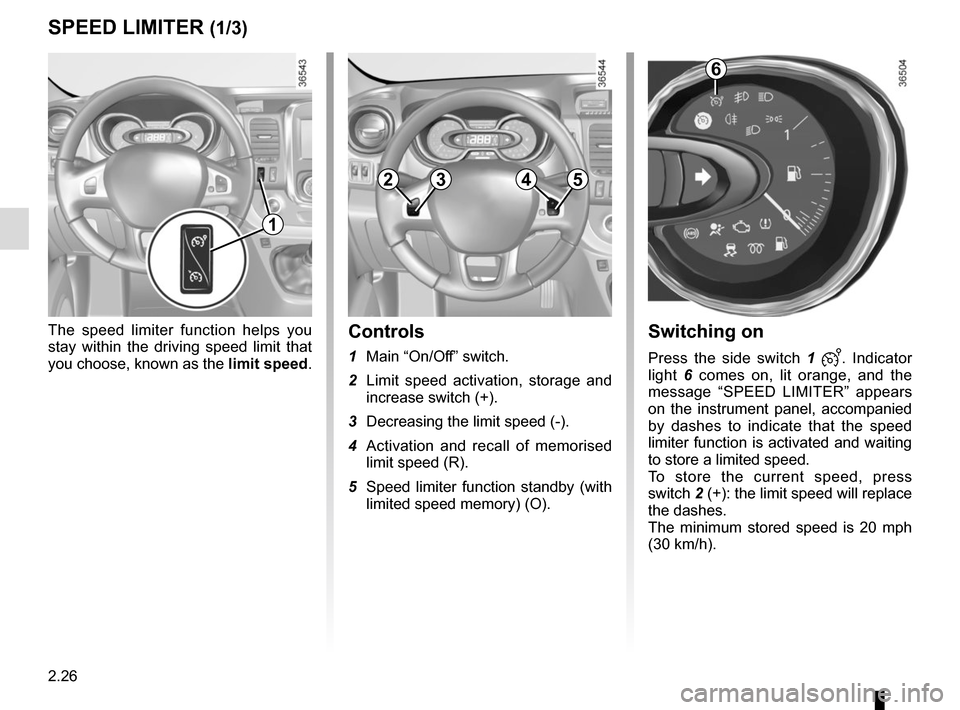
Switching on
Press the side switch 1 . Indicator
light 6 comes on, lit orange, and the
message “SPEED LIMITER” appears
on the instrument panel, accompanied
by dashes to indicate that the speed
limiter function is activated and waiting
to store a limited speed.
To store the current speed, press
switch 2 (+): the limit speed will replace
the dashes.
The minimum stored speed is 20 mph
(30 km/h).
Controls
1 Main “On/Off” switch.
2 Limit speed activation, storage and increase switch (+).
3 Decreasing the limit speed (-).
4 Activation and recall of memorised limit speed (R).
5 Speed limiter function standby (with limited speed memory) (O).
The speed limiter function helps you
stay within the driving speed limit that
you choose, known as the
limit speed.
SPEED LIMITER (1/3)
6
2354
1
Page 153 of 294
2.27
Exceeding the limit speed
It is possible to exceed the limit speed
at any time. To do this: press the accel-
erator pedal firmly and fully (beyond
the resistance point).
If the speed is exceeded, the limited
speed flashes on the instrument panel
accompanied by a beep.
Then, release the accelerator: the
speed limiter function will return as
soon as you reach a speed lower than
the stored speed.
Limited speed cannot be maintained
If driving up or down a steep gradient,
the system is unable to maintain the
limited speed: the memorised speed
flashes on the instrument panel and
a beep sounds at regular intervals to
inform you.
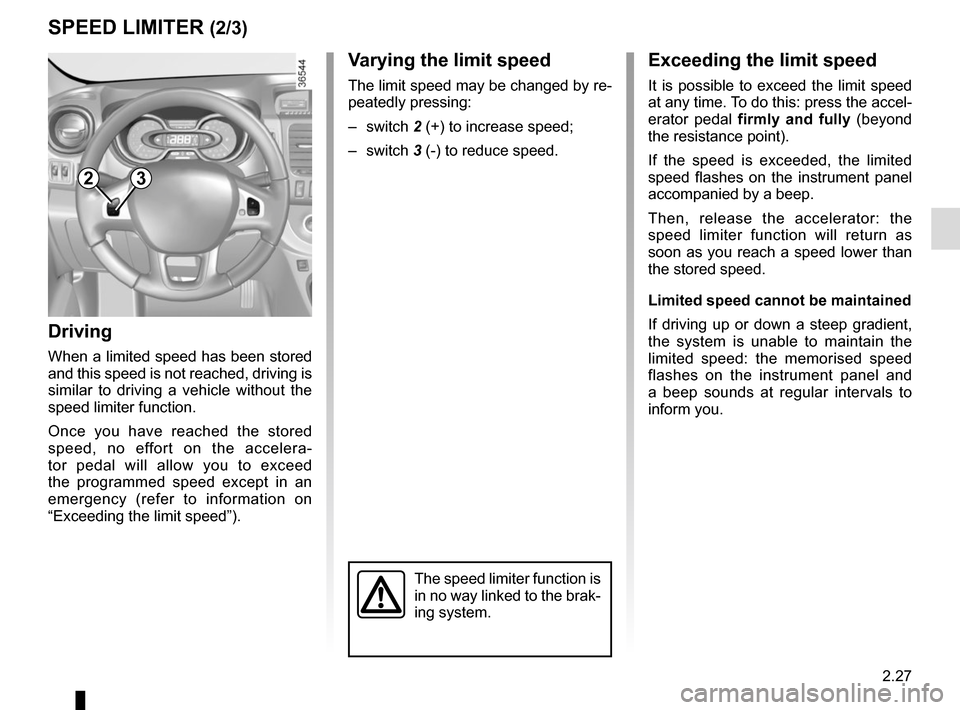
Varying the limit speed
The limit speed may be changed by re-
peatedly pressing:
– switch 2 (+) to increase speed;
– switch 3 (-) to reduce speed.
Driving
When a limited speed has been stored
and this speed is not reached, driving is
similar to driving a vehicle without the
speed limiter function.
Once you have reached the stored
speed, no effort on the accelera-
tor pedal will allow you to exceed
the programmed speed except in an
emergency (refer to information on
“Exceeding the limit speed”).
SPEED LIMITER (2/3)
The speed limiter function is
in no way linked to the brak-
ing system.
23
Page 154 of 294
2.28
SPEED LIMITER (3/3)
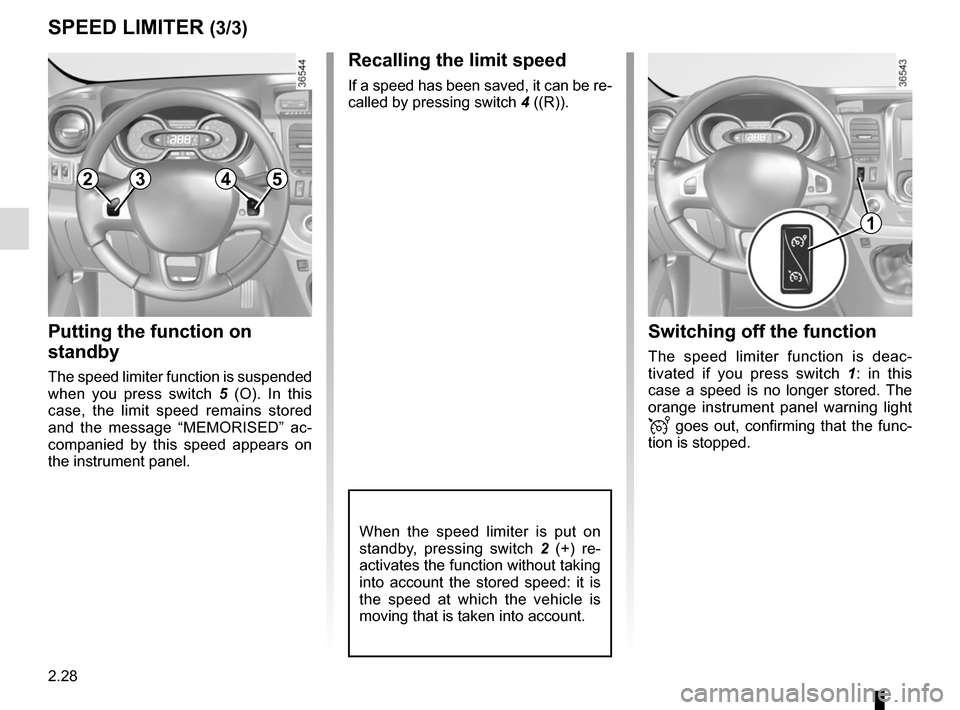
Recalling the limit speed
If a speed has been saved, it can be re-
called by pressing switch 4 ((R)).
Putting the function on
standby
The speed limiter function is suspended
when you press switch 5 (O). In this
case, the limit speed remains stored
and the message “MEMORISED” ac-
companied by this speed appears on
the instrument panel.
Switching off the function
The speed limiter function is deac-
tivated if you press switch 1 : in this
case a speed is no longer stored. The
orange instrument panel warning light
goes out, confirming that the func-
tion is stopped.
When the speed limiter is put on
standby, pressing switch 2 (+) re-
activates the function without taking
into account the stored speed: it is
the speed at which the vehicle is
moving that is taken into account.
2354
1
Page 155 of 294
2.29
The cruise control function helps you to
maintain your driving speed at a speed
that you choose, called the cruising
speed.
This cruising speed may be set at any
speed above 20 mph (30 km/h).
This function is an addi-
tional driving aid. The func-
tion does not take the place
of the driver.
Therefore, it can under no circum-
stances replace the driver’s respon-
sibility to respect speed limits and to
be vigilant (the driver must always
be ready to brake).
Cruise control must not be used in
heavy traffic, on undulating or slip-
pery roads (black ice, aquaplan-
ing, gravel) and during bad weather
(fog, rain, side winds etc.).
There is a risk of accidents.
The cruise control function
is in no way linked to the
braking system.
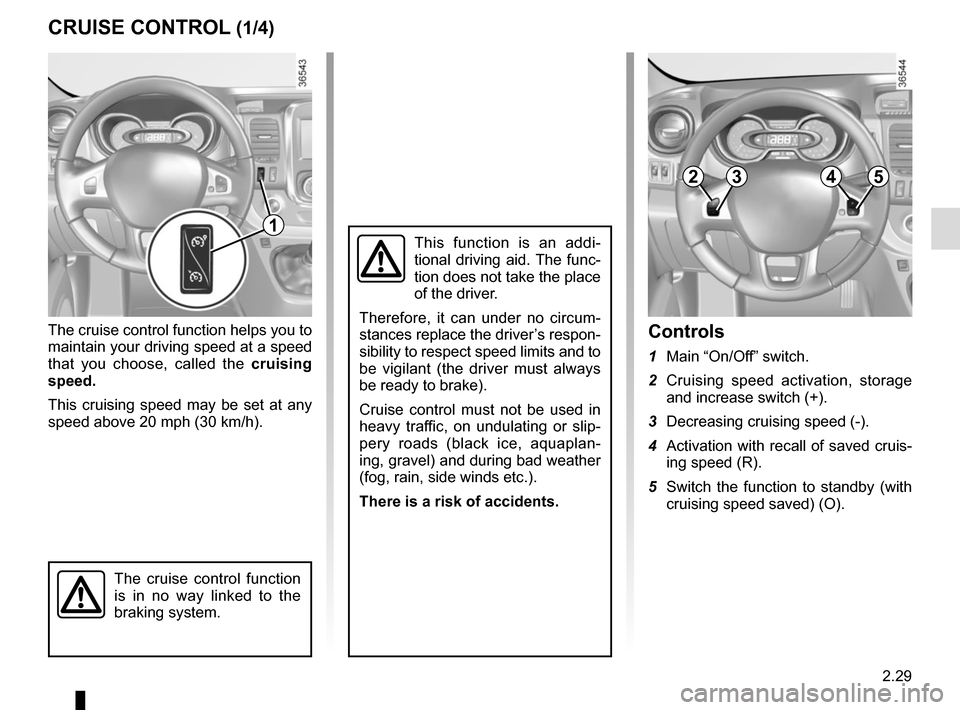
Controls
1 Main “On/Off” switch.
2 Cruising speed activation, storage and increase switch (+).
3 Decreasing cruising speed (-).
4 Activation with recall of saved cruis- ing speed (R).
5 Switch the function to standby (with cruising speed saved) (O).
CRUISE CONTROL (1/4)
2354
1