Page 164 of 358

Limitation of the system operation
– A vehicle travelling in the opposite direction will not trigger any alert\
or any action on the system operation.
– The ra")
2.46
ACTIVE EMERGENCY BRAKING (7/7)
Limitation of the system operation
– A vehicle travelling in the opposite direction will not trigger any alert\
or any action on the system operation.
– The radar-camera area on the windscreen should be kept clean and free of\
any modifications in order to ensure the
proper operation of the system.
– The system cannot respond to small vehicles such as motorbikes or bicycl\
es as effectively as to other vehicles.
– The system may not operate properly when the road surface is slippery (\
rain, snow, black ice etc.).
– To ensure correct operation, the system needs to distinguish the complete\
outline of the pedestrian. So the system cannot detect:
– pedestrians in the darkness or in poor lighting conditions;
– partially visible pedestrians:
– pedestrians less than approximately 80 cm tall;
– pedestrians carrying large objects;
– ...
Deactivating the function
You must disable the function if:
– the brake lights are not functioning;
– the area of the radar-camera has been damaged (on the windscreen side o\
r the interior rear-view mirror side);
– the vehicle is being towed (breakdowns);
– the windscreen is cracked or distorted (do not carry out repairs on thi\
s area of the windscreen; have it changed by an Authorised Dealer).
Halting the function
You can halt the active braking function at any time by tapping the accel\
erator pedal or by turning the steering wheel in a avo id-
ance manoeuvre.
In the event of the system behaving abnormally, deactivate it and consult an authorised dealer.
Page 168 of 358

2.50
This function is an additional driving aid. This function is not under any circumstances intended to replace the due\
care
and attention of the driver, who should at all times be in control of the vehicle.
System servicing/repairs
– In the event of an impact, the camera alignment may be changed, and its \
operation may consequently be affected. Deactivate the function, then consult an authorised dealer.
– Any work in the area where the camera is located (repairs, replacements\
, windscreen modifications etc.) must be carried out by a qualified professional.
Only an authorised dealer is qualified to service the system.
In the event of system disturbance
Some conditions can disturb or damage the operation of the system, such \
as:
– a complex environment (tunnel etc.);
– poor weather conditions (snow, hail, black ice etc.);
– poor visibility (night, fog etc.);
– road markings which are worn, lacking in contrast or very widely spaced \
from one another (lines partially erased etc);
– being dazzled (glaring sun, lights of vehicles travelling in the opposi\
te direction etc.);
– the road is narrow, winding or undulating (tight bends etc.);
– closely following a vehicle travelling in the same lane.
Risk of false alarms or absence of warnings
LANE DEPARTURE WARNING (4/4)
Page 172 of 358

2.54
This function is an additional driving aid. This function is not under any circumstances intended to replace the due\
care
and attention of the driver, who should at all times be in control of the vehicle.
System servicing/repairs
– In the event of an impact, the camera alignment may be changed, and its \
operation may consequently be affected. Deactivate the function and consult an authorised dealer.
– Any work in the area where the camera is located (repairs, replacements\
, windscreen modifications etc.) must be carried out by a qualified professional.
Only an authorised dealer is qualified to service the system.
In the event of system disturbance
Some conditions can disturb or damage the operation of the system, such \
as:
– a complex environment (tunnel etc.) ;
– poor weather conditions (snow, hail, black ice etc.);
– poor visibility (night, fog etc.) ;
– road markings which are worn, lacking in contrast or very widely spaced \
from one another (lines partially erased etc) ;
– being dazzled (glaring sun, lights of vehicles travelling in the opposi\
te direction etc.) ;
– the road is narrow, winding or undulating (tight bends etc.);
– closely following a vehicle travelling in the same lane.
In this case, the “Lane Keeping Assist” may react incorrectly or not at all.
Risk of unwanted, incorrect correction or no correction of trajectory.
Deactivating the function
You must disable the function if:
– the area of the camera has been damaged (on the windscreen side or the \
interior rear-view mirror side);
– the road is slippery (snow, black ice, aquaplaning, gravel etc.) ;
– poor visibility (night, fog etc.);
– the windscreen is cracked or distorted (do not carry out windscreen rep\
airs in this area; have it changed by an Authorised Dealer);
– the vehicle is towing a trailer or a caravan;
– the vehicle is entering an area with several surface markings (an area \
with road works etc.).
LANE KEEPING ASSIST (4/4)
Page 179 of 358

2.61
This function is an additional driving aid. This function is not under any circumstances intended to replace the due\
care
and attention of the driver, who should at all times be in control of the vehicle.
System servicing/repairs
– In the event of an impact, the radar-camera alignment may be changed, an\
d its operation may consequently be affected. Deactivate the function and consult an authorised dealer.
– Any work in the area where the radar-camera is located (repairs, replac\
ements, windscreen modifications etc.) must be car- ried out by a qualified professional.
Only an authorised dealer is qualified to service the system.
In the event of system disturbance
Some conditions can disturb or damage the operation of the system, such \
as:
– a complex environment (tunnel etc.);
– poor weather conditions (snow, hail, black ice etc.);
– poor visibility (night, fog etc.);
– poor contrast between the vehicle preceding it and the surrounding area \
(e.g. white vehicle in a snowy area etc.);
– being dazzled (glaring sun, lights of vehicles travelling in the opposi\
te direction etc.);
– the road is narrow, winding and undulating (tight bends etc.)
Risk of erroneous false alarms.
SAFE DISTANCE ALERT (3/3)
Page 186 of 358
2.68
SPEED LIMITER (2/3)Exceeding the limit speed
It is possible to exceed the limit speed
at any time. To do this: press the accel-
erator pedal firmly and fully (beyond
the resistance point).
While the speed is being exceeded, the
speed limiter flashes red on the instru-
ment panel.
Then, release the accelerator: the
speed limiter function will return as
soon as you reach a speed lower than
the stored speed.
Limited speed cannot be maintained
If driving up or down a steep gradient,
the system is unable to maintain the
limited speed: the stored speed flashes
red on the instrument panel and a beep
sounds at regular intervals to inform
you.
Varying the limit speed
The speed limiter can be changed by
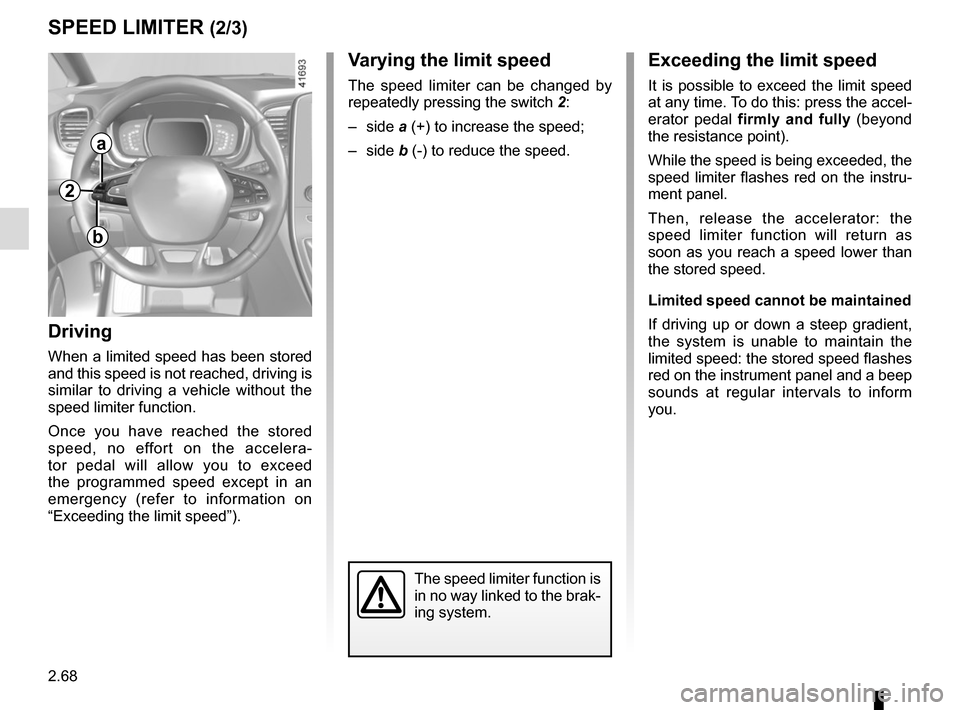
repeatedly pressing the switch 2:
– side a (+) to increase the speed;
– side b (-) to reduce the speed.
Driving
When a limited speed has been stored
and this speed is not reached, driving is
similar to driving a vehicle without the
speed limiter function.
Once you have reached the stored
speed, no effort on the accelera-
tor pedal will allow you to exceed
the programmed speed except in an
emergency (refer to information on
“Exceeding the limit speed”).
The speed limiter function is
in no way linked to the brak-
ing system.
a
b
2
Page 190 of 358
2.72
CRUISE CONTROL (3/4)
Exceeding the cruising speed
The cruising speed may be exceeded
at any time by depressing the accelera-
tor pedal. While overtaking, the cruis-
ing speed flashes red on the instrument
panel.
Then, release the accelerator: after a
few seconds, the vehicle will automati-
cally return to its set cruising speed.
Cruising speed cannot be
maintained
If driving up or down a steep gradi-
ent, the system is unable to maintain
the cruising speed: the stored speed is
flashes red on the instrument panel to
inform you of this situation.
Adjusting the cruising speed
The cruising speed can be changed by
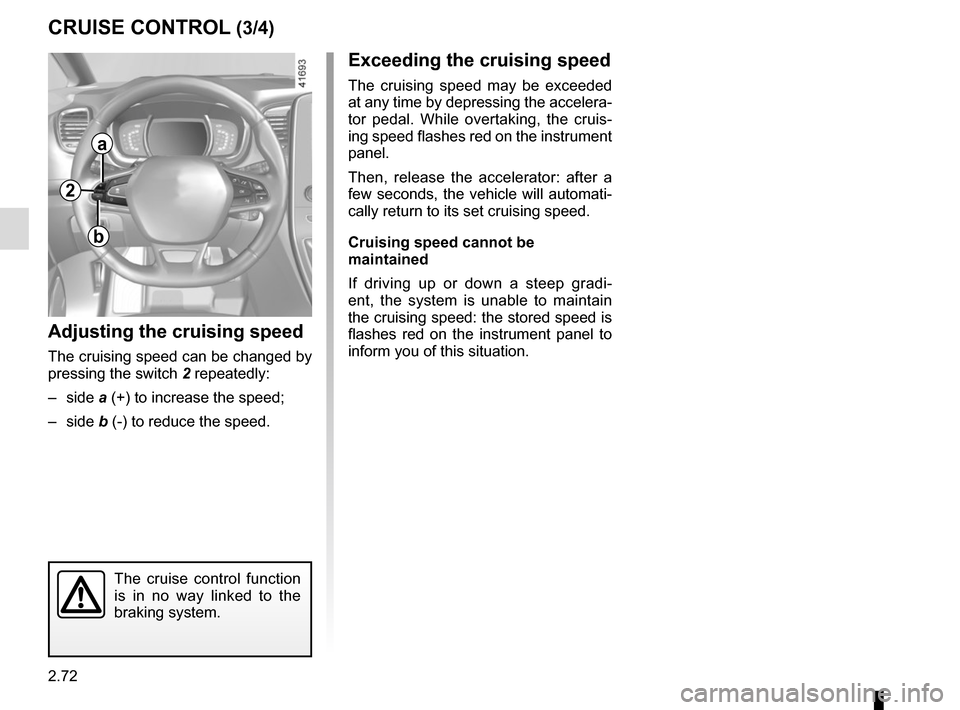
pressing the switch 2 repeatedly:
– side a (+) to increase the speed;
– side b (-) to reduce the speed.
The cruise control function
is in no way linked to the
braking system.
2
a
b
Page 194 of 358
2.76
Driving
Once a cruising speed is memorised
and the cruise control function is active,
you may lift your foot off the accelera-
tor pedal.
If a following distance is stored and a
vehicle travelling slower than yours is
detected by the system in your lane,
your vehicle will brake (with the brake
lights on) and adapt its speed to that of
the vehicle in front, respecting the fol-
lowing distance selected previously.
Overtaking
If your speed is lower than the cruise
control and you wish to perform an
overtaking manoeuvre, activating the
direction indicator will provide acceler-
ation enabling the overtaking manoeu-
vre.
Please note that you must
keep your feet close to the
pedals in order to react in
an emergency.
ADAPTIVE CRUISE CONTROL (3/8)
Adjusting the cruising speed
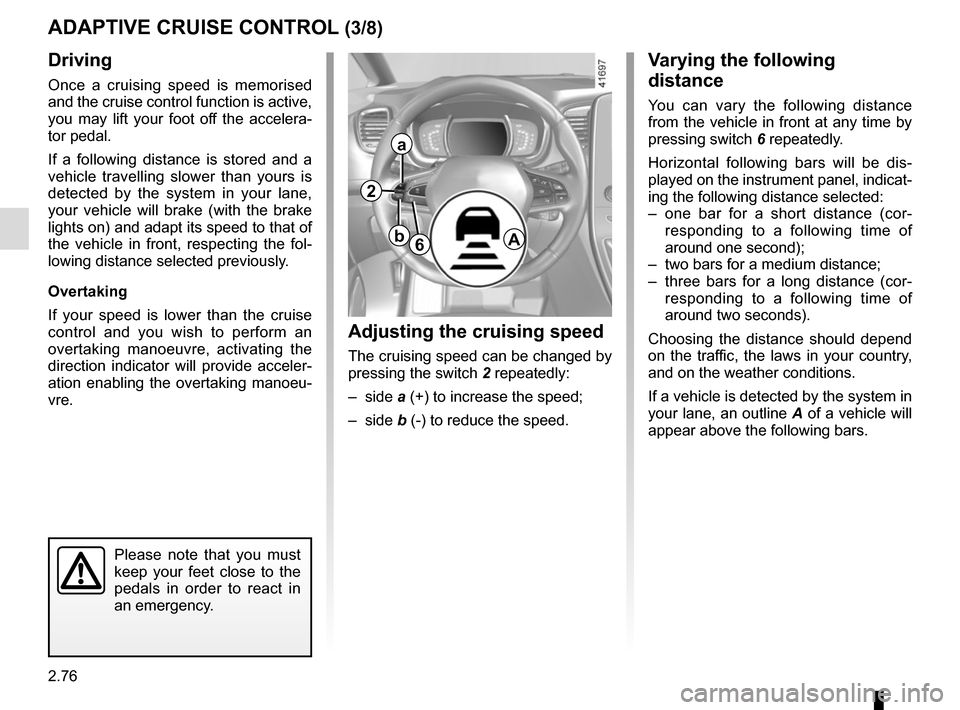
The cruising speed can be changed by
pressing the switch 2 repeatedly:
– side a (+) to increase the speed;
– side b (-) to reduce the speed.
Varying the following
distance
You can vary the following distance
from the vehicle in front at any time by
pressing switch 6 repeatedly.
Horizontal following bars will be dis-
played on the instrument panel, indicat-
ing the following distance selected:
– one bar for a short distance (cor- responding to a following time of
around one second);
– two bars for a medium distance;
– three bars for a long distance (cor- responding to a following time of
around two seconds).
Choosing the distance should depend
on the traffic, the laws in your country,
and on the weather conditions.
If a vehicle is detected by the system in
your lane, an outline A of a vehicle will
appear above the following bars.
6A
2
a
b
Page 196 of 358
2.78
ADAPTIVE CRUISE CONTROL (5/8)
Putting the cruise control
on standby or switching it
off does not cause a rapid
reduction in speed: you
must brake by depressing the brake
pedal.
Please note that you must
keep your feet close to the
pedals in order to react in
an emergency.
Note: if the speed previously stored is
much higher than the current speed,
the vehicle will accelerate to reach this
threshold.
Under certain conditions (coming up
behind a vehicle moving more slowly,
rapid change of lane of vehicles in front
etc.), the system may not have time to
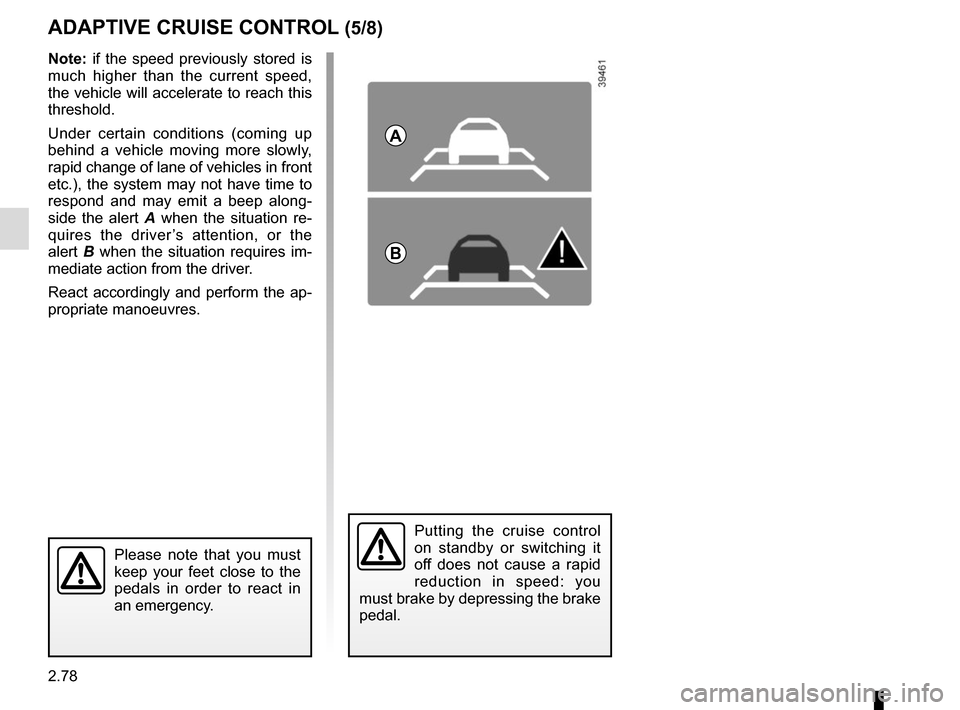
respond and may emit a beep along-
side the alert A when the situation re-
quires the driver’s attention, or the
alert B when the situation requires im-
mediate action from the driver.
React accordingly and perform the ap-
propriate manoeuvres.
A
B