2017 RENAULT MEGANE Gear
[x] Cancel search: GearPage 61 of 346

1.55
DRIVER’S POSITION, LEFT-HAND DRIVE (2/2)
The equipment fitted, described below, DEPENDS ON THE VERSION AND COUNTRY.
1 Air vent.
2 Demister outlet.
3 Stalk for:
– direction indicator lights;
– exterior lights;
– rear fog lights.
4 Driver Airbag and horn location.
5 Instrument panel.
6 Head-up display.
7 Controls for:
– on-board computer information
read-out and vehicle settings
customisation menu,
– remote radio and navigation
system.
8 Steering column stalk for wind-
screen and rear screen wash/
wiper.
9 Heating or air conditioning con-
trols.
10 Multifunction touch-screen.
11 Multifunction screen controls:
– screen activation/deactivation;
– volume;
– welcome menu;
– driving aids menu;
– settings.
12 Switches for:
– hazard warning lights;
– electric door locking.
13 Passenger Airbag location.
14 Glove compartment
15 Controls for:
– front seat heating;
– activation/deactivation, depend-
ing on the vehicle, of the ECO or
RS Drive mode;
– activation/deactivation of the
parking distance control system;
– activation/deactivation of the
Stop and Start function;
– lane departure warning.
16 Accessories and multimedia sock-
ets.
17 Storage compartment/cup holder.
18 Cruise control/speed limiter main
control.
19 Assisted parking brake control.
20 Multi-Sense control.
21 Gearstick.
22 Engine start/stop button (vehicles
with RENAULT card).
23 Ignition switch (vehicles with key).
24
Control for adjusting steering wheel height and reach.
25 Cruise control/speed limiter and
adaptive cruise control controls.
26 Handbrake.
27 Bonnet release control.
28 Controls for:
– headlight beam height remote
adjustment;
– lighting rheostat for control in-
struments;
– steering wheel heating;
– luggage compartment lid re-
lease;
– unlocking the fuel tank cover.
Page 63 of 346

1.57
DRIVING POSITION: RIGHT-HAND DRIVE (2/2)
The equipment fitted, described below, DEPENDS ON THE VERSION AND COUNTRY.
16 Control for adjusting steering
wheel height and reach.
17 Engine start/stop button (vehicles
with RENAULT card).
18 Switches for:
– hazard warning lights;
– electric door locking.
19 Gearstick.
20 Storage compartment/cup holders.
21 Cruise control/speed limiter main
control.
22 Assisted parking brake control.
23 Multi-Sense control.
24 Accessories and multimedia sock-
ets.
25 Glove compartment
26 Handbrake.
27 Bonnet release control.
1 Air vent.
2 Demister outlet.
3 Passenger Airbag location.
4 Controls for:
– front seat heating;
– activation/deactivation, depend-
ing on the vehicle, of the ECO or
RS Drive mode;
– activation/deactivation of the
parking distance control system;
– activation/deactivation of the
Stop and Start function;
– lane departure warning.
5 Heating or air conditioning con-
trols.
6 Multifunction touch-screen.
7 Multifunction screen controls:
– screen activation/deactivation;
– volume;
– welcome menu;
– driving aids menu;
– settings.
8 Stalk:
– direction indicator lights;
– exterior lights;
– rear fog lights.
9 Cruise control/speed limiter and
adaptive cruise control controls.
10 Instrument panel.
11 Driver Airbag and horn location.
12 Controls for:
– on-board computer information
read-out and vehicle settings
customisation menu,
– remote radio and navigation
system.
13 Steering column stalk for wind-
screen and rear screen wash/
wiper.
14 Controls for:
– headlight beam height remote
adjustment;
– lighting rheostat for control in-
struments;
– steering wheel heating;
– luggage compartment lid re-
lease;
– unlocking the fuel tank cover.
15 Ignition switch (vehicles with key).
Page 67 of 346

1.61
WARNING LIGHTS (4/6)
ÉPreheating warning light
(Diesel version)
This should come on when the igni-
tion is switched on. It indicates that the
heater plugs are in operation.
It goes out when preheating is com-
plete. The engine can be started.
2 Door(s) open warning light
Š ‰Gear change indicator
This lights up to advise you to
change to a higher gear (up arrow) or
lower gear (down arrow).
Please refer to the information on
“Driving advice, Eco-driving” in
Section 2.
The display of information shown below DEPENDS ON THE VEHICLE EQUIPMENT \
AND COUNTRY.
ÓBrake pedal warning light
This lights up when the brake
pedal should be depressed. Refer to
the information on the “Automatic gear-
box” in Section 2.
Please refer to the information on
“Driving advice, Eco-driving” in
Section 2.
}Handbrake “on” and elec-
tronic parking brake warn-
ing light
Refer to the information on the
“Handbrake” and “Electronic parking
brake” in Section 2.
åAir bag warning light
This warning light will be dis-
played on the instrument panel when
the ignition is switched on or the engine
is started, and will then go out after a
few seconds.
If it does not come on when the igni-
tion is switched on, or comes on when
the engine is running, there is a fault in
the system.
Contact your approved Dealer as soon
as possible.
Page 86 of 346

1.80
VEHICLE SETTINGS CUSTOMISATION MENU (1/2)
Adjusting the settings
Select the function to modify:
a) Free wheel in ECO mode;
(please refer to the information on “Driving advice, ECO-driving” in
Section 2)
b) Auto door lock while driving ;
c) Use handsfree card: open/close ;
d) Indicator sound volume ;
e) Internal welcome sound ;
f) External welcom ;
g) Automatic Cabin Light ;
h) Rear wiper when rear gear engaged ;
i) Driving style indicator ;
Depending on the function, select “ON"
or "OFF" to activate or disable it, and
"+" or "-" to adjust the volume of the in-
dicators.
Depending on the vehicle equipment,
this function allows you to activate/de-
activate and adjust some of the vehi-
cle’s functions.
Vehicles fitted with a
multimedia system
Accessing the settings menu
With the vehicle at a standstill, using
the multifunction screen
1, select menu
“Vehicle”, “User settings” to access the
various settings.
1
For safety reasons, carry
out any adjustments when
the vehicle is stationary.
Page 87 of 346

1.81
VEHICLE SETTINGS CUSTOMISATION MENU (2/2)
34
Once a line has been selected, press
the switch 3 OK to adjust the function.
If you select either “PARKING ASSIST
VOLUME” or “LANGUAGE”, you will
have to make a further selection (sound
volume of the parking distance control
or instrument panel language). In this
case, make your selection and con-
firm it by holding the switch 3 OK – the
selected value is shown by a
~ in
front of the line.
To exit the menu, press the control 4
upwards or downwards. It may be nec-
essary to carry out this operation sev-
eral times.
For further explanations of the Free
wheel in ECO mode function refer to
the information on “Driving Advice,
ECO driving” in section 2.
Vehicles not fitted with a
multimedia system
Accessing the settings menu on
display 2
With the vehicle at a standstill, press
and hold the switch 3 OK to access the
settings menu.
Adjusting the settings
Browse using the control 4 to select the
function to adjust:
a) Free wheel in ECO mode;
(please refer to the information on “Driving advice, ECO-driving” in
Section 2)
b) Auto door lock while driving;
c) Unlock driver door only ;
d) Rear wiper when rear gear engaged;
e) Front park assist;
f) Automaticmain beam lights;
g) Lane departure warning : VOLUME;
h) Lane departure warning : Sensitivity ;
i) Rear park assist;
j) PARKING ASSIST VOLUME;
k) LANGUAGE.
= function activated
< function deactivated
The vehicle settings personalisation
menu cannot be used when driv-
ing. At speed exceeding 12 mph
(20 km/h), the instrumental panel
display switches automatically back
to trip computer and warning system
mode.
2
Page 108 of 346
1.102
REAR SCREEN WASH/WIPE (2/2)
In the event of obstacles present on the
rear window (dirt, snow, etc.), the wiper
will try to sweep away all the obstacles.
If an obstacle prevents the blade from
moving, it can be stopped. Remove the
obstacle, wait for around 30 seconds
and reactivate the wiper using the wiper
stalk.
Precautions
– In the event of ice, check whether
the blades are stuck to the wind-
screen before operating the wiping
mechanism. If you activate the wiper
while the blade is blocked by ice, you
risk damaging both the blade and the
wiping motor.
– Do not activate the wipers on a dry
screen. This will lead to premature
wear or damage to the blades.
Activation/deactivation of the rear
screen wiper
Engaging reverse gear triggers inter-
mittent wiping (if the front wipers are in
operation). If your vehicle is fitted with
a vehicle settings customisation menu,
you can opt to activate or deactivate
this function. To do this, refer to the in-
formation on the “Vehicle settings cus-
tomisation menu” in Section 1; “Rear
wiping in reverse gear”.
For vehicles not fitted with a settings
customisation menu, you can have this
function deactivated by an authorised
dealer.
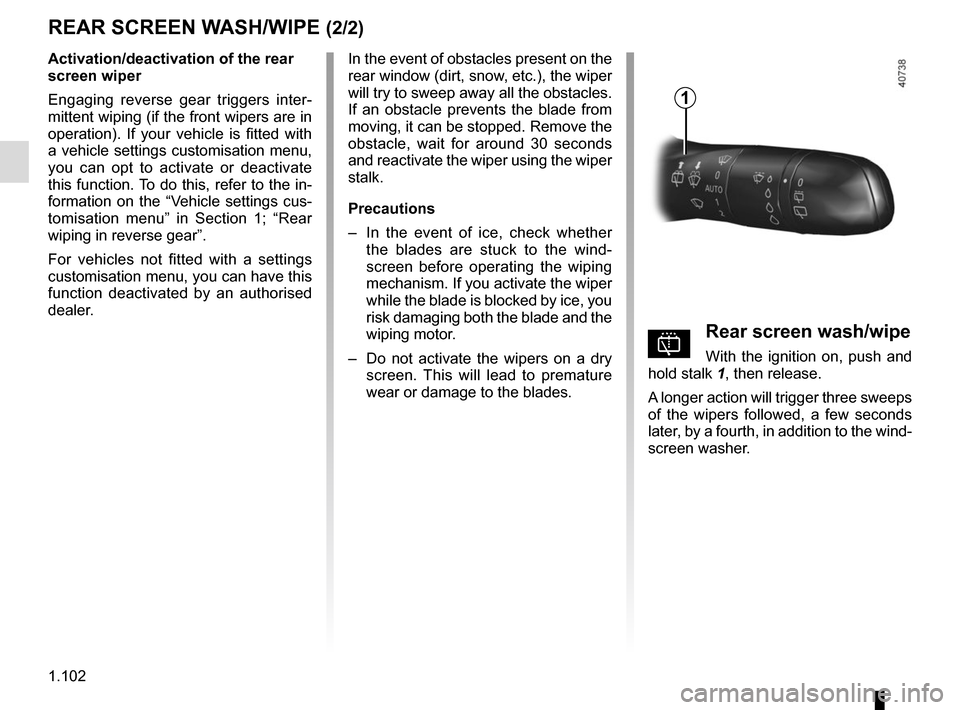
pRear screen wash/wipe
With the ignition on, push and
hold stalk 1, then release.
A longer action will trigger three sweeps
of the wipers followed, a few seconds
later, by a fourth, in addition to the wind-
screen washer.
1
Page 113 of 346

Running in . . . . . . . . . . . . . . . . . . . . . . . . . . . . . . . . . . . . \
. . . . . . . . . . . . . . . .")
2.1
Section 2: Driving
(Advice on use relating to fuel economy and the environment)
Running in . . . . . . . . . . . . . . . . . . . . . . . . . . . . . . . . . . . . \
. . . . . . . . . . . . . . . . . . . . . . . . . . . . . . . . . 2.2
Ignition switch . . . . . . . . . . . . . . . . . . . . . . . . . . . . . . . . . . . .\
. . . . . . . . . . . . . . . . . . . . . . . . . . . . . . 2.3
Starting, stopping the engine: vehicle with key/remote control unit . . . . . . . . . . . . . . . . . . . . . . . . . . 2.4
Starting - Stopping the engine: vehicle with RENAULT card . . . . . . . . . . . . . . . . . . . . . . . . . . . . . . . 2.5
Standing start procedure . . . . . . . . . . . . . . . . . . . . . . . . . . . . . . . . . . . . \
. . . . . . . . . . . . . . . . . . . . . . 2.8
Stop and Start Function . . . . . . . . . . . . . . . . . . . . . . . . . . . . . . . . . . . . \
. . . . . . . . . . . . . . . . . . . . . . . 2.10
Special features of petrol versions . . . . . . . . . . . . . . . . . . . . . . . . . . . . . . . . . . . .\
. . . . . . . . . . . . . . 2.14
Special features of Diesel versions . . . . . . . . . . . . . . . . . . . . . . . . . . . . . . . . . . . . \
. . . . . . . . . . . . . . 2.15
Gear lever/Handbrake . . . . . . . . . . . . . . . . . . . . . . . . . . . . . . . . . . . . \
. . . . . . . . . . . . . . . . . . . . . . . . 2.16
Electronic parking brake . . . . . . . . . . . . . . . . . . . . . . . . . . . . . . . . . . . .\
. . . . . . . . . . . . . . . . . . . . . . 2.17
Driving advice, Eco-driving . . . . . . . . . . . . . . . . . . . . . . . . . . . . . . . . . . . .\
. . . . . . . . . . . . . . . . . . . . 2.20
Maintenance and antipollution advice . . . . . . . . . . . . . . . . . . . . . . . . . . . . . . . . . . . . \
. . . . . . . . . . . . 2.25
Environment . . . . . . . . . . . . . . . . . . . . . . . . . . . . . . . . . . . .\
. . . . . . . . . . . . . . . . . . . . . . . . . . . . . . . 2.26
Tyre pressure monitoring system . . . . . . . . . . . . . . . . . . . . . . . . . . . . . . . . . . . .\
. . . . . . . . . . . . . . . 2.27
Driver correction devices/aids . . . . . . . . . . . . . . . . . . . . . . . . . . . . . . . . . . . . \
. . . . . . . . . . . . . . . . . . 2.30
Lane departure warning. . . . . . . . . . . . . . . . . . . . . . . . . . . . . . . . . . . . \
. . . . . . . . . . . . . . . . . . . . . . . 2.40
Blind spot warning . . . . . . . . . . . . . . . . . . . . . . . . . . . . . . . . . . . . \
. . . . . . . . . . . . . . . . . . . . . . . . . . . 2.43
Safe distance alert . . . . . . . . . . . . . . . . . . . . . . . . . . . . . . . . . . . . \
. . . . . . . . . . . . . . . . . . . . . . . . . . . 2.47
Fatigue detection warning . . . . . . . . . . . . . . . . . . . . . . . . . . . . . . . . . . . . \
. . . . . . . . . . . . . . . . . . . . . 2.49
Speed limiter . . . . . . . . . . . . . . . . . . . . . . . . . . . . . . . . . . . .\
. . . . . . . . . . . . . . . . . . . . . . . . . . . . . . . 2.51
Speeding alert . . . . . . . . . . . . . . . . . . . . . . . . . . . . . . . . . . . . \
. . . . . . . . . . . . . . . . . . . . . . . . . . . . . . 2.54
Cruise control . . . . . . . . . . . . . . . . . . . . . . . . . . . . . . . . . . . .\
. . . . . . . . . . . . . . . . . . . . . . . . . . . . . . 2.57
Adaptive cruise control . . . . . . . . . . . . . . . . . . . . . . . . . . . . . . . . . . . .\
. . . . . . . . . . . . . . . . . . . . . . . 2.61
Parking distance control . . . . . . . . . . . . . . . . . . . . . . . . . . . . . . . . . . . .\
. . . . . . . . . . . . . . . . . . . . . . 2.68
Reversing camera . . . . . . . . . . . . . . . . . . . . . . . . . . . . . . . . . . . . \
. . . . . . . . . . . . . . . . . . . . . . . . . . . 2.73
Assisted parking . . . . . . . . . . . . . . . . . . . . . . . . . . . . . . . . . . . .\
. . . . . . . . . . . . . . . . . . . . . . . . . . . . 2.75
Automatic gearbox. . . . . . . . . . . . . . . . . . . . . . . . . . . . . . . . . . . . \
. . . . . . . . . . . . . . . . . . . . . . . . . . . 2.79
Page 114 of 346

2.2
RUNNING IN
Petrol version
For the first 600 miles (1,000 km), do
not exceed 78 mph (130 km/h) in the
highest gear, or 3,000 to 3,500 rpm.
You may only expect top performance
from your vehicle after approximately
1,800 miles (3,000 km) .
Service intervals: refer to the
Maintenance Document for your vehi-
cle.
Diesel version
For the first 1,000 miles (1,500 km),
do not exceed 80 mph (130 km/h) in
the highest gear, or 2,500 rpm. After
completing this mileage you may drive
faster, although you may only expect
top performance after approximately
3,600 miles (6,000 km).
During the running in period, do not ac-
celerate hard while the engine is still
cold and do not let the engine over-rev.
Service intervals: refer to the
Maintenance Document for your vehi-
cle.