2017 RENAULT MEGANE Rear only
[x] Cancel search: Rear onlyPage 196 of 346

3.2
MULTI-SENSE (1/2)
The Multi-Sense system acts, depend-
ing on the mode selected and depend-
ing on the vehicle, on the drive, the
light environment, the comfort and the
engine noise:
– modes Sport, Eco, Neutral and Comfort are preset and associated
with customisable light environments
and engine noise;
– mode Perso is fully customisable.
The drive modes affect the:
– power-assisted steering;
– the rear wheel steering;
– engine and gearbox responsiveness;
– heating level.
They also affect the:
– the light environment and the instru- ment panel lighting;
– instrument panel and multifunction screen information;
– engine noise;
– massage seat.
After each start-up, the vehicle uses the
mode set at the time the engine was
last switched off.Mode Eco
Mode Eco is geared towards saving
energy and the environment. The
steering is smooth, engine and gearbox
management enable fuel consumption
to be lowered. Air conditioning is man-
aged to be used only when necessary.
Please refer to the information on
“Driving advice, Eco-driving” in
Section 2.
Note: for vehicles without ECOmode,
the Comfort mode becomes the most
suitable mode in terms of energy econ-
omy and respect for the environment.
Mode Neutral
Default mode, mode Neutral selects the
vehicle factory settings.
Multi-Sense
Sport Eco
Neutral Comfort Perso
Sport mode
This mode permits an increased re-
sponsiveness from the engine and the
gearbox. The steering is firmer.
Note: depending on the vehicle, this
mode can inhibit the Stop and Start
(refer to the information on the "Stop
and Start Function" in section 2).
In all modes, it is possible to change the colour of the ambient lightin\
g as well as
the format of the information displayed on the instrument panel and mult\
ifunction
display. You can also reset to the default settings.
Please refer to the multimedia equipment instructions.
Page 199 of 346
3.5
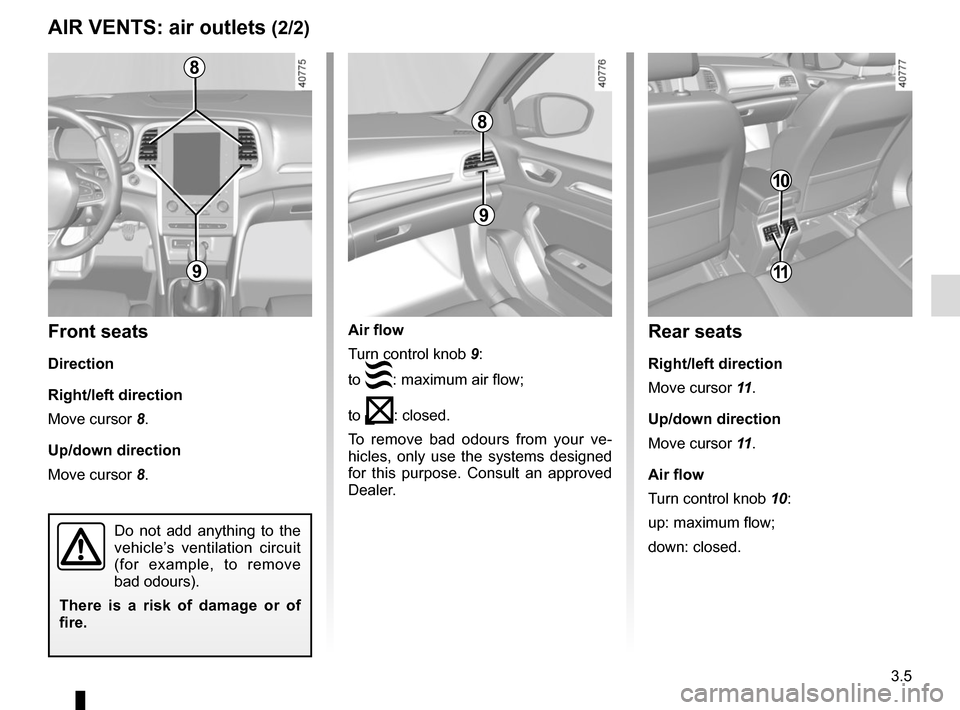
Air flow
Turn control knob 9:
to
: maximum air flow;
to
: closed.
To remove bad odours from your ve-
hicles, only use the systems designed
for this purpose. Consult an approved
Dealer.
AIR VENTS: air outlets (2/2)
8
9
8
9
Front seats
Direction
Right/left direction
Move cursor 8.
Up/down direction
Move cursor 8.
Do not add anything to the
vehicle’s ventilation circuit
(for example, to remove
bad odours).
There is a risk of damage or of
fire.
10
Rear seats
Right/left direction
Move cursor 11 .
Up/down direction
Move cursor 11 .
Air flow
Turn control knob 10:
up: maximum flow;
down: closed.
11
Page 229 of 346

3.35
REAR HEADRESTS (1/2)
Position for using the central
headrest A
Raise the headrest as far as possible to
use it in the high position. Check that it
is correctly locked.
The headrest is a safety
component; check that it is
fitted and in the correct po-
sition. The top of the head-
rest should be as close as possible
to the top of the head.
A
1
Centre seat headrest B
storage position
Press the button 1 and lower the head-
rest completely.
Set the headrest at the lowest po-
sition or tilted forwards for storage
only: do not set it in this position when
the seat is occupied.
B
To remove a headrest
Raise the headrest as far as it will go,
then press button 1 and remove the
headrest.
To refit a headrest
Insert the rods in the holes, press the
button 1 and lower the headrest. Check
that the bonnet is correctly locked.
Page 234 of 346

3.40
LUGGAGE COMPARTMENT: 4-DOOR VERSION (2/3)
The sensor detects the approach and
then the removal of your foot and trig-
gers the opening of the boot lid.
Do not keep your foot in the air. Perform
the movement without stopping and wi-
thout touching the rear bumper.Activation/deactivation of the
hands-free function
Using the multifunction screen, select
menu “Vehicle”, “User settings” then
“Use handsfree card: open/close”.
Select “ON" or "OFF" to activate or de-
activate the function.
Usage features of the hands-free
function
– The hands-free function is no longer
available after a few days of lack of
movement of the vehicle, or after
around 15 minutes if the vehicle is
unlocked. To reactivate it, use the
unlocking button on the RENAULT
card.
– The hands-free function is only avail- able if the vehicle is stationary and
the engine is switched off (and not
on standby with the Stop and Start
function).
– The ‘hands-free’ feature may not work if the vehicle is equipped with a
towbar or is in an area of high elec-
tromagnetic radiation.
Using the hands-free function
The hands-free function enables
access to the luggage compartment
when you have your hands full.
Ensure that the RENAULT card is ap-
proximately 1 metre away in the cen-
tral area of the rear bumper of the vehi-
cle (area B). With the ignition off, stand
approximately 45 cm from the vehicle’s
rear bumper and move your foot for-
wards and backwards in area
A.
A
B
Disable the “hands-free”
function before you:
– wash the vehicle in a
roller-type car wash;
– wash the vehicle by hand;
– handle the towbar;
– ...
Risk of accidental opening of the
luggage compartment lid which
may cause injury.
Page 281 of 346

5.11
TYRES (1/3)
Maintaining the tyres
The tyres must be in good condition
and the tread form must have sufficient
depth; tyres approved by our Technical
Department have tread wear indica-
tors 1 which are indicators moulded
into the tread at several points .
The tyres are the only contact between
the vehicle and the road, so it is essen-
tial to keep them in good condition.
You must make sure that your tyres
con- form to local road traffic regula-
tions.
When the tread has worn down to the
wear warning strips,
these strips will
become visible 2: it is then necessary
to replace your tyres because the tread
rubber is now only 1.6 mm deep at
most, resulting in poor road holding
on wet roads.
An overloaded vehicle, long journeys
by motorway, particularly in very hot
weather, or continual driving on poorly
surfaced minor roads will lead to more
rapid tyre wear and affect safety.
Incidents which occur when
driving, such as striking the
kerb, may damage the tyres
and wheel rims, and could
also lead to misalignment of the
front or rear axle geometry. In this
case, have the condition of these
checked by an approved dealer.
2
1
For your safety, please re-
spect the speed limit.
When they need to be re-
placed, only tyres of the
same make, size, type and profile
should be used on a single axle.
They must: either have a load ca-
pacity and a speed capacity at
least equal to the original tyres,
or correspond to those recom-
mended by your authorised
dealer.
Failure to heed these instructions
could endanger your safety and
affect your vehicle’s roadworthi-
ness.
Risk of loss of control of the ve-
hicle.
Page 283 of 346

5.13
TYRES (3/3)
For safety reasons, this op-
eration must be carried out
by a specialist.
Fitting different tyres may
change your vehicle as follows:
– it may mean that your vehicle no longer conforms to current regu-
lations;
– it may change the way it handles when cornering;
– it may cause the steering to be heavy;
– It may affect the use of snow chains.
Use in winter
Chains
For safety reasons, fitting snow
chains to the rear axle is strictly for-
bidden.
Chains cannot be fitted to tyres which
are larger than those originally fitted to
the vehicle.
Snow or Winter tyres
We would recommend that these be
fitted to all four wheels to ensure that
your vehicle retains maximum adhe-
sion.
Warning : These tyres sometimes have
a specific direction of rotation and a
maximum speed index which may be
lower than the maximum speed of your
vehicle.
Snow chains may only be
fitted to tyres of the same
size as those originally
fitted to your vehicle.
In all cases, we would recommend
that you contact an authorised
dealer who will be able to advise you
on the choice of equipment which is
most suitable for your vehicle.
Changing a wheel
As the tyre pressure moni-
tor may take several min-
utes to correctly determine
the positions of the wheels and the
pressure values after driving, check
the tyre pressures following any op-
eration.
Studded tyres
This type of equipment may only be
used for a limited period and as laid
down by local legislation. It is neces-
sary to observe the speed specified by
current legislation.
These tyres must, at a minimum, be
fitted to the two front wheels.
17” wheels and larger
cannot be fitted with
chains.
If you wish to use special
equipment, please consult an au-
thorised dealer.
Fitting new tyres
Page 308 of 346

5.38
TOWING: breakdown recovery (2/2)
Only use the front 3 and rear 6 towing
points
(never use the drive shafts or any other
part of the vehicle)
These towing points may only be used
for towing: never use them for lifting the
vehicle directly or indirectly.Access to towing points
Front towing point 3
Press zone A and keep depressed
while pulling zone B to open flap 4.
Rear towing point 6
Press zone C and keep depressed
while pulling zone D to open flap 7.
Screw in the tow eye 5 by hand as far
as possible.
When the engine is
stopped, steering and brak-
ing assistance are not op-
erational.Do not leave the tools unse-
cured inside the vehicle as
they may come loose under
braking.
34
5– Use a rigid towing bar.
If a rope or cable is used
(where the law allows this),
the vehicle being towed
must be able to brake.
– A vehicle must not be towed if it is not fit to be driven.
– Avoid accelerating or braking suddenly when towing, as this
may result in damage being
caused to the vehicle.
– When towing a vehicle, it is ad- visable not to exceed 30 mph
(50 km/h).
– Do not push the vehicle if the steering column is locked.
Use the towing eye 5 only (refer to
the information on the “tool kit” in
Section 5).
4
BA
356
7
5
C
D