Page 142 of 346
2.30
DRIVER CORRECTION DEVICES AND AIDS (1/10)ABS (anti-lock braking
system)
Under heavy braking, the ABS prevents
the wheels from locking, allowing the
stopping distance to be managed and
keeping control of the vehicle.
Under these circumstances, the vehi-
cle can be steered to avoid an obstacle
whilst braking. In addition, this system
can increase stopping distances, par-
ticularly on roads with low surface grip
(wet ground etc.).
You will feel a pulsation through the
brake pedal each time the system is
activated. The ABS does not in any way
improve the vehicle's physical perform-
ance relating to the road surface and
roadholding. It is still essential to follow
the rules of good driving practice (such
as driving at a safe distance from the
vehicle in front etc.).
– ABS (anti-lock braking system);
– ESC
(electronic stability control)
with understeer control and trac-
tion control;
– emergency brake assist;
– active emergency braking;
– hill start assistance;
– rear wheel steering.
Other driving assistance systems are
detailed on the following pages.
In an emergency, apply firm and
continuous pressure to the brake
pedal. There is no need to pump
it repeatedly. The ABS will modu-
late the force applied in the braking
system.
These functions are an ad-
ditional aid in the event of
critical driving conditions,
enabling the vehicle behav-
iour to be adapted to suit the driving
conditions.
However, the functions do not take
the place of the driver. They do
not increase the vehicle’s limits
and should not encourage you
to drive more quickly. Therefore,
they can under no circumstances
replace the vigilance or responsibil-
ity of the driver when manoeuvring
the vehicle (the driver must always
be ready for sudden incidents which
may occur when driving).
Page 143 of 346
2.31
DRIVER CORRECTION DEVICES AND AIDS (2/10)
Operating faults:
–
© and x lit up on the in-
strument panel alongside mes-
sages “Check ABS”, “Check braking
system” and “Check ESC”: indicates
the ABS, ESC and emergency brake
assist are deactivated. Braking is
always enabled;
–
x, D, © and ® lit
up on the instrument panel alongside
the message “Braking system fault”:
this indicates a fault in the braking
system.
In both cases, consult an approved
dealer.
Your braking systems
are partially operational.
However, it is dangerous
to brake suddenly and
it is essential to stop immediately,
as soon as traffic conditions allow.
Contact an approved dealer.Warning light ® re-
quires you to stop immedi-
ately, for your own safety,
as soon as traffic conditions
allow. Switch off the engine and do
not restart it. Contact an approved
Dealer.
Page 144 of 346

2.32
Electronic stability control
ESC with understeer control
and traction control
Electronic stability control ESC
This system helps you to keep control
of the vehicle in critical driving condi-
tions (avoiding an obstacle, loss of grip
on a bend, etc.).
Operating principle
A sensor in the steering wheel detects
the direction selected by the driver.
Other sensors throughout the vehicle
measure the actual direction.
The system compares driver input to
the actual trajectory of the vehicle and
corrects the trajectory if necessary by
controlling the braking of certain wheels
and/or engine power. In the event that
the system is engaged, indicator light
flashes on the instrument panel.Understeer control
This system optimises the action of the
ESC in the case of pronounced under-
steer (loss of front axle road holding).
Traction control
This system helps to limit wheelspin of
the drive wheels and to control the ve-
hicle when pulling away accelerating or
decelerating.
Operating principle
Using the wheel sensors, the system
measures and compares the speed of
the drive wheels at all times and slows
down their over-rotation. If a wheel is
starting to slip, the system brakes au-
tomatically until the drive supplied be-
comes compatible with the level of grip
under the wheel again.
The system also adjusts the engine
speed to the grip available under the
wheels, independently of the pressure
exerted on the accelerator pedal.
Operating faults
When the system detects an operat-
ing fault the message “Check ESC” and
warning light
© and appear
on the instrument panel.
In this case, the ESC and traction con-
trol system are deactivated. Consult an
authorised dealer.
DRIVER CORRECTION DEVICES AND AIDS (3/10)
Page 176 of 346

2.64
ADAPTIVE CRUISE CONTROL (4/7)
Exceeding the cruising speed
The cruising speed may be exceeded
at any time by depressing the accelera-
tor pedal.
When exceeding this speed, the crui-
sing speed and the following bars are
shown in red, and the cruising speed
flashes on the instrument panel: the
distance control function is no longer
active.
Then, release the accelerator: cruise
and distance control will automatically
reactivate unless the function has been
set to standby.
Putting the function on
standby
The function is set to standby if:
– you press switch 4 (O);
– you depress the brake pedal;
– you depress the clutch pedal;
– you use the gear lever;
– the vehicle speed is lower than 25 mph (40 km/h) or over 100 mph
(160 km/h);
– the engine speed is too low or too high;
– certain driver correction devices and aids are triggered (ABS, ESC, etc.)
In the latter three cases, the message
“Adaptive cruise Adaptive cruise” is dis-
played on the instrument panel when
the function is set to standby.
Standby is confirmed by the display of
the cruising speed in grey and the mes-
sage “Adaptive cruise ctrl”. Returning to the cruising speed
If a speed is stored, it can be recalled,
once you are sure that the road con-
ditions are suitable (traffic, road sur-
face, weather conditions, etc.). Press
switch
3 (R) if the vehicle speed is
above around 30 mph (50 km/h).
When the stored speed is recalled,
activation of the cruise control is con-
firmed by the illumination of the cruis-
ing speed in green, along with the mes-
sage “Adaptive cruise ctrl”.
When the cruise control is set to
standby, pressing switch 2, side a (+),
reactivates the cruise control function
without taking into account the stored
speed: it is the speed at which the vehi-
cle is moving that is taken into account.
2
a
b
3
4
Page 213 of 346

3.19
Operating faults
As a general rule, contact your ap-
proved dealer in the event of an oper-
ating fault.
– Reduction in de-icing, demisting or air conditioning performance.
This may be caused by the passen-
ger compartment filter cartridge be-
coming clogged.
– No cold air is being produced .
Check that the controls are set cor-
rectly and that the fuses are sound.
Otherwise, switch off the system.
Presence of water under the
vehicle
After prolonged use of the air condi-
tioning system, it is normal for water
to be present under the vehicle. This is
caused by condensation.
AIR CONDITIONING: information and advice on use
Do not open the refriger-
ant fluid circuit. The fluid
may damage eyes or skin.
Fuel consumption
You will normally notice an increase in
fuel consumption (especially in town)
when the air conditioning is operating.
For vehicles fitted with air conditioning
with no automatic mode, switch off the
system when it is not required.
Advice for reducing consumption
and helping to preserve the environ-
ment
Drive with the air vents open and the
windows closed.
If the vehicle has been parked in the
sun, open the doors for a few moments
to let the hot air escape before starting
the engine.
Advice on use
In some situations, (air conditioning
off, air recirculation activated, ventila-
tion speed at zero or low, etc.) you may
notice that condensation starts to form
on the windows and windscreen.
If there is condensation, use the “Clear
View” function to remove it, then use
the air conditioning in automatic mode
to stop it forming again.
Maintenance
Refer to the Maintenance Document
for your vehicle for the inspection fre-
quency.
Do not add anything to the
vehicle’s ventilation circuit
(for example, to remove
bad odours).
There is a risk of damage or of
fire.
Page 216 of 346

3.22
ELECTRIC WINDOWS (2/2)
Operating faults
In case of a fault when closing a
window, the system reverts to normal
mode: pull the switch as many times as
necessary until the window closes com-
pletely, hold the switch (still on the clo-
sing side) for around one second, then
completely lower then raise the window
to reset the system.
If necessary, contact an approved
Dealer.
When closing the windows,
ensure that no part of the
body (arm, hand, etc.) is
protruding from the vehicle.
Risk of serious injury.
One-touch mode
This mode works in addition to the ope-
ration of the electric windows described
previously.
Briefly press or pull the window switch
fully: the window is fully lowered or
raised. Pressing the switch again stops
the window moving.
Note: if the window detects resistance
when closing (e.g.: branch of a tree,
etc.) it stops and then lowers again by a
few centimetres.
Remote control window closing
(vehicles with 4 one-touch electric win-
dows).
When you lock the doors from the out-
side, press the locking button on the
RENAULTcard twice in quick suc-
cession, or on the driver’s door in
hands-free mode, and all the windows
will close automatically (and, depend-
ing on the vehicle, the sunroof).
It is recommended that the user only
operates the system when the vehi-
cle can be seen clearly and no one is
inside.
7
Manual window winder
controls
Turn the handle 7.
Page 224 of 346
3.30
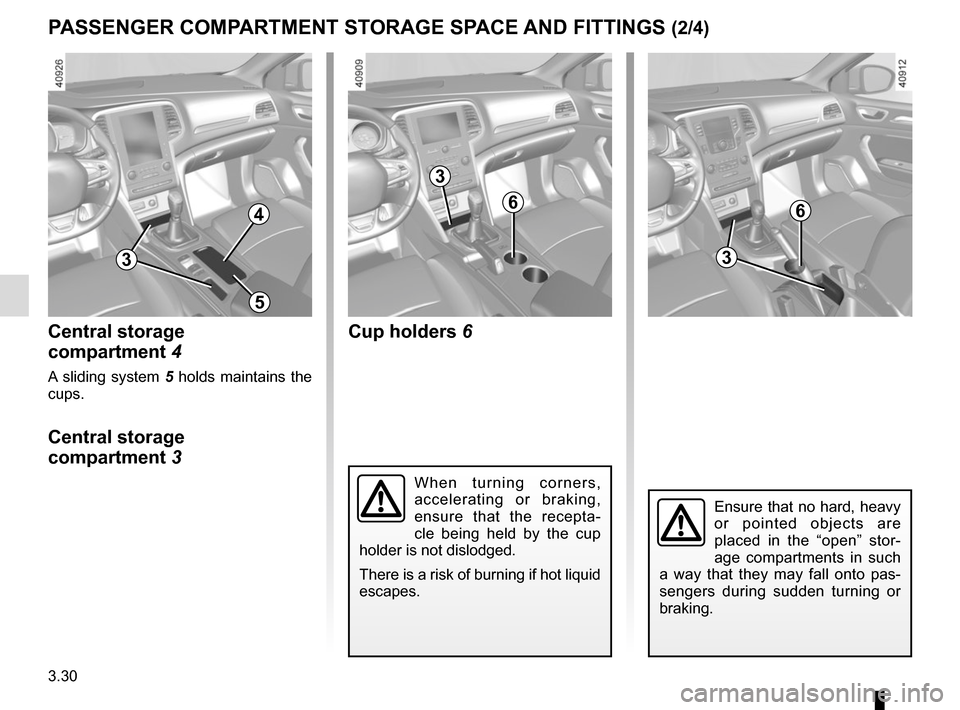
PASSENGER COMPARTMENT STORAGE SPACE AND FITTINGS (2/4)
Central storage
compartment 4
A sliding system 5 holds maintains the
cups.
Central storage
compartment 3 Cup holders
6
When turning corners,
accelerating or braking,
ensure that the recepta-
cle being held by the cup
holder is not dislodged.
There is a risk of burning if hot liquid
escapes.
Ensure that no hard, heavy
or pointed objects are
placed in the “open” stor-
age compartments in such
a way that they may fall onto pas-
sengers during sudden turning or
braking.
64
5
3
3
6
3
Page 226 of 346
3.32
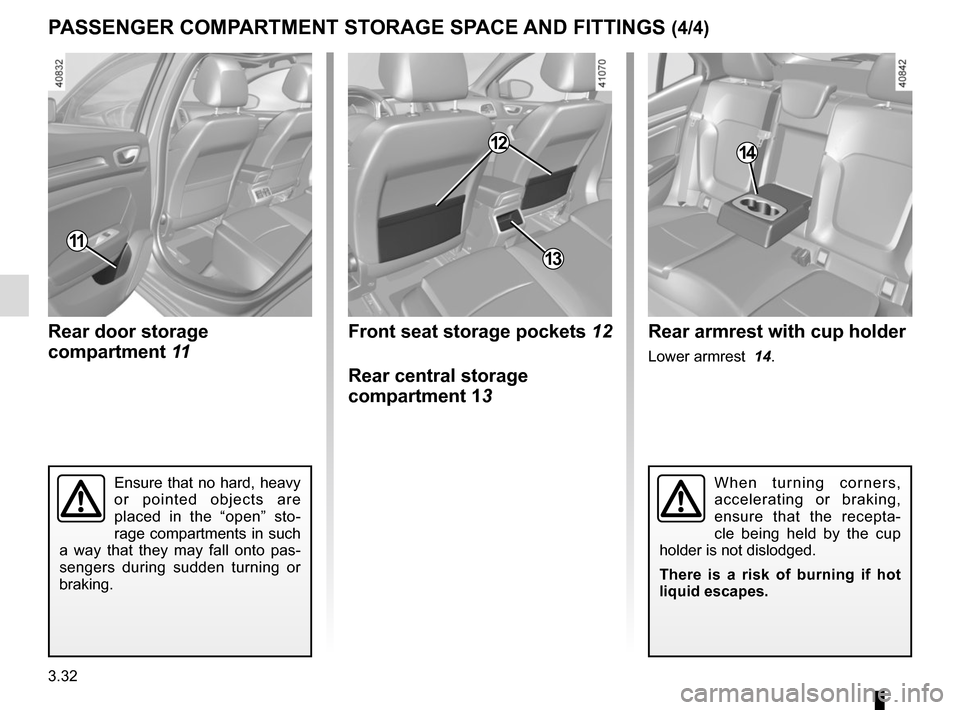
PASSENGER COMPARTMENT STORAGE SPACE AND FITTINGS (4/4)
Rear door storage
compartment 11
11
Front seat storage pockets 12
Rear central storage
compartment 13
12
Rear armrest with cup holder
Lower armrest 14.
14
Ensure that no hard, heavy
or pointed objects are
placed in the “open” sto-
rage compartments in such
a way that they may fall onto pas-
sengers during sudden turning or
braking.When turning corners,
accelerating or braking,
ensure that the recepta-
cle being held by the cup
holder is not dislodged.
There is a risk of burning if hot
liquid escapes.
13