2017 PEUGEOT 5008 warning
[x] Cancel search: warningPage 3 of 404
Welcome
Thank you for choosing a Peugeot 5008.
This document presents the information and recommendations required
for you to be able to explore your vehicle in detail.
Your vehicle will be fitted with only some of the equipment described in
this document, depending on its trim level, version and the specification
for the country in which it was sold.In this document, you will find all of the instructions and
recommendations on the use that will allow you to enjoy your vehicle
to the fullest. It is strongly recommended that you familiarise yourself
with it as well as the Warranty and Maintenance Record which will
provide you with information about warranties, ser vicing and roadside
assistance associated with your vehicle.
Key
Safety warning
Additional information
Contributes to the protection of the environment
Left-hand drive vehicle
Right-hand drive vehicle
The descriptions and illustrations are given as indications only.
Automobiles PEUGEOT reser ves the right to modify the technical
characteristics, equipment and accessories without having to update
this edition of the guide.
If ownership of your vehicle is transferred, please ensure this Complete
Handbook
is passed on to the new owner.
Page 4 of 404
2
.
.
Head-up digital screen 8
I ndicator and warning lamps 1 2
Indicators
28
Manual test
3
4
Distance recorders
3
5
Lighting dimmer
3
5
Trip computer
3
6
Monochrome screen C
3
8
Touch screen
4
0
Remote control
4
9
K
eyless Entry and Starting
5
2
Back-up procedures
5
7
Anti-intrusion security
6
0
Central locking
6
0
Alarm
61
Doors
63
Boot
64
Hands-free tailgate
6
5
Electric windows
6
9
Panoramic opening sunroof
7
0Driving position
7
4
Front seats
7
6
Steering wheel adjustment
8
3
Mirrors 83
Second row seats
8
5
Third row seats
8
8
Seat modularity
9
2
i- Cockpit Amplify function
9
3
Heating and Ventilation 9 4
Manual air conditioning 9 6
Semi-automatic mono-zone air conditioning
9
7
Automatic dual-zone air conditioning
9
9
Recirculation of interior air
1
03
Front demist – defrost
1
03
Heated windscreen
1
04
Rear screen demist – defrost
1
04
Programmable heating
1
05
Front fittings
1
10
Courtesy lamps
1
16
Interior ambient lighting
1
17
Rear fittings
1
18
Boot fittings
1
20Exterior lighting control stalk
1
24
Direction indicators
1
27
Headlamp adjustment
1
28
Automatic illumination of headlamps
1
28
Automatic headlamp dipping
1
31
Cornering lighting
1
33
Wiper control stalk
1
34
Automatic rain sensitive wipers
1
36
General safety recommendations
1
38
Hazard warning lamps
1
39
H or n
13
9
Emergency or assistance call
1
39
Electronic stability control (ESC)
1
42
Advanced Grip Control
1
45
Hill Assist Descent Control
1
47
Seat belts
1
48
Airbags
1
53
Child seats
1
57
Deactivating the passenger front airbag
1
58
ISOFIX mountings and child seats
1
66
i-Size child seats
1
70
Manual child lock
1
73
Electric child lock
1
74
Over view
Dashboard instruments Ease of use and comfort
Safety
Access Lighting and visibility
Eco-driving
Contents
Page 5 of 404

3
.
.
Driving recommendations 175
Anti-theft protection 1 77
Starting / Switching off the engine
with the key
1
77
Starting / Switching off the engine
with Keyless Entry and Starting
1
79
Electric parking brake
1
81
Manual gearbox
1
85
Automatic gearbox
1
85
Hill start assist
1
90
Dynamic pack
1
91
Gear shift indicator
1
91
Stop & Start
1
92
Under-inflation detection
1
95
Memorising speeds
1
97
Recognition of speed limit signs and
recommendation
1
98
Speed limiter
20
1
Cruise control
2
04
Dynamic cruise control with Stop function
2
07
Distance alert and Active Safety Brake
2
15
Fatigue detection system
2
19
Lane Departure Warning System
2
21
Active Lane Departure Warning System
2
22
Blind Spot Monitoring System
2
27
Parking sensors
2
30
Visiopark 1
- Visiopark 2
2
31
Park Assist
2
37Fuel
245
Misfuel prevention (Diesel) 2 46
Compatibility of fuels
2
46
Towing a trailer
2
48
Towbar with quickly detachable towball
2
48
Energy economy mode
2
52
Very cold climate screen
2
53
Snow chains
2
54
Fitting roof bars
2
55
Bonnet
2
56
Engine compartment
2
57
Checking levels
2
58
Checks
26
0
AdBlue
® (BlueHDi engines) 2 62
Warning triangle
2
66
Running out of fuel (Diesel)
2
66
Tool kit
2
67
Temporary puncture repair kit
2
69
Spare wheel
2
73
Changing a bulb
2
78
Changing a wiper blade
2
84
Changing a fuse
2
84
12
V battery
2
85
Towing the vehicle
2
89Characteristics of engines
and towed loads
2
91
Petrol engines
2
92
Diesel engines
2
93
Dimensions
295
Identification markings
2
96
PEUGEOT Connect Nav
PEUGEOT Connect Radio
Bluetooth audio system
Driving Practical information Technical data
Alphabetical index
Audio equipment and telematics
In the event of a breakdown
.
Contents
Page 6 of 404

4
Instruments and controls
1.Sunroof and blind controls
2. Front courtesy / map reading lamps
3. Warning lamp display for the seat belts
and passenger front airbag
Emergency and assistance call buttons
4. Rear view mirror
5. Head-up digital screen
6. Horn
Driver front airbag
7. Door mirror and electric window control
panel
8. Monochrome screen with Bluetooth audio
system
or
Touch screen with PEUGEOT Connect
Radio or PEUGEOT Connect Nav
9. Hazard warning lamps
10. Air conditioning system controls
11. 12
V socket / USB socket
Wireless charger
12 . Advanced Grip Control
Hill Assist Descent Control
13. Ignition switch
or
"START/STOP" button
14 . Gearbox control
"SPORT" button
15. Electric parking brake
16. Passenger's front airbag
17. Glove box
Deactivating the passenger front airbag
Over view
Page 7 of 404
5
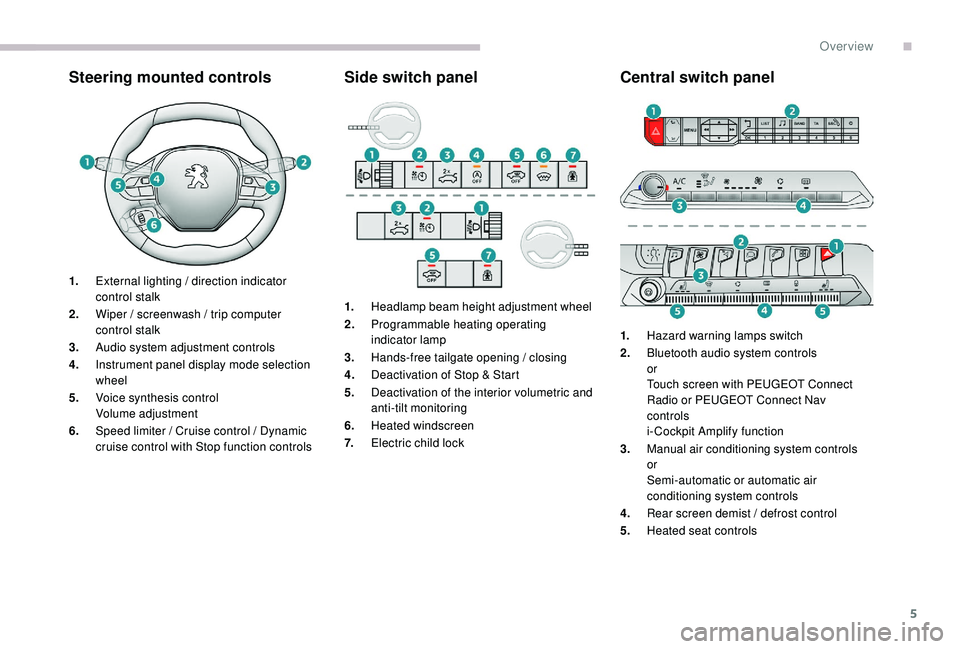
Steering mounted controlsSide switch panelCentral switch panel
1.External lighting / direction indicator
control stalk
2. Wiper / screenwash / trip computer
control stalk
3. Audio system adjustment controls
4. Instrument panel display mode selection
wheel
5. Voice synthesis control
Volume adjustment
6. Speed limiter / Cruise control / Dynamic
cruise control with Stop function controls 1.
Headlamp beam height adjustment wheel
2. Programmable heating operating
indicator lamp
3. Hands-free tailgate opening / closing
4. Deactivation of Stop & Start
5. Deactivation of the interior volumetric and
anti-tilt monitoring
6. Heated windscreen
7. Electric child lock 1.
Hazard warning lamps switch
2. Bluetooth audio system controls
or
Touch screen with PEUGEOT Connect
Radio or PEUGEOT Connect Nav
controls
i- Cockpit Amplify function
3. Manual air conditioning system controls
or
Semi-automatic or automatic air
conditioning system controls
4. Rear screen demist / defrost control
5. Heated seat controls
.
Over view
Page 11 of 404

9
Control buttons
Displays
Most warning and indicator lamps do not have
a fixed position.
The warning and indicator lamps in the second
line are displayed from right to left in order of
priority.
For certain functions that have indicator lamps
for both operation and for deactivation, there is
only one dedicated location.
Permanent information
Whatever the display mode selected, the
instrument panel displays:
-
i
n fixed locations:
•
g
earbox and gear shift indicator
information,
•
t
he fuel gauge,
•
t
he engine coolant temperature indicator,
•
t
he distance recorders.
-
i
n variable locations:
•
t
he digital speedometer,
•
s
tatus or alert messages displayed
temporarily.
Optional information
Depending on the display mode selected and
active features, the following information may
be displayed:
-
t
he rev counter,
-
t
he trip computer,
-
d
riving aids,
-
t
he speed limiter or cruise control,
-
t
he media currently playing,
-
n
avigation instructions,
-
e
ngine information from the Dynamic Pack.
A.
Lighting dimmer for the instruments and
controls* (available in night mode).
or
Instrument panel ambient lighting**.
*
V
ersions with monochrome screen.
**
V
ersions with touch screen.
B.
Short press: start a manual test.
Long press: reset the ser vice indicator or
trip distance recorder (depending on the
contex t).
Personalisation of the
instrument panel
You can modify the appearance of the
instrument panel, by choosing:
-
t
he instrument panel display colour**,
-
a d
isplay mode.
Display language and units
They depend on the configuration of the
multifunction screen (configuration menu).
When travelling abroad, the speed must be
shown in the official units of the country you
are driving in (km/h, km or mph, miles).
As a safety measure, these adjustments
must be carried out with the vehicle
stationary.
**
V
ersions with touch screen.
Choosing a display colour
This depends on the ambience activated by the
i- Cockpit Amplify function.
The possible choices are:
F
"Relax ": grey,
F
"Boost ": red,
F
"Normal " (no colour scheme activated): blue.
For more information on the i-Cockpit Amplify
function , refer to the corresponding section.
1
Dashboard instruments
Page 12 of 404

10
Choice of display mode
To modify the display mode of the instrument
panel:
F
T
urn the knob located to the left of the
steering wheel to display and scroll through
the different modes on the right-hand side
of the instrument panel.
F
O
nce the selected display mode appears,
press on the knob to validate.
The new display mode is applied instantly.
Each mode corresponds to the type of
information displayed in the instrument panel.
-
"
DIALS": standard display of the analogue
and digital speedometers, the rev counter,
the fuel gauge, the engine coolant
temperature indicator and the distance
recorders. -
"
NAVIGATION": standard display with, in
addition, the current navigation information
(mapping database and navigation
instructions).
-
"
DRIVING": standard display with, in
addition, the current driving aid systems
information.
-
"
MINIMAL": minimal display with digital
speedometer and the distance recorders
and, in the event of a warning only, the
fuel gauge and the coolant temperature
i n d i c a t o r.
-
"
TRIP COMPUTER"*: minimal display with,
in addition, the rev counter, instantaneous
information and the trip recorder selected
(1
or 2).
or
-
"
PERSONAL"**: minimal display with, in
addition, the selection made in the touch
screen of the type of information displayed
in the customisable areas on the left and
right.
*
V
ersions with monochrome screen.
**
V
ersions with touch screen.
To enter settings for the "PERSONAL"
display mode and select the information to
be displayed in the customisable areas of the
instrument panel:
or F
Sel
ect the Settings
menu in the
upper bar of the touch screen.
F
Sel
ect "
Settings ".
F
P
ress the "Driver screen
configuration " or "Dashboard
configuration " button.
Dashboard instruments
Page 14 of 404

12
Indicator and warning lamps
When the ignition is switched on
Certain warning lamps come on in the
instrument panel for a few seconds when the
ignition is switched on.
When the engine is started, these same
warning lamps should go off.
If they remain on, before moving off, refer to the
information on the warning lamp concerned.
Associated warnings
Most warning lamps in the instrument panel are
accompanied by the display of a message and
an audible signal.Certain warning lamps may come on in one
of two modes: fixed (continuous) or flashing.
Only by relating the type of illumination to the
operation of the vehicle can it be determined
whether the situation is normal or a fault has
occurred.
For more information, refer to the
corresponding tables of warning and indicator
lamps.
Warning lamps
When the engine is running or the vehicle is
being driven, illumination of one or more of the
following warning lamps indicates a fault which
requires action on the part of the driver.
Any fault resulting in the illumination of a
warning lamp must be investigated further
using the associated alert message.
Operation indicator lamps
If one or more of the following indicator lamps
come on, this confirms that the corresponding
system has been switched on.
Deactivation indicator
lamps
If one of the following indicator lamps comes
on, this confirms that the corresponding system
has been switched off intentionally.
This may be accompanied by the display of a
message and an audible signal.
If you encounter any problems, contact a
PEUGEOT dealer or a qualified workshop.
Dashboard instruments