2017 PEUGEOT 5008 display
[x] Cancel search: displayPage 95 of 404
93
i-Cockpit Amplify function
This function allows the driving ambiences to
be managed.
Specific system settings are offered for each
ambience.
These ambiences can be personalised in the
touch screen.
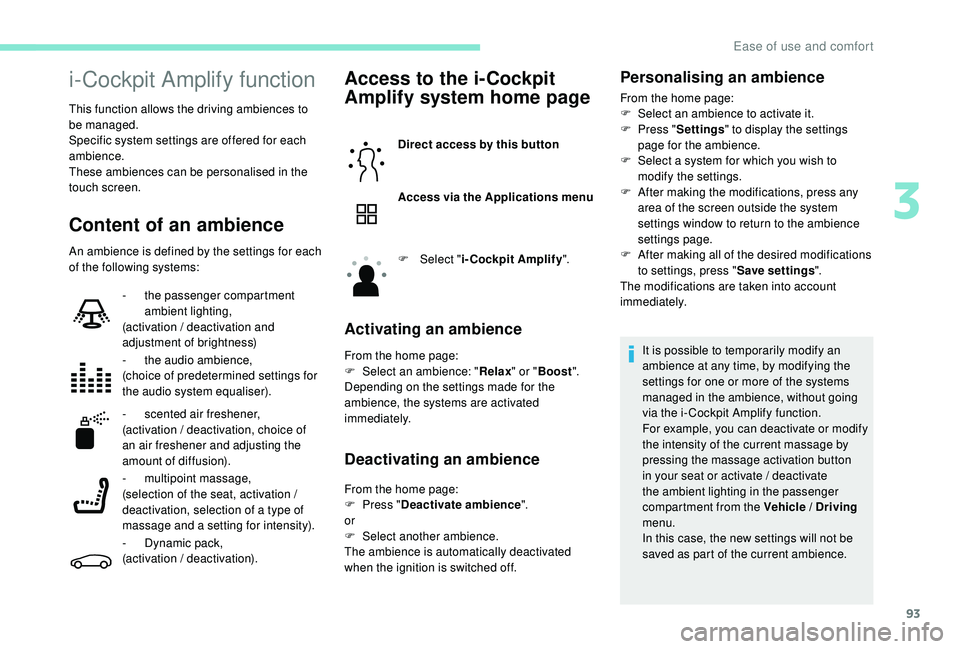
Content of an ambience
An ambience is defined by the settings for each
of the following systems:
Access to the i-Cockpit
Amplify system home page
Direct access by this button
Access via the Applications menu
F
Sel
ect "i-Cockpit Amplify ".
Activating an ambience
From the home page:
F
Sel ect an ambience: " Relax" or "Boost ".
Depending on the settings made for the
ambience, the systems are activated
immediately.
Deactivating an ambience
From the home page:
F P ress " Deactivate ambience ".
or
F
Sel
ect another ambience.
The ambience is automatically deactivated
when the ignition is switched off.
-
t
he passenger compartment
ambient lighting,
(activation / deactivation and
adjustment of brightness)
-
t
he audio ambience,
(choice of predetermined settings for
the audio system equaliser).
-
s
cented air freshener,
(activation / deactivation, choice of
an air freshener and adjusting the
amount of diffusion).
- m
ultipoint massage,
(selection of the seat, activation /
deactivation, selection of a type of
massage and a setting for intensity).
-
D
ynamic pack,
(activation / deactivation).
Personalising an ambience
From the home page:
F S elect an ambience to activate it.
F
P
ress " Settings " to display the settings
page for the ambience.
F
S
elect a system for which you wish to
modify the settings.
F
A
fter making the modifications, press any
area of the screen outside the system
settings window to return to the ambience
settings page.
F
A
fter making all of the desired modifications
to settings, press " Save settings".
The modifications are taken into account
immediately.
It is possible to temporarily modify an
ambience at any time, by modifying the
settings for one or more of the systems
managed in the ambience, without going
via the i- Cockpit Amplify function.
For example, you can deactivate or modify
the intensity of the current massage by
pressing the massage activation button
in your seat or activate / deactivate
the ambient lighting in the passenger
compartment from the Vehicle / Driving
menu.
In this case, the new settings will not be
saved as part of the current ambience.
3
Ease of use and comfort
Page 99 of 404
97
Semi-automatic mono-
zone air conditioning
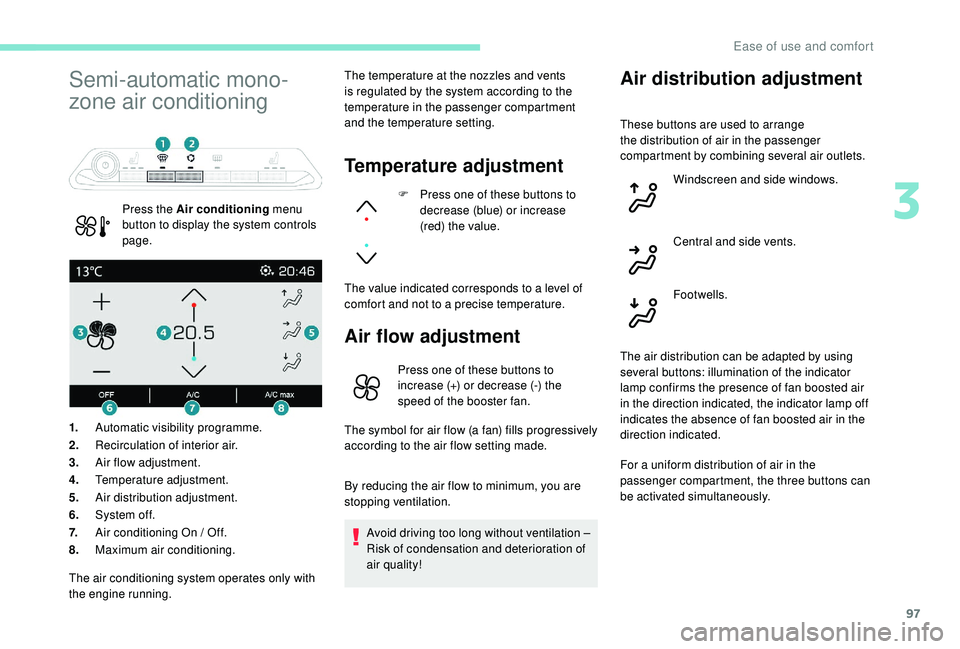
Press the Air conditioning menu
button to display the system controls
page. The temperature at the nozzles and vents
is regulated by the system according to the
temperature in the passenger compartment
and the temperature setting.
Temperature adjustment
F Press one of these buttons to
decrease (blue) or increase
(red) the value.
The value indicated corresponds to a level of
comfort and not to a precise temperature.
Air flow adjustment
1. Automatic visibility programme.
2. Recirculation of interior air.
3. Air flow adjustment.
4. Temperature adjustment.
5. Air distribution adjustment.
6. System of f.
7. Air conditioning On / Off.
8. Maximum air conditioning.
Air distribution adjustment
Press one of these buttons to
increase (+) or decrease (-) the
speed of the booster fan.
The symbol for air flow (a fan) fills progressively
according to the air flow setting made.
By reducing the air flow to minimum, you are
stopping ventilation.
Avoid driving too long without ventilation –
Risk of condensation and deterioration of
air quality!
The air conditioning system operates only with
the engine running. These buttons are used to arrange
the distribution of air in the passenger
compartment by combining several air outlets.
Windscreen and side windows.
Central and side vents.
Footwells.
The air distribution can be adapted by using
several buttons: illumination of the indicator
lamp confirms the presence of fan boosted air
in the direction indicated, the indicator lamp off
indicates the absence of fan boosted air in the
direction indicated.
For a uniform distribution of air in the
passenger compartment, the three buttons can
be activated simultaneously.
3
Ease of use and comfort
Page 101 of 404

99
Automatic dual-zone air
conditioning
Press the Air conditioning menu
button to display the system controls
page. 1.
Automatic visibility programme.
2. Recirculation of interior air.
3. Adjusting the temperature on driver's
side.
4. Adjusting the temperature on passenger's
side.
5. Adjusting the air distribution.
6. Adjusting the air flow.
7. System switch-off.
8. Air conditioning on/off.
9. Automatic comfort programme on/off.
10. Maximum air conditioning.
11. Access to the secondary page.
12 . Selection of settings for the automatic
comfort programme (Soft/Normal/Fast).
13. "AQS (Air Quality System)" function (with
pollution sensor).
14 . Mono-zone / Dual-zone.
15. "REAR" function (depending on version).
The air conditioning system operates with
the engine running, but the ventilation and its
controls are available with the ignition on.
Operation of the air conditioning and regulation
of temperature, air flow and air distribution in
the passenger compartment are automatic.
Temperature adjustment
Automatic comfort
programme
F Press this button to activate or deactivate the automatic mode
of the air conditioning system.
The driver and front passenger can each
choose their own temperature setting.
The value indicated corresponds to a level of
comfort and not to a precise temperature.
F
P
ress one of these buttons to
increase the value.
F
P
ress one of these buttons to
decrease the value.
It is recommended that you avoid a difference
of more than 3°C in the settings for left and
right.
When the indicator lamp in the button is on, the
air conditioning system operates automatically:
the system manages the temperature, air
flow and air distribution in the passenger
compartment in an optimum way according to
the comfort level you have selected.
3
Ease of use and comfort
Page 102 of 404
100
$872
)$67
$872
1250$/
62)7
$872
It is possible to modulate the intensity of the
automatic comfort programme by choosing one
of three settings offered in the secondary page,
accessible from the "OPTIONS" button.
To change the current setting, shown by
illumination of the corresponding indicator
lamp, press this button repeatedly until the
desired setting is displayed:
"Normal ": offers the best
compromise between a
comfortable temperature and
quiet operation (default setting).
" Fast ": provides strong and
effective air flow.
Use the " Normal" or "Fast" setting to assure
the comfort of passengers in the rear seats.
This setting is associated with automatic mode
only. However, on deactivation of AUTO mode,
the indicator for the last setting remains on.
Changing the setting does not reactivate AUTO
mode if deactivated. In cold weather with the engine cold, the
air flow is increased gradually until the
comfort setting has been reached, in order
to limit the delivery of cold air into the
passenger compartment.
On entering the vehicle, if the interior
temperature is much colder or warmer
than the comfort setting requested, there
is no need to alter the value displayed
in order to reach more quickly the
required level of comfort. The system
compensates automatically and corrects
the temperature difference as quickly as
possible.
Automatic visibility
programme
For more information on Front demisting –
defrosting
, refer to the corresponding section.
"Air Quality System" (AQS)
function
Using a pollution sensor, this function
automatically activates recirculation of the
interior air once it detects a certain level of
polluting substances in the exterior air.
When the air quality returns to a satisfactory
level, recirculation of interior air is automatically
deactivated. To activate or deactivate the function, go to the
secondary page by pressing the "
OPTIONS"
button.
Manual control
You can manually adjust one or more settings,
while retaining automatic control of the other
functions:
-
a
ir flow,
-
a
ir distribution.
As soon as you modify a setting, the indicator
lamp in the " AUTO" button goes off.
F
P
ress this button again to
reactivate the automatic comfort
programme.
Air flow adjustment
F Press one of these buttons to increase or decrease the speed
of the booster fan.
"
Soft ": provides soft and quiet
operation by limiting air flow. This function is not designed to detect
unpleasant odours.
Recirculation is automatically activated when
the front screenwash is used or when reverse
gear is engaged.
The function does not operate if the exterior
temperature is below 5°C, to avoid the risk of
misting of the windscreen and side windows.
Ease of use and comfort
Page 103 of 404
101
By reducing the air flow to minimum, you are
stopping ventilation.
"OFF " is displayed alongside the fan.
Avoid driving too long without ventilation –
Risk of condensation and deterioration of
air quality!
Air distribution adjustment
You can vary the distribution of air in the passenger
compartment using these three buttons.
Windscreen and side windows.
Central and side vents.
The air flow symbol (a fan) is filled in
progressively as the speed of the fan is
increased.
Footwells.
Each press on a button activates or deactivates
the function. The indicator lamp is on when the
button is activated. For a uniform distribution
of air in the passenger compartment, the three
buttons can be activated simultaneously. In AUTO mode, the indicator lamps in all three
buttons are off.
Air conditioning On / Off
The air conditioning is designed to operate
effectively in all seasons, with the windows
closed.
It enables you to:
-
l
ower the temperature, in summer,
-
i
ncrease the effectiveness of the demisting
in winter, above 3°C.
Switching on
F Press this button, its indicator lamp comes on.
The air conditioning does not operate
when the air flow adjustment is set to off.
Switching off
F Press this button again, its indicator lamp goes off.
Maximum air conditioning
This function allows faster cooling of the air in
the passenger compartment.
The system automatically adjusts the
temperature setting to the lowest possible, air
distribution towards the centre and outer vents,
air flow to maximum and activates recirculation
of interior air.
Switching off the air conditioning may result in
some discomfort (humidity, condensation). F
P
ress this button to activate
the function; its indicator lamp
comes on.
F
P
ress this button again to deactivate the
function and return to the previous settings;
its indicator lamp goes off.
Mono-zone / Dual-zone
The passenger temperature setting can be
linked to the driver's setting (mono-zone
function).
It is available in the secondary page by
pressing the " OPTIONS" button.
F
P
ress this button to activate
the " MONO " function; its " ON"
status is displayed.
The function is automatically deactivated if the
passenger uses their temperature adjustment
buttons (dual-zone function).
3
Ease of use and comfort
Page 104 of 404
102
"REAR" functionVentilation with the
ignition on
When the ignition is switched on, you can
use the ventilation system to adjust the air
flow settings and the air distribution in the
passenger compartment depending on the
battery charge.
This function does not operate the air
conditioning.
System switch-off
F Press this button.
Its indicator lamp comes on and all
other indicator lamps for the system
go of f.
This action deactivates all functions
of the air conditioning system. Avoid driving for too long with the
ventilation off or the system deactivated –
Risk of misting and deterioration of the air
quality!
Pressing any button reactivates the
system with the settings that were
previously in use.
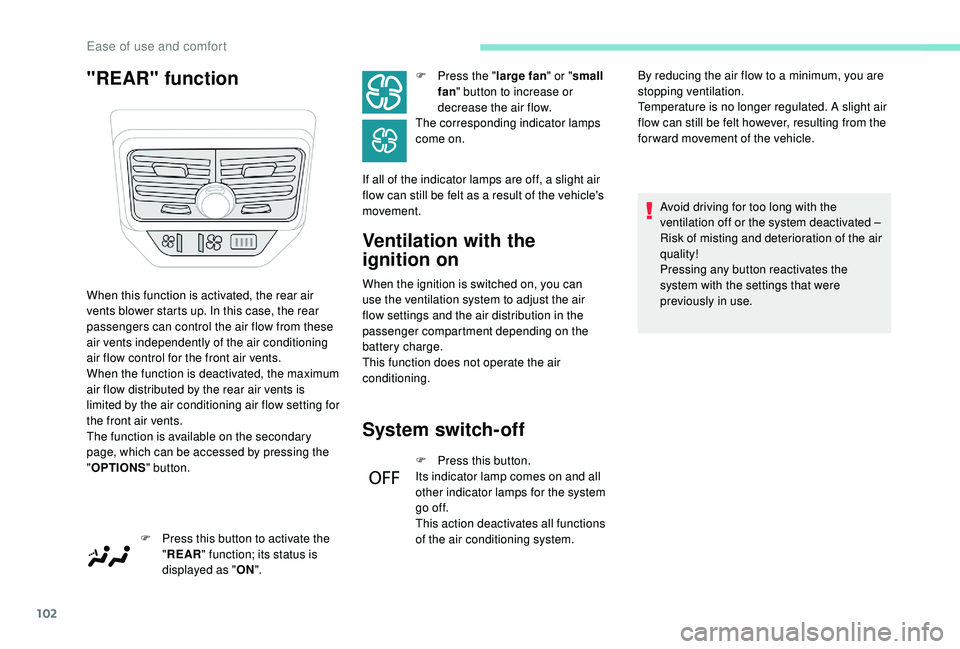
When this function is activated, the rear air
vents blower starts up. In this case, the rear
passengers can control the air flow from these
air vents independently of the air conditioning
air flow control for the front air vents.
When the function is deactivated, the maximum
air flow distributed by the rear air vents is
limited by the air conditioning air flow setting for
the front air vents.
The function is available on the secondary
page, which can be accessed by pressing the
"
OPTIONS " button.
F
P
ress this button to activate the
" REAR " function; its status is
displayed as " ON". F
P
ress the "
large fan " or "small
fan " button to increase or
decrease the air flow.
The corresponding indicator lamps
come on.
If all of the indicator lamps are off, a slight air
flow can still be felt as a result of the vehicle's
movement. By reducing the air flow to a minimum, you are
stopping ventilation.
Temperature is no longer regulated. A slight air
flow can still be felt however, resulting from the
for ward movement of the vehicle.
Ease of use and comfort
Page 108 of 404
106
Adapting the programmable heating
enables you to use it to preheat the
passenger compartment of your vehicle.
Contact a PEUGEOT dealer or a qualified
workshop.
Presentation
Remote controlOperating indicator lamp
Function display
The volumetric alarm movement detector
may be disrupted by the programmable
heating air flows when it is operating.
To avoid any untimely triggering of the
alarm when using the programmable
heating, it is advisable that the volumetric
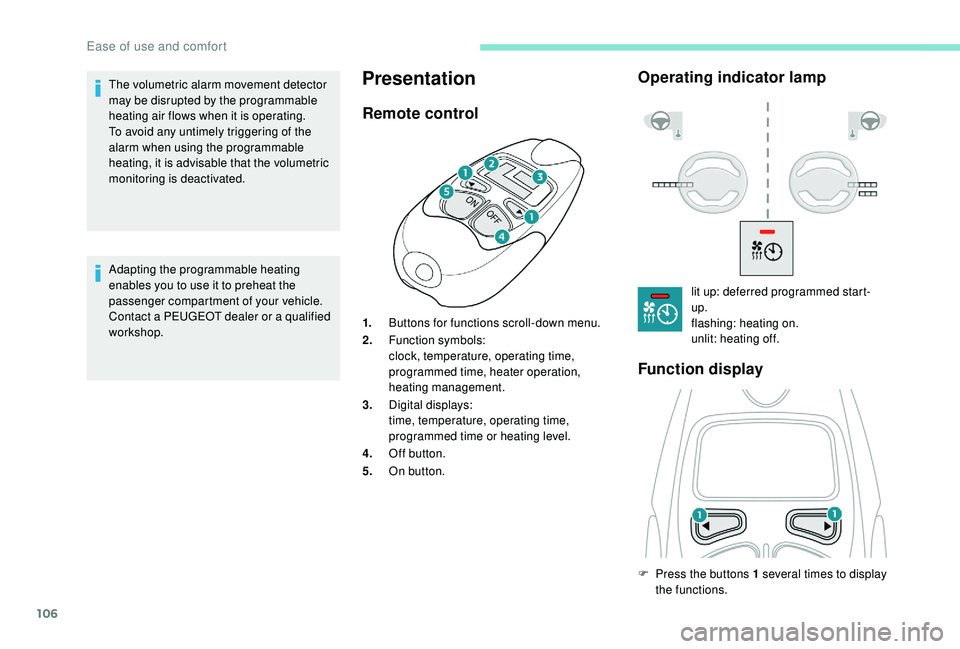
monitoring is deactivated. 1.Buttons for functions scroll-down menu.
2. Function symbols:
clock, temperature, operating time,
programmed time, heater operation,
heating management.
3. Digital displays:
time, temperature, operating time,
programmed time or heating level.
4. Off button.
5. On button. lit up: deferred programmed start-
up.
flashing: heating on.
unlit: heating off.
F
P
ress the buttons 1 several times to display
the functions.
Ease of use and comfort
Page 109 of 404
107
The passenger compartment temperature
information is only available when the
engine is off.
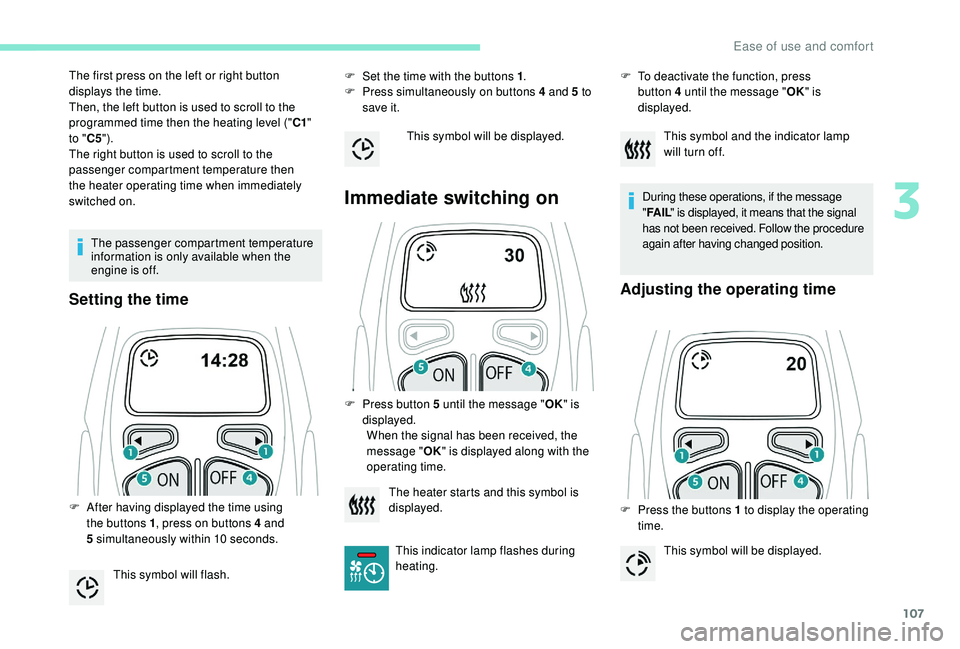
Setting the time
F Set the time with the buttons 1.
F P ress simultaneously on buttons 4 and 5 to
save it.
Immediate switching on
The first press on the left or right button
displays the time.
Then, the left button is used to scroll to the
programmed time then the heating level (" C1"
to " C5").
The right button is used to scroll to the
passenger compartment temperature then
the heater operating time when immediately
switched on.
F
A
fter having displayed the time using
the buttons 1 , press on buttons 4
and
5
simultaneously within 10
seconds.
This symbol will flash. This symbol will be displayed.
F
P
ress button 5 until the message "OK" is
displayed. When the signal has been received, the
message " OK" is displayed along with the
operating time. F
T o deactivate the function, press
button 4
until the message "OK" is
displayed.
During these operations, if the message
"FA I L " is displayed, it means that the signal
has not been received. Follow the procedure
again after having changed position.
Adjusting the operating time
F Press the buttons 1 to display the operating
time.
The heater starts and this symbol is
displayed.
This indicator lamp flashes during
heating. This symbol and the indicator lamp
will turn off.
This symbol will be displayed.
3
Ease of use and comfort