2017 PEUGEOT 4008 brake
[x] Cancel search: brakePage 39 of 368
37
4008_en_Chap01_Instruments-de-bord_ed01-2016
Adjusting vehicle settings
When the vehicle is
stationary, this menu allows
the user to change the
following settings:
-
t
h
e reinitialisation
mode for average
fuel consumption and
average speed. F
P
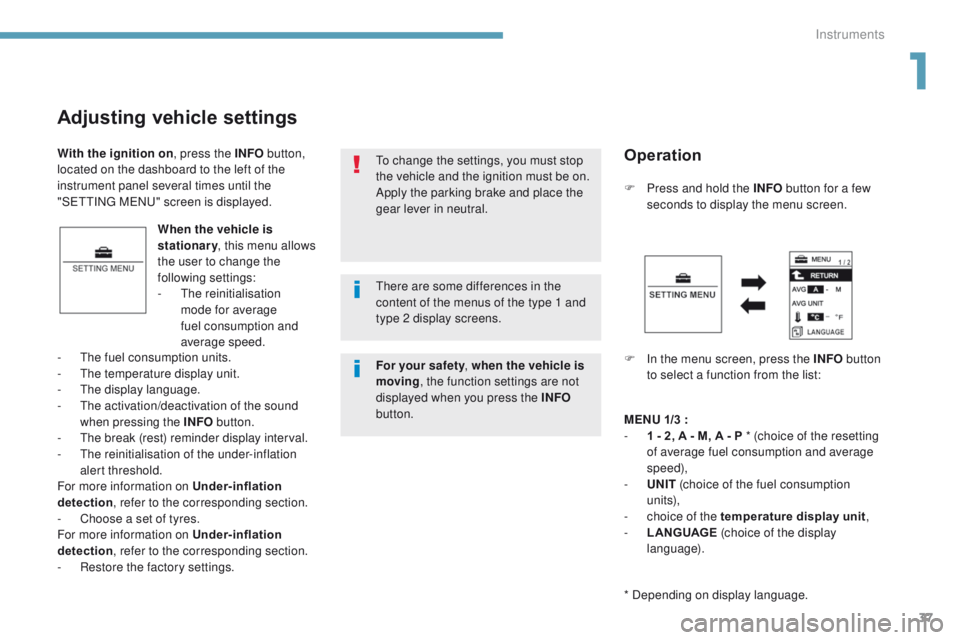
ress and hold the INFO
button for a few
seconds to display the menu screen.
F
I
n the menu screen, press the INFO button
to select a function from the list:
-
t
h
e fuel consumption units.
-
t
h
e temperature display unit.
-
t
h
e display language.
-
t
he
activation/deactivation of the sound
when pressing the INFO button.
-
t
he
break (rest) reminder display interval.
-
t
h
e reinitialisation of the under-inflation
alert threshold.
For more information on Under-inflation
detection , refer to the corresponding section.
-
C
hoose a set of tyres.
For more information on Under-inflation
detection , refer to the corresponding section.
-
R
estore the factory settings.
to c
hange the settings, you must stop
the vehicle and the ignition must be on.
Apply the parking brake and place the
gear lever in neutral.
With the ignition on
, press the INFO button,
located on the dashboard to the left of the
instrument panel several times until the
"S
e
tt
I
N
g
M
eNu" s
creen is displayed.
Operation
MENU
1/3 :
- 1 - 2 , A - M, A - P * (choice of the resetting
of average fuel consumption and average
speed),
-
UN
IT (choice of the fuel consumption
un i t s),
-
c
hoice of the temperature display unit ,
-
L
ANGUAGE (choice of the display
language).
* Depending on display language.
th
ere are some differences in the
content of the menus of the type 1 and
type 2 display screens.
For your safety, when the vehicle is
moving , the function settings are not
displayed when you press the INFO
button.
1
Instruments
Page 99 of 368
97
4008_en_Chap04_conduite_ed01-2016
Driving recommendations
Observe the driving regulations and remain
vigilant whatever the traffic conditions.
Pay close attention to the traffic and keep your
hands on the wheel so that you are ready to
react at any time to any eventuality.
On a long journey, a break every two hours is
strongly recommended.
In difficult weather, drive smoothly, anticipate
the need to brake and increase the distance
from other vehicles.Never drive with the parking brake
applied - Risk of overheating and
damage to the braking system!
Risk of fire!
As the exhaust system of your vehicle
is very hot, even several minutes after
switching off the engine, do not park
or run the engine over areas where
inflammable substances and materials
are present: grass, leaves, etc.
Never leave a vehicle unsupervised
with the engine running. If you have
to leave your vehicle with the engine
running, apply the parking brake
and put the gearbox into neutral or
position
N or P, depending on the type
of gearbox.
Driving on flooded roads
We strongly advise against driving on flooded
roads, as this could cause serious damage
to the engine or gearbox, as well as to the
electrical systems of your vehicle.
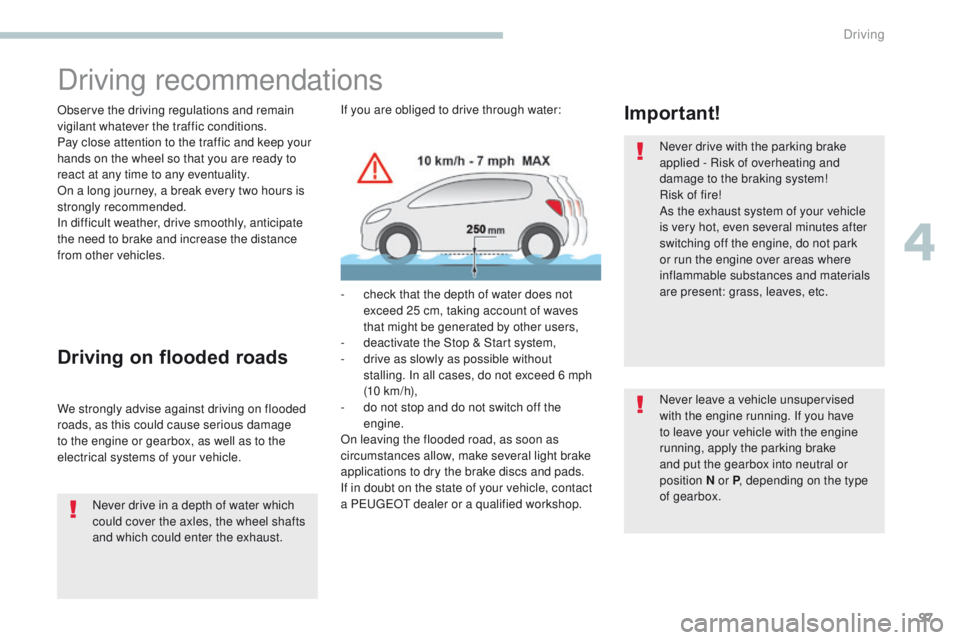
Important!If you are obliged to drive through water:
-
c
heck that the depth of water does not
exceed 25 cm, taking account of waves
that might be generated by other users,
-
d
eactivate the Stop & Start system,
-
d
rive as slowly as possible without
stalling. In all cases, do not exceed 6 mph
(10
km/h),
-
d
o not stop and do not switch off the
engine.
On leaving the flooded road, as soon as
circumstances allow, make several light brake
applications to dry the brake discs and pads.
If in doubt on the state of your vehicle, contact
a P
e
uge
Ot
dealer or a qualified workshop.
Never drive in a depth of water which
could cover the axles, the wheel shafts
and which could enter the exhaust.
4
Driving
Page 100 of 368
98
4008_en_Chap04_conduite_ed01-2016
Starting - switching off the engine with the key
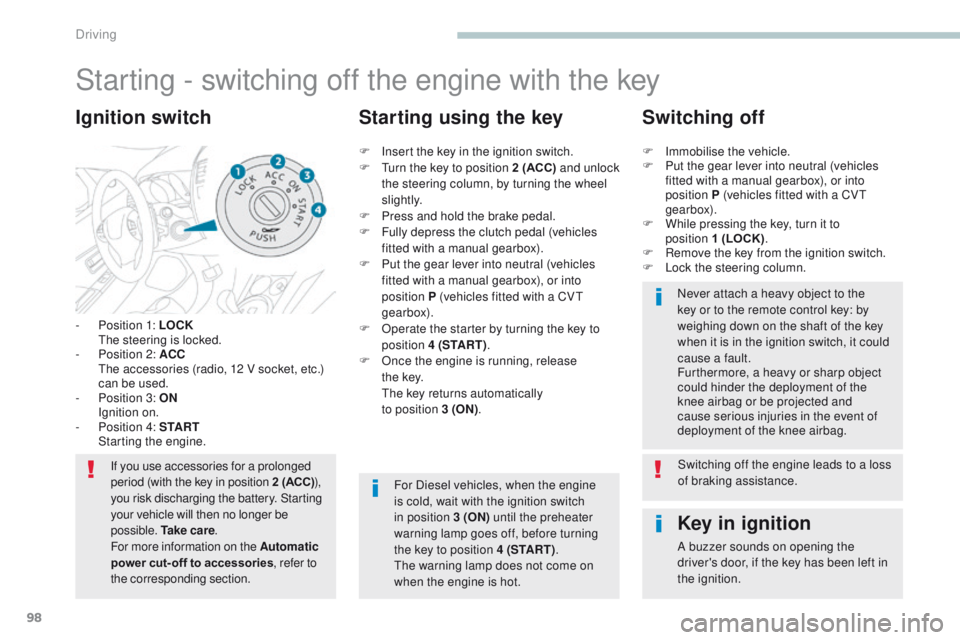
- Position 1: LOCK the steering is locked.
-
P
osition 2: ACC
t
h
e accessories (radio, 12 V socket, etc.)
can be used.
-
P
osition 3: ON
I
gnition on.
-
P
osition 4: S TA R T
S
tarting the engine.
Ignition switch
If you use accessories for a prolonged
period (with the key in position 2 (ACC) ),
you risk discharging the battery. Starting
your vehicle will then no longer be
possible. Ta k e c a r e .
For more information on the Automatic
power cut- off to accessories, refer to
the corresponding section.
Key in ignition
A buzzer sounds on opening the
driver's door, if the key has been left in
the ignition.
F
I
nsert the key in the ignition switch.
F
t
u
rn the key to position 2 (ACC)
and unlock
the steering column, by turning the wheel
s li g ht l y.
F
P
ress and hold the brake pedal.
F
F
ully depress the clutch pedal (vehicles
fitted with a manual gearbox).
F
P
ut the gear lever into neutral (vehicles
fitted with a manual gearbox), or into
position P (vehicles fitted with a CV
t
gearbox).
F
O
perate the starter by turning the key to
position 4 (S TA R T ) .
F
O
nce the engine is running, release
t h e
key.
t
h
e key returns automatically
to position 3 (ON) .
Starting using the key Switching off
F Immobilise the vehicle.
F
P ut the gear lever into neutral (vehicles
fitted with a manual gearbox), or into
position P (vehicles fitted with a CV
t
gearbox).
F
W
hile pressing the key, turn it to
position 1 (LOCK) .
F
R
emove the key from the ignition switch.
F
L
ock the steering column.Never attach a heavy object to the
key or to the remote control key: by
weighing down on the shaft of the key
when it is in the ignition switch, it could
cause a fault.
Furthermore, a heavy or sharp object
could hinder the deployment of the
knee airbag or be projected and
cause serious injuries in the event of
deployment of the knee airbag.
For Diesel vehicles, when the engine
is cold, wait with the ignition switch
in position 3 (ON) until the preheater
warning lamp goes off, before turning
the key to position 4 (S TA R T ) .
th
e warning lamp does not come on
when the engine is hot. Switching off the engine leads to a loss
of braking assistance.
Driving
Page 101 of 368

99
4008_en_Chap04_conduite_ed01-2016
Changing the vehicle's
mode
With the electronic key inside the vehicle; each
press on the "START/STOP " button, with no
action on the pedals , changes the vehicle's
mode:
F
F
irst press (ACC mode), the button's
warning lamp comes on in orange.
t
h
e accessories (audio system, 12 V
socket, etc.) can be used.
F
S
econd press (ON mode), the button's
warning lamp comes on in green.
S
witching on the ignition.
F
t
h
ird press (OFF mode), the warning lamp
in the button goes off. If you use the accessories for a
prolonged period with the ignition
switch in position 2 (ACC)
, you risk
discharging the battery. Starting your
vehicle will then no longer be possible.
Ta k e c a r e .
For more information on the Automatic
power cut- off to accessories , refer to
the corresponding section.
Starting - switching off the engine with
the Keyless e
n
try and Starting system
If the warning lamp flashes orange,
contact a Pe
ugeOt dealer or a
qualified workshop as soon as possible.
F
P
ress and release
the
"START/STOP " button.
F
W
ith the electronic key inside the vehicle,
depress the clutch pedal fully on vehicles
with a manual gearbox or press the brake
pedal on vehicles with a CV
t
gearbox.
Starting using the
electronic key
For vehicles fitted with a manual gearbox, put
the gear lever in neutral.
For vehicles fitted with a CV
t
gearbox, put the
gear lever in P .
4
Driving
Page 103 of 368
101
4008_en_Chap04_conduite_ed01-2016
Once the engine has started, you can
remove the electronic key from its
housing A and close the glove box.
Back-up starting with the
electronic key
the message is displayed
when you open the driver's
door and the electronic key
has not been removed from
its location A . Remember to take the electronic
key with you when you leave the vehicle.
F
P
ress the brake pedal on vehicles fitted
with a CV
t
gearbox or depress the clutch
pedal fully on vehicles with a manual
gearbox.
F
P
ress the "
START/STOP " button.
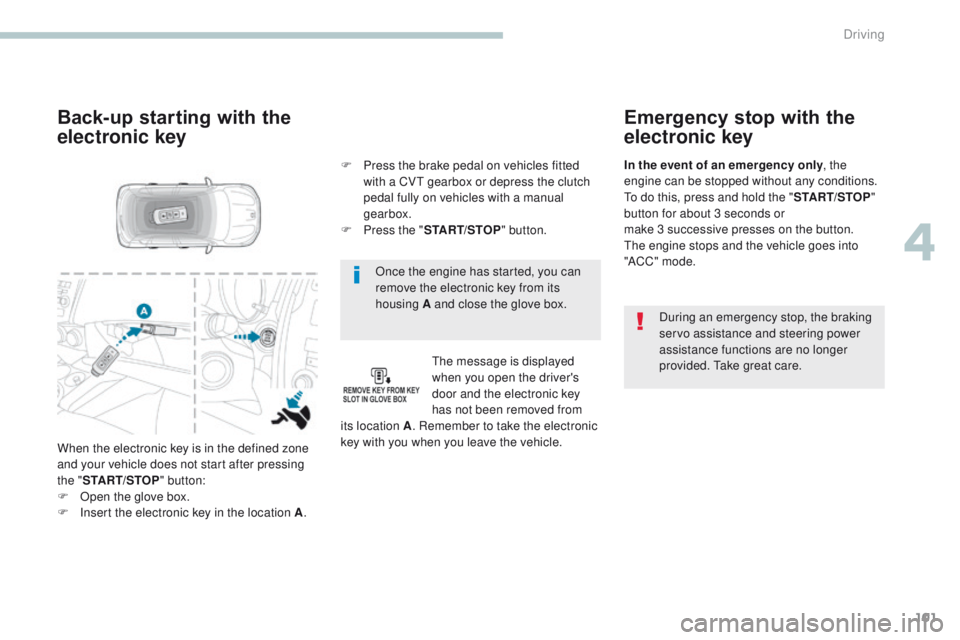
When the electronic key is in the defined zone
and your vehicle does not start after pressing
the " START/STOP " button:
F
O
pen the glove box.
F
I
nsert the electronic key in the location A .
Emergency stop with the
electronic key
During an emergency stop, the braking
servo assistance and steering power
assistance functions are no longer
provided.
t
a
ke great care.
In the event of an emergency only
, the
engine can be stopped without any conditions.
to d
o this, press and hold the "
START/STOP"
button for about 3 seconds or
make 3 successive presses on the button.
th
e engine stops and the vehicle goes into
"ACC " mode.
4
Driving
Page 104 of 368
102
4008_en_Chap04_conduite_ed01-2016
Anti-theft protection
Electronic engine immobiliser
the keys contain an electronic chip which has
a secret code. When the ignition is switched
on, this code must be recognised in order for
starting to be possible.
th
is electronic engine immobiliser locks the
engine management system a few minutes
after the ignition is switched off and prevents
starting of the engine by anyone who does not
have the key.
In the event of a malfunction, you are informed
by a message in the instrument panel screen.
In this case, your vehicle does not start; contact
a P
e
uge
Ot
dealer if required.
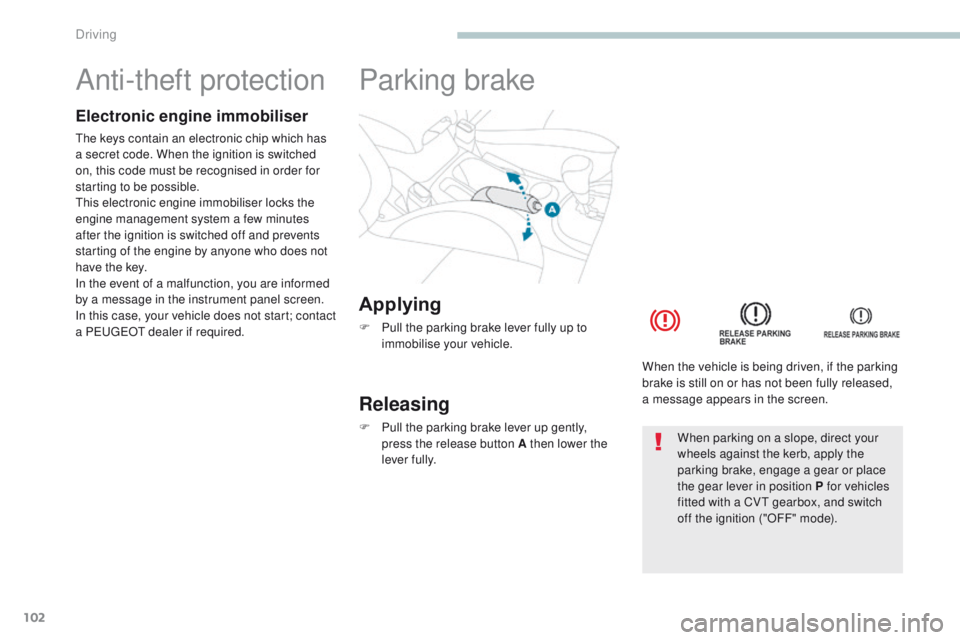
Applying
F Pull the parking brake lever fully up to immobilise your vehicle.
Parking brake
Releasing
F Pull the parking brake lever up gently, press the release button A then lower the
lever fully. When the vehicle is being driven, if the parking
brake is still on or has not been fully released,
a message appears in the screen.When parking on a slope, direct your
wheels against the kerb, apply the
parking brake, engage a gear or place
the gear lever in position P for vehicles
fitted with a CV
t
gearbox, and switch
off the ignition ("OFF" mode).
Driving
Page 108 of 368
106
4008_en_Chap04_conduite_ed01-2016
Gear lever positions
P: park.
Immobilisation of the vehicle, parking brake
applied or not.
R : reverse gear.
With the vehicle stationary, keep your foot
on the brake pedal and push the gear lever
forwards.
N : neutral.
D : driving in automated mode.
Move the lever backwards to select this mode.
+/- :
m
anual mode with sequential gear
changing.
Move the lever backwards, then to the left to
select this mode, then:
-
p
ush forward to change up,
-
p
ull backward to change down. +
: gear changing in manual mode.
Press behind the "+/OFF" steering mounted
control paddle to change up.
- : gear changing in manual mode.
Press behind the "-" steering mounted control
paddle to change down.
Functions of the steering
mounted control paddles
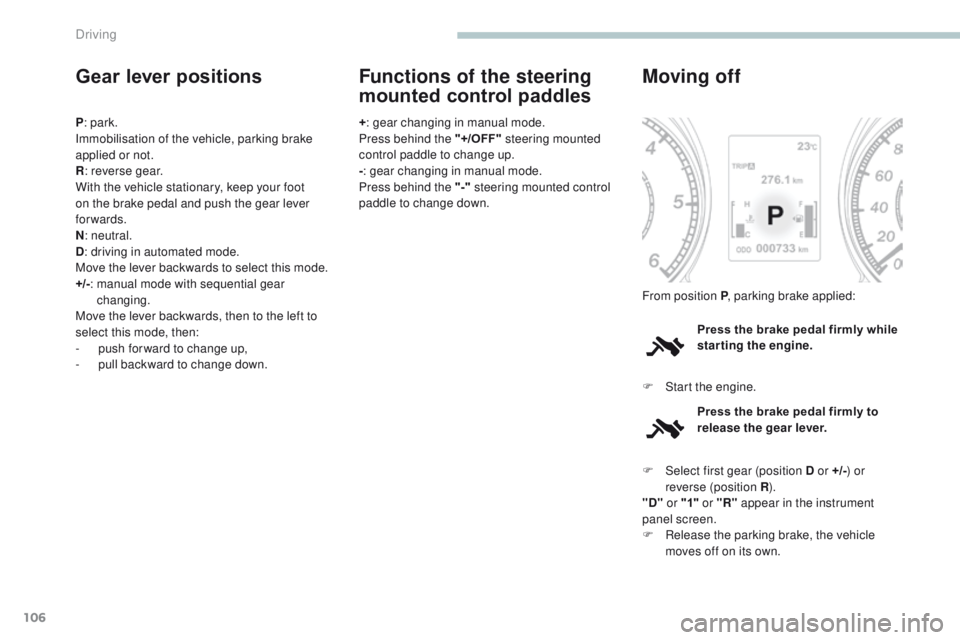
Press the brake pedal firmly while
starting the engine.
Moving off
F Start the engine. From position P , parking brake applied:
Press the brake pedal firmly to
release the gear lever.
F
Sel
ect first gear (position D or +/- ) or
reverse (position R ).
"D" or "1" or "R" appear in the instrument
panel screen.
F
R
elease the parking brake, the vehicle
moves off on its own.
Driving
Page 109 of 368
107
4008_en_Chap04_conduite_ed01-2016
Stopping - Starting on a slope
It is essential to use the parking brake to
hold the vehicle on a slope and not the
accelerator pedal.
When starting on a slope, accelerate gradually
while releasing the parking brake.
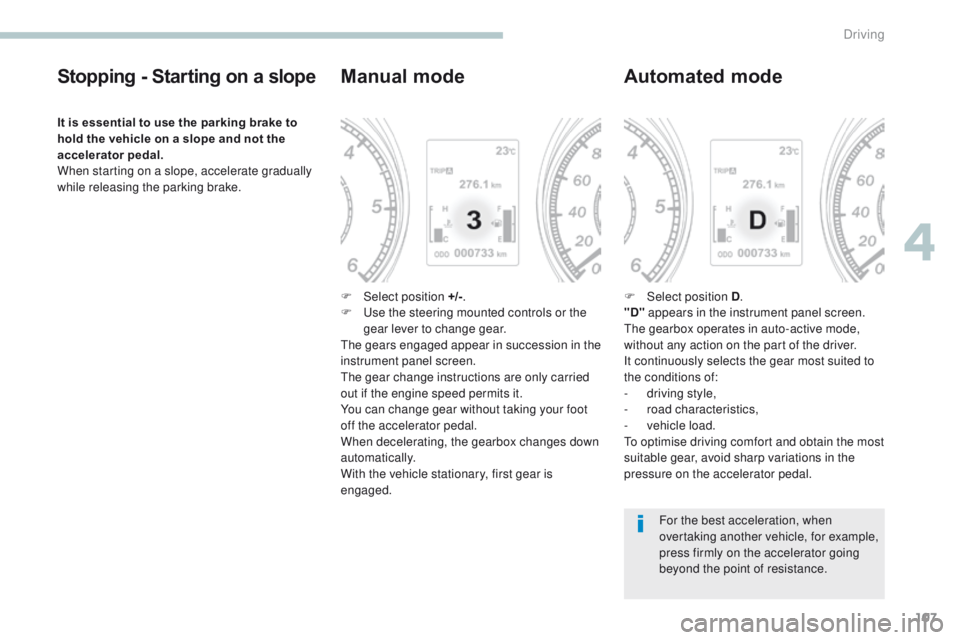
Manual mode
F Select position +/-.
F us e the steering mounted controls or the
gear lever to change gear.
th
e gears engaged appear in succession in the
instrument panel screen.
th
e gear change instructions are only carried
out if the engine speed permits it.
You can change gear without taking your foot
off the accelerator pedal.
When decelerating, the gearbox changes down
automatically.
With the vehicle stationary, first gear is
engaged.
Automated mode
F Select position D .
"D" appears in the instrument panel screen.
th
e gearbox operates in auto-active mode,
without any action on the part of the driver.
It continuously selects the gear most suited to
the conditions of:
-
d
riving style,
-
r
oad characteristics,
-
v
ehicle load.
to o
ptimise driving comfort and obtain the most
suitable gear, avoid sharp variations in the
pressure on the accelerator pedal.
For the best acceleration, when
overtaking another vehicle, for example,
press firmly on the accelerator going
beyond the point of resistance.
4
Driving