Page 189 of 392

187
308_en_Chap06_conduite_ed01-2016
Display of inter-vehicle time
using a radar located at the front of the vehicle,
this system helps the driver maintain a safe
distance between their vehicle and the one in
front, by displaying the current inter-vehicle
time in the instrument panel.
th
is is the time interval, expressed in seconds,
that separates two vehicles in line.
th
e recommended safe value is about
2
seconds.
Refer to the legislation or highway code in force
in your country.Activation / deactivation*
F Press this button, the indicator lamp comes on.
th
e measurement is displayed for
information only: the system takes no
action on the vehicle.
th
is system does not in any
circumstances replace the need for
vigilance on the part of the driver, who
must remain in control of the vehicle at
all times.
th
e system is not designed for urban
use nor for more dynamic driving
(bends, acceleration, harsh braking…)
but rather when driving at a steady
speed.
th
e system is active in a speed range
between 42 and 93 mph (70 and
150
km/h).
Stationary vehicles and certain other
road users (such as bicycles for
example) are not detected.
th
e system displays inter-vehicle time
values of between 3 seconds and 0.5 of
a second.
Below 0.5 of a second, the value
displayed is maintained at this level,
even if the true inter-vehicle time is less.
th
e state of the system is memorised when the
ignition is switched off. Activation of the system is done in the " Driving
assistance " menu, with the engine running.
* Depending on version.
Conditions for display
the dynamic cruise control must not
be selected (the dynamic cruise control
information is displayed instead of that for the
inter-vehicle time).
6
Driving
Page 190 of 392

188
308_en_Chap06_conduite_ed01-2016
Once the speed conditions are met, a symbol is displayed in the instrument panel.
Displays
SymbolAssociated message Comments
No vehicle detected by the radar.
A vehicle is detected but the inter-vehicle time is more than 3 seconds. No value is
displayed.
A vehicle is detected.
t
h
e inter-vehicle time is 3 seconds or less. t
h
e minimum value
displayed is 0.5 seconds, even if the true inter-vehicle time is lower.
"SYS
t
e
M I
NAC
tI
V
e: S
peed
unsuitable" If the speed of your vehicle is outside the operating range.
Where the speed is not suitable, a message is displayed while the speed is outside limits
(below 42 mph (70 km/h) or above 93 mph (150 km/h), approximately). However, when
decelerating, the system is deactivated below 27 mph (45 km/h).
"SYS
t
e
M I
NAC
tI
V
e: V
isibility
reduced"
th
e system switches to standby automatically if the sensor does not detect the vehicle in
front correctly (very difficult weather conditions, sensor out of adjustment,
...).
Driving
Page 191 of 392

189
308_en_Chap06_conduite_ed01-2016
the vehicle being followed may not be detected
in certain conditions such as, for example:
-
w
hen turning,
-
w
hen changing lane,
-
w
hen the vehicle in front is out of the range
of the sensor (maximum range: around
10 0
m).
Operating limits
In the event of a fault with the system,
this warning lamp is displayed
accompanied by a message.
Operating fault
Have the system checked by a Pe ugeOt
dealer or a qualified workshop.
At the first use of the system after
repair, a message may be displayed
indicating that the system is initialising.
th
e system is not available while this is
in progress. As soon as the message
disappears the system is operational
again. If the message does not
disappear, contact a P
e
uge
Ot
dealer
or a qualified workshop.
th
e operation of the radar, located in
the front bumper, may be disturbed in
certain weather conditions, for example:
with accumulations of snow, ice,
mud, ...
Clean the front bumper, removing the
snow, mud,
...
6
Driving
Page 194 of 392

192
308_en_Chap06_conduite_ed01-2016
the change from one level of alert
to the next takes place if the driving
conditions do not change (speed
unchanged, no change of lane...)If the speed of your vehicle is too high
when approaching another vehicle, the
first level of alert may not be displayed:
the level 2 alert may be displayed
di r e c t l y.
On the other hand, the level 1 alert
is never displayed with the "close"
triggering threshold 3.
Severe weather conditions (very heavy
rain, accumulations of snow in front
of the radar) may inter fere with the
operation of the system, resulting in
the display of this message "
SYSTEM
INACTIVE: Reduced visibility ".
t
h
e
system will remain unavailable until the
message disappears.
the
emergency collision alert system
does not replace the need for vigilance
on the part of the driver.
Alerts
According to the collision risk detected by
the system and the alert threshold chosen,
different levels of alert can be given.
Level 1: visual alert only (orange)
indicating that the vehicle in front is
very close.
t
h
e message "Vehicle
close " is displayed.
Level 2 : visual (red) and audible
alerts indicating that a collision is
imminent.
t
h
e message "Brake!" is
displayed.
th
is level of alert is based on the inter-vehicle
time between your vehicle and the one in front.
th
is level of alert is based on a time before
collision. It takes account of the vehicle
dynamics, the speed of your vehicle and
the speed of the vehicle in front, the driving
conditions, the situation with your vehicle
(cornering, pedals pressed, etc.) to trigger the
alert at the right moment.
Driving
Page 196 of 392
194
308_en_Chap06_conduite_ed01-2016
Operating fault
In the event of a fault, you are alerted
by the display of the Service warning
lamp, accompanied by a message.
Consult a P
e
uge
Ot
dealer or a
qualified workshop.
th
e operation of the radar, located in
the front bumper, may be disturbed in
certain weather conditions, for example:
with accumulations of snow, ice,
mud,
...
Clean the front bumper, removing the
snow, mud,
...
Driving
Page 200 of 392

198
308_en_Chap06_conduite_ed01-2016
this system indicates the proximity of an
obstacle (e.g. pedestrian, vehicle, tree, gate)
which comes within the field of detection of
sensors located in the bumper.
Certain types of obstacle (e.g. stake,
roadworks cone) detected initially will no longer
be detected at the end of the manoeuvre, if
they are located in blind spots in the sensors'
field of detection.
Parking sensors
this system cannot in any circumstances replace
the need for vigilance on the part of the driver.
the system is switched on by engaging reverse
g e a r.
th
is is confirmed by an audible signal.
th
e system is switched off when you come out
of reverse gear.
the proximity information is given by an
intermittent audible signal, the frequency of which
increases as the vehicle approaches the obstacle.
the sound emitted by the speaker (right-hand
or left-hand) indicates the side on which the
obstacle is located.
When the distance between the vehicle and
the obstacle becomes less than approximately
thirty centimetres, the audible signal becomes
continuous.
Rear parking sensors
this supplements the audible signal by displaying
bars in the screen or the instrument panel which
move progressively nearer to the vehicle. When the
obstacle is near, the "Danger" symbol is displayed.
Front parking sensors
the sound from the speakers (front or
rear) indicates whether the obstacle is
in front or behind.
As an addition to the rear parking sensors, the
front parking sensors are triggered when an
obstacle is detected in front and the speed of
the vehicle is still below 6 mph (10 km/h).
th
e front parking sensors are interrupted if
the vehicle stops for more than three seconds
in for ward gear, if no further obstacles are
detected or when the speed of the vehicle
exceeds 6 mph (10 km/h).
Audible assistance
Visual assistance
Driving
Page 202 of 392
200
308_en_Chap06_conduite_ed01-2016
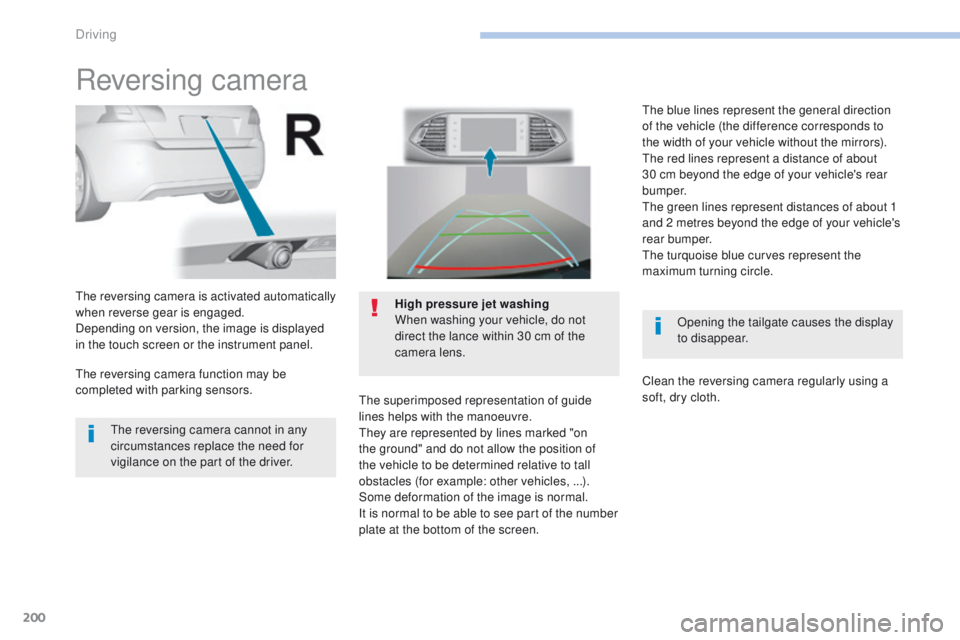
Reversing camera
Opening the tailgate causes the display
to disappear.
the
reversing camera is activated automatically
when reverse gear is engaged.
Depending on version, the image is displayed
in the touch screen or the instrument panel. High pressure jet washing
When washing your vehicle, do not
direct the lance within 30 cm of the
camera lens.
the
superimposed representation of guide
lines helps with the manoeuvre.
th
ey are represented by lines marked "on
the ground" and do not allow the position of
the vehicle to be determined relative to tall
obstacles (for example: other vehicles,
...).
Some deformation of the image is normal.
It is normal to be able to see part of the number
plate at the bottom of the screen.
th
e reversing camera cannot in any
circumstances replace the need for
vigilance on the part of the driver.
th
e reversing camera function may be
completed with parking sensors.
th
e blue lines represent the general direction
of the vehicle (the difference corresponds to
the width of your vehicle without the mirrors).
th
e red lines represent a distance of about
30 cm beyond the edge of your vehicle's rear
b u m p e r.
th
e green lines represent distances of about 1
and 2 metres beyond the edge of your vehicle's
rear bumper.
the
turquoise blue curves represent the
maximum turning circle.
Clean the reversing camera regularly using a
soft, dry cloth.
Driving
Page 204 of 392

202
308_en_Chap06_conduite_ed01-2016
the sequence of manoeuvres and the
driving instructions are displayed in the
instrument panel.
You should always check the
surroundings of your vehicle before
starting a manoeuvre.
th
e assistance is
deactivated: the display of
this symbol indicates that
the steering manoeuvres
are no longer controlled by
the system: you must take
control of the steering.
th
e assistance is
activated: the display of this
symbol and a speed limit
indicate that the steering
manoeuvres are controlled
by the system: do not touch
the steering wheel.th e parking sensors function is
not available during parking space
measurement. It intervenes later when
manoeuvring to warn you that your
vehicle is approaching an obstacle: the
audible signal becomes continuous
when the obstacle is less than thirty
centimetres away.
If you have deactivated the parking
sensors, they are automatically
reactivated during assisted parking
manoeuvres.
Activation of Park Assist deactivates the
Blind Spot Monitoring System.
Driving
