2017 Peugeot 308 bluetooth
[x] Cancel search: bluetoothPage 364 of 392
362
308_en_Chap10c_RD45_ed01-2016
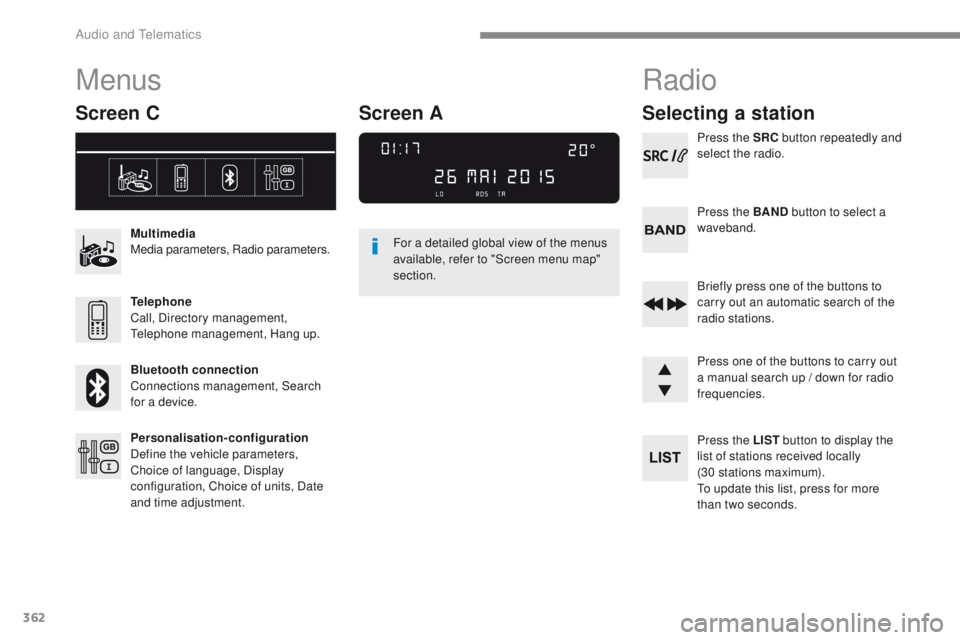
Menus
Screen C
Multimedia
Media parameters, Radio parameters.
Telephone
Call, Directory management,
te
lephone management, Hang up.
Bluetooth connection
Connections management, Search
for a device.
Personalisation-configuration
Define the vehicle parameters,
Choice of language, Display
configuration, Choice of units, Date
and time adjustment. For a detailed global view of the menus
available, refer to "Screen menu map"
section.
Radio
Selecting a station
Press the SRC
button repeatedly and
select the radio.
Press the BAND button to select a
waveband.
Briefly press one of the buttons to
carry out an automatic search of the
radio stations.
Press one of the buttons to carry out
a manual search up / down for radio
frequencies.
Press the LIST button to display the
list of stations received locally
(30 stations maximum).
to u
pdate this list, press for more
than two seconds.
Screen A
Audio and telematics
Page 371 of 392

369
308_en_Chap10c_RD45_ed01-2016
use only uS B memory sticks formatted FAt3 2
(File Allocation ta ble).
It is recommended that you use
genuine Apple
® uSB cables for correct
operation.
to p
rotect the system, do not use a
uS
B hub.
*
I
n certain cases, play of the audio files must
be initiated from the keypad.
** If the telephone supports the function.
Bluetooth® audio streaming
Streaming allows music files on the telephone
to be played via the audio system.
Connect the telephone: see the " Telephone"
section.
Select in the " Bluetooth: Telephone - Audio "
menu the telephone to be connected.
th
e audio system connects to a newly paired
telephone automatically.
Control of tracks to be played is via the buttons
on the audio system control panel and the
steering mounted controls**.
t
h
e contextual
information can be displayed in the screen. Activate the streaming source by
pressing the SOURCE
* button.
Connecting Apple® players
Connect the Apple® player to the uSB port
using a suitable cable (not supplied).
Play starts automatically.
Control is via the audio system.
th
e classifications available are those of the
portable device connected (artists / albums /
genres / playlists / audiobooks / podcasts).
th
e version of software in the audio system
may not be compatible with the generation of
your Apple
® p l aye r.
.
Audio and telematics
Page 372 of 392

370
308_en_Chap10c_RD45_ed01-2016
telephone
Pairing a Bluetooth® telephone
Screen C
(Available according to model and version)
As a safety measure and because they
require prolonged attention on the part
of the driver, the operations for pairing
of the Bluetooth mobile telephone with
the Bluetooth hands-free system of
your audio equipment must be carried
out with the vehicle stationary and the
ignition on.
go
to www.peugeot.co.uk for more information
(compatibility, more help, ...).
Activate the telephone's Bluetooth function
and ensure that it is "visible to all" (telephone
configuration).
Press the MENU button. In the menu, select:
-
"Bluetooth : Telephone - Audio "
-
"Bluetooth configuration "
-
"Perform a Bluetooth search "
A window is displayed with a message that a
search is in progress.
the
services available depend on
the network, the SIM card and the
compatibility of the Bluetooth device
used.
Consult your telephone's manual and
your operator to find out which services
are available to you.
* If your telephone is fully compatible.
th
e first 4 telephones recognised are displayed
in this window.
th
e "Telephone " menu permits access to the
following functions in particular: " Directory" *,
" Calls list ", "Consult the paired equipment ".Select the telephone to be connected from the
list. Only one telephone can be connected at
a time.
A virtual keypad is displayed in the screen:
enter a code with at least 4 digits.
Confirm by pressing OK.
A message in the screen indicates the telephone
chosen.
t
o
accept the pairing, enter the same
code on the telephone, then confirm with OK.
If pairing fails, the number of attempts is not
limited.
A message that the pairing has been
successful appears in the screen.
th
e automatic connection authorised is only
active after the telephone has been configured.
th
e directory and the call list can be accessed
after the necessary synchronisation period.
Audio and telematics
Page 373 of 392

371
308_en_Chap10c_RD45_ed01-2016
Receiving a call
An incoming call is announced by a ring and a
superimposed display in the screen.Select the YES tab on the display
using the buttons.
Confirm by pressing OK.
Press this button at the steering
mounted controls to accept the call.
Making a call
From the " Bluetooth : Telephone - Audio "
menu.
Select " Manage the telephone call".
Select " Call".
Or
Select " Calls list ".
Or
Select " Directory ".
Press this button for more than two
seconds for access to your directory,
then navigate using the thumbwheel.
Or
to d
ial a number, use your telephone's keypad,
with the vehicle stationary.
Ending a call
During a call, press this button for
more than 2 seconds.
Confirm with OK to end the call.
th
e system accesses the telephone's
contacts directory, depending on its
compatibility, and while it is connected
by Bluetooth.
With certain telephones connected by
Bluetooth you can send a contact to the
directory of the audio system.
Contacts imported in this way are
saved in a permanent directory
visible to all, whatever the telephone
connected.
th
e menu for the directory is not
accessible if it is empty.
.
Audio and telematics
Page 375 of 392

373
308_en_Chap10c_RD45_ed01-2016
Media parameters
MEDIA
TELEPHONE
Choice of playback mode
Choice of track listingNormal
By folders Random all
By genres Random
By artists Repeat
By playlists
3
3
3
3
3
3
3
3
1
2
2
Call
Radio parameters
Directory
Calls list
Voice mail box Dial
Directory management
Telephone management
Hang up Connections management
BLUETOOTH CONNECTION
Search for a device
Delete an entry
Delete all entries Consult an entr y
Telephone status
1
1
1
1
1
2
2
2
2
1
1
2
2
2
2
Screen C
.
Audio and telematics
Page 379 of 392

377
308_en_Chap10c_RD45_ed01-2016
Media
QUESTIONANSWER SOLUTION
th
e message "
uS
B
peripheral error" is
displayed on the screen.
th
e Bluetooth connection
is cut.
th
e battery of the peripheral may not be sufficiently charged. Recharge the battery of the peripheral device.
th
e u
S
B memory stick is not recognised.
th
e u
S
B memory stick may be corrupt. Reformat the
u
S
B memory stick.
th
e CD is ejected
automatically or is not
played by the player.
th
e CD is inserted upside down, is unplayable, does not contain any
audio data or contains an audio format which the player cannot play.
th
e CD is protected by an anti-pirating protection system which is
not recognised by the audio equipment. -
C
heck that the CD is inserted in the player the
right way up.
-
C
heck the condition of the CD: the CD cannot
be played if it is too damaged.
-
C
heck the content in the case of a recorded
CD: consult the advice in the "Audio" section.
-
t
h
e audio equipment's CD player does not
play DVDs.
-
D
ue to their quality level, certain writeable
CDs will not be played by the audio system.
th
e CD player sound is
p o o r.
th
e CD used is scratched or of poor quality. Insert good quality CDs and store them in suitable
conditions.
th
e audio equipment settings (bass, treble, ambiences) are
unsuitable. Set the treble or bass level to 0, without selecting
an ambience.
.
Audio and telematics
Page 381 of 392

379
308_en_Chap11_index-alpha_ed01-2016
ABS ...............................................................121
Accessories ................................. 152, 220, 222
AdBlue
® additive ....................... 26, 32, 233-237
Additive, Diesel ............................................. 230
Adjusting headlamps
.................................... 113
Adjusting head restraints
................................ 77
Adjusting the seat
..................................... 7 3 , 74
Adjusting the air distribution
...........................95
Adjusting the air flow
....................................... 95
Adjusting the date
...................................... 47- 4 9
Adjusting the height and reach of the steering wheel
.................................... 72
Adjusting the lumbar support
..........................73
Adjusting the temperature
.............................. 95
A
djusting the time
...................................... 47- 4 9
Advice on driving
.................................. 146, 147
Affaire version
............................................... 291
Airbags
............................................ 23, 127, 134
Airbags, curtain
..................................... 1
2 9, 13 0
Airbags, front ......................................... 1 2 7, 1 3 0
Airbags, lateral
...................................... 12 9, 13 0
Air conditioning
............................ 10, 93, 95, 98
Air conditioning, automatic
.......................92, 95
Air conditioning, digital
................................. 10 0
Air conditioning, manual
...................92-94, 100
Air intake
......................................................... 99
Air vents
.......................................................... 91
Alarm
............................................................... 67
Anti-lock braking system (ABS)
....................121
Anti-pinch
................................................ 70, 102
Anti-slip regulation (ASR)
............................. 121
Anti-theft
................................................. 53, 15 4
Armrest
............................................................ 82
Armrest, front
.................................................. 84
Armrest, rear
................................................... 86
A
ssistance call
.............................................. 11 9
Audible warning
............................................ 121
Audio streaming (Bluetooth)
......... 3
12, 314, 3 69
Auxiliary
........................................................ 312
AB
C
Back-up key..................................................... 63
Battery .................................... 219, 231, 268 -271
Battery, charging
........................................... 270
Battery, remote control
................ 5
4, 55, 64, 65
Bicycle carrier
............................................... 222
Blanking screen (snow shield)
.............. 21
7, 218
Blind, panoramic roof
.................................... 102
Blind spot sensors
.................................. 16, 195
BlueHDi
..................................... 28, 32, 233, 274
Bluetooth (hands-free)
.................. 3
46, 347, 370
Bluetooth (telephone)
...........................346, 347
Bonnet
........................................................... 225
Boot
................................................................. 61
Boot lamp
........................................................ 88
Brake discs
.................................................... 2
32
Brake lamps
...............................
...........257, 259
Brakes
............................................... 21, 25, 232
Bulbs (changing)
........................... 25
2, 257, 259
Cable, audio
.................................................. 312
Cable, jack
.................................................... 312
Capacity, fuel tank
..............................
..........213
Cap, fuel filler
................................................ 213
CD, MP3
........................................ 3
12, 367, 368
Central locking
.............................. 51, 56, 58, 59
Changing a bulb
............................ 252, 257, 259
Changing a fuse
........................... 262, 264, 266
Changing a wheel
................................. 246, 247
Changing a wiper blade
........................117, 222
Changing the remote control battery
........54, 64
Checking the engine oil level
..........................31
Checking the levels
...............................228-230Checking tyre pressures
(using the kit) ..............................
................239
Checks
...............
...................226, 227, 231, 232
Child lock
...............................
..................63, 14 4
Children
...............................
..........13 8, 142, 143
Children (safety)
...............................
.............14 4
Child seats
............1
26, 131-13 3, 137, 13 8, 14 5
Child seats, conventional
..............................137
Child seats, ISOFIX
......................14
0, 142, 143
Closing the boot
..............................................61
Closing the doors
..........................51, 56, 58, 59
Collision risk alert
..............................
...........19 0
Compressor, tyre inflation
............................239
Configuration, vehicle
.....................................44
Connection, Bluetooth
.........................346, 347
Control, electric windows
................................70
Control, emergency boot release
...................62
Control, emergency door
................................63
Control, heated seats
......................................76
Control stalk, lighting
.............................. 14
, 107
Control stalk, wipers
..............................114 -11 6
Courtesy lamps
.............................................103
Cruise control
........................ 1
73, 177, 180, 181
Cruise control, dynamic
................................180
Cup holder
...............................
........................82
DAB (Digital Audio Broadcasting) - Digital radio
.........................310, 311, 364, 365
Date (setting)
...............................
...............47- 4 9
Daytime running lamps
................. 1
08, 110, 252, 253, 255, 256
Deactivating the passenger airbag
.................................................. 1
2 7, 1 3 4
D
.
Alphabetical index