2017 PEUGEOT 3008 display
[x] Cancel search: displayPage 71 of 566

69
3008-2_en_Chap02_ouvertures_ed01-2016
Activation / Deactivation
Anti-intrusion security
Operation
This system allows automatic simultaneous locking of the doors and boot as soon as the speed of the vehicle exceeds 6 mph (10 km/h).
If one of the doors or the boot is open, the
automatic central locking does not take place.
Carrying long or
voluminous objects
If you want to drive with the boot open,
you should press the central locking
button to lock the doors. Other wise,
every time the speed of the vehicle
exceeds 6 mph (10 km/h), the locks
will rebound and the alerts mentioned
above will appear.
Pressing the central locking button
unlocks the vehicle.
Above 6 mph (10 km/h), this unlocking
is temporary.You can activate or deactivate this function
permanently.
Driving with the doors locked may
render access for the emergency
services difficult in an emergency.
This is signalled by the sound of
the locks rebounding, accompanied
by illumination of this symbol in the
instrument panel, an audible signal
and the display of an alert message.
The state of the system stays in memory when
switching off the ignition.F
W ith the ignition on, press this
button until an audible signal
starts and a corresponding
message is displayed.
2
Access
Page 100 of 566

98
3008-2_en_Chap03_ergonomie-et-confort_ed01-2016
System with a choice of type of massage and
adjustment of its intensity.
This system operates with the engine running,
as well as in STOP mode of Stop & Start.
Activation / Settings
The massage settings are adjusted in the touch
screen.
The system is switched on, either directly using
the button on the front seat, or by activating
a personalised ambience with the i-Cockpit
Amplify function
Multipoint massage
F Press this button; its indicator
lamp comes on.
The system is activated immediately with the
last settings used and the settings page is
displayed in the touch screen.
If the settings suit you and you make no
changes, the display returns to its previous
state. If you want to modify the settings:
F
s elect another type of massage from the
five offered,
F
s
elect a massage intensity from the
3
levels offered: "1" (Low), " 2" (Medium)
or " 3" (High).
The modifications are taken into account
immediately.
Once activated, the system starts a one hour
massage cycle, made up of sequences of
6
minutes of massage followed by 3 minutes
at rest.
The system stops automatically at the end of
the cycle; the indicator lamp in the button goes
of f.
The multipoint massages are also
manage by the i-Cockpit Amplify
function.
Using the button on the front seat:
For more information on the i-Cockpit Amplify
function , refer to the corresponding section.
Ease of use and comfort
Page 105 of 566
103
3008-2_en_Chap03_ergonomie-et-confort_ed01-2016
Personalising an ambience
From the home page:
F S elect an ambience to activate it.
F
Press "Settings" to display the settings
page for the ambience.
F
S
elect a system for which you wish to
modify the settings.
F
A
fter making the modifications, press any
area of the screen outside the system
settings window to return to the ambience
settings page.
F
A
fter making all of the desired
modifications to settings, press "Save
settings" .
The modifications are taken into account
immediately. It is possible to temporarily modify an
ambience at any time, by modifying the
settings for one or more of the systems
managed in the ambience, without
going via the i- Cockpit Amplify function.
For example, you can deactivate or
modify the intensity of the current
massage by pressing the massage
button on your seat, or activate or
deactivate the passenger compartment
mood lighting in the Driving
menu.
In this case, the new settings will not be
saved as part of the current ambience.
3
Ease of use and comfort
Page 110 of 566
108
3008-2_en_Chap03_ergonomie-et-confort_ed01-2016
Semi-automatic mono-zone air conditioning
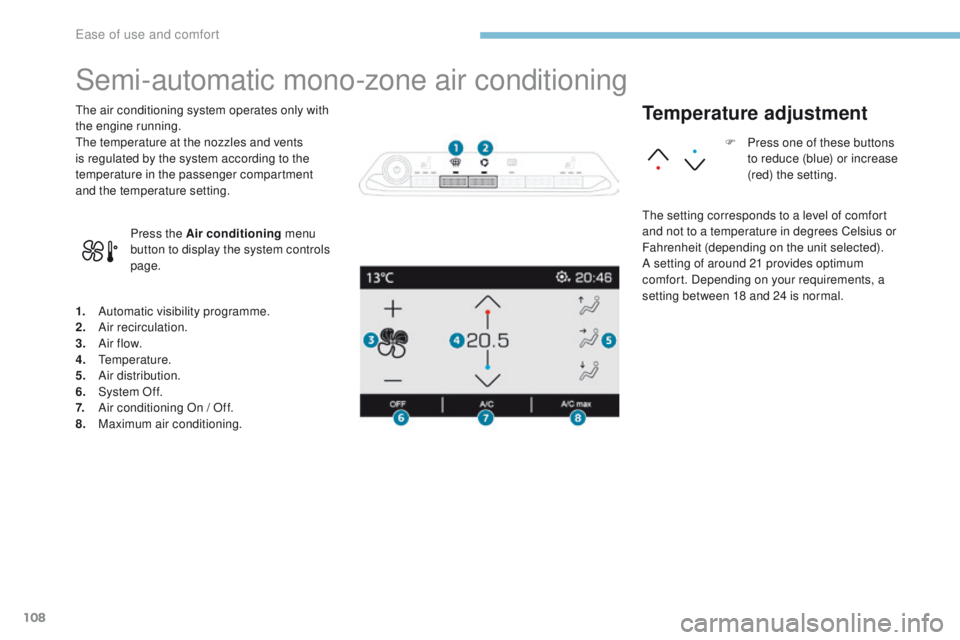
1. Automatic visibility programme.
2. Air recirculation.
3.
A
ir f low.
4.
T
emperature.
5.
A
ir distribution.
6.
S
ystem Of f.
7.
A
ir conditioning On / Off.
8.
M
aximum air conditioning.
The air conditioning system operates only with
the engine running.
The temperature at the nozzles and vents
is regulated by the system according to the
temperature in the passenger compartment
and the temperature setting.
Press the Air conditioning menu
button to display the system controls
page.
Temperature adjustment
The setting corresponds to a level of comfort
and not to a temperature in degrees Celsius or
Fahrenheit (depending on the unit selected).
A setting of around 21 provides optimum
comfort. Depending on your requirements, a
setting between 18 and 24 is normal. F
P
ress one of these buttons
to reduce (blue) or increase
(red) the setting.
Ease of use and comfort
Page 113 of 566

111
3008-2_en_Chap03_ergonomie-et-confort_ed01-2016
Dual-zone automatic air conditioning
1. Automatic visibility programme.
2. Recirculation of interior air.
3.
T
emperature adjustment on driver's side.
4.
T
emperature adjustment on passenger's
side.
5.
A
ir distribution adjustment.
6.
A
ir flow adjustment.
7.
S
ystem of f.
8.
A
ir conditioning On/Off.
9.
A
utomatic comfort programme on / off.
10.
M
aximum air conditioning.
11.
A
ccess to the secondary page.
12 .
S
election of settings for the automatic
comfort programme.
13.
A
ir Quality System (AQS).
14 .
M
ono-zone / Dual-zone.
This air conditioning system operates with
the engine running, but the ventilation and its
controls are available with just the ignition on.
Operation of the air conditioning and regulation
of temperature, air flow and air distribution in
the passenger compartment are automatic.
Press the Air conditioning menu
button to display the controls for the
air conditioning. F
P
ress one of these buttons to
increase the value.
F P ress one of these buttons to
decrease the value.
It is recommended that you avoid a difference
of more than 3 in the settings for left and right.
Temperature adjustment
The driver and front passenger can each
choose their own temperature setting.
The value indicated corresponds to a level of
comfort and not to a precise temperature.
3
Ease of use and comfort
Page 114 of 566

62)7
$872
$872
1250$/
$872
)$67
112
3008-2_en_Chap03_ergonomie-et-confort_ed01-2016
Automatic comfort
programme
F Press this button to activate or deactivate the automatic mode of
the air conditioning system.
When the indicator lamp in the button is on, the
air conditioning system operates automatically:
the system manages the temperature, air
flow and air distribution in the passenger
compartment in an optimum way according to
the comfort level you have selected.
It is possible to modulate the intensity of the
automatic comfort programme by choosing one
of three settings offered in the secondary page,
accessible from the " OPTIONS" button. To change the current setting, shown by
illumination of the corresponding indicator
lamp, press this button repeatedly until the
desired setting is displayed:
"Soft ": provides soft and quiet
operation by limiting air flow.
" Normal ": offers the best
compromise between a comfortable
temperature and quiet operation
(default setting).
" Fast ": provides strong and effective
air f low.
Use the " Normal" or "Fast" setting to assure
the comfort of passengers in the rear seats.
This setting is associated with automatic mode
only. However, on deactivation of AUTO mode,
the indicator for the last setting remains on.
Changing the setting does not reactivate AUTO
mode if deactivated. In cold weather with the engine cold,
the air flow is increased gradually until
the system has warmed up, in order
to limit the delivery of cold air into the
passenger compartment.
On entering the vehicle, if the interior
temperature is much colder or warmer
than the comfort value setting, there
is no need to alter the value displayed
in order to reach more quickly the
required level of comfort. The system
compensates automatically and
corrects the temperature difference as
quickly as possible.
Ease of use and comfort
Page 115 of 566

113
3008-2_en_Chap03_ergonomie-et-confort_ed01-2016
Automatic visibility
programme
For more information on Front demisting /
defrosting, refer to the corresponding section.
"Air Quality System" (AQS)
function
Using a pollution sensor, this function
automatically activates recirculation of the
interior air once it detects a certain level of
polluting substances in the exterior air.
When the air quality returns to a satisfactory
level, recirculation of interior air is automatically
deactivated.
This function is not designed to detect
unpleasant odours.
The function is automatically activated when
the screenwash is used or when in reverse
g e a r.
The function does not operate if the ambient
temperature is below 5°C, to avoid the risk of
misting of the windscreen and side windows.
To activate or deactivate the function, go to the
secondary page by pressing the " OPTIONS"
button. Windscreen and side windows.
Centre and side vents.
Footwells.
Manual control
You can manually adjust one or more settings,
while retaining automatic control of the other
functions:
-
a
ir flow,
-
a
ir distribution.
As soon as you modify a setting, the indicator
lamp in the " AUTO" button goes off.
F
P
ress this button again to
reactivate the automatic comfort
programme.
Air flow adjustment
F Press one of these buttons to increase or decrease the speed
of the booster fan.
The air flow symbol (a fan) is filled in
progressively as the speed of the fan is
increased.
By reducing the air flow to minimum, you are
stopping ventilation.
" OFF " is displayed alongside the fan.
Avoid driving for too long with the
ventilation off - Risk of misting and
deterioration of air quality!
Air distribution adjustment
You can modulate the distribution of air in the
passenger compartment using these three buttons.
Each press on a button activates or deactivates
the function. The indicator lamp is on when the
button is activated. For a uniform distribution in
the passenger compartment, all three buttons
can be pressed simultaneously.
In AUTO mode, the indicator lamps in all three
buttons are off.
3
Ease of use and comfort
Page 117 of 566

115
3008-2_en_Chap03_ergonomie-et-confort_ed01-2016
Mono-zone / Dual-zone
The passenger temperature setting can be
indexed to the driver's setting (mono-zone
function).
It is available in the secondary page by
pressing the "OPTIONS" button.
F
P
ress this button to activate the
" MONO " function; its " ON" status
is displayed.
The function is automatically deactivated if the
passenger uses their temperature adjustment
buttons (dual-zone function).
Ventilation with the ignition on
With the ignition on, you can use the ventilation
system, controlling the air flow and distribution
in the passenger compartment.
This function is also available for a few minutes
after switching off the ignition, depending on
the state of charge of the vehicle's battery.
You can also make use of the residual
heat in the engine to warm the passenger
compartment, using the temperature
adjustment buttons.
This function does not activate operation of the
air conditioning.
Switching off the system
F Press this button; its indicator lamp comes on and all other indicator
lamps for the system go off.
This action deactivates all functions of the air
conditioning system.
Temperature is no longer regulated. A slight air
flow can still be felt however, resulting from the
for ward movement of the vehicle.
Avoid driving for long periods with
the system off - Risk of misting and
deterioration of air quality!
Pressing any button reactivates the
system with the settings that were
previously in use.
3
Ease of use and comfort