2017 NISSAN TITAN light
[x] Cancel search: lightPage 404 of 671
BSW DRIVING SITUATIONS
Indicator
on
Indicator
off
Indicator
flashing
Another vehicle approaching from
behind
Illustration 1:The side BSW/RCTA indicator
light illuminates if a vehicle enters the detection
zone from behind in an adjacent lane.
Illustration 2:If the driver activates the turn
signal when another vehicle is in the detection
zone, then the system chimes (twice) and the
side indicator light flashes.
NOTE:
● The radar sensors may not detect vehicles
which are approaching rapidly from behind.
● If the driver activates the turn signal before a
vehicle enters the detection zone, the side
indicator light will flash but no chime will
sound when the other vehicle is detected.
Illustration 1 – Approaching from behind
LSD2299
Illustration 2 – Approaching from behind
LSD2300
Starting and driving5-27
Page 405 of 671
Overtaking another vehicle
Illustration 3:The side indicator light illumi-
nates if you overtake a vehicle and that vehicle
stays in the detection zone for approximately
2 seconds. Illustration 4:
If the driver activates the turn
signal while another vehicle is in the detection
zone, then the system chimes (twice) and the
side indicator light flashes.
NOTE:
● When overtaking several vehicles in a row,
the vehicles after the first vehicle may not be
detected if they are traveling close together.
● The radar sensors may not detect slower
moving vehicles if they are passed quickly. ●
If the driver activates the turn signal before a
vehicle enters the detection zone, the side
indicator light will flash but no chime will
sound when the other vehicle is detected.
Illustration 3 – Overtaking another vehicle
LSD2302
Illustration 4 – Overtaking another vehicle
LSD2303
5-28Starting and driving
Page 406 of 671
Entering from the side
Illustration 5:The side indicator light illumi-
nates if a vehicle enters the detection zone from
either side. Illustration 6:
If the driver activates the turn
signal while another vehicle is in the detection
zone, then the system chimes (twice) and the
side indicator light flashes.
NOTE:
● If the driver activates the turn signal before a
vehicle enters the detection zone, the side
indicator light will flash but no chime will
sound when the other vehicle is detected. ●
The radar sensors may not detect a vehicle
which is traveling at about the same speed
as your vehicle when it enters the detection
zone.
Illustration 5 – Entering from the side
LSD2305
Illustration 6 – Entering from the side
LSD2308
Starting and driving5-29
Page 410 of 671
1. Side BSW/RCTA Indicator Light
2. BSW/RCTA Indicator
RCTA SYSTEM OPERATION
The RCTA system can help alert the driver of an
approaching vehicle when the driver is backing
out of a parking space.
When the shift position is in R (Reverse) and the
vehicle speed is less than approximately 5 mph
(8 km/h), the RCTA system is operational.
If the radar detects an approaching vehicle from
the side, the system chimes a sound (single
beep) and the side BSW/RCTA indicator light on
the side of the vehicle is approaching from
flashes.
LSD2605
Starting and driving5-33
Page 418 of 671
●If the cruise control system malfunctions, it
cancels automatically. The
(green) or
SET indicator light illuminates in the vehicle
information display then blinks to warn the
driver. For additional information, refer to
“Vehicle information display” in the “Instru-
ments and controls” section of this manual.
● If the
(green) or SET indicator light
blinks, push the cruise control ON/OFF
switch off and have the system checked. It is
recommended that you visit a NISSAN
dealer for this service.
● The
(green) or SET indicator light may
blink when the cruise control ON/OFF
switch is pushed ON while pushing the
ACCEL/RES, COAST/SET, or CANCEL
switch. To properly set the cruise control
system, use the following procedures.
WARNING
Do not use the cruise control when driving
under the following conditions:
● When it is not possible to keep the
vehicle at a set speed.
● In heavy traffic or in traffic that varies in
speed.
● On winding or hilly roads. ●
On slippery roads (rain, snow, ice, etc.) .
● In very windy areas.
Doing so could cause a loss of vehicle
control and result in an accident.
CRUISE CONTROL OPERATIONS
The cruise control allows driving at a speed be-
tween 25 - 89 mph (40 - 144 km/h) without
keeping your foot on the accelerator pedal.
To turn on the cruise control, push the
ON/OFF switch on. The
(white) or
CRUISE indicator light in the vehicle information
display will illuminate.
To set cruising speed, accelerate the vehicle to
the desired speed, push the COAST/SET switch
and release it. The
(green) or SET indica-
tor light in the vehicle information display will
illuminate. Take your foot off the accelerator
pedal. Your vehicle maintains the set speed.
● To pass another vehicle, depress the ac-
celerator pedal. When you release the
pedal, the vehicle returns to the previously
set speed.
● The vehicle may not maintain the set speed
when going up or down steep hills. If this
happens, drive without the cruise control. To cancel the preset speed,
use one of the
following three methods:
● Push the CANCEL switch; the
or SET
indicator light in the vehicle information dis-
play goes out.
● Tap the brake pedal; the
or SET indi-
cator light goes out.
● Push the ON/OFF switch off. The
in-
dicator light or both the CRUISE indicator
light and SET indicator light in the vehicle
information display go out.
The cruise control is automatically canceled and
the
or SET light in the vehicle information
display goes out if:
● You depress the brake pedal while pushing
the ACCEL/RES or SET/COAST switch.
The preset speed is deleted from memory.
● The vehicle slows down more than 8 mph
(13 km/h) below the set speed.
● You move the shift lever to N (Neutral) .
To reset at a faster cruising speed, use one of
the following three methods:
● Depress the accelerator pedal. When the
vehicle attains the desired speed, push and
release the COAST/SET switch.
Starting and driving5-41
Page 419 of 671
●Push and hold the ACCEL/RES switch.
When the vehicle attains the speed you de-
sire, release the switch.
● Push and release the ACCEL/RES switch.
Each time you do this, the set speed in-
creases by about 1 mph (1.6 km/h).
To reset at a slower cruising speed, use one
of the following three methods:
● Lightly tap the brake pedal. When the ve-
hicle attains the desired speed, push the
COAST/SET switch and release it.
● Push and hold the COAST/SET switch. Re-
lease the switch when the vehicle slows to
the desired speed.
● Push and release the COAST/SET switch.
Each time you do this, the set speed de-
creases by about 1 mph (1.6 km/h).
To resume the preset speed, push and re-
lease the ACCEL/RES switch. The vehicle re-
turns to the last set cruising speed when the
vehicle speed is over 25 mph (40 km/h).CAUTION
During the first 1,200 miles (2,000 km),
follow these recommendations to obtain
maximum engine performance and ensure
the future reliability and economy of your
new vehicle. Failure to follow these rec-
ommendations may result in shortened
engine life and reduced engine
performance.
● Avoid driving for long periods at constant
speed, either fast or slow, and do not run the
engine over 4,000 RPM.
● Do not accelerate at full throttle in any gear.
● Avoid quick starts.
● Avoid hard braking as much as possible.
● Do not tow a trailer for the first 500 mi
(805 km) . Your engine, axle or other parts
could be damaged. Follow these easy-to-use Fuel Efficient Driving
Tips to help you achieve the most fuel economy
from your vehicle.
1. Use Smooth Accelerator and Brake
Pedal Application
● Avoid rapid starts and stops.
● Use smooth, gentle accelerator and
brake application whenever possible.
● Maintain constant speed while commut-
ing and coast whenever possible.
2. Maintain Constant Speed
● Look ahead to try and anticipate and mini-
mize stops.
● Synchronizing your speed with traffic
lights allows you to reduce your number
of stops.
● Maintaining a steady speed can minimize
red light stops and improve fuel effi-
ciency.
BREAK-IN SCHEDULE FUEL EFFICIENT DRIVING TIPS
5-42Starting and driving
Page 421 of 671
●Keep your engine tuned up.
● Follow the recommended scheduled main-
tenance.
● Keep the tires inflated to the correct pres-
sure. Low tire pressure increases tire wear
and lowers fuel economy.
● Keep the wheels in correct alignment. Im-
proper alignment increases tire wear and
lowers fuel economy.
● For vehicles equipped with
, use 4H
or 4L position only when necessary. Four-
wheel drive operation lowers fuel economy.
● Use the recommended viscosity engine oil.
For additional information, refer to “Engine
oil and oil filter recommendations” in the
“Technical and consumer information” sec-
tion of this manual.
WARNING
● For 4WD equipped vehicles, do not at-
tempt to raise two wheels off the
ground and shift the transmission to
any drive or reverse position with the
engine running. Doing so may result in
drivetrain damage or unexpected ve-
hicle movement which could result in
serious vehicle damage or personal
injury.
● Do not attempt to test a 4WD equipped
vehicle on a 2-wheel dynamometer
(such as the dynamometers used by
some states for emissions testing) , or
similar equipment even if the other two
wheels are raised off the ground. Make
sure you inform test facility personnel
that your vehicle is equipped with 4WD
before it is placed on a dynamometer.
Using the wrong test equipment may
result in drivetrain damage or unex-
pected vehicle movement which could
result in serious vehicle damage or per-
sonal injury.
CAUTION
● Do not drive the vehicle in the 4H or 4LO
position on dry hard surface roads. Driv-
ing on dry, hard surfaces in 4H or 4LO
may cause unnecessary noise, tire wear
and increased fuel consumption.
If the 4WD warning light or vehicle in-
formation display warning message
turns on when you are driving on dry
hard surface roads:
– in the 4H position, shift the 4WD shift switch to 2WD.
– in the 4LO position, stop the vehicle, move the shift lever to the N (Neutral)
position with the brake pedal de-
pressed, and shift the 4WD shift
switch to 2WD.
● If the warning light or vehicle informa-
tion display warning message is still on
after the above operation, have your
vehicle checked as soon as possible. It
is recommended that you visit a
NISSAN dealer for this service.
INCREASING FUEL ECONOMY USING 4–WHEEL DRIVE (4WD) (if so
equipped)
5-44Starting and driving
Page 422 of 671
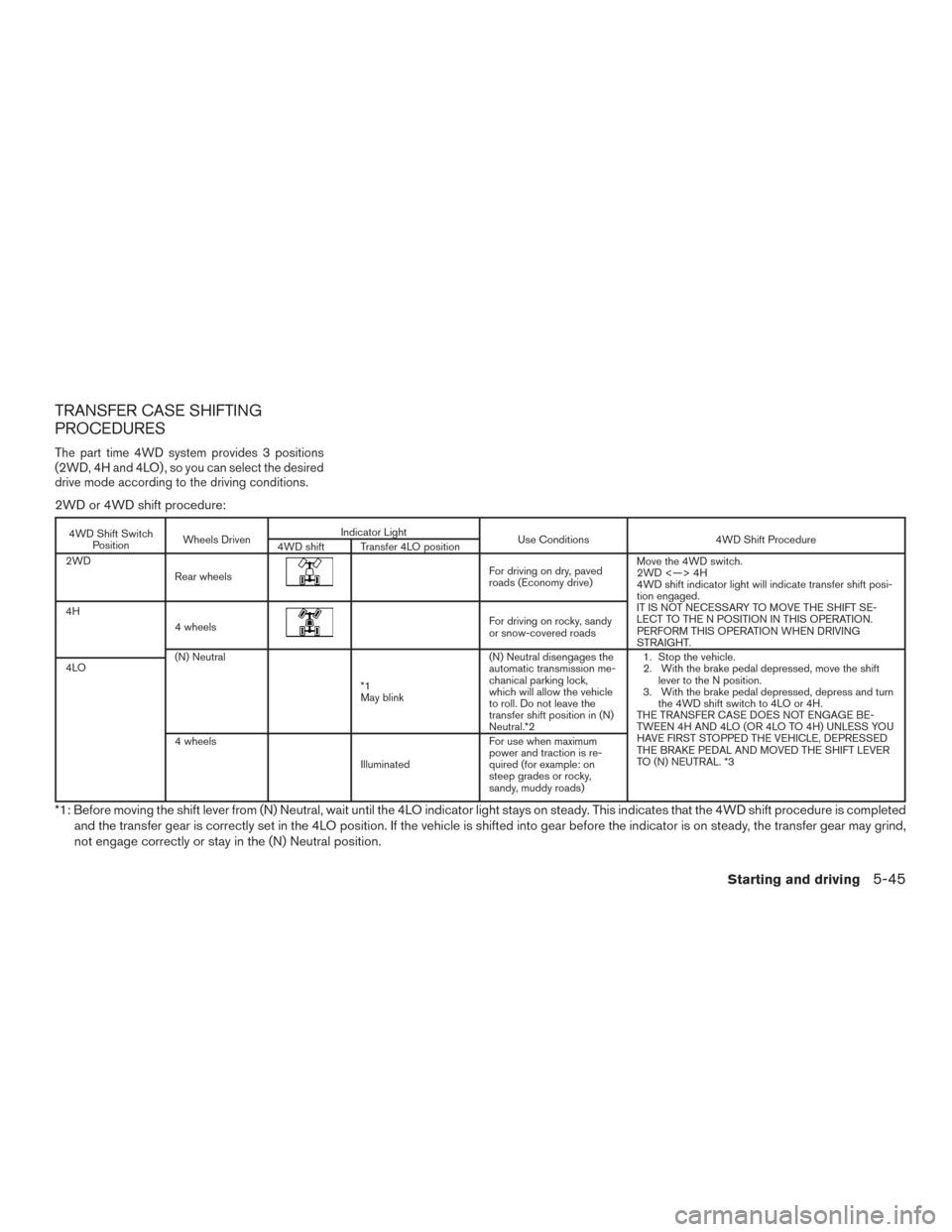
TRANSFER CASE SHIFTING
PROCEDURES
The part time 4WD system provides 3 positions
(2WD, 4H and 4LO) , so you can select the desired
drive mode according to the driving conditions.
2WD or 4WD shift procedure:
4WD Shift SwitchPosition Wheels Driven Indicator Light
Use Conditions 4WD Shift Procedure
4WD shift Transfer 4LO position
2WD
Rear wheels
For driving on dry, paved
roads (Economy drive) Move the 4WD switch.
2WD <—> 4H
4WD shift indicator light will indicate transfer shift posi-
tion engaged.
IT IS NOT NECESSARY TO MOVE THE SHIFT SE-
LECT TO THE N POSITION IN THIS OPERATION.
PERFORM THIS OPERATION WHEN DRIVING
STRAIGHT.
4H
4 wheels
For driving on rocky, sandy
or snow-covered roads
(N) Neutral
*1
May blink (N) Neutral disengages the
automatic transmission me-
chanical parking lock,
which will allow the vehicle
to roll. Do not leave the
transfer shift position in (N)
Neutral.*2 1. Stop the vehicle.
2. With the brake pedal depressed, move the shift
lever to the N position.
3. With the brake pedal depressed, depress and turn the 4WD shift switch to 4LO or 4H.
THE TRANSFER CASE DOES NOT ENGAGE BE-
TWEEN 4H AND 4LO (OR 4LO TO 4H) UNLESS YOU
HAVE FIRST STOPPED THE VEHICLE, DEPRESSED
THE BRAKE PEDAL AND MOVED THE SHIFT LEVER
TO (N) NEUTRAL. *3
4LO
4 wheels
Illuminated For use when maximum
power and traction is re-
quired (for example: on
steep grades or rocky,
sandy, muddy roads)
*1: Before moving the shift lever from (N) Neutral, wait until the 4LO indicator light stays on steady. This indicates that the 4WD shift procedure is completed
and the transfer gear is correctly set in the 4LO position. If the vehicle is shifted into gear before the indicator is on steady, the transfer gear may grind,
not engage correctly or stay in the (N) Neutral position.
Starting and driving5-45