Page 146 of 491
3 Pre-driving checks and adjustments
Keys .............................................3-2NISSAN Intelligent Key® (if so equipped) .........3-2
NISSAN Vehicle Immobilizer System keys .........3-4
Doors ............................................3-5
Locking with key ................................3-5
Locking with inside lock knob ....................3-5
Locking with power door lock switch . . . ..........3-6
Automatic door locks ...........................3-6
Child safety rear door lock .......................3-6
Remote keyless entry system (if so equipped) .........3-7
How to use remote keyless entry system ..........3-8
NISSAN Intelligent Key® (if so equipped) ...........3-10
Operating range ............................... 3-12
Door locks/unlocks precaution ..................3-13
NISSAN Intelligent Key® Operation .............3-13
How to use the remote keyless entry
function ...................................... 3-16
Warning lights and audible reminders . . . .........3-20
Warning signals ............................... 3-20
Troubleshooting guide
(automatic transmission only) . . .................3-22Troubleshooting guide
(manual transmission only)
......................3-23
Hood ........................................... 3-24
Trunk lid ......................................... 3-25
Trunk lid release switch ........................ 3-25
Interior trunk lid release ........................ 3-25
Fuel-filler door ................................... 3-26
Opener operation .............................. 3-26
Fuel-filler cap ................................. 3-26
Steering wheel ................................... 3-28
Tilt operation .................................. 3-28
Telescopic operation ........................... 3-28
Sun visors ....................................... 3-29
Vanity mirrors ................................. 3-29
Card holder (driver’s side only) ..................3-30
Mirrors .......................................... 3-30
Manual anti-glare rearview mirror
(if so equipped) ............................... 3-30
Automatic anti-glare rearview mirror
(if so equipped) ............................... 3-30
Outside mirrors ............................... 3-32
Page 174 of 491
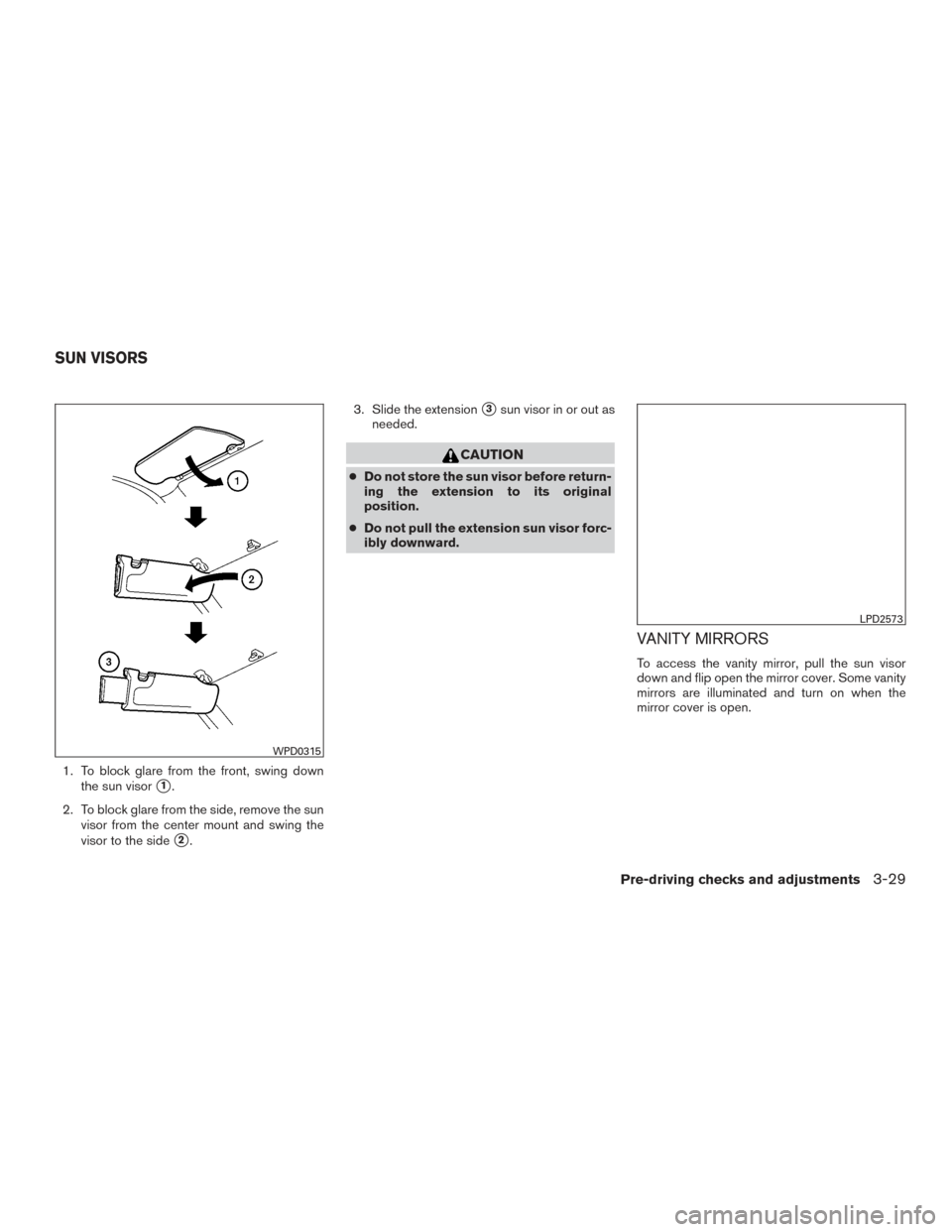
1. To block glare from the front, swing downthe sun visor
�1.
2. To block glare from the side, remove the sun visor from the center mount and swing the
visor to the side
�2. 3. Slide the extension
�3sun visor in or out as
needed.
CAUTION
● Do not store the sun visor before return-
ing the extension to its original
position.
● Do not pull the extension sun visor forc-
ibly downward.
VANITY MIRRORS
To access the vanity mirror, pull the sun visor
down and flip open the mirror cover. Some vanity
mirrors are illuminated and turn on when the
mirror cover is open.
WPD0315
LPD2573
SUN VISORS
Pre-driving checks and adjustments3-29
Page 175 of 491
CARD HOLDER (driver’s side only)
To access the card holder, pull the sun visor
down and slide card in the card holder. Do not
view information while operating the vehicle.
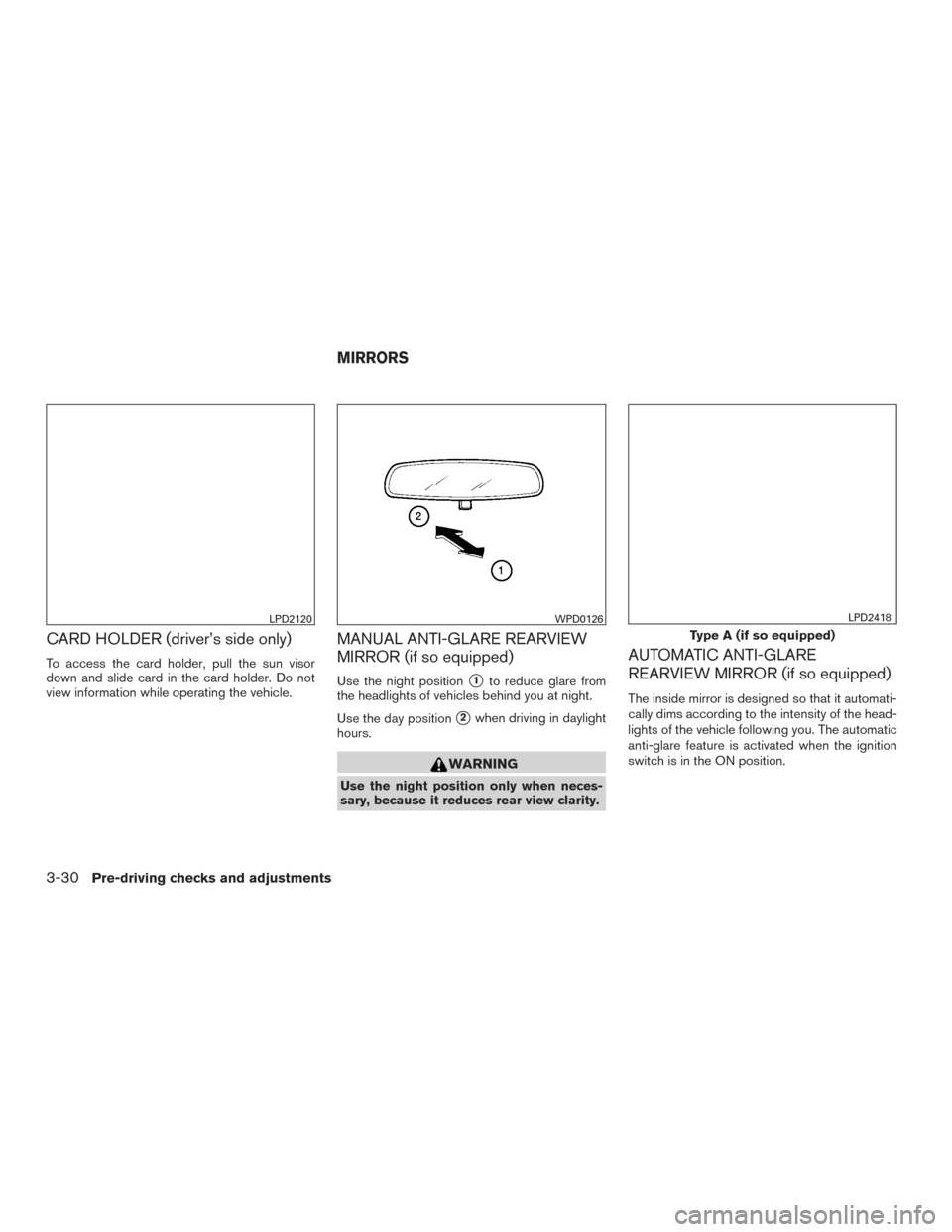
MANUAL ANTI-GLARE REARVIEW
MIRROR (if so equipped)
Use the night position�1to reduce glare from
the headlights of vehicles behind you at night.
Use the day position
�2when driving in daylight
hours.
WARNING
Use the night position only when neces-
sary, because it reduces rear view clarity.
AUTOMATIC ANTI-GLARE
REARVIEW MIRROR (if so equipped)
The inside mirror is designed so that it automati-
cally dims according to the intensity of the head-
lights of the vehicle following you. The automatic
anti-glare feature is activated when the ignition
switch is in the ON position.
LPD2120WPD0126
Type A (if so equipped)
LPD2418
MIRRORS
3-30Pre-driving checks and adjustments
Page 177 of 491
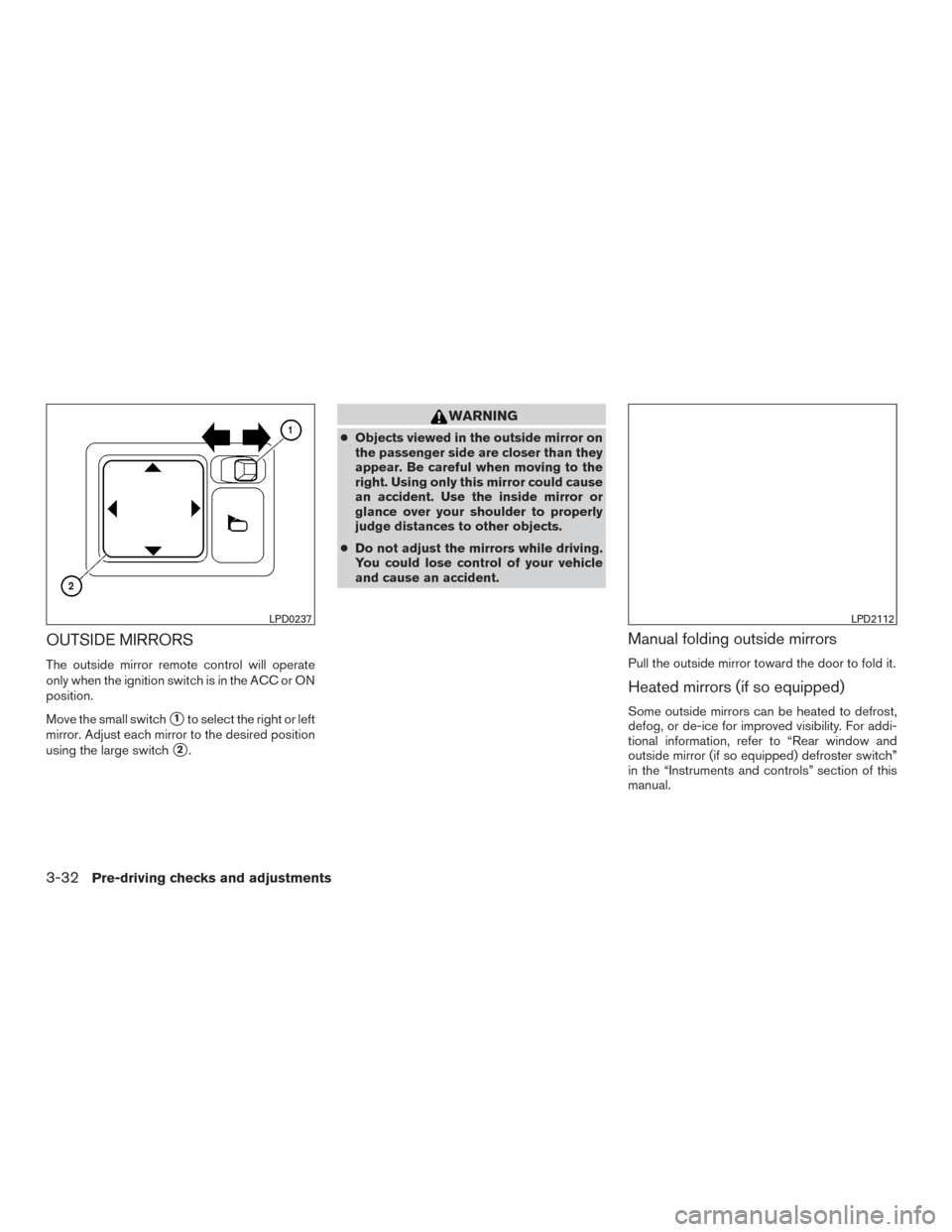
OUTSIDE MIRRORS
The outside mirror remote control will operate
only when the ignition switch is in the ACC or ON
position.
Move the small switch
�1to select the right or left
mirror. Adjust each mirror to the desired position
using the large switch
�2.
WARNING
● Objects viewed in the outside mirror on
the passenger side are closer than they
appear. Be careful when moving to the
right. Using only this mirror could cause
an accident. Use the inside mirror or
glance over your shoulder to properly
judge distances to other objects.
● Do not adjust the mirrors while driving.
You could lose control of your vehicle
and cause an accident.
Manual folding outside mirrors
Pull the outside mirror toward the door to fold it.
Heated mirrors (if so equipped)
Some outside mirrors can be heated to defrost,
defog, or de-ice for improved visibility. For addi-
tional information, refer to “Rear window and
outside mirror (if so equipped) defroster switch”
in the “Instruments and controls” section of this
manual.
LPD0237LPD2112
3-32Pre-driving checks and adjustments
Page 187 of 491
1. CAMERA button (if so equipped)WARNING
●Failure to follow the warnings and in-
structions for proper use of the Rear-
View Monitor system could result in se-
rious injury or death. ●
RearView Monitor is a convenience fea-
ture and is not a substitute for proper
backing. Always turn and look out the
windows and check mirrors to be sure
that it is safe to move before operating
the vehicle. Always back up slowly.
LHA3884
REARVIEW MONITOR (if so
equipped)
4-10Monitor, climate, audio, phone and voice recognition systems
Page 192 of 491
●Underneath the bumper and the corner
areas of the bumper cannot be viewed
on the RearView Monitor because of its
monitoring range limitation. The system
will not show small objects below the
bumper, and may not show objects
close to the bumper or on the ground.
● Objects viewed in the RearView Moni-
tor differ from actual distance because
a wide-angle lens is used.
● Objects in the RearView Monitor will
appear visually opposite compared to
when viewed in the rearview and out-
side mirrors.
● Use the displayed lines as a reference.
The lines are highly affected by the
number of occupants, fuel level, vehicle
position, road conditions and road
grade.
● Make sure that the trunk is securely
closed when backing up.
● Do not put anything on the rearview
camera. The rearview camera is in-
stalled above the license plate. ●
When washing the vehicle with high
pressure water, be sure not to spray it
around the camera. Otherwise, water
may enter the camera unit causing wa-
ter condensation on the lens, a mal-
function, fire or an electric shock.
● Do not strike the camera. It is a preci-
sion instrument. Otherwise, it may mal-
function or cause damage resulting in a
fire or an electric shock.
The following are operating limitations and do not
represent a system malfunction: ● When the temperature is extremely high or
low, the screen may not clearly display ob-
jects.
● When strong light directly shines on the
camera, objects may not be displayed
clearly.
● Vertical lines may be seen in objects on the
screen. This is due to strong reflected light
from the bumper.
● The screen may flicker under fluorescent
light.
● The colors of objects on the RearView Moni-
tor may differ somewhat from the actual
color of objects. ●
Objects on the monitor may not be clear in a
dark environment.
● There may be a delay when switching be-
tween views.
● If dirt, rain or snow accumulate on the cam-
era, the RearView Monitor may not display
objects clearly. Clean the camera.
● Do not use wax on the camera lens. Wipe off
any wax with a clean cloth dampened with a
diluted mild cleaning agent, then wipe with a
dry cloth.
Monitor, climate, audio, phone and voice recognition systems4-15
Page 195 of 491
1.Fan control / system OFF dial
2. Air flow control buttons
3. Temperature control dial
4.
Air recirculation button 5.
Rear window and outside mirror
(if so equipped) defroster switch
6.
Front windshield defroster button
CONTROLS
Fan control dial
Thefan control dial turns the fan on and off
and controls fan speed.
Air flow control buttons
The air flow control buttons allow you to select
the air flow outlets.
— Air flows from center and side
vents.
— Air flows from center and sidevents and the front and rear floor
outlets.
— Air flows mainly from the front andrear floor outlets.
— Air flows from defroster outletsand the front and rear floor outlets.
— Air flows mainly from defrosteroutlets.
Temperature control dial
The temperature control dial allows you to adjust
the temperature of the outlet air. To lower the
temperature, turn the dial to the left. To increase
the temperature, turn the dial to the right.LHA4253
4-18Monitor, climate, audio, phone and voice recognition systems
Page 196 of 491
Air recirculation button
On position (Indicator light on):
Interior air is recirculated inside the vehicle.
Press the
button to the ON position when:
● driving on a dusty road.
● to prevent traffic fumes from entering pas-
senger compartment.
Off position (Indicator light off):
Outside air is drawn into the passenger compart-
ment and distributed through the selected outlet.
Use the OFF position for normal heater opera-
tion.
Rear window and outside mirror (if so
equipped) defroster switch
For additional information, refer to “Rear window
and outside mirror (if so equipped) defroster
switch” in the “Instruments and controls” section
of this manual.
HEATER OPERATION
Heating
This mode is used to direct heated air to the foot
outlets. Some air also flows from the defrost
outlets and the side vent outlets. 1. Press the
button to the OFF position
for normal heating.
2. Press the
air flow control button.
3. Turn the
fan control dial to the desired
position.
4. Turn the temperature control dial to the de- sired position between the middle and the
hot position.
Ventilation
This mode directs outside air to the side and
center vents.
1. Press the
button to the OFF position.
2. Press the
air flow control button.
3. Turn the
fan control dial to the desired
position.
4. Turn the temperature control dial to the de- sired position.
Defrosting or defogging
This mode directs the air to the defrost outlets to
defrost/defog the windows.
1. Press the
defrost/defog button.
2. Turn the
fan control dial to the desired
position. 3. Turn the temperature control dial to the de-
sired position between the middle and the
hot position.
● To quickly remove ice or fog from the win-
dows, turn the
fan control dial to the
highest setting and the temperature control
to the full HOT position.
Bi-level heating
The bi-level mode directs warmed air to the side
and center vents and to the front and rear floor
outlets.
1. Press the
button to the OFF position.
2. Press the
air flow control button.
3. Turn the
fan control dial to the desired
position.
4. Turn the temperature control dial to the de- sired position.
Heating and defogging
This mode heats the interior and defogs the wind-
shield.
1. Press the
air flow control button.
2. Turn the
fan control dial to the desired
position.
Monitor, climate, audio, phone and voice recognition systems4-19