Page 423 of 491
Extended storage switch
If any electrical equipment does not operate,
remove the extended storage switch and check
for an open fuse.
NOTE:
The extended storage switch is used for
long term vehicle storage. Even if the ex-
tended storage switch is broken it is not
necessary to replace it. Replace only the
open fuse in the switch with a new fuse.How to replace the extended storage switch:
1. To remove the extended storage switch, be sure the ignition switch is in the OFF or
LOCK position.
2. Be sure the headlight switch is in the OFF position.
3. Remove the fuse box cover.
4. Pinch the locking tabs
�Aand�Bfound on
each side of the storage switch.
5. Pull the storage switch straight out from the fuse box
�C.
CAUTION
Be careful not to allow children to swallow
the battery or removed parts.
LDI2747
BATTERY REPLACEMENT
8-24Do-it-yourself
Page 427 of 491
HEADLIGHTS
For additional information on headlight bulb re-
placement, refer to the instructions outlined in
this section.
Replacing the halogen headlight bulb
(if so equipped)
NOTE:
The headlight is a semi-sealed beam type
which used a replaceable headlight (halo-
gen) bulb. They can be replaced from inside
the engine compartment without removing
the headlight assembly.
CAUTION
●Aiming is not necessary after replacing
the bulb. When aiming adjustment is
necessary, it is recommended that you
visit a NISSAN dealer for this service.
● Do not leave the headlight assembly
open without a bulb installed for a long
period of time. Dust, moisture, smoke,
etc. entering the headlight body may
affect bulb performance. Remove the
bulb from the headlight assembly just
before a replacement bulb is installed.
● Only touch the base when handling the
bulb. Never touch the glass envelope.
Touching the glass could significantly
affect bulb life and/or headlight
performance.
● High pressure halogen gas is sealed
inside the halogen bulb. The bulb may
break if the glass envelope is scratched
or the bulb is dropped.
● Use the same number and wattage as
shown in the chart.
Type A (if so equipped)
LDI2980
LIGHTS
8-28Do-it-yourself
Page 428 of 491
1. Rotate the (high beam) cover�Acounter-
clockwise to access the (high beam) bulb
socket
�C. Rotate the bulb socket�Ccoun-
terclockwise and remove bulb.
2. Rotate the (low beam) cover
�B(if so
equipped) counterclockwise to access the
(low beam) bulb socket
�D(if so equipped) .
Rotate the bulb socket
�D(if so equipped)
counterclockwise and remove bulb.
3. Rotate the side marker bulb socket
�Ecoun-
terclockwise and remove bulb.
4. Rotate the turn signal bulb socket
�Fcoun-
terclockwise and remove bulb
�G. Reverse instructions to install bulbs and replace
fender protector.
WARNING
Do not touch bulb by hand while it is lit or
right after being turned off. Burning may
result.
CAUTION
• Do not touch glass surface of the bulb
with bare hands or allow oil or grease to
get on it to prevent damage to bulb.
• Do not leave the bulb out of the lamp
reflector for a long time because dust,
moisture, smoke, etc. may affect the per-
formance of the lamp.
• Fog may temporarily form inside the lens
of the exterior lights in the rain or in a car
wash. A temperature difference between
the inside and the outside of the lens
causes the fog. This is not a malfunction. If
large drops of water collect inside the
lens, it is recommended that you visit a
NISSAN dealer for servicing.
Replacing the LED headlight bulb (if
so equipped)
If LED headlight bulb replacement is required, it is
recommended that you visit a NISSAN dealer for
this service.
TURN SIGNAL BULB
To replace the turn signal bulb follow the instruc-
tions listed in the “Replacing the halogen head-
light bulb” found in this section.
FOG LIGHTS (if so equipped)
For additional information on fog light bulb re-
placement, refer to the instructions outlined in
this section.
Type B (if so equipped)
LDI2981
Do-it-yourself8-29
Page 429 of 491
Replacing the fog light bulb
CAUTION
●High pressure halogen gas is sealed
inside the halogen bulb. The bulb may
break if the glass envelope is scratched
or the bulb is dropped.
● When handling the bulb, do not touch
the glass envelope.
●
Use the same number and wattage as
originally installed as shown in the chart.
● Do not leave the bulb out of the fog light
for a long period of time as dust, mois-
ture and smoke may enter the fog light
body and affect the performance of the
fog light.
1. Disconnect the negative battery cable.
2. Access to the fog light is in front of and behind the front tire and the fascia.
3. Remove the fasteners
�A; carefully pull back
the front fender protector.
4. Rotate the bulb
�Bcounterclockwise and
pull out to remove.
5.
Remove by pulling straight off the fog light. Do
not shake or rotate the bulb when removing it.
6. Install the new bulb in the reverse order of removal.
LDI2179
8-30Do-it-yourself
Page 430 of 491
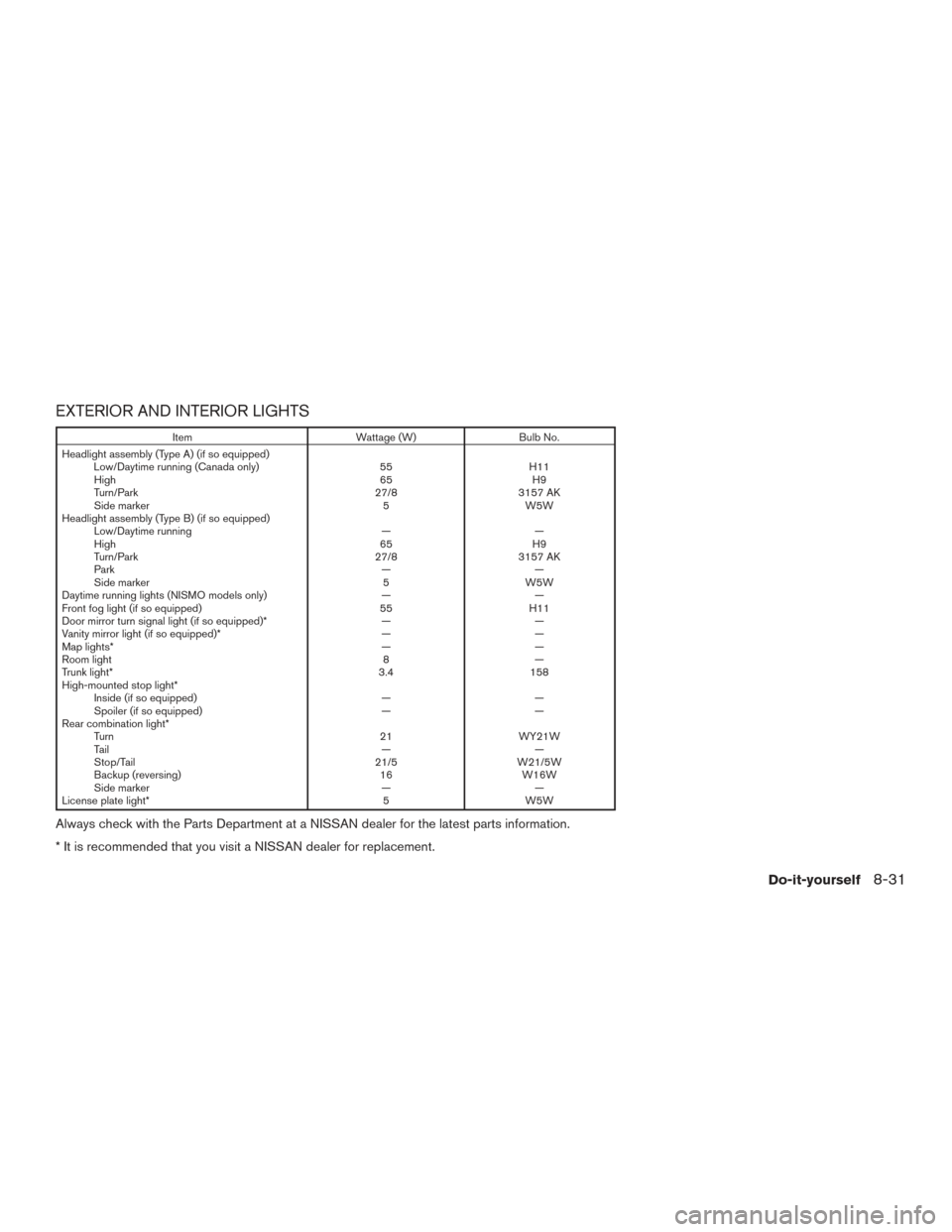
EXTERIOR AND INTERIOR LIGHTS
ItemWattage (W)Bulb No.
Headlight assembly (Type A) (if so equipped) Low/Daytime running (Canada only) 55H11
High 65H9
Turn/Park 27/83157 AK
Side marker 5W5W
Headlight assembly (Type B) (if so equipped) Low/Daytime running ——
High 65H9
Turn/Park 27/83157 AK
Park ——
Side marker 5W5W
Daytime running lights (NISMO models only) ——
Front fog light (if so equipped) 55H11
Door mirror turn signal light (if so equipped)* ——
Vanity mirror light (if so equipped)* ——
Map lights* ——
Room light 8—
Trunk light* 3.4158
High-mounted stop light* Inside (if so equipped) ——
Spoiler (if so equipped) ——
Rear combination light* Turn 21WY21W
Ta i l ——
Stop/Tail 21/5W21/5W
Backup (reversing) 16W16W
Side marker ——
License plate light* 5W5W
Always check with the Parts Department at a NISSAN dealer for the latest parts information.
* It is recommended that you visit a NISSAN dealer for replacement.
Do-it-yourself8-31
Page 431 of 491
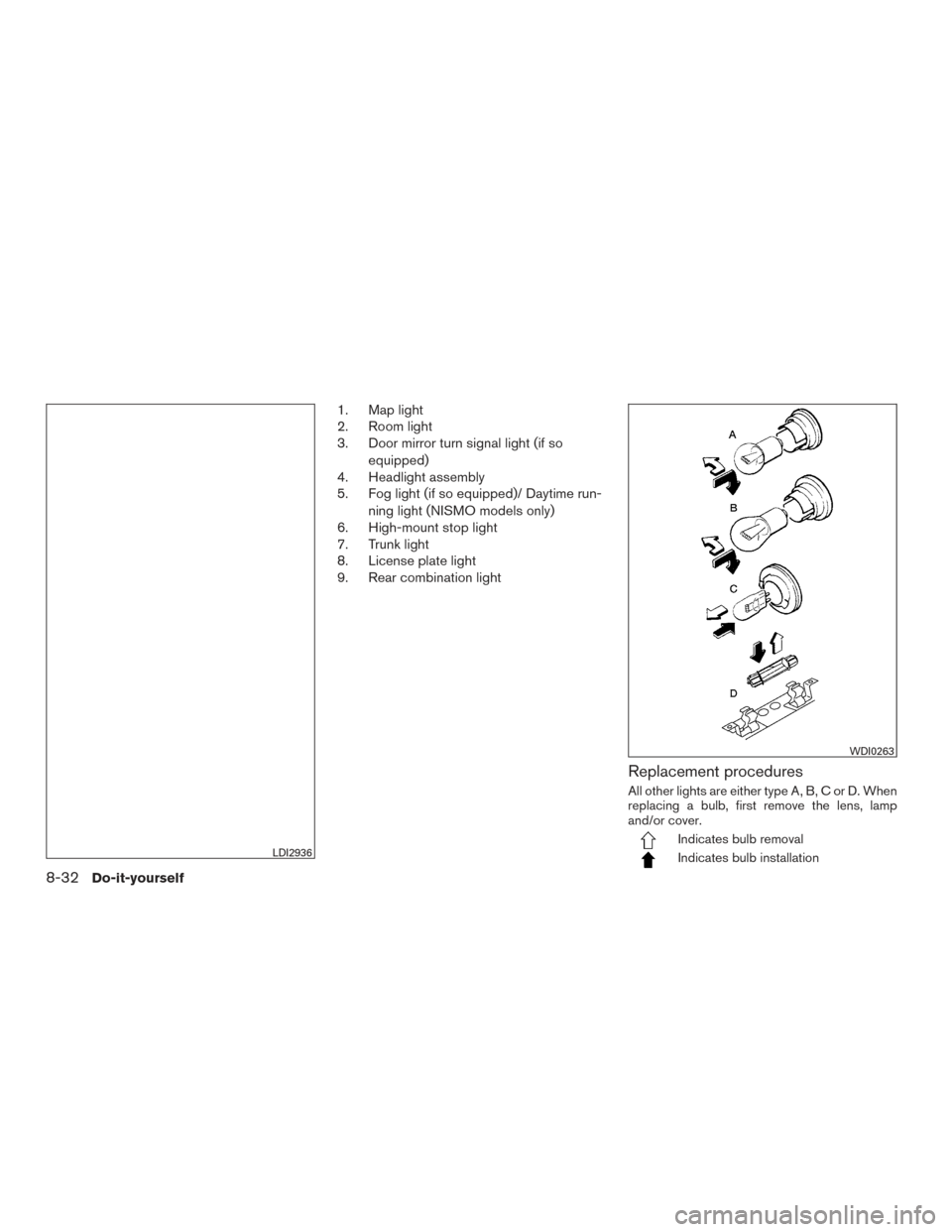
1. Map light
2. Room light
3. Door mirror turn signal light (if soequipped)
4. Headlight assembly
5. Fog light (if so equipped)/ Daytime run-
ning light (NISMO models only)
6. High-mount stop light
7. Trunk light
8. License plate light
9. Rear combination light
Replacement procedures
All other lights are either type A, B, C or D. When
replacing a bulb, first remove the lens, lamp
and/or cover.
Indicates bulb removal
Indicates bulb installationLDI2936
WDI0263
8-32Do-it-yourself
Page 432 of 491
If you have a flat tire, refer to “Flat tire” in
the “In case of emergency” section of this
manual.
TIRE PRESSURE
Tire Pressure Monitoring System
(TPMS)
This vehicle is equipped with the Tire
Pressure Monitoring System (TPMS) . It
monitors tire pressure of all tires except
the spare. When the low tire pressure
warning light is lit and the CHECK TIRE
PRES warning is displayed in the odom-
eter, one or more of your tires is signifi-
cantly under-inflated.
The TPMS will activate only when the
vehicle is driven at speeds above 16 mph
(25 km/h). Also, this system may not de-
tect a sudden drop in tire pressure (for
example a flat tire while driving) .
For additional information, refer to “Low
tire pressure warning light” in the “Instru-
ments and controls” section, “Tire Pres-
sure Monitoring System (TPMS)” in the“Starting and driving” section, and “Flat
tire” in the “In case of emergency” section
of this manual.
Tire inflation pressure
Check the tire pressures (including the
spare) often and always prior to long dis-
tance trips. The recommended tire pres-
sure specifications are shown on the
F.M.V.S.S./C.M.V.S.S. certification label
or the Tire and Loading Information label
under the “Cold Tire Pressure” heading.
The Tire and Loading Information label is
affixed to the driver side center pillar. Tire
pressures should be checked regularly
because:
● Most tires naturally lose air over time.
● Tires can lose air suddenly when
driven over potholes or other objects
or if the vehicle strikes a curb while
parking. The tire pressures should be checked
when the tires are cold. The tires are
considered COLD after the vehicle has
been parked for 3 or more hours, or driven
less than 1 mile (1.6 km) at moderate
speeds.
The TPMS with Easy-Fill Tire Alert (if so
equipped) provides visual and audible
signals outside the vehicle for inflating
tires to the recommended COLD tire
pressure. For additional information, refer
to “TPMS with Easy-Fill Tire Alert” in the
“Starting and driving” section of this
manual.
WHEELS AND TIRES
Do-it-yourself8-33
Page 441 of 491
Replacing wheels and tires
When replacing a tire, use the same size, tread
design, speed rating and load carrying capacity
as originally equipped. For additional information,
refer to “Wheels and tires” in the “Technical and
consumer information” section of this manual.
WARNING
●The use of tires other than those recom-
mended or the mixed use of tires of
different brands, construction (bias,
bias-belted or radial) , or tread patterns
can adversely affect the ride, braking,
handling, Vehicle Dynamic Control
(VDC) system, ground clearance, body-
to-tire clearance, tire chain clearance,
speedometer calibration, headlight aim
and bumper height. Some of these ef-
fects may lead to accidents and could
result in serious personal injury.
● If your vehicle was originally equipped
with four tires that were the same size
and you are only replacing two of the
four tires, install the new tires on the
rear axle. Placing new tires on the front
axle may cause loss of vehicle control in
some driving conditions and cause an
accident and personal injury ●
If the wheels are changed for any rea-
son, always replace with wheels which
have the same off-set dimension.
Wheels of a different off-set could
cause premature tire wear, degrade ve-
hicle handling characteristics, affect the
VDC system and/or interference with
the brake discs. Such interference can
lead to decreased braking efficiency
and/or early brake pad wear. For addi-
tional information on wheel off-set di-
mensions, refer to “Wheels and tires” in
the “Technical and consumer informa-
tion” section of this manual.
● Since the spare tire is not equipped with
the TPMS, when a spare tire is mounted
or a wheel is replaced, tire pressure will
not be indicated, the TPMS will not
function and the low tire pressure warn-
ing light will flash for approximately
1 minute. The light will remain on after
1 minute. Have your tires replaced
and/or TPMS system reset as soon as
possible. It is recommended that you
visit a NISSAN dealer for this service.
● Replacing tires with those not originally
specified by NISSAN could affect the
proper operation of the TPMS. ●
The TPMS sensor may be damaged if it
is not handled correctly. Be careful
when handling the TPMS sensor.
● When replacing the TPMS sensor, the
ID registration may be required. It is
recommended that you visit a NISSAN
dealer for ID registration.
● Do not use a valve stem cap that is not
specified by NISSAN. The valve stem
cap may become stuck.
● Be sure that the valve stem caps are
correctly fitted. Otherwise the valve may
be clogged up with dirt and cause a
malfunction or loss of pressure.
● Do not install a damaged or deformed
wheel or tire even if it has been re-
paired. Such wheels or tires could have
structural damage and could fail with-
out warning.
● The use of retread tires is not
recommended.
● For additional information regarding
tires, refer to “Important Tire Safety In-
formation” (US) or “Tire Safety Informa-
tion” (Canada) in the Warranty Informa-
tion Booklet.
8-42Do-it-yourself