Page 330 of 491
BSW DRIVING SITUATIONS
Indicator
on
Indicator
off
Indicator
flashing
Another vehicle approaching from
behind
Illustration 1:The side BSW/RCTA indicator
light illuminates if a vehicle enters the detection
zone from behind in an adjacent lane.
Illustration 2:If the driver activates the turn
signal when another vehicle is in the detection
zone, then the system chimes (twice) and the
side indicator light flashes.
NOTE:
● The radar sensors may not detect vehicles
which are approaching rapidly from behind.
● If the driver activates the turn signal before a
vehicle enters the detection zone, the side
indicator light will flash but no chime will
sound when the other vehicle is detected.
Illustration 1 – Approaching from behind
LSD2299
Illustration 2 – Approaching from behind
LSD2300
Starting and driving5-31
Page 331 of 491
Overtaking another vehicle
Illustration 3:The side indicator light illumi-
nates if you overtake a vehicle and that vehicle
stays in the detection zone for approximately
2 seconds. Illustration 4:
If the driver activates the turn
signal while another vehicle is in the detection
zone, then the system chimes (twice) and the
side indicator light flashes.
NOTE:
● When overtaking several vehicles in a row,
the vehicles after the first vehicle may not be
detected if they are traveling close together.
● The radar sensors may not detect slower
moving vehicles if they are passed quickly. ●
If the driver activates the turn signal before a
vehicle enters the detection zone, the side
indicator light will flash but no chime will
sound when the other vehicle is detected.
Illustration 3 – Overtaking another vehicle
LSD2302
Illustration 4 – Overtaking another vehicle
LSD2303
5-32Starting and driving
Page 332 of 491
Entering from the side
Illustration 5:The side indicator light illumi-
nates if a vehicle enters the detection zone from
either side. Illustration 6:
If the driver activates the turn
signal while another vehicle is in the detection
zone, then the system chimes (twice) and the
side indicator light flashes.
NOTE:
● If the driver activates the turn signal before a
vehicle enters the detection zone, the side
indicator light will flash but no chime will
sound when the other vehicle is detected. ●
The radar sensors may not detect a vehicle
which is traveling at about the same speed
as your vehicle when it enters the detection
zone.
Illustration 5 – Entering from the side
LSD2305
Illustration 6 – Entering from the side
LSD2308
Starting and driving5-33
Page 336 of 491
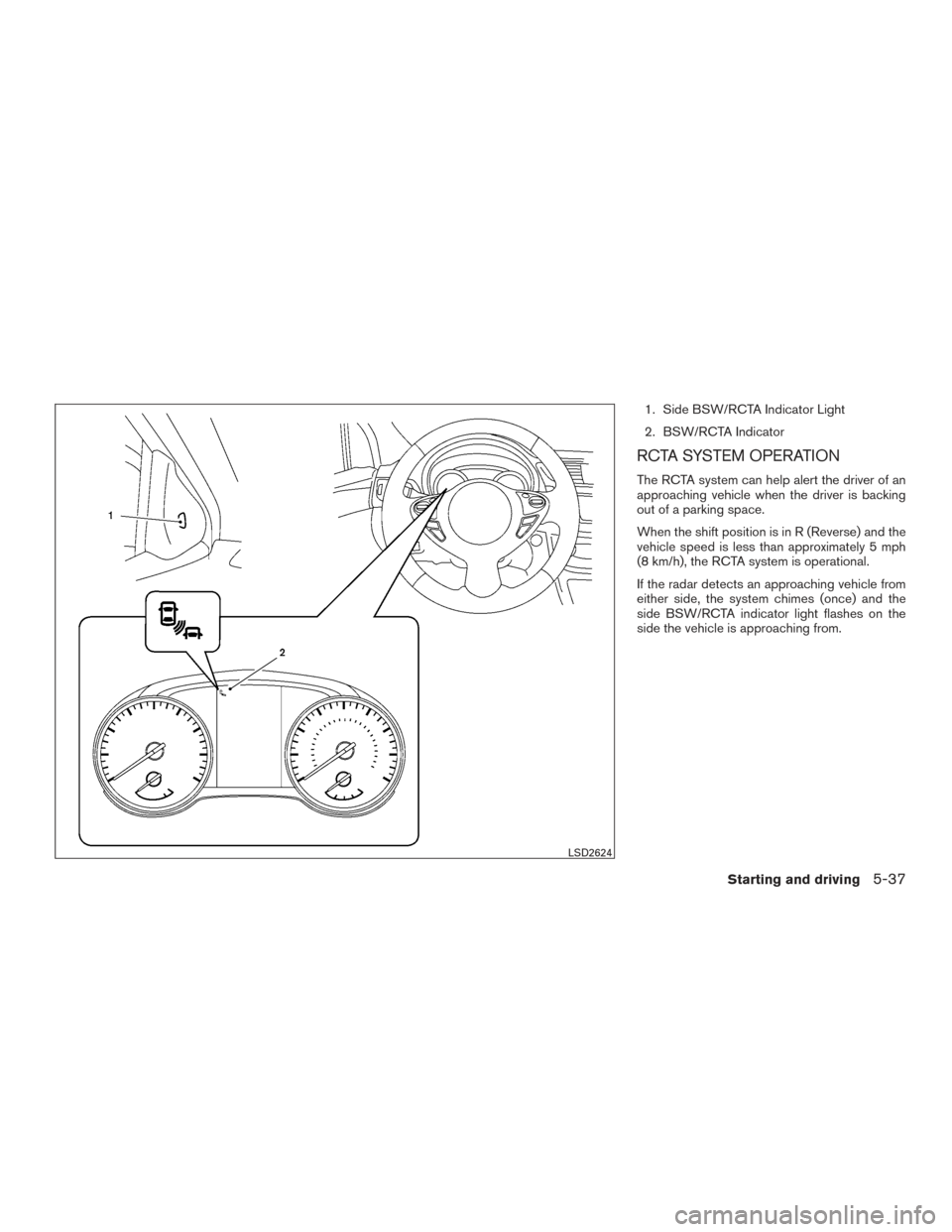
1. Side BSW/RCTA Indicator Light
2. BSW/RCTA Indicator
RCTA SYSTEM OPERATION
The RCTA system can help alert the driver of an
approaching vehicle when the driver is backing
out of a parking space.
When the shift position is in R (Reverse) and the
vehicle speed is less than approximately 5 mph
(8 km/h), the RCTA system is operational.
If the radar detects an approaching vehicle from
either side, the system chimes (once) and the
side BSW/RCTA indicator light flashes on the
side the vehicle is approaching from.
LSD2624
Starting and driving5-37
Page 344 of 491
This device complies with Industry Canada
licence-exempt RSS standard (s) . Opera-
tion is subject to the following two condi-
tions: (1) this device may not cause inter-
ference, and (2) this device must accept any
interference, including interference that
may cause undesired operation of the de-
vice.
Frequency bands: 24.05GHz – 24.25GHz
Output power: less than 20 milliwatts
PRECAUTIONS ON CRUISE
CONTROL
1. CANCEL switch
2. ACCEL/RES switch
3. COAST/SET switch
4. ON/OFF switch●
If the cruise control system malfunctions, it
cancels automatically. The CRUISE
orindicator light in the instrument
panel then blinks to warn the driver. For
additional information, refer to “Warning
lights, indicator lights and audible remind-
ers” or “Vehicle information display” in the
“Instruments and controls” section of this
manual.
● If the CRUISE indicator light blinks, push the
cruise control ON/OFF switch off and have
the system checked. It is recommended that
you visit a NISSAN dealer for this service.
Type A (if so equipped)
LSD2430
Type B (if so equipped)
LSD2572
CRUISE CONTROL (if so equipped)
Starting and driving5-45
Page 345 of 491
●The CRUISE indicator light may blink when
the cruise control ON/OFF switch is pushed
ON while pushing the ACCEL/RES,
COAST/SET, or CANCEL switch. To prop-
erly set the cruise control system, use the
following procedures.
WARNING
Do not use the cruise control when driving
under the following conditions:
● When it is not possible to keep the
vehicle at a set speed.
● In heavy traffic or in traffic that varies in
speed.
● On winding or hilly roads.
● On slippery roads (rain, snow, ice, etc.) .
● In very windy areas.
Doing so could cause a loss of vehicle
control and result in an accident.
CRUISE CONTROL OPERATIONS
The cruise control allows driving at a speed be-
tween 25 - 89 mph (40 - 144 km/h) without
keeping your foot on the accelerator pedal.
To turn on the cruise control, push the
ON/OFF switch. The CRUISE or
indicator
light in the instrument panel comes on. To set cruising speed,
accelerate the vehicle to
the desired speed, push the COAST/SET switch
and release it. Take your foot off the accelerator
pedal. Your vehicle maintains the set speed.
● To pass another vehicle, depress the ac-
celerator pedal. When you release the
pedal, the vehicle returns to the previously
set speed.
● The vehicle may not maintain the set speed
when going up or down steep hills. If this
happens, drive without the cruise control.
To cancel the preset speed, use one of the
following three methods.
● Push the CANCEL switch, or
● Tap the brake pedal, or
● Push the ON/OFF switch off. The CRUISE
or
indicator light in the instrument
panel goes out.
The cruise control is automatically canceled if:
● You depress the brake or clutch pedal while
pushing the ACCEL/RES or SET/COAST
switch. The preset speed is deleted from
memory.
● The vehicle slows down more than 8 mph
(13 km/h) below the set speed. ●
You depress the clutch pedal (MT) , or move
the shift lever to N (Neutral) (CVT) .
To reset at a faster cruising speed, use one of
the following three methods.
● Depress the accelerator pedal. When the
vehicle attains the desired speed, push and
release the COAST/SET switch.
● Push and hold the ACCEL/RES switch.
When the vehicle attains the speed you de-
sire, release the switch.
● Push and release the ACCEL/RES switch.
Each time you do this, the set speed in-
creases by about 1 mph (1.6 km/h).
To reset at a slower cruising speed, use one
of the following three methods.
● Lightly tap the brake pedal. When the ve-
hicle attains the desired speed, push the
COAST/SET switch and release it.
● Push and hold the COAST/SET switch. Re-
lease the switch when the vehicle slows to
the desired speed.
● Push and release the COAST/SET switch.
Each time you do this, the set speed de-
creases by about 1 mph (1.6 km/h).
5-46Starting and driving
Page 351 of 491
●When the shift lever is not in the D (Drive) or
L (Low) (if so equipped) mode
● When the parking brake is applied
● When the brakes are operated by the driver
When the COAST/SET switch is pushed under
the following conditions, the system cannot be
set.
A warning chime will sound and a message will
pop up: ● When the VDC system is off (To use the ICC
system, turn on the VDC system. Push the
CRUISE ON/OFF switch to turn off the ICC
system and reset the ICC switch by pushing
the CRUISE ON/OFF switch again.)
For additional information about the VDC
system, refer to “Vehicle Dynamic Control
(VDC) system” in this section.
● When ABS or VDC is operating
● When a wheel is slipping (To use the ICC
system, make sure the wheels are no longer
slipping. Push the CRUISE ON/OFF switch
to turn off the ICC system, and reset the ICC
system by pushing the CRUISE ON/OFF
switch again.)
�1System set display with vehicle ahead
�2System set display without vehicle ahead
Vehicle detected ahead
When a vehicle is detected in the lane ahead, the
ICC system decelerates the vehicle by control-
ling the throttle and applying the brakes to match
the speed of a slower vehicle ahead. The system
then controls the vehicle speed based on the
speed of the vehicle ahead to maintain the driver
selected distance. NOTE:
● The stoplights of the vehicle come on
when braking is performed by the ICC
system.
● When the brake operates, a noise may
be heard. This is not a malfunction.
When a vehicle ahead is detected, the vehicle
ahead detection indicator comes on. The ICC
system will also display the set speed and se-
lected distance.
Vehicle ahead not detected
When a vehicle is no longer detected ahead, the
ICC system gradually accelerates your vehicle to
resume the previously set vehicle speed. The ICC
system then maintains the set speed.
When a vehicle is no longer detected, the vehicle
ahead detection indicator turns off.
If a vehicle ahead appears during acceleration to
the set vehicle speed or any time the ICC system
is in operation, the system controls the distance
to that vehicle.
When a vehicle is no longer detected under
approximately 15 mph (24 km/h), the system will
be canceled.
LSD2566
5-52Starting and driving
Page 352 of 491
When passing another vehicle,the set speed
indicator
�Bwill flash when the vehicle speed
exceeds the set speed. The vehicle detect indi-
cator will turn off when the area ahead of the
vehicle is open. When the pedal is released, the
vehicle will return to the previously set speed.
Even though your vehicle speed is set in the ICC
system, you can depress the accelerator pedal
when it is necessary to accelerate your vehicle
rapidly.�1System set display with vehicle ahead
�2System set display without vehicle ahead
How to change the set vehicle speed
To cancel the preset speed: use one of the
following methods:
● Push the CANCEL switch. The set vehicle
speed indicator will go out.
● Tap the brake pedal. The set vehicle speed
indicator will go out.
● Turn the CRUISE ON/OFF switch off. The
ICC indicators will go out. To reset at a faster cruising speed:
use one
of the following methods:
● Depress the accelerator pedal. When the
vehicle attains the desired speed, push and
release the COAST/SET switch.
● Push and hold the ACCEL/RES switch. The
set vehicle speed will increase by approxi-
mately 5 mph (5 km/h for Canada) .
● Push, then quickly release the ACCEL/RES
switch. Each time you do this, the set speed
will increase by approximately 1 mph (1 km/h
for Canada) .
To reset at a slower cruising speed: use one
of the following methods:
● Lightly tap the brake pedal. When the ve-
hicle attains the desired speed, push the
COAST/SET switch and release it.
● Push and hold the COAST/SET switch. The
set vehicle speed will decrease by approxi-
mately 5 mph (5 km/h for Canada) .
● Push, then quickly release the COAST/SET
switch. Each time you do this, the set speed
will decrease by approximately 1 mph
(1 km/h for Canada) .
LSD2575LSD2566
Starting and driving5-53