2017 NISSAN ROGUE interior lights
[x] Cancel search: interior lightsPage 169 of 547
Using the interior lights
Press thebutton on the key fob once to
turn on the interior lights.
For additional information, refer to “Interior lights”
in the “Instruments and controls” section of this
manual.
Answer back horn feature
If desired, the answer back horn feature can be
deactivated using the key fob. When deactivated
and the LOCK
button is pressed the
hazard indicator flashes twice and when the
UNLOCK
button is pressed, neither the
hazard indicator nor the horn operates. NOTE:
If you change the answer back horn and
light flash feature with the key fob, the
vehicle information display screen will
show the current mode after the ignition
switch has been cycled from the OFF to the
ON position. The vehicle information dis-
play screen can also be used to change the
answer back horn mode.
To deactivate:
Press and hold the
andbuttonsfor at least two seconds.
The hazard indicator lights will flash three times to
confirm that the answer back horn feature has
been deactivated.
To activate: Press and hold the
andbuttonsfor at least two seconds
once more.
The hazard indicator lights will flash once and the
horn will sound once to confirm that the horn
beep feature has been reactivated.
Deactivating the horn beep feature does not si-
lence the horn if the alarm is triggered.
LPD2196
3-10Pre-driving checks and adjustments
Page 175 of 547
Unlocking doors
1. Carry the Intelligent Key.
2. Push the door handle request switch.
3. The hazard warning lights flash once and theoutside buzzer sounds once, unless the an-
swer back feature is deactivated, then only
the hazard lights will flash. For additional
information, refer to “Answer back horn fea-
ture” in this section.
4. Push the door handle request switch again within one minute to unlock all doors. For power liftgate opening:
1. Carry the Intelligent Key.
2. Push the power liftgate request switch (if so equipped) .
NOTE:
Request switches for all doors and liftgate
can be deactivated when the I-Key Door
Lock setting is turned off in the Vehicle
Settings of the vehicle information display.
For additional information, refer to “Ve-
hicle information display” in the “Instru-
ments and controls” section of this manual. If a door handle is pulled while unlocking the
doors, that door may not be unlocked. Returning
the door handle to its original position will unlock
the door. If the door does not unlock after return-
ing the door handle, push the door handle re-
quest switch to unlock the door.
All doors will be locked automatically unless one
of the following operations is performed within
one minute after pushing the request switch.
● Opening any door.
● Pushing the ignition switch.
The interior light timer illuminates for a period of
time when a door is unlocked and the room light
switch is in the DOOR position.
The interior light can be turned off without waiting
by performing one of the following operations: ● Placing the ignition switch in the ON posi-
tion.
● Locking the doors with the remote control.
● Switching the room light switch to the OFF
position.
LPD2509LPD2183
3-16Pre-driving checks and adjustments
Page 177 of 547
Unlocking doors
1. Press thebutton on the Intelligent
Key.
2. The driver’s door will unlock and the hazard indicator lights flash once.
3. Press the
button again within five
seconds, the hazard indicator lights flash
once and the remaining doors unlock. NOTE:
The unlocking operation can be changed in
Selective Unlock in the Vehicle Settings of
the vehicle information display. For addi-
tional information, refer to “Vehicle infor-
mation display” in the “Instruments and
controls” section of this manual.
All doors will be locked automatically unless one
of the following operations is performed within
one minute after pressing the
button:
● Opening any doors.
● Pushing the ignition switch.
The interior light illuminates for a period of time
when a door is unlocked and the room light
switch is in the DOOR position.
The light can be turned off without waiting by
performing one of the following operations:
● Placing the ignition switch in the ON posi-
tion.
● Locking the doors with the Intelligent Key.
● Switching the room light switch to the OFF
position. ●
Switching the Auto Room Lamp to the OFF
position in Vehicle Settings of the vehicle
information display. For additional informa-
tion, refer to “Vehicle information display” in
the “Instruments and controls” section of this
manual.
LPD2258
3-18Pre-driving checks and adjustments
Page 178 of 547
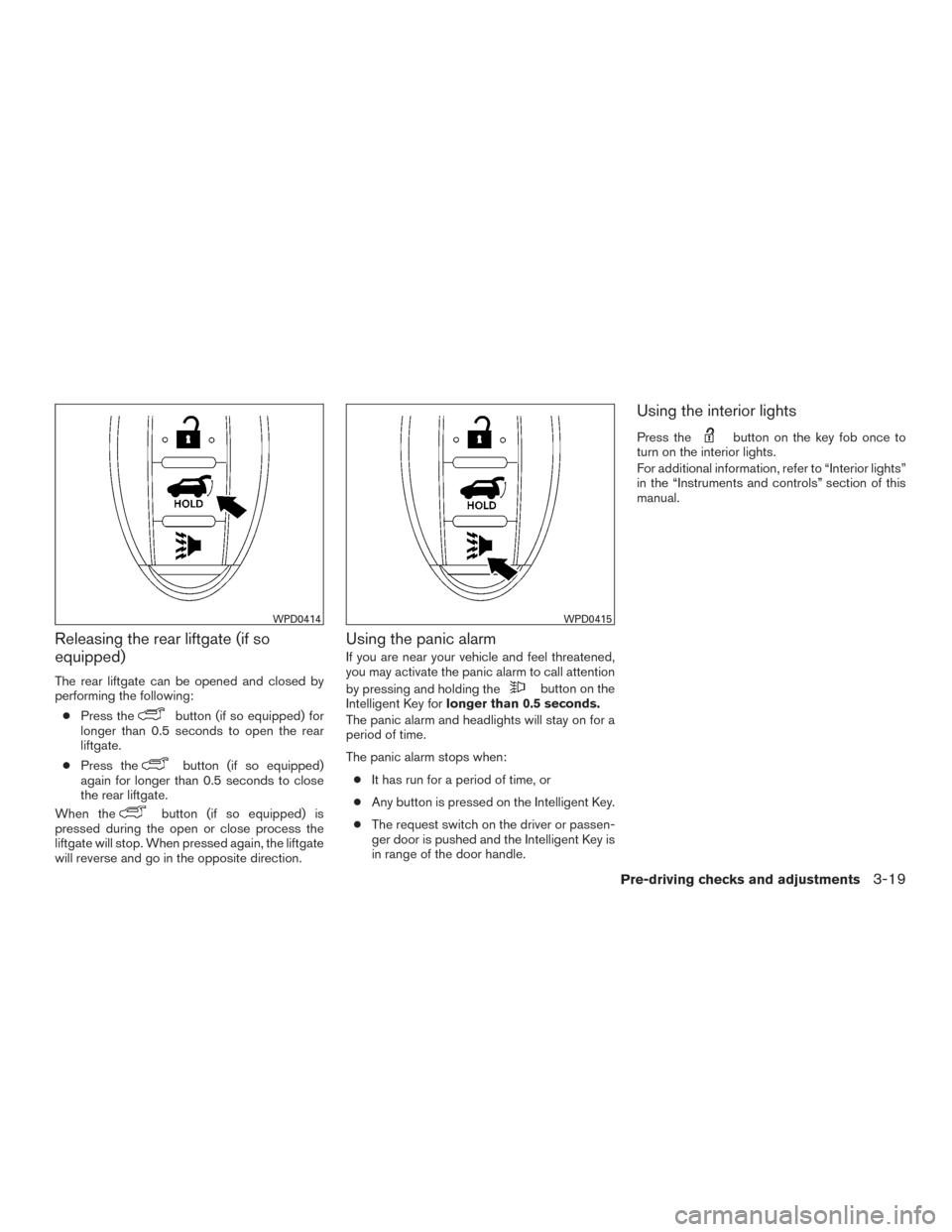
Releasing the rear liftgate (if so
equipped)
The rear liftgate can be opened and closed by
performing the following:● Press the
button (if so equipped) for
longer than 0.5 seconds to open the rear
liftgate.
● Press the
button (if so equipped)
again for longer than 0.5 seconds to close
the rear liftgate.
When the
button (if so equipped) is
pressed during the open or close process the
liftgate will stop. When pressed again, the liftgate
will reverse and go in the opposite direction.
Using the panic alarm
If you are near your vehicle and feel threatened,
you may activate the panic alarm to call attention
by pressing and holding the
button on the
Intelligent Key for longer than 0.5 seconds.
The panic alarm and headlights will stay on for a
period of time.
The panic alarm stops when:
● It has run for a period of time, or
● Any button is pressed on the Intelligent Key.
● The request switch on the driver or passen-
ger door is pushed and the Intelligent Key is
in range of the door handle.
Using the interior lights
Press thebutton on the key fob once to
turn on the interior lights.
For additional information, refer to “Interior lights”
in the “Instruments and controls” section of this
manual.
WPD0414WPD0415
Pre-driving checks and adjustments3-19
Page 341 of 547
– On roads where there are sharpcurves.
– On roads where there are sharply contrasting objects, such as shad-
ows, snow, water, wheel ruts, seams
or lines remaining after road repairs.
(The LDW system could detect these
items as lane markers.)
– On roads where the traveling lane merges or separates.
– When the vehicle’s traveling direc- tion does not align with the lane
marker.
– When traveling close to the vehicle in front of you, which obstructs the lane
camera unit detection range.
– When rain, snow, dirt or object ad- heres to the windshield in front of the
lane camera unit.
– When the headlights are not bright due to dirt on the lens or if the aiming
is not adjusted properly.
– When strong light enters the lane camera unit. (For example, the light
directly shines on the front of the
vehicle at sunrise or sunset.) – When a sudden change in brightness
occurs. (For example, when the ve-
hicle enters or exits a tunnel or under
a bridge.)
SYSTEM TEMPORARILY
UNAVAILABLE
If the vehicle is parked in direct sunlight under
high temperature conditions (over approximately
104°F (40°C)) and then started, the LDW system
may be deactivated automatically, the warning
systems ON indicator on the switch will flash and
the following message will appear in the vehicle
information display. - “Unavailable High Cabin
Temp.”
When the interior temperature is reduced, the
LDW system will resume operating automatically
and the warning systems ON indicator will stop
flashing.
The LDW system is not designed to warn under
the following conditions:
● When you operate the lane change signal
and change traveling lanes in the direction of
the signal. (The LDW system will become
operable again approximately 2 seconds af-
ter the lane change signal is turned off.)
● When the vehicle speed lowers to less than
approximately 37 mph (60 km/h). After the above conditions have finished and the
necessary operating conditions are satisfied, the
LDW functions will resume.
SYSTEM MALFUNCTION
If the LDW system malfunctions, it will cancel
automatically and “Malfunction: See Owner’s
Manual” will appear in the vehicle information
display. If “Malfunction: See Owner’s Manual”
appears in the vehicle information display, pull off
the road to a safe location and stop the vehicle.
Place shift lever in the P (Park) position and the
ignition switch to the OFF position and restart the
engine/motor. If “Malfunction: See Owner’s
Manual” continues to appear in the vehicle infor-
mation display, have the system checked. It is
recommended that you visit a NISSAN dealer for
this service.
5-30Starting and driving
Page 450 of 547
8 Do-it-yourself
Maintenance precautions...........................8-2
Engine compartment check locations ................8-3
Engine cooling system .............................8-4
Checking engine coolant level ...................8-5
Changing engine coolant ........................8-5
Engine oil .........................................8-6
Checking engine oil level ........................8-6
Changing engine oil ............................8-7
Changing engine oil filter ........................8-8
Continuously Variable Transmission (CVT) fluid .......8-9
Brake fluid ........................................8-9
Windshield-washer fluid ........................... 8-10
Windshield-washer fluid reservoir ...............8-10
Battery .......................................... 8-11
Jump starting ................................. 8-12
Variable voltage control system .....................8-13
Drive belt ........................................ 8-13
Spark plugs ...................................... 8-14
Replacing spark plugs ......................... 8-14
Air cleaner ....................................... 8-15
In-cabin microfilter (if so equipped) ..............8-15Windshield wiper blades
.......................... 8-16
Cleaning ..................................... 8-16
Replacing .................................... 8-16
Brakes .......................................... 8-18
Fuses ........................................... 8-18
Engine compartment ........................... 8-19
Passenger compartment .......................8-20
Battery replacement .............................. 8-21
Key fob (if so equipped) ........................ 8-21
NISSAN jackknife key (if so equipped) ...........8-23
NISSAN Intelligent Key® (if so equipped) ........8-24
Lights ........................................... 8-26
Headlights .................................... 8-26
Fog lights (if so equipped) ......................8-26
Exterior and interior lights .......................8-27
Wheels and tires ................................. 8-29
Tire pressure .................................. 8-29
Tire
labeling ................................... 8-33
Types of tires .................................. 8-35
Tire chains .................................... 8-37
Changing wheels and tires .....................8-38
Page 476 of 547
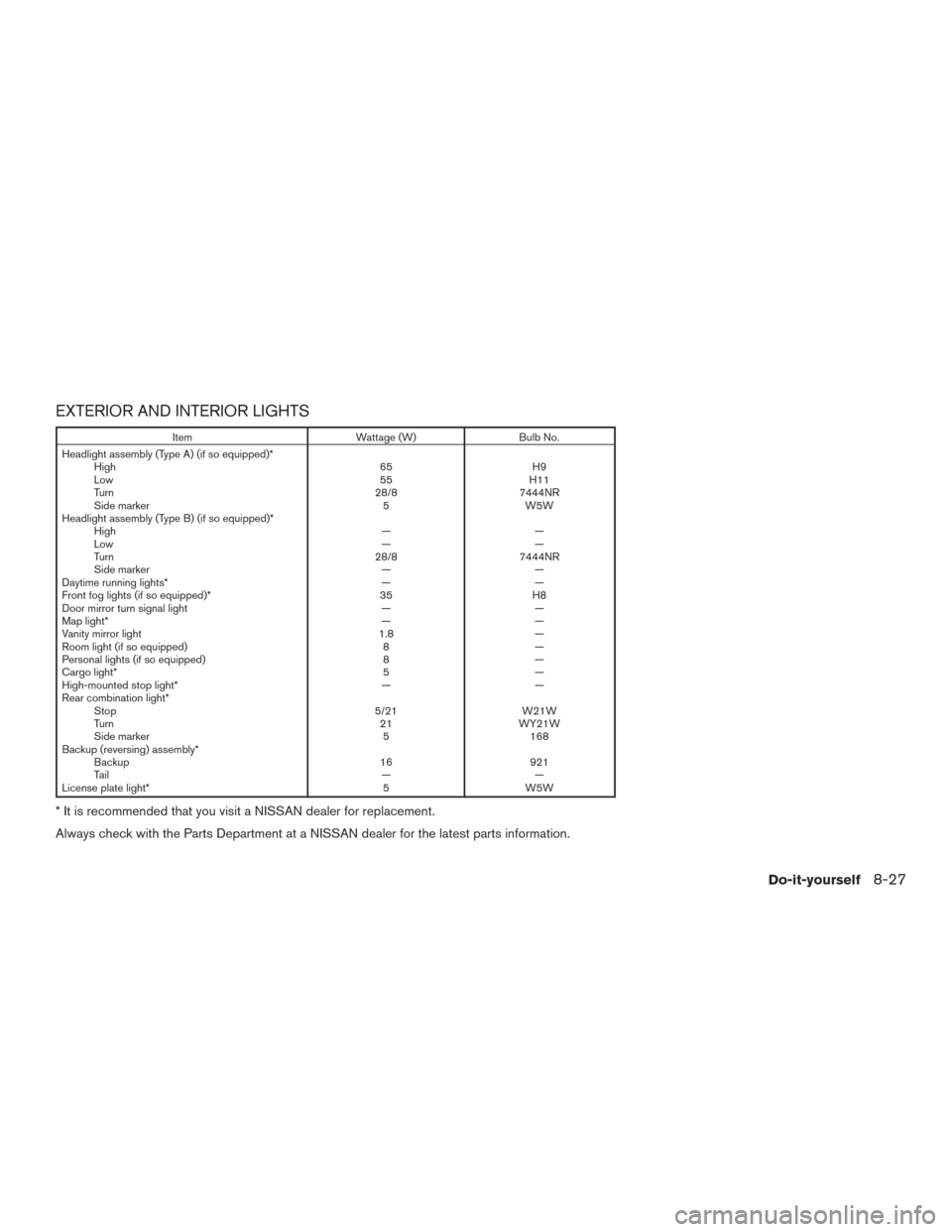
EXTERIOR AND INTERIOR LIGHTS
ItemWattage (W)Bulb No.
Headlight assembly (Type A) (if so equipped)* High 65H9
Low 55H11
Turn 28/87444NR
Side marker 5W5W
Headlight assembly (Type B) (if so equipped)* High ——
Low ——
Turn 28/87444NR
Side marker ——
Daytime running lights* ——
Front fog lights (if so equipped)* 35H8
Door mirror turn signal light ——
Map light* ——
Vanity mirror light 1.8—
Room light (if so equipped) 8—
Personal lights (if so equipped) 8—
Cargo light* 5—
High-mounted stop light* ——
Rear combination light* Stop 5/21W21W
Turn 21WY21W
Side marker 5168
Backup (reversing) assembly* Backup 16921
Ta i l ——
License plate light* 5W5W
* It is recommended that you visit a NISSAN dealer for replacement.
Always check with the Parts Department at a NISSAN dealer for the latest parts information.
Do-it-yourself8-27
Page 541 of 547
Intelligent Cruise Control (ICC).........5-57
Intelligent Key system Key operating range .............3-12
Key operation ................3-14
Mechanicalkey ................3-4
Remote keyless entry operation.......3-17
Troubleshooting guide ............3-21
Warning signals ...............3-21
Interiorlight................2-66,2-68
iPod®Player ...............4-67,4-69
ISOFIX child restraints .............1-27
J
Jump starting ...............6-11,8-12
K
Key.........................3-2
Key fob battery replacement ..........8-21
Keyless entry With Intelligent Key system
(See Intelligent Key system) .........3-17
Without Intelligent Key system
(See remote keyless entry system) . . .3-2, 3-7,
3-8
Keys NISSAN Intelligent Key® .......3-3,3-11
NISSAN Vehicle Immobilizer System keys . .3-4 L
Label Tire and Loading Information label ....10-12
Labels Air conditioner specification label .....10-12
C.M.V.S.S. certification label .......10-11
Emission control information label ....10-11
Engine serial number ............10-11
F.M.V.S.S. certification label ........10-11
Tire and Loading Information label ....10-12
Vehicle identification number (VIN) ....10-10
Vehicle identification number (VIN)
plate.....................10-10
Warning labels (for SRS) ..........1-63
Lane Departure Prevention (LDP)
system ...............5-26,5-31,5-34
Lane Departure Warning (LDW)
system ...............5-26,5-31,5-34
LATCH (Lower Anchors and Tethers for CHildren)
System ......................1-27
License plate Installing the license plate .........10-12
Liftgate ......................3-27
Liftgate release ..................3-33
Light Air bag warning light .........1-64,2-16
Brake light (See stop light) .........8-27
Bulb check/instrument panel ........2-11
Bulbreplacement..............8-27
Charge warning light ............2-13
Consolelight.................2-67
Exterior and Interior lights ..........8-27 Foglights...................8-26
Fog light switch
...............2-46
Headlightandturnsignalswitch......2-39
Headlight control switch ..........2-39
Headlights..................8-26
Interiorlight..............2-66,2-68
Lightbulbs..................8-26
Low tire pressure warning light .......2-13
Low windshield-washer fluid warning
light ..................2-15,2-31
Passenger air bag and status light .....1-56
Personal lights ................2-68
Security indicator light ............2-18
Spotlights(Seemaplight) .........2-67
Warning/indicator lights and audible
reminders ...............2-12,2-17
Lights.......................8-26 Maplights ..................2-67
Lock Child safety rear door lock ..........3-7
Door locks ...................3-5
Liftgate release ................3-33
Power door locks ...............3-6
Loose
fuel cap warning ..........2-31,3-36
Low fuel warning light ..........2-15,2-31
Low tire pressure warning light .........2-13
Low windshield-washer fluid warning
light ....................2-15,2-31
Luggage hook ..................2-59
Luggage rack (see roof rack) ..........2-61
Luggage (See vehicle loading information) . .10-13
Luggage storage
(see vehicle loading information) ........2-58
11-4