2017 NISSAN ROGUE HYBRID door lock
[x] Cancel search: door lockPage 30 of 520
1. Front view camera (if so equipped)(P. 4-17)
2. Engine hood (P. 3-23)
3. Wiper and washer switch (P. 2-36) Wiper blades (P. 8-16)
4. Windshield (P. 8-16) Windshield-washer fluid (P. 8-11)
5. Power windows (P. 2-55)
6. Door locks (P. 3-4) NISSAN Intelligent Key® (P. 3-7)
Keys (P. 3-2)
7. Mirrors (P. 3-36) Side view camera (if so equipped)
(P. 4-17)
8. Tire pressure (P. 8-28) Flat tire (P. 6-3)
Tire chains (P. 8-28)
9. Fog light switch (if so equipped)
(P. 2-39)
Daytime running light system (P. 2-39)
10. Headlight and turn signal switch
(P. 2-39)
Replacing bulbs (P. 8-24)
Refer to the page number indicated in pa-
rentheses for operating details.
LII2493
EXTERIOR FRONT
Illustrated table of contents0-3
Page 31 of 520
1. Wiper and washer switch (P. 2-36)
2. Antenna (P. 4-70)
3. Child safety rear door lock (P. 3-4)
4. Fuel-filler door (P. 3-31)Fuel-filler cap (P. 3-31)
Fuel recommendation (P. 10-2)
5. Replacing bulbs (P. 8-24)
6. Rearview camera (P. 4-11, 4-17)
7. Liftgate release (P. 3-24)
Refer to the page number indicated in pa-
rentheses for operating details.
LII2494
EXTERIOR REAR
0-4Illustrated table of contents
Page 34 of 520
15. Cruise control main/set switches(if so equipped) (P. 5-41)
Intelligent Cruise Control (ICC)
switches (if so equipped) (P. 5-43)
Bluetooth® Hands-Free Phone System
(P. 4-75, 4-88)
16. Driver supplemental air bag (P. 1-42) Horn (P. 2-43)
17. Tilt and telescopic steering (P. 3-34)
18. Control panel and vehicle information
display switches (P. 2-20)
19. Hood release (P. 3-23) Fuel door release (P. 3-31)
20. Vehicle Dynamic Control (VDC) OFF
switch (P. 2-45)
SPORT mode switch (P. 5-23)
ECO mode switch (P. 5-23)
Power liftgate switch (if so equipped)
(P. 3-24)
Power liftgate main switch
(if so equipped) (P. 3-24)
All-Wheel Drive (AWD) lock switch
(if so equipped) (P. 2-46)
Heated steering wheel switch
(if so equipped) (P. 2-44) 21. Instrument brightness control (P. 2-42)
Twin trip odometer reset switch (P. 2-4)
*: Refer to the separate Navigation System Own-
er’s Manual (if so equipped) .
Refer to the page number indicated in pa-
rentheses for operating details.
Illustrated table of contents0-7
Page 91 of 520
2. Make sure there are no objects on your lap.
3. Fasten the seat belt as outlined in the “Seatbelts” section of this manual. Front passen-
ger seat belt buckle status is monitored by
the occupant classification system, and is
used as an input to determine occupancy
status. So, it is highly recommended that the
front passenger fasten their seat belt.
4. Remain in this position for 30 seconds al- lowing the system to classify the front pas-
senger before the vehicle is put into motion.
5. Ensure proper classification by checking the front passenger air bag status light.
NOTE:
This vehicle’s occupant classification sen-
sor system generally keeps the classifica-
tion locked during driving, so it is important
that you confirm that the front passenger is
properly classified prior to driving. How-
ever, the occupant classification sensor
may recalculate the weight of the occupant
under some conditions (both while driving
and when stopped) , so front passenger
seat occupants should continue to remain
seated as outlined above. Troubleshooting
If you think the front passenger air bag status light
is incorrect:
1. If the light is ON with an adult occupying the front passenger seat:
● Occupant is a small adult — the air bag light
is functioning as intended. The front passen-
ger air bag is suppressed.
However, if the occupant is not a small adult, then
this may be due to the following conditions that
may be interfering with the weight sensors: ● Occupant is not sitting upright, leaning
against the seatback, and centered on the
seat cushion with his/her feet comfortably
extended to the floor.
● A child restraint or other object pressing
against the rear of the seatback.
● A rear passenger pushing or pulling on the
back of the front passenger seat.
● Forcing the front seat or seatback against an
object on the seat or floor behind it.
● An object placed under the front passenger
seat.
● An object placed between the seat cushion
and center console or between the seat
cushion and the door. If the vehicle is moving, please come to a stop
when it is safe to do so. Check and correct any of
the above conditions. Restart the vehicle and
wait 1 minute.
NOTE:
A system check will be performed during
which the front passenger air bag status
light will remain lit for about 7 seconds
initially.
If the light is still ON after this, the person should
be advised not to ride in the front passenger seat
and the vehicle should be checked as soon as
possible. It is recommended that you visit a
NISSAN dealer for this service.
2. If the light is OFF with a small adult, child or child restraint occupying the front passen-
ger seat.
This may be due to the following conditions
that may be interfering with the weight sen-
sors:
● Small adult or child is not sitting upright,
leaning against the seatback, and centered
on the seat cushion with his/her feet com-
fortably extended to the floor.
● The child restraint is not properly installed,
as outlined in the “Child restraints” section of
this manual.
1-54Safety—Seats, seat belts and supplemental restraint system
Page 102 of 520
15. Cruise control main/set switches(if so equipped) (P. 5-41)
Intelligent Cruise Control (ICC)
switches (if so equipped) (P. 5-43)
Bluetooth® Hands-Free Phone System
(P. 4-75, 4-88)
16. Driver supplemental air bag (P. 1-42) Horn (P. 2-43)
17. Tilt and telescopic steering (P. 3-34)
18. Control panel and vehicle information
display switches (P. 2-20)
19. Hood release (P. 3-23) Fuel door release (P. 3-31)
20. Vehicle Dynamic Control (VDC) OFF
switch (P. 2-45)
SPORT mode switch (P. 5-23)
ECO mode switch (P. 5-23)
Power liftgate switch (if so equipped)
(P. 3-24)
Power liftgate main switch
(if so equipped) (P. 3-24)
All-Wheel Drive (AWD) lock switch
(if so equipped) (P. 2-46)
Heated steering wheel switch
(if so equipped) (P. 2-44) 21. Instrument brightness control (P. 2-42)
Twin trip odometer reset switch (P. 2-4)
*: Refer to the separate Navigation System Own-
er’s Manual (if so equipped) .
Refer to the page number indicated in pa-
rentheses for operating details.
Instruments and controls2-3
Page 110 of 520
CHECKING LIGHTS
With all doors closed, apply the parking brake,
fasten the seat belts and place the ignition switch
in the ON position without starting the hybrid
system. The following lights (if so equipped) will
come on:
,,,,
The following lights (if so equipped) come on
briefly and then go off:
,,,,
If any light fails to come on or operate in a way
other than described, it may indicate a burned-
out bulb and/or a system malfunction. Have the
system checked. It is recommended that you visit
a NISSAN dealer for this service.
Some indicators and warnings are also displayed
on the vehicle information display between the
speedometer and tachometer. For additional in-
formation, refer to “Vehicle information display” in
this section.
WARNING LIGHTS
For additional information, refer to “Vehicle infor-
mation display” in this section.
12–volt battery charge warninglight
If this light comes on when the READY to drive
indicator light comes on, it may indicate the
charging system is not functioning properly. Have
your vehicle serviced immediately. It is recom-
mended that you visit a NISSAN dealer for this
service.
CAUTION
The charging system may not be function-
ing properly if the 12–volt battery charge
warning light comes on while the hybrid
system is running. The hybrid system will
stop operating when the 12–volt battery
becomes discharged. Immediately stop
the vehicle in a safe place and contact a
NISSAN dealer.
Anti-lock Braking System(ABS) warning light
When the ignition switch is placed in the ON
position, the ABS warning light illuminates and
then turns off. This indicates the ABS is opera-
tional. If the ABS warning light illuminates while the
hybrid system is running, or while driving, it may
indicate the ABS is not functioning properly.
Have the system checked. It is recommended
that you visit a NISSAN dealer for this service.
If an ABS malfunction occurs, the anti-lock func-
tion is turned off. The brake system then operates
normally, but without anti-lock assistance. For
additional information, refer to “Brake system” in
the “Starting and driving” section of this manual.
Brake warning light
This light functions for both the parking brake and
the foot brake systems.
Low brake fluid warning light
When the ignition switch is placed in the ON
position, the light warns of a low brake fluid level.
If the light comes on while the hybrid system is
running, with the parking brake not applied, stop
the vehicle and perform the following:
1. Check the brake fluid level. Add brake fluid as necessary. For additional information, re-
fer to “Brake fluid” in the “Do-it-yourself”
section of this manual.
2. If the brake fluid level is correct, have the warning system checked. It is recommended
that you visit a NISSAN dealer for this ser-
vice.
Instruments and controls2-11
Page 118 of 520
Vehicle Dynamic Control(VDC) OFF indicator light
This indicator light comes on when the VDC OFF
switch is pushed to off. This indicates the VDC
system has been turned off.
Push the VDC OFF switch again or restart the
hybrid system and the system will operate nor-
mally. For additional information, refer to “Vehicle
Dynamic Control (VDC) system” in the “Starting
and driving” section of this manual.
The VDC indicator light also comes on when you
place the ignition switch in the ON position. The
light will turn off after about 2 seconds if the
system is operational. If the
indicator light
stays on while you are driving, have the system
checked. It is recommended that you visit a
NISSAN dealer for this service.
While the VDC system is operating, you might
feel a slight vibration or hear the system working
when starting the vehicle or accelerating, but this
is normal.
AUDIBLE REMINDERS
Brake pad wear warning
The disc brake pads have audible wear warnings.
When a disc brake pad requires replacement, it
makes a high pitched scraping sound when the
vehicle is in motion, whether or not the brake
pedal is depressed. Have the brakes checked as
soon as possible if the warning sound is heard.
Key reminder chime
A chime sounds if the driver’s door is opened
while the ignition switch is placed in the OFF
position or placed in the OFF or LOCK position
with the key left in the vehicle. Make sure the
ignition switch is placed in the LOCK position,
and take the key with you when leaving the ve-
hicle.
Light reminder chime
With the ignition switch placed in the OFF posi-
tion, a chime sounds when the driver’s door is
opened if the headlights or parking lights are on.
Turn the headlight control switch off before leav-
ing the vehicle.
NISSAN Intelligent Key® door buzzer
The Intelligent Key door buzzer sounds if any one
of the following improper operations is found.
● The Intelligent Key is left inside the vehicle
when locking the doors.
● Any doors are not closed securely when
locking the doors.
When the buzzer sounds, be sure to check both
the vehicle and the Intelligent Key. For additional
information, refer to “NISSAN Intelligent Key®” in
the “Pre-driving checks and adjustments” section
of this manual.
Instruments and controls2-19
Page 124 of 520
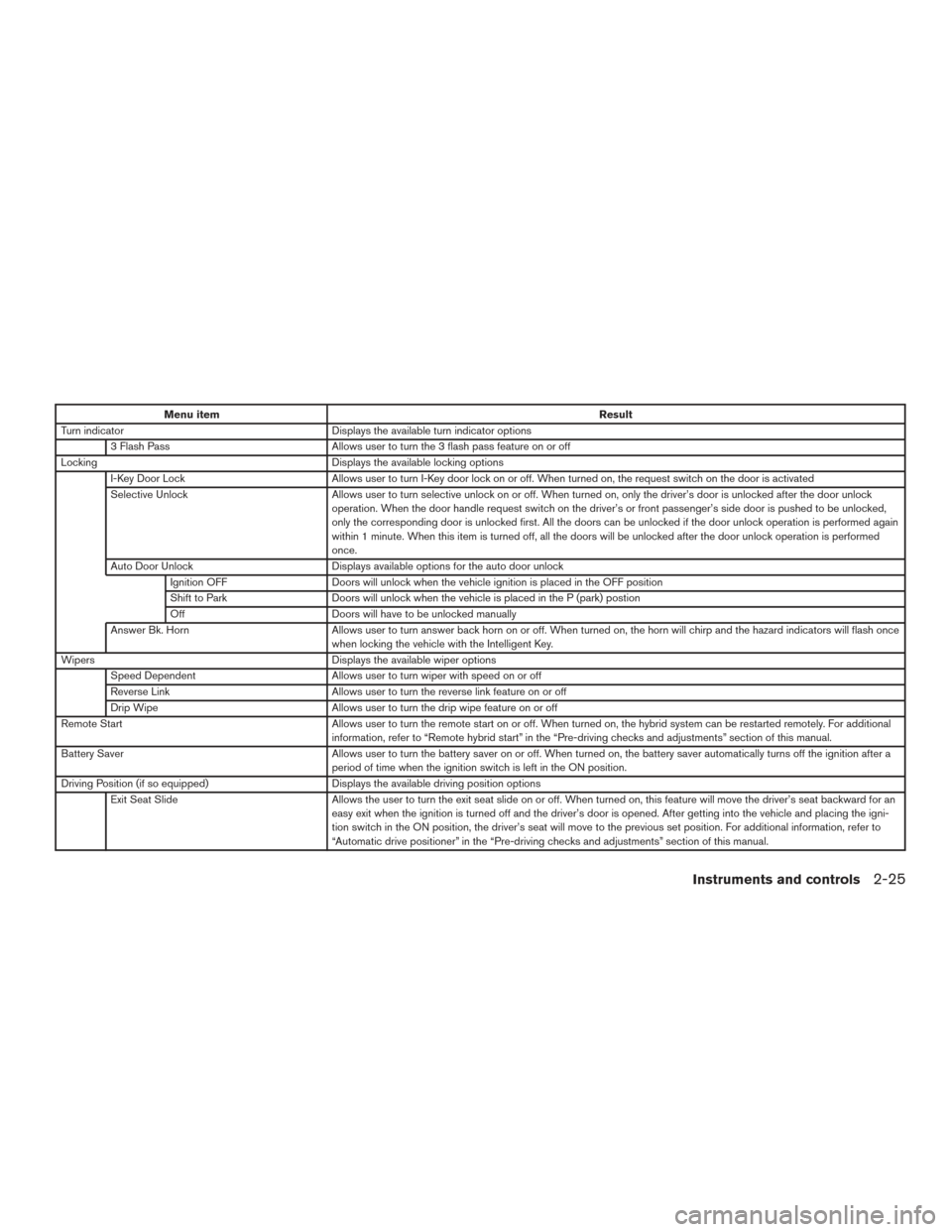
Menu itemResult
Turn indicator Displays the available turn indicator options
3 Flash Pass Allows user to turn the 3 flash pass feature on or off
Locking Displays the available locking options
I-Key Door Lock Allows user to turn I-Key door lock on or off. When turned on, the request switch on the door is activated
Selective Unlock Allows user to turn selective unlock on or off. When turned on, only the driver’s door is unlocked after the door unlock
operation. When the door handle request switch on the driver’s or front passenger’s side door is pushed to be unlocked,
only the corresponding door is unlocked first. All the doors can be unlocked if the door unlock operation is performed again
within 1 minute. When this item is turned off, all the doors will be unlocked after the door unlock operation is performed
once.
Auto Door Unlock Displays available options for the auto door unlock
Ignition OFF Doors will unlock when the vehicle ignition is placed in the OFF position
Shift to Park Doors will unlock when the vehicle is placed in the P (park) postion
Off Doors will have to be unlocked manually
Answer Bk. Horn Allows user to turn answer back horn on or off. When turned on, the horn will chirp and the hazard indicators will flash once
when locking the vehicle with the Intelligent Key.
Wipers Displays the available wiper options
Speed Dependent Allows user to turn wiper with speed on or off
Reverse Link Allows user to turn the reverse link feature on or off
Drip Wipe Allows user to turn the drip wipe feature on or off
Remote Start Allows user to turn the remote start on or off. When turned on, the hybrid system can be restarted remotely. For additional
information, refer to “Remote hybrid start” in the “Pre-driving checks and adjustments” section of this manual.
Battery Saver Allows user to turn the battery saver on or off. When turned on, the battery saver automatically turns off the ignition after a
period of time when the ignition switch is left in the ON position.
Driving Position (if so equipped) Displays the available driving position options
Exit Seat Slide Allows the user to turn the exit seat slide on or off. When turned on, this feature will move the driver’s seat backward for an
easy exit when the ignition is turned off and the driver’s door is opened. After getting into the vehicle and placing the igni-
tion switch in the ON position, the driver’s seat will move to the previous set position. For additional information, refer to
“Automatic drive positioner” in the “Pre-driving checks and adjustments” section of this manual.
Instruments and controls2-25