2017 NISSAN QUEST start stop button
[x] Cancel search: start stop buttonPage 287 of 520
4-98Monitor, heater, air conditioner, audio, phone and voice recognition systems
Operation keys:
To operate the USB memory, select the desired
key displayed on the operation screen using the
multi-function controller.
Pause
Select the “
” key to pause the movie file. To
resume playing the movie file, select the “”
key.
Play
Select the “
” key to start playing a movie file,
for example, after pausing a movie file.
STOP
Select the “
” key to stop playing a movie file.
Skip (Next chapter)
Select the “
” key to skip the chapter(s) of
the file forward. The chapters will advance the
number of times the ENTER button is pushed.
Skip (Previous chapter)
Select the “
” key to skip the chapter(s) of
the file backward. The chapters will go back the
number of times the “
” key is selected. List:
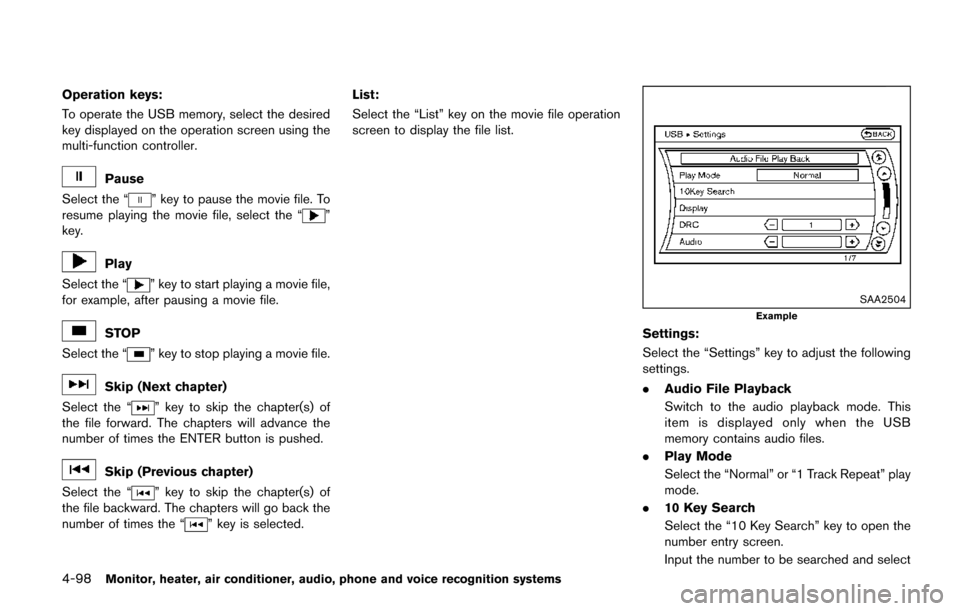
Select the “List” key on the movie file operation
screen to display the file list.
SAA2504
Example
Settings:
Select the “Settings” key to adjust the following
settings.
.
Audio File Playback
Switch to the audio playback mode. This
item is displayed only when the USB
memory contains audio files.
. Play Mode
Select the “Normal” or “1 Track Repeat” play
mode.
. 10 Key Search
Select the “10 Key Search” key to open the
number entry screen.
Input the number to be searched and select
Page 306 of 520
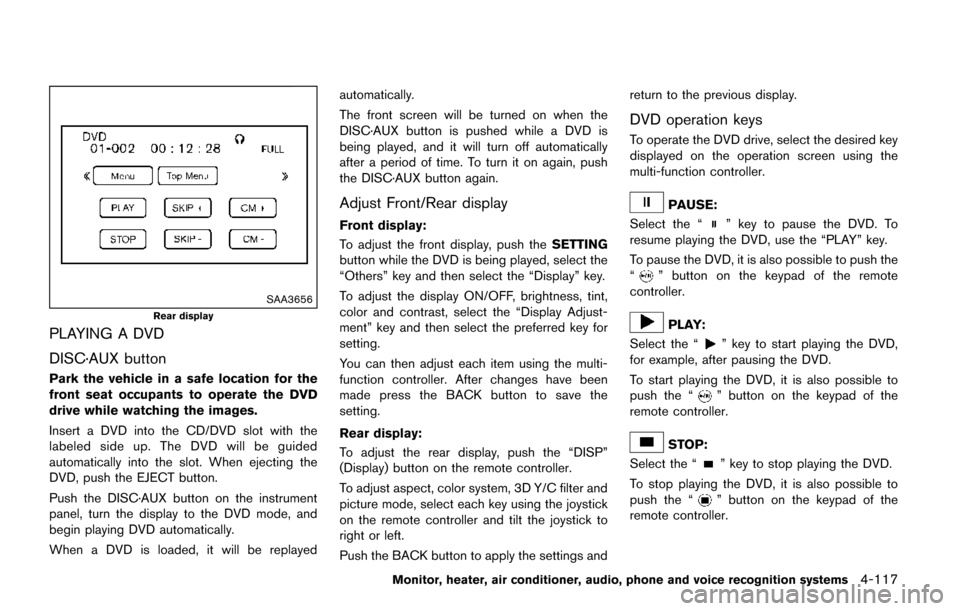
SAA3656
Rear display
PLAYING A DVD
DISC·AUX button
Park the vehicle in a safe location for the
front seat occupants to operate the DVD
drive while watching the images.
Insert a DVD into the CD/DVD slot with the
labeled side up. The DVD will be guided
automatically into the slot. When ejecting the
DVD, push the EJECT button.
Push the DISC·AUX button on the instrument
panel, turn the display to the DVD mode, and
begin playing DVD automatically.
When a DVD is loaded, it will be replayedautomatically.
The front screen will be turned on when the
DISC·AUX button is pushed while a DVD is
being played, and it will turn off automatically
after a period of time. To turn it on again, push
the DISC·AUX button again.
Adjust Front/Rear display
Front display:
To adjust the front display, push the
SETTING
button while the DVD is being played, select the
“Others” key and then select the “Display” key.
To adjust the display ON/OFF, brightness, tint,
color and contrast, select the “Display Adjust-
ment” key and then select the preferred key for
setting.
You can then adjust each item using the multi-
function controller. After changes have been
made press the BACK button to save the
setting.
Rear display:
To adjust the rear display, push the “DISP”
(Display) button on the remote controller.
To adjust aspect, color system, 3D Y/C filter and
picture mode, select each key using the joystick
on the remote controller and tilt the joystick to
right or left.
Push the BACK button to apply the settings and return to the previous display.
DVD operation keys
To operate the DVD drive, select the desired key
displayed on the operation screen using the
multi-function controller.
PAUSE:
Select the “
” key to pause the DVD. To
resume playing the DVD, use the “PLAY” key.
To pause the DVD, it is also possible to push the
“
” button on the keypad of the remote
controller.
PLAY:
Select the “
” key to start playing the DVD,
for example, after pausing the DVD.
To start playing the DVD, it is also possible to
push the “
” button on the keypad of the
remote controller.
STOP:
Select the “
” key to stop playing the DVD.
To stop playing the DVD, it is also possible to
push the “
” button on the keypad of the
remote controller.
Monitor, heater, air conditioner, audio, phone and voice recognition systems4-117
Page 322 of 520
* Type B is models without navigation
system/without text message function.
WARNING
.Use a phone after stopping your
vehicle in a safe location. If you
have to use a phone while driving,
exercise extreme caution at all
times so full attention may be given
to vehicle operation.
. If you find yourself unable to devote
full attention to vehicle operation
while talking on the phone, pull off
the road to a safe location and stop
your vehicle before doing so.
CAUTION
To avoid draining the vehicle battery,
use a phone after starting the engine.
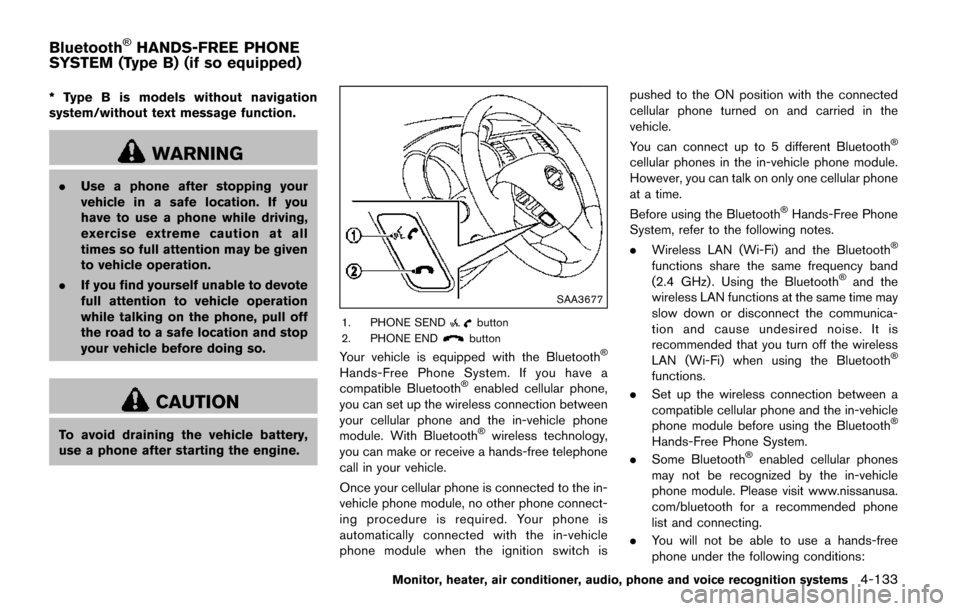
SAA3677
1. PHONE SENDbutton
2. PHONE ENDbutton
Your vehicle is equipped with the BluetoothŠ
Hands-Free Phone System. If you have a
compatible BluetoothŠenabled cellular phone,
you can set up the wireless connection between
your cellular phone and the in-vehicle phone
module. With Bluetooth
Šwireless technology,
you can make or receive a hands-free telephone
call in your vehicle.
Once your cellular phone is connected to the in-
vehicle phone module, no other phone connect-
ing procedure is required. Your phone is
automatically connected with the in-vehicle
phone module when the ignition switch is pushed to the ON position with the connected
cellular phone turned on and carried in the
vehicle.
You can connect up to 5 different Bluetooth
Š
cellular phones in the in-vehicle phone module.
However, you can talk on only one cellular phone
at a time.
Before using the Bluetooth
ŠHands-Free Phone
System, refer to the following notes.
. Wireless LAN (Wi-Fi) and the Bluetooth
Š
functions share the same frequency band
(2.4 GHz) . Using the BluetoothŠand the
wireless LAN functions at the same time may
slow down or disconnect the communica-
tion and cause undesired noise. It is
recommended that you turn off the wireless
LAN (Wi-Fi) when using the Bluetooth
Š
functions.
. Set up the wireless connection between a
compatible cellular phone and the in-vehicle
phone module before using the Bluetooth
Š
Hands-Free Phone System.
. Some BluetoothŠenabled cellular phones
may not be recognized by the in-vehicle
phone module. Please visit www.nissanusa.
com/bluetooth for a recommended phone
list and connecting.
. You will not be able to use a hands-free
phone under the following conditions:
Monitor, heater, air conditioner, audio, phone and voice recognition systems4-133
BluetoothŠHANDS-FREE PHONE
SYSTEM (Type B) (if so equipped)
Page 377 of 520
5-8Starting and driving
6. Turn on the hazard warning flashers andeither contact a roadside emergency service
to change the tire or see “Changing a flat
tire” (P.6-4) .
DRINKING ALCOHOL/DRUGS AND
DRIVING
WARNING
Never drive under the influence of
alcohol or drugs. Alcohol in the blood-
stream reduces coordination, delays
reaction time and impairs judgement.
Driving after drinking alcohol increases
the likelihood of being involved in an
accident injuring yourself and others.
Additionally, if you are injured in an
accident, alcohol can increase the se-
verity of the injury.
NISSAN is committed to safe driving. However,
you must choose not to drive under the influence
of alcohol. Every year thousands of people are
injured or killed in alcohol-related accidents.
Although the local laws vary on what is
considered to be legally intoxicated, the fact is
that alcohol affects all people differently and
most people underestimate the effects of
alcohol. Remember, drinking and driving don’t mix! And
that is true for drugs, too (over-the-counter,
prescription, and illegal drugs) . Don’t drive if
your ability to operate your vehicle is impaired by
alcohol, drugs, or some other physical condition.
WARNING
Do not operate the push-button ignition
switch while driving the vehicle except
in an emergency. (The engine will stop
when the ignition switch is pushed 3
consecutive times or the ignition switch
is pushed and held for more than 2
seconds.) If the engine stops while the
vehicle is being driven, this could lead
to a crash and serious injury.
Before operating the push-button ignition
switch, be sure to move the shift lever to the P
(Park) position.
PUSH-BUTTON IGNITION SWITCH
Page 381 of 520
5-12Starting and driving
1. Apply the parking brake.
2. Move the shift lever to the P (Park) or N(Neutral) position. (P is recommended.)
The starter is designed not to operate unless
the shift lever is in either of the above
positions.
3. Push the ignition switch to the ON position. Depress the brake pedal and push the
ignition switch to start the engine.
To start the engine immediately, push and
release the ignition switch while depressing
the brake pedal with the ignition switch in
any position.
.If the engine is very hard to start inextremely cold weather or when restart-
ing, depress the accelerator pedal a little
(approximately 1/3 to the floor) and while
holding, crank the engine. Release the
accelerator pedal when the engine starts.
.If the engine is very hard to start becauseit is flooded, depress the accelerator
pedal all the way to the floor and hold it.
Push the ignition switch to the ON
position to start cranking the engine.
After 5 or 6 seconds, stop cranking by
pushing the ignition switch to OFF. After
cranking the engine, release the accel-
erator pedal. Crank the engine with your
foot off the accelerator pedal bydepressing the brake pedal and pushing
the push-button ignition switch to start
the engine. If the engine starts, but fails
to run, repeat the above procedure.
CAUTION
Do not operate the starter for more
than 15 seconds at a time. If the engine
does not start, push the ignition switch
to OFF and wait 10 seconds before
cranking again, otherwise the starter
could be damaged.
4. Warm-up
Allow the engine to idle for at least 30
seconds after starting. Do not race the
engine while warming it up. Drive at
moderate speed for a short distance first,
especially in cold weather. In cold weather,
keep the engine running for a minimum of 2 -
3 minutes before shutting it off. Starting and
stopping the engine over a short period of
time may make the vehicle more difficult to
start.
5. To stop the engine, shift the shift lever to the P (Park) position and push the ignition
switch to the OFF position. NOTE:
Care should be taken to avoid situations
that can lead to potential battery discharge
and potential no-start conditions such as:
1.
Installation or extended use of electro-
nic accessories that consume battery
power when the engine is not running
(Phone chargers, GPS, DVD players,
etc.)
2. Vehicle is not driven regularly and/or
only driven short distances.
In these cases, the battery may need to be
charged to maintain battery health.
STARTING THE ENGINE
Page 383 of 520
5-14Starting and driving
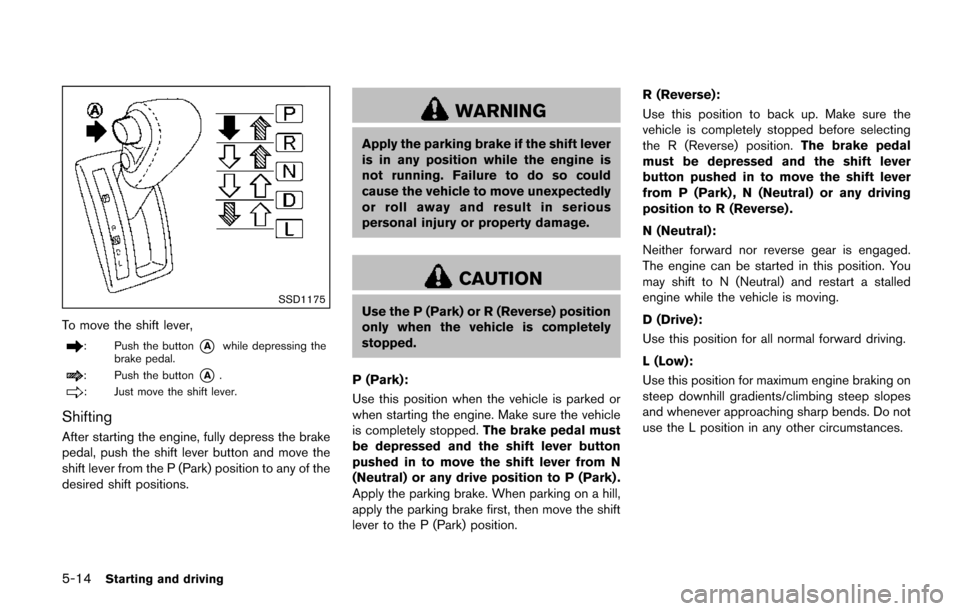
SSD1175
To move the shift lever,
: Push the button*Awhile depressing the
brake pedal.
: Push the button*A.
: Just move the shift lever.
Shifting
After starting the engine, fully depress the brake
pedal, push the shift lever button and move the
shift lever from the P (Park) position to any of the
desired shift positions.
WARNING
Apply the parking brake if the shift lever
is in any position while the engine is
not running. Failure to do so could
cause the vehicle to move unexpectedly
or roll away and result in serious
personal injury or property damage.
CAUTION
Use the P (Park) or R (Reverse) position
only when the vehicle is completely
stopped.
P (Park):
Use this position when the vehicle is parked or
when starting the engine. Make sure the vehicle
is completely stopped. The brake pedal must
be depressed and the shift lever button
pushed in to move the shift lever from N
(Neutral) or any drive position to P (Park) .
Apply the parking brake. When parking on a hill,
apply the parking brake first, then move the shift
lever to the P (Park) position. R (Reverse):
Use this position to back up. Make sure the
vehicle is completely stopped before selecting
the R (Reverse) position.
The brake pedal
must be depressed and the shift lever
button pushed in to move the shift lever
from P (Park) , N (Neutral) or any driving
position to R (Reverse) .
N (Neutral):
Neither forward nor reverse gear is engaged.
The engine can be started in this position. You
may shift to N (Neutral) and restart a stalled
engine while the vehicle is moving.
D (Drive):
Use this position for all normal forward driving.
L (Low):
Use this position for maximum engine braking on
steep downhill gradients/climbing steep slopes
and whenever approaching sharp bends. Do not
use the L position in any other circumstances.
Page 385 of 520
5-16Starting and driving
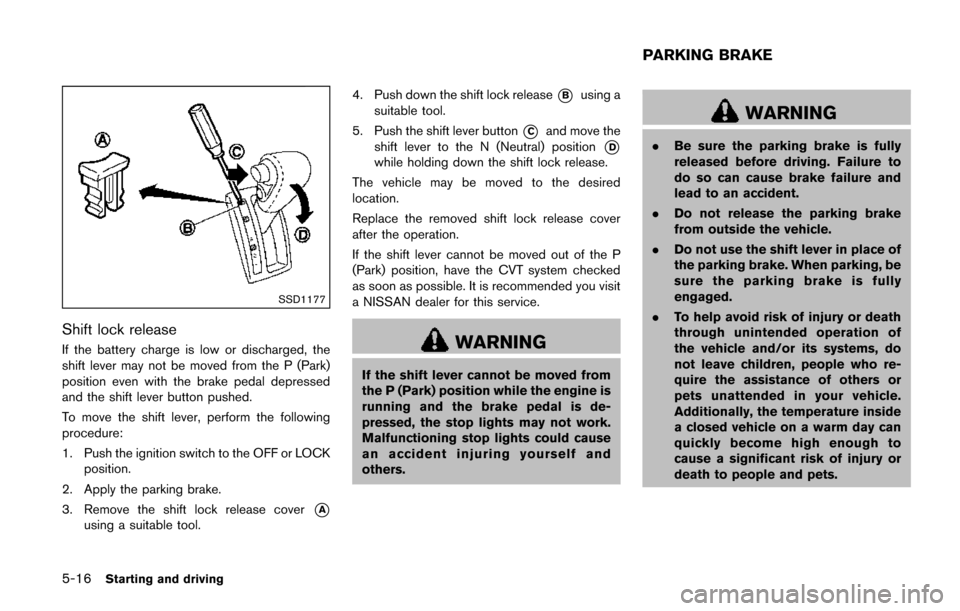
SSD1177
Shift lock release
If the battery charge is low or discharged, the
shift lever may not be moved from the P (Park)
position even with the brake pedal depressed
and the shift lever button pushed.
To move the shift lever, perform the following
procedure:
1. Push the ignition switch to the OFF or LOCKposition.
2. Apply the parking brake.
3. Remove the shift lock release cover
*A
using a suitable tool. 4. Push down the shift lock release
*Busing a
suitable tool.
5. Push the shift lever button
*Cand move the
shift lever to the N (Neutral) position
*D
while holding down the shift lock release.
The vehicle may be moved to the desired
location.
Replace the removed shift lock release cover
after the operation.
If the shift lever cannot be moved out of the P
(Park) position, have the CVT system checked
as soon as possible. It is recommended you visit
a NISSAN dealer for this service.
WARNING
If the shift lever cannot be moved from
the P (Park) position while the engine is
running and the brake pedal is de-
pressed, the stop lights may not work.
Malfunctioning stop lights could cause
an accident injuring yourself and
others.
WARNING
. Be sure the parking brake is fully
released before driving. Failure to
do so can cause brake failure and
lead to an accident.
. Do not release the parking brake
from outside the vehicle.
. Do not use the shift lever in place of
the parking brake. When parking, be
sure the parking brake is fully
engaged.
. To help avoid risk of injury or death
through unintended operation of
the vehicle and/or its systems, do
not leave children, people who re-
quire the assistance of others or
pets unattended in your vehicle.
Additionally, the temperature inside
a closed vehicle on a warm day can
quickly become high enough to
cause a significant risk of injury or
death to people and pets.
PARKING BRAKE
Page 512 of 520
11 Index
A
A/C (Air Conditioner) operation ............................. 4-49
ABS (Anti-lock Braking System) ............................ 5-31
Advanced air bag system ......................................... 1-54
Aiming control, Headlights ....................................... 2-37
Air bag systemAdvanced air bag system .................................. 1-54
Front passenger air bag and status light ...... 1-55
Front-seat mounted side-impact
supplemental air bag system ............................ 1-61
Roof-mounted curtain side-impact
supplemental air bag system ............................ 1-61
Air bag warning labels .............................................. 1-63
Air bag warning light ..................................... 1-64, 2-15
Air cleaner housing filter ........................................... 8-14
Air conditioner Air conditioner operation ................................... 4-47
Air conditioner service ....................................... 4-60
Air conditioner specification label ................. 10-10
Air conditioning system refrigerant and
lubricant recommendations .................... 4-60, 10-6
In-cabin microfilter ............................................... 4-60
Alarm, How to stop alarm (see vehicle
security system) .......................................................... 2-30
Alcohol, drugs and driving ......................................... 5-8
Antenna ...................................................................... 4-109
Anti-lock Braking System (ABS) ............................ 5-31
Anti-lock braking system (ABS) warning light .... 2-12
Appearance care Exterior appearance care ..................................... 7-2
Interior appearance care ....................................... 7-4
Armrests .......................................................................... 1-7
Around view
Šmonitor ............................................... 4-32
Audible reminders ...................................................... 2-18 Audio operation precautions ................................... 4-61
Audio system ............................................................... 4-61
Steering wheel audio controls ....................... 4-108
Auto closure ................................................................. 3-29
Autolight system ......................................................... 2-34
Automatic Air conditioner ...................................................... 4-54
Door locks ................................................................ 3-7
Drive positioner .................................................... 3-36
Moonroof ............................................................... 2-54
Seat positioner ..................................................... 3-36
AUX (Auxiliary) input .................................................. 4-85
Avoiding collision and rollover .................................. 5-6
B
Back door (See liftgate) ........................................... 3-26
Battery ........................................................................... 8-10 Battery saver system .......................................... 2-36
Intelligent Key ....................................................... 8-20
Variable voltage control system ....................... 8-12
Before starting the engine ....................................... 5-11
Blind Spot Warning (BSW) system ...................... 5-17
Blind Spot Warning (BSW) system
warning light ................................................................ 2-12
Bluetooth
Šhands-free phone system
(Type A) ..................................................................... 4-122
Bluetooth
Šhands-free phone system
(Type B) ..................................................................... 4-133
Bluetooth
Šhands-free phone system
(Type C) ..................................................................... 4-146
Bluetooth
Šstreaming audio .................................. 4-101
Booster seats .............................................................. 1-45
Brake
Anti-lock Braking System (ABS) ..................... 5-31
Brake fluid ................................................................ 8-9 Brake system ........................................................ 5-30
Parking brake operation ..................................... 5-16
Warning light ........................................................ 2-12
Break-in schedule ....................................................... 5-27
Brightness control Display ON/OFF button ..................................... 4-10
Instrument panel .................................................. 2-38
Bulb replacement ....................................................... 8-22
C
Cabin air filter .............................................................. 4-60
Capacities and
recommended fluids/lubricants ............................... 10-2
Car phone or CB radio .......................................... 4-121
Cargo floor box ........................................................... 2-48
Cargo lights ................................................................. 2-60
Catalytic converter, Three way catalyst .................. 5-3
CD/DVD/USB memory care and cleaning ....... 4-107
Center multi-function control panel ......................... 4-5
Chassis and body maintenance ............................. 9-11
Checking lights ........................................................... 2-12
Child restraints ............................................................ 1-27 Booster seats ....................................................... 1-45
LATCH system ..................................................... 1-29
Precautions on child restraints ........................ 1-27
Top tether strap ................................................... 1-32
Child safety .................................................................. 1-24
Chimes Audible reminders ............................................... 2-18
Seat belt warning light and chime .................. 2-15
Circuit breaker, Fusible link ..................................... 8-18
Cleaning exterior and interior ........................... 7-2, 7-4
Coat hooks ................................................................... 2-51
Cockpit ............................................................................ 2-3
Cold weather driving ................................................. 5-34