Page 17 of 555
VQ35DD engine
1. Power steering fluid reservoir (P. 8-9)
2. Engine coolant reservoir (P. 8-4)
3. Drive belt location (P.8-13)
4. Fuse box (P. 8-19)
5. Engine oil filler cap (P. 8-6)
6. Brake fluid reservoir (P. 8-10)
7. Air cleaner (P. 8-15)
8. Fuse box (P. 8-19)
9. Fuse/Fusible link box (P. 8-19)
10. Fuse/Fusible link box (P. 8-19)
11. Battery (P. 8-11)
12. Engine oil dipstick (P. 8-6)
13. Radiator cap (P. 8-4)
14. Windshield-washer fluid reservoir(P. 8-11)
Refer to the page number indicated in pa-
rentheses for operating details.
LDI3012
ENGINE COMPARTMENT CHECK
LOCATIONS
0-8Illustrated table of contents
Page 18 of 555
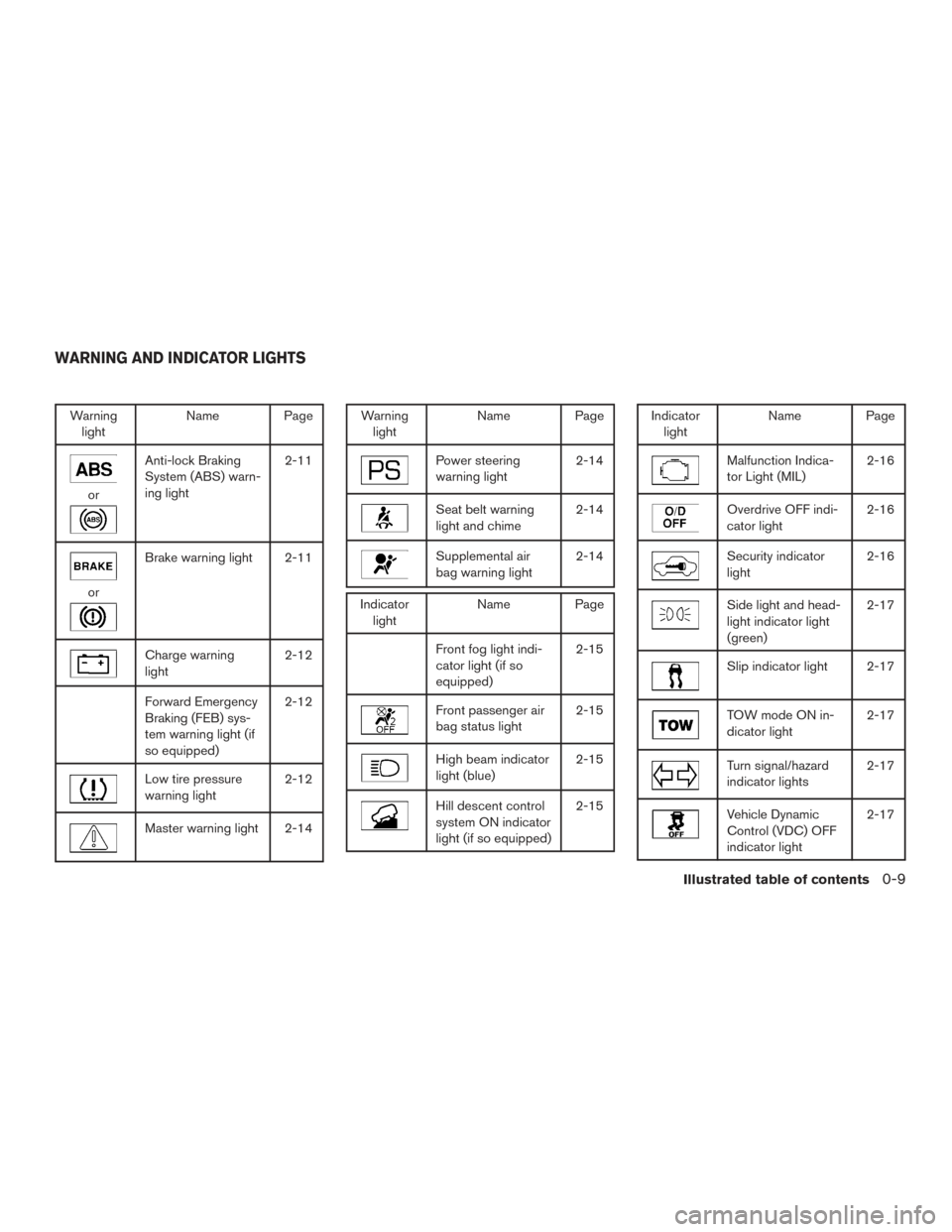
Warninglight Name Page
or
Anti-lock Braking
System (ABS) warn-
ing light 2-11
or
Brake warning light 2-11
Charge warning
light
2-12
Forward Emergency
Braking (FEB) sys-
tem warning light (if
so equipped)2-12
Low tire pressure
warning light
2-12
Master warning light 2-14
Warning
light Name Page
Power steering
warning light 2-14
Seat belt warning
light and chime2-14
Supplemental air
bag warning light2-14
Indicator
light Name Page
Front fog light indi-
cator light (if so
equipped) 2-15
Front passenger air
bag status light
2-15
High beam indicator
light (blue)2-15
Hill descent control
system ON indicator
light (if so equipped)2-15
Indicator
light Name Page
Malfunction Indica-
tor Light (MIL) 2-16
Overdrive OFF indi-
cator light2-16
Security indicator
light2-16
Side light and head-
light indicator light
(green)2-17
Slip indicator light 2-17
TOW mode ON in-
dicator light
2-17
Turn signal/hazard
indicator lights2-17
Vehicle Dynamic
Control (VDC) OFF
indicator light2-17
WARNING AND INDICATOR LIGHTS
Illustrated table of contents0-9
Page 19 of 555
MEMO
0-10Illustrated table of contents
Page 308 of 555
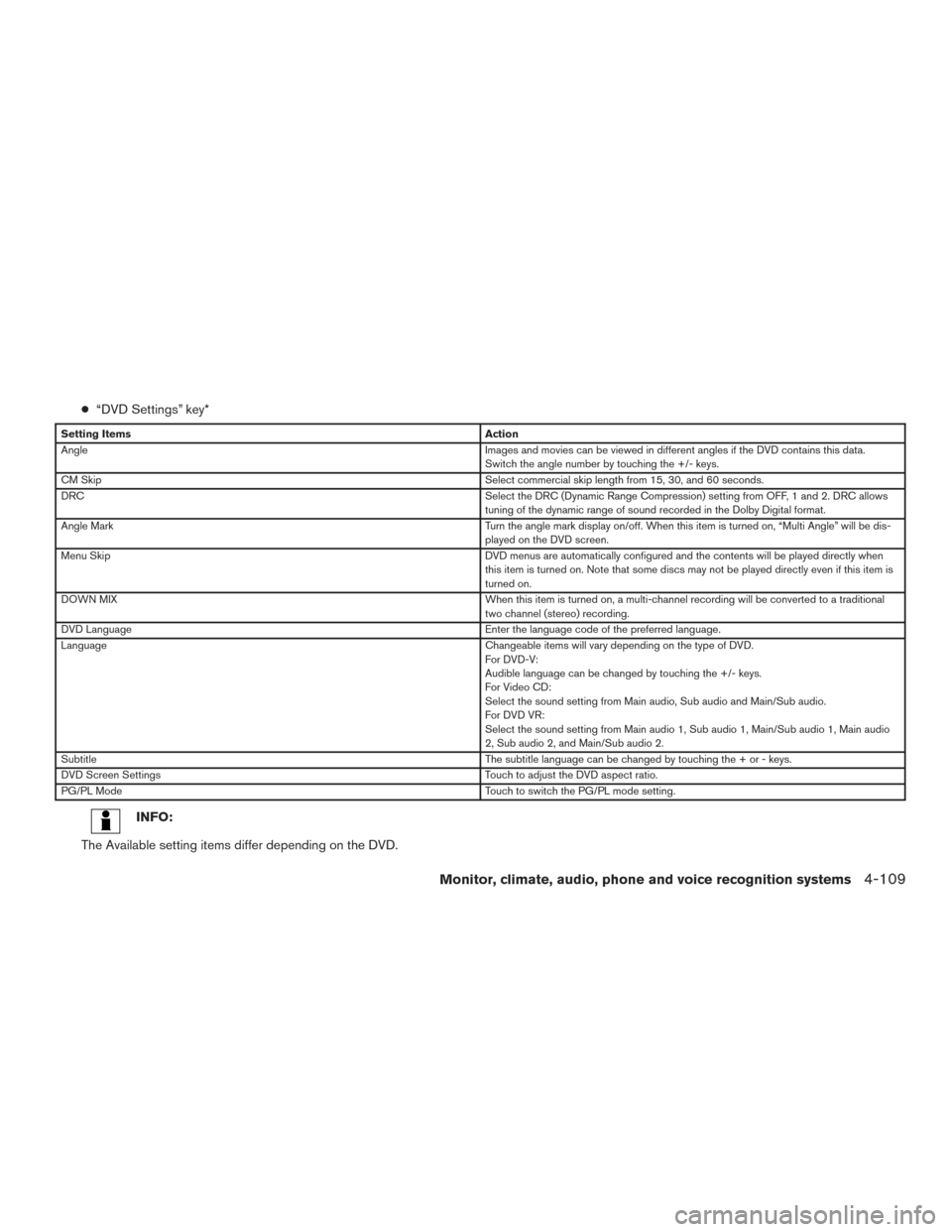
●“DVD Settings” key*
Setting Items Action
Angle Images and movies can be viewed in different angles if the DVD contains this data.
Switch the angle number by touching the +/- keys.
CM Skip Select commercial skip length from 15, 30, and 60 seconds.
DRC Select the DRC (Dynamic Range Compression) setting from OFF, 1 and 2. DRC allows
tuning of the dynamic range of sound recorded in the Dolby Digital format.
Angle Mark Turn the angle mark display on/off. When this item is turned on, “Multi Angle” will be dis-
played on the DVD screen.
Menu Skip DVD menus are automatically configured and the contents will be played directly when
this item is turned on. Note that some discs may not be played directly even if this item is
turned on.
DOWN MIX When this item is turned on, a multi-channel recording will be converted to a traditional
two channel (stereo) recording.
DVD Language Enter the language code of the preferred language.
Language Changeable items will vary depending on the type of DVD.
For DVD-V:
Audible language can be changed by touching the +/- keys.
For Video CD:
Select the sound setting from Main audio, Sub audio and Main/Sub audio.
For DVD VR:
Select the sound setting from Main audio 1, Sub audio 1, Main/Sub audio 1, Main audio
2, Sub audio 2, and Main/Sub audio 2.
Subtitle The subtitle language can be changed by touching the + or - keys.
DVD Screen Settings Touch to adjust the DVD aspect ratio.
PG/PL Mode Touch to switch the PG/PL mode setting.
INFO:
The Available setting items differ depending on the DVD.
Monitor, climate, audio, phone and voice recognition systems4-109
Page 456 of 555
REMOVING SPOTS
Remove tar and oil spots, industrial dust, insects,
and tree sap as quickly as possible from the
surface of the paint to avoid lasting damage or
staining. Special cleaning products are available
at a NISSAN dealer or any automotive accessory
store. It is recommended that you visit a NISSAN
dealer for these products.
UNDERBODY
In areas where road salt is used in winter, it is
necessary to clean the underbody regularly in
order to prevent dirt and salt from building up and
causing the acceleration of corrosion on the un-
derbody and suspension. Before the winter pe-
riod and again in the spring, the underseal must
be checked and, if necessary, re-treated.
GLASS
Use glass cleaner to remove smoke and dust film
from the glass surfaces. It is normal for glass to
become coated with a film after the vehicle is
parked in the hot sun. Glass cleaner and a soft
cloth will easily remove this film.
CAUTION
When cleaning the inside of the windows,
do not use sharp-edged tools, abrasive
cleaners or chlorine-based disinfectant
cleaners. They could damage the electrical
conductors, radio antenna elements or
rear window defroster elements.
ALUMINUM ALLOY WHEELS
Wash the wheels regularly with a sponge damp-
ened in a mild soap solution, especially during
winter months in areas where road salt is used. If
not removed, road salt can discolor the wheels.
CAUTION
Follow the directions below to avoid
staining or discoloring the wheels:
●Do not use a cleaner that uses strong
acid or alkali contents to clean the
wheels.
● Do not apply wheel cleaners to the
wheels when they are hot. The wheel
temperature should be the same as am-
bient temperature.
● Rinse the wheel to completely remove
the cleaner within 15 minutes after the
cleaner is applied.
CHROME PARTS
Clean all chrome parts regularly with a non-
abrasive chrome polish to maintain the finish.
TIRE DRESSINGS
NISSAN does not recommend the use of tire
dressings. Tire manufacturers apply a coating to
the tires to help reduce discoloration of the rub-
ber. If a tire dressing is applied to the tires, it may
react with the coating and form a compound. This
compound may come off the tire while driving and
stain the vehicle paint.
If you choose to use a tire dressing, take the
following precautions:
● Use a water-based tire dressing. The coat-
ing on the tire dissolves more easily than
with an oil-based tire dressing.
● Apply a light coat of tire dressing to help
prevent it from entering the tire
tread/grooves (where it would be difficult to
remove) .
● Wipe off excess tire dressing using a dry
towel. Make sure the tire dressing is com-
pletely removed from the tire tread/grooves.
● Allow the tire dressing to dry as recom-
mended by the tire dressing manufacturer.
Appearance and care7-3