2017 NISSAN MURANO lock
[x] Cancel search: lockPage 164 of 466
●Doors do not lock by pushing the door
handle request switch while any door is
open. However, doors lock with the me-
chanical key even if any door is open.
● Doors do not lock with the door handle
request switch with the Intelligent Key inside
the vehicle and a beep sounds to warn you.
However, when an Intelligent Key is inside
the vehicle, doors can be locked with an-
other Intelligent Key.
CAUTION
● After locking the doors using the re-
quest switch, make sure that the doors
have been securely locked by operating
the door handles or the rear liftgate
opener switch.
● When locking the doors using the re-
quest switch, make sure to have the
Intelligent Key in your possession be-
fore operating the request switch to
prevent the Intelligent Key from being
left in the vehicle.
● The request switch is operational only
when the Intelligent Key has been de-
tected by the Intelligent Key system. Lockout protection
To prevent the Intelligent Key from being acci-
dentally locked in the vehicle, lockout protection
is equipped with the Intelligent Key system.
When any door is open, the doors are locked,
and then the Intelligent Key is put inside the
vehicle and all the doors are closed; a chime will
sound and the lock will automatically unlock.
NOTE:
The doors may not lock when the Intelli-
gent Key is in the same hand that is oper-
ating the request switch to lock the door.
Put the Intelligent Key in a purse, pocket or
your other hand.
CAUTION
The lockout protection may not function
under the following conditions:
●
When the Intelligent Key is placed on
top of the instrument panel.
● When the Intelligent Key is placed in-
side the glove box or a storage bin.
● When the Intelligent Key is placed in-
side the door pockets.
● When the Intelligent Key is placed in-
side or near metallic materials.
Unlocking doors
1. Carry the Intelligent Key.
2. Push the door handle request switch.
3. The door on which the request switch was
pressed will unlock and the hazard warning
lights flash once, the outside buzzer sounds
once, and the front and tail lights will turn on
for 30 seconds.
4. Push the door handle request switch again within one minute to unlock the remaining
doors.
LPD2551
Pre-driving checks and adjustments3-11
Page 165 of 466
NOTE:
If Selective Unlock is turned off in the Ve-
hicle Settings, all doors will unlock upon
first request switch press.
For power liftgate opening:1. Carry the Intelligent Key.
2. Press the power liftgate request switch. NOTE:
Request switches for all doors and liftgate
can be deactivated when the Intelligent Key
Door Lock setting is switched to OFF in the
Vehicle Settings of the vehicle information
display. For additional information, refer to
“Vehicle information display” in the “In-
struments and controls” section of this
manual.
If a door handle is pulled while unlocking the
doors, that door may not be unlocked. Returning
the door handle to its original position will unlock
the door. If the door does not unlock after return-
ing the door handle, push the door handle re-
quest switch to unlock the door.
All doors will be locked automatically unless one
of the following operations is performed within
one minute after pushing the request switch.
● Opening any door.
● Pushing the ignition switch.
The interior light timer illuminates for a period of
time when a door is unlocked and the room light
switch is in the DOOR position.
The interior light can be turned off without waiting
by performing one of the following operations: ● Placing the ignition switch in the ON posi-
tion. ●
Locking the doors with the remote control.
● Switching the room light switch to the OFF
position.
● Switching the Light Off Delay to 0 in Vehicle
Settings of the vehicle information display.
For additional information, refer to “Vehicle
information display” in the “Instruments and
controls” section of this manual.
HOW TO USE THE REMOTE
KEYLESS ENTRY FUNCTION
The remote keyless entry function can operate all
door locks using the remote keyless function of
the Intelligent Key. The remote keyless function
can operate at a distance of 33 ft (10 m) away
from the vehicle. The operating distance de-
pends upon the conditions around the vehicle.
The remote keyless entry function will not func-
tion under the following conditions:
● When the Intelligent Key is not within the
operational range.
● When the Intelligent Key battery is dis-
charged.
LPD2278
3-12Pre-driving checks and adjustments
Page 166 of 466
CAUTION
When locking the doors using the Intelli-
gent Key, be sure not to leave the key in
the vehicle.
Locking doors
1. Place the ignition switch in the LOCK posi-tion.
2. Close all doors.
3. Press the
button on the Intelligent
Key.
4. The hazard warning lights flash twice, the horn beeps once, and the front and tail lights
will turn on for 10 seconds.
5. All doors will be locked.
CAUTION
After locking the doors using the Intelli-
gent Key, be sure that the doors have been
securely locked by operating the door
handles.
LPD2257
Pre-driving checks and adjustments3-13
Page 167 of 466
Unlocking doors
1. Press thebutton on the Intelligent
Key.
2. The driver’s door will unlock and the hazard warning lights flash once, and the front and
tail lights will turn on for 30 seconds.
3. Press the
button again within one
minute to unlock the remaining doors. NOTE:
The unlocking operation can be changed in
Selective Unlock in the Vehicle Settings of
the vehicle information display. For addi-
tional information, refer to “Vehicle infor-
mation display” in the “Instruments and
controls” section of this manual.
NOTE:
If Selective Unlock is turned off in the Ve-
hicle Settings, all doors will unlock upon
the first
press of the Intelligent Key
remote.
All doors will be locked automatically unless one
of the following operations is performed within
one minute after pressing the
button:
● Opening any doors.
● Pushing the ignition switch.
The interior light illuminates for a period of time
when a door is unlocked and the room light
switch is in the DOOR position.
The light can be turned off without waiting by
performing one of the following operations:
● Placing the ignition switch in the ON posi-
tion.
● Locking the doors with the Intelligent Key. ●
Switching the room light switch to the OFF
position.
● Switching the Light Off Delay to 0 in Vehicle
Settings of the vehicle information display.
For additional information, refer to “Vehicle
information display” in the “Instruments and
controls” section of this manual.
Opening windows
The Intelligent Key allows you to simultaneously
open windows equipped with automatic opera-
tion.
● To open the windows, press and hold
the
button on the Intelligent Key for
longer than 3 seconds.
The door windows will lower while holding down
the
button on the Intelligent Key.
NOTE:
The windows will stop lowering at the time
the
button is released.
The door windows cannot be closed by
using the Intelligent Key.
LPD2258
3-14Pre-driving checks and adjustments
Page 169 of 466
Answer back horn feature
If desired, the answer back horn feature can be
deactivated using the Intelligent Key. When it is
deactivated and the LOCK
button is
pushed, the hazard indicator lights flash twice.
When the UNLOCK
button is pushed, nei-
ther the hazard indicator lights nor the horn op-
erates. NOTE:
If you change the answer back horn and
hazard indicator lights flash feature with
the Intelligent Key, the vehicle information
display screen will show the current mode
after the ignition switch has been cycled
from the OFF to the ON position. The ve-
hicle information display screen can also
be used to change the answer back horn
mode.
To deactivate:
Press and hold the
andbuttonsfor at least 2 seconds.
The hazard indicator lights will flash three times to
confirm that the answer back horn feature has
been deactivated.
To activate: Press and hold the
andbuttonsfor at least 2 seconds once
more.
The hazard indicator lights will flash once and the
horn will sound once to confirm that the horn
beep feature has been reactivated.
Deactivating the horn beep feature does not si-
lence the horn if the alarm is triggered.
WARNING SIGNALS
To help prevent the vehicle from moving unex-
pectedly by erroneous operation of the Intelligent
Key or to help prevent the vehicle from being
stolen, a chime or buzzer sounds from inside and
outside the vehicle and a warning is displayed in
the instrument panel.
When a chime or beep sounds or a warning is
displayed, be sure to check the vehicle and the
Intelligent Key.
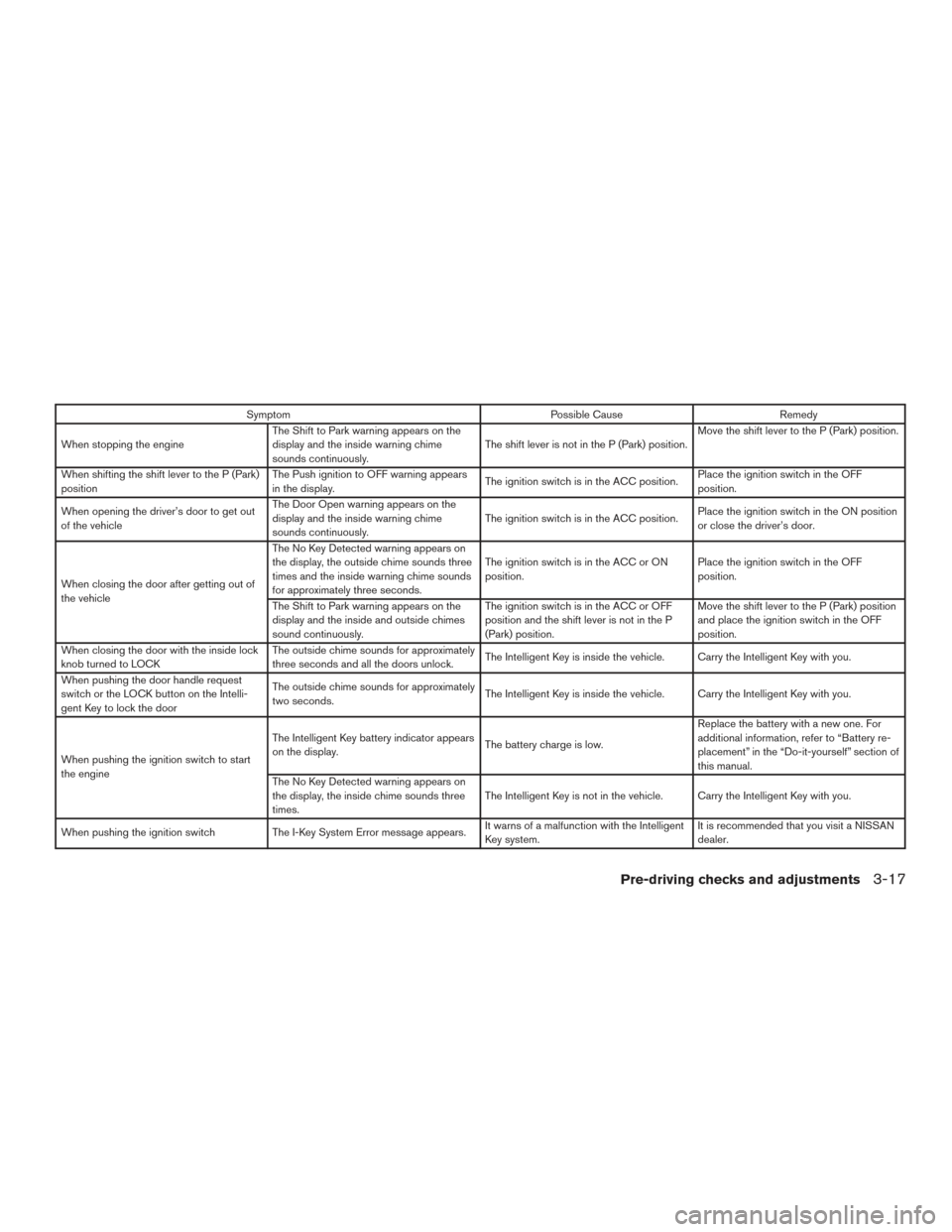
For additional information, refer to the “Trouble-
shooting guide” in this section and “Vehicle infor-
mation display” in the “Instruments and controls”
section of this manual.
TROUBLESHOOTING GUIDE
Verify the location of all Intelligent Keys that are
programmed for the vehicle. If another Intelligent
Key is in range or inside the vehicle, the vehicle
system may respond differently than expected.
LPD2259
3-16Pre-driving checks and adjustments
Page 170 of 466
SymptomPossible CauseRemedy
When stopping the engine The Shift to Park warning appears on the
display and the inside warning chime
sounds continuously. The shift lever is not in the P (Park) position.Move the shift lever to the P (Park) position.
When shifting the shift lever to the P (Park)
position The Push ignition to OFF warning appears
in the display.
The ignition switch is in the ACC position.Place the ignition switch in the OFF
position.
When opening the driver’s door to get out
of the vehicle The Door Open warning appears on the
display and the inside warning chime
sounds continuously.
The ignition switch is in the ACC position.
Place the ignition switch in the ON position
or close the driver’s door.
When closing the door after getting out of
the vehicle The No Key Detected warning appears on
the display, the outside chime sounds three
times and the inside warning chime sounds
for approximately three seconds.
The ignition switch is in the ACC or ON
position.
Place the ignition switch in the OFF
position.
The Shift to Park warning appears on the
display and the inside and outside chimes
sound continuously. The ignition switch is in the ACC or OFF
position and the shift lever is not in the P
(Park) position.Move the shift lever to the P (Park) position
and place the ignition switch in the OFF
position.
When closing the door with the inside lock
knob turned to LOCK The outside chime sounds for approximately
three seconds and all the doors unlock.
The Intelligent Key is inside the vehicle. Carry the Intelligent Key with you.
When pushing the door handle request
switch or the LOCK button on the Intelli-
gent Key to lock the door The outside chime sounds for approximately
two seconds.
The Intelligent Key is inside the vehicle. Carry the Intelligent Key with you.
When pushing the ignition switch to start
the engine The Intelligent Key battery indicator appears
on the display.
The battery charge is low.Replace the battery with a new one. For
additional information, refer to “Battery re-
placement” in the “Do-it-yourself” section of
this manual.
The No Key Detected warning appears on
the display, the inside chime sounds three
times. The Intelligent Key is not in the vehicle. Carry the Intelligent Key with you.
When pushing the ignition switch The I-Key System Error message appears. It warns of a malfunction with the Intelligent
Key system. It is recommended that you visit a NISSAN
dealer.
Pre-driving checks and adjustments3-17
Page 171 of 466
Thebutton will be on the NISSAN Intelli-
gent Key® if the vehicle has remote engine start.
This feature allows the engine to start from out-
side the vehicle.
The following features may be affected when the
remote start feature is used:
● The vehicle’s automatic climate control sys-
tem will set the cabin temperature appropri-
ately before the customer unlocks and en-
ters the vehicle. For additional information,
refer to “Remote engine start logic” in the
“Display screen, heater, air conditioner, au-
dio, and phone systems” section of this
manual. ●
Vehicles without automatic climate control
will default to the last used heating or cool-
ing mode.
Laws in some local communities may restrict the
use of remote starters. For example, some laws
require a person using remote start to have the
vehicle in view. Check local regulations for any
requirements.
Other conditions may affect the function of the
Remote Engine Start feature. For additional infor-
mation, refer to “Conditions the remote start will
not work” in this section. Other conditions can affect the performance of
the Intelligent Key transmitter. For additional in-
formation, refer to “NISSAN Intelligent Key®” in
this section.
REMOTE ENGINE START
OPERATING RANGE
The remote engine start function can only be
used when the Intelligent Key is within the speci-
fied operating range from the vehicle.
When the Intelligent Key battery is discharged or
other strong radio wave sources are present near
the operating location, the Intelligent Key operat-
ing range becomes narrower, and the Intelligent
Key may not function properly.
The remote engine start operating range is ap-
proximately 197 ft (60 m) from the vehicle.
REMOTE STARTING THE VEHICLE
To use the remote start feature to start the engine
perform the following:
1. Aim the Intelligent Key at the vehicle.
2. Press the
LOCK button to lock all
doors.
Type A (if so equipped)
LPD2293
Type B (if so equipped)
LPD2060
REMOTE ENGINE START (if so
equipped)
3-18Pre-driving checks and adjustments
Page 172 of 466
3. Within 5 seconds press and hold theremote start button until the turn signal lights
flash and the tail lamps turn on. If the vehicle
is not within view press and hold the
remote start button for at least 2 seconds.
The following events will occur when the engine
starts:
● The parking lights will turn on and remain on
as long as the engine is running.
● The doors will be locked and the climate
control system may come on.
● The engine will continue to run for 10 min-
utes. Repeat the steps to extend the time for
an additional 10 minutes. For additional in-
formation, refer to “Extending engine run
time” in this section.
Depress and hold the brake then press the push-
button ignition switch to the ON position before
driving. For additional information, refer to “Driv-
ing the vehicle” in the “Starting and driving” sec-
tion of this manual.
EXTENDING ENGINE RUN TIME
The remote start feature can be extended one
time by performing the steps listed in “Remote
starting the vehicle” in this section. Run time will
be calculated as follows: ● The first 10 minute run time will start when
the remote start function is performed.
● The second 10 minutes will start immedi-
ately when the remote start function is per-
formed again. For example, if the engine has
been running for 5 minutes, and 10 minutes
are added, the engine will run for a total of
15 minutes.
● Extending engine run time will count towards
the two remote start limit.
A maximum of two remote starts, or a single start
with an extension, are allowed between ignition
cycles. The ignition switch must be cycled to the
ON position and then back to the OFF position
before the remote start procedure can be used
again.
CANCELING A REMOTE START
To cancel a remote start, perform one of the
following: ● Aim the Intelligent Key at the vehicle and
press
until the parking lights turn off.
● Turn on the hazard warning flashers.
● Cycle the ignition switch ON and then OFF.
● The extended engine run time has expired.
● The first 10 minute timer has expired.
● The engine hood has been opened.
● The shift lever is moved out of park.
● The alarm sounds due to illegal entry into the
vehicle.
● The ignition switch is pushed without an
Intelligent Key in the vehicle.
● The ignition switch is pushed with an Intelli-
gent Key in the vehicle but the brake pedal is
not depressed.
Pre-driving checks and adjustments3-19