2017 NISSAN MURANO ECU
[x] Cancel search: ECUPage 77 of 466
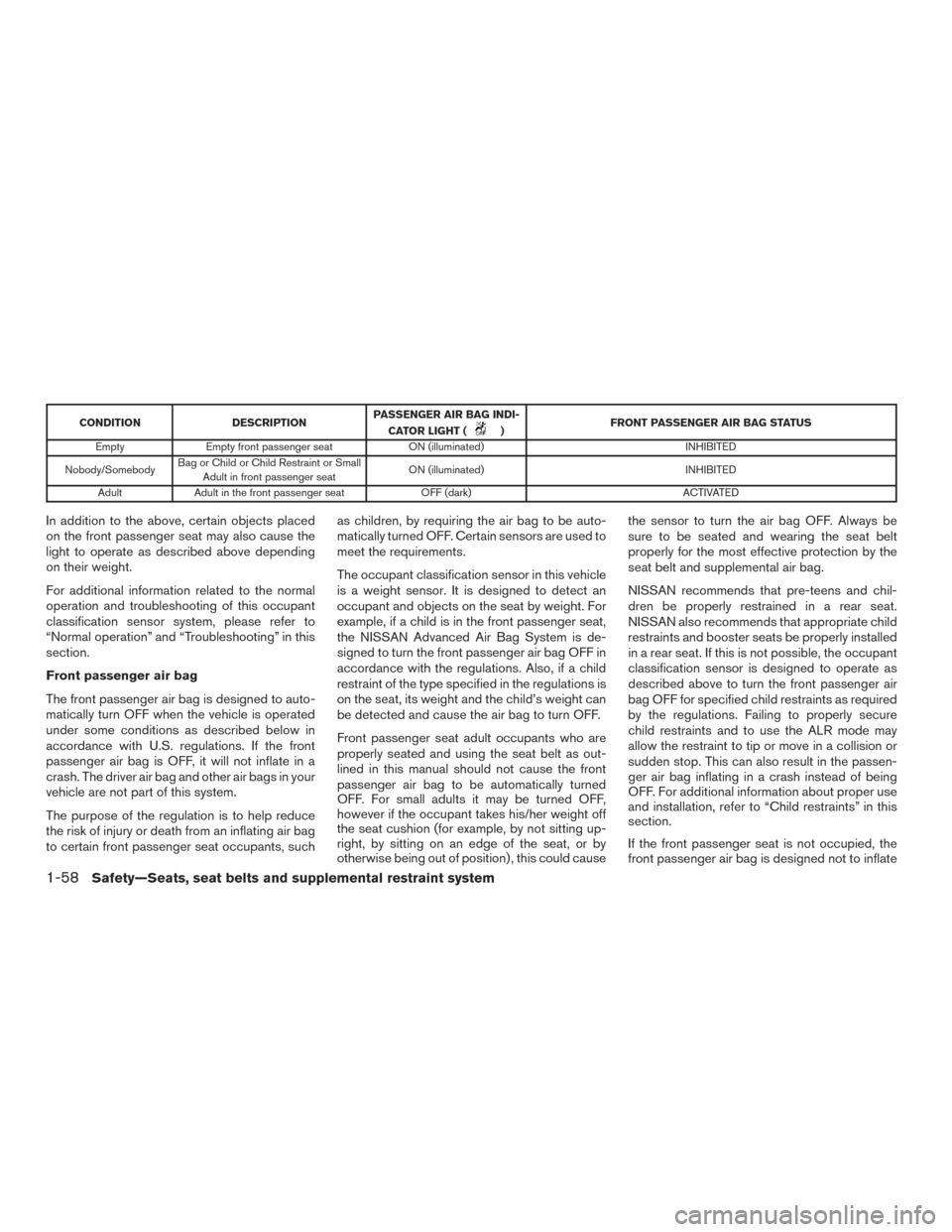
CONDITIONDESCRIPTIONPASSENGER AIR BAG INDI-
CATOR LIGHT () FRONT PASSENGER AIR BAG STATUS
Empty Empty front passenger seat ON (illuminated) INHIBITED
Nobody/Somebody Bag or Child or Child Restraint or Small
Adult in front passenger seat ON (illuminated)
INHIBITED
Adult Adult in the front passenger seat OFF (dark) ACTIVATED
In addition to the above, certain objects placed
on the front passenger seat may also cause the
light to operate as described above depending
on their weight.
For additional information related to the normal
operation and troubleshooting of this occupant
classification sensor system, please refer to
“Normal operation” and “Troubleshooting” in this
section.
Front passenger air bag
The front passenger air bag is designed to auto-
matically turn OFF when the vehicle is operated
under some conditions as described below in
accordance with U.S. regulations. If the front
passenger air bag is OFF, it will not inflate in a
crash. The driver air bag and other air bags in your
vehicle are not part of this system.
The purpose of the regulation is to help reduce
the risk of injury or death from an inflating air bag
to certain front passenger seat occupants, suchas children, by requiring the air bag to be auto-
matically turned OFF. Certain sensors are used to
meet the requirements.
The occupant classification sensor in this vehicle
is a weight sensor. It is designed to detect an
occupant and objects on the seat by weight. For
example, if a child is in the front passenger seat,
the NISSAN Advanced Air Bag System is de-
signed to turn the front passenger air bag OFF in
accordance with the regulations. Also, if a child
restraint of the type specified in the regulations is
on the seat, its weight and the child’s weight can
be detected and cause the air bag to turn OFF.
Front passenger seat adult occupants who are
properly seated and using the seat belt as out-
lined in this manual should not cause the front
passenger air bag to be automatically turned
OFF. For small adults it may be turned OFF,
however if the occupant takes his/her weight off
the seat cushion (for example, by not sitting up-
right, by sitting on an edge of the seat, or by
otherwise being out of position) , this could causethe sensor to turn the air bag OFF. Always be
sure to be seated and wearing the seat belt
properly for the most effective protection by the
seat belt and supplemental air bag.
NISSAN recommends that pre-teens and chil-
dren be properly restrained in a rear seat.
NISSAN also recommends that appropriate child
restraints and booster seats be properly installed
in a rear seat. If this is not possible, the occupant
classification sensor is designed to operate as
described above to turn the front passenger air
bag OFF for specified child restraints as required
by the regulations. Failing to properly secure
child restraints and to use the ALR mode may
allow the restraint to tip or move in a collision or
sudden stop. This can also result in the passen-
ger air bag inflating in a crash instead of being
OFF. For additional information about proper use
and installation, refer to “Child restraints” in this
section.
If the front passenger seat is not occupied, the
front passenger air bag is designed not to inflate
1-58Safety—Seats, seat belts and supplemental restraint system
Page 89 of 466
2 Instruments and controls
Instrument panel...................................2-2
Meters and gauges ................................2-3
Speedometer and odometer .....................2-4
Tachometer ....................................2-5
Engine coolant temperature gauge ...............2-5
Fuel gauge ....................................2-6
Warning lights, indicator lights and audible
reminders .........................................2-7
Checking lights ................................2-7
Warning lights .................................2-7
Indicator lights ................................ 2-12
Audible reminders ............................. 2-14
Vehicle information display ......................... 2-15
How to use the vehicle information display .......2-15
Startup display ................................ 2-16
Settings ...................................... 2-16
Vehicle information display warnings and
indicators ..................................... 2-23
Security systems ................................. 2-27
Vehicle security system ......................... 2-27
NISSAN vehicle immobilizer system .............2-28
Wiper and washer switch ......................... 2-30
Switch operation .............................. 2-30Rear switch operation
.......................... 2-31
Rear window and outside mirror (if so equipped)
defroster switch .................................. 2-32
Headlight and turn signal switch ....................2-33
Headlight control switch ........................ 2-33
Daytime running light system ....................2-35
Instrument brightness control ...................2-35
Turn signal switch ............................. 2-36
Fog light switch (if so equipped) ................2-36
Horn ............................................ 2-37
Climate controlled seat switches (if so equipped) ....2-37
Heated seat switches (if so equipped) ..............2-38
Heated rear seat switches (if so equipped) ..........2-39
Heated steering wheel switch (if so equipped) .......2-40
Vehicle Dynamic Control (VDC) off switch ...........2-41
E-call (SOS) switch (if so equipped) ................2-42
P
ower outlets .................................... 2-42
12v outlets ................................... 2-42
Extended storage switch .......................... 2-43
Storage ......................................... 2-44
Front-door pockets ............................ 2-44
Console side pockets (if so equipped) ...........2-45
Seatback pockets ............................. 2-45
Page 96 of 466
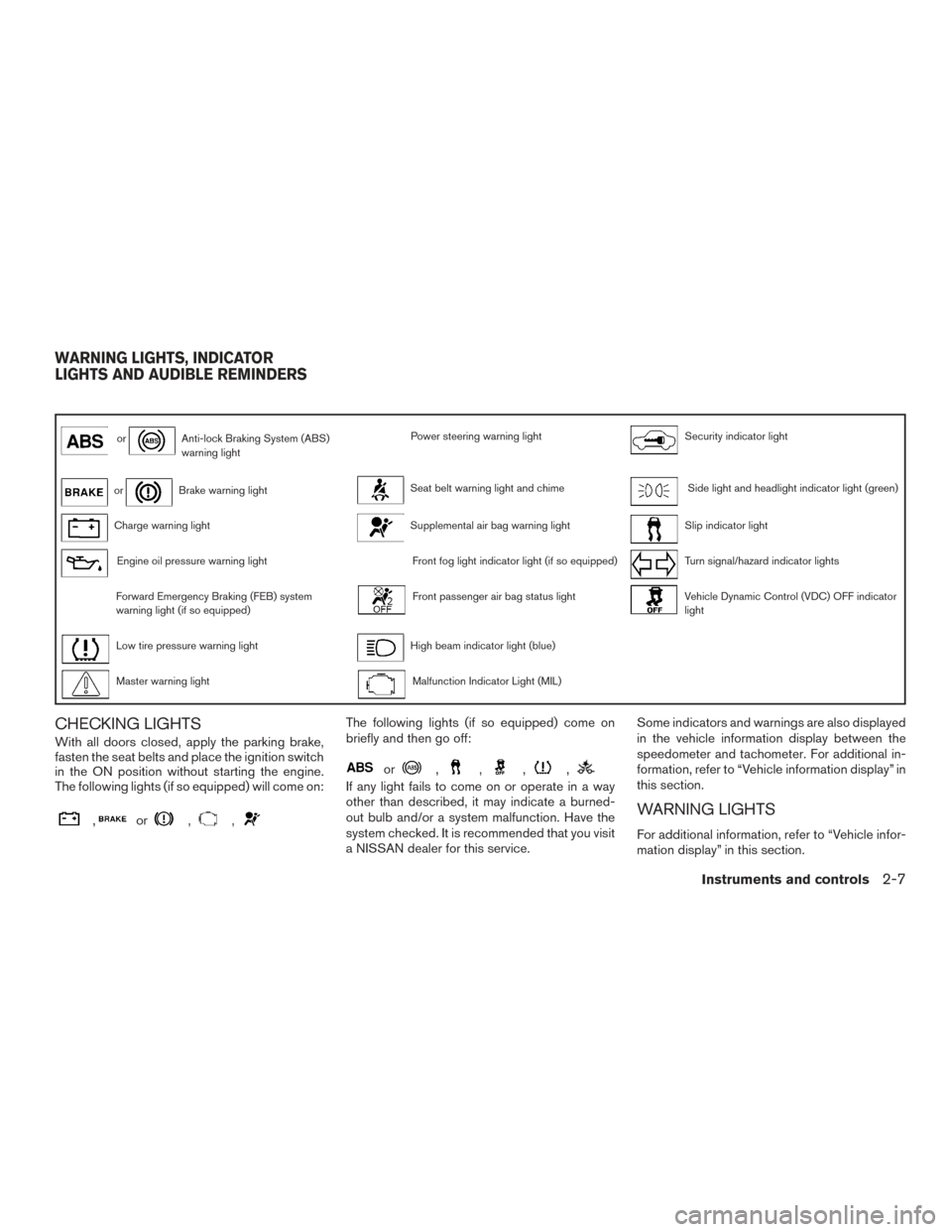
orAnti-lock Braking System (ABS)
warning lightPower steering warning lightSecurity indicator light
orBrake warning lightSeat belt warning light and chimeSide light and headlight indicator light (green)
Charge warning lightSupplemental air bag warning lightSlip indicator light
Engine oil pressure warning lightFront fog light indicator light (if so equipped)Turn signal/hazard indicator lights
Forward Emergency Braking (FEB) system
warning light (if so equipped)Front passenger air bag status lightVehicle Dynamic Control (VDC) OFF indicator
light
Low tire pressure warning lightHigh beam indicator light (blue)
Master warning lightMalfunction Indicator Light (MIL)
CHECKING LIGHTS
With all doors closed, apply the parking brake,
fasten the seat belts and place the ignition switch
in the ON position without starting the engine.
The following lights (if so equipped) will come on:
,or,,
The following lights (if so equipped) come on
briefly and then go off:
or,,,,
If any light fails to come on or operate in a way
other than described, it may indicate a burned-
out bulb and/or a system malfunction. Have the
system checked. It is recommended that you visit
a NISSAN dealer for this service.Some indicators and warnings are also displayed
in the vehicle information display between the
speedometer and tachometer. For additional in-
formation, refer to “Vehicle information display” in
this section.
WARNING LIGHTS
For additional information, refer to “Vehicle infor-
mation display” in this section.
WARNING LIGHTS, INDICATOR
LIGHTS AND AUDIBLE REMINDERS
Instruments and controls2-7
Page 100 of 466
Master warning light
When the ignition switch is in the ON position,
the master warning light illuminates if any of the
following are displayed on the vehicle information
display:● No key warning
● Low fuel warning
● Low washer fluid warning
● Parking brake release warning
● Door open warning
● Loose fuel cap warning (if so equipped)
● Check tire pressure warning
For additional information, refer to “Vehicle infor-
mation display” in this section.
Power steering warning light
WARNING
● If the engine is not running or is turned
off while driving, the power assist for
the steering will not work. Steering will
be harder to operate. ●
When the power steering warning light
illuminates with the engine running,
there will be no power assist for the
steering. You will still have control of
the vehicle, but the steering will be
harder to operate. Have the power
steering system checked. It is recom-
mended that you visit a NISSAN dealer
for this service.
When the ignition switch is placed in the ON
position, the power steering warning light illumi-
nates. After starting the engine, the power steer-
ing warning light turns off. This indicates the
power steering is operational.
If the power steering warning light illuminates
while the engine is running, it may indicate the
power steering is not functioning properly and
may need servicing. Have the power steering
checked. It is recommended that you visit a
NISSAN dealer for this service.
When the power steering warning light illumi-
nates with the engine running, there will be no
power assist for the steering, but you will still
have control of the vehicle. At this time, greater
steering effort is required to operate the steering
wheel, especially in sharp turns and at low
speeds. For additional information, refer to “Power steer-
ing” in the “Starting and driving” section of this
manual.
Seat belt warning light and
chime
The light and chime remind you to fasten your
seat belts. The light illuminates whenever the
ignition switch is placed in the ON or START
position and remains illuminated until the driver’s
seat belt is fastened. At the same time, the chime
sounds for about 6 seconds unless the driver’s
seat belt is securely fastened.
The seat belt warning light may also illuminate if
the front passenger’s seat belt is not fastened
when the front passenger’s seat is occupied. For
7 seconds after the ignition switch is placed in
the ON position, the system does not activate the
warning light for the front passenger.
For additional information, refer to “Seat belts” in
the “Safety—Seats, seat belts and supplemental
restraint system” section of this manual.
Supplemental air bag warninglight
When the ignition switch is placed in the ON or
START position, the supplemental air bag warn-
ing light illuminates for about 7 seconds and then
turns off. This means the system is operational.
Instruments and controls2-11
Page 102 of 466
If this indicator light comes on steady for 20 sec-
onds and then blinks for 10 seconds when the
engine is not running, it indicates that the vehicle
is not ready for an emission control system
inspection/maintenance test. For additional infor-
mation, refer to “Readiness for
inspection/maintenance (I/M) test” in the “Tech-
nical and consumer information” section of this
manual.
Operation
The MIL will come on in one of two ways:● MIL on steady — An emission control system
malfunction has been detected. Check the
fuel-filler cap if the LOOSE FUEL CAP
warning appears in the vehicle information
display. If the fuel-filler cap is loose or miss-
ing, tighten or install the cap and continue to
drive the vehicle. The
light should turn
off after a few driving trips. If the
light
does not turn off after a few driving trips,
have the vehicle inspected. It is recom-
mended that you visit a NISSAN dealer for
this service. You do not need to have your
vehicle towed to the dealer.
● MIL blinking — An engine misfire has been
detected which may damage the emission
control system. To reduce or avoid emission
control system damage: – do not drive at speeds above 45 mph
(72 km/h).
– avoid hard acceleration or deceleration.
– avoid steep uphill grades.
– if possible, reduce the amount of cargo being hauled or towed.
The MIL may stop blinking and come on steady.
Have the vehicle inspected. It is recommended
that you visit a NISSAN dealer for this service.
You do not need to have your vehicle towed to the
dealer.
CAUTION
Continued vehicle operation without hav-
ing the emission control system checked
and repaired as necessary could lead to
poor driveability, reduced fuel economy,
and possible damage to the emission con-
trol system.
Security indicator light
This light blinks when the ignition switch is
placed in the OFF, LOCK or ACC (if so
equipped) position.
The blinking security indicator light indicates that
the security systems equipped on the vehicle are
operational. For additional information, refer to “Security sys-
tems” in this section.
Side light and headlight
indicator light (green)
The side light and headlight indicator light illumi-
nates when the side light or headlight position is
selected. For additional information, refer to
“Headlight and turn signal switch” in this section.
Slip indicator light
This indicator will blink when the VDC system is
operating, thus alerting the driver to the fact that
the road surface is slippery and the vehicle is
nearing its traction limits.
You may feel or hear the system working; this is
normal.
The light will blink for a few seconds after the
VDC system stops limiting wheel spin.
The
indicator light also comes on when
you place the ignition switch in the ON position.
The light will turn off after approximately 2 sec-
onds if the system is operational. If the light does
not come on have the system checked. It is
recommended that you visit a NISSAN dealer for
this service.
Instruments and controls2-13
Page 116 of 466
Blind Spot Warning (BSW) and Rear Cross
Traffic Alert (RCTA) indicator (if so
equipped)
This indicator shows when the BSW and RCTA
systems are engaged.
For additional information, refer to “Blind Spot
Warning (BSW)” and “Rear Cross Traffic Alert
(RCTA)” in the “Starting and driving” section of
this manual.
Malfunction: See Owner’s Manual (if so
equipped)
This warning appears when one or more of the
following systems (if so equipped) is not func-
tioning properly:● Forward Emergency Braking (FEB)
● Blind Spot Warning (BSW)
● Predictive Forward Collision Warning
(PFCW)
If one or more of these warning appears, have the
system checked. It is recommended that you visit
a NISSAN dealer for this service.
Headlight System Error: See Owner’s
Manual (if so equipped)
This warning appears when the LED headlights
are not functioning properly. If this warning appears, have your system
checked. It is recommended that you visit a
NISSAN dealer for this service.
Unavailable: Front Radar Obstruction (if
so equipped)
This warning appears when the there is radar
blockage detected. For additional information,
refer to “Forward Emergency Braking (FEB)” in
the “Starting and driving” section of this manual.
Push Ignition to OFF
After the Push Ignition to OFF warning illumi-
nates, the warning will illuminate if the ignition
switch is placed in the ACC position when the
shift lever is moved to the P (Park) position.
To turn off the Push warning, place the ignition
switch in the ON position and then in the LOCK
position.
Your vehicle has two types of security systems:
● Vehicle security system
● NISSAN Vehicle Immobilizer System
VEHICLE SECURITY SYSTEM
The vehicle security system provides visual and
audible alarm signals if someone opens the
doors, liftgate or the hood when the system is
armed. It is not, however, a motion detection type
system that activates when a vehicle is moved or
when a vibration occurs.
The system helps deter vehicle theft but cannot
prevent it, nor can it prevent the theft of interior or
exterior vehicle components in all situations. Al-
LIC2930
SECURITY SYSTEMS
Instruments and controls2-27
Page 117 of 466
ways secure your vehicle even if parking for a
brief period. Never leave your Intelligent Key in
the vehicle, and always lock the vehicle when
unattended. Be aware of your surroundings, and
park in secure, well-lit areas whenever possible.
Many devices offering additional protection, such
as component locks, identification markers, and
tracking systems, are available at auto supply
stores and specialty shops. A NISSAN dealer
may also offer such equipment. Check with your
insurance company to see if you may be eligible
for discounts for various theft protection features.
How to arm the vehicle security
system
1. Close all windows.(The system can be
armed even if the windows are open.)
2. Remove the Intelligent Key from the vehicle.
3. Close all doors, hood and trunk/liftgate. Lock all doors. The doors can be locked with
the Intelligent Key, door handle request
switch (if so equipped) , or mechanical key.
4. Confirm that the
security indicator
light stays on for about 30 seconds. The
vehicle security system is now pre-armed.
The vehicle security system will automati-
cally shift into the armed phase. The
security light begins to flash once every three seconds. If during the pre-armed
phase one of the following occurs, the sys-
tem will not arm:
● Any door is unlocked with the mechanical
key, the Intelligent Key or door request
switch (if so equipped) .
● Ignition switch is placed in ACC or ON
position.
● Even when the driver and/or passen-
gers are in the vehicle, the system will
activate with all the doors, hood and
trunk lid locked with the ignition switch
placed in the LOCK position. When
placing the ignition switch in the ACC
or ON position, the system will be re-
leased.
Vehicle security system activation
The vehicle security system will give the following
alarm:
● The headlights blink and the horn sounds
intermittently but synchronously.
● The alarm automatically turns off after a pe-
riod of time. However, the alarm reactivates if
the vehicle is tampered with again. The alarm is activated by:
● opening any door or hood without using the
key or Intelligent Key (even if the door is
unlocked by releasing the door inside lock
knob) .
How to stop an activated alarm
The alarm stops only by unlocking a door or the
trunk/liftgate with the mechanical key, pressing
the
button on the Intelligent Key, or press-
ing the request switch on the driver’s or passen-
ger’s door with the Intelligent Key in range of the
door handle.
NISSAN VEHICLE IMMOBILIZER
SYSTEM
The NISSAN Vehicle Immobilizer System will not
allow the engine to start without the use of a
registered key.
2-28Instruments and controls
Page 118 of 466
Never leave these keys in the vehicle.
FCC Notice:
For USA:
This device complies with Part 15 of the
FCC Rules. Operation is subject to the fol-
lowing two conditions: (1) This device may
not cause harmful interference, and (2) this
device must accept any interference re-
ceived, including interference that may
cause undesired operation.
NOTE:
Changes or modifications not expressly ap-
proved by the party responsible for compli-
ance could void the user’s authority to op-
erate the equipment.
For Canada:
This device complies with Industry Canada
license-exempt RSS standard(s) . Opera-
tion is subject to the following two condi-
tions: (1) this device may not cause inter-
ference, and (2) this device must accept any
interference received, including interfer-
ence that may cause undesired operation
of the device.
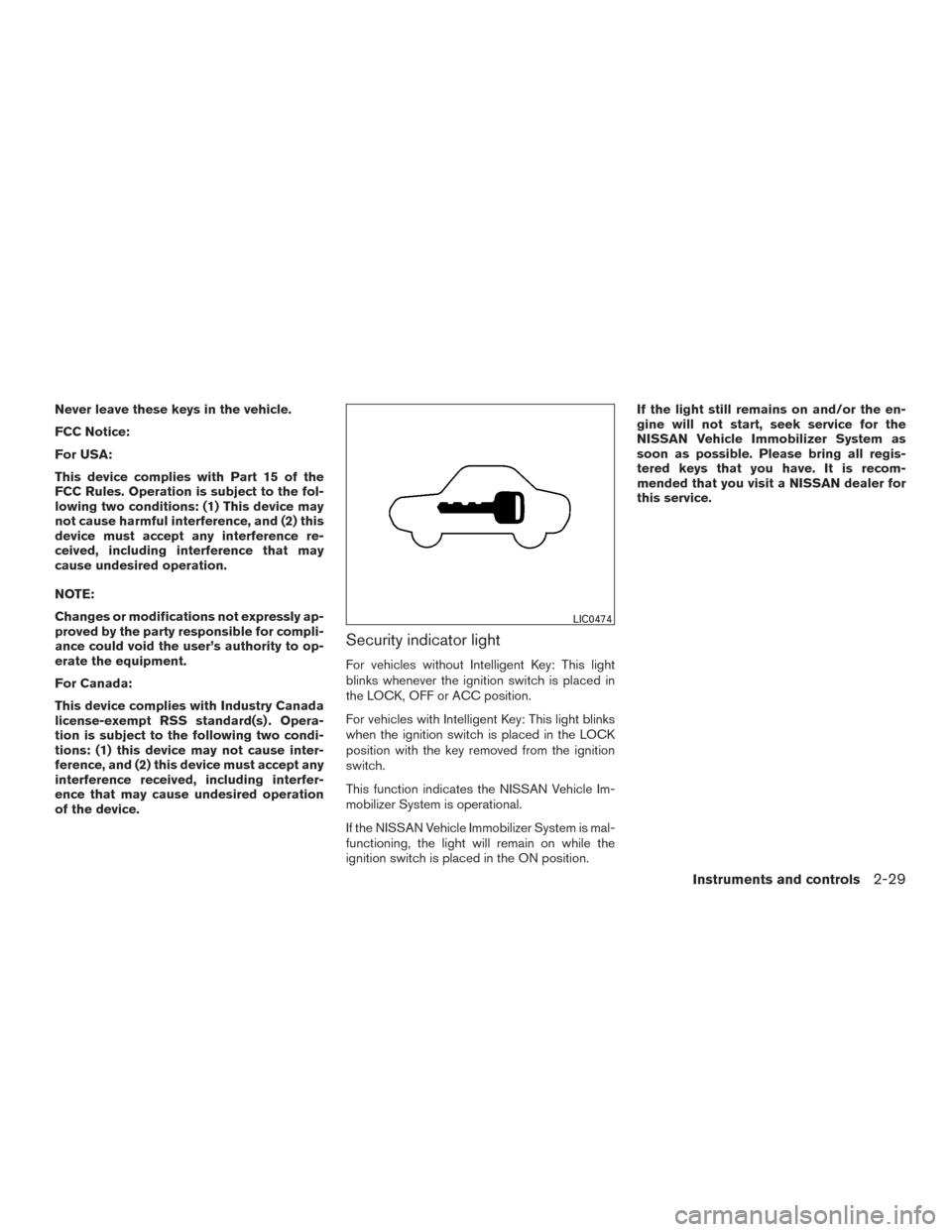
Security indicator light
For vehicles without Intelligent Key: This light
blinks whenever the ignition switch is placed in
the LOCK, OFF or ACC position.
For vehicles with Intelligent Key: This light blinks
when the ignition switch is placed in the LOCK
position with the key removed from the ignition
switch.
This function indicates the NISSAN Vehicle Im-
mobilizer System is operational.
If the NISSAN Vehicle Immobilizer System is mal-
functioning, the light will remain on while the
ignition switch is placed in the ON position.If the light still remains on and/or the en-
gine will not start, seek service for the
NISSAN Vehicle Immobilizer System as
soon as possible. Please bring all regis-
tered keys that you have. It is recom-
mended that you visit a NISSAN dealer for
this service.
LIC0474
Instruments and controls2-29