Page 117 of 466
ways secure your vehicle even if parking for a
brief period. Never leave your Intelligent Key in
the vehicle, and always lock the vehicle when
unattended. Be aware of your surroundings, and
park in secure, well-lit areas whenever possible.
Many devices offering additional protection, such
as component locks, identification markers, and
tracking systems, are available at auto supply
stores and specialty shops. A NISSAN dealer
may also offer such equipment. Check with your
insurance company to see if you may be eligible
for discounts for various theft protection features.
How to arm the vehicle security
system
1. Close all windows.(The system can be
armed even if the windows are open.)
2. Remove the Intelligent Key from the vehicle.
3. Close all doors, hood and trunk/liftgate. Lock all doors. The doors can be locked with
the Intelligent Key, door handle request
switch (if so equipped) , or mechanical key.
4. Confirm that the
security indicator
light stays on for about 30 seconds. The
vehicle security system is now pre-armed.
The vehicle security system will automati-
cally shift into the armed phase. The
security light begins to flash once every three seconds. If during the pre-armed
phase one of the following occurs, the sys-
tem will not arm:
● Any door is unlocked with the mechanical
key, the Intelligent Key or door request
switch (if so equipped) .
● Ignition switch is placed in ACC or ON
position.
● Even when the driver and/or passen-
gers are in the vehicle, the system will
activate with all the doors, hood and
trunk lid locked with the ignition switch
placed in the LOCK position. When
placing the ignition switch in the ACC
or ON position, the system will be re-
leased.
Vehicle security system activation
The vehicle security system will give the following
alarm:
● The headlights blink and the horn sounds
intermittently but synchronously.
● The alarm automatically turns off after a pe-
riod of time. However, the alarm reactivates if
the vehicle is tampered with again. The alarm is activated by:
● opening any door or hood without using the
key or Intelligent Key (even if the door is
unlocked by releasing the door inside lock
knob) .
How to stop an activated alarm
The alarm stops only by unlocking a door or the
trunk/liftgate with the mechanical key, pressing
the
button on the Intelligent Key, or press-
ing the request switch on the driver’s or passen-
ger’s door with the Intelligent Key in range of the
door handle.
NISSAN VEHICLE IMMOBILIZER
SYSTEM
The NISSAN Vehicle Immobilizer System will not
allow the engine to start without the use of a
registered key.
2-28Instruments and controls
Page 122 of 466
HEADLIGHT CONTROL SWITCH
Lighting
�1Rotate the switch to theposition, and
the front parking, tail, license plate, and in-
strument panel lights will come on.
�2Rotate the switch to theposition, and
the headlights will come on and all the other
lights remain on.
CAUTION
Use the headlights with the engine run-
ning to avoid discharging the vehicle
battery.
Autolight system
The autolight system allows the headlights to turn
on and off automatically. The autolight system
can:
● Turn on the headlights, front parking, tail,
license plate and instrument panel lights au-
tomatically when it is dark.
● Turn off all the lights (except daylight running
lights) when it is light.
● Keep all the lights on for a period of time after
you place the ignition switch in the OFF
position and all doors are closed.
Type A (if so equipped)
LIC3240
Type B (if so equipped)
LIC3241LIC3474
HEADLIGHT AND TURN SIGNAL
SWITCH
Instruments and controls2-33
Page 123 of 466
NOTE:
Autolight activation sensitivity and the time
delay for autolight shutoff can be adjusted.
For additional information, refer to “Ve-
hicle information display” in this section.
To turn on the autolight system:1. Turn the headlight switch to the AUTO posi- tion
�1.
2. Turn the ignition switch to ON.
3. The autolight system automatically turns the headlights on and off.
Initially, if the ignition switch is turned off and a
door is opened and left open, the headlights
remain on for a period of time. If another door is
opened while the headlights are on, then the
timer is reset.
To turn the autolight system off, turn the switch to
the OFF,
,orposition. Be sure you do not put anything on top of
the autolight sensor located in the top side
�1of the instrument panel. The autolight
sensor controls the autolight; if it is cov-
ered, the autolight sensor reacts as if it is
dark out and the headlights will illuminate.
If this occurs while parked with the engine
off and the ignition switch placed in the ON
position, your vehicle’s battery could be-
come discharged.
Headlight beam select
�1To select the high beam function, push the
lever forward while the low beams are on.
The high beam lights come on and the
indicator light illuminates.
LIC2237LIC3250
2-34Instruments and controls
Page 124 of 466
�2Pull the lever back to return to the low beam.
�3Pulling and releasing the lever flashes the
headlight high beams on and off. The low
beams do not need to be on for this to
function.
Battery saver system
If the ignition switch is placed in the OFF position
while the headlight switch is in the
orposition, the headlights will turn off after
a period of time.
CAUTION
Even though the battery saver feature au-
tomatically turns off the headlights after a
period of time, you should turn the head-
light switch to the OFF position when the
engine is not running to avoid discharging
the vehicle battery.
DAYTIME RUNNING LIGHT SYSTEM
The LED portion of the headlights automatically
illuminate at 100% intensity when the engine is
started with the parking brake released. The day-
time running lights operate with the headlight
switch in the OFF position or in the
posi-
tion. Turn the headlight switch to the
posi-
tion for full illumination when driving at night. If the parking brake is applied before the engine is
started, the daytime running lights do not illumi-
nate. The daytime running lights illuminate when
the parking brake is released. The daytime run-
ning lights will remain on until the ignition switch
is placed in the OFF position.
WARNING
When the daytime running light system is
active, tail lights on your vehicle are not
on. It is necessary at dusk to turn on your
headlights. Failure to do so could cause
an accident injuring yourself and others.
INSTRUMENT BRIGHTNESS
CONTROL
Press the “-” button�Ato decrease the bright-
ness of instrument panel lights.
Press the “+” button
�Bto increase the bright-
ness of instrument panel lights.
LIC2624
Instruments and controls2-35
Page 125 of 466
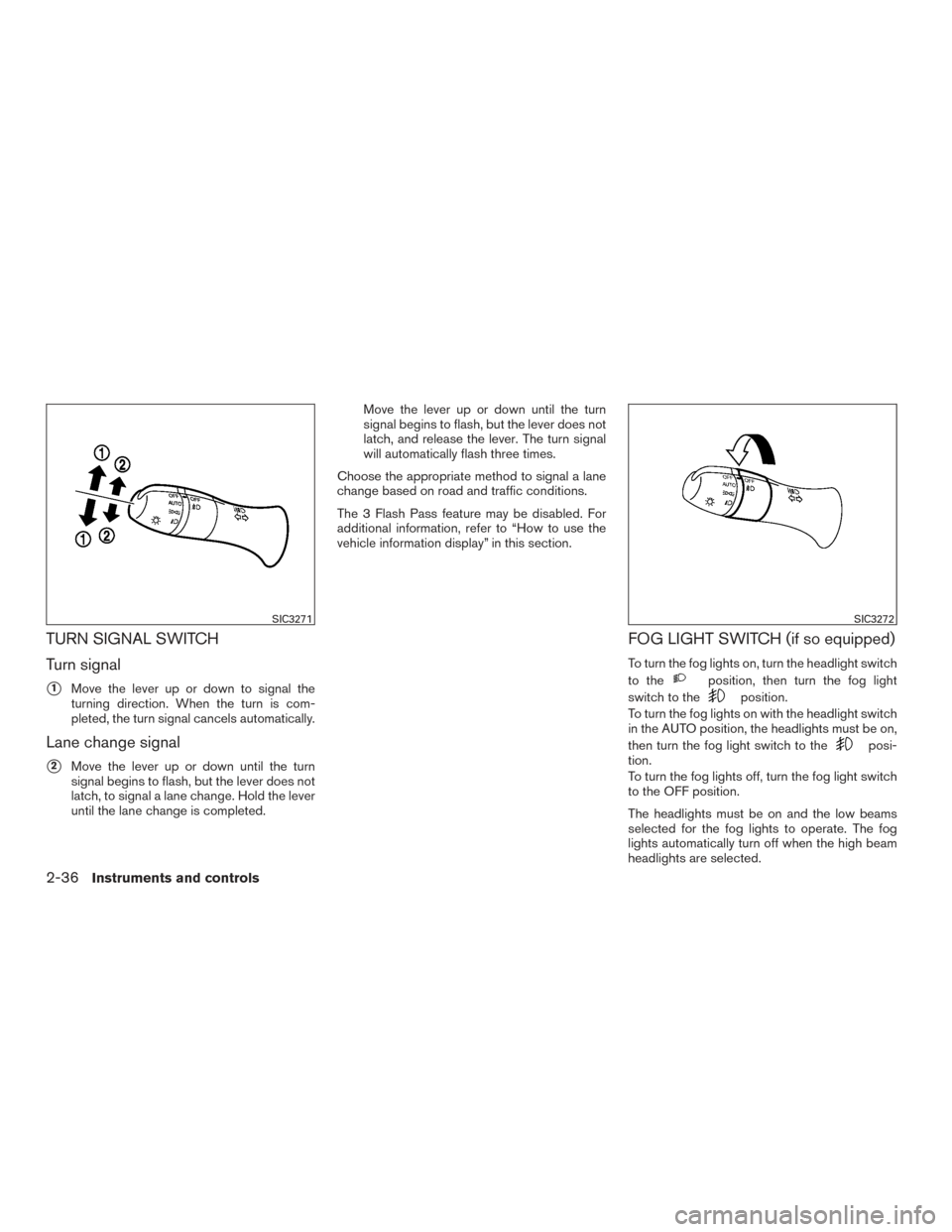
TURN SIGNAL SWITCH
Turn signal
�1Move the lever up or down to signal the
turning direction. When the turn is com-
pleted, the turn signal cancels automatically.
Lane change signal
�2Move the lever up or down until the turn
signal begins to flash, but the lever does not
latch, to signal a lane change. Hold the lever
until the lane change is completed. Move the lever up or down until the turn
signal begins to flash, but the lever does not
latch, and release the lever. The turn signal
will automatically flash three times.
Choose the appropriate method to signal a lane
change based on road and traffic conditions.
The 3 Flash Pass feature may be disabled. For
additional information, refer to “How to use the
vehicle information display” in this section.
FOG LIGHT SWITCH (if so equipped)
To turn the fog lights on, turn the headlight switch
to the
position, then turn the fog light
switch to the
position.
To turn the fog lights on with the headlight switch
in the AUTO position, the headlights must be on,
then turn the fog light switch to the
posi-
tion.
To turn the fog lights off, turn the fog light switch
to the OFF position.
The headlights must be on and the low beams
selected for the fog lights to operate. The fog
lights automatically turn off when the high beam
headlights are selected.
SIC3271SIC3272
2-36Instruments and controls
Page 132 of 466
●Do not use double adapters or more
than one electrical accessory.
● Use power outlets with the engine run-
ning to avoid discharging the vehicle
battery.
● Avoid using power outlets when the air
conditioner, headlights or rear window
defroster is on.
● Before inserting or disconnecting a
plug, be sure the electrical accessory
being used is turned off. ●
Push the plug in as far as it will go. If
good contact is not made, the plug may
overheat or the internal temperature
fuse may open.
● When not in use, be sure to close the
cap. Do not allow water or any other
liquid to contact the outlet.
Cargo Area
LIC2617LDI2758
EXTENDED STORAGE SWITCH
Instruments and controls2-43
Page 145 of 466
When the ON switch�1is pushed, the footwell
lights (if so equipped) , step lights (if so
equipped) , map lights and rear personal lights
will automatically turn on and stay on for a period
of time when:
● The doors are unlocked by the Intelligent
Key, a key or the request switch (if so
equipped) while all doors are closed and the
ignition switch is in the OFF position.
● The driver’s door is opened and then closed
while the ignition switch is in the OFF posi-
tion.
● Individually pushed. When the OFF switch
�2is pushed, the interior
lights will illuminate when pushed. When the
DOOR/OFF switch is pushed and the ON switch
is pushed, all of the lights will come on.
NOTE:
The footwell lights (if so equipped) and
step lights (if so equipped) illuminate when
the driver and passenger doors are open
regardless of the interior light switch posi-
tion. These lights will turn off automatically
after a period of time while doors are open
to prevent the battery from becoming dis-
charged.
CAUTION
Do not use for extended periods of time
with the engine stopped. This could result
in a discharged battery.
CONSOLE LIGHT (if so equipped)
The console light will turn on whenever the park-
ing lights or headlights are illuminated.
The console light brightness can be adjusted
with the illumination brightness control in the
vehicle information display.
LIC2302LIC2303
INTERIOR LIGHTS
2-56Instruments and controls
Page 146 of 466
MAP LIGHTS
Press the button to turn the map lights on. To turn
them off, press the button again.
CAUTION
Do not use for extended periods of time
with the engine stopped. This could result
in a discharged battery.
PERSONAL LIGHTS
To turn the rear personal lights on, push the
switch. To turn them off, push the switch again.
LUGGAGE COMPARTMENT LIGHT
The light illuminates when the rear hatch is
opened. When the rear hatch is closed, the light
will turn off.
The light also illuminates with other interior lights
when the interior light switch is in the DOOR
position. For additional information, refer to “Inte-
rior lights” in this section.The lights will turn off automatically after a period
of time while doors are open to prevent the bat-
tery from becoming discharged.
LIC2304
Rear personal lights
LIC1083
Instruments and controls2-57