2017 NISSAN MURANO phone
[x] Cancel search: phonePage 253 of 466
RECEIVING A CALL
When a call is received by the phone connected
to the vehicle’s Bluetooth® Hands-Free Phone
System, the call information is displayed on either
the vehicle information display or both the vehicle
information display and he control panel display.
Press the
button to accept the call. Press
the
button to reject the call.
DURING A CALL
While a call is active, press thebutton to
access additional options. Speak one of the fol-
lowing commands:
● “Send” – Speak this command followed by
the digits to enter digits during the phone
call.
● “Mute On” or “Mute Off” – Speak the com-
mand to mute or unmute the system.
● “Transfer Call” – Speak this command to
transfer the call to the handset. To transfer
the call back from the handset to the
Bluetooth® Hands-Free Phone System,
press the
button and confirm when
prompted. If supported by the phone, the Bluetooth®
Hands-Free Phone System allows for call waiting
functionality. If a call is received while another call
is already active, a message will be displayed on
the screen. Press the
button to hold the
active call and switch to the second call. Press
the
button to reject the second call.
While the second call is active, pressing
the
button will allow the same commands
that are available during any call and two addi-
tional commands:
● “Switch Call” – Speak this command to hold
the second call and switch back to the origi-
nal call.
● “End Other Call” – Speak this command to
stay with the second call and end the original
call.
Press the
button to accept the call. Press
the
button to reject the call.
ENDING A CALL
To end an active call, press thebutton.
TEXT MESSAGING (if so equipped)
WARNING
● Laws in some jurisdictions may restrict
the use of “Text-to-Speech”. Check lo-
cal regulations before using this
feature.
● Laws in some jurisdictions may restrict
the use of some of the applications and
features, such as social networking and
texting. Check local regulations for any
requirements.
● Use the text messaging feature after
stopping your vehicle in a safe location.
If you have to use the feature while
driving, exercise extreme caution at all
times so full attention may be given to
vehicle operation.
● If you are unable to devote full attention
to vehicle operation while using the text
messaging feature, pull off the road to a
safe location and stop your vehicle.
4-62Display screen, heater, air conditioner, audio and phone systems
Page 254 of 466
NOTE:
This feature is automatically disabled if the
connected device does not support the
Message Access Profile (MAP) . For addi-
tional information, refer to the phone’s
Owner’s Manual for details and instruc-
tions.
NOTE:
Many phones may require special permis-
sion to enable text messaging. Check the
phone’s screen during Bluetooth® pairing.
For some phones, you may need to enable
‘Notifications’ in the phone’s Bluetooth®
menu for text messages to appear on the
headunit. For additional information, refer
to your phone’s Owner’s manual. Text mes-
sage integration requires that the phone
support MAP (Message Access Profile) for
both receiving and sending text messages.
Some phones may not support all text mes-
saging features. Please refer to
www.nissanusa.com/bluetooth or
www.nissan.ca/bluetooth for compatibility
information, as well as your device’s Own-
er’s manual.
The system allows for the sending and receiving
of text messages through the vehicle interface.Sending a text message:
1. Press the
button on the steering
wheel.
2. Say “Phone” after the tone.
3. Say “Send Text” after the tone.
4. The system will provide a list of available commands in order to determine the recipi-
ent of the text message. Choose from the
following:
● To (a name)
● Enter Number
● Missed Calls
● Incoming Calls
● Outgoing Calls
For additional information about these op-
tions, refer to “Voice commands” in this sec-
tion.
5. Once a recipient is chosen, the system prompts for which message to send. Nine
predefined messages are available as well
as three custom messages. To choose one
of the predefined messages, speak one of
the following after the tone:
● “Driving, can’t text” ●
“Call me”
● “On my way”
● “Running late”
● “Okay”
● “Yes”
● “No”
● “Where are you?”
● “When?”
● “Custom Messages”
To send one of the custom messages, say
“Custom Messages”. If more than one cus-
tom message is stored, the system will
prompt for the number of the desired cus-
tom message. For additional information on
setting and managing custom text mes-
sages, refer to “Bluetooth® settings” in this
section.
Reading a received text message:
1. Press the
button on the steering
wheel.
2. Say “Phone” after the tone.
3. Say “Read Text” after the tone.
Display screen, heater, air conditioner, audio and phone systems4-63
Page 255 of 466
The text message, sender and delivery time are
shown on the screen. Use the tuning switch to
scroll through all text messages if more than one
are available. Press the
button to exit the
text message screen. Press the
button to
access the following options for replying to the
text message:
● Call Back
Speak this command to call the sender of
the text message using the Bluetooth®
Hands-Free Phone System.
● Send Text
Speak this command to send a text message
response to the sender of the text message.
● Read Text
Speak this command to read the text mes-
sage again.
● Previous Text
Speak this command to move to the previ-
ous text message (if available) .
● Next Text
Speak this command to move to the next text
message (if available) . Siri® Eyes Free
If a connected phone is equipped with Siri®, it
can also be used to create custom messages
that are sent through the phone. For additional
information, refer to “Siri® Eyes Free” in this
section.
NOTE:
Text messages are only displayed if the
vehicle speed is less than 5 mph (8 km/h).
NOTE:
For Apple iPhones®, text messages can
only be sent through Siri.
BLUETOOTH® SETTINGS
To access and adjust the settings for the
Bluetooth® Hands-Free Phone System:
1. Press the SETTING button.
2. Use the TUNE-SCROLL knob to select “Bluetooth” and then press the SETTING
button.
● Bluetooth
Select “On” or “Off” to turn the vehicle’s
Bluetooth® system on or off.
● Add Phone
For additional information, refer to “Con-
necting procedure” in this section.
LHA3540
4-64Display screen, heater, air conditioner, audio and phone systems
Page 256 of 466
●Delete Phone
Select to delete a phone from the displayed
list. The system will ask to confirm before
deleting the phone.
● Replace Phone
Select to replace a phone from the displayed
list. When a selection is made, the system
will ask to confirm before proceeding. The
recorded phonebook for the phone being
deleted will be saved as long as the new
phone’s phonebook is the same as the old
phone’s phonebook.
● Select Phone
Select to connect to a previously connected
phone from the displayed list.
● Phonebook Download
Select to turn on or off the automatic down-
load of a connected phone’s phonebook.
● Show Incoming Calls
Select “Driver Only” to have incoming call
information displayed only in the vehicle in-
formation display. Select “Both” to have in-
coming call information displayed in both the
vehicle information display and the center
display screen. ●
Text Message (if so equipped)
Select to turn on or off the vehicle’s text
messaging feature.
● New Text Sound (if so equipped)
Select to adjust the volume of the sound that
plays when a new text is received by a phone
connected to the Bluetooth® Hands-Free
Phone System. The setting all the way to the
left indicates that the new text sound will be
muted.
● Show Incoming Text (if so equipped)
Select “Driver Only” to have incoming text
messages displayed only in the vehicle infor-
mation display. Select “Both” to have incom-
ing text messages displayed in both the ve-
hicle information display and the center
display screen. Select “None” to have no
display of incoming text messages.
● Edit Custom Messages (if so equipped)
Select to set a custom message that will be
available with the standard options when
sending a text message. To set a custom
message, send a text message to your own
phone number while the phone is connected
to the system. Three custom messages can
be set. Custom messages can only be set
while the vehicle is stationary. ●
Auto Reply (if so equipped)
Select to turn on or off the Auto Reply func-
tion. When enabled, the vehicle will auto-
matically send a predefined text message to
the sender when a text message is received
while driving.
● Auto Reply Message (if so equipped)
Select to choose the message that is sent
when the Auto Reply function is enabled.
Choose from “I’m Driving” or one of the three
custom messages stored in the system.
● Vehicle Signature On/Off (if so equipped)
Select to choose whether or not the vehicle
signature is added to outgoing text mes-
sages from the vehicle. This message can-
not be changed or customized.
MANUAL CONTROL
While using the NISSAN Voice Recognition sys-
tem, it is possible to select menu options by using
the steering wheel controls instead of speaking
voice commands. To activate manual control
mode, press the PHONE/SEND (
) button
on the steering wheel to access the phone menu
and then push either up or down on the tuning
switch (
).
Display screen, heater, air conditioner, audio and phone systems4-65
Page 257 of 466
The manual control mode does not allow dialing a
phone number by digits. The user may select an
entry from the Phonebook or Recent Calls lists.
To reactivate NISSAN Voice Recognition, exit the
manual control mode by pressing and holding the
PHONE/END (
) button. At that time, press-
ing the PHONE/SEND (
) button will start
the Hands Free Phone System.
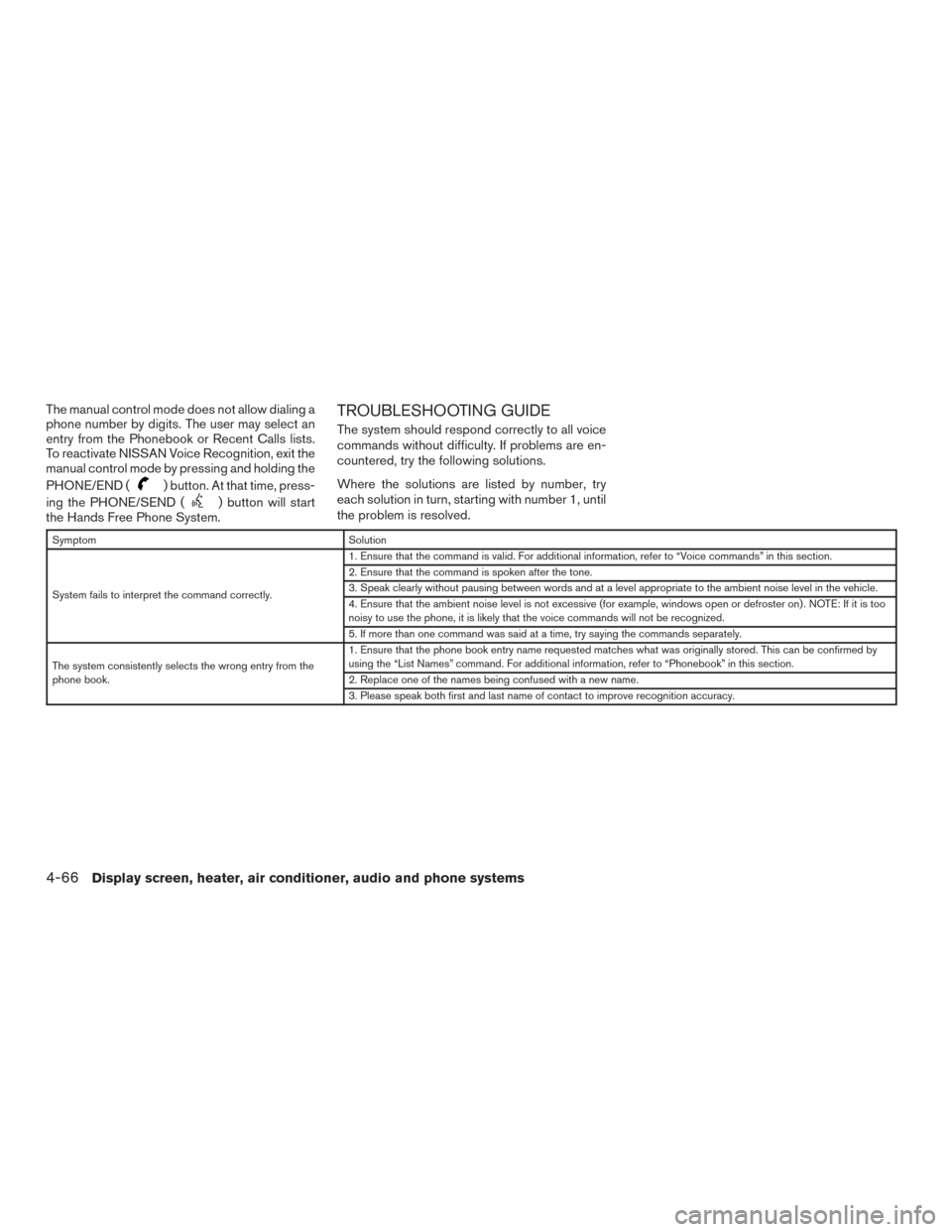
TROUBLESHOOTING GUIDE
The system should respond correctly to all voice
commands without difficulty. If problems are en-
countered, try the following solutions.
Where the solutions are listed by number, try
each solution in turn, starting with number 1, until
the problem is resolved.
Symptom Solution
System fails to interpret the command correctly. 1. Ensure that the command is valid. For additional information, refer to “Voice commands” in this section.
2. Ensure that the command is spoken after the tone.
3. Speak clearly without pausing between words and at a level appropriate to the ambient noise level in the vehicle.
4. Ensure that the ambient noise level is not excessive (for example, windows open or defroster on) . NOTE: If it is too
noisy to use the phone, it is likely that the voice commands will not be recognized.
5. If more than one command was said at a time, try saying the commands separately.
The system consistently selects the wrong entry from the
phone book. 1. Ensure that the phone book entry name requested matches what was originally stored. This can be confirmed by
using the “List Names” command. For additional information, refer to “Phonebook” in this section.
2. Replace one of the names being confused with a new name.
3. Please speak both first and last name of contact to improve recognition accuracy.
4-66Display screen, heater, air conditioner, audio and phone systems
Page 258 of 466

MEMO
Display screen, heater, air conditioner, audio and phone systems4-67
Page 274 of 466
1. Apply the parking brake.
2. Move the shift lever to P (Park) or N (Neu-tral) . P (Park) is recommended.
The starter is designed not to operate
unless the shift lever is in either P
(Park) or N (Neutral) .
3. Push the ignition switch to the ON position. Depress the brake pedal and push the igni-
tion switch to start the engine.
To start the engine immediately, push and
release the ignition switch while depressing
the brake pedal with the ignition switch in
any position.
● If the engine is very hard to start in ex-
tremely cold weather or when restarting,
depress the accelerator pedal a little (ap-
proximately 1/3 to the floor) and while
holding, crank the engine. Release the
accelerator pedal when the engine starts.
● If the engine is very hard to start because
it is flooded, depress the accelerator
pedal all the way to the floor and hold it.
Push the ignition switch to the ON posi-
tion to start cranking the engine. After five
or six seconds, stop cranking by pushing
the ignition switch to LOCK. After crank-
ing the engine, release the accelerator
pedal. Crank the engine with your foot off the accelerator pedal by depressing the
brake pedal and pushing the push-button
ignition switch to start the engine. If the
engine starts, but fails to run, repeat the
above procedure.
CAUTION
Do not operate the starter for more than
15 seconds at a time. If the engine does
not start, push the ignition switch to the
OFF position and wait 10 seconds before
cranking again, otherwise the starter
could be damaged.
4. Warm-up
Allow the engine to idle for at least 30 seconds
after starting. Do not race the engine while
warming it up. Drive at moderate speed for a
short distance first, especially in cold weather.
In cold weather, keep the engine running for a
minimum of two to three minutes before shut-
ting it off. Starting and stopping the engine
over a short period of time may make the
vehicle more difficult to start.
5. To stop the engine, shift the shift lever into
the P (Park) position and push the ignition
switch to the OFF position. NOTE:
Care should be taken to avoid situations
that can lead to potential battery discharge
and potential no-start conditions such as:
1. Installation or extended use of electronic accessories that consume battery power
when the engine is not running (phone char-
gers, GPS, DVD players, etc.)
2. The vehicle is not driven regularly and/or only driven short distances.
In these cases, the battery may need to be
charged to maintain battery health.
REMOTE ENGINE START (if so
equipped)
Vehicles started with the remote engine start
require the ignition switch to be placed in the ON
position before the shift lever can be moved from
the P (Park) position. To place the ignition switch
to the ON position, follow these steps: 1. Make sure that the Intelligent Key is on you.
2. Apply the brake.
3. Push the ignition switch once to the ON position.
For additional information, refer to “NISSAN In-
telligent Key®” in the “Pre-driving checks and
adjustments” section of this manual.
STARTING THE ENGINE
Starting and driving5-15
Page 385 of 466
●Keep the battery surface clean and dry.
Clean the battery with a solution of baking
soda and water.
● Make certain the terminal connections are
clean and securely tightened.
● If the vehicle is not to be used for 30 days or
longer, disconnect the negative (-) battery
terminal cable to prevent discharge.
NOTE:
Care should be taken to avoid situations
that can lead to potential battery discharge
and potential no-start conditions such as: 1. Installation or extended use of elec-
tronic accessories that consume bat-
tery power when the engine is not run-
ning (Phone chargers, GPS, DVD
players, etc.) .
2. Vehicle is not driven regularly and/or
only driven short distances.
In these cases, the battery may need to be
charged to maintain battery health.WARNING
● Do not expose the battery to flames, an
electrical spark or a cigarette. Hydrogen
gas generated by the battery is explo-
sive. Explosive gases can cause blind-
ness or injury. Do not allow battery fluid
to contact your skin, eyes, fabrics or
painted surfaces. Sulfuric acid can
cause blindness or injury. After touch-
ing a battery or battery cap, do not
touch or rub your eyes. Thoroughly
wash your hands. If the acid contacts
your eyes, skin or clothing, immediately
flush with water for at least 15 minutes
and seek medical attention.
● Do not operate the vehicle if the fluid in
the battery is low. Low battery fluid can
cause a higher load on the battery
which can generate heat, reduce battery
life, and in some cases lead to an
explosion.
● When working on or near a battery, al-
ways wear suitable eye protection and
remove all jewelry.
● Battery posts, terminals and related ac-
cessories contain lead and lead com-
pounds. Wash hands after handling. ●
Keep battery out of the reach of
children.
● Do not tip the battery. Keep the vent
caps tight and the battery level.
BATTERY
8-12Do-it-yourself