Page 10 of 318
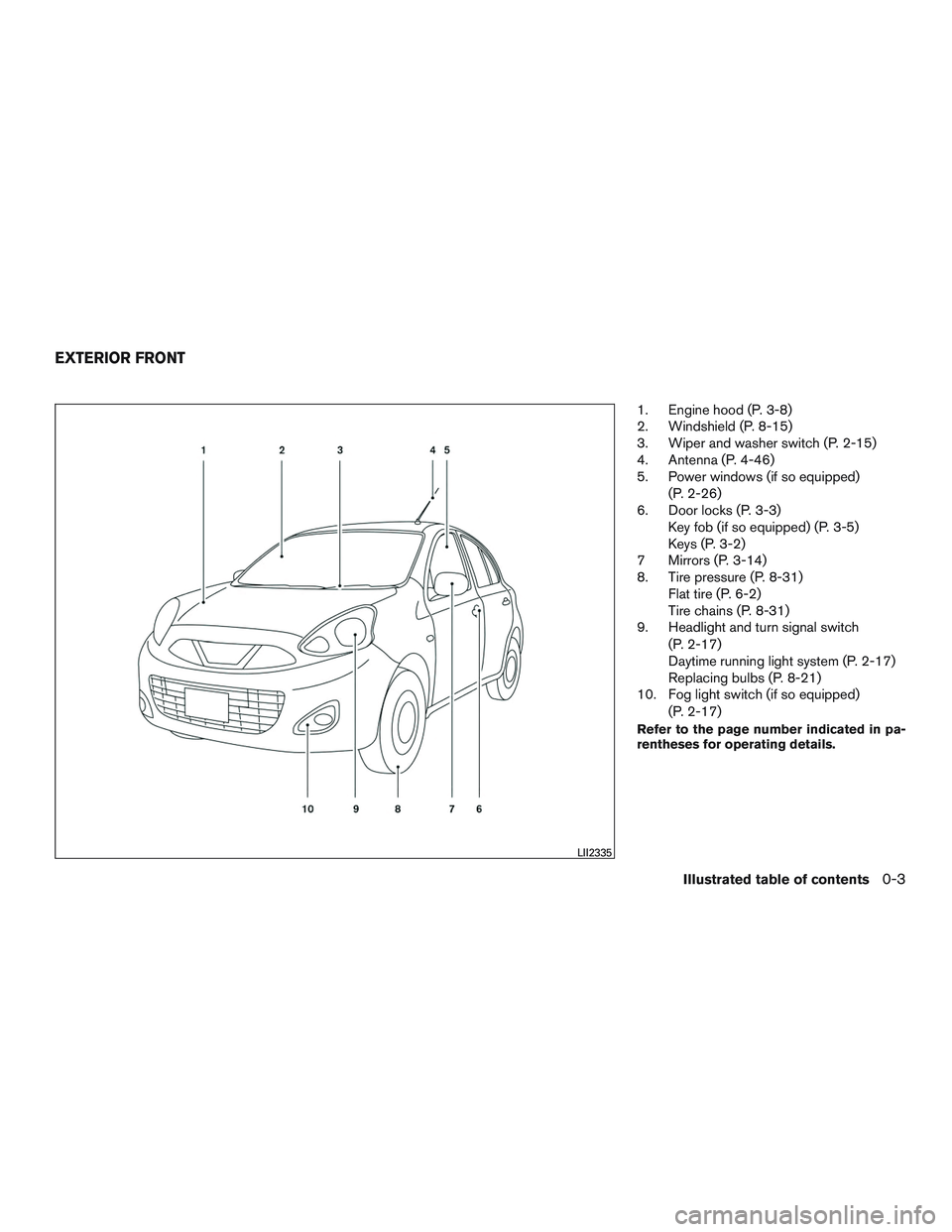
1. Engine hood (P. 3-8)
2. Windshield (P. 8-15)
3. Wiper and washer switch (P. 2-15)
4. Antenna (P. 4-46)
5. Power windows (if so equipped)(P. 2-26)
6. Door locks (P. 3-3) Key fob (if so equipped) (P. 3-5)
Keys (P. 3-2)
7 Mirrors (P. 3-14)
8. Tire pressure (P. 8-31) Flat tire (P. 6-2)
Tire chains (P. 8-31)
9. Headlight and turn signal switch
(P. 2-17)
Daytime running light system (P. 2-17)
Replacing bulbs (P. 8-21)
10. Fog light switch (if so equipped)
(P. 2-17)
Refer to the page number indicated in pa-
rentheses for operating details.
LII2335
EXTERIOR FRONT
Illustrated table of contents0-3
Page 11 of 318
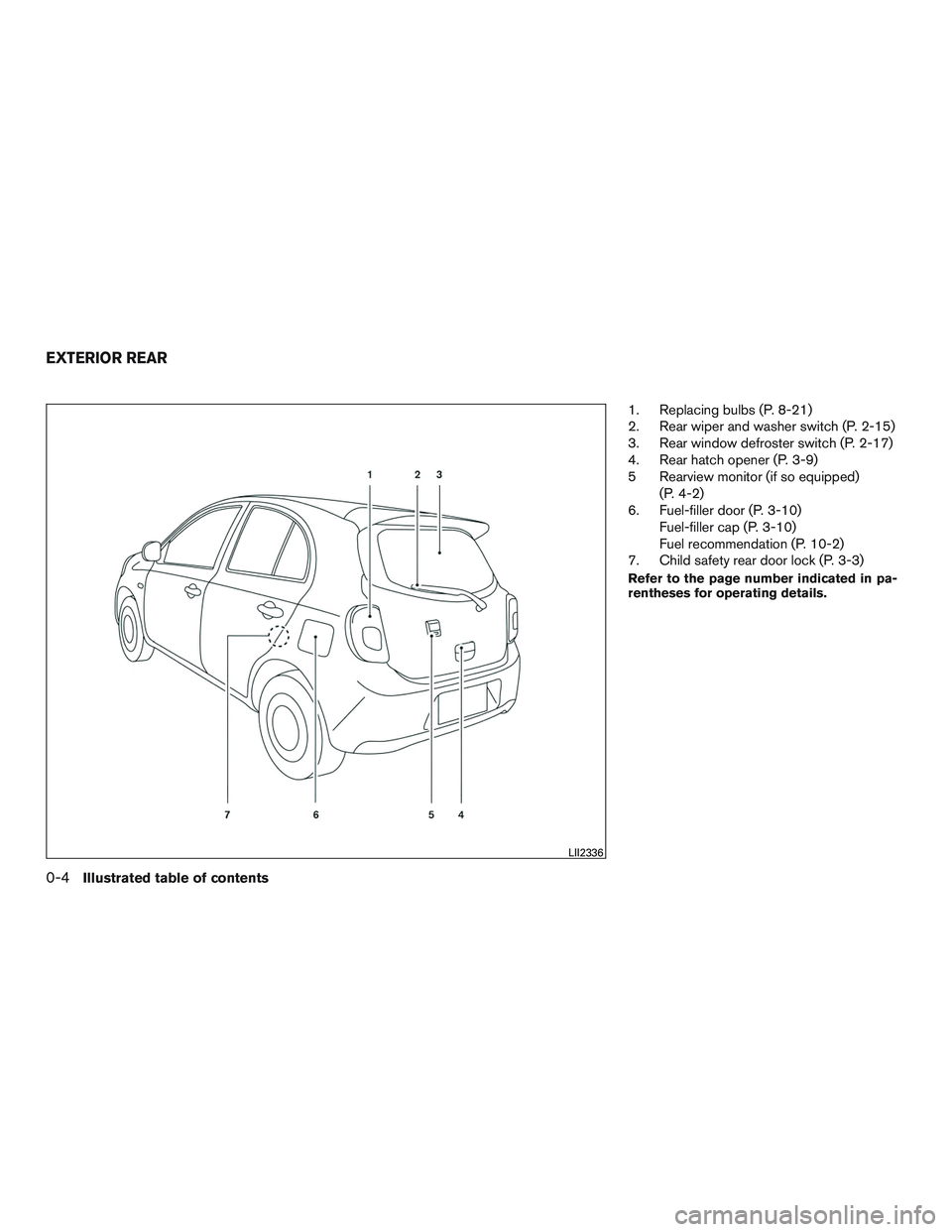
1. Replacing bulbs (P. 8-21)
2. Rear wiper and washer switch (P. 2-15)
3. Rear window defroster switch (P. 2-17)
4. Rear hatch opener (P. 3-9)
5 Rearview monitor (if so equipped)(P. 4-2)
6. Fuel-filler door (P. 3-10) Fuel-filler cap (P. 3-10)
Fuel recommendation (P. 10-2)
7. Child safety rear door lock (P. 3-3)
Refer to the page number indicated in pa-
rentheses for operating details.
LII2336
EXTERIOR REAR
0-4Illustrated table of contents
Page 84 of 318

Anti-lock Braking System (ABS) warning lightPower steering warning light (if so equipped)High beam indicator light (blue)
Brake warning lightSeat belt warning light and chimeMalfunction Indicator Light (MIL)
Charge warning lightSupplemental air bag warning lightOverdrive OFF indicator light (A/T models only)
Door open warning lightAutomatic Transmission position indicator light
(A/T models only)Security indicator light (if so equipped)
Engine oil pressure warning lightCruise main switch indicator light (if so
equipped)Slip indicator light
High temperature warning light (red)Front fog light indicator light (if so equipped)Turn signal/hazard indicator lights
Low windshield-washer fluid warning lightFront passenger air bag status lightVehicle Dynamic Control (VDC) OFF indicator
light
CHECKING LIGHTS
With all doors closed, apply the parking brake,
fasten the seat belts and place the ignition switch
in the ON position without starting the engine.
The following lights (if so equipped) will come on:
,,,,
The following lights (if so equipped) come on
briefly and then go off:
,
If any light fails to come on or operate in a way
other than described, it may indicate a burned-
out bulb and/or a system malfunction. Have the
system checked. It is recommended that you visit
a NISSAN dealer for this service. Some indicators and warnings are also displayed
in the trip computer located to the right of the
speedometer. For additional information, refer to
“Meters and gauges” in this section.
WARNING LIGHTS, INDICATOR
LIGHTS AND AUDIBLE REMINDERS
Instruments and controls2-7
Page 254 of 318
●The operational range of the key fob
extends to approximately 10 m (33 ft)
from the vehicle. This range may vary
with conditions.
Operation is subject to the following two
conditions: (1) This device may not cause
harmful interference, and (2) this device
must accept any interference received, in-
cluding interference that may cause unde-
sired operation of the device.
FCC Notice:
For USA:
This device complies with Part 15 of the
FCC Rules. Operation is subject to the fol-
lowing two conditions: (1) This device may
not cause harmful interference, and (2) this
device must accept any interference re-
ceived, including interference that may
cause undesired operation.
Note:
Changes or modifications not expressly ap-
proved by the party responsible for compli-
ance could void the user’s authority to op-
erate the equipment. For Canada:
This device complies with Industry Canada
licence-exempt RSS standard(s) . Opera-
tion is subject to the following two condi-
tions: (1) this device may not cause inter-
ference, and (2) this device must accept any
interference, including interference that
may cause undesired operation of the de-
vice.HEADLIGHTS
For additional information on headlight bulb re-
placement, refer to the instructions outlined in
this section.
LIGHTS
Do-it-yourself8-21
Page 255 of 318
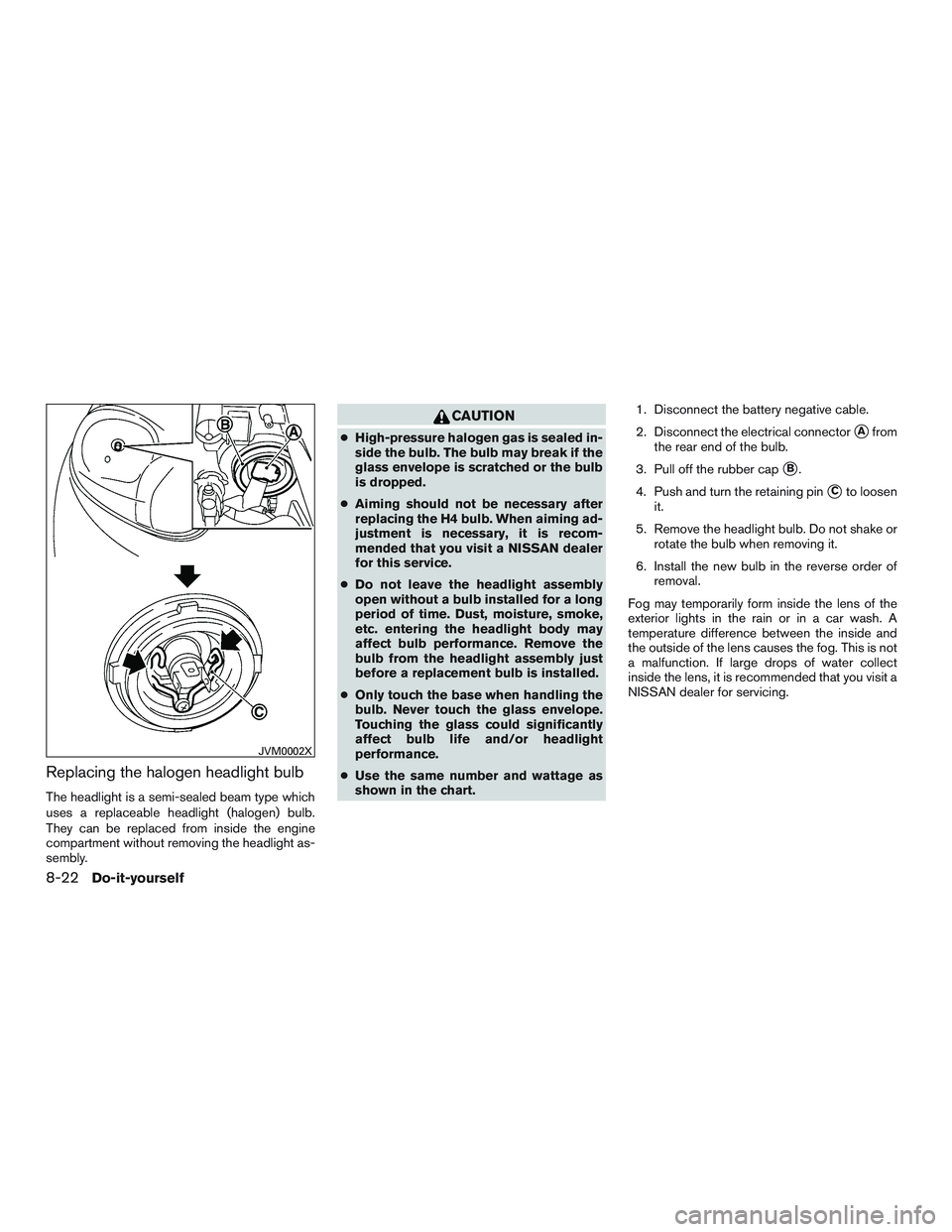
Replacing the halogen headlight bulb
The headlight is a semi-sealed beam type which
uses a replaceable headlight (halogen) bulb.
They can be replaced from inside the engine
compartment without removing the headlight as-
sembly.
CAUTION
●High-pressure halogen gas is sealed in-
side the bulb. The bulb may break if the
glass envelope is scratched or the bulb
is dropped.
● Aiming should not be necessary after
replacing the H4 bulb. When aiming ad-
justment is necessary, it is recom-
mended that you visit a NISSAN dealer
for this service.
● Do not leave the headlight assembly
open without a bulb installed for a long
period of time. Dust, moisture, smoke,
etc. entering the headlight body may
affect bulb performance. Remove the
bulb from the headlight assembly just
before a replacement bulb is installed.
● Only touch the base when handling the
bulb. Never touch the glass envelope.
Touching the glass could significantly
affect bulb life and/or headlight
performance.
● Use the same number and wattage as
shown in the chart. 1. Disconnect the battery negative cable.
2. Disconnect the electrical connector�Afrom
the rear end of the bulb.
3. Pull off the rubber cap
�B.
4. Push and turn the retaining pin
�Cto loosen
it.
5. Remove the headlight bulb. Do not shake or rotate the bulb when removing it.
6. Install the new bulb in the reverse order of removal.
Fog may temporarily form inside the lens of the
exterior lights in the rain or in a car wash. A
temperature difference between the inside and
the outside of the lens causes the fog. This is not
a malfunction. If large drops of water collect
inside the lens, it is recommended that you visit a
NISSAN dealer for servicing.
JVM0002X
8-22Do-it-yourself
Page 258 of 318
4. Turn the lower screws�1in the opposite
direction until the headlight projection be-
comes 70 mm (2.76 in) below the point P.
Once the left headlight has been adjusted,
perform right side adjustment as well.
”C” is the distance between point P and
point
�3.
5. Turn the upper screws
�2in the opposite
direction until the horizontal headlight pro-
jection’s turn point
�3is directly below the
point P. Once the left headlight has been
adjusted, perform right side adjustment as
well.
FOG LIGHTS (if so equipped)
Replacing the fog light bulb
If replacement is required, it is recommended that
you visit a NISSAN dealer for this service.
CAUTION
● High pressure halogen gas is sealed
inside the halogen bulb. The bulb may
break if the glass envelope is scratched
or the bulb is dropped.
● When handling the bulb, do not touch
the glass envelope.
● Use the same number and wattage as
originally installed as shown in the
chart.
● Do not leave the bulb out of the fog light
for a long period of time as dust, mois-
ture and smoke may enter the fog light
body and affect the performance of the
fog light.
Do-it-yourself8-25
Page 259 of 318
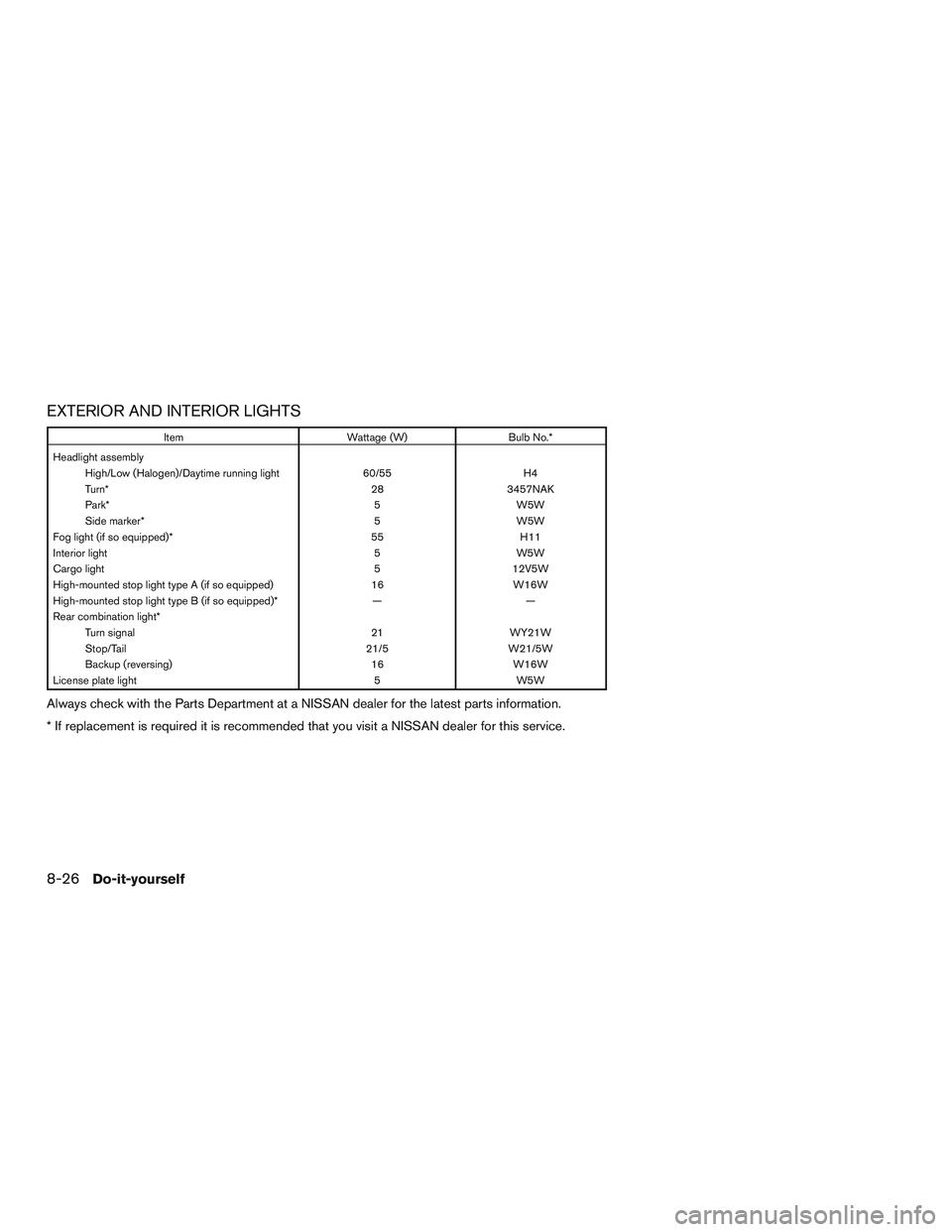
EXTERIOR AND INTERIOR LIGHTS
ItemWattage (W)Bulb No.*
Headlight assembly High/Low (Halogen)/Daytime running light 60/55H4
Turn* 283457NAK
Park* 5W5W
Side marker* 5W5W
Fog light (if so equipped)* 55H11
Interior light 5W5W
Cargo light 512V5W
High-mounted stop light type A (if so equipped) 16W16W
High-mounted stop light type B (if so equipped)* ——
Rear combination light* Turn signal 21WY21W
Stop/Tail 21/5W21/5W
Backup (reversing) 16W16W
License plate light 5W5W
Always check with the Parts Department at a NISSAN dealer for the latest parts information.
* If replacement is required it is recommended that you visit a NISSAN dealer for this service.
8-26Do-it-yourself
Page 261 of 318
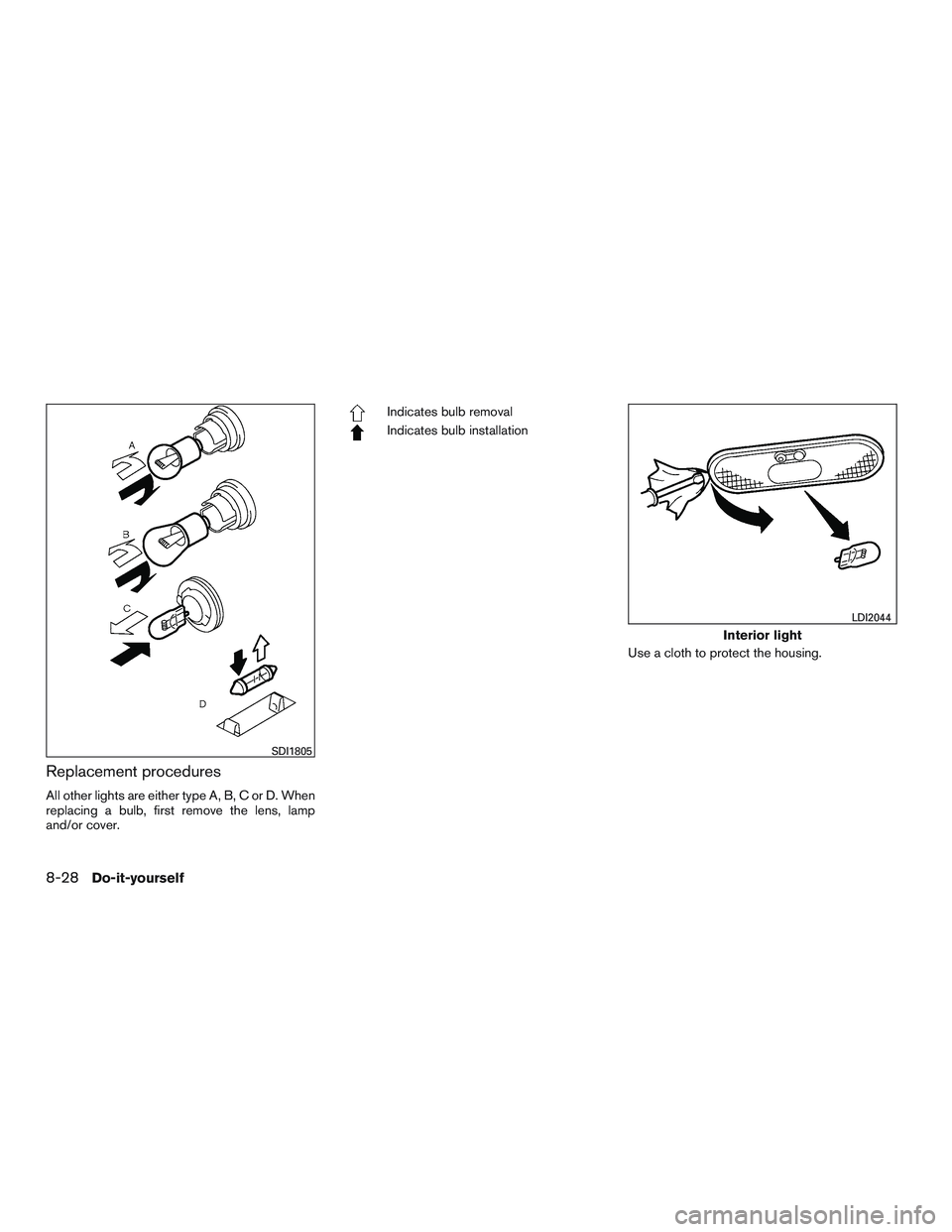
Replacement procedures
All other lights are either type A, B, C or D. When
replacing a bulb, first remove the lens, lamp
and/or cover.
Indicates bulb removal
Indicates bulb installationUse a cloth to protect the housing.
SDI1805
Interior light
LDI2044
8-28Do-it-yourself