2017 NISSAN MICRA CD player
[x] Cancel search: CD playerPage 159 of 318
The scan mode is canceled once it scans through
all tracks on the disc, or if the SCAN button is
pressed during scan mode.
CD EJECT
When the
button is pressed with a com-
pact disc loaded, the compact disc will be
ejected.
When the
button is pressed while the
compact disc is playing, the compact disc will
eject and the system will turn off.
AUX (Auxiliary) button
The AUX IN jack is located on the CD player. The
AUX IN audio input jack accepts any standard
analog audio input such as from a portable cas-
sette tape/CD player, MP3 player or laptop com-
puters.
Press the AUX button to play a compatible device
when it is plugged into the AUX IN jack.
Press the MENU button repeatedly until “AUX IN
Volume” appears on the screen to control the
incoming volume level of the auxiliary input de-
vice. Turn the TUNE/FOLDER knob to adjust the
level between 0 and +3.
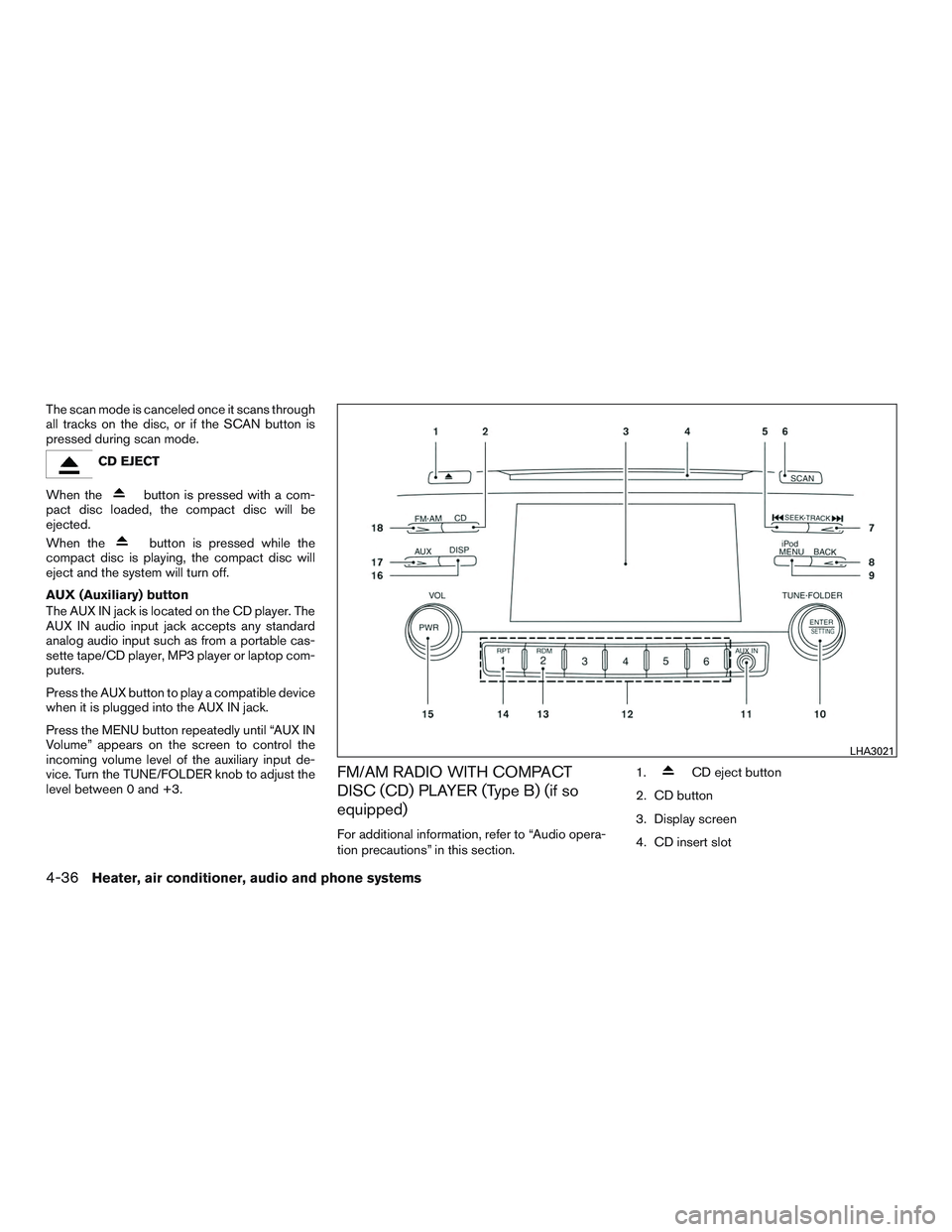
FM/AM RADIO WITH COMPACT
DISC (CD) PLAYER (Type B) (if so
equipped)
For additional information, refer to “Audio opera-
tion precautions” in this section. 1.
CD eject button
2. CD button
3. Display screen
4. CD insert slot
LHA3021
4-36Heater, air conditioner, audio and phone systems
Page 162 of 318
iPod MENU button
This button can only be used for iPod® opera-
tions. For additional information, refer to “iPod®
player operation” in this section.
DISP (display) button
The DISP (display) button turns the display
screen on or off.
BACK button
Press the BACK button to return to the previous
menu screen.
FM/AM radio operation
FM·AM button
Press the FM·AM button to change the band as
follows:
AM→FM1 →FM2 →AM
If another audio source is playing when the
FM·AM button is pressed, the audio source play-
ing will automatically be turned off and the last
radio station played will begin playing.
TUNE/FOLDER knob (Tuning)
Turn the TUNE/FOLDER knob to the left or right
for manual tuning.
SEEK tuning
Press the SEEK button
orto tune
from low to high or high to low frequencies and to
stop at the next broadcasting station.
SCAN tuning
Press the SCAN button to stop at each broad-
casting station for 5 seconds. SCAN will appear
on the screen while the radio is scan tuning.
Pressing the button again during this 5 second
period will stop SCAN tuning and the radio will
remain tuned to that station. If the SCAN button is
not pressed within 5 seconds, SCAN tuning
moves to the next station.
1 to 6 Station memory operations
Six stations can be set for the AM band. Twelve
stations can be set for the FM band (6 for FM1, 6
for FM2) .
1. Choose the radio band AM, FM1 or FM2 using the FM·AM button.
2. Tune to the desired station using manual, SEEK or SCAN tuning. Press and hold any
of the desired station memory buttons (1 –
6) until the preset number is updated on the
display and a beep sound is heard. 3. The channel indicator will then come on and
the sound will resume. Programming is now
complete.
4. Other buttons can be set in the same man- ner.
If the battery cable is disconnected, or if the fuse
opens, the radio memory will be canceled. In that
case, reset the desired stations.
Compact disc (CD) player operation
If the radio is already operating, it automatically
turns off and the compact disc begins to play.
CD/MP3 display mode
While listening to an MP3/WMA CD, certain text
may be displayed on the screen if the CD has
been encoded with text information. Depending
on how the MP3/WMA CD is encoded, informa-
tion such as Artist, Song and Folder will be dis-
played.
The track number and the total number of tracks
in the current folder or on the current disc are
displayed on the screen as well.
Heater, air conditioner, audio and phone systems4-39
Page 163 of 318
SEEK/TRACK (Reverse orFast Forward) button
Press and hold the SEEK/TRACK button
orfor 1.5 seconds while the compact disc
is playing to reverse or fast forward the track
being played. The compact disc plays at an in-
creased speed while reversing or fast forwarding.
When the button is released, the compact disc
returns to normal play speed.
SEEK/TRACK button
Press the SEEK/TRACK button
while a
CD or MP3/WMA CD is playing to return to the
beginning of the current track. Press the
SEEK/TRACK button
several times to skip
backward several tracks.
Press the SEEK/TRACK button
while a
CD or MP3/WMA CD is playing to advance one
track. Press the SEEK/TRACK button
sev-
eral times to skip forward several tracks. If the last
track on a CD is skipped, the first track on the
disc is played. If the last track in a folder of an
MP3/WMA CD is skipped, the first track of the
next folder is played. TUNE/FOLDER knob, ENTER/SETTING
button (MP3/WMA CD only)
If a MP3/WMA CD with multiple folders is play-
ing, turn the TUNE/FOLDER knob to change
folders. Turn the knob to the left to skip back a
folder. Turn the knob to the right to skip ahead a
folder.
RPT (repeat) button
When the RPT button is pressed while a com-
pact disc is playing, the play pattern can be
changed as follows:
CD:
1 Track Repeat
←→OFF
CD with MP3 or WMA:
1 Folder Repeat →1 Track Repeat →OFF
1 Track Repeat: the current track will be re-
peated.
1 Folder Repeat: the current folder will be re-
peated.
OFF: No repeat play pattern is applied. The indi-
cator on the display will turn off.
The current play pattern of the CD is displayed on
the screen unless no pattern is applied. RDM (random) button
When the RDM button is pressed while a com-
pact disc is playing, the play pattern can be
changed as follows:
CD:
1 Disc Random
←→OFF
CD with MP3 or WMA:
1 Disc Random →1 Folder Random →OFF
1 Disc Random: all tracks on the disc will be
played randomly.
1 Folder Random: all tracks in the current folder
will be played randomly.
OFF: No random play pattern is applied. The
indicator on the display will turn off.
The current play pattern of the CD is displayed on
the screen unless no pattern is applied.
AUX button
The AUX IN jack is located on the CD player. The
AUX IN audio input jack accepts any standard
analog audio input such as from a portable cas-
sette tape/CD player, MP3 player or a laptop
computer.
4-40Heater, air conditioner, audio and phone systems
Page 164 of 318
Press the AUX button to play a compatible device
plugged into the AUX IN jack. The AUX button is
also used to switch the audio system to a source
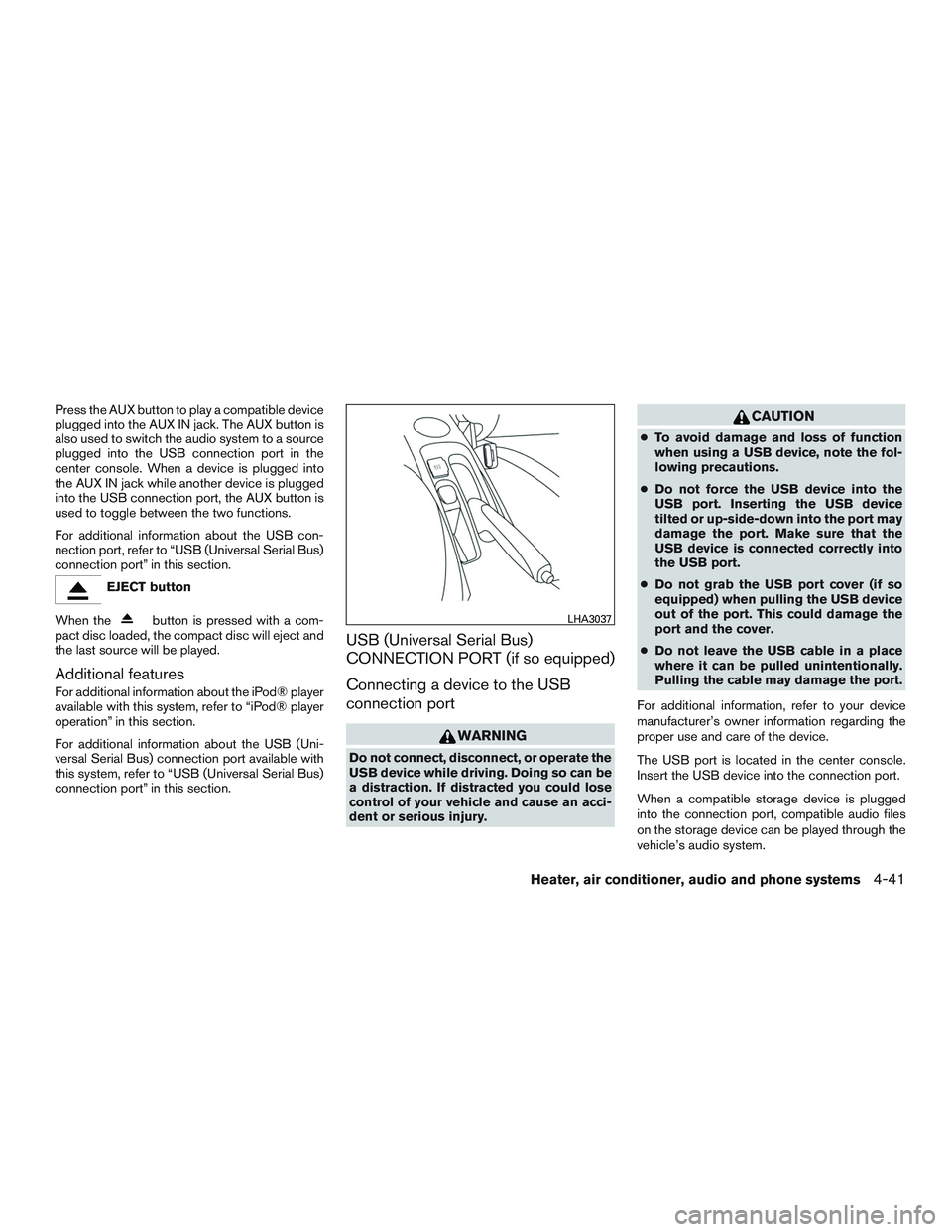
plugged into the USB connection port in the
center console. When a device is plugged into
the AUX IN jack while another device is plugged
into the USB connection port, the AUX button is
used to toggle between the two functions.
For additional information about the USB con-
nection port, refer to “USB (Universal Serial Bus)
connection port” in this section.
EJECT button
When the
button is pressed with a com-
pact disc loaded, the compact disc will eject and
the last source will be played.
Additional features
For additional information about the iPod® player
available with this system, refer to “iPod® player
operation” in this section.
For additional information about the USB (Uni-
versal Serial Bus) connection port available with
this system, refer to “USB (Universal Serial Bus)
connection port” in this section.
USB (Universal Serial Bus)
CONNECTION PORT (if so equipped)
Connecting a device to the USB
connection port
WARNING
Do not connect, disconnect, or operate the
USB device while driving. Doing so can be
a distraction. If distracted you could lose
control of your vehicle and cause an acci-
dent or serious injury.
CAUTION
● To avoid damage and loss of function
when using a USB device, note the fol-
lowing precautions.
● Do not force the USB device into the
USB port. Inserting the USB device
tilted or up-side-down into the port may
damage the port. Make sure that the
USB device is connected correctly into
the USB port.
● Do not grab the USB port cover (if so
equipped) when pulling the USB device
out of the port. This could damage the
port and the cover.
● Do not leave the USB cable in a place
where it can be pulled unintentionally.
Pulling the cable may damage the port.
For additional information, refer to your device
manufacturer’s owner information regarding the
proper use and care of the device.
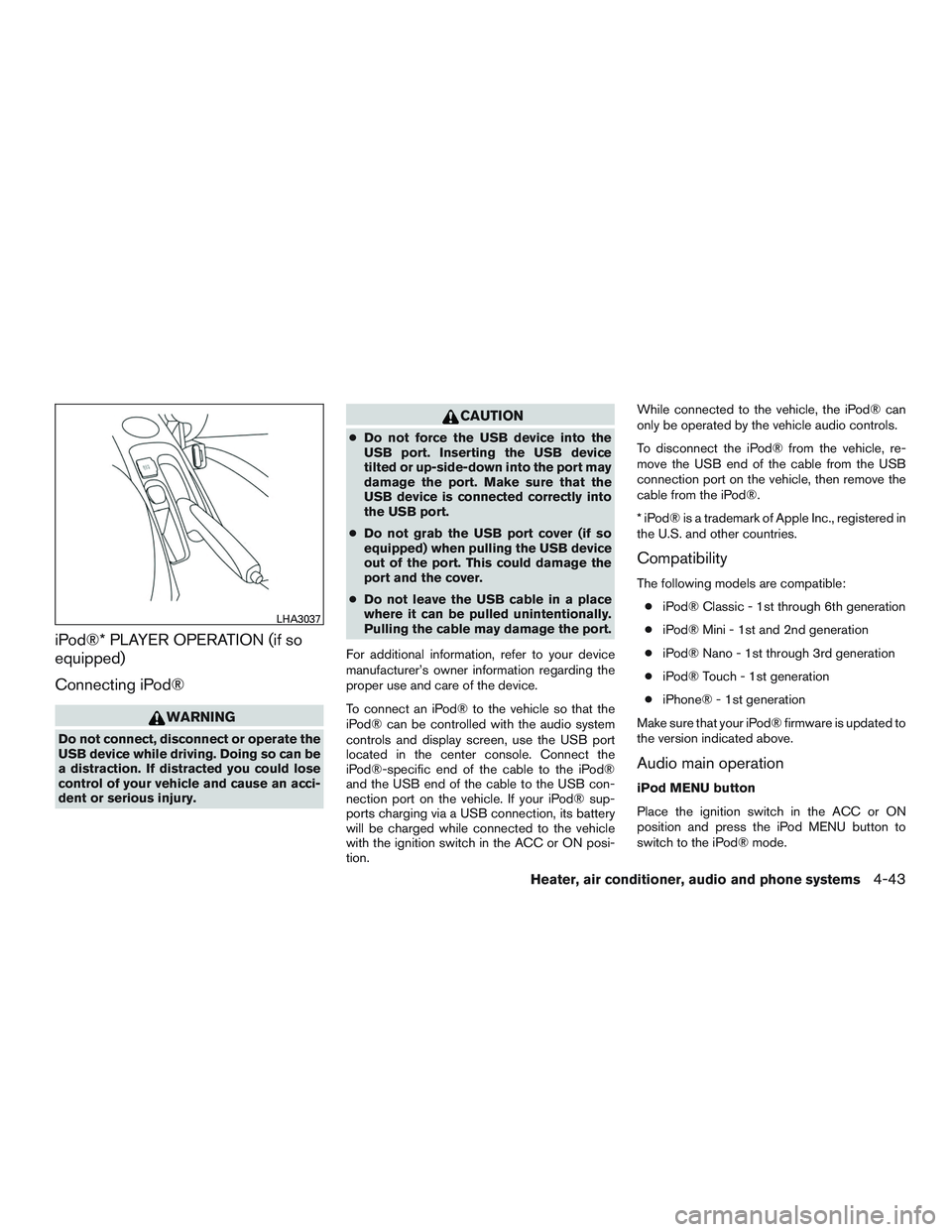
The USB port is located in the center console.
Insert the USB device into the connection port.
When a compatible storage device is plugged
into the connection port, compatible audio files
on the storage device can be played through the
vehicle’s audio system.
LHA3037
Heater, air conditioner, audio and phone systems4-41
Page 166 of 318
iPod®* PLAYER OPERATION (if so
equipped)
Connecting iPod®
WARNING
Do not connect, disconnect or operate the
USB device while driving. Doing so can be
a distraction. If distracted you could lose
control of your vehicle and cause an acci-
dent or serious injury.
CAUTION
●Do not force the USB device into the
USB port. Inserting the USB device
tilted or up-side-down into the port may
damage the port. Make sure that the
USB device is connected correctly into
the USB port.
● Do not grab the USB port cover (if so
equipped) when pulling the USB device
out of the port. This could damage the
port and the cover.
● Do not leave the USB cable in a place
where it can be pulled unintentionally.
Pulling the cable may damage the port.
For additional information, refer to your device
manufacturer’s owner information regarding the
proper use and care of the device.
To connect an iPod® to the vehicle so that the
iPod® can be controlled with the audio system
controls and display screen, use the USB port
located in the center console. Connect the
iPod®-specific end of the cable to the iPod®
and the USB end of the cable to the USB con-
nection port on the vehicle. If your iPod® sup-
ports charging via a USB connection, its battery
will be charged while connected to the vehicle
with the ignition switch in the ACC or ON posi-
tion. While connected to the vehicle, the iPod® can
only be operated by the vehicle audio controls.
To disconnect the iPod® from the vehicle, re-
move the USB end of the cable from the USB
connection port on the vehicle, then remove the
cable from the iPod®.
* iPod® is a trademark of Apple Inc., registered in
the U.S. and other countries.
Compatibility
The following models are compatible:
● iPod® Classic - 1st through 6th generation
● iPod® Mini - 1st and 2nd generation
● iPod® Nano - 1st through 3rd generation
● iPod® Touch - 1st generation
● iPhone® - 1st generation
Make sure that your iPod® firmware is updated to
the version indicated above.
Audio main operation
iPod MENU button
Place the ignition switch in the ACC or ON
position and press the iPod MENU button to
switch to the iPod® mode.
LHA3037
Heater, air conditioner, audio and phone systems4-43
Page 189 of 318
and then crank the engine. Release the
key and the accelerator pedal when the
engine starts.
● If the engine is very hard to start because
it is flooded, depress the accelerator
pedal all the way to the floor and hold it.
Crank the engine for 5-6 seconds. After
cranking the engine, release the accel-
erator pedal. Crank the engine with your
foot off the accelerator pedal by plac-
ing the ignition in the START position.
Release the key when the engine starts. If
the engine starts, but fails to run, repeat
the above procedure.
CAUTION
Do not operate the starter for more than
15 seconds at a time. If the engine does
not start, turn the key off and wait 10 sec-
onds before cranking again, otherwise the
starter could be damaged.
4. Allow the engine to idle for at least 30 sec- onds after starting. Do not race the engine
while warming it up. Drive at moderate
speed for a short distance first, especially in
cold weather. NOTE:
Care should be taken to avoid situations
that can lead to potential battery discharge
and potential no-start conditions such as:
1. Installation or extended use of electronic accessories that consume battery power
when the engine is not running (phone char-
gers, GPS, DVD players, etc.) .
2. The vehicle is not driven regularly and/or only driven short distances.
In these cases, the battery may need to be
charged to maintain battery health.
AUTOMATIC TRANSMISSION (if so
equipped)
The Automatic Transmission (A/T) in your vehicle
is electronically controlled to produce maximum
power and smooth operation.
The recommended operating procedures for this
transmission are shown on the following pages.
Follow these procedures for maximum vehicle
performance and driving enjoyment.
WARNING
●Do not depress the accelerator pedal
while shifting from P (Park) or N (Neu-
tral) to R (Reverse) , D (Drive) , 2 or 1.
Always depress the brake pedal until
shifting is completed. Failure to do so
could cause you to lose control and
have an accident.
● The cold engine idle speed is high, so
use caution when shifting the transmis-
sion into a forward or reverse position
before the engine has warmed up.
● Avoid revving up the engine while the
vehicle is stopped. This could cause un-
expected vehicle movement.
● Do not downshift abruptly on slippery
roads. This may cause a loss of control.
DRIVING THE VEHICLE
5-8Starting and driving
Page 243 of 318
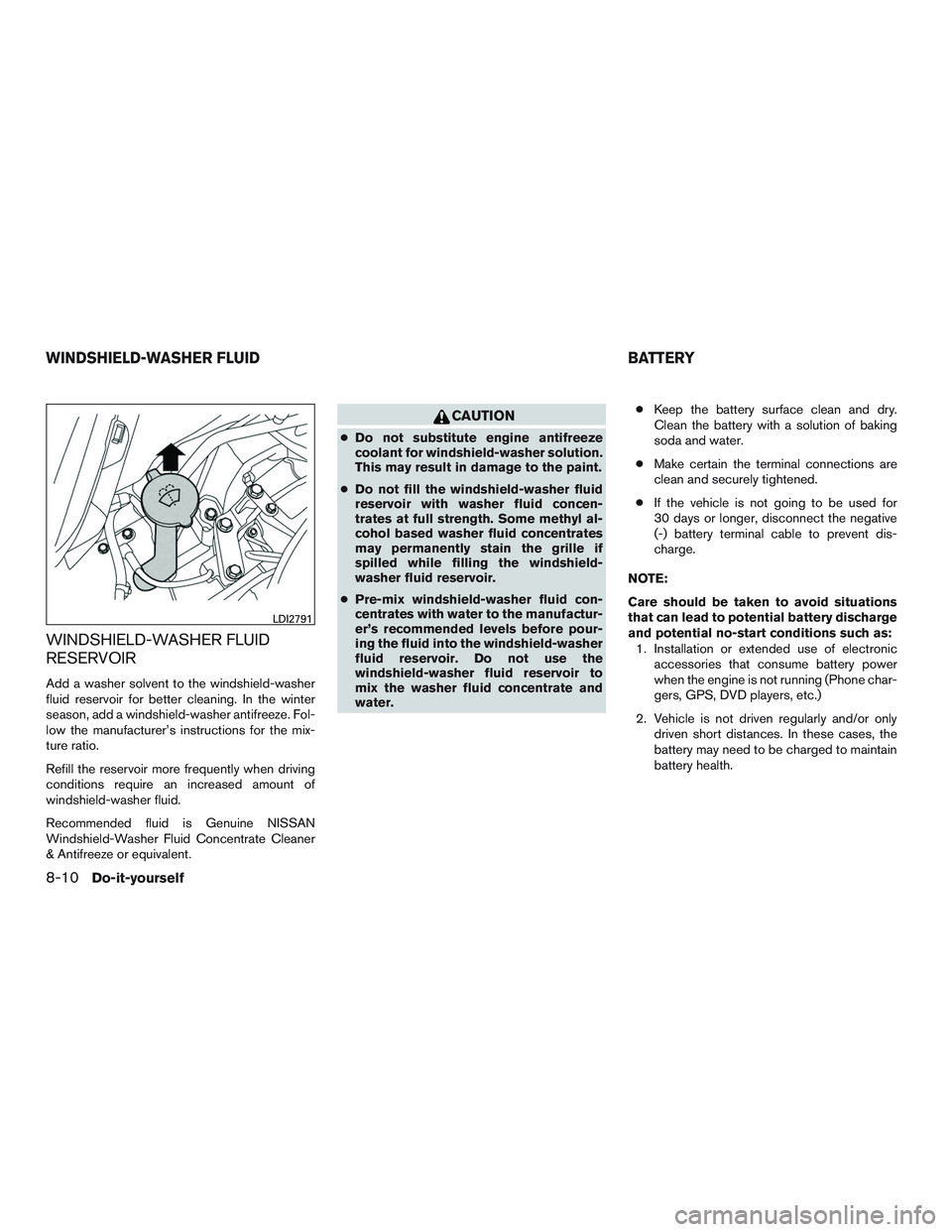
WINDSHIELD-WASHER FLUID
RESERVOIR
Add a washer solvent to the windshield-washer
fluid reservoir for better cleaning. In the winter
season, add a windshield-washer antifreeze. Fol-
low the manufacturer’s instructions for the mix-
ture ratio.
Refill the reservoir more frequently when driving
conditions require an increased amount of
windshield-washer fluid.
Recommended fluid is Genuine NISSAN
Windshield-Washer Fluid Concentrate Cleaner
& Antifreeze or equivalent.
CAUTION
●Do not substitute engine antifreeze
coolant for windshield-washer solution.
This may result in damage to the paint.
● Do not fill the windshield-washer fluid
reservoir with washer fluid concen-
trates at full strength. Some methyl al-
cohol based washer fluid concentrates
may permanently stain the grille if
spilled while filling the windshield-
washer fluid reservoir.
● Pre-mix windshield-washer fluid con-
centrates with water to the manufactur-
er’s recommended levels before pour-
ing the fluid into the windshield-washer
fluid reservoir. Do not use the
windshield-washer fluid reservoir to
mix the washer fluid concentrate and
water. ●
Keep the battery surface clean and dry.
Clean the battery with a solution of baking
soda and water.
● Make certain the terminal connections are
clean and securely tightened.
● If the vehicle is not going to be used for
30 days or longer, disconnect the negative
(-) battery terminal cable to prevent dis-
charge.
NOTE:
Care should be taken to avoid situations
that can lead to potential battery discharge
and potential no-start conditions such as: 1. Installation or extended use of electronic accessories that consume battery power
when the engine is not running (Phone char-
gers, GPS, DVD players, etc.)
2. Vehicle is not driven regularly and/or only driven short distances. In these cases, the
battery may need to be charged to maintain
battery health.
LDI2791
WINDSHIELD-WASHER FLUID BATTERY
8-10Do-it-yourself
Page 277 of 318

Seats:Check seat position controls such as
seat adjusters, seatback recliner, etc., to ensure
they operate smoothly and all latches lock se-
curely in every position. Check that the head
restraints/headrests move up and down
smoothly and the locks (if so equipped) hold
securely in all latched positions.
Seat belts: Check that all parts of the seat belt
system (for example, buckles, anchors, adjusters
and retractors) operate properly and smoothly,
and are installed securely. Check the belt web-
bing for cuts, fraying, wear or damage.
Steering wheel: Check for changes in the
steering system, such as excessive free play,
hard steering or strange noises.
Warning lights and chimes: Make sure all
warning lights and chimes are operating properly.
Windshield defroster: Check that the air
comes out of the defroster outlets properly and in
sufficient quantity when operating the heater or
air conditioner.
Windshield wiper and washer*: Check that
the wipers and washer operate properly and that
the wipers do not streak.Under the hood and vehicle
The maintenance items listed here should be
checked periodically (for example, each time you
check the engine oil or refuel) .
Battery* (for serviceable batteries): Check
the fluid level in each cell. It should be between
the MAX and MIN lines. Vehicles operated in high
temperatures or under severe conditions require
frequent checks of the battery fluid level.
NOTE:
Care should be taken to avoid situations
that can lead to potential battery discharge
and potential no-start conditions such as:
1. Installation or extended use of electronic accessories that consume battery power
when the engine is not running (Phone char-
gers, GPS, DVD players, etc.) .
2. Vehicle is not driven regularly and/or only driven short distances.
In these cases, the battery may need to be
charged to maintain battery health.
Brake and clutch (if so equipped) fluid
level*: Make sure that the brake and clutch fluid
levels are between the MIN and MAX lines on the
reservoir. Engine coolant level*:
Check the coolant level
when the engine is cold.
Engine drive belts*: Make sure the drive belts
are not frayed, worn, cracked or oily.
Engine oil level*: Check the level after parking
the vehicle on a level surface with the engine off.
Wait more than 15 minutes for the oil to drain
back into the oil pan.
Exhaust system: Make sure there are no loose
supports, cracks or holes. If the sound of the
exhaust seems unusual or there is a smell of
exhaust fumes, immediately have the exhaust
system inspected. It is recommended that you
visit a NISSAN dealer for this service. For addi-
tional information, refer to “Exhaust gas (carbon
monoxide)” in the “Starting and driving” section of
this manual.
Fluid leaks: Check under the vehicle for fuel, oil,
water or other fluid leaks after the vehicle has
been parked for a while. Water dripping from the
air conditioner after use is normal. If you should
notice any leaks or if fuel fumes are evident,
check for the cause and have it corrected imme-
diately.
9-4Maintenance and schedules