2017 NISSAN LEAF cooling
[x] Cancel search: coolingPage 42 of 424
RANGE
The distance you can drive the vehicle (range)
varies considerably depending upon available
charge, weather, temperature, usage, battery
age, topography, and driving style.
Refer to the Monroney label (window sticker) for
the official EPA range. Your actual range can vary,
either initially or as the battery ages and with use
over time. For additional information, refer to “Im-
prove driving range” in this section for information
on the factors that affect vehicle range and how
to use the vehicle to maximize vehicle range.
IMPROVE DRIVING RANGE
Vehicle range depends on a number of factors.
Actual vehicle range will vary depending upon:
• Speed,
• Vehicle load,
• Electrical load from vehicle accessories,
• Traffic and road conditions.NISSAN recommends the following driving
habits to help maximize vehicle range:
Before driving:
• Follow recommended periodic maintenance.
• Keep tires inflated to correct pressure.
• Keep wheels in correct alignment.
• Pre-heat or pre-cool the interior cabin while the
vehicle is charging.
• Remove unnecessary cargo from the vehicle.
While driving:
• Drive in ECO mode – The ECO mode helps reduce power con-sumption by reducing acceleration when
compared to the same accelerator pedal
position in the D (Drive) position.
• Drive at a constant speed. Maintain cruising speeds with constant accelerator positions or
by using cruise control when appropriate.
• Accelerate slowly and smoothly. Gently press and release the accelerator pedal for accelera-
tion and deceleration.
• Drive at moderate speeds on the highway. • Avoid frequent stopping and braking. Maintain a
safe distance behind other vehicles.
• Turn off the air conditioner/heater when it is not necessary.
• Select a moderate temperature setting for heat- ing or cooling to help reduce power
consumption.
• Use the air conditioner/heater and close win- dows to reduce drag when cruising at highway
speed.
• Vehicle range may be substantially reduced in extremely cold conditions (for example, -4°F
(-20°C)) .
• Using the climate control system to heat the cabin when the outside temperature is below
32°F (0°C) uses more electricity and affects
vehicle range more than when using the heater
when the temperature is above 32°F (0°C) .
EFFICIENT USE OF YOUR VEHICLE
EV OverviewEV-23
Page 51 of 424
WARNING
• If you use any medical electric devices, such as an implantable cardiac pace-
maker or an implantable cardiovascu-
lar defibrillator, check with the electric
medical device manufacturer concern-
ing the effects that charging may have
on implanted devices before starting
the charge operation. Charging may
affect the operation.
• Make sure there is no water or foreign materials in the charge port, charge
connector or electrical plug, and that
they are not damaged or affected by
rust or corrosion. If any of these condi-
tions are noticeable, do not charge the
Li-ion battery. This may result in a
short circuit or electric shock and
could cause a fire which may result in
serious personal injury or death.
• To avoid serious personal injury or death when the Li-ion battery is charg-
ing, be aware of the following precau-
tions.
– Do not touch the metal contacts ofthe charge port, charge connector or
electrical plug. – Do not touch the vehicle and charger
when there is lightning. A lightning
strike may back feed into the char-
ger causing damage and possible
personal injury or death.
• Make sure the charge connector is re- moved from the charge port before
starting your vehicle. If the charge con-
nector is only partially engaged and
the connector latch is unlocked, it is
possible to place the EV in the READY
to drive position.
• Do not plug in or unplug the plug with wet hands and do not stand in water,
liquid or snow. This may cause an elec-
tric shock which may result in serious
personal injury or death.
• Do not disassemble or modify the charge port or the EVSE (Electric Ve-
hicle Supply Equipment) . This may
cause a fire.
• If you notice an unusual odor or smoke coming from the vehicle, stop charging
immediately.
• Be careful not to allow your hands, hair, jewelry or clothing to come into
contact with, or get caught in, the trac-
tion motor cooling fan. The cooling fan
can start at any time during charging.
CAUTION
• To prevent damage to the charging
equipment:
– Do not close the charge port lid
without closing the cap.
– Do not subject the charging equip- ment to impact.
– Do not pull or twist the charge cable.
– Do not drag the charge cable.
– Do not store and use charging equipment in locations where the
temperature is over 185°F (85°C) .
PRECAUTIONS ON CHARGING
CH-2Charging
Page 155 of 424
1. Check the brake fluid level. If brake fluid isnecessary, add fluid and have the system
checked. It is recommended that you visit a
NISSAN certified LEAF dealer for this service.
For additional information, refer to “Brake
fluid” in the “Maintenance and do-it-yourself”
section of this manual.
2. If the brake fluid level is correct, have the warning system checked. It is recommended
that you visit a NISSAN certified LEAF dealer
for this service.
WARNING
• Your brake system may not be working properly if the warning light is on. Driv-
ing could be dangerous. If you judge
the brake system to be safe, drive care-
fully to the nearest service station for
repairs. Otherwise, have your vehicle
towed because driving it could be dan-
gerous.
• Pressing the brake pedal when the power switch position is not in the ON
or READY to drive position and/or low
brake fluid level may increase the
stopping distance and braking will re-
quire greater pedal effort as well as
pedal travel. • If the brake fluid level is below the
minimum or MIN mark on the brake
fluid reservoir, do not drive until the
brake system has been checked at a
NISSAN certified LEAF dealer.
Electric shift control system
warning light
This light illuminates to warn when a malfunction
occurs in the electric shift control system. When
the master warning light illuminates, the chime
sounds and the message, “When parked apply
parking brake”, is displayed on the vehicle infor-
mation display.
When the power switch is in the OFF position,
the chime sounds continuously. Make sure the
parking brake is applied.
Have the system checked. It is recommended
that you visit a NISSAN certified LEAF dealer for
this service.
Electric Vehicle (EV) system
warning light
This light illuminates if there is a malfunction in the
following systems. Have the system checked. It is
recommended that you visit a NISSAN certified
LEAF dealer for this service. • Traction motor and inverter system
• Charge port or on board charger
• Li-ion battery system
• Cooling system
• Shift control system
• Emergency shut off system is activated. For
additional information, refer to “Emergency
shut-off system” in the “EV overview” section of
this manual.
Headlight warning light
This light illuminates if the LED headlights are
malfunctioning. Have the system checked. It is
recommended that you visit a NISSAN certified
LEAF dealer for this service.
Low battery charge warning
light
This light illuminates when the available Li-ion
battery charge is getting low. Charge as soon as
it is possible, preferably before the Li-ion battery
available charge gauge reaches the bottom line.
2-16Instruments and controls
Page 251 of 424
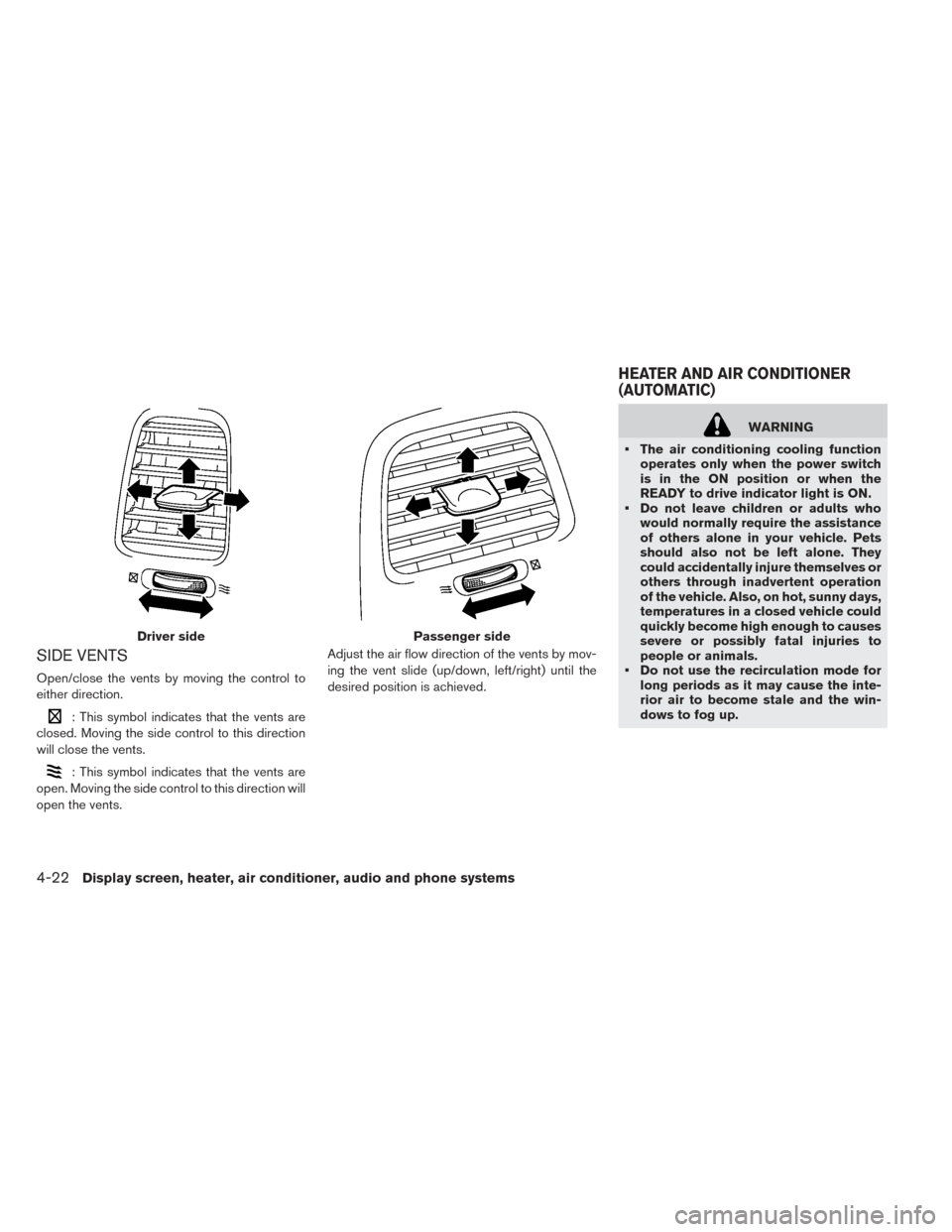
SIDE VENTS
Open/close the vents by moving the control to
either direction.
: This symbol indicates that the vents are
closed. Moving the side control to this direction
will close the vents.
: This symbol indicates that the vents are
open. Moving the side control to this direction will
open the vents. Adjust the air flow direction of the vents by mov-
ing the vent slide (up/down, left/right) until the
desired position is achieved.
WARNING
• The air conditioning cooling function operates only when the power switch
is in the ON position or when the
READY to drive indicator light is ON.
• Do not leave children or adults who would normally require the assistance
of others alone in your vehicle. Pets
should also not be left alone. They
could accidentally injure themselves or
others through inadvertent operation
of the vehicle. Also, on hot, sunny days,
temperatures in a closed vehicle could
quickly become high enough to causes
severe or possibly fatal injuries to
people or animals.
• Do not use the recirculation mode for long periods as it may cause the inte-
rior air to become stale and the win-
dows to fog up.
Driver sidePassenger side
HEATER AND AIR CONDITIONER
(AUTOMATIC)
4-22Display screen, heater, air conditioner, audio and phone systems
Page 256 of 424
NOTE:
•If thefan speed control dial, MODE
button, or
intake air control button
is operated while AUTO is in use, all the
other buttons operate in AUTO mode.
• While the AUTO indicator is illuminated,
electric power consumption of the air con-
ditioner can be economized compared to
the amount consumed while the AUTO
indicator is not illuminated.
The HEAT indicator light and the A/C indicator
light illuminates according to the operation
modes of the climate control system.
Operation
mode A/C indicator HEAT indica-
tor
Cooling ON OFF
Heating (A/C
off) OFF ON
Manual operation
The manual mode can be used to control the
heater and air conditioner to your desired tem-
perature.
The HEAT indicator light and the A/C indicator
light illuminates according to the operation
modes.
Operation
modeA/C indicator HEAT indica-
tor
Cooling ON OFF
Dehumidified
heating ON
ON
Heating (A/C
off) OFF ON
Ventilation OFF OFF
Cooling:
1. Press the A/C button to illuminate the A/C indicator light.
2. Press the
HEAT button to turn off the
HEAT indicator light.
• Do not set the temperature higher than the outside air temperature. Doing so may prevent
the temperature from being controlled properly.
• A visible mist may be seen coming from the ventilators in hot, humid conditions as the air is
cooled rapidly. This does not indicate a
malfunction.
Dehumidified heating:
1. Press the A/C button to illuminate the A/C indicator light. 2. Press the
HEAT button to illuminate the
HEAT indicator light
NOTE:
Electric power consumption of climate con-
trol increases while A/C button indicator
and
HEAT button indicator simultane-
ously illuminate. As a result, the driving
range may be decreased.
Heating (A/C off):
1. Press the
HEAT button to illuminate the
HEAT indicator light.
2. Press the A/C button to turn off the A/C indicator light.
• Do not set temperature lower than the outside air temperature. Doing so may prevent the tem-
perature from being controlled properly.
• If the windows fog up, use dehumidified heating instead of the A/C off heating.
Ventilation:
Press the
HEAT button and A/C button if
the indicator lights are on so that both indicator
lights turn off.
Display screen, heater, air conditioner, audio and phone systems4-27
Page 263 of 424
NOTE:
•If thefan speed control button,
MODE button, or
intake air control
button is operated while AUTO is in use,
all the other buttons operate in AUTO
mode.
• While the AUTO indicator is illuminated,
electric power consumption of the air con-
ditioner can be economized compared to
the amount consumed while the AUTO
indicator is not illuminated.
The HEAT indicator light and the A/C indicator
light illuminates according to the operation
modes of the climate control system.
Operation
mode A/C indica-
tor HEAT indi-
cator
Cooling ON OFF
Heating (A/C
off) OFF ON
Manual operation
The manual mode can be used to control the
heater and air conditioner to your desired tem-
perature. The HEAT indicator light and the A/C indicator
light illuminates according to the operation
modes.
Operation
mode
A/C indica-
tor HEAT indi-
cator
Cooling ON OFF
Dehumidified
heating ON
ON
Heating (A/C
off) OFF ON
Ventilation OFF OFF
Cooling:
1. Press the A/C button to illuminate the A/C indicator light.
2. Press the
HEAT button to turn off the
HEAT indicator light.
• Do not set the temperature higher than the outside air temperature. Doing so may prevent
the temperature from being controlled properly.
• A visible mist may be seen coming from the ventilators in hot, humid conditions as the air is
cooled rapidly. This does not indicate a
malfunction. Dehumidified heating:
1. Press the A/C button to illuminate the A/C
indicator light.
2. Press the
HEAT button to illuminate the
HEAT indicator light
NOTE:
Electric power consumption of climate con-
trol increases while A/C button indicator
and
HEAT button indicator simultane-
ously illuminate. As a result, the driving
range may be decreased.
Heating (A/C off):
1. Press the
HEAT button to illuminate the
HEAT indicator light.
2. Press the A/C button to turn off the A/C indicator light.
• Do not set temperature lower than the outside air temperature. Doing so may prevent the tem-
perature from being controlled properly.
• If the windows fog up, use dehumidified heating instead of the A/C off heating.
Ventilation:
Press the
HEAT button and A/C button if
the indicator lights are on so that both indicator
lights turn off.
4-34Display screen, heater, air conditioner, audio and phone systems
Page 323 of 424
• Push, then quickly release, the COAST/SETswitch. Each time you do this, the set speed will
decrease by about 1 mph or 1km/h.
To resume the preset speed, push and re-
lease the ACCEL/RES switch. The vehicle will
resume the last set cruising speed when the
vehicle speed is over 25 mph (40 km/h) . Vehicle range depends on a number of factors.
Actual vehicle range will vary depending upon:
• speed
• vehicle load
• electrical load from vehicle accessories
• traffic and road conditions
NISSAN recommends the following driving
habits to help maximize vehicle range:
Before driving:
• Follow recommended periodic maintenance.
• Keep tires inflated to correct pressure.
• Keep wheels in correct alignment.
• Pre-heat or pre-cool the interior cabin while the
vehicle is charging.
• Remove unnecessary cargo from the vehicle.
While driving:
• Drive in ECO mode – The ECO mode helps reduce power con-sumption by reducing acceleration when
compared to the same accelerator pedal
position in the D (Drive) position.
• Drive at a constant speed. Maintain cruising speeds with a constant accelerator position or
by using cruise control when appropriate. • Accelerate slowly and smoothly. Gently press
and release the accelerator pedal for accelera-
tion and deceleration.
• Drive at moderate speeds on the highway.
• Avoid frequent stopping and braking. Maintain a safe distance behind other vehicles.
• Turn off the air conditioner/heater when it is not necessary.
• Select a moderate temperature setting for heat- ing or cooling to help reduce power
consumption.
• Use the air conditioner/heater and close win- dows to reduce drag when cruising at highway
speed.
• Release the accelerator pedal to slow down and do not apply the brakes when traffic and
road conditions allow. – This vehicle is equipped with a regenerative brake system. The primary purpose of the
regenerative brake system is to provide
some power to recharge the Li-ion battery
and extend driving range. A secondary ben-
efit is “engine braking” that operates based
on Li-ion battery conditions. In the D (Drive)
INCREASING POWER ECONOMY
5-18Starting and driving
Page 332 of 424
FREEING A FROZEN DOOR LOCK
To prevent a door lock from freezing, apply deicer
through the key hole. If the lock becomes frozen,
heat the key before inserting it into the key hole or
use the remote keyless entry key fob.
ANTIFREEZE
In the winter when it is possible that the outside
temperature will drop below 32°F (0°C) , check
the antifreeze to ensure proper winter protection.
For additional information, refer to “Cooling sys-
tem” in the “Maintenance and do-it-yourself” sec-
tion of this manual.
12-VOLT BATTERY
If the 12-volt battery is not fully charged during
extremely cold weather conditions, the 12-volt
battery fluid may freeze and damage the 12-volt
battery. To maintain maximum efficiency, the 12-
volt battery should be checked regularly. For ad-
ditional information, refer to “12-volt battery” in
the “Maintenance and do-it-yourself” section of
this manual.
DRAINING OF COOLANT WATER
If the vehicle is to be left outside without anti-
freeze, drain the cooling system. Refill before
operating the vehicle. For additional information,
refer to “Cooling system” in the “Maintenance
and do-it-yourself” section of this manual.
TIRE EQUIPMENT
SUMMER tires have a tread designed to provide
superior performance on dry pavement. How-
ever, the performance of these tires will be sub-
stantially reduced in snowy and icy conditions. If
you operate your vehicle on snowy or icy roads,
NISSAN recommends the use of MUD & SNOW
or ALL SEASON tires on all four wheels. It is
recommended that you visit a NISSAN certified
LEAF dealer for the tire type, size, speed rating
and availability information.
For additional traction on icy roads, studded tires
may be used. However, some U.S. states and
Canadian provinces prohibit their use. Check
local, state and provincial laws before installing
studded tires.Skid and traction capabilities of studded
snow tires, on wet or dry surfaces, may be
poorer than that of non-studded snow tires.
Tire chains may be used. For additional informa-
tion, refer to “Tire chains” in the “Maintenance
and do-it-yourself” section of this manual.
SPECIAL WINTER EQUIPMENT
It is recommended that the following items be
carried in the vehicle during winter:
• A scraper and stiff-bristled brush to remove ice
and snow from the windows and wiper blades.
• A shovel to dig the vehicle out of snow-drifts.
• Extra windshield-washer fluid to refill the reser- voir tank.
Starting and driving5-27