2017 NISSAN JUKE belt
[x] Cancel search: beltPage 94 of 416

All-Wheel Drive (AWD) warning light (AWD
model) (if so equipped)Low fuel warning lightEngine start operation indicator light
Anti-lock Braking System (ABS) warning
lightLow tire pressure warning lightExterior light indicator
Low washer fluid warning light (if so
equipped)Front fog light indicator light (if so equipped)
Brake warning lightP position selecting warning lightFront passenger air bag status light
Seat belt warning lightHigh beam indicator light
Charge warning lightSupplemental air bag warning lightMalfunction Indicator Light (MIL)
Door open warning lightVehicle Dynamic Control (VDC) warning lightSecurity indicator light
Electric power steering warning lightAll-Wheel Drive (AWD) indicator light (AWD
model) (if so equipped)Turn signal/hazard indicator lights
Engine oil pressure warning lightAll-Wheel Drive (AWD) -V indicator light
(AWD model) (if so equipped)Vehicle Dynamic Control (VDC) off indicator
light
High temperature warning light (if so
equipped)Continuously Variable Transmission (CVT)
indicator light (if so equipped)
Intelligent Key system warning lightCruise indicator light
Instruments and controls2-15
WARNING LIGHTS, INDICATOR
LIGHTS AND AUDIBLE REMINDERS
Page 95 of 416

2-16Instruments and controls
CHECKING LIGHTS
With all doors closed, apply the parking brake,
fasten the seat belts and place the ignition
switch in the ON position without starting the
engine. The following lights (if so equipped) will
come on:
,or,,,,
The following lights (if so equipped) come on
briefly and then go off:
,,or,,,,,,,
If any light does not come on or operates in a
way other than described, it may indicate a
burned-out bulb and/or a system malfunction. It
is recommended you have the system checked
by a NISSAN dealer.
WARNING LIGHTS
All-Wheel Drive (AWD) warning
light (AWD model)
When the ignition switch is in the “ON” position,
the All-Wheel Drive (AWD) warning light will
illuminate. It will turn off soon after the engine is
started.
If the AWD system malfunctions or the revolu-
tion or radius of the front and the rear wheel
differs, the AWD warning light will either remain
illuminated or blink. (See “All-Wheel Drive (AWD)” (P.5-29) .)
orAnti-lock Braking System
(ABS) warning light
When the ignition switch is in the ON position,
the Anti-lock Braking System (ABS) warning
light illuminates and then turns off. This indicates
the ABS is operational.
If the ABS warning light illuminates while the
engine is running, or while driving, it may
indicate the ABS is not functioning properly.
Have the system checked. It is recommended
you visit a NISSAN dealer for this service.
If an ABS malfunction occurs, the anti-lock
function is turned off. The brake system then
operates normally, but without anti-lock assis-
tance. (See “Brake system” (P.5-35).)
orBrake warning light
This light functions for both the parking brake
and the foot brake systems.
Parking brake indicator:
When the ignition switch is in the ON position,
the light illuminates when the parking brake is
applied.
Low brake fluid warning light:
When the ignition switch is in the ON position, the light warns of a low brake fluid level. If the
light illuminates while the engine is running with
the parking brake not applied, stop the vehicle
and perform the following:
1. Check the brake fluid level. If brake fluid is
necessary, add fluid and have the system
checked. It is recommended you have this
service performed by a NISSAN dealer.
(See “Brake and clutch fluid” (P.8-9) .)
2. If the brake fluid level is correct, have the warning system checked. It is recommended
you have this service performed by a
NISSAN dealer.
Anti-lock Braking System (ABS) warning
indicator:
When the parking brake is released and the
brake fluid level is sufficient, if both the brake
warning light and the Anti-lock Braking System
(ABS) warning light illuminate, it may indicate
the ABS is not functioning properly. Have the
brake system checked, and if necessary re-
paired. It is recommended you visit a NISSAN
dealer for this service. (See “Anti-lock Braking
System (ABS) warning light” (P.2-16) .)
Page 96 of 416
WARNING
.Your brake system may not be
working properly if the warning light
is on. Driving could be dangerous. If
you judge it to be safe, drive care-
fully to the nearest service station
for repairs. Otherwise, have your
vehicle towed because driving it
could be dangerous.
. Pressing the brake pedal with the
engine stopped and/or low brake
fluid level may increase your stop-
ping distance and braking will re-
quire greater pedal effort as well as
pedal travel.
. If the brake fluid level is below the
minimum or MIN mark on the brake
fluid reservoir, do not drive until the
brake system has been checked. It
is recommended you visit a NISSAN
dealer for this service.
Charge warning light
If the light illuminates while the engine is running,
it may indicate the charging system is not
functioning properly. Turn the engine off and
check the alternator belt. If the belt is loose,
broken, missing or if the light remains on, have
your vehicle serviced immediately. It is recom-
mended you visit a NISSAN dealer for this
service.
CAUTION
Do not continue driving if the alternator
belt is loose, broken or missing.
Door open warning light
This light illuminates when any of the doors and/
or liftgate are not closed securely while the
ignition switch is in the ON position.
Electric power steering warning
light
When the ignition switch is in the ON position,
the electric power steering warning light illumi-
nates. After starting the engine, the electric
power steering warning light turns off. This
indicates the electric power steering is opera- tional.
If the electric power steering warning light
illuminates while the engine is running, it may
indicate the electric power steering is not
functioning properly and may need servicing.
Have the electric power steering checked. It is
recommended you visit a NISSAN dealer for this
service.
When the electric power steering warning light
illuminates with the engine running, the power
assist to the steering will cease operation but
you will still have control of the vehicle. At this
time, greater steering efforts are required to
operate the steering wheel, especially in sharp
turns and at low speeds.
See “Electric power steering” (P.5-34).
Engine oil pressure warning light
This light warns of low engine oil pressure. If the
light flickers or illuminates during normal driving,
pull off the road in a safe area, stop the engine
immediately
and call a NISSAN dealer or other
authorized repair shop.
The engine oil pressure warning light is
not designed to indicate a low oil level.
Use the dipstick to check the oil level. (See
“Engine oil” (P.8-5).)
Instruments and controls2-17
Page 99 of 416
2-20Instruments and controls
CAUTION
.The TPMS is not a substitute for the
regular tire pressure check. Be sure
to check the tire pressure regularly.
. If the vehicle is being driven at
speeds of less than 16 MPH (25
km/h) , the TPMS may not operate
correctly.
. Be sure to install the specified size
of tires to the four wheels correctly.
Low washer fluid warning light
(Canada only)
This light illuminates when the washer fluid is at
a low level. Add washer fluid as necessary. (See
“Window washer fluid” (P.8-9) .)
P position selecting warning light
The warning light blinks in red when the ignition
switch is pushed to stop the engine with the
shift lever in any position except the P (Park)
position.
If this warning appears, move the shift lever to
the P (Park) position or push the ignition switch
to the ON position. An inside warning chime will also sound.
See “Intelligent Key system” (P.3-6) .
Seat belt warning light
The light and chime remind you to fasten seat
belts. The light illuminates whenever the ignition
switch is placed in the ON position, and will
remain illuminated until the driver’s seat belt is
fastened. At the same time, the chime will sound
for about 6 seconds unless the driver’s seat belt
is securely fastened.
The seat belt warning light for the front
passenger will illuminate if the seat belt is not
fastened when the front passenger’s seat is
occupied. For about 5 seconds after the ignition
switch is in the ON position, the system does
not activate the warning light for the front
passenger.
See “Seat belts” (P.1-10) for precautions on
seat belt usage.
Supplemental air bag warning light
After placing the ignition switch in the ON
position, the supplemental air bag warning light
will illuminate. The supplemental air bag warning
light will turn off after about 7 seconds if the
supplemental front air bag and supplemental
side air bag, curtain air bag systems and/or
pretensioner seat belt are operational.If any of the following conditions occur, the front
air bag, side air bag, curtain air bag and
pretensioner systems need servicing.
.
The supplemental air bag warning light
remains on after approximately 7 seconds.
. The supplemental air bag warning light
flashes intermittently.
. The supplemental air bag warning light does
not illuminate at all.
It is recommended you visit a NISSAN dealer for
these services.
Unless checked and repaired, the Supplemental
Restraint Systems and/or the pretensioners may
not function properly.
For additional information, see “Supplemental
restraint system” (P.1-38) .
WARNING
If the supplemental air bag warning
light is on, it could mean that the front
air bag, side air bag, curtain air bag
and/or pretensioner systems will not
operate in an accident. To help avoid
injury to yourself or others, have your
vehicle checked. It is recommended you
visit a NISSAN dealer for this service.
Page 103 of 416

2-24Instruments and controls
Seat belt warning chime
The seat belt warning chime will sound for about
6 seconds unless the driver’s seat belt is
securely fastened.The Integrated Control System is located below
the audio system or navigation system (if so
equipped) . Two Integrated Control System
modes can be selected: Drive mode and
Climate Control mode.
Depending on which Integrated Control System
mode is selected (Drive mode or Climate
Control mode) , the screen display and some
button functions will change.
.
Drive mode
In the Drive mode, three types of driving
modes can be selected: NORMAL, SPORT
and ECO. See “Drive mode” (P.5-22). In
addition, while in the Drive mode, SETUP,
Drive information and ECO information can
be displayed and adjusted. See “Drive
mode” (P.2-24) .
. Climate Control mode
In the Climate Control mode, the climate
control can be set and adjusted. See
“Automatic air conditioner (with Integrated
Control System)” (P.4-32) .
DRIVE MODE
When the Drive mode select button is pressed,
the display and buttons appear as shown.
INTEGRATED CONTROL SYSTEM (if
so equipped)
Page 131 of 416
2-52Instruments and controls
Auto-reverse function
WARNING
There are some small distances imme-
diately before the closed position which
cannot be detected. Make sure that all
passengers have their hands, etc., in-
side the vehicle before closing the
window.
If the control unit detects something caught in
the window as it is closing, the window will be
immediately lowered.
The auto reverse function can be activated when
the window is closed by automatic operation
when the ignition switch is in the ON position or
for 45 seconds after the ignition switch is placed
in the OFF position.
Depending on the environment or driving
conditions, the auto reverse function may
be activated if an impact or load similar to
something being caught in the window
occurs.
If the windows do not close automatically
If the power window automatic function (closing
only) does not operate properly, perform the
following procedure to initialize the power
window system.
1. Place the ignition switch in the ON position.
2. Close the door.
3. Open the window completely by operating the power window switch.
4. Pull the power window switch and hold it to close the window, and then hold the switch
more than 3 seconds after the window is
closed completely.
5. Release the power window switch. Operate the window by the automatic function to
confirm the initialization is complete.
If the power window automatic function does
not operate properly after performing the pro-
cedure above, it is recommended you have your
vehicle checked by a NISSAN dealer.WARNING
. In an accident you could be thrown
from the vehicle through an open
moonroof. Always use seat belts
and child restraints.
. Do not allow anyone to stand up or
extend any portion of their body out
of the moonroof opening while the
vehicle is in motion or while the
moonroof is closing.
CAUTION
.Remove water drops, snow, ice or
sand from the moonroof before
opening.
. Do not place any heavy object on
the moonroof or surrounding area.
POWER MOONROOF
The moonroof only operates when the ignition
switch is in the ON position.
The moonroof is operational for about 45
seconds, even if the ignition switch is pushed
to the OFF position. If the driver’s door or the
MOONROOF (if so equipped)
Page 139 of 416
3-4Pre-driving checks and adjustments
WARNING
.Always have the doors locked while
driving. Along with the use of seat
belts, this provides greater safety in
the event of an accident by helping
to prevent persons from being
thrown from the vehicle. This also
helps keep children and others from
unintentionally opening the doors,
and will help keep out intruders.
. Before opening any door, always
look for and avoid oncoming traffic.
. To help avoid risk of injury or death
through unintended operation of
the vehicle and or its systems,
including entrapment in windows
or inadvertent door lock activation,
do not leave children, people who
require the assistance of others or
pets unattended in your vehicle.
Additionally, the temperature inside
a closed vehicle on a warm day can
quickly become high enough to
cause a significant risk of injury or
death to people and pets.
SPA2602
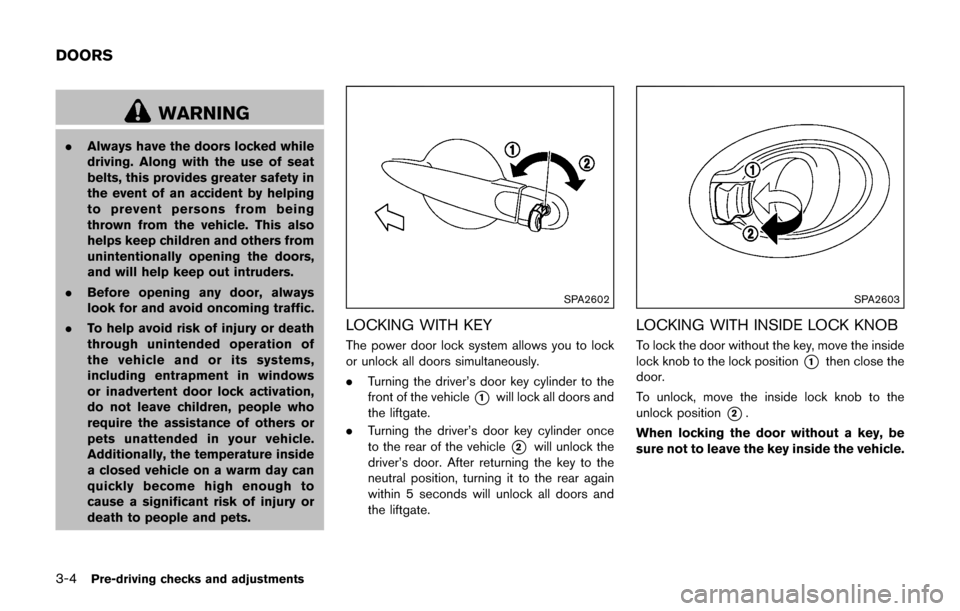
LOCKING WITH KEY
The power door lock system allows you to lock
or unlock all doors simultaneously.
.Turning the driver’s door key cylinder to the
front of the vehicle
*1will lock all doors and
the liftgate.
. Turning the driver’s door key cylinder once
to the rear of the vehicle
*2will unlock the
driver’s door. After returning the key to the
neutral position, turning it to the rear again
within 5 seconds will unlock all doors and
the liftgate.
SPA2603
LOCKING WITH INSIDE LOCK KNOB
To lock the door without the key, move the inside
lock knob to the lock position
*1then close the
door.
To unlock, move the inside lock knob to the
unlock position
*2.
When locking the door without a key, be
sure not to leave the key inside the vehicle.
DOORS
Page 267 of 416

5-6Starting and driving
ence that may cause undesired operation
of the device.
AVOIDING COLLISION AND ROLL-
OVER
WARNING
Failure to operate this vehicle in a safe
and prudent manner may result in loss
of control or an accident.
Be alert and drive defensively at all times. Obey
all traffic regulations. Avoid excessive speed,
high speed cornering, or sudden steering
maneuvers, because these driving practices
could cause you to lose control of your vehicle.
As with any vehicle, a loss of control could
result in a collision with other vehicles or
objects, or cause the vehicle to rollover,
particularly if the loss of control causes the
vehicle to slide sideways. Be attentive at all
times, and avoid driving when tired. Never drive
when under the influence of alcohol or drugs
(including prescription or over-the-counter
drugs which may cause drowsiness) . Always
wear your seat belt as outlined in “Seat belts”
(P.1-10) of this manual, and also instruct your
passengers to do so.
Seat belts help reduce the risk of injury in collisions and rollovers.
In a rollover crash, an
unbelted or improperly belted person is
significantly more likely to be injured or
killed than a person properly wearing a
seat belt.
OFF-ROAD RECOVERY
If the right side or left side wheels leave the road
surface, maintain control of the vehicle by
following the procedure below. Please note that
this procedure is only a general guide. The
vehicle must be driven as appropriate based on
the conditions of the vehicle, road and traffic.
1. Remain calm and do not overreact.
2. Do not apply the brakes.
3. Maintain a firm grip on the steering wheel with both hands and try to hold a straight
course.
4. When appropriate, slowly release the accel- erator pedal to gradually slow the vehicle.
5. If there is nothing in the way, steer the vehicle to follow the road while the vehicle
speed is reduced. Do not attempt to drive
the vehicle back onto the road surface until
vehicle speed is reduced.
6. When it is safe to do so, gradually turn the steering wheel until both tires return to the
road surface. When all tires are on the road
surface, steer the vehicle to stay in the appropriate driving lane.
.If you decide that it is not safe to return
the vehicle to the road surface based on
vehicle, road or traffic conditions, gradu-
ally slow the vehicle to a stop in a safe
place off the road.
RAPID AIR PRESSURE LOSS
Rapid air pressure loss or a “blow-out” can
occur if the tire is punctured or is damaged due
to hitting a curb or pothole. Rapid air pressure
loss can also be caused by driving on under-
inflated tires.
Rapid air pressure loss can affect the handling
and stability of the vehicle, especially at highway
speeds.
Help prevent rapid air pressure loss by main-
taining the correct air pressure and visually
inspect the tires for wear and damage. See
“Wheels and tires” (P.8-28) of this manual.
If a tire rapidly loses air pressure or “blows-out”
while driving maintain control of the vehicle by
following the procedure below. Please note that
this procedure is only a general guide. The
vehicle must be driven as appropriate based on
the conditions of the vehicle, road and traffic.