2017 NISSAN JUKE light
[x] Cancel search: lightPage 82 of 416

JVC0725X
1. Outside mirror remote control switch
2. Headlight, fog light and turn signal switch— Headlight
— Turn signal light
— Fog light*
3. Paddle shifter* 4. Steering wheel
— Electric power steering
— Horn
— Driver’s supplemental air bag
5. Wiper and washer switch 6. Shift lever
— Continuously Variable Transmission (CVT)
— Manual Transmission (MT)
7. Fuse box cover
8. Vehicle Dynamic Control (VDC) OFF switch
9. All-Wheel Drive (AWD) switch*
10. Tilting steering wheel lever
11. Steering-wheel-mounted controls (left side) — Audio control
— Siri
ŠEyes Free
— BluetoothŠHands-Free Phone System con-
trol
— NISSAN Voice Recognition System (with
navigation system)*
12. Steering-wheel-mounted controls (right side) — Cruise control switches
13. Heated seat switch*
*: if so equipped
Instruments and controls2-3
COCKPIT
Page 84 of 416

JVC0850X
Type A (if so equipped)1. Tachometer
2. Vehicle information display— Odometer/twin trip odometer
— Trip computer
— Torque vectoring AWD (AWD model)
— Outside air temperature
3. Fuel gauge 4. Speedometer
5. Warning/indicator lights
6. Instrument brightness control knob
7. Continuously Variable Transmission (CVT) posi-
tion indicator*
8. RESET switch for trip odometer/Trip computer mode switch *: if so equipped
The needle indicators may move slightly
after the ignition switch is placed in the
OFF or LOCK position. This is not a
malfunction.
Instruments and controls2-5
METERS AND GAUGES
Page 85 of 416
2-6Instruments and controls
SIC4601
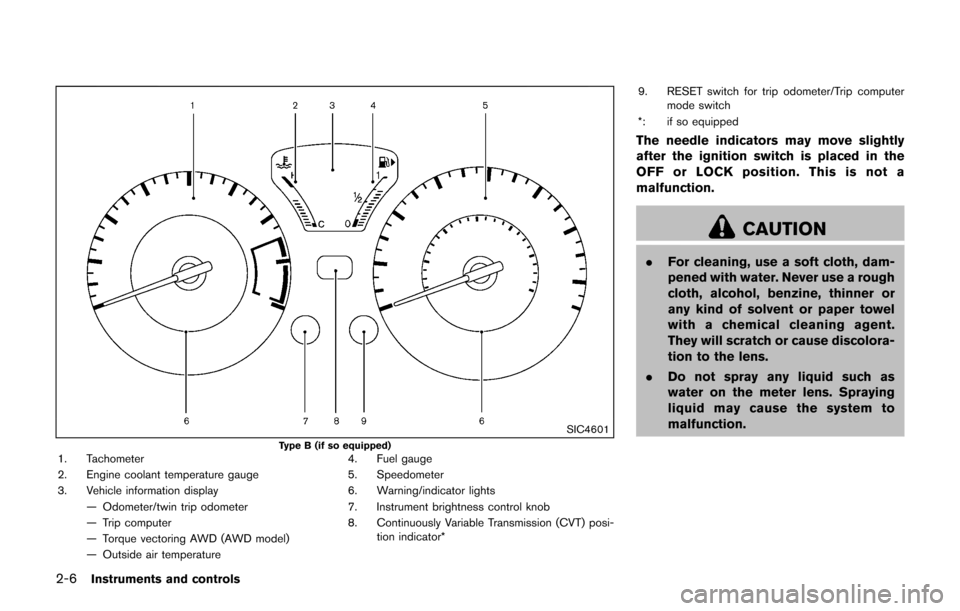
Type B (if so equipped)1. Tachometer
2. Engine coolant temperature gauge
3. Vehicle information display— Odometer/twin trip odometer
— Trip computer
— Torque vectoring AWD (AWD model)
— Outside air temperature 4. Fuel gauge
5. Speedometer
6. Warning/indicator lights
7. Instrument brightness control knob
8. Continuously Variable Transmission (CVT) posi-
tion indicator* 9. RESET switch for trip odometer/Trip computer
mode switch
*: if so equipped
The needle indicators may move slightly
after the ignition switch is placed in the
OFF or LOCK position. This is not a
malfunction.
CAUTION
. For cleaning, use a soft cloth, dam-
pened with water. Never use a rough
cloth, alcohol, benzine, thinner or
any kind of solvent or paper towel
with a chemical cleaning agent.
They will scratch or cause discolora-
tion to the lens.
. Do not spray any liquid such as
water on the meter lens. Spraying
liquid may cause the system to
malfunction.
Page 88 of 416

JVI1372X
Check tire pressure warning message
The CHECK TIRE PRES (pressure) warning
message is displayed when the low tire pressure
warning light
is illuminated and low tire
pressure is detected. Check and adjust the tire
pressure to the recommended COLD tire
pressure shown on the Tire and Loading
Information label. The CHECK TIRE PRES
warning message turns off when the low tire
pressure warning light
turns off.
The low tire pressure warning light
remains
illuminated until the tires are inflated to the
recommended COLD tire pressure. The CHECK
TIRE PRES warning message is displayed each
time the ignition switch is placed in the ON position as long as the low tire pressure warning
light
remains illuminated.
The CHECK TIRE PRES warning message can
be turned off by pushing the reset switch
*A.
For more information see “Low tire pressure
warning light” (P.2-18) , “Tire Pressure Monitor-
ing System (TPMS)” (P.5-3) , and “Wheels and
tires” (P.8-28).
Extended storage fuse warning message
The SHIP PHASE On/PUSH FUSE In warning
message may be displayed if the extended
storage fuse switch is not pushed in (switched
on) . When this message is displayed, push in
(switch on) the extended storage fuse switch to
turn off the message. For more information, see
“Extended storage fuse switch” (P.8-20).
SIC4506
TACHOMETER
The tachometer indicates engine speed in
revolutions per minute (RPM) . Do not rev the
engine into the red zone
*1.
CAUTION
When engine speed approaches the red
zone, shift to a higher gear or reduce
engine speed. Operating the engine in
the red zone may cause serious engine
damage.
Instruments and controls2-9
Page 90 of 416
FUEL GAUGE
The gauge*1indicates theapproximate fuel
level in the tank.
The gauge may move slightly during braking,
turning, acceleration, or going up or down hills.
Refill the fuel tank before the gauge
registers 0 (empty) .
The low fuel warning light
illuminates when
the amount of fuel in the tank is getting low.
Refuel as soon as it is convenient, preferably
before the gauge reaches 0. There will be a
small reserve of fuel in the tank when the fuel
gauge reaches 0.
The
indicates that the fuel-filler door is
located on the front passenger’s side of the
vehicle.
CAUTION
. If the vehicle runs out of fuel, themalfunction indicator light (MIL)
may come on. Refuel as soon as
possible. After a few driving trips,
the
light should turn off. If the
light remains on after a few driving
trips, have the vehicle inspected. It
is recommended you visit a NISSAN
dealer for this service. .
For additional information, see
“Malfunction Indicator Light (MIL)”
(P.2-22) .
JVI1325X
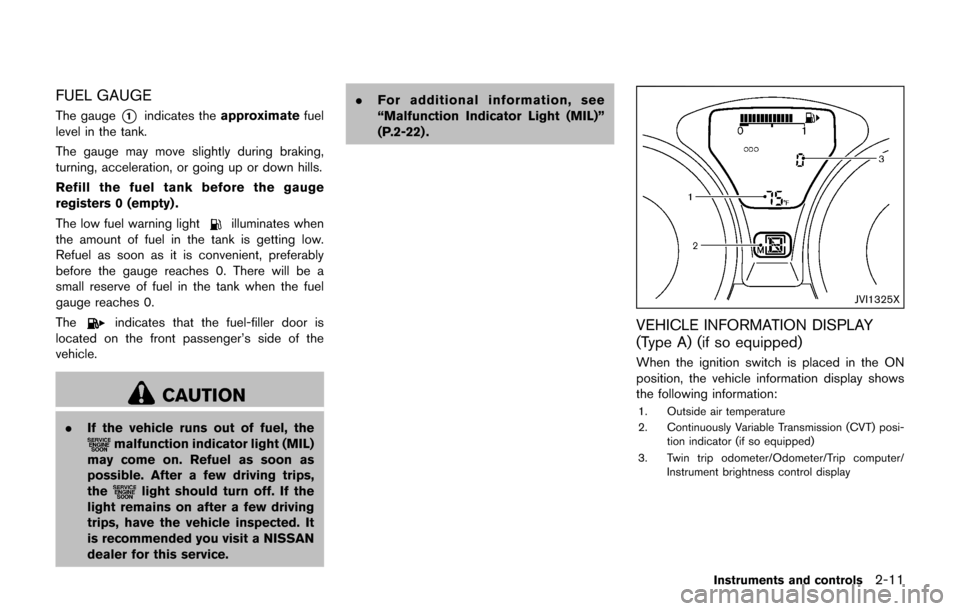
VEHICLE INFORMATION DISPLAY
(Type A) (if so equipped)
When the ignition switch is placed in the ON
position, the vehicle information display shows
the following information:
1. Outside air temperature
2. Continuously Variable Transmission (CVT) posi-
tion indicator (if so equipped)
3. Twin trip odometer/Odometer/Trip computer/ Instrument brightness control display
Instruments and controls2-11
Page 94 of 416

All-Wheel Drive (AWD) warning light (AWD
model) (if so equipped)Low fuel warning lightEngine start operation indicator light
Anti-lock Braking System (ABS) warning
lightLow tire pressure warning lightExterior light indicator
Low washer fluid warning light (if so
equipped)Front fog light indicator light (if so equipped)
Brake warning lightP position selecting warning lightFront passenger air bag status light
Seat belt warning lightHigh beam indicator light
Charge warning lightSupplemental air bag warning lightMalfunction Indicator Light (MIL)
Door open warning lightVehicle Dynamic Control (VDC) warning lightSecurity indicator light
Electric power steering warning lightAll-Wheel Drive (AWD) indicator light (AWD
model) (if so equipped)Turn signal/hazard indicator lights
Engine oil pressure warning lightAll-Wheel Drive (AWD) -V indicator light
(AWD model) (if so equipped)Vehicle Dynamic Control (VDC) off indicator
light
High temperature warning light (if so
equipped)Continuously Variable Transmission (CVT)
indicator light (if so equipped)
Intelligent Key system warning lightCruise indicator light
Instruments and controls2-15
WARNING LIGHTS, INDICATOR
LIGHTS AND AUDIBLE REMINDERS
Page 95 of 416

2-16Instruments and controls
CHECKING LIGHTS
With all doors closed, apply the parking brake,
fasten the seat belts and place the ignition
switch in the ON position without starting the
engine. The following lights (if so equipped) will
come on:
,or,,,,
The following lights (if so equipped) come on
briefly and then go off:
,,or,,,,,,,
If any light does not come on or operates in a
way other than described, it may indicate a
burned-out bulb and/or a system malfunction. It
is recommended you have the system checked
by a NISSAN dealer.
WARNING LIGHTS
All-Wheel Drive (AWD) warning
light (AWD model)
When the ignition switch is in the “ON” position,
the All-Wheel Drive (AWD) warning light will
illuminate. It will turn off soon after the engine is
started.
If the AWD system malfunctions or the revolu-
tion or radius of the front and the rear wheel
differs, the AWD warning light will either remain
illuminated or blink. (See “All-Wheel Drive (AWD)” (P.5-29) .)
orAnti-lock Braking System
(ABS) warning light
When the ignition switch is in the ON position,
the Anti-lock Braking System (ABS) warning
light illuminates and then turns off. This indicates
the ABS is operational.
If the ABS warning light illuminates while the
engine is running, or while driving, it may
indicate the ABS is not functioning properly.
Have the system checked. It is recommended
you visit a NISSAN dealer for this service.
If an ABS malfunction occurs, the anti-lock
function is turned off. The brake system then
operates normally, but without anti-lock assis-
tance. (See “Brake system” (P.5-35).)
orBrake warning light
This light functions for both the parking brake
and the foot brake systems.
Parking brake indicator:
When the ignition switch is in the ON position,
the light illuminates when the parking brake is
applied.
Low brake fluid warning light:
When the ignition switch is in the ON position, the light warns of a low brake fluid level. If the
light illuminates while the engine is running with
the parking brake not applied, stop the vehicle
and perform the following:
1. Check the brake fluid level. If brake fluid is
necessary, add fluid and have the system
checked. It is recommended you have this
service performed by a NISSAN dealer.
(See “Brake and clutch fluid” (P.8-9) .)
2. If the brake fluid level is correct, have the warning system checked. It is recommended
you have this service performed by a
NISSAN dealer.
Anti-lock Braking System (ABS) warning
indicator:
When the parking brake is released and the
brake fluid level is sufficient, if both the brake
warning light and the Anti-lock Braking System
(ABS) warning light illuminate, it may indicate
the ABS is not functioning properly. Have the
brake system checked, and if necessary re-
paired. It is recommended you visit a NISSAN
dealer for this service. (See “Anti-lock Braking
System (ABS) warning light” (P.2-16) .)
Page 96 of 416
WARNING
.Your brake system may not be
working properly if the warning light
is on. Driving could be dangerous. If
you judge it to be safe, drive care-
fully to the nearest service station
for repairs. Otherwise, have your
vehicle towed because driving it
could be dangerous.
. Pressing the brake pedal with the
engine stopped and/or low brake
fluid level may increase your stop-
ping distance and braking will re-
quire greater pedal effort as well as
pedal travel.
. If the brake fluid level is below the
minimum or MIN mark on the brake
fluid reservoir, do not drive until the
brake system has been checked. It
is recommended you visit a NISSAN
dealer for this service.
Charge warning light
If the light illuminates while the engine is running,
it may indicate the charging system is not
functioning properly. Turn the engine off and
check the alternator belt. If the belt is loose,
broken, missing or if the light remains on, have
your vehicle serviced immediately. It is recom-
mended you visit a NISSAN dealer for this
service.
CAUTION
Do not continue driving if the alternator
belt is loose, broken or missing.
Door open warning light
This light illuminates when any of the doors and/
or liftgate are not closed securely while the
ignition switch is in the ON position.
Electric power steering warning
light
When the ignition switch is in the ON position,
the electric power steering warning light illumi-
nates. After starting the engine, the electric
power steering warning light turns off. This
indicates the electric power steering is opera- tional.
If the electric power steering warning light
illuminates while the engine is running, it may
indicate the electric power steering is not
functioning properly and may need servicing.
Have the electric power steering checked. It is
recommended you visit a NISSAN dealer for this
service.
When the electric power steering warning light
illuminates with the engine running, the power
assist to the steering will cease operation but
you will still have control of the vehicle. At this
time, greater steering efforts are required to
operate the steering wheel, especially in sharp
turns and at low speeds.
See “Electric power steering” (P.5-34).
Engine oil pressure warning light
This light warns of low engine oil pressure. If the
light flickers or illuminates during normal driving,
pull off the road in a safe area, stop the engine
immediately
and call a NISSAN dealer or other
authorized repair shop.
The engine oil pressure warning light is
not designed to indicate a low oil level.
Use the dipstick to check the oil level. (See
“Engine oil” (P.8-5).)
Instruments and controls2-17