2017 NISSAN JUKE key
[x] Cancel search: keyPage 113 of 416

2-34Instruments and controls
.the mechanical key
4. Confirm that the security indicator light illuminates. The security indicator light stays
on for about 30 seconds. The vehicle
security system is now pre-armed. After
about 30 seconds the vehicle security
system automatically shifts into the armed
phase. The security light begins to flash
once every approximately 3 seconds. If,
during this 30-second pre-arm time period,
the door is unlocked, or the ignition switch is
placed in the ACC or ON position, the
system will not arm.
Even when the driver and/or passengers
are in the vehicle, the system will activate
with all doors locked with the ignition
switch in the LOCK position. When placing
the ignition switch in the ACC or ON
position, the system will be released.
Vehicle security system activation
The vehicle security system will give the follow-
ing alarm:
. The headlights blink and the horn sounds
intermittently.
. The alarm automatically turns off after
approximately 50 seconds. However, the
alarm reactivates if the vehicle is tampered
with again. The alarm is activated by:
.
Unlocking the door without using the
Intelligent Key, the request switch or the
key. (Even if the door is opened by releasing
the door inside lock knob, the alarm will
activate.)
How to stop an activated alarm
The alarm will stop by unlocking a door by
pushing the UNLOCKbutton on the
Intelligent Key, pushing the request switch or
using the key. The alarm will not stop if the
ignition switch is placed in the ACC or ON
position.
If the system does not operate as de-
scribed above, have it checked. It is
recommended you visit a NISSAN dealer
for this service.
NISSAN VEHICLE IMMOBILIZER SYS-
TEM
The NISSAN Vehicle Immobilizer System will not
allow the engine to start without the use of the
registered key.
If the engine fails to start using the registered
key, it may be due to interference caused by
another registered key, an automated toll road
device or automated payment device on the key
ring. Restart the engine using the following
procedures: 1. Leave the ignition switch in the ON position
for approximately 5 seconds.
2. Place the ignition switch in the OFF or LOCK position and wait approximately 10
seconds.
3. Repeat step 1 and 2 again.
4. Restart the engine while holding the device (which may have caused the interference)
separate from the registered key.
If this procedure allows the engine to start,
NISSAN recommends placing the regis-
tered key on a separate key ring to avoid
interference from other devices.
Statement related to section 15 of FCC
rules for NISSAN Vehicle Immobilizer
System (CONT ASSY-BCM. ANT ASSY-
IMMOBILISER)
FCC Notice:
For USA:
This device complies with Part 15 of the
FCC Rules. Operation is subject to the
following two conditions: (1) This device
may not cause harmful interference, and
(2) this device must accept any interfer-
ence received, including interference that
may cause undesired operation.
Note: Changes or modifications not ex-
pressly approved by the party responsible
Page 114 of 416

for compliance could void the user’s
authority to operate the equipment.
For Canada:
This device complies with Industry Canada
licence-exempt RSS standard(s) . Opera-
tion is subject to the following two condi-
tions: (1) this device may not cause
interference, and (2) this device must
accept any interference, including interfer-
ence that may cause undesired operation
of the device.
SIC2045
Security indicator light
The security indicator light is located on the
meter panel. It indicates the status of the
NISSAN Vehicle Immobilizer System.
The light blinks whenever the ignition switch is in
the LOCK, OFF or ACC position. This function
indicates the security systems equipped on the
vehicle are operational.
If the NISSAN Vehicle Immobilizer System is
malfunctioning, this light will remain on while the
ignition switch is in the ON position.
If the light still remains on and/or the
engine will not start, seek service for the
NISSAN Vehicle Immobilizer System assoon as possible. Please bring all regis-
tered keys that you have. It is recom-
mended you visit a NISSAN dealer for
this service.
Instruments and controls2-35
Page 134 of 416

SIC4573
MAP LIGHT CONTROL SWITCH (if so
equipped)
The map lights control switch has three posi-
tions: ON
*1, OFF*2and center.
ON position
When the switch is in the ON position*1, the
map lights will illuminate.
OFF position
When the switch is in the OFF position*2, the
map lights will not illuminate, regardless of the
condition.
Center position
When the switch is in the center position, the
map lights will illuminate under the following
conditions:
. ignition switch is placed in the OFF position
— remain on for about 15 seconds.
. doors are unlocked by pushing the UN-
LOCK
button (on the Intelligent Key) or
the request switch with the ignition switch in
the LOCK position
— remain on for about 15 seconds.
. any door is opened and then closed with the
ignition switch in the LOCK position
— remain on for about 15 seconds.
. any door is opened with the ignition switch
in the ACC or ON position
— remain on while the door is opened.
When the door is closed, the lights go
off.
The lights will turn off after a period of
time when the lights remain illuminated to
prevent the battery from becoming dis-
charged.
CARGO LIGHT
The cargo room lights illuminate when the
liftgate is opened. When the liftgate is closed,
the lights will turn off.
Instruments and controls2-55
Page 136 of 416

3 Pre-driving checks and adjustments
Keys ........................................................................\
...................... 3-2Intelligent Keys ..................................................................... 3-2
Doors ........................................................................\
.................... 3-4
Locking with key .................................................................. 3-4
Locking with inside lock knob .......................................... 3-4
Locking with power door lock switch ............................ 3-5
Automatic door locks ......................................................... 3-5
Child safety rear door lock ............................................... 3-6
Intelligent Key system .............................................................. 3-6 Intelligent Key operating range ........................................ 3-8
Door locks/unlocks precaution ........................................ 3-8
Intelligent Key operation .................................................... 3-9
Battery saver system ....................................................... 3-10
Warning lights and audible reminders ........................ 3-10
Troubleshooting guide ..................................................... 3-11
How to use remote keyless entry function ................ 3-12 Hood ........................................................................\
................. 3-15
Liftgate ........................................................................\
............. 3-16
Front side and rear unique parts (NISMO models) ..... 3-17
Fuel-filler door ........................................................................\
3-18
Opening the fuel-filler door ......................................... 3-18
Fuel-filler cap .................................................................. 3-18
Tilt steering column .............................................................. 3-20 Tilt operation ................................................................... 3-20
Sun visors ........................................................................\
........ 3-21
Mirrors ........................................................................\
............. 3-21
Inside mirror ..................................................................... 3-21
Outside mirrors ............................................................... 3-22
Vanity mirror ..................................................................... 3-23
Page 137 of 416
3-2Pre-driving checks and adjustments
A key number plate is supplied with your keys.
Record the key number and keep it in a safe
place (such as your wallet) , not in the vehicle. If
you lose your keys, it is recommended you visit a
NISSAN dealer for duplicates by using the key
number. NISSAN does not record any key
numbers so it is very important to keep track of
your key number plate.
A key number is only necessary when you have
lost all keys and do not have one to duplicate
from. If you still have a key, it can be duplicated
without knowing the key number.
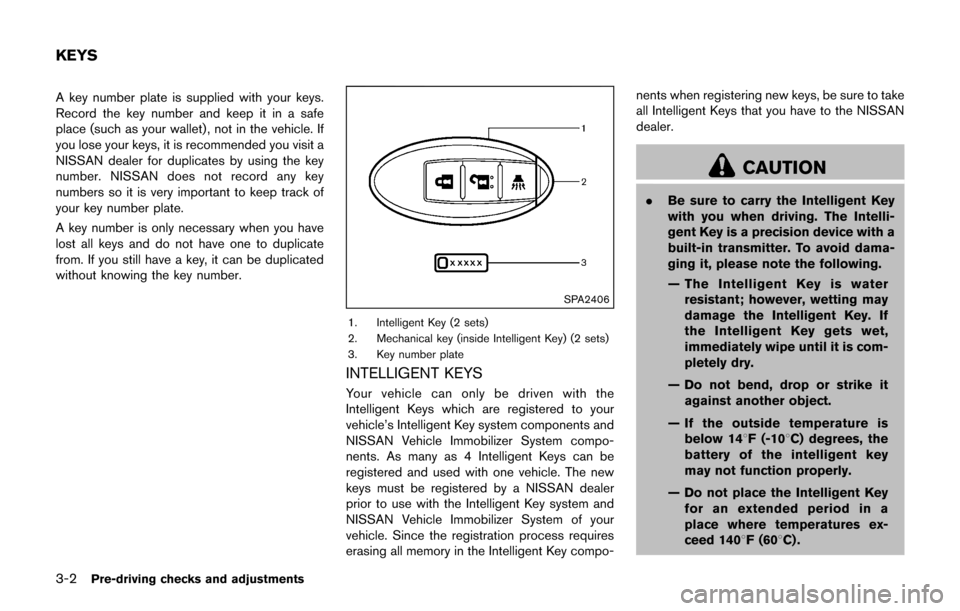
SPA2406
1. Intelligent Key (2 sets)
2. Mechanical key (inside Intelligent Key) (2 sets)
3. Key number plate
INTELLIGENT KEYS
Your vehicle can only be driven with the
Intelligent Keys which are registered to your
vehicle’s Intelligent Key system components and
NISSAN Vehicle Immobilizer System compo-
nents. As many as 4 Intelligent Keys can be
registered and used with one vehicle. The new
keys must be registered by a NISSAN dealer
prior to use with the Intelligent Key system and
NISSAN Vehicle Immobilizer System of your
vehicle. Since the registration process requires
erasing all memory in the Intelligent Key compo-nents when registering new keys, be sure to take
all Intelligent Keys that you have to the NISSAN
dealer.
CAUTION
.
Be sure to carry the Intelligent Key
with you when driving. The Intelli-
gent Key is a precision device with a
built-in transmitter. To avoid dama-
ging it, please note the following.
— The Intelligent Key is water
resistant; however, wetting may
damage the Intelligent Key. If
the Intelligent Key gets wet,
immediately wipe until it is com-
pletely dry.
— Do not bend, drop or strike it against another object.
— If the outside temperature is below 148F (-108C) degrees, the
battery of the intelligent key
may not function properly.
— Do not place the Intelligent Key for an extended period in a
place where temperatures ex-
ceed 1408F (608C) .
KEYS
Page 138 of 416
— Do not change or modify theIntelligent Key.
— Do not use a magnet key holder.
— Do not place the Intelligent Key near an electric appliance such
as a television set, personal
computer or cellular phone.
— Do not allow the Intelligent Key to come into contact with water
or salt water, and do not wash it
in a washing machine. This
could affect the system function.
. If an Intelligent Key is lost or stolen,
NISSAN recommends erasing the ID
code of that Intelligent Key. This will
prevent the Intelligent Key from
unauthorized use to unlock the
vehicle. For information regarding
the erasing procedure, it is recom-
mended you visit a NISSAN dealer.
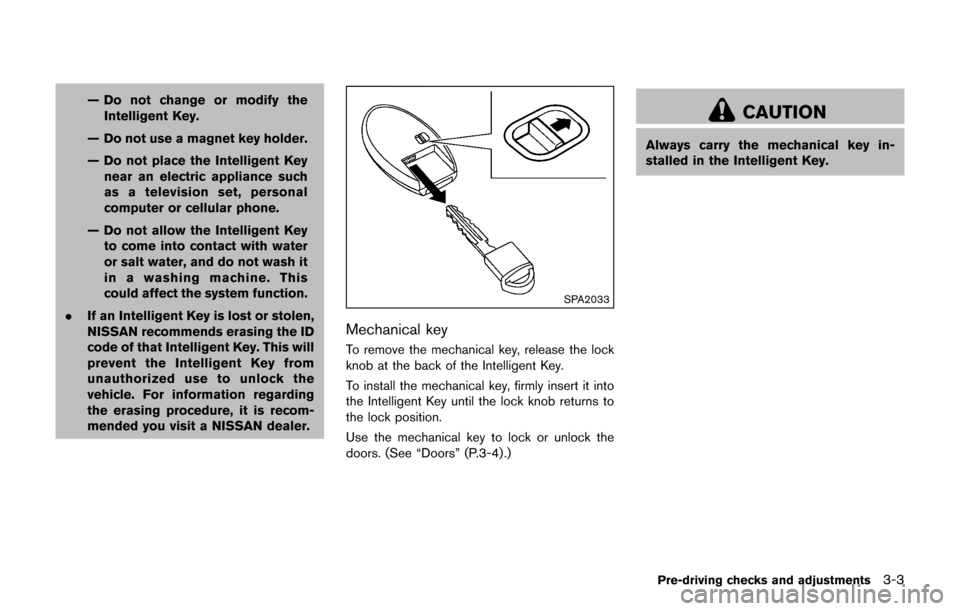
SPA2033
Mechanical key
To remove the mechanical key, release the lock
knob at the back of the Intelligent Key.
To install the mechanical key, firmly insert it into
the Intelligent Key until the lock knob returns to
the lock position.
Use the mechanical key to lock or unlock the
doors. (See “Doors” (P.3-4).)
CAUTION
Always carry the mechanical key in-
stalled in the Intelligent Key.
Pre-driving checks and adjustments3-3
Page 139 of 416
3-4Pre-driving checks and adjustments
WARNING
.Always have the doors locked while
driving. Along with the use of seat
belts, this provides greater safety in
the event of an accident by helping
to prevent persons from being
thrown from the vehicle. This also
helps keep children and others from
unintentionally opening the doors,
and will help keep out intruders.
. Before opening any door, always
look for and avoid oncoming traffic.
. To help avoid risk of injury or death
through unintended operation of
the vehicle and or its systems,
including entrapment in windows
or inadvertent door lock activation,
do not leave children, people who
require the assistance of others or
pets unattended in your vehicle.
Additionally, the temperature inside
a closed vehicle on a warm day can
quickly become high enough to
cause a significant risk of injury or
death to people and pets.
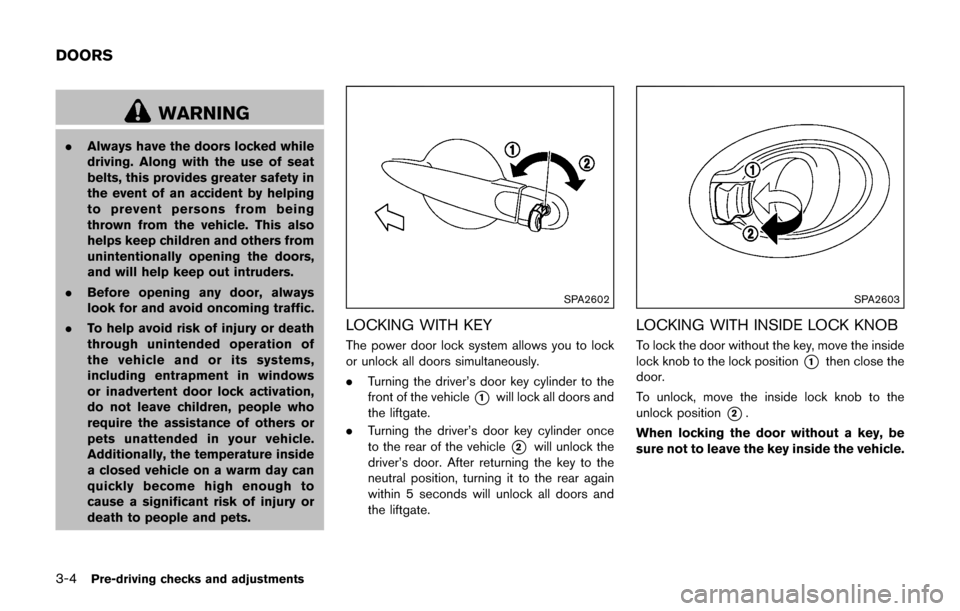
SPA2602
LOCKING WITH KEY
The power door lock system allows you to lock
or unlock all doors simultaneously.
.Turning the driver’s door key cylinder to the
front of the vehicle
*1will lock all doors and
the liftgate.
. Turning the driver’s door key cylinder once
to the rear of the vehicle
*2will unlock the
driver’s door. After returning the key to the
neutral position, turning it to the rear again
within 5 seconds will unlock all doors and
the liftgate.
SPA2603
LOCKING WITH INSIDE LOCK KNOB
To lock the door without the key, move the inside
lock knob to the lock position
*1then close the
door.
To unlock, move the inside lock knob to the
unlock position
*2.
When locking the door without a key, be
sure not to leave the key inside the vehicle.
DOORS
Page 140 of 416

SPA2803
Driver’s armrest
LOCKING WITH POWER DOOR LOCK
SWITCH
Operating the power door lock switch will lock
or unlock all the doors. The switch is located on
the driver’s door armrest.
To lock the doors, push the power door lock
switch to the lock position
*1with the driver’s
door open, then close the door.
When locking the door this way, be sure
not to leave the key inside the vehicle.
To unlock the doors, push the power door lock
switch to the unlock position
*2.
Lockout protection
Lockout protection function helps to prevent the
keys from being accidentally locked inside the
vehicle.
. When the power door lock switch is moved
to the lock position with the ignition switch
placed in the ACC or ON position and any
door open, all doors will lock and then
unlock automatically.
. When the power door lock switch is moved
to the lock position with the Intelligent Key
left in the vehicle and any door open, all
doors will unlock automatically and a chime
will sound after the door is closed.
AUTOMATIC DOOR LOCKS
.All doors lock automatically when the vehicle
speed reaches 15 MPH (24 km/h) .
. All doors unlock automatically when the
ignition switch is placed in the OFF position.
The automatic unlock function can be
deactivated or activated.
To deactivate or activate the automatic door
unlock system, perform the following procedure.
1. Close all doors.
2. Place the ignition switch in the ON position.
3. Within 20 seconds, push and hold the power door lock switch to the
(UN-
LOCK) position for more than 5 seconds. 4. When activated, the hazard warning lights
will flash twice. When deactivated, the
hazard warning lights will flash once.
5. The ignition switch must be placed in the OFF and ON position again between each
setting change.
When the automatic door unlock system is
deactivated, the doors do not unlock when the
ignition is placed in the OFF position. To unlock
the door manually, use the inside lock knob or
the power door lock switch.
Pre-driving checks and adjustments3-5