2017 NISSAN ARMADA buttons
[x] Cancel search: buttonsPage 284 of 614
Audio main operation
Push the ignition switch to the ACC or ON
position. Then, push the DISC·AUX button
repeatedly to switch to the iPod
Šmode.
If the system has been turned off while the iPodŠ
was playing, pushing the ON·OFF button will
start the iPodŠ.
PLAY:
When the DISC·AUX button is pushed with the
system off and the iPod
Šconnected, the system
will turn on. If another audio source is playing
and the iPod
Šis connected, push the DISC·AUX
button repeatedly until the center display
changes to the iPod
Šmode.
Interface:
The interface for iPod
Šoperation shown on the
vehicle center display is similar to the iPodŠ
interface. Use the multi-function controller and
the ENTER or BACK button to play the iPodŠ
with your favorite settings.
The following items can be chosen from the
menu list screen. For further information about
each item, see the iPod
ŠOwner’s Manual.
. Now Playing
. Playlists .
Artists
. Albums
. Songs
. Podcasts
. Genres
. Composers
. Audiobooks
. Shuffle Songs
. Play Mode
The following touch-panel buttons shown on the
screen are also available:
.
: returns to the previous screen.
.
: plays/pauses the music selected.
Next/Previous Track and Fast
Forward/Rewind:
When the
orbutton is pushed for more
than 1.5 seconds while the iPodŠis playing, the
iPodŠwill play while fast forwarding or rewind-
ing. When the button is released, the iPodŠwill
return to the normal play speed.
When the
orbutton is pushed for less
than 1.5 seconds while the iPodŠis playing, the
next track or the beginning of the current track
on the iPod
Šwill be played.
When the rewind button is pushed for less than
1.5 seconds within 3 seconds after the current
track starts playing, the previous track will be played.
The multi-function controller can also be used to
select tracks when the iPod
Šis playing.
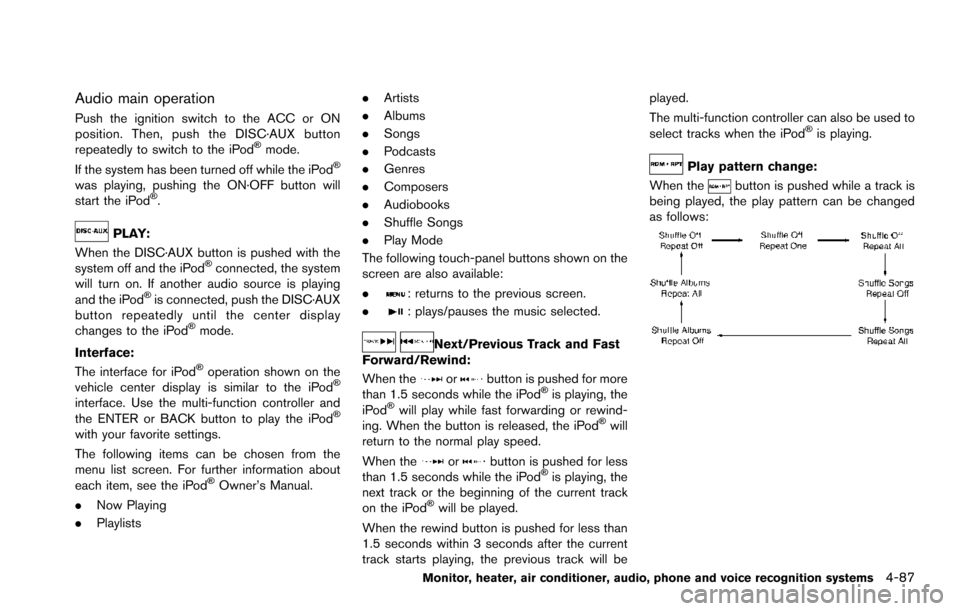
Play pattern change:
When the
button is pushed while a track is
being played, the play pattern can be changed
as follows:
Monitor, heater, air conditioner, audio, phone and voice recognition systems4-87
Page 292 of 614
How to use headphones:
Control buttons for the headphones are located
on the back of the right headphone speaker.
.Turning power on/off:
Push the power ON/OFF button to turn the
headphones on or off. The POWER indica-
tor will illuminate when the headphones are
on.
. Selecting display (L/R):
When the rear displays are playing different
sources, sliding the DISPLAY SELECT
switch selects which of the audio sources
to listen to.
— L: the headphone will play audio from the
source playing on the left display.
— R: the headphone will play audio from the source playing on the right display.
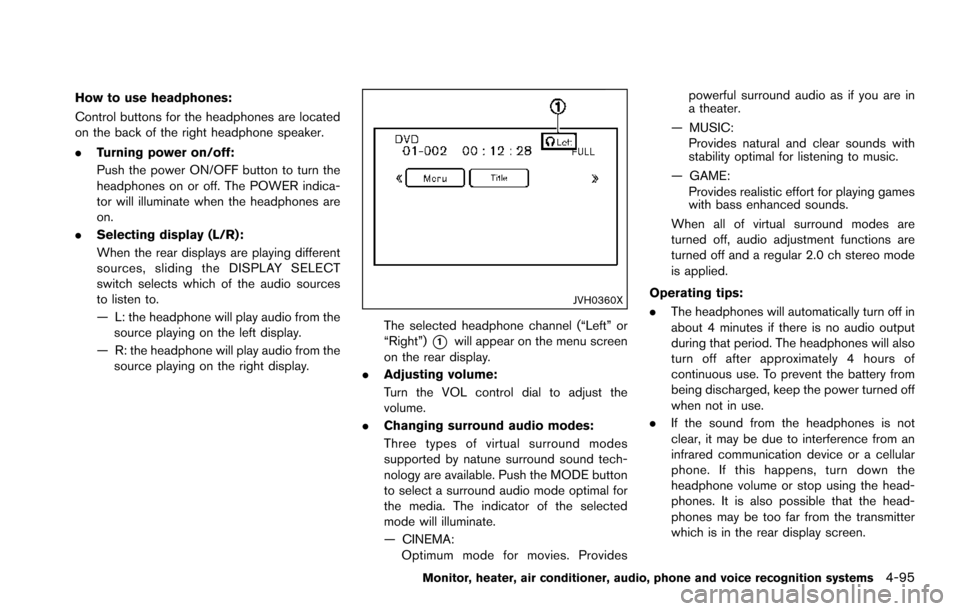
JVH0360X
The selected headphone channel (“Left” or
“Right”)
*1will appear on the menu screen
on the rear display.
. Adjusting volume:
Turn the VOL control dial to adjust the
volume.
. Changing surround audio modes:
Three types of virtual surround modes
supported by natune surround sound tech-
nology are available. Push the MODE button
to select a surround audio mode optimal for
the media. The indicator of the selected
mode will illuminate.
— CINEMA:
Optimum mode for movies. Provides powerful surround audio as if you are in
a theater.
— MUSIC: Provides natural and clear sounds with
stability optimal for listening to music.
— GAME: Provides realistic effort for playing games
with bass enhanced sounds.
When all of virtual surround modes are
turned off, audio adjustment functions are
turned off and a regular 2.0 ch stereo mode
is applied.
Operating tips:
. The headphones will automatically turn off in
about 4 minutes if there is no audio output
during that period. The headphones will also
turn off after approximately 4 hours of
continuous use. To prevent the battery from
being discharged, keep the power turned off
when not in use.
. If the sound from the headphones is not
clear, it may be due to interference from an
infrared communication device or a cellular
phone. If this happens, turn down the
headphone volume or stop using the head-
phones. It is also possible that the head-
phones may be too far from the transmitter
which is in the rear display screen.
Monitor, heater, air conditioner, audio, phone and voice recognition systems4-95
Page 301 of 614
4-104Monitor, heater, air conditioner, audio, phone and voice recognition systems
SETUP button:
Push the SETUP button to display the rear seat
display settings. (See “Rear display settings”
(P.4-104) .)
BACK button:
Push to go back to the previous screen or
cancel the selection.
Volume:
To adjust the speaker volume push
oron the volume control button.
This button is used to control the volume from
the vehicle speakers. To adjust the volume of the
headphones, use the volume knob that is
attached to the headphones.
Keypad:
: PLAY/PAUSE button
: STOP button
: FORWARD button
: REWIND button
: FORWARD button for commercial skip (forDVD-VIDEO and DVD-VR)
: REWIND button for commercial skip (forDVD-VIDEO and DVD-VR)
Key illumination button:
If the key illumination button is pushed, the
buttons on the remote controller will be lit up.
Rear display settings
Display mode adjustment of the rear seat
displays can be performed while a DVD or
USB movie is being played. Set the rear display
select switch on the remote controller to either L
or R according to the display you want to set,
and then push the SETUP button. It is not
possible to make display mode adjustments to
the left and right displays at the same time.
Aspect:
Select the display size from “FULL”, “NORMAL”,
“CINEMA” or “WIDE”.
Picture Mode:
Select the Picture Mode from “NORMAL”,
“DYNAMIC”, “CINEMA”, “GAME” .
To adjust the display brightness automatically,
select the “Brightness” key and then select from
“DARKER”, “NORMAL” or “BRIGHTER”. When
adjusting manually, select “OFF” and push
ENTER button on the remote controller.
To adjust tint, color or contrast, select a key
using the select button (
or) , push
ENTER on the remote controller.
Push the BACK button on the remote controller
to apply the settings and return to the previous
display.
To return the adjustment levels to the default
value, select “Execute” next to “Initialization” push the select button (
,) on the remote
controller and push the ENTER button. The
“Execute” key is deactivated when the picture
mode settings are already in the default value.
Color System:
To choose the color system, select from
“NTSC”, “PAL”, “PAL-60”, “PAL-M”, “PAL-N” or
“AUTO” .
3D Y/C filter:
Set to ON/OFF push the select button (
or) and push ENTER button on the remote
controller. When turned on, small characters
and an outline of the shapes will be displayed
more clearly than when turned off.
AUX Volume Setting:
This is only active when in the Rear AUX mode.
To set the AUX volume, select from “HIGH”,
“LOW” or “MIDDLE” .
Page 305 of 614
4-108Monitor, heater, air conditioner, audio, phone and voice recognition systems
.If reception between callers is unclear,
adjusting the incoming or outgoing call
volume may improve the clarity.
REGULATORY INFORMATION
FCC Regulatory information
.CAUTION: To maintain compliance with
FCC’s RF exposure guidelines, use only
the supplied antenna. Unauthorized antenna,
modification, or attachments could damage
the transmitter and may violate FCC regula-
tions.
. Operation is subject to the following two
conditions:
1. this device may not cause interference and
2. this device must accept any interference, including interference that may cause un-
desired operation of the device
IC Regulatory information
.Operation is subject to the following two
conditions: (1) this device may not cause
interference, and (2) this device must accept
any interference, including interference that
may cause undesired operation of the
device.
. This Class B digital apparatus meets all
requirements of the Canadian Interference-
Causing Equipment Regulations. Bluetooth
Štrademark:
BluetoothŠis a trademark owned
by Bluetooth SIG, Inc., and
licensed to Clarion Co., Ltd.
VOICE COMMANDS
You can use voice commands to operate various
BluetoothŠHands-Free Phone System features
using the NISSAN Voice Recognition system.
For more details, see “NISSAN Voice Recogni-
tion system” (P.4-117) .
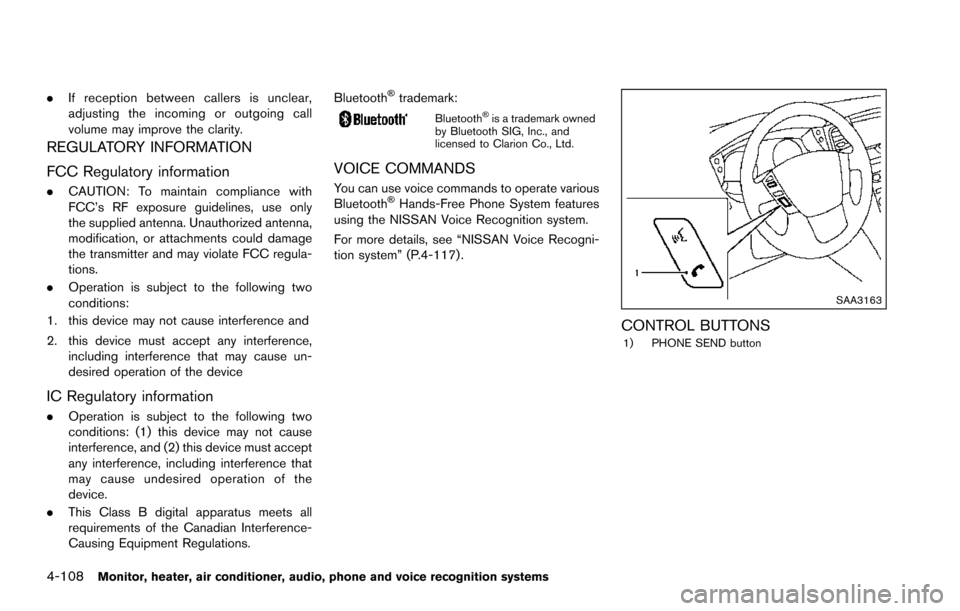
SAA3163
CONTROL BUTTONS1) PHONE SEND button
Page 537 of 614
8-22Do-it-yourself
SDI2451
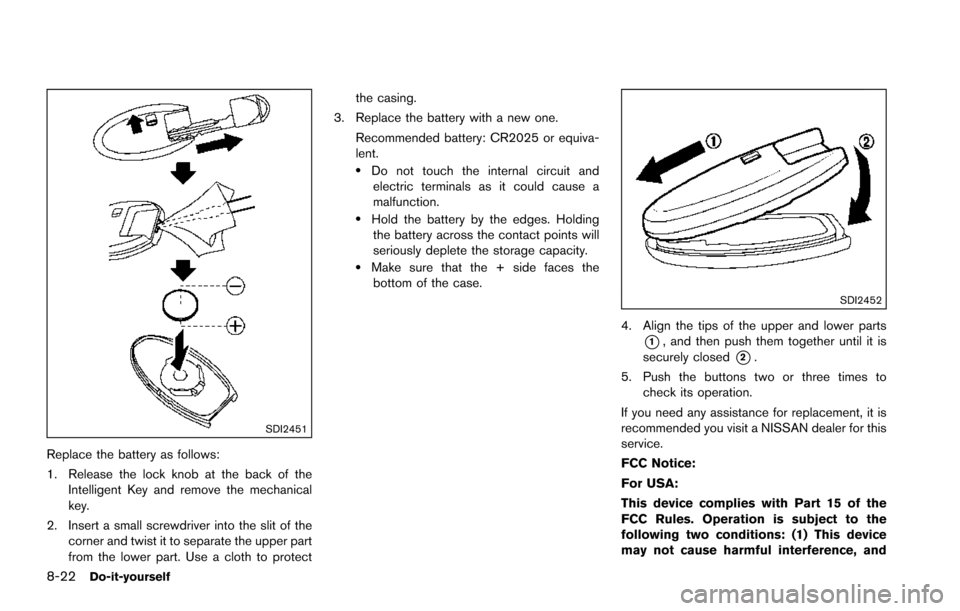
Replace the battery as follows:
1. Release the lock knob at the back of theIntelligent Key and remove the mechanical
key.
2. Insert a small screwdriver into the slit of the corner and twist it to separate the upper part
from the lower part. Use a cloth to protect the casing.
3. Replace the battery with a new one.
Recommended battery: CR2025 or equiva-
lent.
.Do not touch the internal circuit andelectric terminals as it could cause a
malfunction.
.Hold the battery by the edges. Holdingthe battery across the contact points will
seriously deplete the storage capacity.
.Make sure that the + side faces thebottom of the case.
SDI2452
4. Align the tips of the upper and lower parts
*1, and then push them together until it is
securely closed
*2.
5. Push the buttons two or three times to check its operation.
If you need any assistance for replacement, it is
recommended you visit a NISSAN dealer for this
service.
FCC Notice:
For USA:
This device complies with Part 15 of the
FCC Rules. Operation is subject to the
following two conditions: (1) This device
may not cause harmful interference, and