2017 NISSAN ARMADA Sonar
[x] Cancel search: SonarPage 344 of 614
SNOW mode ....................................................................... 5-132
Sonar system (if so equipped) ........................................ 5-133Sonar indicator ............................................................... 5-134
Sonar system OFF switch .......................................... 5-135
Power steering ..................................................................... 5-135
Brake system ........................................................................\
5-136 Braking precautions ...................................................... 5-136
Parking brake break-in ................................................. 5-136
Brake assist ........................................................................\
.. 5-137 Brake assist .................................................................... 5-137
Anti-lock Braking System (ABS) ............................... 5-137 Vehicle Dynamic Control (VDC) system ...................... 5-138
Vehicle Dynamic Control (VDC) OFF switch ...... 5-140
Cold weather driving ......................................................... 5-140 Freeing a frozen door lock ........................................ 5-140
Antifreeze ...................................................................... 5-140
Battery ........................................................................\
.... 5-140
Draining of coolant water .......................................... 5-140
Tire equipment ............................................................. 5-141
Special winter equipment ......................................... 5-141
Driving on snow or ice .............................................. 5-141
Engine block heater (if so equipped) .................... 5-141
Page 397 of 614
5-56Starting and driving
Radio frequency statement
This device complies with part 15 of the FCC
Rules and RSS-310 of Industry Canada.
Operation is subject to the following two
conditions:
1. This device may not cause harmful inter-ference.
2. This device must accept any interference received, including interference that may
cause undesired operation.
Frequency of operation: 24.05GHz —
24.25GHz
Field Strength: Not greater than 2.5V/m peak
(0.25V/m average) at a distance of 3 m
The manufacturer is not responsible for any
radio or TV interference caused by unauthorized
modifications to this equipment. Such modifica-
tions could void the user’s authority to operate
the equipment.WARNING
Failure to follow the warnings and
instructions for proper use of the BCI
system could result in serious injury or
death.
. The BCI system is not a replacement
for proper driving procedure, is not
designed to prevent contact with
vehicles or objects and does not
provide full brake power. When
backing out of parking spaces, al-
ways use the inside and rear mirrors
and turn and look in the direction
you will move. Never rely solely on
the BCI system.
. There is a limitation to the detection
capability of the radar or the sonar.
Using the BCI system under some
road, ground, traffic or weather
conditions could lead to improper
system operation. Always rely on
your own operation to avoid acci-
dents.
The BCI system can help alert the driver of an
approaching vehicle or objects behind the
vehicle when the driver is backing out of a parking space.
BACK-UP COLLISION
INTERVENTION (BCI) (if so
equipped)
Page 398 of 614
JVS0912X
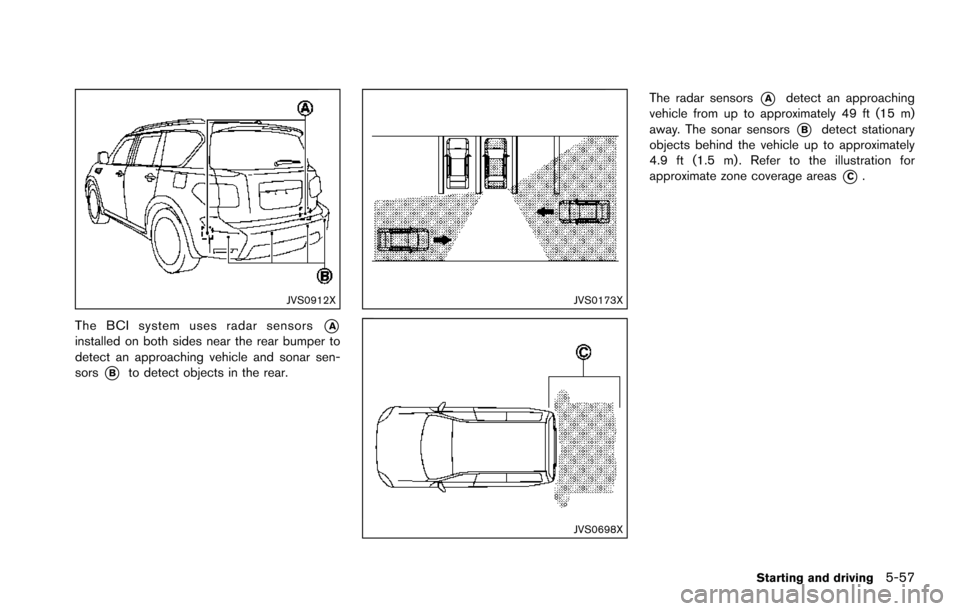
The BCI system uses radar sensors*Ainstalled on both sides near the rear bumper to
detect an approaching vehicle and sonar sen-
sors
*Bto detect objects in the rear.
JVS0173X
JVS0698X
The radar sensors*Adetect an approaching
vehicle from up to approximately 49 ft (15 m)
away. The sonar sensors
*Bdetect stationary
objects behind the vehicle up to approximately
4.9 ft (1.5 m) . Refer to the illustration for
approximate zone coverage areas
*C.
Starting and driving5-57
Page 399 of 614
5-58Starting and driving
JVS0886X
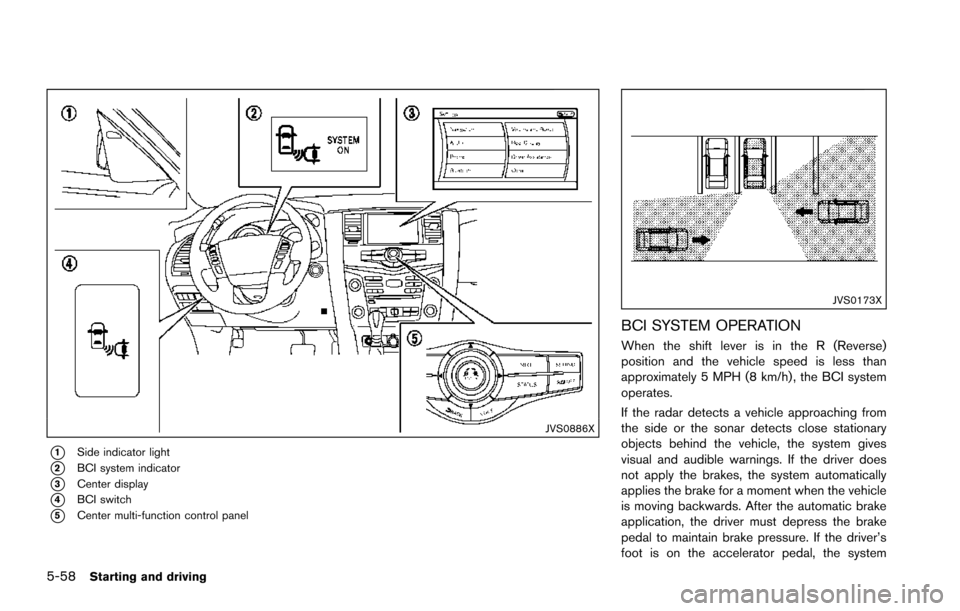
*1Side indicator light
*2BCI system indicator
*3Center display
*4BCI switch
*5Center multi-function control panel
JVS0173X
BCI SYSTEM OPERATION
When the shift lever is in the R (Reverse)
position and the vehicle speed is less than
approximately 5 MPH (8 km/h) , the BCI system
operates.
If the radar detects a vehicle approaching from
the side or the sonar detects close stationary
objects behind the vehicle, the system gives
visual and audible warnings. If the driver does
not apply the brakes, the system automatically
applies the brake for a moment when the vehicle
is moving backwards. After the automatic brake
application, the driver must depress the brake
pedal to maintain brake pressure. If the driver’s
foot is on the accelerator pedal, the system
Page 401 of 614
5-60Starting and driving
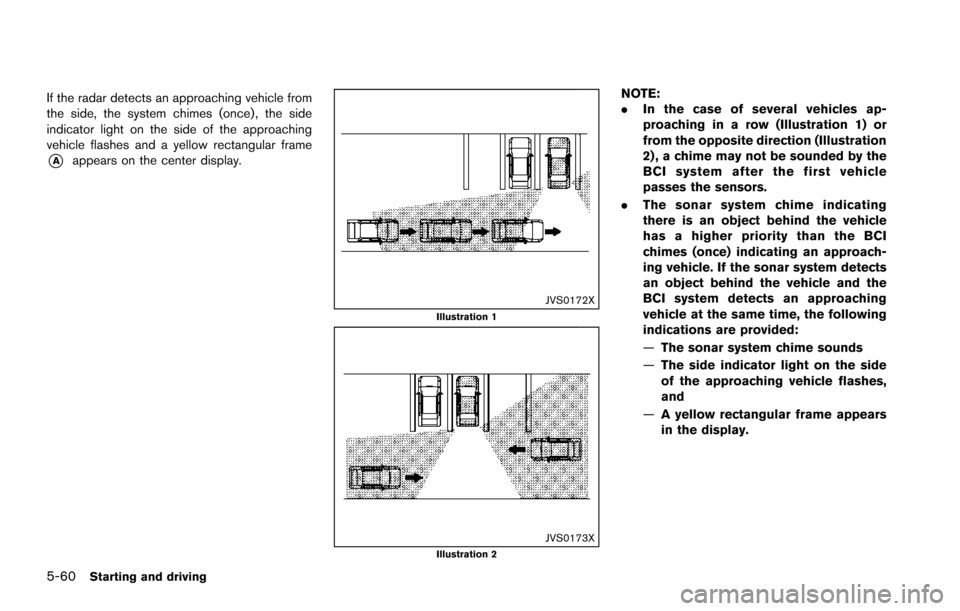
If the radar detects an approaching vehicle from
the side, the system chimes (once) , the side
indicator light on the side of the approaching
vehicle flashes and a yellow rectangular frame
*Aappears on the center display.
JVS0172XIllustration 1
JVS0173XIllustration 2
NOTE:
.In the case of several vehicles ap-
proaching in a row (Illustration 1) or
from the opposite direction (Illustration
2) , a chime may not be sounded by the
BCI system after the first vehicle
passes the sensors.
. The sonar system chime indicating
there is an object behind the vehicle
has a higher priority than the BCI
chimes (once) indicating an approach-
ing vehicle. If the sonar system detects
an object behind the vehicle and the
BCI system detects an approaching
vehicle at the same time, the following
indications are provided:
—The sonar system chime sounds
— The side indicator light on the side
of the approaching vehicle flashes,
and
— A yellow rectangular frame appears
in the display.
Page 406 of 614
.The following conditions may re-
duce the ability of the radar sensors
to detect other vehicles:
— Severe weather
— Road spray
— Ice/frost/dirt build up on the
vehicle
. Do not attach stickers (including
transparent material) , install acces-
sories or apply additional paint near
the radar sensors. These conditions
may reduce the ability of the radar
sensors to detect other vehicles.
. The sonar sensors detect stationary
objects behind the vehicle. The
sonar sensor may not detect:
— Small or moving objects
— Wedge-shaped objects
— Object close to the bumper (less
than approximately 1 ft (30 cm))
— Thin objects such as rope, wire and chain, etc.
. The brake engagement by the BCI
system is not as effective on a slope
as it is on flat ground. When on a
steep slope the system may not function properly.
. Do not use the BCI system under the
following conditions because the
system may not function properly.
— When driving with a tire that is
not within normal tire conditions
(for example, tire wear, low tire
pressure, installation of spare
tire, tire chains, non-standard
wheels) .
— When the vehicle is equipped with non-original brake parts or
suspension parts.
— When towing a trailer or other vehicle.
. Excessive noise (for example, audio
system volume, open vehicle win-
dow) will interfere with the chime
sound, and it may not be heard.
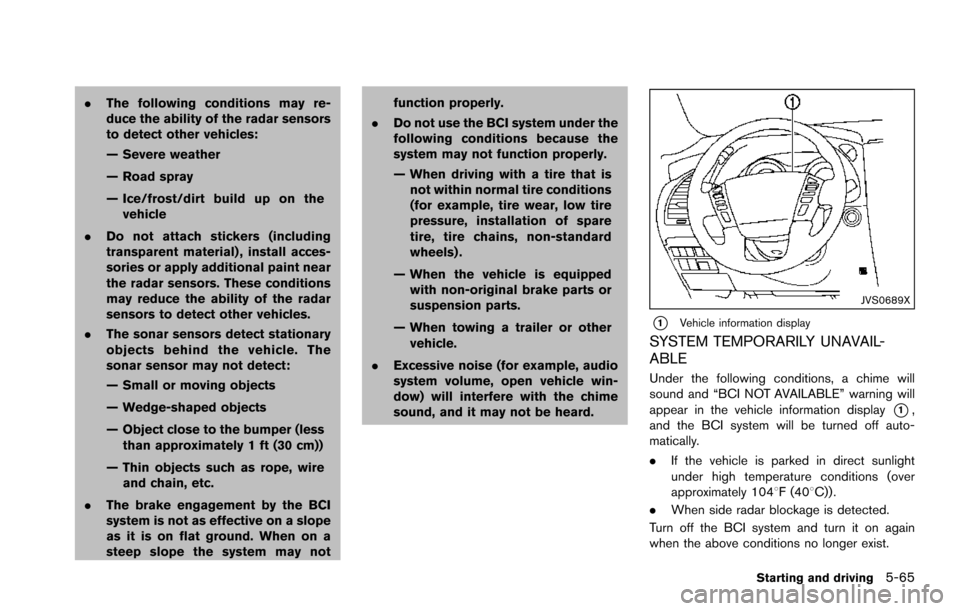
JVS0689X
*1Vehicle information display
SYSTEM TEMPORARILY UNAVAIL-
ABLE
Under the following conditions, a chime will
sound and “BCI NOT AVAILABLE” warning will
appear in the vehicle information display
*1,
and the BCI system will be turned off auto-
matically.
. If the vehicle is parked in direct sunlight
under high temperature conditions (over
approximately 1048F (408C)) .
. When side radar blockage is detected.
Turn off the BCI system and turn it on again
when the above conditions no longer exist.
Starting and driving5-65
Page 474 of 614
SSD0622
WARNING
.The sonar system is a convenience
but it is not a substitute for proper
parking. Always look around and
check that it is safe to do so before
parking. Always move slowly.
. Read and understand the limita-
tions of the sonar system as con-
tained in this section. Inclement
weather may affect the function of
the sonar system; this may include
reduced performance or a false
activation. .
This system is not designed to
prevent contact with small or mov-
ing objects.
. The system is designed as an aid to
the driver in detecting large station-
ary objects to help avoid damaging
the vehicle. The system will not
detect small objects below the
bumper, and may not detect objects
that are too close to the bumper or
on the ground.
. If your vehicle sustains damage to
the bumper fascia, leaving it mis-
aligned or bent, the sensing zone may be altered causing inaccurate
measurement of obstacles or false
alarms.
CAUTION
Keep the interior of the vehicle as quiet
as possible to hear the tone clearly.
The sonar system sounds a tone to warn the
driver of obstacles near the bumper. When the
“Sonar Display” key is ON, the sonar indicator
will also appear in the center display. (See
“Sonar indicator” (P.5-134) .) The system de-
tects front obstacles when the shift lever is in the
D (Drive) position or N (Neutral) position. The
system detects both front and rear obstacles
when the shift lever is in the R (Reverse)
position.
The system may not detect objects at speeds
above 6 MPH (10 km/h) and may not detect
certain angular or moving objects.
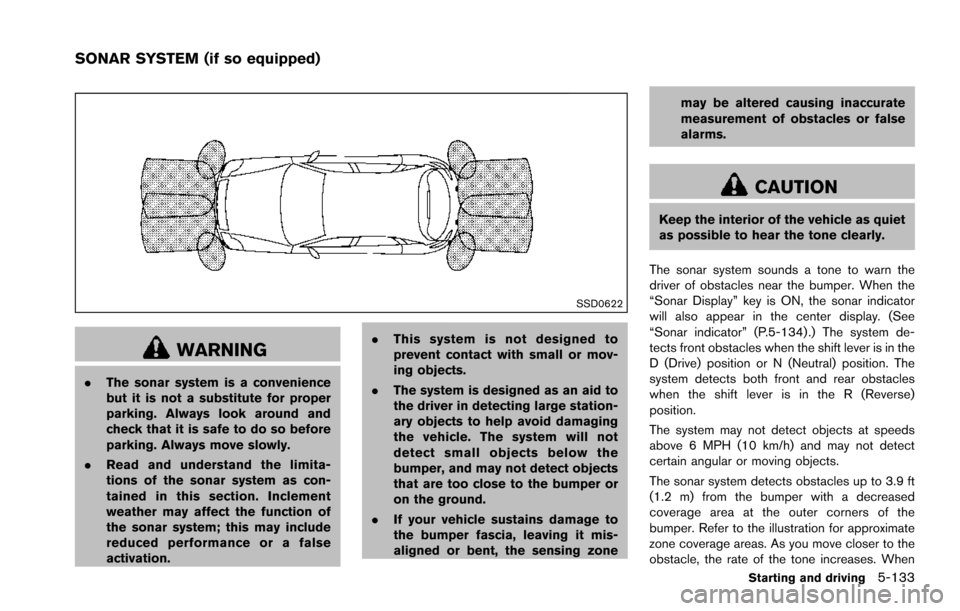
The sonar system detects obstacles up to 3.9 ft
(1.2 m) from the bumper with a decreased
coverage area at the outer corners of the
bumper. Refer to the illustration for approximate
zone coverage areas. As you move closer to the
obstacle, the rate of the tone increases. When
Starting and driving5-133
SONAR SYSTEM (if so equipped)
Page 475 of 614
5-134Starting and driving
the obstacle is less than 11.8 in (30 cm) away,
the tone will sound continuously.
Keep the corner/center sensors (located on the
bumper fascia) free from snow, ice and large
accumulations of dirt (do not clean the sensors
with sharp objects) . If the sensors are covered, it
will affect the accuracy of the sonar system.
The sensitivity level of the corner/center sensors
can be adjusted (higher or lower) in the Sonar
setting display. (See “Sonar settings” (P.4-27) .)
The intermittent tone will stop in 3 seconds
when an obstacle is detected by only the corner
sensor and the distance does not change.
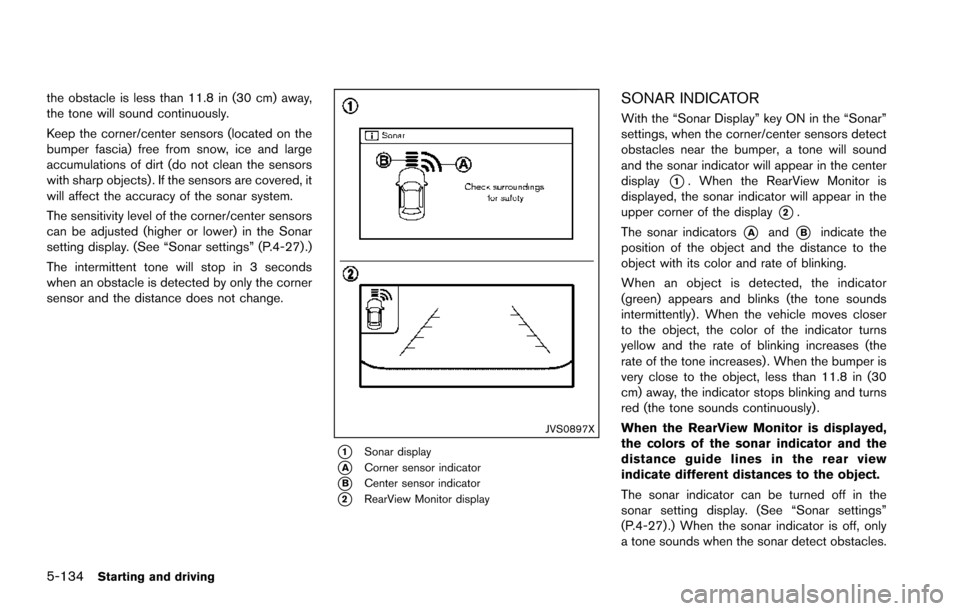
JVS0897X
*1Sonar display
*ACorner sensor indicator
*BCenter sensor indicator
*2RearView Monitor display
SONAR INDICATOR
With the “Sonar Display” key ON in the “Sonar”
settings, when the corner/center sensors detect
obstacles near the bumper, a tone will sound
and the sonar indicator will appear in the center
display
*1. When the RearView Monitor is
displayed, the sonar indicator will appear in the
upper corner of the display
*2.
The sonar indicators
*Aand*Bindicate the
position of the object and the distance to the
object with its color and rate of blinking.
When an object is detected, the indicator
(green) appears and blinks (the tone sounds
intermittently) . When the vehicle moves closer
to the object, the color of the indicator turns
yellow and the rate of blinking increases (the
rate of the tone increases) . When the bumper is
very close to the object, less than 11.8 in (30
cm) away, the indicator stops blinking and turns
red (the tone sounds continuously) .
When the RearView Monitor is displayed,
the colors of the sonar indicator and the
distance guide lines in the rear view
indicate different distances to the object.
The sonar indicator can be turned off in the
sonar setting display. (See “Sonar settings”
(P.4-27) .) When the sonar indicator is off, only
a tone sounds when the sonar detect obstacles.