2017 MITSUBISHI OUTLANDER SPORT light
[x] Cancel search: lightPage 151 of 399
Multi-information display 5-88 Features and controls
5
N00555400113
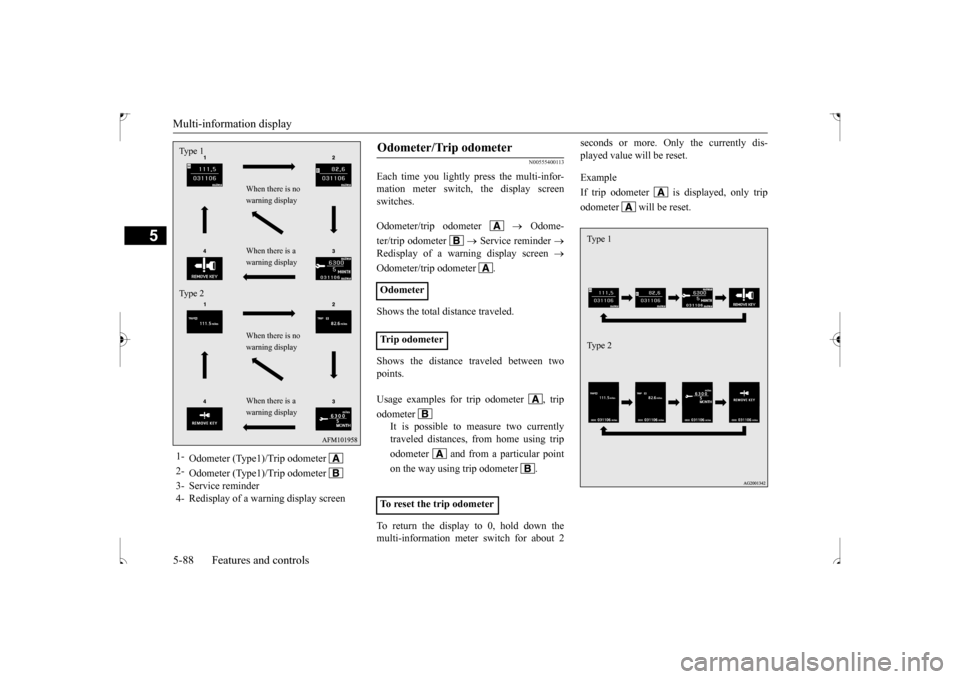
Each time you lightly press the multi-infor- mation meter switch, the display screenswitches. Odometer/trip odometer
Odome-
ter/trip odometer
Service reminder
Redisplay of a warning display screen
Odometer/trip odometer . Shows the total distance traveled. Shows the distance traveled between two points. To return the display to 0, hold down the multi-information meter switch for about 2
seconds or more. Only the currently dis- played value will be reset. Example If trip odometer is displayed, only tripodometer will be reset.
1-
Odometer (Type1)/Trip odometer
2-
Odometer (Type1)/Trip odometer
3- Service reminder4- Redisplay of a warning display screenType 1 Type 2
When there is no warning display When there is a warning display When there is no warning display When there is a warning display
Odometer/Trip odometer Odometer Trip odometer Usage examples for trip odometer , trip odometer
It is possible to measure two currently traveled distances, from home using trip odometer and from a particular pointon the way using trip odometer . To reset the trip odometer
Ty p e 1 Ty p e 2
BK0239500US.bo
ok 88 ページ 2016年5月13日 金曜日 午前8時53分
Page 152 of 399
Multi-information display
Features and controls 5-89
5
N00555500042
Shows the distance and number of months until the next periodic inspection. Refer to “Service reminder” on page 5-97.
N00559600201
When there is information to be announced, such as a key reminder, the buzzer sounds andswitches to the warning display screen. Refer
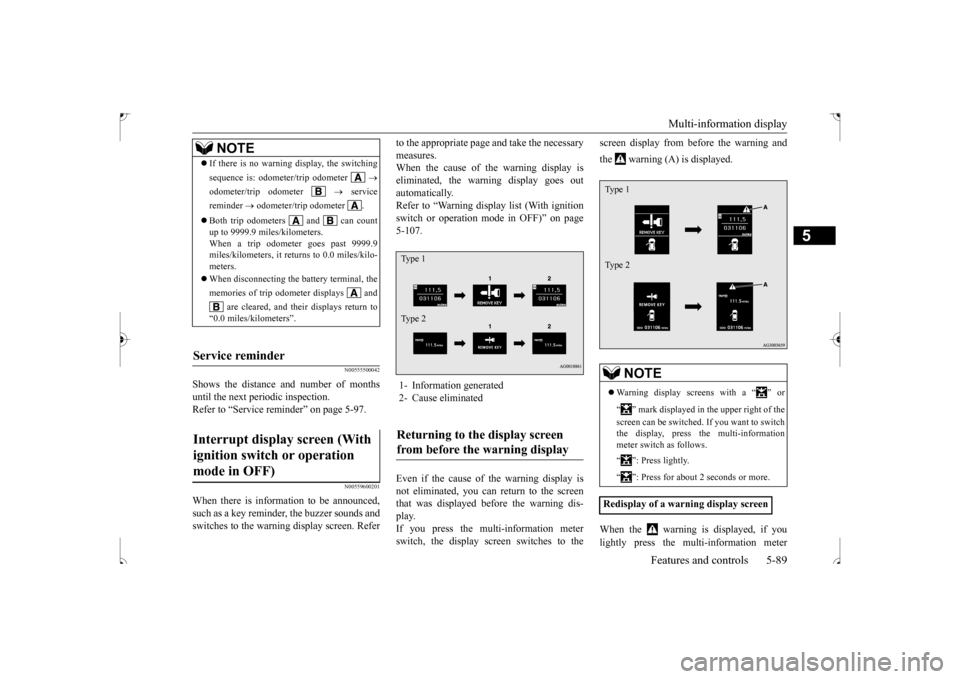
to the appropriate page and take the necessary measures. When the cause of the warning display is eliminated, the warning display goes outautomatically. Refer to “Warning display list (With ignition switch or operation mode in OFF)” on page5-107. Even if the cause of the warning display is not eliminated, you can return to the screen that was displayed before the warning dis- play.If you press the multi-information meter switch, the display screen switches to the
screen display from before the warning and the warning (A) is displayed. When the warning is displayed, if you lightly press the multi-information meter
NOTE
If there is no warning display, the switching sequence is: odometer/trip odometer
odometer/trip odometer
service
reminder
odometer/trip odometer .
Both trip odometers and can count up to 9999.9 miles/kilometers. When a trip odometer goes past 9999.9 miles/kilometers, it returns to 0.0 miles/kilo-meters. When disconnecting the battery terminal, the memories of trip odometer displays and
are cleared, and their displays return to
“0.0 miles/kilometers”.
Service reminder Interrupt display screen (With ignition switch or operation mode in OFF)
1- Information generated 2- Cause eliminatedReturning to the display screen from before the warning display Ty p e 1 Ty p e 2
NOTE
Warning display screens with a “ ” or “ ” mark displayed in the upper right of the screen can be switched. If you want to switch the display, press the multi-information meter switch as follows. “ ”: Press lightly. “ ”: Press for about 2 seconds or more.
Redisplay of a warning display screenType 1 Type 2
BK0239500US.bo
ok 89 ページ 2016年5月13日 金曜日 午前8時53分
Page 154 of 399
Multi-information display
Features and controls 5-91
5
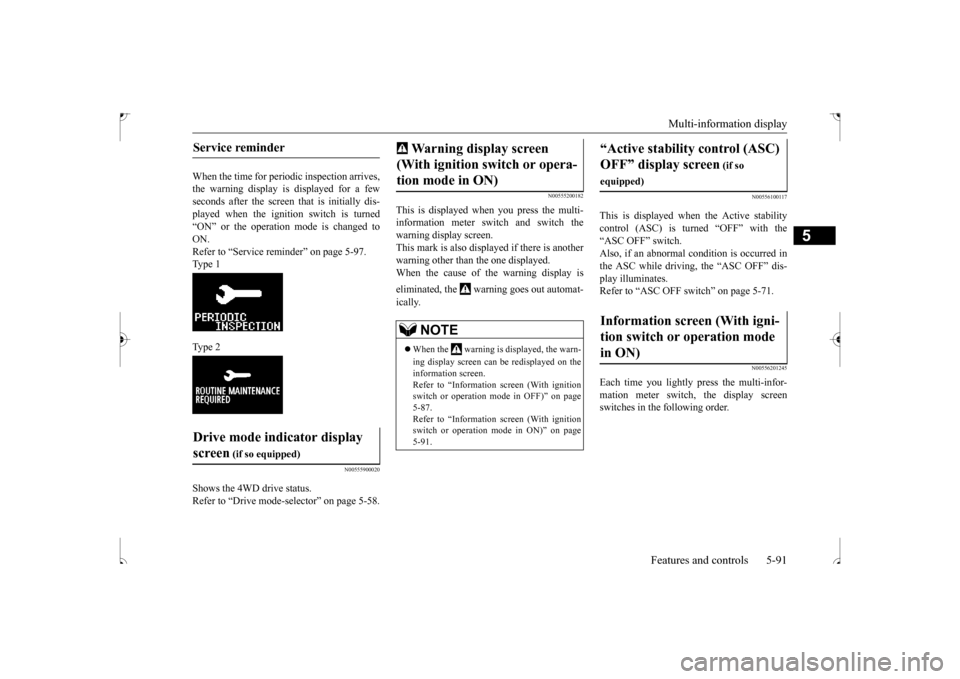
When the time for periodic inspection arrives, the warning display is displayed for a fewseconds after the screen
that is initially dis-
played when the ignition switch is turned “ON” or the operation mode is changed toON. Refer to “Service reminder” on page 5-97. Type 1 Type 2
N00555900020
Shows the 4WD drive status. Refer to “Drive mode-selector” on page 5-58.
N00555200182
This is displayed when you press the multi- information meter switch and switch the warning display screen.This mark is also displayed if there is another warning other than the one displayed. When the cause of the warning display is eliminated, the warning goes out automat- ically.
N00556100117
This is displayed when the Active stability control (ASC) is turned “OFF” with the“ASC OFF” switch. Also, if an abnormal condition is occurred in the ASC while driving, the “ASC OFF” dis-play illuminates.Refer to “ASC OFF switch” on page 5-71.
N00556201245
Each time you lightly press the multi-infor-mation meter switch, the display screenswitches in the following order.
Service reminder Drive mode indicator display screen
(if so equipped)
Warning display screen (With ignition switch or opera- tion mode in ON)
NOTE
When the warning is displayed, the warn- ing display screen can be redisplayed on the information screen. Refer to “Information screen (With ignition switch or operation mode in OFF)” on page5-87. Refer to “Information screen (With ignition switch or operation mode in ON)” on page 5-91.
“Active stability control (ASC) OFF” display screen
(if so
equipped)Information screen (With igni- tion switch or operation mode in ON)
BK0239500US.bo
ok 91 ページ 2016年5月13日 金曜日 午前8時53分
Page 159 of 399
Multi-information display 5-96 Features and controls
5
When the warning is displayed, if you lightly press the multi-information meter switch a few times, the warning displayscreen you switched from is redisplayed. The operation status of each system is dis- played on the information screen. For further details, refer to the appropriate page in the warning display list.Refer to “Other interrupt displays” on page 5-117.
N00556400064
Shows the position of the selector lever.Refer to “Selector lever operation” on page 5-51.
N00556500065
Shows the temperature outside the vehicle.
N00568700019
This indicator will be displayed when fuel- efficient driving is achieved.
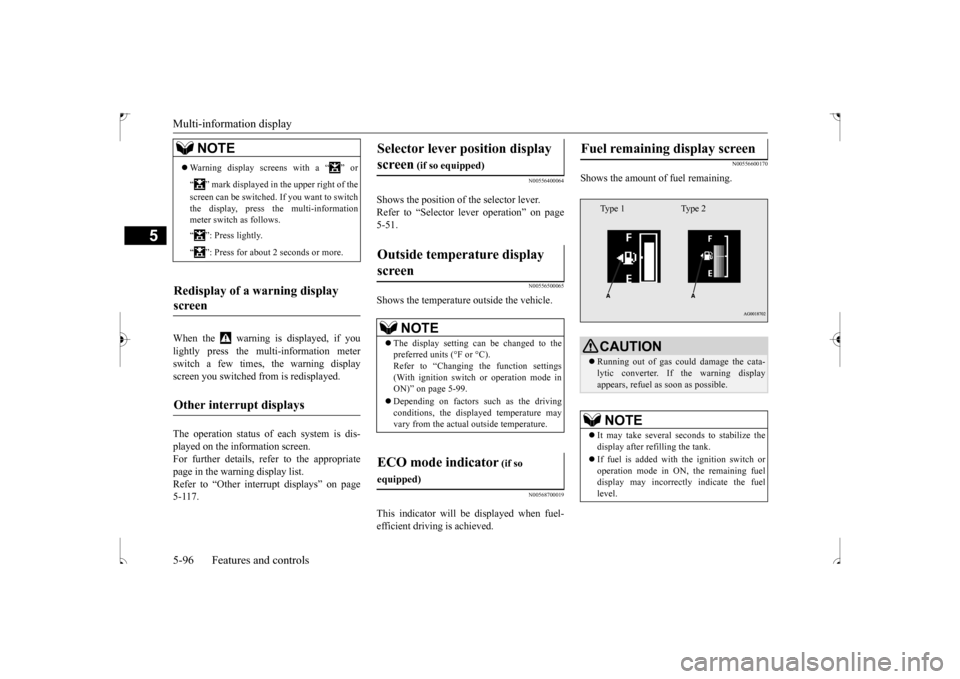
N00556600170
Shows the amount of fuel remaining.
NOTE
Warning display screens with a “ ” or “ ” mark displayed in the upper right of the screen can be switched. If you want to switch the display, press the multi-information meter switch as follows. “ ”: Press lightly. “ ”: Press for about 2 seconds or more.
Redisplay of a warning display screen Other interrupt displays
Selector lever position display screen
(if so equipped)
Outside temperature display screen
NOTE
The display setting can be changed to the preferred units (°F or °C).Refer to “Changing the function settings (With ignition switch or operation mode in ON)” on page 5-99. Depending on factors such as the driving conditions, the displayed temperature mayvary from the actual outside temperature.
ECO mode indicator
(if so
equipped)
Fuel remaining display screen
CAUTION Running out of gas could damage the cata- lytic converter. If the warning displayappears, refuel as soon as possible.NOTE
It may take several seconds to stabilize the display after refilling the tank. If fuel is added with the ignition switch or operation mode in ON, the remaining fueldisplay may incorrectly indicate the fuel level.Type 1 Type 2
BK0239500US.bo
ok 96 ページ 2016年5月13日 金曜日 午前8時53分
Page 161 of 399

Multi-information display 5-98 Features and controls
5
3. After your vehicle is inspected at an authorized Mitsubishi Motors dealer, it displays the time until the next periodic inspection.
The “---” display can be reset while the igni- tion switch or the operation mode is in OFF.When the display is reset, the time until thenext periodic inspection is displayed and the warning display is no longer displayed when the ignition switch is switched from the“OFF” position to the “ON” position or the operation mode is changed from OFF to ON. 1. When you lightly press the multi-informa- tion meter switch, the information screenswitches to the service reminder display screen.
2. Press and hold the multi-information meter switch (for about 2 seconds or more) to display “ ” and make it flash. (If there is no operation for about 10 sec- onds with this indicator flashing, the dis-play returns to the previous screen.) 3. With this indicator flashing, if you lightly press the multi-information meter switch, the screen switches from “---” to“CLEAR”. After that, the time until the next periodic inspection is shown.
To r e s e t
Type 1 Type 2
CAUTION The customer is responsible for making sure that regular inspections and maintenance and periodic inspections and maintenance are performed.Inspections and maintenance must be per- formed to prevent accidents and malfunc- tions.NOTE
The “---” display cannot be reset while the ignition switch or the operation mode is inON. When “---” is displayed, after a certain dis- tance and a certain period of time, the dis- play is reset and the time until the next periodic inspection is displayed.Type 1 Type 2
BK0239500US.bo
ok 98 ページ 2016年5月13日 金曜日 午前8時53分
Page 162 of 399
Multi-information display
Features and controls 5-99
5
N00555700132
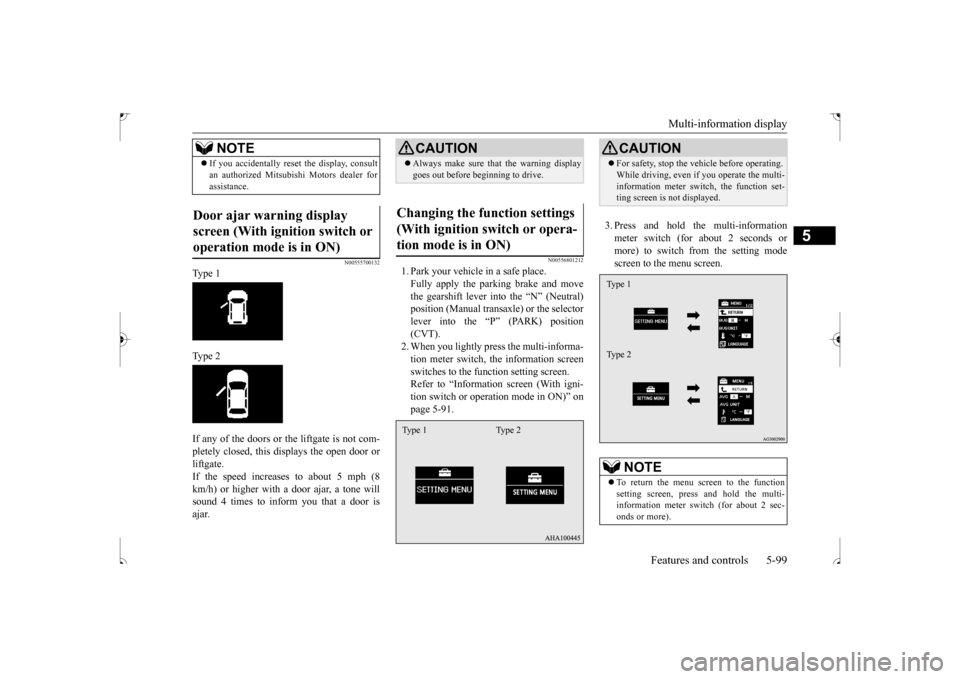
Type 1 Type 2 If any of the doors or the liftgate is not com- pletely closed, this displays the open door or liftgate. If the speed increases to about 5 mph (8km/h) or higher with
a door ajar, a tone will
sound 4 times to inform you that a door is ajar.
N00556801212
1. Park your vehicle in a safe place.Fully apply the parking brake and movethe gearshift lever into the “N” (Neutral) position (Manual transaxle) or the selector lever into the “P” (PARK) position(CVT). 2. When you lightly press the multi-informa- tion meter switch, the information screenswitches to the function setting screen. Refer to “Information screen (With igni- tion switch or operation mode in ON)” onpage 5-91.
3. Press and hold the multi-information meter switch (for about 2 seconds or more) to switch from the setting modescreen to the menu screen.
If you accidentally reset the display, consult an authorized Mitsubishi Motors dealer for assistance.
Door ajar warning display screen (With ignition switch or operation mode is in ON)
NOTE
CAUTION Always make sure that the warning display goes out before beginning to drive.
Changing the function settings (With ignition switch or opera-tion mode is in ON) Type 1 Type 2
CAUTION For safety, stop the vehicle before operating. While driving, even if you operate the multi- information meter switch, the function set- ting screen is not displayed.NOTE
To return the menu screen to the function setting screen, press and hold the multi-information meter switch (for about 2 sec- onds or more).Type 1 Type 2
BK0239500US.bo
ok 99 ページ 2016年5月13日 金曜日 午前8時53分
Page 163 of 399

Multi-information display 5-100 Features and controls
5
4. Select the item to change on the menu screen and change to the desired setting.For further details on the operation meth- ods, refer to the following sections. Refer to “Changing the reset mode for average fuel consum
ption and average
speed” on page 5-100. Refer to “Changing the fuel consumptiondisplay unit” on page 5-101. Refer to “Changing the temperature unit” on page 5-102.Refer to “Changing the display language” on page 5-102. Refer to “Operation sound setting” onpage 5-103. Refer to “Changing the time until “REST REMINDER” is displayed” on page5-103. Refer to “Changing the turn signal sound” on page 5-104.Refer to “Changing the momentary fuel consumption display (Type 2)” on page 5-104.Refer to “Returning to the factory set- tings” on page 5-105.
N00557000227
You can change the mode condition for the average fuel consumption and average speed display to “Auto reset” or “Manual reset.” 1. Press and hold the multi-information meter switch (for about 2 seconds ormore) to switch from the setting modescreen to the menu screen. Refer to “Changing the function settings (With ignition switch or operation modeis in ON)” on page 5-99. 2. Lightly press the multi-information meter switch to select “AVG” (average fuel con-sumption and average speed setting).
3. Press and hold the multi-information meter switch (for about 2 seconds or more) to switch in sequence from A or 1 (Auto reset)
M, 2 or P (Manual reset)
A or 1 (Auto reset). The setting is changed to the selected reset condition. If you press and hold the multi-informa- tion meter switch when the average fuelconsumption and average speed are dis- played, these calculations will be reset to zero. When the following operation is per- formed, the mode setting changes auto- matically from manual to auto. [Except for vehicles equipped with the F. A . S . T. - k e y ] Turn the ignition switch to the “ON” posi- tion from the “ACC” or “OFF” position. [For vehicles equipped with the F.A.S.T.- key] Change the operation mode to ON from ACC or OFF.
If no operations are made within about 15 seconds of the menu screen being displayed, the display returns to the function setting screen.NOTE
Changing the reset mode for aver- age fuel consumption and average speed Type 1 Type 2
Manual reset mode
BK0239500US.book
100 ページ 2016年5月13日 金曜日 午前8時53分
Page 164 of 399
Multi-information display
Features and controls 5-101
5
When the average fuel consumption and average speed are being displayed, if you hold down the multi-information meter switch, these calculations will be reset tozero. When the engine switch or the operation mode is in the following conditions, theaverage fuel consumption display and the average speed display will automatically reset. [Except for vehicles equipped with the F. A . S . T. - k e y ]The ignition switch has been set to the “ACC” or “OFF” position for about 4 hours or more. [For vehicles equipped with the F.A.S.T.- key] The operation mode has been in ACC or OFF for about 4 hours or more.
N00557100143
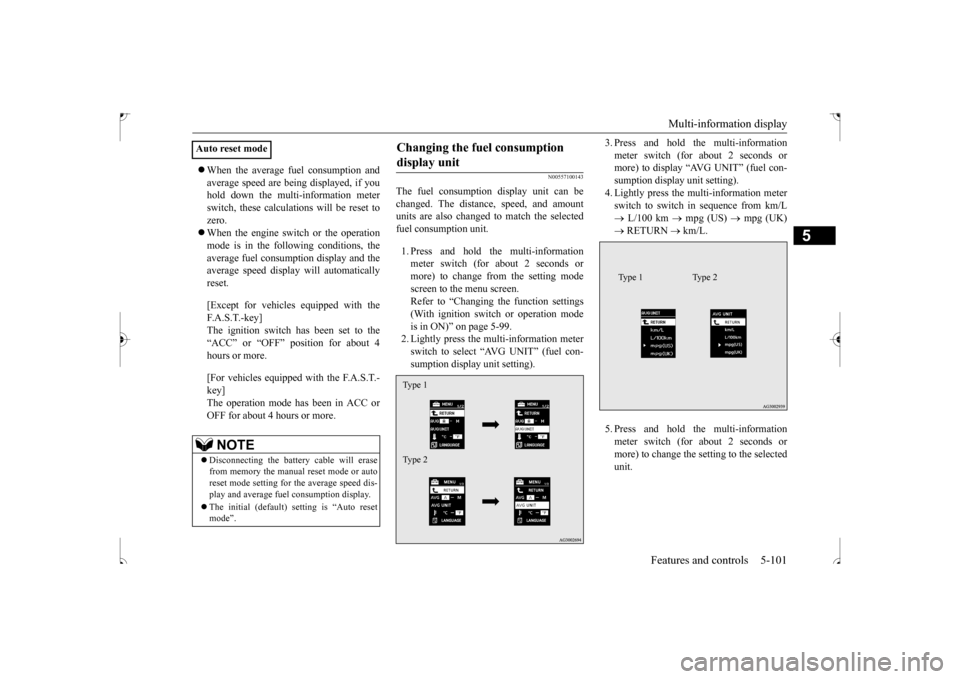
The fuel consumption display unit can be changed. The distance, speed, and amount units are also changed to match the selectedfuel consumption unit. 1. Press and hold the multi-information meter switch (for about 2 seconds or more) to change from the setting modescreen to the menu screen.Refer to “Changing the function settings (With ignition switch or operation mode is in ON)” on page 5-99.2. Lightly press the multi-information meter switch to select “AVG UNIT” (fuel con- sumption display unit setting).
3. Press and hold the multi-information meter switch (for about 2 seconds or more) to display “AVG UNIT” (fuel con- sumption display unit setting).4. Lightly press the multi-information meter switch to switch in sequence from km/L L/100 km
mpg (US)
mpg (UK)
RETURN
km/L.
5. Press and hold the multi-information meter switch (for about 2 seconds or more) to change the setting to the selected unit.
Auto reset mode
NOTE
Disconnecting the battery cable will erase from memory the manual reset mode or autoreset mode setting for the average speed dis- play and average fuel consumption display. The initial (default) setting is “Auto reset mode”.
Changing the fuel consumption display unit Type 1 Type 2
Type 1 Type 2
BK0239500US.book
101 ページ 2016年5月13日 金曜日 午前8時53分