2017 MITSUBISHI OUTLANDER SPORT ECU
[x] Cancel search: ECUPage 110 of 399
Starting the engine
Features and controls 5-47
5
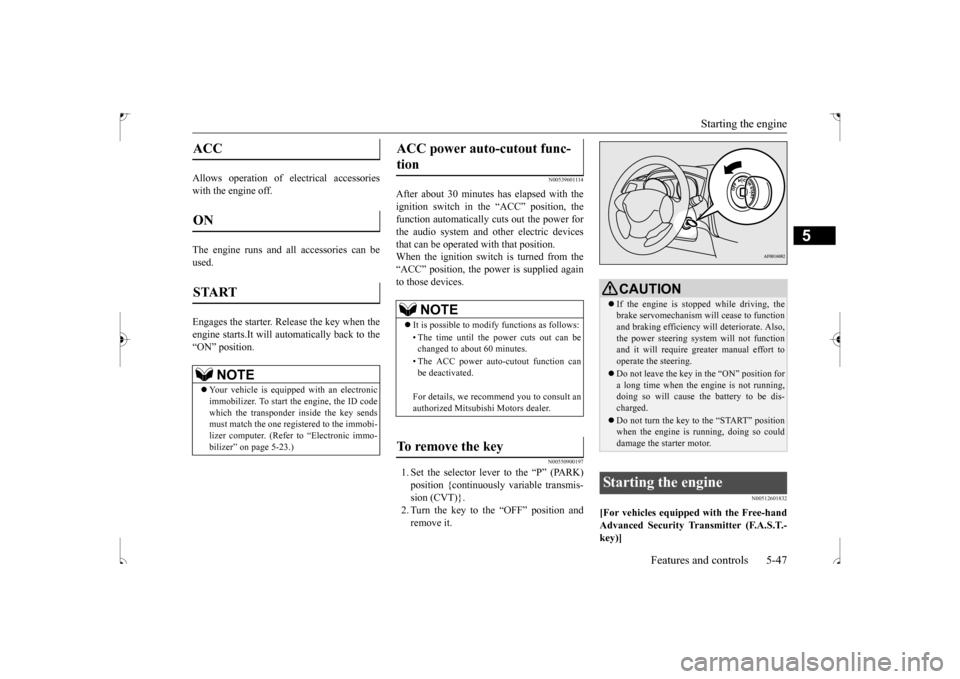
Allows operation of electrical accessories with the engine off. The engine runs and all accessories can be used. Engages the starter. Release the key when the engine starts.It will auto
matically back to the
“ON” position.
N00539601114
After about 30 minutes has elapsed with theignition switch in the “ACC” position, the function automatically cuts out the power for the audio system and other electric devicesthat can be operated with that position. When the ignition switch is turned from the “ACC” position, the power is supplied againto those devices.
N00550900197
1. Set the selector lever to the “P” (PARK) position {continuously variable transmis- sion (CVT)}.2. Turn the key to the “OFF” position and remove it.
N00512601832
[For vehicles equipped with the Free-handAdvanced Security Transmitter (F.A.S.T.- key)]
ACC ON START
NOTE
Your vehicle is equipped with an electronic immobilizer. To start the engine, the ID code which the transponder inside the key sendsmust match the one registered to the immobi- lizer computer. (Refer to “Electronic immo- bilizer” on page 5-23.)
ACC power auto-cutout func- tion
NOTE
It is possible to modify functions as follows: • The time until the power cuts out can be changed to about 60 minutes. • The ACC power auto-cutout function can be deactivated. For details, we recommend you to consult an authorized Mitsubishi Motors dealer.
To remove the key
CAUTION If the engine is stopped while driving, the brake servomechanism will cease to function and braking efficiency will deteriorate. Also, the power steering system will not functionand it will require greater manual effort to operate the steering. Do not leave the key in the “ON” position for a long time when the engine is not running, doing so will cause the battery to be dis-charged. Do not turn the key to the “START” position when the engine is running, doing so could damage the starter motor.
Starting the engine
BK0239500US.bo
ok 47 ページ 2016年5月13日 金曜日 午前8時53分
Page 111 of 399
Starting the engine 5-48 Features and controls
5
For information on operation for vehicles equipped with the Free-hand Advanced Secu- rity Transmitter (F.A.S.T.-key), refer to “Free-hand Advanced Security Transmitter(F.A.S.T.-key): Starting and stopping the engine” on page 5-20. [Except for vehicles equipped with the Free-hand Advanced Security Transmitter(F.A.S.T.-key)] Do not operate the starter motor continu- ously for longer than
15 seconds as this
could run the battery down or damage thestarter motor. If the engine does not start, turn the ignition switch back to the “OFF” position, wait a few seconds, and then tryagain. Trying repeatedly with the engine or starter motor still turning will damage the starter mechanism. If the engine will not start because the bat- tery is weak or discharged, refer to “Jump-starting the engine” (on page 8-2)for instructions.
A longer warm up period will only con- sume extra fuel. The
engine is warmed up
enough for driving when the bar graph of engine coolant temperature display startsto move. Refer to “Interrupt display screen (With ignition switch or operation mode in ON)” on page 5-95.
This model is equipped with an electronically controlled fuel injection system. This is a sys- tem that automatically controls fuel injection.
There is usually no need to depress the accel- erator pedal when starting the engine. The starter should not be run for more than 15 seconds at a time.To prevent battery drain, wait a few seconds between attempts to restart the engine. 1. Make sure all occupants are properly seated with seat belts fastened.2. Insert the ignition key. 3. Make sure the parking brake is applied. 4. Press and hold the brake pedal downfirmly with your right foot.5. Press and hold the clutch pedal all the way down (manual transaxle). 6. On vehicles equipped with manual trans-axle, place the gearshift lever in the “N” (Neutral) position. On vehicles equipped with continuouslyvariable transmission (CVT), make sure the selector lever is in the “P” (PARK) position.
Tips for starting
WA R N I N G Never run the engine in a closed or poorly ventilated area any longer than is neededto move your vehicle out of the area. Car- bon monoxide gas, which is odorless and extremely poisonous, could build up andcause serious injury or death.CAUTION Do not push-start the vehicle.Do not run the engine
at high rpms or drive
at high speeds until the engine has had achance to warm up. Release the ignition switch as soon as the engine starts. Otherwise, the starter motor will be damaged.
Starting the engine
NOTE
On vehicles equipped with CVT, the starter will not operate unless the selector lever is in the “P” (PARK) or “N” (NEUTRAL) posi- tion.For safety reasons, start the engine in the “P” (PARK) position so that the wheels are locked.
BK0239500US.bo
ok 48 ページ 2016年5月13日 金曜日 午前8時53分
Page 119 of 399
Continuously variable transmis
sion (CVT) (if so equipped)
5-56 Features and controls
5
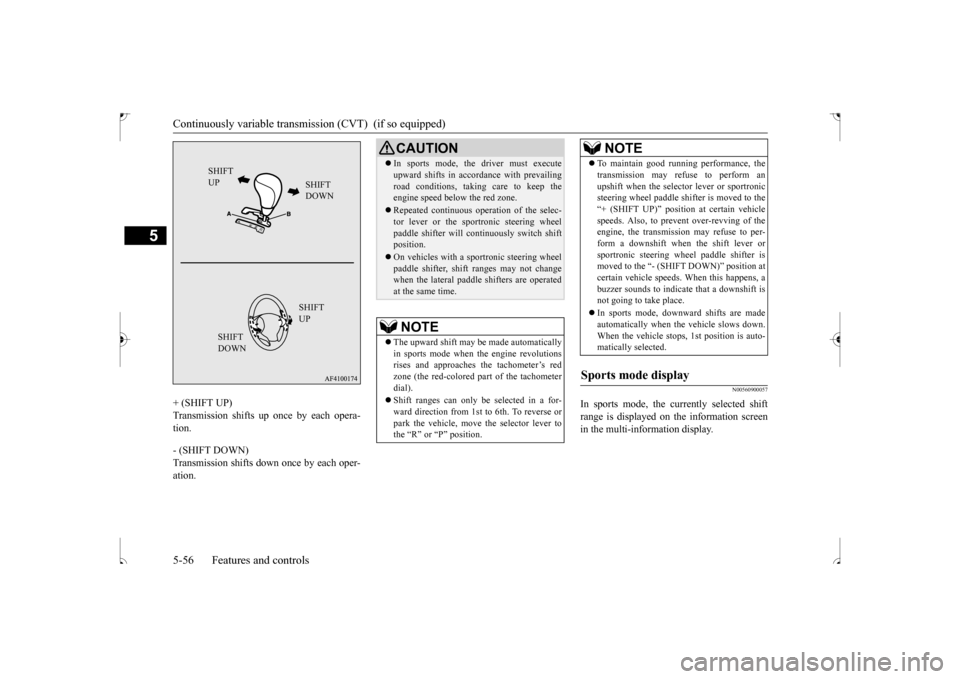
+ (SHIFT UP) Transmission shifts up once by each opera- tion. - (SHIFT DOWN) Transmission shifts down once by each oper-ation.
N00560900057
In sports mode, the currently selected shift range is displayed on the information screen in the multi-information display.
SHIFT UP
SHIFT DOWN SHIFT UP
SHIFT DOWN
CAUTION In sports mode, the driver must execute upward shifts in accordance with prevailing road conditions, taking care to keep the engine speed below the red zone. Repeated continuous operation of the selec- tor lever or the sportronic steering wheel paddle shifter will continuously switch shiftposition. On vehicles with a sportronic steering wheel paddle shifter, shift ranges may not change when the lateral paddle shifters are operated at the same time.NOTE
The upward shift may be made automatically in sports mode when the engine revolutions rises and approaches the tachometer’s redzone (the red-colored part of the tachometer dial). Shift ranges can only be selected in a for- ward direction from 1st to 6th. To reverse or park the vehicle, move the selector lever tothe “R” or “P” position.
To maintain good running performance, the transmission may refuse to perform an upshift when the selector lever or sportronic steering wheel paddle shifter is moved to the “+ (SHIFT UP)” position at certain vehiclespeeds. Also, to prevent over-revving of the engine, the transmission may refuse to per- form a downshift when the shift lever orsportronic steering wheel paddle shifter is moved to the “- (SHIFT DOWN)” position at certain vehicle speeds. When this happens, abuzzer sounds to indicate that a downshift is not going to take place. In sports mode, downward shifts are made automatically when the vehicle slows down. When the vehicle stops, 1st position is auto-matically selected.
Sports mode display
NOTE
BK0239500US.bo
ok 56 ページ 2016年5月13日 金曜日 午前8時53分
Page 127 of 399
Service brake 5-64 Features and controls
5
N00517500275
Overuse of the brake can cause weakening, resulting in poor brake response and prema- ture wear of the brake pads.When driving down a long or steep hill, use engine braking by downshifting.
N00517600436
Your vehicle is equipped with power brakes for more braking force with less brake pedaleffort. Your brakes are designed to operate at full capacity, even if the power
assist is not being
used. If the power assist is not being used, the effort needed to press the brake pedal is greater.If you should lose the power assist for some reason, the brakes will still work. If the power brake unit or either of the twobrake hydraulic systems stops working prop- erly, the rest of the br
ake system will still
work, but the vehicle will not slow down asquickly. You will know this has happened if you find you need to press the brake down farther, orharder when slowing down or stopping, or if the brake warning light and the warning dis- play in the multi-information display comeon. Have the brake system repaired at an
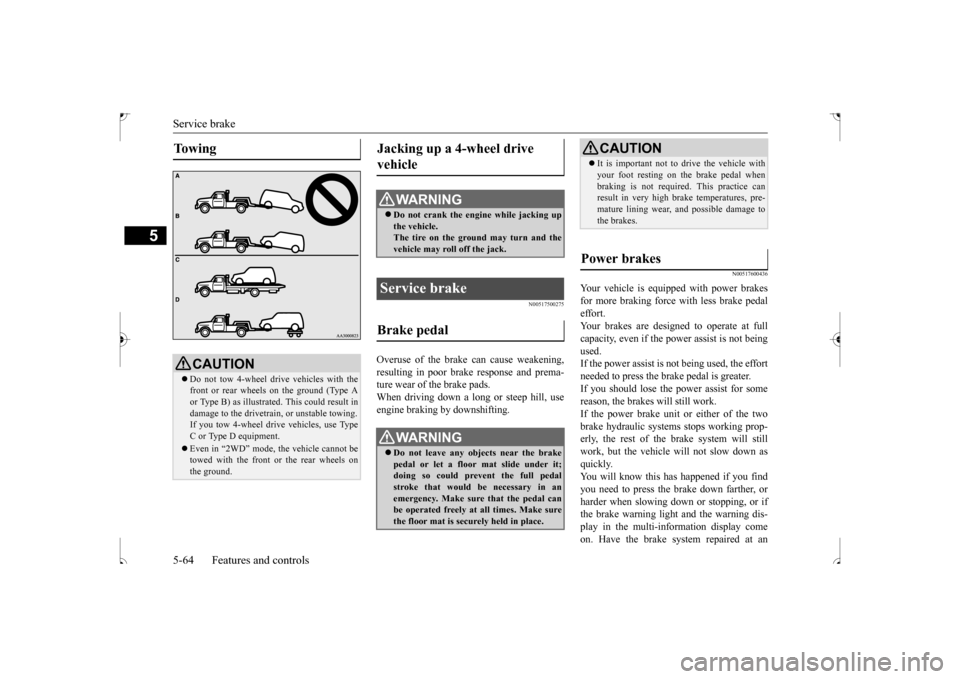
To w i n g
CAUTION Do not tow 4-wheel drive vehicles with the front or rear wheels on the ground (Type Aor Type B) as illustrated. This could result in damage to the drivetrain, or unstable towing. If you tow 4-wheel drive vehicles, use Type C or Type D equipment. Even in “2WD” mode, the vehicle cannot be towed with the front or the rear wheels on the ground.
Jacking up a 4-wheel drive vehicle
WA R N I N G Do not crank the engine while jacking up the vehicle.The tire on the ground may turn and the vehicle may roll off the jack.
Service brake Brake pedal
WA R N I N G Do not leave any objects near the brake pedal or let a floor mat slide under it; doing so could prevent the full pedal stroke that would be necessary in anemergency. Make sure that the pedal can be operated freely at all times. Make sure the floor mat is securely held in place.
CAUTION It is important not to drive the vehicle with your foot resting on the brake pedal when braking is not required. This practice can result in very high brake temperatures, pre- mature lining wear, and possible damage tothe brakes.
Power brakes
BK0239500US.bo
ok 64 ページ 2016年5月13日 金曜日 午前8時53分
Page 145 of 399
Rear-view camera (if so equipped) 5-82 Features and controls
5
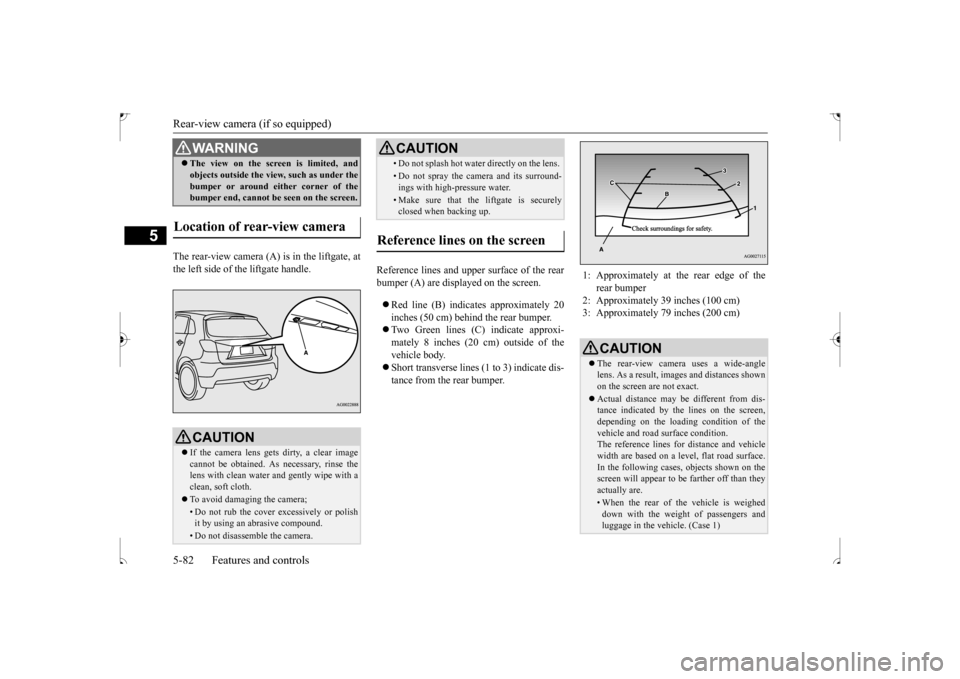
The rear-view camera (A) is in the liftgate, at the left side of the liftgate handle.
Reference lines and upper surface of the rear bumper (A) are displayed on the screen. Red line (B) indicates approximately 20 inches (50 cm) behind the rear bumper. Two Green lines (C) indicate approxi- mately 8 inches (20 cm) outside of the vehicle body. Short transverse lines (1 to 3) indicate dis- tance from the rear bumper.
The view on the screen is limited, and objects outside the view, such as under the bumper or around either corner of the bumper end, cannot be seen on the screen.
Location of rear-view camera
CAUTION If the camera lens gets dirty, a clear image cannot be obtained. As necessary, rinse thelens with clean water and gently wipe with a clean, soft cloth. To avoid damaging the camera;• Do not rub the cover excessively or polish it by using an abrasive compound. • Do not disassemble the camera.WA R N I N G
• Do not splash hot water directly on the lens. • Do not spray the camera and its surround- ings with high-pressure water.• Make sure that the liftgate is securelyclosed when backing up.
Reference lines on the screen
CAUTION
1: Approximately at the rear edge of the
rear bumper
2: Approximately 39 inches (100 cm) 3: Approximately 79 inches (200 cm)
CAUTION The rear-view camera uses a wide-angle lens. As a result, images and distances shownon the screen are not exact. Actual distance may be different from dis- tance indicated by the lines on the screen, depending on the loading condition of the vehicle and road surface condition.The reference lines for distance and vehicle width are based on a level, flat road surface. In the following cases, objects shown on thescreen will appear to be farther off than they actually are.• When the rear of the vehicle is weigheddown with the weight of passengers and luggage in the vehicle. (Case 1)
BK0239500US.bo
ok 82 ページ 2016年5月13日 金曜日 午前8時53分
Page 172 of 399
Indicator light, warning light, an
d information screen display list Features and controls 5-109
5
—
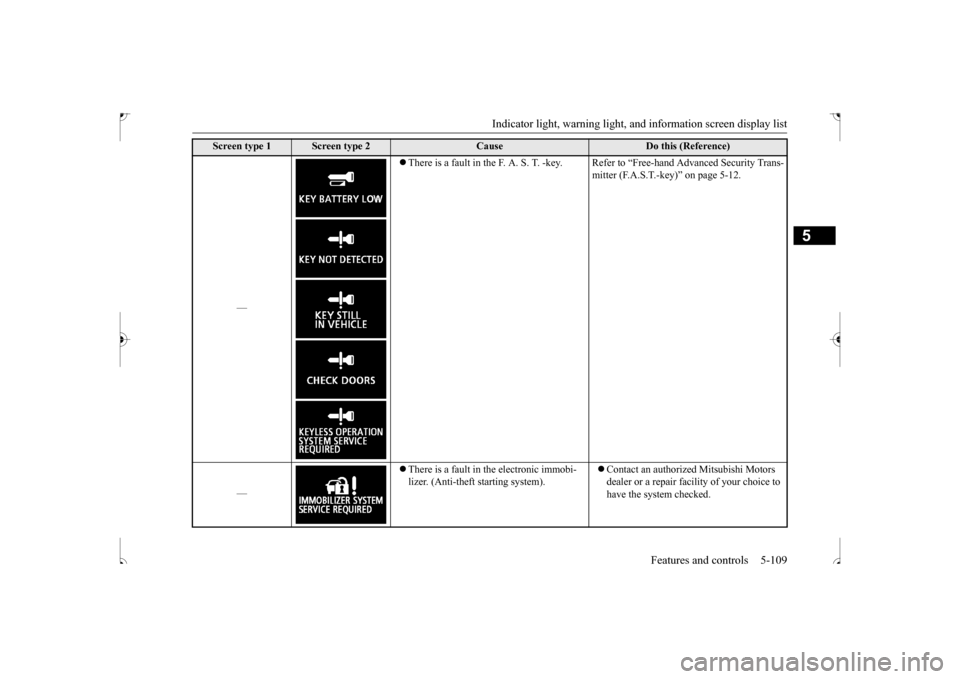
There is a fault in the F. A. S. T. -key. Refer to “Free-hand Advanced Security Trans-
mitter (F.A.S.T.-key)” on page 5-12.
—
There is a fault in the electronic immobi- lizer. (Anti-theft starting system).
Contact an authorized Mitsubishi Motors dealer or a repair facility of your choice to have the system checked.
Screen type 1
Screen type 2
Cause
Do this (Reference)
BK0239500US.book
109 ページ 2016年5月13日 金曜日 午前8時53分
Page 174 of 399
Indicator light, warning light, an
d information screen display list Features and controls 5-111
5
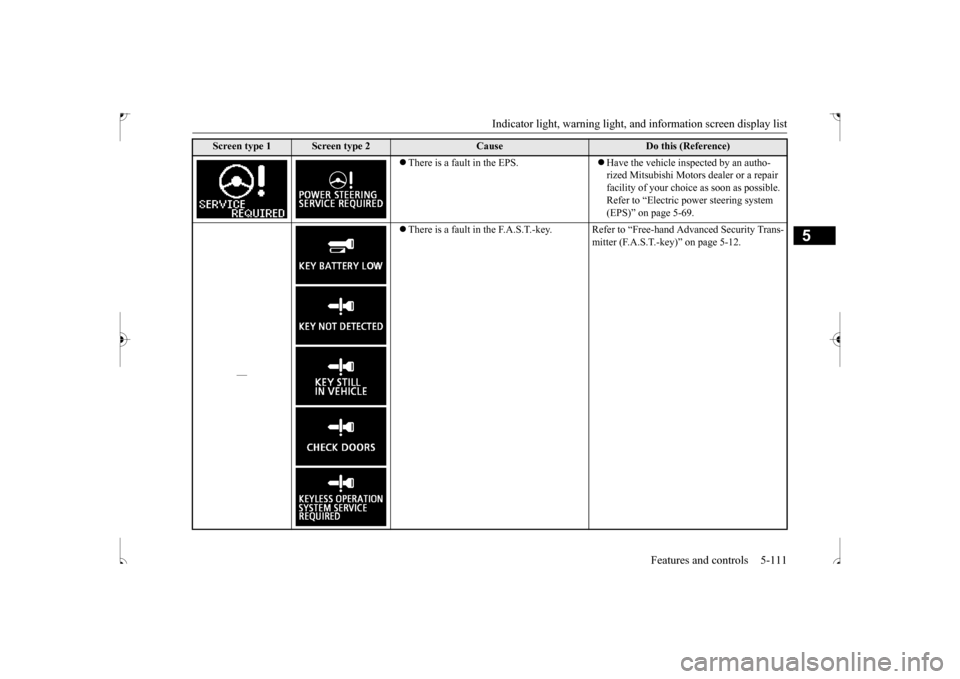
There is a fault in the EPS.
Have the vehicle inspected by an autho- rized Mitsubishi Motors dealer or a repair facility of your choice as soon as possible.Refer to “Electric power steering system (EPS)” on page 5-69.
—
There is a fault in the F.A.S.T.-key. Refer to “Free-hand Advanced Security Trans-
mitter (F.A.S.T.-key)” on page 5-12.
Screen type 1
Screen type 2
Cause
Do this (Reference)
BK0239500US.book
111 ページ 2016年5月13日 金曜日 午前8時53分
Page 204 of 399

Bluetooth® 2.0 interface (if so equipped)
Features and controls 5-141
5
N00564401057
There are 2 cancel functions. If you are at the main menu, say “Cancel” to exit from the Bluetooth
® 2.0 interface.
If you are anywhere else within the system, say “Cancel” to return to the main menu.
N00564501045
The Bluetooth
® 2.0 interface is equipped
with a confirmation function. With the confirmation function activated, you are given more opportunities than normal toconfirm a command when making various settings to the Bluetooth
® 2.0 interface. This
allows you to decrease the possibility that asetting is accidentally changed. The confirmation function can be turned on or off by following the steps below. 1. Press the SPEECH button (except for vehicles with Mitsubishi Multi-Commu- nication System) or PICK-UP button (for vehicles with Mitsubishi Multi-Commu-nication System).
2. Say “Setup.” 3. Say “Confirmation prompts.” 4. The voice guide will say “Confirmation prompts are
N00564601150
It is possible to use a passcode as a security function by setting a passcode of your choice for the Bluetooth
® 2.0 interface.
When the security function is turned on, it is necessary to make a voice input of a 4-digit passcode in order to use all functions of the Bluetooth
® 2.0 interface, except when receiv-
ing calls. Use the following procedure to turn on the security function by setting a passcode. 1. Press the SPEECH button (except for vehicles with Mits
ubishi Multi-Commu-
nication System) or PICK-UP button (forvehicles with Mits
ubishi Multi-Commu-
nication System).
2. Say “Setup.” 3. Say “Passcode.” 4. The voice guide will say “Passcode is dis- abled. Would you like to enable it?”Answer “Yes.” Answer “No” to cancel the setting of the passcode and return to the main menu. 5. The voice guide will say “Please say a 4- digit passcode. Remember this passcode. It will be required to use this system.” Say a 4-digit number which you want toset as a passcode. 6. For confirmation purposes, the voice guide will say “Passcode <4-digit pass-code>. Is this correct?” Answer “Yes.” Answer “No” to return to the passcode input in Step 5. 7. When the registration of the passcode is completed, the voice guide will say “Pass- code is enabled” and the system willreturn to the main menu.
Canceling
NOTE
You can return to the previous menu by say- ing “Go Back.” (if so equipped)
Confirmation function setting
Security function
Setting the passcode
NOTE
Passcode will be required to access the sys- tem after the next ignition cycle.
BK0239500US.book
141 ページ 2016年5月13日 金曜日 午前8時53分