2017 MITSUBISHI OUTLANDER SPORT ESP
[x] Cancel search: ESPPage 232 of 399
HomeLink® Wireless Control System (if so equipped)
Features and controls 5-169
5
3. Once the door has stopped, press and release the “Learn” or “Smart” button on the garage door opener (refer to your garage door opener owner’s manual forthe location of the “Learn” button). Both the HomeLink
® garage door operation
indicators will flash rapidly green uponsuccessful synchronization with the door opener (within 5 seconds).
N00585000033
To operate, simply press and release the pro- grammed HomeLink
® button. Activation will
now occur for the trained device (i.e. garage door opener, gate operator, security system,entry door lock, home/office lighting, etc.). For convenience, the hand-held transmitter of the device may also be used at any time.
N00585200035
The HomeLink
® has the capability of receiv-
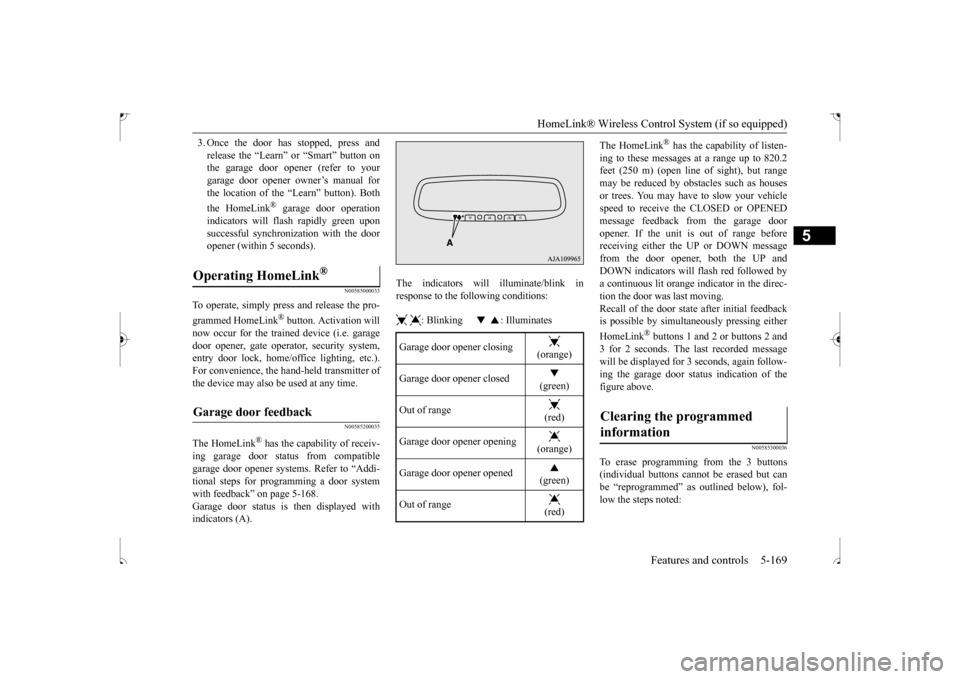
ing garage door status from compatiblegarage door opener systems. Refer to “Addi- tional steps for programming a door system with feedback” on page 5-168.Garage door status is then displayed with indicators (A).
The indicators will illuminate/blink in response to the following conditions: : Blinking : Illuminates
The HomeLink
® has the capability of listen-
ing to these messages at a range up to 820.2 feet (250 m) (open line
of sight), but range
may be reduced by obstacles such as housesor trees. You may have to slow your vehicle speed to receive the CLOSED or OPENED message feedback from the garage dooropener. If the unit is out of range before receiving either the UP or DOWN message from the door opener, both the UP andDOWN indicators will flash red followed bya continuous lit orange indicator in the direc- tion the door was last moving. Recall of the door state after initial feedbackis possible by simultaneously pressing either HomeLink
® buttons 1 and 2 or buttons 2 and
3 for 2 seconds. The last recorded messagewill be displayed for 3 seconds, again follow- ing the garage door status indication of the figure above.
N00585300036
To erase programming from the 3 buttons(individual buttons cannot be erased but can be “reprogrammed” as outlined below), fol- low the steps noted:
Operating HomeLink
®
Garage door feedback
Garage door opener closing
(orange)
Garage door opener closed
(green)
Out of range
(red)
Garage door opener opening
(orange)
Garage door opener opened
(green)
Out of range
(red)
Clearing the programmed information
BK0239500US.book
169 ページ 2016年5月13日 金曜日 午前8時53分
Page 233 of 399
Interior lights 5-170 Features and controls
5
1. Press and hold the 2 outer HomeLink
®
buttons for at least 10 seconds. The indi- cator will change from continuous yellow to rapidly flashing green.2. Release both buttons. 3. HomeLink
® is now in the train (or learn-
ing) mode and can be programmed at any time beginning with “Programming a new HomeLink
®” step 1.
N00585400037
To reprogram a HomeLink
® button, complete
the following. 1. Press and hold the desired HomeLink
®
button. Do not release the button. 2. The indicator light will begin to slowlyflash orange after 20 seconds. The Home- Link
® button can be released at this point.
Proceed with “Programming a new HomeLink
®” step 2.
N00585600039
Your HomeLink
® system operates on a radio
frequency subject to Federal Communica- tions Commission (FCC) Rules (For vehiclessold in U.S.A.) and Industry Canada Rules (For vehicles sold in Canada). This device complies with Part 15 of the FCC Rules andRSS- 210 of the Industry Canada Rules. Operation is subject to the following two con- ditions. This device may not cause harmful inter- ference. This device must accept any interference that may be received, including interfer-ence that may cause undesired operation.
This equipment complies with FCC radiation exposure limits set forth for an uncontrolledenvironment. End Users must follow the spe-cific operating instructions for satisfying RF exposure compliance. This transmitter must be at least 12 inches (20 cm) from the userand must not be co-located or operating in conjunction with any other antenna or trans- mitter.The term “IC:” before the certification/regis- tration number only signifies that Industry Canada technical specifications were met.
N00525300562
NOTE
Do not hold for longer than 20 seconds.
Reprogramming a single HomeLink
® button
NOTE
If you do not complete the programming of a new device to the button, it will revert to the previously stored programming. For questions or comments, visit www.homelink.com,www.youtube.com/HomeLinkGentex, or by calling the HomeLink
® Hotline.
General information
CAUTION The transmitter has been tested and complies with FCC and IC rules. Changes or modifications not expressly approved by the party responsible for com- pliance could void the user’s authority tooperate the device.
Interior lights
NOTE
Be aware that leaving the light illuminated with the engine off may run the battery down. Never leave the vehicle without checkingthat the light is off.
BK0239500US.book
170 ページ 2016年5月13日 金曜日 午前8時53分
Page 248 of 399
Driving during cold weather
Driving safety 6-5
6
Before changing lanes, check your mir- rors and use your turn-signal light. While driving, watch the behavior of other drivers, bicyclists, and pedestrians. Always obey applicable laws and regula- tions. Be a polite and alert driver. Always leave room for unexpected events, such assudden braking. If you plan to drive in another country, obey their vehicle registration laws andmake sure you will be able to get the rightfuel.
N00629400461
Check the battery. At the same time, check the terminals and wiring. During extremely cold weather, the battery will not be as strong. Also, the battery powerlevel may drop because more power is used for cold starting and driving. Before driving the vehicle, check to see ifthe engine runs at the proper speed and if the headlights are as bright as normally. Charge or replace the battery if necessary.During extreme cold weather, it is possi- ble that a very low battery could freeze.
Warm the engine sufficiently. After start- ing the engine, allow a short warm-up time to distribute oil to all cylinders. Then drive your vehicle slowly. Stay at low speeds at first so that the transaxle, transfer case and rear axle oil have time to spread to all the lubricationpoints. Manual transaxle can be harder to shift in cold weather conditions. This is normaland shifting will get easier as the transaxle warms up. Check the engine antifreeze. If there is not enough coolant because of a leak or from engine overheating, add Mitsubishi Motors Genuine Super LongLife Coolant Premium or equivalent. Please read this section in conjunction with the “Engine coolant” on page 9-7.
N00629500491
All the parts of the brake system are criticalto safety. Have the vehicle serviced by anauthorized Mitsubishi Motors dealer or a repair facility of your choice at regular inter- vals according to the “WARRANTY ANDMAINTENANCE MANUAL”. Check the brake system while driving at a low speed immediately after starting, espe- cially when the brakes are wet, to confirm they work normally.A film of water can be formed on the brake discs and prevent normal braking after driv- ing in heavy rain or through large puddles, orafter the vehicle is wash
ed. If this occurs, dry
the brakes out by driving slowly while lightly depressing the brake pedal.
Driving during cold weather
WA R N I N G The battery gives off explosive hydrogen gas. Any spark or flame can cause the bat- tery to explode, which could cause serious injury or death. Always wear protective clothes and a facemask when working with your battery, or let a skilled mechanic do it.
WA R N I N G Never open the radiator cap when the radiator is hot. You could be seriously burned.
Braking When brakes are wet
BK0239500US.bo
ok 5 ページ 2016年5月13日 金曜日 午前8時53分
Page 283 of 399
AM/FM radio/CD player (if so equipped) 7-26 Comfort controls
7
N00715000021
This product supports audio playback from iPod/iPhone devices, however dif- fering versions mean that playback cannot be guaranteed. Please be aware that depending on the iPod/iPhone model or version, operation may differ.
N00715200023
If the product becomes dirty, wipe with a soft cloth. If very dirty, use a soft cloth dipped in neutral detergent diluted in water, and then wrung out. Do not use benzene, thin-ners, or other chemical wipes. This may harm the surface.
N00715300082
Product names and other proper names are the trademarks or registered trade-marks of their respective owners. Furthermore, even if there is no specific denotation of trademarks or registeredtrademarks, these are to be observed in their entirety. “Made for iPod”, “Made for iPhone” mean that an electronic accessory has been designed to connect specifically to iPod or iPhone, respectively, and has beencertified by the developer to meet Appleperformance standards. iPhone, iPod, iPod classic, iPod nano, and iPod touch are trademarks of Apple Inc.,registered in the U.S. and other countries. Apple is not responsib
le for the operation
of this device or its compliance withsafety and regulatory standards.
NOTE
To listen to the audio system while the engine is not running, turn the ignition switch to the “ACC” position or put the oper- ation mode in ACC. If the ignition switch or the operation modeis left in ACC, the accessory power will automatically turn off after a certain period of time and you will no longer be able to usethe audio system. The accessory power comes on again if the ignition switch or the engine switch is operated with it in the“ACC” position. Refer to “ACC power auto- cutout function” on page 5-18 and 5-47. If a cellular phone is used inside the vehicle, it may create noise in the audio equipment. This does not mean that anything is wrongwith your audio equipment. In such a case, use the cellular phone at a place as far away as possible from the audio equipment. If foreign objects or water get into the audio equipment, or if sm
oke or a strange odor
comes from it, immediately turn off the audio system and have it checked at an authorized Mitsubishi Motors dealer or arepair facility of your choice. Never try to repair it yourself. Avoid using the audio sys- tem until it is inspected by a qualified per- son. If the audio system is damaged by foreign objects, water, or fire, have the system checked by a qualified Mitsubishi Motorstechnician.
The audio amplifier (if so equipped) is located under the front right seat. Do not subject the amplifier to a strong impact. It could damage the amplifier or malfunc-tioning could result.
Important Points on Usage
iPod/iPhone Playback Function
(if
so equipped)How to Clean
NOTE
Trademarks
NOTE
iPod and iTunes licensing allows individual users to privately reproduce and play back non- copyrighted material as well as material that may be legally copied and reproduced.Infringement of copyright is prohibited.
BK0239500US.bo
ok 26 ページ 2016年5月13日 金曜日 午前8時53分
Page 306 of 399
To play iPod/USB memory device tracks via voice
operation (vehicles with
Bluetooth® 2.0 interface) Comfort controls 7-49
7
N00772001067
When connected to the USB input terminal desired tracks on the iPod/USB memory device can be selected and played via voiceoperation. For information concerning the voice recog- nition function or speaker registration func- tion, refer to “Bluetooth
® 2.0 interface” on
page 5-137. The following explains how to prepare forvoice operation and play the tracks.
N00772101068
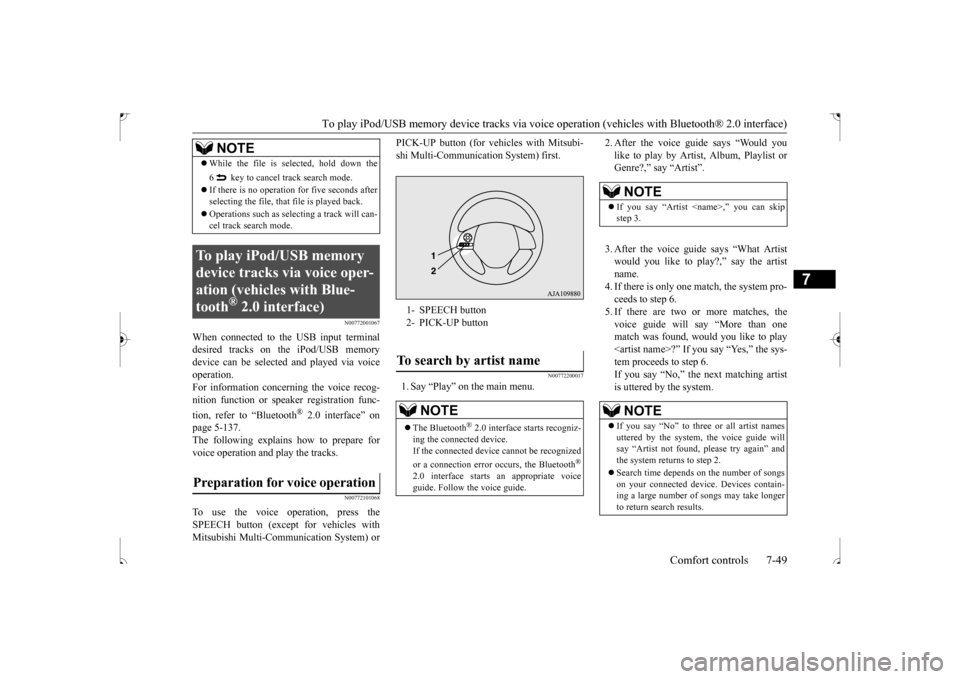
To use the voice operation, press theSPEECH button (except for vehicles withMitsubishi Multi-Communication System) or
PICK-UP button (for vehicles with Mitsubi- shi Multi-Communication System) first.
N00772200017
1. Say “Play” on the main menu.
2. After the voice guide says “Would you like to play by Artist, Album, Playlist or Genre?,” say “Artist”. 3. After the voice guide says “What Artist would you like to play?,” say the artistname. 4. If there is only one match, the system pro- ceeds to step 6.5. If there are two or more matches, the voice guide will say “More than one match was found, would you like to play
While the file is selected, hold down the 6 key to cancel track search mode. If there is no operation for five seconds after selecting the file, that file is played back. Operations such as selecting a track will can- cel track search mode.
To play iPod/USB memory device tracks via voice oper-ation (vehicles with Blue-tooth
® 2.0 interface)
Preparation for voice operation
NOTE
1- SPEECH button 2- PICK-UP buttonTo search by artist name
NOTE
The Bluetooth
® 2.0 interface starts recogniz-
ing the connected device. If the connected device cannot be recognized or a connection error occurs, the Bluetooth
®
2.0 interface starts an appropriate voice guide. Follow the voice guide.
NOTE
If you say “Artist
If you say “No” to three or all artist names uttered by the system, the voice guide will say “Artist not found, please try again” and the system returns to step 2. Search time depends on the number of songs on your connected device. Devices contain- ing a large number of songs may take longerto return search results.
BK0239500US.bo
ok 49 ページ 2016年5月13日 金曜日 午前8時53分
Page 317 of 399
Troubleshooting 7-60 Comfort controls
7
N00718600057
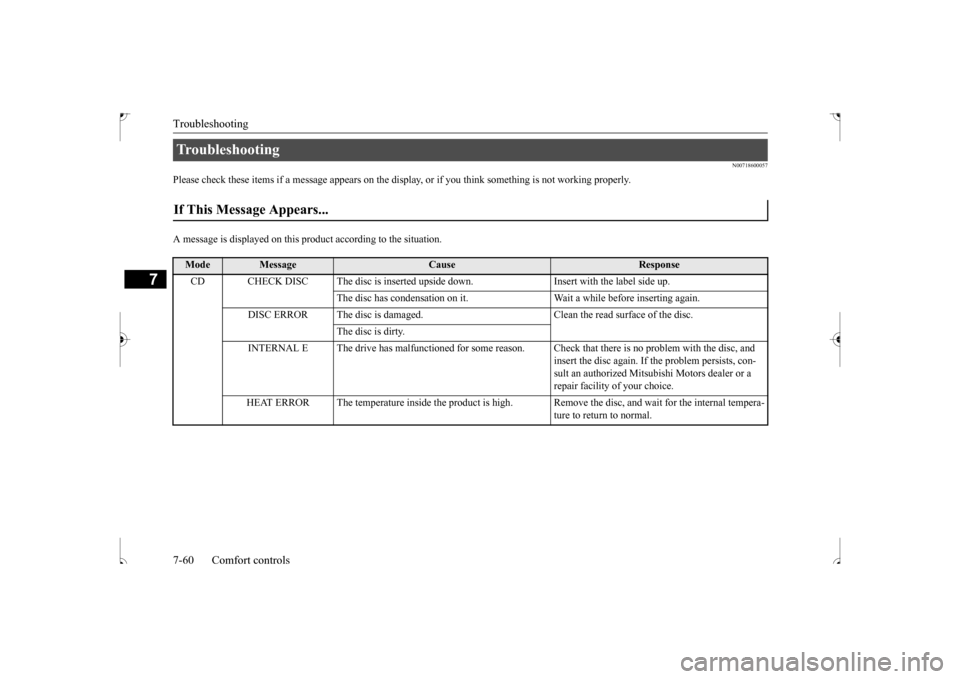
Please check these items if a message appears on the displa
y, or if you think something is not working properly.
A message is displayed on this
product according to the situation.
Troubleshooting If This Message Appears...
Mode
Message
Cause
Response
CD CHECK DISC The disc is inserted upsi
de down. Insert with the label side up.
The disc has condensation on it. Wait a while before inserting again.
DISC ERROR The disc is damaged. Clean the read surface of the disc.
The disc is dirty.
INTERNAL E The drive has malfunctioned for some reason. Check that there is no problem with the disc, and
insert the disc again. If the problem persists, con-sult an authorized Mitsubishi Motors dealer or a repair facility of your choice.
HEAT ERROR The temperature inside the product is high.
Remove the disc, and wait for the internal tempera- ture to return to normal.
BK0239500US.bo
ok 60 ページ 2016年5月13日 金曜日 午前8時53分
Page 318 of 399
Troubleshooting
Comfort controls 7-61
7
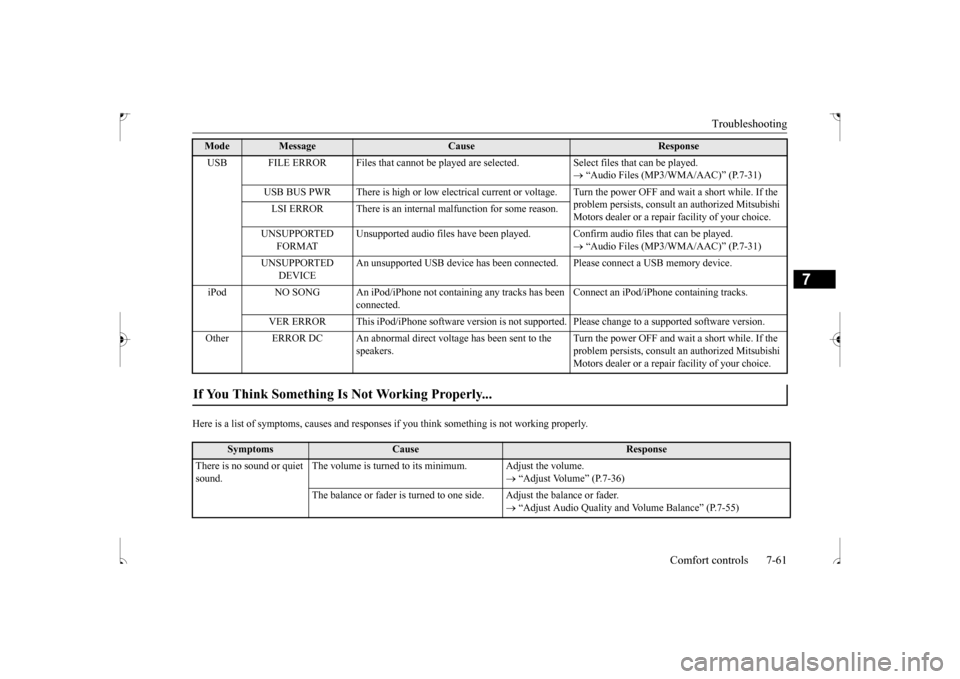
Here is a list of symptoms, causes and responses
if you think something is not working properly.
USB FILE ERROR Files that cannot be played are
selected. Select files that can be played.
“Audio Files (MP3/WMA/AAC)” (P.7-31)
USB BUS PWR There is high or low electrical current or
voltage. Turn the power OFF and wait a short while. If the
problem persists, consult an authorized Mitsubishi Motors dealer or a repair facility of your choice.
LSI ERROR There is an internal malfunction for some reason. UNSUPPORTED
FORMAT
Unsupported audio files have been played
. Confirm audio files that can be played.
“Audio Files (MP3/WMA/AAC)” (P.7-31)
UNSUPPORTED
DEVICE
An unsupported USB device has been connect
ed. Please connect a USB memory device.
iPod NO SONG An iPod/iPhone not containing any tracks has been
connected.
Connect an iPod/iPhone containing tracks.
VER ERROR This iPod/iPhone software version is not supported. Please change to a supported software version.
Other ERROR DC An abnormal direct voltage has been sent to the
speakers.
Turn the power OFF and wait a short while. If the problem persists, consult an authorized Mitsubishi Motors dealer or a repair facility of your choice.
If You Think Something Is Not Working Properly...
Symptoms
Cause
Response
There is no sound or quiet sound.
The volume is turned to its minimum. Adjust the volume.
“Adjust Volume” (P.7-36)
The balance or fader is turned to one side. Adjust the balance or fader.
“Adjust Audio Quality and Volume Balance” (P.7-55)
Mode
Message
Cause
Response
BK0239500US.bo
ok 61 ページ 2016年5月13日 金曜日 午前8時53分
Page 319 of 399
Clock (if so equipped) 7-62 Comfort controls
7
N00755001192
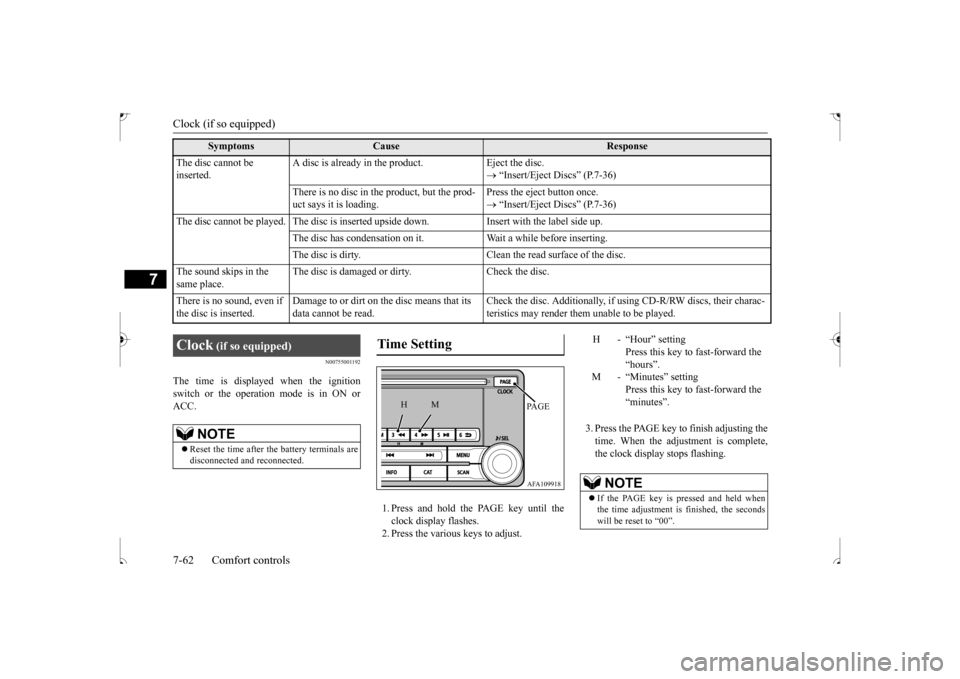
The time is displayed when the ignition switch or the operation mode is in ON or ACC.
1. Press and hold the PAGE key until the clock display flashes.2. Press the various keys to adjust.
3. Press the PAGE key to finish adjusting the time. When the adjustment is complete,the clock display stops flashing.
The disc cannot be inserted.
A disc is already in the product. Eject the disc.
“Insert/Eject Discs” (P.7-36)
There is no disc in the product, but the prod- uct says it is loading.
Press the eject button once. “Insert/Eject Discs” (P.7-36)
The disc cannot be played. The disc is inserted upside down. Insert with the label side up.
The disc has condensation on it. W
ait a while before inserting.
The disc is dirty. Clean the read surface of the disc.
The sound skips in the same place.
The disc is damaged or dirty. Check the disc.
There is no sound, even if the disc is inserted.
Damage to or dirt on the disc means that its data cannot be read.
Check the disc. Additionally, if using CD-R/RW discs, their charac- teristics may render them unable to be played.
Symptoms
Cause
Response
Clock
(if so equipped)
NOTE
Reset the time after the battery terminals are disconnected and reconnected.
Time Setting
AFA109918PA G E
M
H
H - “Hour” setting
Press this key to fast-forward the“hours”.
M - “Minutes” setting
Press this key to fast-forward the“minutes”.
NOTE
If the PAGE key is pressed and held when the time adjustment is finished, the seconds will be reset to “00”.
BK0239500US.bo
ok 62 ページ 2016年5月13日 金曜日 午前8時53分