2017 MITSUBISHI OUTLANDER SPORT ECO mode
[x] Cancel search: ECO modePage 108 of 399
Outside rearview mirrors
Features and controls 5-45
5
N00549201155
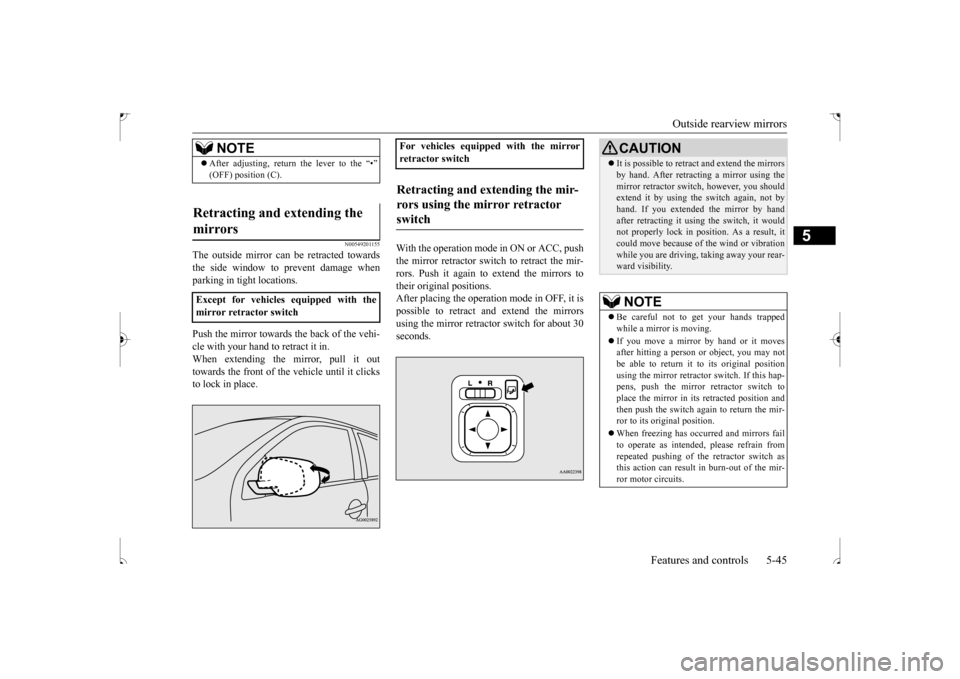
The outside mirror can be retracted towards the side window to prevent damage whenparking in tight locations. Push the mirror towards the back of the vehi- cle with your hand to retract it in. When extending the mirror, pull it outtowards the front of the vehicle until it clicks to lock in place.
With the operation mode in ON or ACC, push the mirror retractor switch to retract the mir-rors. Push it again to extend the mirrors totheir original positions. After placing the operation mode in OFF, it is possible to retract and extend the mirrorsusing the mirror retractor switch for about 30 seconds.
NOTE
After adjusting, return the lever to the “•” (OFF) position (C).
Retracting and extending the mirrors Except for vehicles equipped with the mirror retractor switch
For vehicles equipped with the mirror retractor switchRetracting and extending the mir- rors using the mirror retractor switch
CAUTION It is possible to retract and extend the mirrors by hand. After retracting a mirror using the mirror retractor switch, however, you should extend it by using the switch again, not by hand. If you extended the mirror by handafter retracting it using the switch, it would not properly lock in position. As a result, it could move because of the wind or vibrationwhile you are driving, taking away your rear- ward visibility.NOTE
Be careful not to get your hands trapped while a mirror is moving. If you move a mirror
by hand or it moves
after hitting a person or object, you may not be able to return it to its original position using the mirror retractor
switch. If this hap-
pens, push the mirror retractor switch to place the mirror in its retracted position and then push the switch again to return the mir-ror to its original position. When freezing has occurred and mirrors fail to operate as intended, please refrain from repeated pushing of the retractor switch as this action can result in burn-out of the mir- ror motor circuits.
BK0239500US.bo
ok 45 ページ 2016年5月13日 金曜日 午前8時53分
Page 111 of 399
Starting the engine 5-48 Features and controls
5
For information on operation for vehicles equipped with the Free-hand Advanced Secu- rity Transmitter (F.A.S.T.-key), refer to “Free-hand Advanced Security Transmitter(F.A.S.T.-key): Starting and stopping the engine” on page 5-20. [Except for vehicles equipped with the Free-hand Advanced Security Transmitter(F.A.S.T.-key)] Do not operate the starter motor continu- ously for longer than
15 seconds as this
could run the battery down or damage thestarter motor. If the engine does not start, turn the ignition switch back to the “OFF” position, wait a few seconds, and then tryagain. Trying repeatedly with the engine or starter motor still turning will damage the starter mechanism. If the engine will not start because the bat- tery is weak or discharged, refer to “Jump-starting the engine” (on page 8-2)for instructions.
A longer warm up period will only con- sume extra fuel. The
engine is warmed up
enough for driving when the bar graph of engine coolant temperature display startsto move. Refer to “Interrupt display screen (With ignition switch or operation mode in ON)” on page 5-95.
This model is equipped with an electronically controlled fuel injection system. This is a sys- tem that automatically controls fuel injection.
There is usually no need to depress the accel- erator pedal when starting the engine. The starter should not be run for more than 15 seconds at a time.To prevent battery drain, wait a few seconds between attempts to restart the engine. 1. Make sure all occupants are properly seated with seat belts fastened.2. Insert the ignition key. 3. Make sure the parking brake is applied. 4. Press and hold the brake pedal downfirmly with your right foot.5. Press and hold the clutch pedal all the way down (manual transaxle). 6. On vehicles equipped with manual trans-axle, place the gearshift lever in the “N” (Neutral) position. On vehicles equipped with continuouslyvariable transmission (CVT), make sure the selector lever is in the “P” (PARK) position.
Tips for starting
WA R N I N G Never run the engine in a closed or poorly ventilated area any longer than is neededto move your vehicle out of the area. Car- bon monoxide gas, which is odorless and extremely poisonous, could build up andcause serious injury or death.CAUTION Do not push-start the vehicle.Do not run the engine
at high rpms or drive
at high speeds until the engine has had achance to warm up. Release the ignition switch as soon as the engine starts. Otherwise, the starter motor will be damaged.
Starting the engine
NOTE
On vehicles equipped with CVT, the starter will not operate unless the selector lever is in the “P” (PARK) or “N” (NEUTRAL) posi- tion.For safety reasons, start the engine in the “P” (PARK) position so that the wheels are locked.
BK0239500US.bo
ok 48 ページ 2016年5月13日 金曜日 午前8時53分
Page 114 of 399
Continuously variable transmission (CVT) (if so equipped)
Features and controls 5-51
5
N00513000096
It is recommended that you downshift to a lower gear when needed to maintain thedesired speed, according to the table. Avoid downshifting at too high a speed. The engine may suffer damage.To maintain a safe speed and prolong brake life, shift down to 2nd or 1st when descend- ing a steep hill.Downshifting is also important to avoid “lug-ging” the engine at too low a speed, such as when turning a corner or when driving up a steep hill.
N00513100228
Do not use the gearshift lever as a han- drest. This can result in premature wear ofthe transaxle shift forks.
The table above shows the maximum rec- ommended driving speed for in each gear. Do not drive near or at these speeds for prolonged periods of time.
N00560200047
The CVT will automatically and continuouslychange its gear ratio depending on road anddriving conditions. This helps achieve smooth driving and excellent fuel efficiency. Also you can manually shift up and shiftdown the transmission. Refer to “Sports
mode” on page 5-55. The transmission prevents unnecessary upshifts even when the accelerator pedal isreleased and ensures smooth driving. According to the condi
tions, the transmission
will automatically shift to a lower gear ratioto achieve stronger engine braking. This may help reduce your need to use the service brake.
N00560300048
As an additional safe
ty precaution, models
equipped with a continuously variable trans-mission have a shift-lock device that holds the selector lever in the “P” (PARK) position. To move the selector lever from the “P”(PARK) position to another position, follow the steps below. 1. Press and hold the brake pedal down. 2. Move the selector lever to the desiredposition.
Downshifting
Recommended downshifting speed
Downshifting speed
Shift point
Under 20 mph (32 km/h)
Shift down from cur- rent gear to 2nd gear.
20 to 30 mph (32 to
48 km/h)
Shift down from cur- rent gear to 3rd gear.
Driving precautions
Maximum possible driving speed
Shift points
Maximum possible driving
speed
1st gear
28 mph (45 km/h)
2nd gear
59 mph (95 km/h)
3rd gear
86 mph (140 km/h)
4th gear
111 mph (180 km/h)
Continuously variable transmission (CVT)
(if so
equipped)
DRIVING UPHILL
DRIVING DOWNHILL
Selector lever operation
BK0239500US.bo
ok 51 ページ 2016年5月13日 金曜日 午前8時53分
Page 116 of 399
Continuously variable transmission (CVT) (if so equipped)
Features and controls 5-53
5
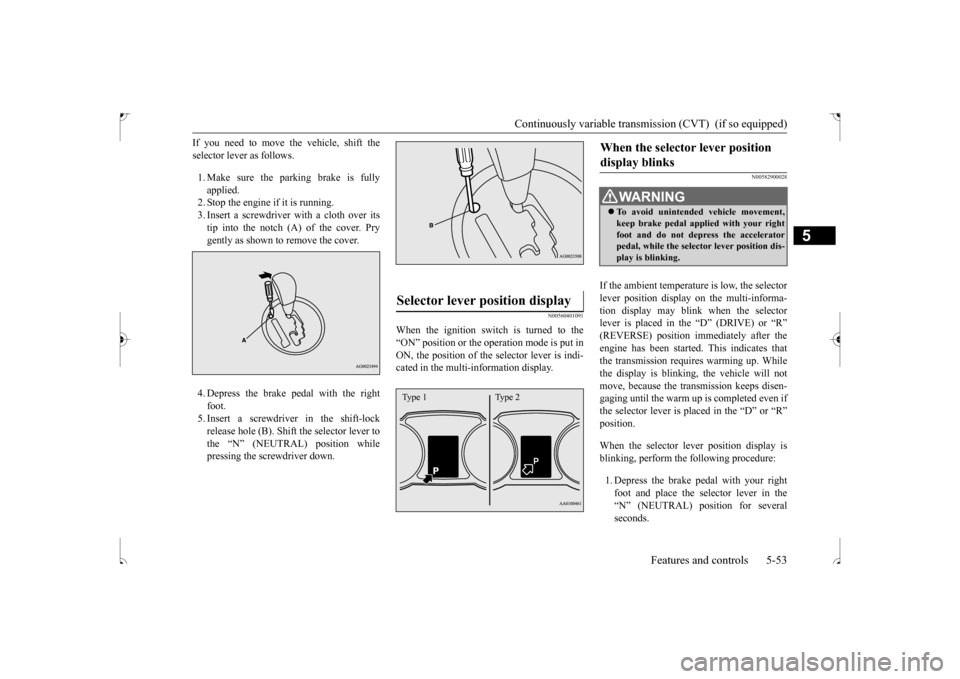
If you need to move the vehicle, shift the selector lever as follows. 1. Make sure the parking brake is fully applied. 2. Stop the engine if it is running.3. Insert a screwdriver with a cloth over its tip into the notch (A) of the cover. Pry gently as shown to remove the cover. 4. Depress the brake pedal with the right foot. 5. Insert a screwdriver in the shift-lockrelease hole (B). Shift the selector lever to the “N” (NEUTRAL) position while pressing the screwdriver down.
N00560401091
When the ignition switch is turned to the“ON” position or the operation mode is put inON, the position of the selector lever is indi- cated in the multi-information display.
N00582900028
If the ambient temperature is low, the selector lever position display on the multi-informa- tion display may blink when the selector lever is placed in the “D” (DRIVE) or “R”(REVERSE) position immediately after the engine has been started. This indicates that the transmission requires warming up. Whilethe display is blinking, the vehicle will not move, because the transmission keeps disen- gaging until the warm up is completed even ifthe selector lever is placed in the “D” or “R” position. When the selector lever position display is blinking, perform the following procedure: 1. Depress the brake pedal with your right foot and place the selector lever in the “N” (NEUTRAL) position for several seconds.
Selector lever position display
Type 1 Type 2
When the selector lever position display blinks
WA R N I N G To avoid unintended vehicle movement, keep brake pedal applied with your right foot and do not depress the acceleratorpedal, while the selector lever position dis- play is blinking.
BK0239500US.bo
ok 53 ページ 2016年5月13日 金曜日 午前8時53分
Page 118 of 399
Continuously variable transmission (CVT) (if so equipped)
Features and controls 5-55
5
Move the lever to this position only after the vehicle has come to a complete stop. At this position, the transmission is disen- gaged. It is the same as the neutral position ona manual transaxle and
should be used when
the vehicle is not moving for an extended length of time during driving, such as in atraffic jam.
This position is used for most city and high- way driving. The transmission will automati- cally and continuously change its gear ratio depending on road and driving conditions.
N00560701078
Whether the vehicle is stationary or inmotion, sports mode is selected by pushingthe selector lever from the “D” (DRIVE) position into the manual gate (A). To return
to “D” (DRIVE) operation, push the selector lever back into the main gate (B). In sports mode, rapid sh
ifting is possible sim-
ply by operating the selector lever or spor-tronic steering wheel paddle shifter. Unlike the manual transaxle, sports mode allows shifting with the accelerator pedaldepressed.
“R” REVERSE
CAUTION Never shift into the “P” (PARK) or “R” (REVERSE) position while the vehicle is inmotion. If the lever is shifted into the “P” (PARK) or “R” (REVERSE) position while the vehicle is in motion, the transmissionmay be damaged.
“N” NEUTRAL
WA R N I N G Never move the selector lever to the “N” (NEUTRAL) position while driving since you could accidentally slip it into the “P”(PARK) or “R” (REVERSE) position, damaging the transmission.
To prevent the vehicle from rolling when stopped on a slope, the engine should be started in the “P” (PARK) position, not in “N” (NEUTRAL) position. To prevent rolling, always keep your foot on the brake pedal when the vehicle is in “N” (NEUTRAL) position, or when shift-ing into or out of “N” (NEUTRAL) posi- tion.
“D” DRIVE
CAUTION To prevent transmission damage, never shift into the “D” (DRIVE) position from the “R” (REVERSE) position while the vehicle is inmotion.
Sports mode
WA R N I N G
NOTE
For vehicles equipped with the sportronic steering wheel paddle shifter, sports mode can be operated even when the selector leveris in the main gate (B). Also, you can return to the “D” operation in any of following ways. When returning to “D” operation, theselector lever position display will change to “D” (DRIVE) position. • Pull the + (SHIFT UP) side sportronic steering wheel paddle shifter forward (toward the driver) for over 2 seconds. • Stop the vehicle • Push the selector lever from the “D” (DRIVE) position into the manual gate (A) and push the selector lever back into themain gate (B).
BK0239500US.bo
ok 55 ページ 2016年5月13日 金曜日 午前8時53分
Page 121 of 399
Electronically controlled 4WD system (if so equipped) 5-58 Features and controls
5
To park the vehicle, first bring it to a com- plete stop, fully engage the parking brake,and then move the selector lever to the “P” (PARK) position. If the CVT does not shift while driving, or your vehicle does not pick up enough speedwhen starting on an uphill slope, it may be that there is something unusual happening in the transmission, causing a safety device toactivate. Have your vehicle checked at an authorized Mitsubishi Motors dealer or a repair facility of your choice as soon as possi-ble.
N00517201178
The electronically controlled 4WD system isan all-wheel drive system that allows one of three drive modes to be selected with a switch, in accordance with the driving condi-tions. The following drive modes are available.
4-wheel drive operation requires special driv- ing skills. Carefully read the “4-wheel drive operation”section on page 5-60
and take care to drive
safely. The drive mode can be changed by pressing the drive mode-selector while the ignition switch or the operation mode is in ON.
Parking
When the CVT makes no speed change
NOTE
When the warning display and “SLOW DOWN” or the warning display and “SERVICE REQUIRED” appear on the information screen in the multi-informationdisplay, there could be a malfunction in the CVT. Refer to “Continuously variable trans- mission (CVT): Warning display” on page5-54.
Electronically controlled 4WD system
(if so equipped)
Drive mode
Function
2WD
This mode is for eco- nomical driving on normal dry roads and freeways. Driving in front-wheel drive.
4WD AUTO
The default mode. This mode is for automatically con-trolling the distribu- tion of driving torque to all four wheels according to the driving conditions.
4WD LOCK
This mode is for driving in slippery conditions such as on snow-covered roads or sand. The large amount of driving torque that is applied to the rear tires enables getting out of slippery areas and powerful driv- ing is possible across all ranges.
Drive mode-selector
Drive mode
Function
BK0239500US.bo
ok 58 ページ 2016年5月13日 金曜日 午前8時53分
Page 122 of 399
Electronically controlled 4WD system (if so equipped)
Features and controls 5-59
5
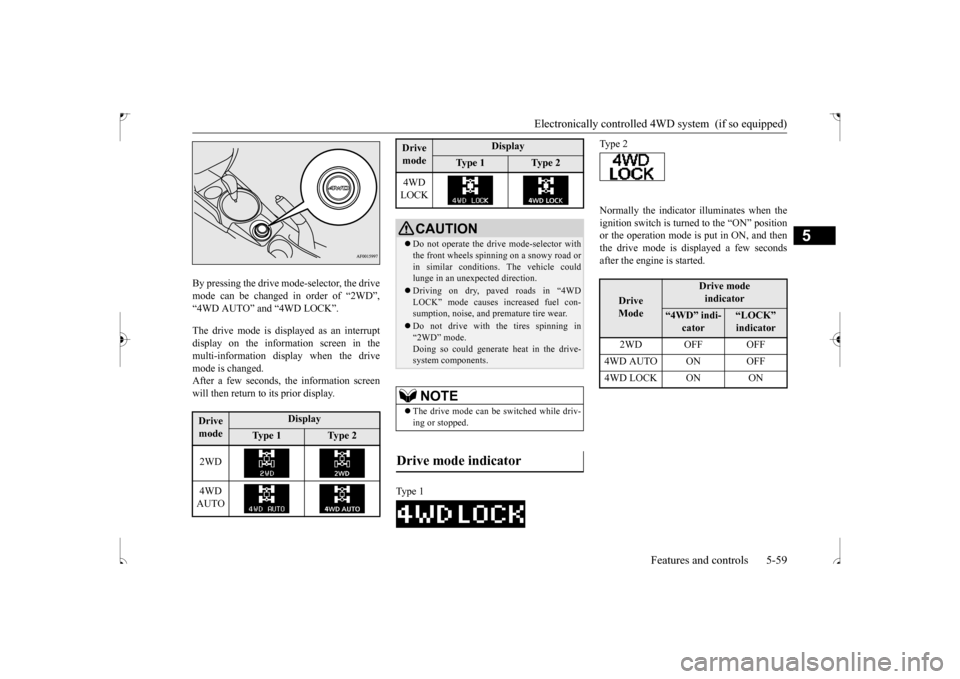
By pressing the drive mode-selector, the drive mode can be changed in order of “2WD”,“4WD AUTO” and “4WD LOCK”. The drive mode is displayed as an interrupt display on the information screen in the multi-information display when the drivemode is changed.After a few seconds, the information screen will then return to its prior display.
Normally the indicator illuminates when the ignition switch is turned to the “ON” position or the operation mode is put in ON, and then the drive mode is displayed a few secondsafter the engine is started.
Drive mode
Display
Ty p e 1
Ty p e 2
2WD 4WD AUTO
4WD LOCK
CAUTION Do not operate the drive mode-selector with the front wheels spinning on a snowy road or in similar conditions. The vehicle couldlunge in an unexpected direction. Driving on dry, paved roads in “4WD LOCK” mode causes increased fuel con- sumption, noise, and premature tire wear. Do not drive with the tires spinning in “2WD” mode. Doing so could generate heat in the drive-system components.NOTE
The drive mode can be switched while driv- ing or stopped.
Drive mode indicator
Type 1Drive mode
Display
Ty p e 1
Ty p e 2
Type 2
Drive Mode
Drive modeindicator
“4WD” indi-
cator
“LOCK” indicator
2WD OFF OFF
4WD AUTO ON OFF4WD LOCK ON ON
BK0239500US.bo
ok 59 ページ 2016年5月13日 金曜日 午前8時53分
Page 124 of 399
4-wheel drive operation
Features and controls 5-61
5
When turning a sharp corner in “4WD LOCK” position at low speed, a slight differ- ence in steering may be experienced similarto feeling as if the brakes were applied. This
is called tight corner braking and results from each of the four tires being at a different dis- tance from the corner. The phenomenon is typical of 4-wheel drive vehicles. If thisoccurs, either straighten out the steering wheel or change to another mode. Set the drive mode-selector to “4WD AUTO” or “4WD LOCK” in accordance with the road conditions, and then gradually depress the accelerator pedal for a smooth start.
WA R N I N G Do not over-rely on the 4-wheel drive vehi- cles. Even 4-wheel drive vehicles have lim- its to the system and ability to maintain control and traction. Reckless driving may lead to accidents. Always drive carefully,taking account of the road conditions. Improperly operating this vehicle on or off-pavement can cause an accident or rollover in which you and your passengers could be seriously injured or killed.• Follow all instructio
ns and guidelines in
the owner’s manual.• Keep your speed low and do not drivefaster than conditions.NOTE
Driving on rough roads can be hard on a vehicle. Before you leave the pavement, be sure all scheduled maintenance and servicehas been done, and that you have inspected your vehicle. Pay special attention to the condition of the tires, and check the tire pres-sures. Mitsubishi Motors is not responsible to the operator for any damage or injury caused or liability incurred by improper and negligentoperation of a vehicle. All techniques of vehicle operation depend on the skill and experience of the operator and other partici-pating parties. Any deviation from the rec- ommended operating instructions above is at their own risk.
Note that the stopping distance required of the 4-wheel drive vehicle differs very little from that of the front-wheel drive vehicle. When driving on a snow-covered road or a slippery, muddy surface, make sure that youkeep a sufficient distance between your vehi- cle and the one ahead of you. The driving posture should be more upright; adjust the seat to a good position for easy steering and pedal operation. Be sure to wearthe seat belt. After driving on rough roads, check each part of the vehicle and wash it thoroughly with water. Refer to the “Inspection and maintenance following rough road opera-tion” section and “Vehicle care and Mainte- nance” sections.CAUTION Setting the drive mode-selector to “4WD LOCK” position to drive on dry paved roadwill increase fuel consumption, with possible noise generation.
Turning sharp corners
NOTE
On snowy or icy roads
NOTE
The use of snow tires is recommended. Maintain a safe distance between vehicles, avoid sudden braking, and use engine brak- ing (downshifting).CAUTION Avoid sudden braking, sudden acceleration and sharp turning. Skidding occurs and con- trol of the vehicle could be lost.
BK0239500US.bo
ok 61 ページ 2016年5月13日 金曜日 午前8時53分