2017 MITSUBISHI OUTLANDER SPORT replace
[x] Cancel search: replacePage 143 of 399
Tire pressure monitoring system 5-80 Features and controls
5
TPMS malfunctions may occur for a variety of reasons, including the installation of replacement or alternate tires or wheels on the vehicle that prevent the TPMS from function-ing properly. Always check the TPMS mal- function telltale after replacing one or more tires or wheels on your vehicle to ensure thatthe replacement or alternate tires and wheels allow the TPMS to continue to function prop- erly.
N00532801524
1. If the tire pressure monitoring systemwarning light illuminates, avoiding hardbraking, sharp steering maneuvers and high speeds. You should stop and adjust the tires to the proper inflation pressure assoon as possible. Adjust the spare tire at the same time. Refer to “Tires” on page 9-14.
2. If the tire pressure monitoring system warning light remains illuminated after you have been driving for about 20 min- utes after you adjust the tire inflation pres-sure, one or more of the tires may have a puncture. Inspect the tire and if it has a puncture, have it repaired by an autho-rized Mitsubishi Motors dealer as soon as possible.
The tire pressure monitoring system may not work normally in the following circum- stances: A wireless facility or device using the same frequency is near the vehicle. Snow or ice is stuck inside the fenders and/or on the wheels. The tire inflation pressure sensor’s battery is dead.
If the warning light/display illu- minates while driving
NOTE
In addition, the warning display is displayed on the information screen in the multi-infor- mation display. When inspecting or adjusting the tire pres- sure, do not apply excessive force to the valve stem to avoid breakage.
After inspecting or adjusting the tire pres- sure, always reinstall the valve cap on the valve stem. Without the valve cap, dirt or moisture could get into the valve, resulting in damage to thetire inflation pressure sensor. Do not use metal valve caps, which may cause a metal reaction, resulting in corrosion and damage of the tire inflation pressure sen- sors. Once adjustments have been made, the warn- ing light will go off after a few minutes ofdriving.WA R N I N G If the warning light/display illuminates while you are driving, avoid hard braking, sharp steering maneuvers and high speeds.Driving with an under-inflated tire adversely affects vehicle performance and can result in an accident.NOTE
CAUTION If a tire has a puncture, replace that tire with the spare tire. Driving on a punctured tire could lead to an accident. The warning light/display may not illuminate immediately in the event of a tire blowout or rapid leak.NOTE
To avoid the risk of damage to the tire infla- tion pressure sensors, have any punctured tire repaired by an authorized Mitsubishi Motors dealer. If the tire repair is not done byan authorized Mitsubishi Motors dealer, it is not covered by your warranty. Do not use an aerosol puncture-repair spray on any tire. Such a spray could damage the tire inflationpressure sensors. Have any puncture repaired by an authorized Mitsubishi Motors dealer.
BK0239500US.bo
ok 80 ページ 2016年5月13日 金曜日 午前8時53分
Page 144 of 399
Rear-view camera (if so equipped)
Features and controls 5-81
5
Wheels other than Mitsubishi genuine wheels are being used. Wheels that are not fitted with tire infla- tion pressure sensors are being used. Wheels whose ID codes are not memo- rized by the vehicle are used. Compact spare tire is fitted on a road wheel. A window tint that affects the radio wave signals is installed.
N00532901192
If new wheels with new tire inflation pressure sensors are installed, their ID codes must be programmed into the tire pressure monitoringsystem. Have the tire and wheel replacement performed by an authorized Mitsubishi Motors dealer to avoid the risk of damagingthe tire inflation pressure sensors. If the
wheel replacement is not done by an autho- rized Mitsubishi Motors dealer, it is not cov- ered by your warranty.
N00533001246
Your tire pressure monitoring system oper- ates on a radio frequency subject to Federal Communications Commission (FCC) Rules (For vehicles sold in U.S.A.) and IndustryCanada Rules (For vehicles sold in Canada). This device complies with part 15 of FCC Rules and Industry Canada licence-exemptRSS standard(s). Operation is subject to
the following two con-
ditions. This device may not cause harmful inter- ference. This device must accept any interference received, including interference that maycause undesired operation.
N00546201183
When the gearshift lever or the selector lever is in the “R” position with the ignition switch or the operation mode is in ON, the rear-viewimage will be displayed on the screen of the Mitsubishi Multi-Communication System or the DISPLAY AUDIO in the center panel.When the gearshift lever or the selector lever is shifted out of the “R” position, the rear- view image will go off.
NOTE
Tire inflation pressures vary with the ambi- ent temperature. If the
vehicle is subjected to
large variations in ambient temperature, the tire inflation pressures may be under-inflated (causing the warning light/display to comeon) when the ambient temperature is rela- tively low. If the warning light/display comes on, adjust the tire inflation pressure.
Whenever the tires and wheels are replaced with new ones
CAUTION The use of non-genuine wheels will prevent the proper fit of the tire inflation pressure sensors, resulting air leakage or damage of the sensors.
General information
CAUTION Changes or modifications not expressly approved by the manufacturer for compli- ance could void the user’s authority to oper- ate the equipment.
Rear-view camera (if so equipped)
WA R N I N G Never rely solely on the rear-view camera to clear the area behind your vehicle. Always check visually behind and all around your vehicle for persons, animals, obstructions or other vehicles. Failure todo so can result in vehicle damage, serious injury or death. The rear-view camera is an aid system for backing up, but it is not a substitute for your visual confirmation.
BK0239500US.bo
ok 81 ページ 2016年5月13日 金曜日 午前8時53分
Page 199 of 399
Electric rear window defogger switch 5-136 Features and controls
5
N00523700373
The rear window defogger can be used when the engine is running.
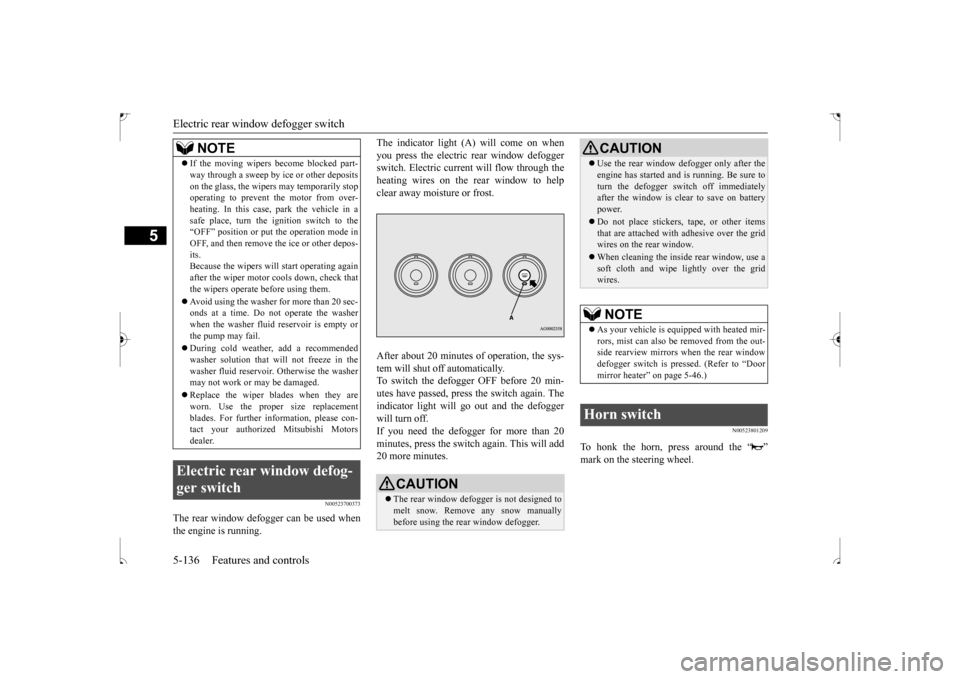
The indicator light (A) will come on when you press the electric rear window defogger switch. Electric current will flow through the heating wires on the rear window to helpclear away moisture or frost. After about 20 minutes of operation, the sys- tem will shut off automatically.To switch the defogger OFF before 20 min-utes have passed, press the switch again. The indicator light will go out and the defogger will turn off.If you need the defogger for more than 20 minutes, press the switch again. This will add 20 more minutes.
N00523801209
To honk the horn, press around the “ ”mark on the steering wheel.
If the moving wipers become blocked part- way through a sweep by ice or other deposits on the glass, the wipers may temporarily stop operating to prevent the motor from over- heating. In this case, park the vehicle in asafe place, turn the ignition switch to the “OFF” position or put the operation mode in OFF, and then remove the ice or other depos-its. Because the wipers will start operating again after the wiper motor cools down, check thatthe wipers operate before using them. Avoid using the washer for more than 20 sec- onds at a time. Do not operate the washer when the washer fluid reservoir is empty or the pump may fail. During cold weather, add a recommended washer solution that will not freeze in thewasher fluid reservoir. Otherwise the washer may not work or may be damaged. Replace the wiper blades when they are worn. Use the proper size replacement blades. For further information, please con-tact your authorized Mitsubishi Motors dealer.
Electric rear window defog- ger switch
NOTE
CAUTION The rear window defogger is not designed to melt snow. Remove any snow manually before using the rear window defogger.
Use the rear window defogger only after the engine has started and is running. Be sure to turn the defogger switch off immediately after the window is clear to save on battery power. Do not place stickers, tape, or other items that are attached with adhesive over the gridwires on the rear window. When cleaning the inside rear window, use a soft cloth and wipe lightly over the grid wires.NOTE
As your vehicle is equipped with heated mir- rors, mist can also be removed from the out-side rearview mirrors when the rear window defogger switch is pressed. (Refer to “Door mirror heater” on page 5-46.)
Horn switch
CAUTION
BK0239500US.book
136 ページ 2016年5月13日 金曜日 午前8時53分
Page 209 of 399
Bluetooth® 2.0 interface (if so equipped) 5-146 Features and controls
5
1. Stop your vehicle in a safe area, put the gearshift lever in the “N” (Neutral) posi- tion (manual transaxle), or the selectorlever in the “P” (PARK) position (contin- uously variable transmission (CVT)), and pull the parking brake lever. 2. Press the SPEECH button (except for vehicles with Mitsubishi Multi-Commu- nication System) or PICK-UP button (forvehicles with Mitsubishi Multi-Commu- nication System). 3. Say “Pair Device.”
4. The voice guide will say “Start pairing procedure on the device. See the devicemanual for instructions.” and then willsay “The pairing code is
5. Enter in the Bluetooth
® device the 4-digit
number that has been read out in Step 4.
Pairing procedure- Type 2
(if so
equipped)NOTE
You cannot pair any Bluetooth
® device with
the Bluetooth
® 2.0 interface unless the vehi-
cle is parked. Before pairing a Bluetooth
®
device with the Bluetooth
® 2.0 interface,
confirm that the vehicle is parked in a safe location.
NOTE
The following procedure ( to ) can also be used instead of saying “Pair Device.” Replace this step 3 with the following proce- dure if you prefer. Say “Setup.” Say “Pairing Options.” The voice guide will say “Select one of the following: pair, edit, delete, or list.” Say “Pair.” If 7 devices have already been paired, the voice guide will say “Maximum devicespaired” and then the system will end the pairing process. To register a new device, delete one device and then repeat the pairing process. (Refer to “Selecting a device: Deleting adevice” on page 5-147.)NOTE
Some Bluetooth
® devices require a specific
pairing code. Please refer to the device man- ual for pairing code requirements and read the next section “If your device requires a specific pairing code” on page 5-147 to setthe pairing code.
The pairing code entered here is only used for the Bluetooth
® connection certification.
Depending on the connection settings of the Bluetooth
® device, this code may have to be
entered each time you connect the Blue- tooth
® device to the Bluetooth
® 2.0 inter-
face. For the default connection settings,refer to the instructions for the device.NOTE
Depending on the Bluetooth
® device, it may
take a few minutes to pair it with the Blue- tooth
® 2.0 interface.
If the Bluetooth
® 2.0 interface cannot recog-
nize the Bluetooth
® device, the voice guide
will say “Pairing has timed out” and the pair- ing process will be cancelled. Confirm that the device you are pairing sup- ports Bluetooth
®, and try pairing it again.
NOTE
BK0239500US.book
146 ページ 2016年5月13日 金曜日 午前8時53分
Page 227 of 399
12 V power outlets 5-164 Features and controls
5
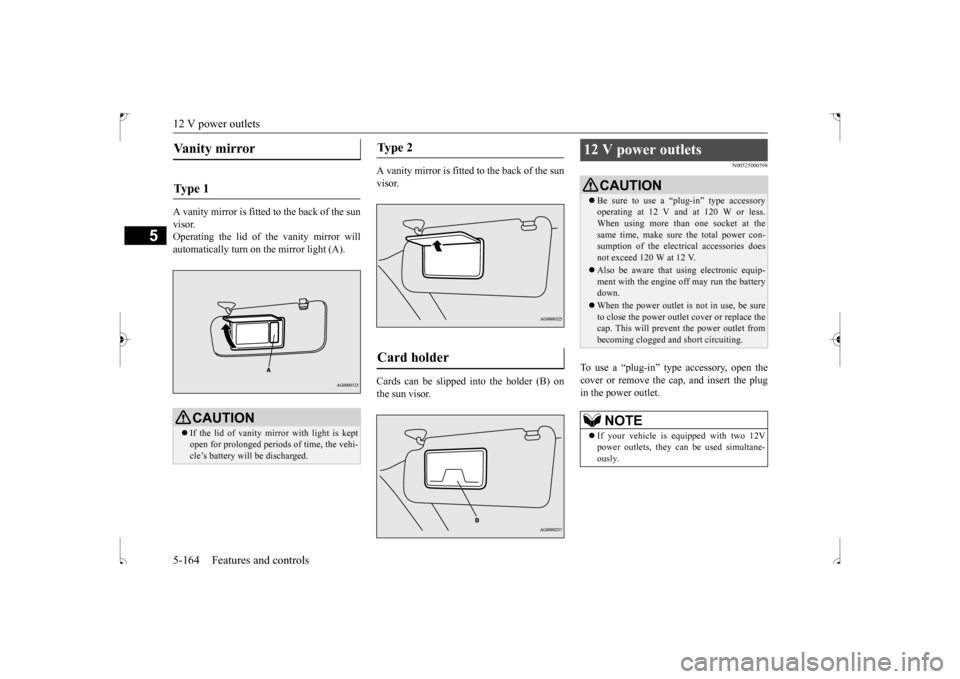
A vanity mirror is fitted to the back of the sun visor. Operating the lid of the vanity mirror willautomatically turn on the mirror light (A).
A vanity mirror is fitted to the back of the sun visor. Cards can be slipped into the holder (B) on the sun visor.
N00525000598
To use a “plug-in” type accessory, open thecover or remove the cap, and insert the plug in the power outlet.
Vanity mirror Ty p e 1
CAUTION If the lid of vanity mirror with light is kept open for prolonged periods of time, the vehi-cle’s battery will be discharged.
Ty p e 2 Card holder
12 V power outlets
CAUTION Be sure to use a “plug-in” type accessory operating at 12 V and at 120 W or less. When using more than one socket at the same time, make sure the total power con-sumption of the electrical accessories does not exceed 120 W at 12 V. Also be aware that using electronic equip- ment with the engine off may run the battery down. When the power outlet is not in use, be sure to close the power outlet cover or replace thecap. This will prevent the power outlet from becoming clogged and short circuiting.NOTE
If your vehicle is equipped with two 12V power outlets, they can be used simultane- ously.
BK0239500US.book
164 ページ 2016年5月13日 金曜日 午前8時53分
Page 228 of 399
HomeLink® Wireless Control System (if so equipped)
Features and controls 5-165
5
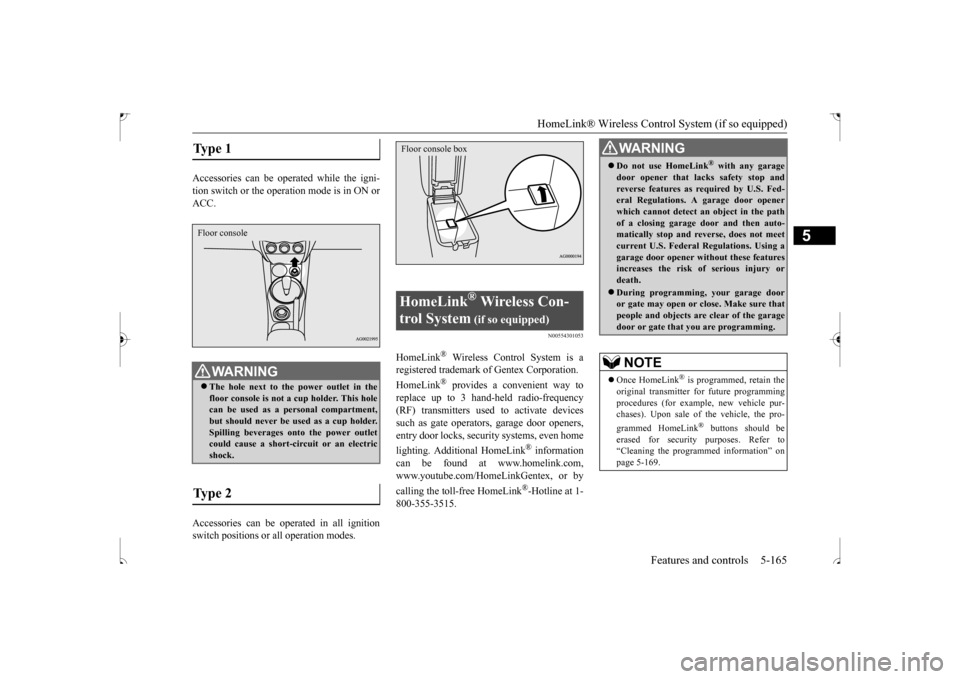
Accessories can be operated while the igni- tion switch or the operat
ion mode is in ON or
ACC. Accessories can be operated in all ignition switch positions or all operation modes.
N00554301053
HomeLink
® Wireless Control System is a
registered trademark of Gentex Corporation. HomeLink
® provides a convenient way to
replace up to 3 hand-held radio-frequency(RF) transmitters used to activate devicessuch as gate operators, garage door openers, entry door locks, security systems, even home lighting. Additional HomeLink
® information
can be found at www.homelink.com, www.youtube.com/HomeLinkGentex, or by calling the toll-free HomeLink
®-Hotline at 1-
800-355-3515.
Type 1
WA R N I N G The hole next to the power outlet in the floor console is not a cup holder. This hole can be used as a personal compartment, but should never be used as a cup holder.Spilling beverages onto the power outlet could cause a short-circuit or an electric shock.
Type 2 Floor console
HomeLink
® Wireless Con-
trol System
(if so equipped)
Floor console box
WA R N I N G Do not use HomeLink
® with any garage
door opener that lacks safety stop andreverse features as required by U.S. Fed- eral Regulations. A garage door opener which cannot detect an object in the pathof a closing garage door and then auto- matically stop and reverse, does not meet current U.S. Federal Regulations. Using agarage door opener without these features increases the risk of serious injury or death. During programming, your garage door or gate may open or close. Make sure thatpeople and objects are clear of the garage door or gate that you are programming.NOTE
Once HomeLink
® is programmed, retain the
original transmitter for future programming procedures (for example, new vehicle pur-chases). Upon sale of the vehicle, the pro- grammed HomeLink
® buttons should be
erased for security purposes. Refer to“Cleaning the programmed information” on page 5-169.
BK0239500US.book
165 ページ 2016年5月13日 金曜日 午前8時53分
Page 229 of 399
HomeLink® Wireless Control System (if so equipped) 5-166 Features and controls
5
N00584600032
Some garage door openers manufactured after 1995 have “rolling code protection”. To program a garage door opener equipped with “rolling code protection”;you will need to access the garage door opener motor to press the motor’s “Learn” or “Smart” buttons. For conve-nience, use a ladder and another person toassist you. It is recommended that a new battery be placed in the hand-held transmitter of the device being programmed to HomeLink
®
for quicker training and accurate trans- mission of the radio-frequency signal.
N00584700033
To program HomeLink
® to operate a garage
door, gate, or entry door opener, home or office lighting, you need to be at the same location as the device. 1. Press the HomeLink
® button that you
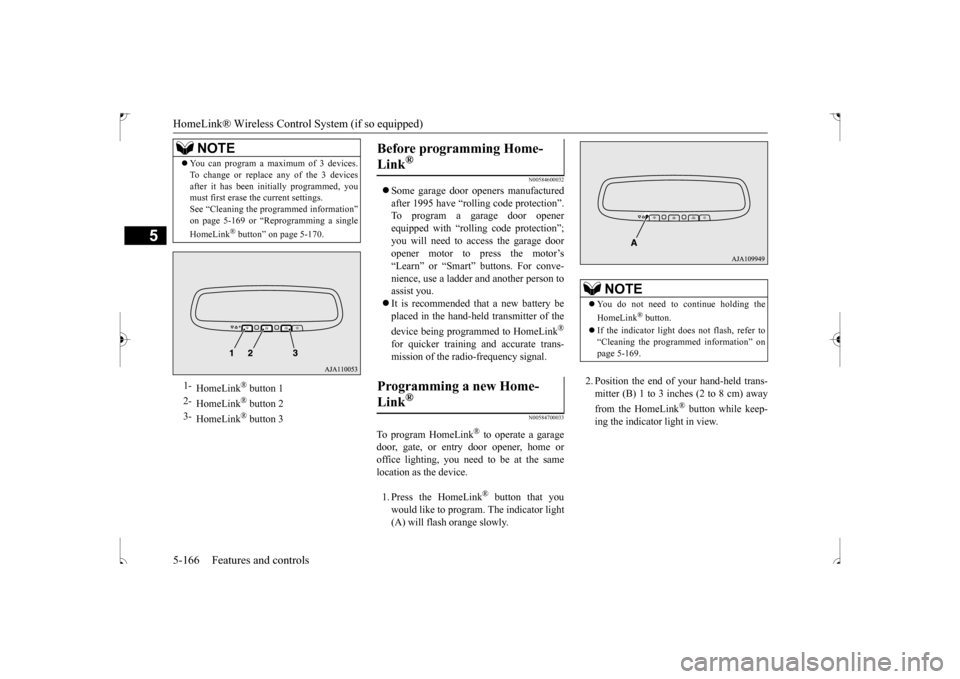
would like to program. The indicator light (A) will flash orange slowly.
2. Position the end of your hand-held trans- mitter (B) 1 to 3 inches (2 to 8 cm) away from the HomeLink
® button while keep-
ing the indicator light in view.
You can program a maximum of 3 devices. To change or replace any of the 3 devices after it has been initially programmed, you must first erase the current settings. See “Cleaning the programmed information”on page 5-169 or “Reprogramming a single HomeLink
® button” on page 5-170.
1-
HomeLink
® button 1
2-
HomeLink
® button 2
3-
HomeLink
® button 3
NOTE
Before programming Home- Link
®
Programming a new Home-Link
®
NOTE
You do not need to continue holding the HomeLink
® button.
If the indicator light does not flash, refer to “Cleaning the programmed information” on page 5-169.
BK0239500US.book
166 ページ 2016年5月13日 金曜日 午前8時53分
Page 230 of 399
HomeLink® Wireless Control System (if so equipped)
Features and controls 5-167
5
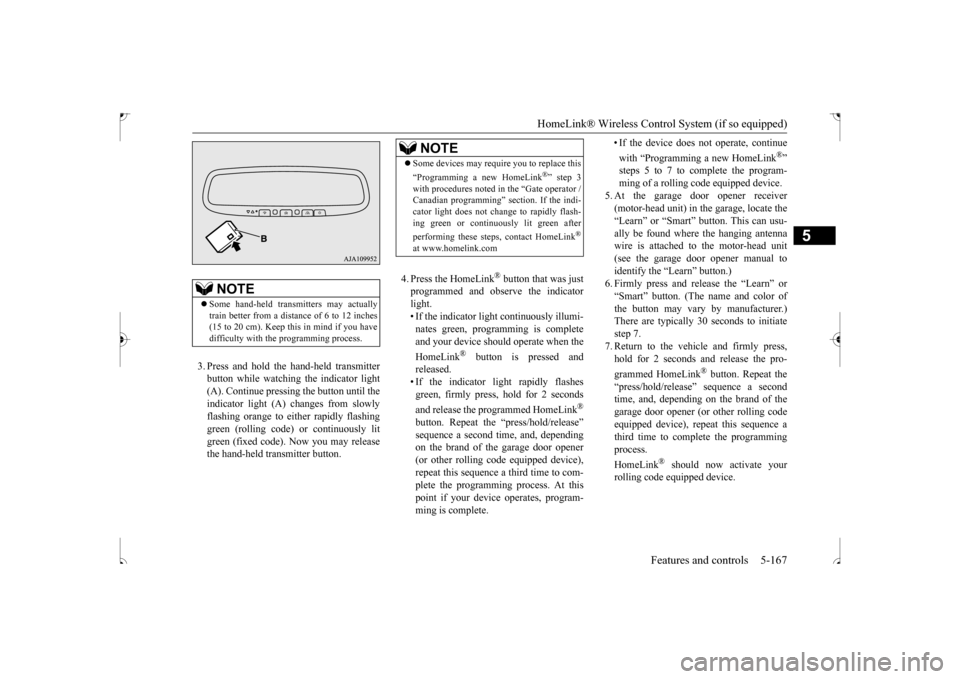
3. Press and hold the hand-held transmitter button while watching the indicator light(A). Continue pressing the button until theindicator light (A) changes from slowly flashing orange to either rapidly flashing green (rolling code) or continuously litgreen (fixed code). Now you may release the hand-held transmitter button.
4. Press the HomeLink
® button that was just
programmed and observe the indicatorlight. • If the indicator light continuously illumi- nates green, programming is completeand your device should operate when the HomeLink
® button is pressed and
released.• If the indicator light rapidly flashesgreen, firmly press, hold for 2 seconds and release the programmed HomeLink
®
button. Repeat the “press/hold/release” sequence a second time, and, depending on the brand of the garage door opener (or other rolling code equipped device),repeat this sequence a third time to com- plete the programming process. At this point if your device operates, program-ming is complete.
• If the device does not operate, continue with “Programming a new HomeLink
®”
steps 5 to 7 to complete the program- ming of a rolling code equipped device.
5. At the garage door opener receiver (motor-head unit) in the garage, locate the “Learn” or “Smart” button. This can usu-ally be found where the hanging antenna wire is attached to the motor-head unit (see the garage door opener manual toidentify the “Learn” button.)6. Firmly press and release the “Learn” or “Smart” button. (The name and color of the button may vary by manufacturer.)There are typically 30 seconds to initiate step 7. 7. Return to the vehicle and firmly press,hold for 2 seconds and release the pro- grammed HomeLink
® button. Repeat the
“press/hold/release” sequence a secondtime, and, depending on the brand of the garage door opener (or other rolling code equipped device), repeat this sequence athird time to complete the programming process. HomeLink
® should now activate your
rolling code equipped device.
NOTE
Some hand-held transmitters may actually train better from a distance of 6 to 12 inches (15 to 20 cm). Keep this in mind if you havedifficulty with the programming process.
NOTE
Some devices may require you to replace this “Programming a new HomeLink
®” step 3
with procedures noted in the “Gate operator / Canadian programming” section. If the indi- cator light does not change to rapidly flash-ing green or continuously lit green after performing these steps, contact HomeLink
®
at www.homelink.com
BK0239500US.book
167 ページ 2016年5月13日 金曜日 午前8時53分